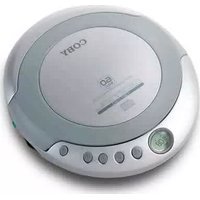
CXCD329 - CD-Player COBY - Kostenlose Bedienungsanleitung
Finden Sie kostenlos die Bedienungsanleitung des Geräts CXCD329 COBY als PDF.


| Produkttyp | CD-Player |
| Marke | Coby |
| Modell | CXCD329 |
| Abmessungen (ca.) | 20 x 20 x 3 cm |
| Gewicht (ca.) | 0,5 kg |
| Stromversorgung | 2x AA-Batterien oder Netzteil (optional) |
| CD-Formate | CD, CD-R, CD-RW |
| Wiedergabefunktionen | Wiedergabe, Pause, Überspringen, Wiederholen, Zufallswiedergabe |
| Programmierfunktion | Ja (bis zu 20 Titel) |
| Kopfhöreranschluss | 3,5 mm Klinke |
| Lautsprecher | Integriert (Mono) |
| Anzeige | LCD (Titelnummer, Zeit) |
| Schutzklasse | Laserschutz Klasse 1 |
| Reinigung | Linsenreinigung mit speziellem Reinigungs-CD |
| Lagertemperatur | 0–40 °C |
| Zubehör | Netzteil (optional), Kopfhörer (nicht im Lieferumfang) |
Häufig gestellte Fragen - CXCD329 COBY
Benutzerfragen zu CXCD329 COBY
0 Frage zu diesem Gerät. Beantworten Sie die, die Sie kennen, oder stellen Sie Ihre eigene.
Eine neue Frage zu diesem Gerät stellen
Laden Sie die Anleitung für Ihr CD-Player kostenlos im PDF-Format! Finden Sie Ihr Handbuch CXCD329 - COBY und nehmen Sie Ihr elektronisches Gerät wieder in die Hand. Auf dieser Seite sind alle Dokumente veröffentlicht, die für die Verwendung Ihres Geräts notwendig sind. CXCD329 von der Marke COBY.
BEDIENUNGSANLEITUNG CXCD329 COBY
COBY®
PORTABLE CD PLAYER WITH 60 SEC ASP
USER GUIDE
CX-CD329


MAINTENANCE AND CARE
- Read the instruction manual before operating this unit.
- Do not expose the unit to high temperature or humidity. Use damned soft cloth to clean the unit. Do not use strong
Use dampened soft cloth to clean the detergent or solvent to clean the unit.
- Consult your dealer if you are ever in doubt about the
installation, operation or safety of your equipment
SPECIFICATIONS
CD Play Section
| Frequency Response | 20 ~ 20,000Hz |
| Wow and Flutter | Below Measurable Limits |
| Sampling Rate | 8 times over sampling |
| D/A Converter | 1-Bit |
General
Maximum Output (Stereo Headphone..15mW+15mW(32ohm)
Power Supply
DC....3V with 2 size "AA" Batteries
Dimension 5.1"x 1.1"x 5.9"(WHD)
NAME OF PARTS

Open door lock
-ESP button -FF button
11.11 Button
-REW← button
.Stop button
lay/Pause button
LCD Display
Headphone jack
- Volume control
BATTERY OPERATION (BATTERIES NOT INCLUDED) Your unit operates on two(2)AA size alkaline batteries. Open the CD cover and insert the batteries in the battery compartment following the polarity diagram located inside.

CAUTION
Hearing experts advise against the constant use of personal stereos played at high volume. Constant high volume use can lead to hearing loss. If you experience ringing in the ears or hearing loss, discontinue use and seek medical advice.
HANDLING DISCS
To remove the disc from its storage case, press down on the center of
the case and lift the disc out. Hold it carefully by the edges as shown


- Insert the disc into the unit with the label of the disc facing UP.
- Idently wipe the dust using a soft cloud from the center to the outer direction to remove dust, fingerprints or any other particles on the
disc surface. Never use chemicals, such as record sprays, anti-static
sprays, benzene or thinners to clean the
To avoid serious scratches on CD, keep them in the cases after each
use. Scratches can cause the laser pick-up skip in the future play.
- Do not place stickers or write anything on the disc.
IMPORTANT
The CD mechanism and the sensitive circuitry may cause interference
to a radio tuner nearby. Do not operate this unit while operating other radio devices.
Danger
radiation. Avoid direct exposure to
the beam.
Caution Use of controls, adjustments or procedures not listed in
this manual

CONCERNING COMPACT DISCS
Only compact discs iden
be used with this player

OPERATION MANUAL
POWER ON —— AUTO PLAY
(1) Press PLAY/PAUSE (H) button to turn
the power on.
(2)LOD screen will display - 2. Once the player is powered it will go to
the anti-shock mode automatically and
anti-shock symbol 📋 appears on the Press ESP button to quit the anti-shock
anti-shock symbol will disappear from
(3)LCD screen will display "disc" if CD is in the volt
(4)LCD screen will display "Er" if the unit cannot
read CD track data.
(1) 2017年 ,公司及子公司 ,本公司
(3) When CD track data has been read, ECD
screen will display the last truck number with the total play time.
where the following table
(6)Unit will start play from track No.1
automatically.

(2)
广力云智慧零售收银系统
2 Icnaq
(2) 1950年
[Non-Text]
n langen
(5-3008)

(2)ISSUE
(二)本说明仅供参考。
[Non-Text]
(
0 100:58)
-
PLAYING MODES
LISTEN TO DESIBED TRACK
2.1.1 陈伟 陈伟 陈伟
(1) Press 17-21 (or NEW 17) button to set
desired track: 11695 FLAT/FA05E - 4 button to play. Press EE 201 (or REW 106)
button to change the track # during the m
mode.
(1) 2017年1月1日至2018年1月1日(含)的公司股票交易均价为4.56元/股,与前一交易日收盘价相比,涨幅为-0.97%。

[Non-Text]
(
(US03:08)
C
Press FF but
↓
05:00:00
C
(
(04000)
C
1
•
03page
a source
[Non-Text]
MOVE TO THE DESIRED SPOT
- During play, press and hold FF ➞! (c)
REW(+) button to fast forward (or
or
UJoses
LOW BATTERY DETECTION
(1) is displa
reaches low
广力云智慧零售收银系统
(2) When the v
automatically
(1)
090308
0
[Non-Text]
ANTI SHOCK PLAY
(1) 2017年1月1日
Press ESP button to prevent disruption or stopping of the CD player for
as described, Fed will show an and sheet spinar.
[Non-Text]
PROD. DE WASHINGTON:
Handling the created electrical mines of this product expenses you to lead a chemical economy in the State of California to use resources.
birth deficits and other reproductive harm
(1) 陈家乐先生
en.
@15L
。
[Non-Text]
[Non-Text]
[Non-Text]
[Non-Text]
[Non-Text]
[Non-Text]
[Non-Text]
[Non-Text]
[Non-Text]
[Non-Text]
[Non-Text]
[Non-Text]
[Non-Text]
[Non-Text]
[Non-Text]
[Non-Text]
[Non-Text]
[Non-Text]
[Non-Text]
[Non-Text]
[Non-Text]
[Non-Text]
[Non-Text]
[Non-Text]
[Non-Text]
[Non-Text]
[Non-Text]
[Non-Text]
[Non-Text]
[Non-Text]
[Non-Text]
[Non-Text]
[Non-Text]
[Non-Text]
[Non-Text]
[Non-Text]
[Non-Text]
[Non-Text]
[Non-Text]
[Non-Text]
[Non-Text]
[Non-Text]
[Non-Text]
[Non-Text]
[Non-Text]
[Non-Text]
[Non-Text]
[Non-Text]
[Non-Text]
[Non-Text]
[Non-Text]
[Non-Text]
[Non-Text]
[Non-Text]
[Non-Text]
[Non-Text]
[Non-Text]
[Non-Text]
[Non-Text]
[Non-Text]
[Non-Text]
[Non-Text]
[Non-Text]
[Non-Text]
[Non-Text]
[Non-Text]
[Non-Text]
[Non-Text]
[Non-Text]
[Non-Text]
[Non-Text]
[Non-Text]
[Non-Text]
[Non-Text]
[Non-Text]
[Non-Text]
[Non-Text]
[Non-Text]
[Non-Text]
[Non-Text]
[Non-Text]
[Non-Text]
[Non-Text]
[Non-Text]
[Non-Text]
[Non-Text]
[Non-Text]
[Non-Text]
[Non-Text]
[Non-Text]
[Non-Text]
[Non-Text]
[Non-Text]
[Non-Text]
[Non-Text]
[Non-Text]
[Non-Text]
[Non-Text]
[Non-Text]
[Non-Text]
[Non-Text]
[Non-Text]
[Non-Text]
[Non-Text]
[Non-Text]
[Non-Text]
[Non-Text]
[Non-Text]
[Non-Text]
[Non-Text]
[Non-Text]
[Non-Text]
[Non-Text]
[Non-Text]
[Non-Text]
[Non-Text]
[Non-Text]
[Non-Text]
[Non-Text]
[Non-Text]
[Non-Text]



Marke : COBY
Modell : CXCD329
Kategorie : CD-Player