
CX-CD248 - CD-Player COBY - Kostenlose Bedienungsanleitung
Finden Sie kostenlos die Bedienungsanleitung des Geräts CX-CD248 COBY als PDF.


| Produkttyp | CD-Player |
| Marke | COBY |
| Modell | CX-CD248 |
| Abmessungen (ca.) | 20 x 20 x 5 cm |
| Gewicht (ca.) | 500 g |
| Stromversorgung | Netzteil (DC 5V) oder 2 AA-Batterien |
| Wiedergabeformate | CD, CD-R, CD-RW |
| Funktionen | Wiedergabe, Pause, Vor-/Rücklauf, Zufallswiedergabe, Wiederholung, Programmwiedergabe |
| Kopfhörerausgang | 3,5 mm Klinke |
| Anti-Shock-Schutz | Ja |
| Display | LCD |
| Fernbedienung | Ja |
| Lautsprecher | Nein (nur Kopfhörer) |
| Energieverbrauch | Niedrig |
| Material | Kunststoff |
| Farbe | Schwarz |
| Zubehör | Netzteil, Batterien, Bedienungsanleitung |
| Reinigung | Mit weichem, trockenem Tuch reinigen |
| Sicherheitshinweise | Nicht in der Nähe von Wasser verwenden; nur mit angegebenem Netzteil betreiben |
Häufig gestellte Fragen - CX-CD248 COBY
Benutzerfragen zu CX-CD248 COBY
0 Frage zu diesem Gerät. Beantworten Sie die, die Sie kennen, oder stellen Sie Ihre eigene.
Eine neue Frage zu diesem Gerät stellen
Laden Sie die Anleitung für Ihr CD-Player kostenlos im PDF-Format! Finden Sie Ihr Handbuch CX-CD248 - COBY und nehmen Sie Ihr elektronisches Gerät wieder in die Hand. Auf dieser Seite sind alle Dokumente veröffentlicht, die für die Verwendung Ihres Geräts notwendig sind. CX-CD248 von der Marke COBY.
BEDIENUNGSANLEITUNG CX-CD248 COBY
COBY®
MODEL NO-CX-CD248
Portable AM/FM Radio, Casselle Recorder and CD Player
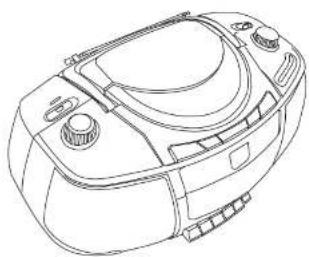
Please read instruction manual before use.
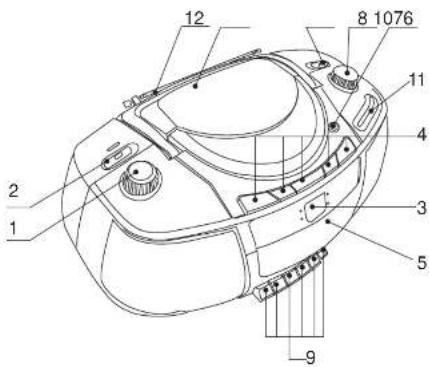
LOCATION OF CONTROLS
-
Volume Control
-
Function Selector
3.CD Display
4.CD Operation Buttons
- Cassette Compartment
6.CD Compartment
7.Band Selector
B. Tuning Control
- Cassette Operation Buttons
10.CD Compartment Open/Close Button
11.Tuning Indicator Window
12.Telescopic Antenna
IMPORTANT SAFEGUARDS
Always operate the product from a power supply of the same voltage, frequency and rating as indicated on the product identification plate.
Do not operate product with a damaged cord or plug. Never install the unit where there are heat sources such as radiators, heat registers, stoves, direct sunlight,
excessive dust or where there is mechanical vibration or shock. Switch off and unplug from AC outlet when not in use.
IMPORTANT
The CD mechanism and the sensitive circuitry may cause interference to a radio-lunar nearby. Do not
operate this unit while operating other radio devices.
Danger This product utilizes invisible laser radiation. Avoid direct exposure to the beam.

Caution Use of controls, adjustments or procedures not listed in this manual may result in hazardous radiation exposure.
CONCERNING COMPACT DISCS
Only compact discs identified with this mark can be used with this player.

CARE and MAINTENANCE
Handle your unit with care to extend the life of the unit. Use a soft and clean cloth damped with plain lukewarm water to clean the exterior of the unit.
Never use solvents such as benzene or other strong chemical cleaners since these could damage your unit.
It is important that no liquid reaches the inside of the unit.
Do not touch the CD laser part or look directly at it.
INTRODUCTION
Please read and follow the instruction manual carefully before operating in order to avoid any damage to the unit.
POWER SUPPLY
- By using AC power
Insert one end of the AC power cord into the AC socket on the rear of the unit and the other end into a standard wall socket.
- By using batteries
Insert 8x'D'size batteries (not included) in the battery compartment in the back of the unit by matching the polarities.
● The unit will not operate on battery power when
the AC power cord is plugged into the AC socket.
- Replace batteries when the power indicator dims,
the volume decreases or the sound distorts.
● Use batteries of high quality and check them
regularly. Alkaline batteries are recommended.
- Do not mix new batteries with old or used batteries.
● Use only batteries of the same brand and type
● Batteries should not be left in the unit if they
are exhausted or if the unit is not to be used for a long period of time as they may leak and damage the unit. Battery leakage is not covered under the warranty.
HEADPHONES (Not included)
You can use headphones with 3.5mm diameter stereo plug and have impedance of 32ohms. When the headphones are connected, the speakers are disconnected automatically.
See the VOLUME to a low level before using headphones and gradually adjust the Volume Control to the comfortable listening level.
Do not play the VOLUME tan load for extended periods of time to avoid any damage your hearing.
RADIO OPERATION
-
Slide the Function Selector switch to radio.
-
Select the desired AM or FM with the band switch.
-
Tune the desired station by tuning the Turing Control.
-
Adjust the volume with Volume Central as desired.
-
Extend Telescopic Antenna and adjust the drochan and angle
to obtain the continuum reception.
ii. Set the Function Switch to Tape for power standby mode.
CD OPERATION
Set the FUNCTION Selector to the CD position and insert a CD.
-Play/Stop/Pause Mode
-
Press PLAY:PAUSE button to play.
-
Press PLAY/PAUSE button to pause while in play mode
-
Press PLAY:PAUSE button once more to resume play
-
Press STOP to stop play.
-
Always press STOP and wait for complete stop to remove CD from CD player.
- Repeat Mode
-
Press Repeat button once to repeat current track only, the indicator is lighting and keeping on twice to repeat all tracks, the indicator is flashing.
-
Press Repeat button twice to cancel repeat current track Or once to cancel repeat all tracks.
2、本次股东大会的召集和召开程序符合《公司法》及《公司章程》的规定。
Program Function
To program:
(1) Press REPEAT button at stop mode, REPEAT
indicatoright will flash. the serial number for
programming frozen at the same time.
(2) Press FF (or REW) button to select the track
number.
(3) When desired track is displayed, press REPEAT
button to confirm.
(4) Repeat (2)\~ (3) to set up 16 traces. The display
will show the current set track
(5) Set tracks can be reviewed by pressing REPEAT
n.
(5) To complete the programming and to play,
press PLAY/PAUSE button to start the
programmed tracks.
(5) To clear the programming, press STOP(■)
button
Note: After setting up to 10 tracks(P0-P9), the letters "a-b-c-d-e-l" (Pa-P1) will replace the digits "11-12-13-14
-75-16", because the LCD can only display
two digits at most.
-Tracking Mode
-
To go back to beginning of current track, present once.
-
To go back to previous tracks, press repeatedly.
-
To go to next back, press once or repeatedly to play
your desired track
CASSETTE TAPE OPERATION
- Sel the FUNCTION Selector to the TAPE (OFF) position.
- Press STOP-EJECT to open the tape deck door. Insert
a tape and close the door. - Press PLAY to start play, the have will stop automatically
at the end - 2007
- Presses to rewind or press to last forward tape.
- Press STOP/EJECT to stop play
- Press STOP/EJECT are more time to open the cassette
door and take the tape out. - Adjust the sound with the VOLUME control.
We recommend that you use only type1 (Normal Bias)
cassette tape with your tape player.
RECORDING FROM RADIO/CD
This unit is equipped with ALC (Automatic Level control) circuit that automatically sets the recording to the optimum level. Adjusting the VOL LMF control does not affect the recording.
We recommend that the unit be powered by AG (house current) when recording since this function uses the most power. We recommend that you use Type 1 (normal batch cassette tapes only
•Recording from Radio
-
Set the FUNCTION Selector to the RADIO position
-
Set the BAND Seater to PM or FM.
-
Tur: the TUNING Cable line to a radio station
A Close the cassette thick glass and need the black glass.
4.3.31 The case is back open and when the book taps
- Press PADGE, Pin press RECDFU, PC PLAY key is automatic
cally engaged with RECORD BUTTON
- Release the PAUSE button to begin recording. You can use the
PAUSE button to edit any unwarned commercials or programs
during your recording.
- Recording will stop automatically at the end of the tape or
press STOP to send the recanting morally
• Recording from CD
- Set the FUNCTION selector to the CD position,
2.18.04.05
-
Open the cassette desk door and insert the blank tape.
-
Press RECORD and the PLAY key is automatically engaged
-
Pass the EU AS EMIE is then on the EU papers, the EU EFS are
C.Press and P.E.M. Phase School of the CB Journal, The Phys.Factor Indicators will illustrate
It. Pass the STOP notice to exactly and recurring or it will ship
automatically at the end of recording.
SPECIFICATIONS
Power Source AC 110-220V 50-6GHz 10W DC 12V
(84 D" size batteries)(not included)
Speakers 4" Wide range, 4ohm
Output Power : 2x2W
Weight : 8 lbs ( batteries not included)
Tape Player/Recorder
Tape: Standard normal bias
Frequency Response : 125-6300 Hz
Radio
Frequency Response: FM 88-108MHz
AM 530-1600kHz
CD Player
Laser Wavelength : 760-800NM
Tracking Method : 3 spot error detection:3.96mm ions
(1) 2017年1月1日
The following person of the Group of California has no number in the above section of the U.S. state or its own state of interest
(Book History of the Year)


- COBY®
- LOCATION OF CONTROLS
- IMPORTANT SAFEGUARDS
- IMPORTANT
- CONCERNING COMPACT DISCS
- CARE AND MAINTENANCE
- INTRODUCTION
- POWER SUPPLY
- HEADPHONES (NOT INCLUDED)
- RADIO OPERATION
- CD OPERATION
- PLAY/STOP/PAUSE MODE
- REPEAT MODE
- TRACKING MODE
- CASSETTE TAPE OPERATION
- RECORDING FROM RADIO/CD
- RECORDING FROM RADIO
- RECORDING FROM CD
- SPECIFICATIONS
- TAPE PLAYER/RECORDER
- RADIO
- CD PLAYER
Marke : COBY
Modell : CX-CD248
Kategorie : CD-Player