
XL-PG7 - CD-Player JVC - Kostenlose Bedienungsanleitung
Finden Sie kostenlos die Bedienungsanleitung des Geräts XL-PG7 JVC als PDF.
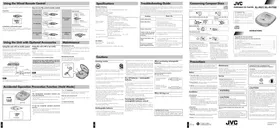


| Produkttyp | Tragbarer CD-Player |
| Modell | XL-PG7 |
| Marke | JVC |
| Abmessungen (ca.) | 130 x 140 x 30 mm |
| Gewicht (ca.) | 300 g (ohne Batterien) |
| Stromversorgung | Netzteil (DC 4,5 V), Auto-Adapter, 2x AA-Batterien (Trocken- oder Akku) |
| Batterieladezeit (Akku) | ca. 3 Stunden |
| Wiedergabemodi | Normal, Zufallswiedergabe, Programmwiedergabe (bis zu 24 Titel), Wiederholung (1 Titel/alle) |
| Klangverbesserung | HBS (Hoch-Bass), LIVE (Konzertsaal-Effekt) |
| Fernbedienung | Kabelgebundene Fernbedienung |
| Automatische Abschaltung | Nach ca. 10 Minuten im Stopp-Modus, nach 30 Sekunden ohne Disc |
| Batterieanzeige | Blinkt bei niedrigem Batteriestand |
| Antischockschutz | Ja (elektronischer Puffer) |
| Kopfhöreranschluss | 3,5-mm-Klinke |
| Auto-Adapter | Optional (CA-R455) |
| Cassettenadapter | Optional (für Autosysteme) |
| Lieferumfang | Netzteil, Auto-Adapter, Kabelfernbedienung |
| Pflege | Reinigen Sie das Gehäuse mit einem trockenen Tuch; CD mit weichem Tuch von innen nach außen reinigen |
| Sicherheitshinweise | Nicht öffnen, keine Fremdkörper einführen, nur mit Originalzubehör betreiben |
Häufig gestellte Fragen - XL-PG7 JVC
Benutzerfragen zu XL-PG7 JVC
0 Frage zu diesem Gerät. Beantworten Sie die, die Sie kennen, oder stellen Sie Ihre eigene.
Eine neue Frage zu diesem Gerät stellen
Laden Sie die Anleitung für Ihr CD-Player kostenlos im PDF-Format! Finden Sie Ihr Handbuch XL-PG7 - JVC und nehmen Sie Ihr elektronisches Gerät wieder in die Hand. Auf dieser Seite sind alle Dokumente veröffentlicht, die für die Verwendung Ihres Geräts notwendig sind. XL-PG7 von der Marke JVC.
BEDIENUNGSANLEITUNG XL-PG7 JVC
Verwendung der kabelgebundenen Fernbedienung
Die Fernbedienung kann unabhängig vom Betriebsmodus des Geräts bedient werden.
■
Vorbereitung: Lösen Sie die Fernbedienung aus dem Halte-Modus.


■ Betriebsbestätigungstöne
Wenn eine Bedientaste gedrückt wird, ertönt ein Bestätigungston. Die verschiedenen Arten von Bestätigungstönen sind in der Abbildung in Klammern angegeben.
Verwendung der kabelgebundenen Fernbedienung
(kein Text)
Einmal während des Aus- oder Stopp-Modus drücken.
Zum Starten der Wiedergabe
12.20.9.23
|
Zum Anhalten
Zum Stoppen der Wiedergabe
\left{ {2 : {x}^{\prime }\left( x\right) = {y}^{\prime }\left( x\right) = 1}\right.
|
\left{ {2 : {x}^{\prime }\left( x\right) = {y}^{\prime }\left( x\right) = 1}\right.
Zum Ausschalten
des Geräts
\left{ {2 : {x}^{\prime }\left( x\right) = {y}^{\prime }\left( x\right) = 1}\right.
ationales Zubehör
Optionales Zubehör
Dies ist ein Schlüsselbeispiel
Mit Y System
System
XL-IPV700 o Adapter
- Auto-Adapter
• Auto-Audio
Zum Anschluss
Anschluss
Kopfhörer LAUTSTÄRKE
Falls vorhanden oder
oder OPT OUT
mm Durchmesser Je nach
wird es wiedererkannt
Hinweis:
Es kann sein, dass keine Bestellung gemäß
Audio-Kabel
Für weitere Details
•
Schutzfunktion
Diese Funktion bewirkt, dass das Gerät kurze versehentliche Betätigungen ignoriert.
Die Schutzfunktion gegen Fehlbedienung
verhindert Folgendes:
- Versehentliches Einschalten des Geräts (was dazu führen kann, dass die Lautsprecher ausfallen).
- Unerwartetes Unterbrechen der Wiedergabe mitten in einem Titel.
Das Gerät und die kabelgebundene Fernbedienung verfügen über HOLD-Schalter,
die funktionieren.
Um die Funktion zu nutzen,
HOLD INV
- zum Schutz der HC
disc.
[Non-Text]
[Non-Text]
[Non-Text]
[Non-Text]
[Non-Text]
[Non-Text]
[Non-Text]
[Non-Text]
[Non-Text]
[Non-Text]
[Non-Text]
[Non-Text]
[Non-Text]
[Non-Text]
[Non-Text]
[Non-Text]
[Non-Text]
[Non-Text]
[Non-Text]
[Non-Text]
[Non-Text]
[Non-Text]
[Non-Text]
[Non-Text]
[Non-Text]
[Non-Text]
[Non-Text]
[Non-Text]
[Non-Text]
[Non-Text]
[Nicht-Text]
[Nicht-Text]
[Nicht-Text]
[Nicht-Text]
[Nicht-Text]
[Nicht-Text]
[Nicht-Text]
[Nicht-Text]
[Nicht-Text]
[Nicht-Text]
[Nicht-Text]
[Nicht-Text]
[Nicht-Text]
[Nicht-Text]
[Nicht-Text]
Vorbereitung der Stromversorgung
Verwendung von Akkus
3 Wenn der Ladevorgang abgeschlossen ist, ziehen Sie den Netzadapter aus der Steckdose und aus der DC-IN-Buchse.
Ladevorgang 1 Legen Sie die speziellen Akkus in das Gerät ein.
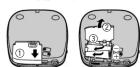
2 Schließen Sie den Netzadapter an.
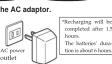
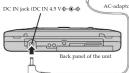
Wenn der Ladevorgang beginnt, blinkt die Ladeanzeige „C“ auf dem Display.
Verwendung des Netzadapters Schließen Sie den mitgelieferten Netzadapter an.
Schließen Sie den mitgelieferten Netzadapter an. Siehe „Verwendung von Akkus“ für die Anschlusshinweise.
Hinweis:
Das Gerät befindet sich im Bereitschaftszustand, wenn der Netzadapter angeschlossen ist.
Der Primärkreis ist immer „live“, solange der Netzadapter an eine Steckdose angeschlossen ist.
Verwendung des Auto-Adapters
Das AL-PV700 wird mit einem Auto-Adapter geliefert. Für das AL-PG7 besorgen Sie den optionalen Auto-Adapter bei Bedarf.
- Auto-Adapter (CA-R455)
Der Auto-Adapter kann verwendet werden, um die Akkus des Geräts aufzuladen, während
man im Auto ist.
Verwendung von Trockenbatterien
(nicht im Lieferumfang enthalten)
Nach dem Trennen des Netzadapters zwei "AA"- (Lho) Alkalibatterien einlegen.
Das Verfahren zum Einsetzen und Entfernen von Trockenbatterien ist identisch mit dem für makrophobische Wärme.
Batterien ist identisch mit dem für wiederaufladbare Batterien.
Batterieanzeige
10 www
Batterieanzeige
Diese Anzeige blinkt, wenn die Batterien fast leer sind. Kurz darauf wird die Stromversorgung vollständig unterbrochen.
Wiederaufladbare Batterien: Batterien aufladen.
Trockenbatterien: Ersetzen Sie die Batterien durch neue.
Hinweise:
- Die Betriebsdauer des Geräts nach dem Aufleuchten der Batterieanzeige und bis zur Abschaltung
hängt vom verwendeten Batterietyp ab. Die Batterieanzeige leuchtet möglicherweise nicht auf, wenn nicht wiederaufladbare Batterien verwendet werden.
- Die Anzeige kann je nach Umgebungsbedingungen variieren, wenn andere als die von JVC vorgesehenen Batterien verwendet werden.
Wenn das Gerät während des Gebrauchs eine Fehlfunktion aufweist oder einfriert
Wenn das Gerät während des Gebrauchs eine Fehlfunktion aufweist oder einfriert, trennen Sie die Stromquellen (Netzteil
und Batterien).
Schließen Sie die Stromquelle wieder an und setzen Sie den Betrieb fort.
[Nicht-Text]
[Nicht-Text]
[Nicht-Text]
[Nicht-Text]
[Nicht-Text]
[Nicht-Text]
[Nicht-Text]
[Nicht-Text]
[Nicht-Text]
[Nicht-Text]
[Nicht-Text]
[Nicht-Text]
[Nicht-Text]
[Nicht-Text]
[Nicht-Text]
Sequential Play Basic Play![graph TD A["1 Label must face upward"] --> B["2 Return held mode."] B --> C["3 Set the play mode. choose to NORMAL, 50% FEDERAL FORUM"] C --> D["4 Close the bit"] D --> E["5 Track number in play"] E --> F["6 Elapsed playing time of each track"] F --> G["7 Track number in play"] G --> H["8 VOLUME"] H…](/content/2026/05/816848/images/68a855ec019c6fbfc79be23c05a4899e3e6e5347277a3cea4fae6908d9e5c22e.jpg)
Folgen Sie den Schritten 1–7
Verbinden Sie in den Schritten 4 und 5 den Stecker fest mit der Buchse.
- Die Wiedergabe stoppt automatisch, wenn alle Titel abgespielt wurden.
- Wenn das Gerät an eine Autoradioanlage angeschlossen wurde, stellen Sie die Lautstärke am Gerät zwischen 4 und 6 ein und passen Sie dann die Lautstärke an der Anlage an.
Zu Ihrer Information:
"Hybridisierung
Diese Anzeige erscheint etwa 30 Sekunden lang, wenn die Taste ▶ □ gedrückt wird,
oder wenn keine Disc eingelegt ist oder die Disc nicht vollständig eingerastet ist.
*09/Anzeige
Diese Anzeige erscheint, wenn der Deckel geöffnet wird. (Die Anzeige erscheint jedoch nicht, wenn das Gerät ausgeschaltet ist).
10.2.20
Hinweis:
Führen Sie niemals Fremdkörper in das Gerätegehäuse ein.
Entfernen von Discs
Nachdem die Disc aufgehört hat zu drehen, drücken Sie die PUSH-Taste, um die Disc freizugeben. (Zum Schutz der Disc öffnen Sie den Deckel niemals, während sie
abgespielt wird.)

Automatische Abschaltfunktion
Wenn das Gerät etwa 10 Minuten lang im Stopp- oder Pausenmodus bleibt,
schaltet es sich automatisch ab, um Folgendes zu verhindern.
Wenn keine Disc eingelegt ist, schaltet es sich nach 30 Sekunden ab.
)
∴ m = 3/11
-
-
-
M)
Andere Wiedergabemethoden
Die Buchstaben wie Ⓐ in den verschiedenen Abbildungen beziehen sich auf
Überspringen der Wiedergabe
Die folgende Tabelle enthält die Originaldaten:
Die Disc wird von dem bestimmten Titel bis zum letzten Titel abgespielt, dann stoppt die Wiedergabe automatisch.
Vorbereitung: Versetzen Sie das Gerät in den Stopp-Modus. (Siehe Seite 3.)
1
NORMAL ANFORDERUNG AN ZUFALL
⑥
-
- Wählen Sie den gewünschten Titel
■ Wählen Sie den gewünschten Titel.
(A)
2
3
©
8
Zufallswiedergabe
1.
1 ♂ NORMAL REASSEM RADIOSE
©
→
Treiber
186358
① ZUFALLSWIEDERGABE
(1)
←
Zu Ihrer Information: - Es ist auch vorteilhaft, die PPI-Taste zu drücken, während sich die Karte im
- Es ist auch möglich, den Teil 227 zu platzieren, während der dritte im Stopp-Status ist, um den ersten zu platzierenden Titel zu ändern. (Alle Titel werden
letztendlich abgespielt, unabhängig davon, welcher zuerst gespielt wird.)
- Programmwiedergabe ist im Zufallsmodus nicht möglich.
Wiedergabe fortsetzen
Wiedergabe fortsetzen
Mit dieser Funktion können Sie vom Anfang des Titels an hören.
wo die Wiedergabe gestoppt wurde, weil das Gerät ausgeschaltet wurde (oder ohne den Stopp-Status). Dies funktioniert beim Hören von CDs im
Quelle: ID exp-Status. Es ist nützlich, wenn es zu CLS als Quelle hinzugefügt wird.
① NORMAL
- FORSCHUNG FINANZIELL
Briepase
(二) Beschluss der diesjährigen Hauptversammlung
①
(1) 1. Januar 2017
→
zu den Beschreibungen im Abschnitt "Position der Bedienelemente". (Siehe Seite 3.)
(1) Im Jahr 2017 erzielte das Unternehmen eine Trendwende von Verlust zu Gewinn, aber der den Aktionären der Muttergesellschaft zuzurechnende Nettogewinn betrug -3.456,9 Millionen Yuan.
Zu Ihrer Information:
- Wenn der RESUME-, NORMAL-, RANDOM- (Wiedergabemodus) Wähler auf RESUME steht, wird die Wiederholungsfunktion aktiviert
Teil im Derivat (möglicherweise, aber alle Ruhesubstanzen werden automatisch aktiviert, sobald das Gerät eingeschaltet wird).
- Wenn der Strom gegen Ende eines Titels unterbrochen wird (Ausschaltzustand),
kann die Wiedergabe vom Anfang des nächsten Titels fortgesetzt werden.
• Wenn das Gerät ausgeschaltet wird, während eine Disc abgespielt wurde, und dann eine
neue Disc eingelegt wird, beginnt die Wiedergabe in der Mitte der
neuen Disc, da sich das Gerät die Position merkt, an der die Wiedergabe
auf der vorherigen Disc gestoppt wurde.
P
Programmwiedergabe
Bis zu 24 Titel können in der programmierten Reihenfolge eingegeben werden.
Vorbereitung: Versetzen Sie das Gerät in den Stopp-Modus. (Siehe Seite 3.)
1
① VIRAL RESUM || | RANDOM
⑧
。
2
(2)
3 In der Reihenfolge registrieren.
1.2.1 2.3.2
②
4 Wiederholen Sie die Schritte 2 und 3, um alle zu programmieren.
4
5
5
- Wenn „ζ“ angezeigt wird
Es dürfen keine weiteren Titel zur Wiedergabeliste hinzugefügt werden.
•
Wiedergabeliste Freies Programm, während die Disc geschlossen wird. (Die Nummern der
ten
Wiedergabeliste.)
•
Über die ■-Taste.
Für
Es ist möglich, denselben Titel mehr als einmal in der Wiedergabeliste zu programmieren.
als
(7.6.1) Formation
L. (Siehe Seite 3.)
(1) 2014.03.19
Wiederholungsfunktion
Drücken Sie REPEAT, während die Disc abgespielt wird oder das Gerät im Stoppmodus ist.
REPEAT
⑬
-
Die Einstellung wird bei jedem Drücken von REPEAT in der unten angegebenen Reihenfolge umgeschaltet.
REPEAT
1-Titel-Wiederholung
Ein Titel wird wiederholt. "1¢2"
10
All-track-Wiederholung Alle Titel auf der
Disc werden wiederholt. "ALLO"
1
| |
Abbrechen
„▼“
Zur Information: Wenn während der Programm-Wiedergabe REPEAT gedrückt wird, werden nur die Titel
a. die ein Programm-Training haben, aber der Kurs ist eine programmierte Sequenz, wiederholt.
(Die Anzeige "ALL" wird nicht angezeigt.)
Ändern der Klangqualität
Drücken Sie HIPS/LIVE, während die Disc fehlt oder sich das Gerät im Stopp-Modus befindet.
HBS/LIVE
(2) AD = BD = 1
Die Einstellung wird jedes Mal in der unten angegebenen Reihenfolge umgeschaltet, wenn
HBS/LIVE gedrückt wird.
OFF HRS-LHP
OFF HOLD-END
HBS:
Wählen Sie diese Einstellung, um die Reaktion im Nahbereich zu verstärken.
OFF HRS LIVE
E
E
1,2-fach
LIVE:
Wählen Sie diese Einstellung, um den Klang so wiederzugeben, wie er in einem Konzertsaal gehört würde.
OFF HBS LIVE
E
①
OFF:
Wählen Sie diese Einstellung, um die HIPS-LIVE-Funktion auszuschalten.
Der normale Ton ist zu hören.
OFF HBS LIVE
⑤
Verwendung des Batteriefachs
Das Batteriefach ermöglicht es Ihnen, die maximale Spielzeit zu verlängern.
des Geräts, indem Sie zwei zusätzliche "AA" (LR6) Alkaline-Batterien einlegen.
Batterien.
Hinweise:
- Wenn Sie das Batteriefach verwenden, legen Sie die Batterien unbedingt in das Gerät ein.
Der Körper ebenfalls. (Das Gerät kann nicht allein mit den Batterien im externen Batteriegehäuse betrieben werden.)
der externe Batteriebehälter allein.)
- Wenn Sie die wiederaufladbaren Batterien in der Batterieseite verwenden, werden sie nicht wieder aufgeladen. (Ich bevorzuge Trockenbatterien, wenn möglich.)
- Wenn Sie wiederaufladbare Batterien im Gerätekörper und Trocken-
batterien im Batteriegehäuse verwenden, achten Sie darauf, vollständig geladene wiederaufladbare Batterien zu verwenden.
• Wenn Sie vier Trockenbatterien verwenden, mischen Sie nicht neue und alte Batterien.
Batterien.
1
1 Öffnen Sie den Deckel des Batteriegehäuses und setzen Sie die Batterien ein.
Setzen Sie die Batterien ein.
Setzen Sie das Ende mit der Markierung (-
2 Montieren Sie das Batteriefach am Gerätekörper.
Führen Sie die Vorsprünge
des Batteriefachs in
die vier Vertiefungen im
Gerätekörper ein.
3 Befestigen Sie es mit der Schraube.
- 90.
Abbildung 1
Entfernen Sie das Batteriefach gemäß der obigen Anleitung.
Zu Ihrer Information:
Die maximale Spielzeit hängt von der Art der Batterien (wiederaufladbar/Trockenbatterien) ab, die im Gerät eingelegt sind.
Batterien (wiederaufladbar/Trockenbatterien) im Gerät eingelegt sind.
Wenn der Deckel des Batteriefachs zu locker sitzt,
Wenn der Deckel des Batteriefachs zu fest sitzt,
Führen Sie die Vorsprünge in die



Marke : JVC
Modell : XL-PG7
Kategorie : CD-Player