
iMac 27" (2020) - Desktop-Computer APPLE - Kostenlose Bedienungsanleitung
Finden Sie kostenlos die Bedienungsanleitung des Geräts iMac 27" (2020) APPLE als PDF.
 — Desktop-Computer — Mode d'emploi PDF")


| Produkttyp | Desktop-Computer |
| Marke | Apple |
| Modell | iMac 27" (2020) |
| Bildschirmdiagonale | 27 Zoll |
| Bildschirmauflösung | 5K (5120 x 2880) |
| Prozessor | Intel Core i5 oder i7 (10. Generation) |
| Arbeitsspeicher (RAM) | 8 GB bis 128 GB DDR4 |
| Speicher | 256 GB bis 8 TB SSD |
| Grafik | AMD Radeon Pro 5000 Serie |
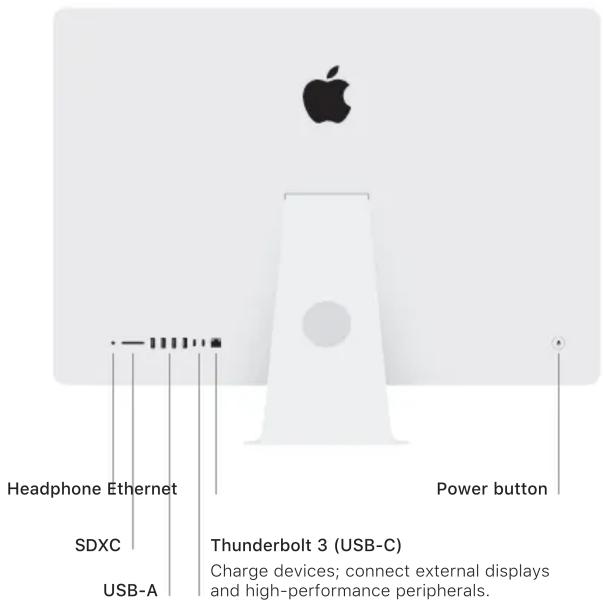
| Anschlüsse | Kopfhörer, Ethernet, SDXC-Kartensteckplatz, 4x USB-A, 2x Thunderbolt 3 (USB-C) |
| Kamera | FaceTime HD 1080p |
| Lautsprecher | Stereo-Lautsprecher, Mikrofonarray |
| Betriebssystem | macOS |
| Abmessungen (H x B x T) | 51,6 cm x 65,0 cm x 20,3 cm |
| Gewicht | ca. 8,92 kg |
| Stromversorgung | 100–240 V AC, 50–60 Hz |
| Mitgeliefertes Zubehör | Magic Mouse 2, Magic Keyboard (optional Magic Trackpad 2) |
| Kabellose Verbindung | Bluetooth 5.0, Wi‑Fi 802.11ac |
| Garantie | 1 Jahr eingeschränkte Garantie |
| Pflegehinweise | Mit einem weichen, trockenen Tuch reinigen |
Häufig gestellte Fragen - iMac 27" (2020) APPLE
Benutzerfragen zu iMac 27" (2020) APPLE
0 Frage zu diesem Gerät. Beantworten Sie die, die Sie kennen, oder stellen Sie Ihre eigene.
Eine neue Frage zu diesem Gerät stellen
Laden Sie die Anleitung für Ihr Desktop-Computer kostenlos im PDF-Format! Finden Sie Ihr Handbuch iMac 27" (2020) - APPLE und nehmen Sie Ihr elektronisches Gerät wieder in die Hand. Auf dieser Seite sind alle Dokumente veröffentlicht, die für die Verwendung Ihres Geräts notwendig sind. iMac 27" (2020) von der Marke APPLE.
BEDIENUNGSANLEITUNG iMac 27" (2020) APPLE
Zubehör
Magic Mouse 2 und Magic Keyboard sind bereits mit dem iMac gekoppelt. Wenn Sie ein Magic Trackpad 2 oder ein Magic Keyboard mit Nummernblock zusammen mit Ihrem iMac gekauft haben, sind diese Geräte ebenfalls gekoppelt. Um sie einzuschalten, schieben Sie den Ein-/Ausschalter, sodass die grüne Seite sichtbar ist.
Verwenden von Maus und Tastatur
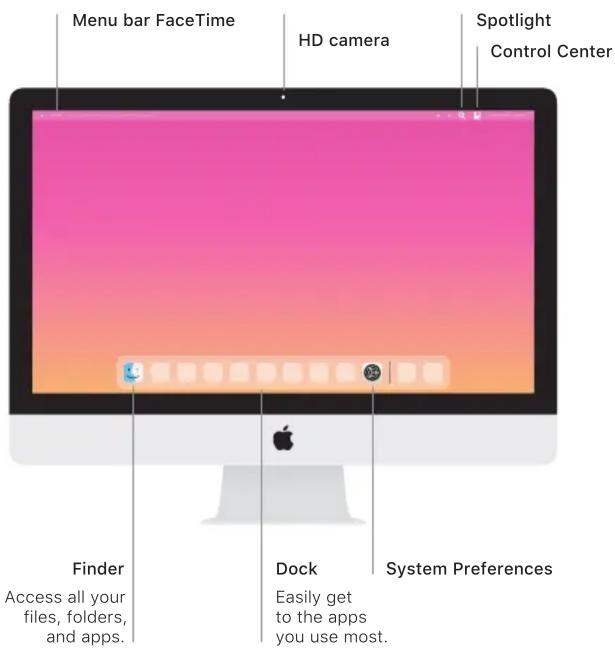
Um Ihre Geräte aufzuladen oder erneut zu koppeln, verbinden Sie sie mit dem mitgelieferten Lightning-auf-USB-Kabel mit dem iMac. Überprüfen Sie den Batteriestatus und den Verbindungsstatus im Bluetooth®-Menü. Wenn das Bluetooth-Menü nicht sichtbar ist, öffnen Sie die Systemeinstellungen, klicken Sie auf Bluetooth und aktivieren Sie dann "Bluetooth in der Menüleiste anzeigen".
Um die Verwendung Ihrer Geräte zu personalisieren, öffnen Sie die Systemeinstellungen und wählen Sie Tastatur, Maus oder Trackpad. Klicken Sie auf die Registerkarten, um Gesten und Optionen für jedes Gerät zu erkunden.
Das iMac Essentials Handbuch
Erfahren Sie mehr über die Einrichtung und Verwendung Ihres iMac im iMac Essentials Handbuch. Um das Handbuch anzusehen, gehen Sie zu support.apple.com/guide/imac.
Support
Für detaillierte Informationen besuchen Sie support.apple.com/mac/imac. Um Apple zu kontaktieren, gehen Sie zu support.apple.com/contact.
iMac
Nicht alle Funktionen sind in allen Regionen verfügbar. © 2020 Apple Inc. Alle Rechte vorbehalten. Das Bluetooth®-Wortzeichen und die Logos sind eingetragene Marken von Bluetooth SIG, Inc. und werden unter Lizenz verwendet. Entworfen von Apple in Kalifornien. Gedruckt in XXXX. 034-04238-A
Willkommen bei Ihrem iMac
Drücken Sie die Einschalttaste, um den iMac zu starten.
Der Einrichtungsassistent hilft Ihnen beim Start.





Marke : APPLE
Modell : iMac 27" (2020)
Kategorie : Desktop-Computer