Airport Essentials - Tasche Think Tank - Kostenlose Bedienungsanleitung
Finden Sie kostenlos die Bedienungsanleitung des Geräts Airport Essentials Think Tank als PDF.


Benutzerfragen zu Airport Essentials Think Tank
0 Frage zu diesem Gerät. Beantworten Sie die, die Sie kennen, oder stellen Sie Ihre eigene.
Eine neue Frage zu diesem Gerät stellen
Laden Sie die Anleitung für Ihr Tasche kostenlos im PDF-Format! Finden Sie Ihr Handbuch Airport Essentials - Think Tank und nehmen Sie Ihr elektronisches Gerät wieder in die Hand. Auf dieser Seite sind alle Dokumente veröffentlicht, die für die Verwendung Ihres Geräts notwendig sind. Airport Essentials von der Marke Think Tank.
BEDIENUNGSANLEITUNG Airport Essentials Think Tank
Airport Accelerator™, Airport Commuter™, Airport Essentials™ Instructions

TRIPOD ATTACHMENT
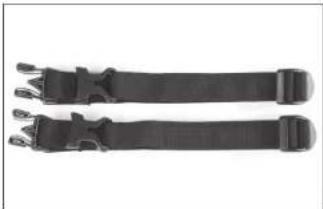
Tripods can be attached to the side of the backpack by putting two legs into the stretchable bottom pocket and then attaching it with two tripod straps.
natural_image
Pair of black athletic belt straps with buckles, shown against white background (no text or symbols)Step 1: Locate the "tripod straps" with the two buckles inside of the backpack.
natural_image
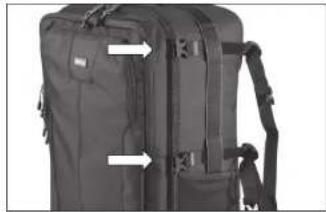
Black tactical backpack with attached straps and buttons, no visible text or symbolsStep 2: Thread the tripod straps under the webbing near the top of the bag and directly above the stretch pocket (two locations).
natural_image
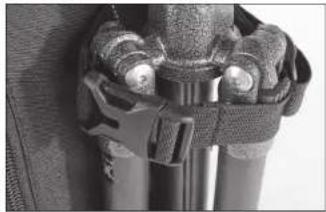
Close-up of a mechanical component with clamps and brackets (no visible text or symbols)Step 3: The side release buckle should be located on the side of the tripod. Adjust the strap position on the bag so it is in this position.
natural_image
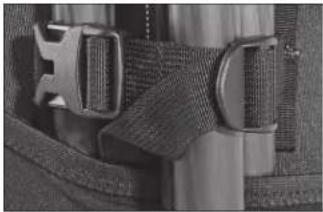
Close-up of a mechanical buckle with metal clamps and textured straps (no visible text or symbols)Step 4: The ladder lock buckle should also be located on the side of the tripod. Use this buckle to tighten the strap.
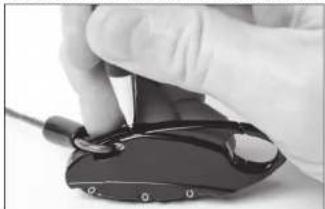
SETTING THE CABLE LOCK COMBINATION
natural_image
Close-up of a gloved hand holding a black electronic device with a cable (no visible text or symbols)Step 1: Start by setting the dials to 0-0-0. Take a ballpoint pen and press down (as hard as you can) the small recessed reset button located at the base of the clasp until you hear a "click" sound.
natural_image
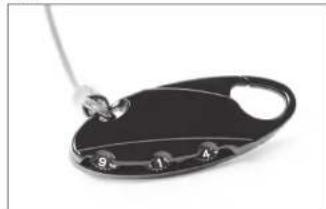
Close-up of a black plastic tray with four numbered slots and a metal rod inserted (no text or symbols visible)Step 2: Rotate the dials to the new combination of your choice.
natural_image
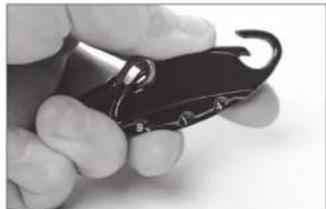
Close-up of a hand holding a black metal object with a curled hook (no text or symbols visible)Step 3: Depress the lock clasp until you hear a "click" sound. The lock will open using the new combination.
REMOVABLE WAISTBELT ATTACHING A MODULAR BELT
natural_image
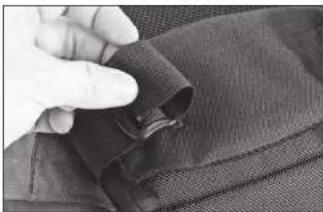
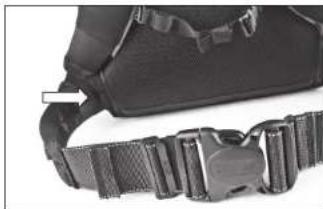
Close-up of a hand holding a dark fabric piece with a zipper, no visible text or symbolsThe included waistbelt is removable by unthreading the webbing through the buckle.
natural_image
Close-up of a black athletic belt buckle with a white arrow pointing to the belt (no text or symbols visible)Remove the included waist belt. Then feed the Pro Speed Belt™ or Thin Skin Belt™ through the opening in the bottom panel of the backpack.
For more information about this and other Think Tank products, visit www.thinktankphoto.com