
GT54UHD-TM - Nicht kategorisiert GARMIN - Kostenlose Bedienungsanleitung
Finden Sie kostenlos die Bedienungsanleitung des Geräts GT54UHD-TM GARMIN als PDF.


| Produkttyp | UHD-Fischsonar-Geber |
| Modell | GT54UHD-TM |
| Marke | Garmin |
| Montageart | Spiegelmontage (Transom Mount) |
| Frequenz | 455/800 kHz |
| Leistung (RMS/Spitze) | 500 W / 4000 W |
| Erfassungsbereich | bis zu 120° |
| Tiefenbereich | bis zu ca. 300 m |
| Kabellänge | ca. 2 m |
| Kabelanschluss | 4-polig |
| Gehäusematerial | Kunststoff |
| Gewicht | ca. 150 g |
| Betriebstemperatur | -10 °C bis +50 °C |
| Lagertemperatur | -20 °C bis +60 °C |
| Wasserdichtigkeit | bis 150 m Tiefe |
| Lieferumfang | Geber, Montagehalterung, Schrauben, Schablonenblatt |
| Kompatibilität | ausgewählte Garmin ECHOMAP- und STRIKER-Serien |
| Besondere Merkmale | UHD-Sonartechnologie, integrierte Temperatursonde |
| Herstellungsland | Taiwan |
| Garantie | 2 Jahre |
Häufig gestellte Fragen - GT54UHD-TM GARMIN
Benutzerfragen zu GT54UHD-TM GARMIN
0 Frage zu diesem Gerät. Beantworten Sie die, die Sie kennen, oder stellen Sie Ihre eigene.
Eine neue Frage zu diesem Gerät stellen
Laden Sie die Anleitung für Ihr Nicht kategorisiert kostenlos im PDF-Format! Finden Sie Ihr Handbuch GT54UHD-TM - GARMIN und nehmen Sie Ihr elektronisches Gerät wieder in die Hand. Auf dieser Seite sind alle Dokumente veröffentlicht, die für die Verwendung Ihres Geräts notwendig sind. GT54UHD-TM von der Marke GARMIN.
BEDIENUNGSANLEITUNG GT54UHD-TM GARMIN
GARMIN®
Printing a Mounting Template
NOTICE
It is not recommended that you print a mounting template on your own. Use the template that came in the product box.
If you do print the template, you must follow these instructions for printing a mounting template precisely. To print large templates, you need large enough paper and printer. Failure to have the correct sized paper and printer, or a failure to follow these instructions, may result in an incorrectly sized template and therefore an incorrect cutout (too large or too small) on the mounting surface of your boat.
1 Select File > Print.
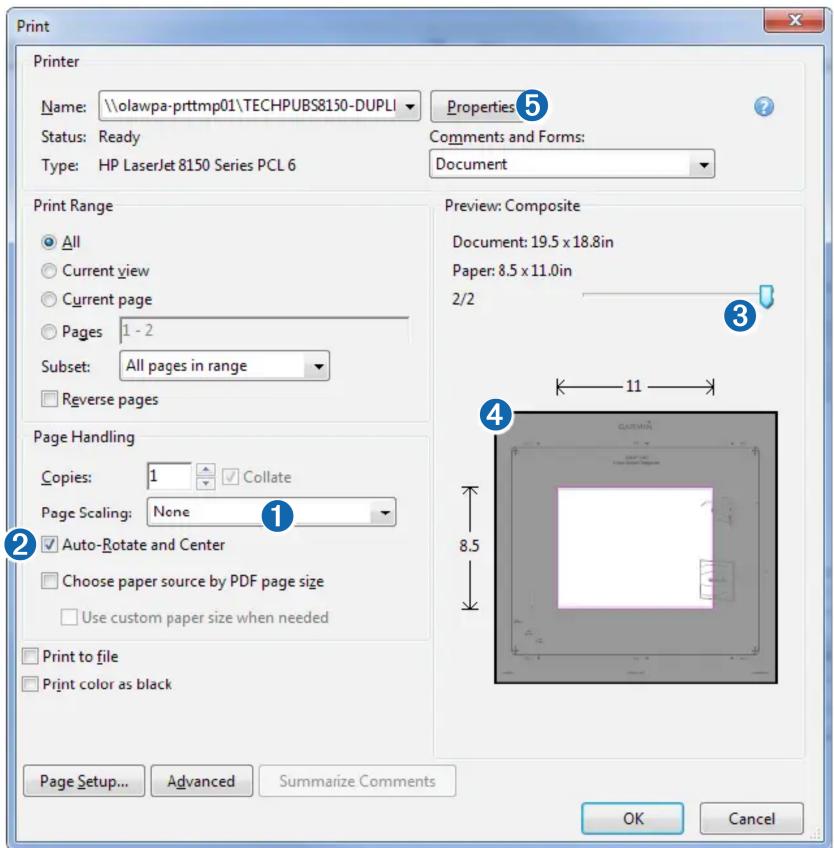
2 Select None for Page Scaling 1.
3 Ensure the check mark is next to Auto-Rotate and Center ②.
4 Drag the arrow ③ to the right, to view page 2 in the window below.
4 Verify that the paper size is larger than the template ④.
In this example, the paper is not larger than the template.
5 If the paper size is not large enough, select Properties ⑤ and select a Page Size that is larger than the template.
NOTICE
Garmin is not responsible for any damages or expenses resulting from a miscut mounting surface arising from a failure to follow these instructions.
GARMIN®
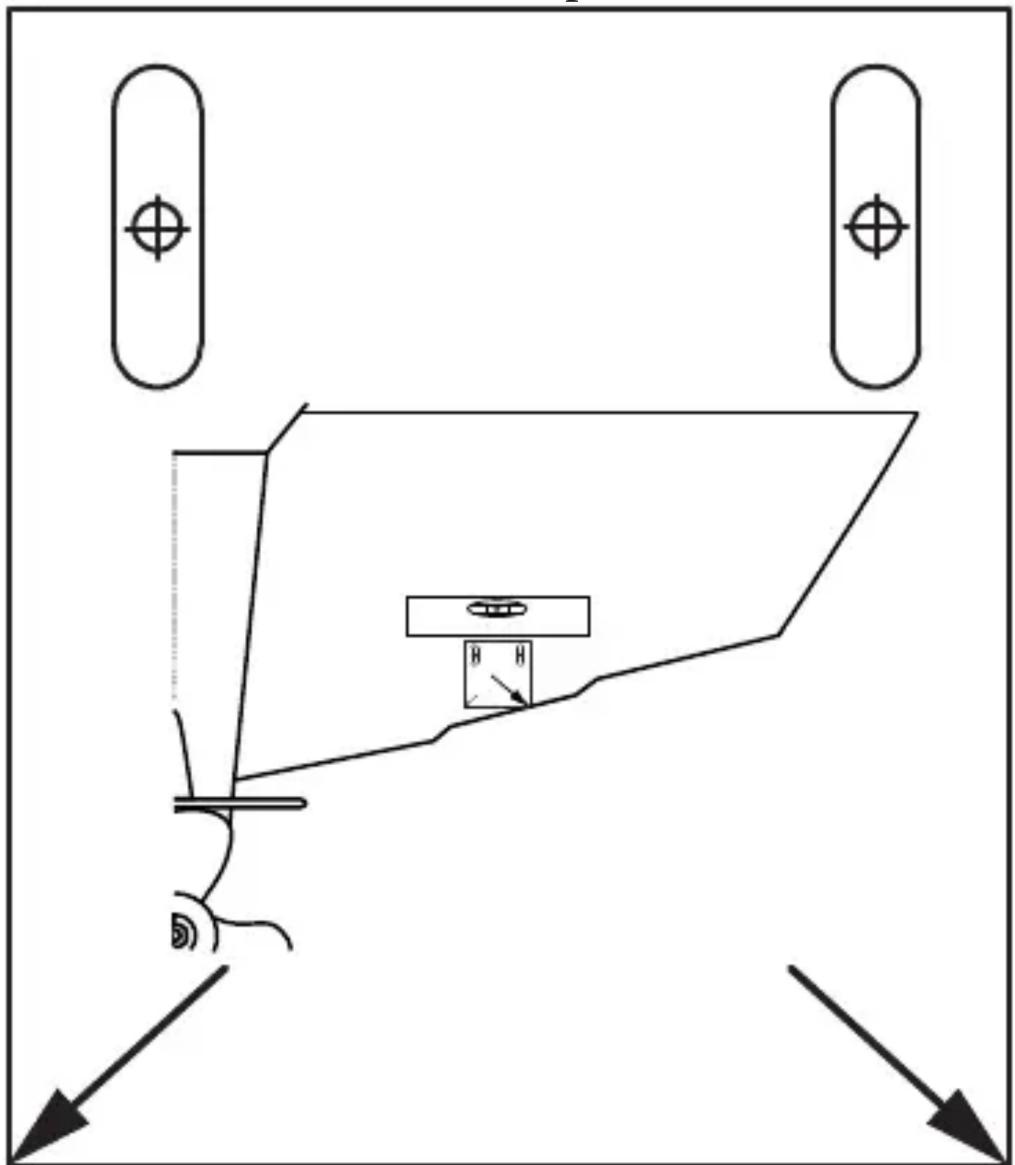
Transducer Transom Mount Template
natural_image
Pure technical diagram showing a mechanical assembly with no text, numbers, or symbols
Marke : GARMIN
Modell : GT54UHD-TM
Kategorie : Nicht kategorisiert