
Mi Smart Home Cube - Nicht kategorisiert Xiaomi - Kostenlose Bedienungsanleitung
Finden Sie kostenlos die Bedienungsanleitung des Geräts Mi Smart Home Cube Xiaomi als PDF.


Benutzerfragen zu Mi Smart Home Cube Xiaomi
0 Frage zu diesem Gerät. Beantworten Sie die, die Sie kennen, oder stellen Sie Ihre eigene.
Eine neue Frage zu diesem Gerät stellen
Laden Sie die Anleitung für Ihr Nicht kategorisiert kostenlos im PDF-Format! Finden Sie Ihr Handbuch Mi Smart Home Cube - Xiaomi und nehmen Sie Ihr elektronisches Gerät wieder in die Hand. Auf dieser Seite sind alle Dokumente veröffentlicht, die für die Verwendung Ihres Geräts notwendig sind. Mi Smart Home Cube von der Marke Xiaomi.
BEDIENUNGSANLEITUNG Mi Smart Home Cube Xiaomi
Magic Cube Controller
Overview
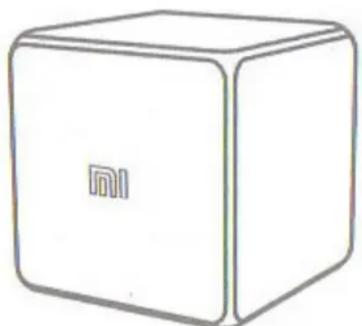
Magic Cube Controller is an integrated wireless controller with internal motion sensors. Connect it to multifunctional Mi gateway, open «Smart Home» application and make settings required to control appliances in your home.
natural_image
Simple line drawing of a Xiaomi cube with no text or symbols on its faces*This device is intended only for indoor use.
Installing the App



To set «Mi Smart Home» on the smartphone, open Mi Store and search for «Mi Smart Home» App or scan QR-Code. Connect multifunction Mi gateway, then add Magic Cube Controller in «List of devices».
Register at mi.com, to buy more Smart Devices or make a purchase using Mi Smart Home.
Adding devices
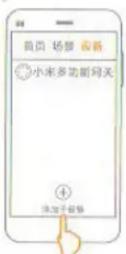
Open «Mi Smart Home», then connect multifunction Mi gateway, then on the home page click on «Add Device» and follow instructions of the application, follow successful connection of devices.
Shake the device
* If you have any problems, you need to shorten the distance between the device and the gateway. Open the device, and re-do the «add device» by following instructions of the app.
Recommendations for connecting devices
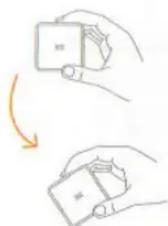
Shake the device - on / off indicator multifunction gateway.
Slide the device to the side - on / off Yeelight lamp.
Turn the device 90 degrees - on / off Mi Smart Socket.
Turn the device through 180 degrees - on / off Mi Home Suite.
Discover many other options for connecting devices
Specifications
Model: MFKZQ01LM;
Standard: Q/QLML008-2016;
Dimensions: 45 x 45 x 45mm;
Temperature range: - 10C – 50C;
Wireless connection: ZigBee;
Battery Type: CR2450.
Warranty
After-sales servicing is carried out according to the law on «consumer rights» and «Law on product quality.» In warranty service includes:
-
Within 7 days of purchase, in case of problems with the «List of faults» Xiaomi service center determines the cause of the problem, then you can choose a free replacement product, return or repair.
-
Within 8-15 days after the purchase, in the event of a problem with «fault list» Xiaomi service center defines the problem, then you choose a free replacement product or repair.
-
Within 12 months after the purchase, in the event of a problem with «fault list» Xiaomi service center defines the problem, then you have free repair.
The conditions are not included in warranty
- Repair the device in unauthorized companies, fall, neglect, abuse, water impact, accident, improper use of components; if disrupted or corrupted label and marking of device;
- The warranty period is over;
- Damage arising under force majeure circumstances;
- Damage that do not meet the «List of faults»;
- Damage device or its components, which arose due to the human factor, which became the cause of a problem with «List of faults».
List of Faults
Cracks / breakage due to design or material of the device;
Problems with the indicator;
Problems with the reset button;
Problems with the wireless connection.
The presence of toxic and hazardous substances
| Name | The presence of toxic and hazardous substances | |||||
| Pb | Hg | Cd | Cr VI | PBB | PBDE | |
| Plastic housing | 0 | 0 | 0 | 0 | 0 | 0 |
| Hard plastic | 0 | 0 | 0 | 0 | 0 | 0 |
| Metal | 0 | 0 | 0 | 0 | 0 | 0 |
| Resistor | 0 | 0 | 0 | 0 | 0 | 0 |
0: toxic and harmful substances in all components of the device are contained in an amount below the limit value according to SJ / T11363-2006 «requirements limit the presence of toxic and hazardous substances in products.»
X: means the presence of toxic and hazardous substances at least one of the components of the device in an amount that exceeds the threshold, according to SJ / T11363-2006 «requirements limit the presence of toxic and hazardous substances in products.»
Manufacturer: «Shenzhen Lumi Lianchuang Technology» LLC. Address: Shenzhen, Nanshan distr., Gaoxin Nansi str., taibang Keji Dasha, 16
XIAOMI-MI.COM
Marke : Xiaomi
Modell : Mi Smart Home Cube
Kategorie : Nicht kategorisiert