
SRF-HM03V - Radio SONY - Kostenlose Bedienungsanleitung
Finden Sie kostenlos die Bedienungsanleitung des Geräts SRF-HM03V SONY als PDF.


| Produkttyp | Kopfhörerradio (Portabler Radioempfänger) |
| Marke | Sony |
| Modell | SRF-HM03V |
| Empfangsbänder | TV (Kanal 2-13), Wetter (Kanal 1-7), FM (87,5-108 MHz), AM (530-1710 kHz) |
| Abstimmungsart | PLL-synthetisiert |
| Anzahl Senderspeicher | 30 (TV: 5, Wetter: 5, FM: 15, AM: 5) |
| Bassverstärkung | MEGA BASS (ein-/ausschaltbar) |
| Wasserbeständigkeit | Ja (für leichte Regen- und Schneeeinwirkung) |
| Stromversorgung | 1,5 V DC, 1 x AAA (R03) Batterie (nicht im Lieferumfang) |
| Batterielebensdauer (Alkaline) | TV: ca. 33 h, Wetter: ca. 33 h, FM: ca. 37 h, AM: ca. 57 h |
| Gewicht (inkl. Batterie) | ca. 159 g |
| Kopfhörertyp | Dynamisch (geschlossene Bauweise) |
| Ausgangsleistung | 7 mW + 7 mW (bei 10 % Klirrfaktor) |
| Frequenzbereich FM | 87,5 - 108 MHz (Schrittweite 0,1 MHz) |
| Frequenzbereich AM | 530 - 1710 kHz (Schrittweite 10 kHz/9 kHz umschaltbar) |
| Zeitanzeige | 12-Stunden-System |
| Sicherheitshinweise | Nicht beim Fahren oder Radfahren verwenden; Gehörschäden vermeiden; Lichtreflektor für nächtliche Sichtbarkeit |
| Reinigung | Weiches, leicht mit mildem Reinigungsmittel angefeuchtetes Tuch |
| Empfindlichkeitseinstellung | DX/LOCAL für TV/Wetter/FM |
| Lieferumfang | Kopfhörerradio (mit integrierten Kopfhörern) |
Häufig gestellte Fragen - SRF-HM03V SONY
Benutzerfragen zu SRF-HM03V SONY
0 Frage zu diesem Gerät. Beantworten Sie die, die Sie kennen, oder stellen Sie Ihre eigene.
Eine neue Frage zu diesem Gerät stellen
Laden Sie die Anleitung für Ihr Radio kostenlos im PDF-Format! Finden Sie Ihr Handbuch SRF-HM03V - SONY und nehmen Sie Ihr elektronisches Gerät wieder in die Hand. Auf dieser Seite sind alle Dokumente veröffentlicht, die für die Verwendung Ihres Geräts notwendig sind. SRF-HM03V von der Marke SONY.
BEDIENUNGSANLEITUNG SRF-HM03V SONY
SONY®
3-265-633-11(1)
TV/WEATHER/FM Stereo/AM PLL Synthesized Headphone Radio
Operating Instructions
WALKMAN TV/WEATHER/FM/AM WALKMAN
"WALKMAN" is a registered trademark of Sony Corporation to represent Headphone Stereo products. WALKMAN is a registered trademark of Sony Corporation.
SRF-HM03V
© 2004 Sony Corporation Printed in China

Printed on 100% recycled paper using VOC (Volatile Organic Compound)-free vegetable oil based ink.
http://www.sony.net/
OWNER'S RECORD
The model number is located on the rear of the left side of the headphone radio and serial number inside the battery compartment. Record the serial number in the space provide below. Refer to these numbers whenever you call upon your Sony dealer regarding this product.
Model No. SRF-HM03V Serial No
For customers who purchased this product in the USA
Please register this product on line at
http://www.sony.com/productregistration.
Proper registration will enable us to send you periodic mailings about new products, services, and other important announcements. Registering your
products, services, and other important announcements. Registering y product will also allow us to contact you in the unlikely event that the
product needs adjustment or modification. Thank you.
SONY _s
Tape Cassette Player/Recorder/CD Player/Mini Disc DAT/Radio/Head Phone/Speaker/MIC/Personals
Portable Audio
LIMITED WARRANTY
Sony Electronics Inc. ("Sony") warrants this Product (including any accessories) against defects in material or workmanship as follows:
- LABOR: For a period of one (1) year from the date of purchase, if this Product is determined to be defective.
Sony will repair or replace the Product, at its option, at no charge, or pay the labor charges to any Sony authorized service facility. After the Warranty Period, you must pay for all labor charges.
- PARTS: In addition, Sony will supply, at no charge, new or rebuilt replacements in exchange for defective
parts for a period of one (1) year. After the warranty period, you must pay for all parts costs.
- ACCESSORIES: Parts and labor for all accessories are for one (1) year.
To obtain warranty service, you must take the Product, or deliver the Product freight prepaid, in either its original
packaging or packaging affording an equal degree of protection, to any authorized Sony service facility.
This warranty does not cover customer instruction, installation, set up adjustments or signal reception problems.
This warranty does not cover cosmetic damage or damage due to acts of God, accident, misuse, abuse, negli-
gence, commercial use, or modification of, or to any part of the Product, including the antenna. This warranty does not cover damage due to improper operation or maintenance, connection to improper voltage supply, or
attempted repair by anyone other than a facility authorized by Sony to service the Product. This warranty does not cover Products sold AS IS or WITH ALL FAULTS, or consumables (such as fuses or batteries). This warranty
is valid only in the United States.
Proof of purchase in the form of a bill of sale or receipted invoice Warranty period must be presented to obtain warranty service.
This warranty is invalid if the factory applied serial number has been altered or removed from the Product
This maturity is fixed at the factory approval sector member that has been stated or removed from the 1st quarter.
REPAIR OR REPLACEMENT AS PROVIDED UNDER THIS WARRANTY IS THE EXCLUSIVE REMEDY OF THE CONSUMER, SONY SHALL NOT BE LIABLE FOR ANY INCIDENTAL OR CONSEQUENTIAL DAMAGES FOR
BREACH OF ANY EXPRESS OR IMPLIED WARRANTY ON THIS PRODUCT. EXCEPT TO THE EXTENT PROHIBITED BY APPLICABLE LAW. ANY IMPLIED WARRANTY OF MERCHANTABILITY OR FITNESS FOR A PARTICULAR
LAR PURPOSE ON THIS PRODUCT IS LIMITED IN DURATION TO THE DURATION OF THIS WARRANTY.
Some states do not allow the exclusion or limitation of incidental or consequential damages, or allow limitations
on how long an implied warranty lasts, so the above limitations or exclusions may not apply to you. In addition, if you enter into a service contract with the Sony Partnership within 50 days of the date of sale, the limitation on
how long an implied warranty lasts does not apply to you. This warranty gives you specific legal rights, and you may have other rights which you first act as sure.
may have other rights which vary from stake to stake.
For your convenience, Sony Electronics Inc. has established telephone numbers for frequently asked questions:
To locate the servicer or dealer nearest you, or for service assistance or resolution of a service problem, or for
Product Information of Operation, Inc.
Sony Customer Information Services Center 1-800-222-7669
or visit the Sony Web S
www.sany.com
For an accessory or part not available from your authorized dealer, call
1-800-688-SONY (7669)
D 455214502
WARNING
You are cautioned that any changes or modifications not expressly approved in this manual could void your authority to operate this equipment.
If you have any questions about this product, you may call; Sony Customer Information Services Center 1-800-222-7669 or http://www.sony.com/
Declaration of Conformity
Trade Name: SONY
Model: SRF-HM0.5V
Responsible Party: Sony Electronics Inc.
Address: 10430 W. Bernardo Dr, St. Telephone Number: 858-942-2230
This device complies with part 15 of the FCC rules. Operation is subject to the following two conditions: (1) This device may not cause harmful interference, and (2) this device must accept any interference received, including interference that may cause undesired operation.
Features
- PLL synthesized tuning 4 band radio.
- Designed for hands-free use.
• A total of 30 stations can be preset, 5 TV stations, 5 WEATHER stations, 15
1 M stations and 5 AM stations
• TV/WEATHER/FM SENS (sensitivity) DX/LOCAL selector for better
• MEGA BASS for dynamic bass sound system.
• Light reflector to reflect car lights at night for your safety.
- Water-resistant body for all weathers operation.
Precautions
- Operate the unit only on 1.5V DC with one size AAA (R03) battery.
- A void exposure to temperature extremes, direct sunlight, moisture, sand, dust or mechanical shock. Never leave in a car parked under the sun.
- Should any solid object or liquid fall into the unit, remove the battery and have
the unit checked by a qualified personnel before operating it any further
- In vehicles or buildings, radio reception may be difficult or noisy. Try listening near a window.
- To clean the casing, use a soft cloth dampened with a mild detergent solution.
Notes on Headphones
Road safety Do not use headphones while driving, cycling, or operating any motorized vehicle. It may create a traffic hazard and is illegal in many areas. It can also be potentially dangerous to play your headphones at high volume while walking, especially at pedestrian crossings. You should exercise extreme caution or discontinue use in potentially hazardous situations.
Preventing hearing damage
Avoid using headphones at high volume.
Hearing experts advise against continuous, loud and extended play. If you
experience a ringing in your ears, reduce volume of discontinue use
Caring for others
Keep the volume at a moderate level. This will allow you to hear outside sounds and to be considerate to people around you.
Cautions on Water-resistance
This unit is designed so that it can be used with slight exposure to rain, snow and other forms of moisture, but there are several points on which caution should be observed.
- Do not allow it to come into contact with large amounts of water
- Do not immerse it in water.
- If water should get on it or if it should fall into water, take it out immediately and wipe it off with a dry cloth. To prevent the battery from corroding, wipe out the interior of the battery compartment as follows:
- Open or close the battery compartment with dry hands in a place without
exposure to any water.
- Wipe off the battery and the inside of the battery compartment. Give special attention to the contacts so that no water remains on them.
Warning
If there is lightning when you are using the unit, take off the headphones immediately.
If you have any questions or problems concerning your unit, please consult your nearest Sony dealer.
The preset stations may be initialized, if a maintenance service is performed. Please keep a copy of your settings in case you want to preset them again.
Specifications
Time display: 12-hour system
Frequency range
Band Range Channel step
| TV 2 - 13 ch 1 channel | ||
| WEATHER | 1 - 7 ch | 1 channel |
| FM | 87.5 - 108 MHz | 0.1 MHz |
| AM | 530 - 1 710 kHz | 10 kHz |
| 531 - 1 710 kHz | 9 kHz | |
Headphone type: Dynamic
Power output: 7 mW + 7 mW (at 10 % harmonic distortion)
Power requirements: 1.5V DC, one size AAA (R03) battery
Mass: Approx. 159 g (3.6 oz) incl. a battery
Design and specifications are subject to change without notice.
Installing the Battery
1 Open the battery compartment lid and install one battery (not supplied).
When the battery is first installed, "AM 12:00" flashes in the display. Once the current time is set, the flashing stops. (See "Setting the Clock")
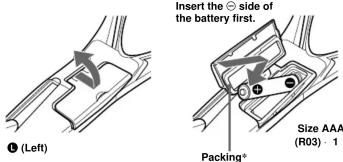
Insert the ⊖ side of the battery first.
* The attached packing is used to ensure water-resistance for the battery compartment. Therefore, make sure to close the battery compartment lid securely.
2 To close the lid, press the center of the lid firmly and push it back to its original position as illustrated.

Battery Life (Approx. hours)
(JEITA*)
| TV | WEATHER | FM | AM | |
| Sony alkaline size AAA (LR03) battery | 33 | 33 | 37 | 57 |
| Sony size AAA (R03) battery | 14 | 14 | 16 | 26 |
* Measured by JEITA (Japan Electronics and Information Technology Industries Association) standards.
The actual battery life may vary depending on the circumstance of the unit.
When to replace the battery
You can check the remaining battery power that appears in the display. The indicators are as follows:
Indicator
4
小
[NO TEXT]
小
Used up. The unit will sound a long beep and then turn off. Replace the battery with a new one. When you set POWER to ON after installing the new battery, the indicator changes to "☐".
Note on replacing the battery
Do not take more than 5 minutes to replace the battery, otherwise, the clock setting, preset stations and the AM channel step will be initialized. Should that happen, reset the functions.
Notes on battery
- Do not charge the dry battery.
- Do not carry the dry battery together with coins or other metallic objects. It can generate heat if the positive and negative terminals of the battery accidentally come into contact with metallic objects.
- When you are not going to use the unit for a long time, remove the battery to avoid damage from battery leakage and corrosion.

Setting the Clock
The clock time display of this unit is a 12-hour system.
When the battery is first installed, "AM 12:00" flashes in the display.
1 Set POWER to OFF to turn off the power.
2 Hold down MEGA BASS/CLOCK for more than 2 seconds until "AM 12" starts flashing.

3 Press TUNE + or - to adjust the hour, then press MEGA BASS/CLOCK.
If you hold down TUNE + or -, the digit changes rapidly "AM 12:00" = midnight. "PM 12:00" = noon.

4 Repeat step 3 above to adjust the minute.
“:” starts flashing and the clock starts operating. To set the current time exactly to the second, adjust the minute and then press MEGA BASS/CLOCK to synchronize with a time signal (such as the telephone time signal).
Note
If you do not press TUNE + or -, or MEGA BASS/CLOCK within one minute, the clock setting mode will be canceled.
Wearing the Headphone
Radio
(See fig A)
1 Wear the L side driver unit in your left ear and the R side in your right ear as illustrated.
2 Adjust the position of the driver units for a comfortable fit.
Changing AM Channel Step
The AM channel step differs depending on areas. The channel step of this unit is factory-set to 10kHz . Change the settings as shown below to be able to listen to the radio.
Area Channel step
North and South American countries 10 kHz
Other countries 9 kHz
Note
When the AM channel step is changed, only the preset stations on the AM band will be initialized.
1 Set POWER to OFF to turn off the power.
2 While holding down MODE, hold down TUNE + or - for more than 5 seconds.
The channel step will change and "9" kHz (or "10" kHz) will flash for 3 seconds in the display.
If you proceed to step 2 again, the channel step changes again.
Playing the Radio
— Manual Tuning
1 Set POWER to ON to turn on the power.
2 If "PRESET" is displayed, press MODE so that "PRESET" disappears.

Pressing MODE will switch over between manual tuning mode and preset tuning mode.
- Press BAND to select the band.
Each press changes the band as follows:
→AM FM TW WEATHER
4 Press TUNE + or - to select the desired frequency.
If you hold down TUNE + or −, the frequency or channel changes rapidly. When the frequency matches the broadcast frequency, the broadcast will be received.
5 Adjust the volume using VOL
To turn off the radio, set POWER to OFF.
Improving Radio Reception
TV/WEATHER/FM: Set TV/WB/FM SENS to LOCAL if interference is
prevalent when radio wave intensity is dramatically stronger.
Under normal conditions, set to DX
AM: Move around to obtain better reception.
Obtaining Powerful Bass Sound
Press MEGA BASS/CLOCK
“MB” appears in the display.

If the sound is distorted, or if you want to reduce the bass tone, press MEGA PASS/LOCK again to turn off this function.
BASS/GEOR again to turn off this function. The MECA BASS setting is not canceled even if the media is turned off
Presetting your Favorite
Stations
— Preset Tuning
You can preset up to 5 stations each for TV, WEATHER and AM, and 15 stations for FM. Also, you can delete the preset station whether it is factory-set or preset by yourself.
Presetting a Station
1 Follow steps 1 to 5 in "Playing the Radio" and manually tune in to
the station you wish to preset.
2 Hold down ENTER until the preset number flashes. If there is a preset number that has no preset station, that preset number flashes.
When all the preset numbers are set to certain stations (factory-set), "1" flashes and "RESET" appears.

3 Press TUNE + or - to select the number you wish to preset, then press ENTER.
When you select the preset number using TUNE + or -, "PRESET" appears if that number has a preset station. If it has no preset station, only the number flashes and "PRESET" does not appear.
When you press ENTER, the selected preset number lights up in the display. Example: Display window when you preset FM 90.0 MHz in preset

To preset another station, repeat these steps.
To change the preset station, preset a new station. The previous station will be canceled.
Note
If you do not press TUNE + or -, or ENTER within one minute, the preset tuning mode will be canceled.
Tuning in to a Preset Station
1 Set POWER to ON to turn on the power.
2 Press MODE so that "PRESET" and preset number appear.
3 Select the band with BAND
4 Press TUNE + or - to select the desired preset number
5 Adjust the volume using VOL
To turn off the radio, set POWER to OFF
Note
If you hold down MODE for more than 2 seconds, the unit enters the preset station deleting mode. Press MODE again to return to the previous mode.
Deleting a Preset Station
1 Follow steps 1 and 2 in "Tuning in to a Preset Station".
2 Select the band with BAND
3 Press TUNE + or - to select the preset number to be deleted.
4 Hold down MODE for more than 2 seconds until "PRESET",
"del" and the preset number flash

- preset number to
be deleted
[Non-Text]
[Non-Text]
5 While the letters and the preset number are flashing, press ENTER.
The station set to the preset number just before the deleted station will be displayed.
To delete other stations, repeat steps 2 to 5.
If all the preset stations are deleted, "PRESET -" appears in the display.
To cancel deleting, press MODE while "PRESET", "dEL" and the preset number are flashing.



- SONY®
- TV/WEATHER/FM Stereo/AM PLL Synthesized Headphone Radio
- WALKMAN TV/WEATHER/FM/AM WALKMAN
- SRF-HM03V
- OWNER'S RECORD
- SONY _s
- LIMITED WARRANTY
- WARNING
- Features
- Precautions
- Notes on Headphones
- Preventing hearing damage
- Caring for others
- Cautions on Water-resistance
- Specifications
- Installing the Battery
- When to replace the battery
- Note on replacing the battery
- Notes on battery
- Setting the Clock
- Note
- Wearing the Headphone
- Radio
- (See fig A)
- Changing AM Channel Step
- Area Channel step
- Playing the Radio
- — Manual Tuning
- Improving Radio Reception
- Obtaining Powerful Bass Sound
- Presetting your Favorite
- Stations
- — Preset Tuning
- Presetting a Station
- Tuning in to a Preset Station
- Deleting a Preset Station
Marke : SONY
Modell : SRF-HM03V
Kategorie : Radio