
SRF-X90 - Radio SONY - Kostenlose Bedienungsanleitung
Finden Sie kostenlos die Bedienungsanleitung des Geräts SRF-X90 SONY als PDF.


| Produkttyp | FM Stereo/AM Monokular-Radio |
| Marke | Sony |
| Modell | SRF-X90 |
| Frequenzbereich | FM: 87,6–108 MHz; AM: 530–1.605 kHz |
| Ausgangsleistung | 3,6 mW + 3,6 mW (bei 10% Klirrfaktor) |
| Kopfhöreranschluss | Stereo-Miniklinke, Impedanz 16 Ohm |
| Stromversorgung | 1,5 V DC, eine AA-Batterie (R6) |
| Monokular | 8-fach Vergrößerung, 24 mm Durchmesser, Sehwinkel 6,25° |
| Batterielebensdauer (ca.) | FM: 35 h, AM: 42 h (mit Sony SUM-3(NS)) |
| Abmessungen (B × H × T) | ca. 104 × 41 × 127 mm |
| Gewicht (inkl. Batterie und Kopfhörer) | ca. 200 g |
| Wassergeschützt | Ja (spritzwassergeschützt, nicht eintauchen) |
| AVLS (Automatische Lautstärkebegrenzung) | Ja, 2 Stufen (ca. 95 dB und 85 dB) |
| Zubehör | Stereo-Kopfhörer, Trageriemen |
| Besonderheiten | Monokular für Sportbeobachtung, wassergeschützt |
Häufig gestellte Fragen - SRF-X90 SONY
Benutzerfragen zu SRF-X90 SONY
0 Frage zu diesem Gerät. Beantworten Sie die, die Sie kennen, oder stellen Sie Ihre eigene.
Eine neue Frage zu diesem Gerät stellen
Laden Sie die Anleitung für Ihr Radio kostenlos im PDF-Format! Finden Sie Ihr Handbuch SRF-X90 - SONY und nehmen Sie Ihr elektronisches Gerät wieder in die Hand. Auf dieser Seite sind alle Dokumente veröffentlicht, die für die Verwendung Ihres Geräts notwendig sind. SRF-X90 von der Marke SONY.
BEDIENUNGSANLEITUNG SRF-X90 SONY
SONY
3-759-212-21(1)
FM Stereo/AM Monocular Radio
Operating instructions
Before operating the unit, please read this manual thoroughly and retain it for future reference.
SRF-X90
Features
- 8 times monocular for watching sport, etc.
•The AVLS (Automatic Volume Limiter System) selector to allow you to limit the maximum volume without degrading the sound quality
•Water-resistant for all-weather operation - Requires only 1.5 V DC from one size AA (R6) battery
Precautions
- Avoid exposure to extremely high temperatures, direct sunlight, moisture, sand, dust, or mechanical shock. Never leave the unit in a car parked in the sun.
• In vehicles or in building, radio reception may be difficult or noisy. Try listening near a window. - If there is lightning when you are using this unit, take off the headphones immediately.
- Do not give a shock and strong vibration
- Avoid using the unit for an extended period of time in a place subject to direct sunlight or ultra violet.
• Clean the unit with a soft cloth.
Never use abrasive cleansers or chemical solvents, as they may damage the unit.
SONY.
TRANSISTOR RADIO
LIMITED WARRANTY
SONY ELECTRONICS INC. ("SONY") warrants this product against defects in material or workmanship, as follows:
-
For a period of 1 year from the date of purchase, SONY will pay the labor charges of your SONY authorized service facility to repair the defective product. After this 1 year period, you must pay for all labor charges.
-
In addition, SONY will supply at no charge, new or rebuilt replacements for defective parts for a period of 1 year from the original date of purchase.
To obtain warranty service, you must take the product, or deliver the product prepaid, to a SONY authorized service facility.
This warranty does not cover cosmetic damage and damage due to acts of God, accident, misuse, abuse, or negligence to this product including antenna. This warranty is valid only in the United States of America.
Proof of purchase in the form of a bill of sale or receipted invoice which is evidence that the unit is within the warranty period must be presented to obtain warranty service.
This warranty is valid only if the serial number appears on the product.
REPAIR OR REPLACEMENT AS PROVIDED UNDER THIS WARRANTY IS THE EXCLUSIVE REMEDY OF THE CONSUMER, SONY SHALL NOT BE LIABLE FOR ANY INCIDENTAL OR CONSEQUENTIAL DAMAGES FOR BREACH OF ANY EXPRESS OR IMPLIED WARRANTY ON THIS PRODUCT. EXCEPT TO THE EXTENT PROHIBITED BY APPLICABLE LAW, ANY IMPLIED WARRANTY OF MERCHANTABILITY OR FITNESS FOR A PARTICULAR PURPOSE ON THIS PRODUCT IS LIMITED IN DURATION TO THE DURATION OF THIS WARRANTY.
Some states do not allow the exclusion or limitation of incidental or consequential damages or allow limitations on how long an implied warranty lasts, so the above limitations or exclusion may not apply to you. This warranty gives you specific legal rights, and you may also have other rights which vary from state to state.
For your convenience, Sony Electronics Inc. has established the Customer Information Center to supply you with product or service information.
Important: If returning product for service, please see reverse side of this card for your nearest Sony Service Center.
SONY CUSTOMER INFORMATION CENTER
201-93D-50NY (7869)
714-821-SONY (7669)
708-250-SONY (7669)
or write to:
Sony Customer Information Center
Sony Drive, Mail Drop @TI-11
Park Ridge, NJ 07655
SONY ELECTRONICS INC.
Sony Drive Park Ridge, New Jersey 07656
Sony Service Centers
| Arizona | Hawaii | Missouri |
| Phoenix2140 North Scottshire RoadTampa, AZ 8638118021 848-7069 | Hawaii850 Mapunapura StreetHonolulu, HI 98858(1805) 834-5622 | St. Louis12463-D Innsural Bridge RoadBridgington, MO 83044(314) 281-2301 |
| California | Illinois | New Jersey |
| Buenos, Los Angeles west4100 Riverside Drive, Suite ABarlsburg, CA 81905(18) 843-7069Casta Mesa (Krope Country west)2729 Bristol Street SouthCasta Mesa, CA 92820(714) 649-4833San Bruno, San Francisco west781 Canna PassSan Bruna, CA 94066(1451) 871-2810San Diego8976 Campiston DohaSan Diego, CA 92123(18) 279-2724San Jose1359 Old Oakland RoadSan Jose, CA 88112(1408) 280-7689 | Chicago1730 West Fultonon, Suite 4Riverfront Shopping CenterChicago, IL 90614(1312) 929-8565 | Mahmash B.V. Metropolitan AveI 388 Massa 17 SouthMahmash, NJ 07430(201) 828-1686UrbanStadtene Shopping CenterUS Highways 22 At Morris AvenueUnion, NJ 07063(201) 887-5655Ohio |
| Mass (Chicago NW)7840 North Coldwell AvenueMass, IL 80648(708) 847-7400 | ||
| Westmore (Chicago SW)8008-38 South Cass AvenueWestmont, IL 90568(1708) 869-0049 | ||
| Kansas | Oklie | |
| Kansas City11112 West 8th StreetOverland ParkRS 98214(913) 949-2822 | Cleveland6370 York RoadParma Hughes, OH 44130(2181) 845-7699 | |
| Pennsylvania | ||
| Rhodeville661 Park AvenueKing of People, PA 18408(215) 708-6860 | ||
| Colorado | Maryland (Washington D.C.) | Pittsburgh |
| DenverHorales Place Center10740 East BW AvenueAurora, CO 80014(303) 755-7689 | Washington DC8300 Sunnolada AvenueBalonville, MO 20705(301) 596-1818 | Wyndham Plaza10610 Perry Highway St. 1806Wyndham, PA 18090(412) 935-8488 |
| Florida | Massachusetts | Texas |
| Boston | Dallas | |
| Fort Lauderdale2850 North 28th TerraceHollywood, FL 33020(306) 920-5800 | 390 University Avenue128 Westwood Industrial CenterWearwood, MA 02090(817) 329-8130 | 401 Preston Valley Shopping CenterDallas, TX 76230(214) 981-3637Houston |
| Houston7639 WashingtonHouston, TX 77063(713) 783-8761 | ||
| Georgia | Michigan | Washington |
| Atlanta120 Interstate North Portover EastSuite 410Atlanta, GA 30339(404) 953-6871 | Detroit43304 Dover Mile RoadIsmit, MI 48060(313) 344-4044 | Seattle835 PardoGeorgetown, WA 98108(208) 762-8500 |
| Minnesota | ||
| Minneapolis4300 W. 36 ^1 / _1 StreetSt. Louis Park, MN 65418(812) 920-8000 |
Sony District Service Offices
| Western Zone | Central Zone | Eastern Zone |
| Western District | Mid-West District | Eastern District |
| Sony Service Company | Sony Service Company | Sony Service Company |
| 2329 Breast River South | 1200 Mt Arlington Heights Rd | 386 Route 17 South |
| Costa Mesa, CA 92628 | Risaca, IL 80143 | Midwest, NJ 07430 |
| (714) 548-4936 | (708) 773-7966 | (201) 528-1818 |
| Northwestern District | East Central District | Mid-Atlantic District |
| Sony Service Company | Sony Service Company | Sony Service Company |
| 1369 Old Oakland Road | 28200 Town Center Drive | 651 Park Avenue |
| San Jose, CA 95112 | Suite 300 New, MI 48060 | King of Punta, PA 18408 |
| (408) 280-7876 | (513) 347-2261 | (218) 748-9845 |
| Southwestern District | Southwestern District | |
| Sony Service Company | Sony Service Company | |
| 3201 Pannar Dr., Suite 100 | 120 Interstate North Railway East | |
| Irving, TX 76083 | Suite 414 | |
| (214) 640-6370 | Atlanta, GA 30238 | |
| (404) 953-5658 |
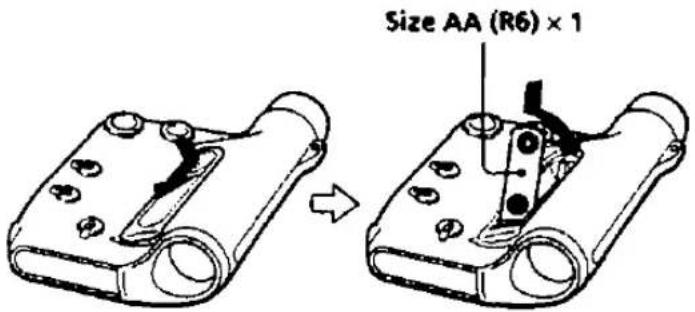
Installing the Battery
Install one size AA (R6) battery with correct polarity.
1 Open the lid of the battery case.
2 Install a battery with correct polarity.
3 Close the lid.
Notes on a Battery
When the sound becomes distorted or unstable, replace the battery with new one. For battery life, see "Specifications".
To avoid damage from battery leakage and corrosion.
Remove the battery when you do not use the unit for a long time.
Playing the Radio
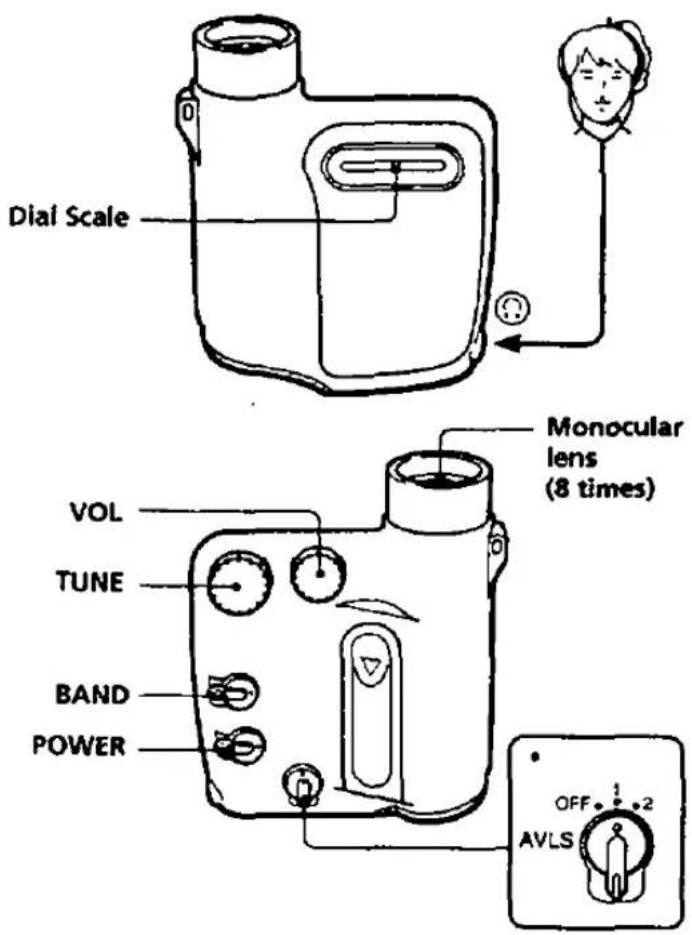
1 Set POWER to ON to turn on the radio.
2 Select FM or AM with BAND.
FM
DX: for FM reception, normally set it to DX position.
LOCAL: if a very strong signal causes noise, set it to LOCAL.
AM: for AM reception.
3 Tune in the desired station with TUNE.
4 Adjust VOL (volume).
To turn off the radio
Set POWER to OFF.
To improve the reception
FM: Extend the headphone cord fully. It functions as an FM antenna.
AM: A ferrite bar antenna is built into the radio for AM reception. Rotate the radio horizontally for optimum reception.
* When the AVLS selector is set to either position 1 or 2, (around 95 dB, 85 dB respectively) the volume will be kept at a moderate level without degradation of the sound quality, even if you attempt to turn the volume up higher. When the AVLS selector is turned off, you will be able to enjoy the full volume capability of your radio.
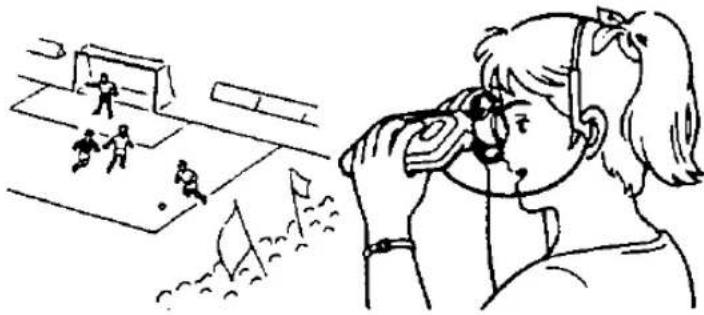
Using the Monocular
If the image on the monocular is not clear, turn the eyecup so that the lens fits your eyesight and the focus is adjusted.
natural_image
Illustration of a girl observing soccer players in a field, with no visible text or symbolsAdjust the focus by turning the eyecup in the direction of the arrows.
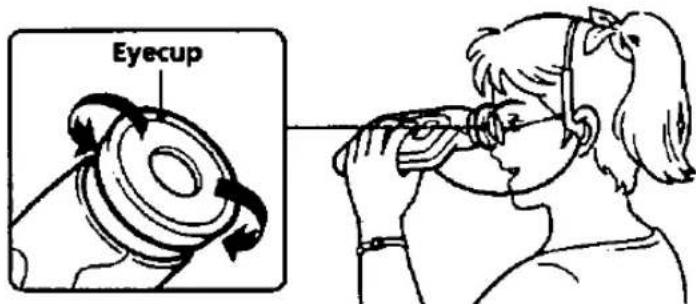
If You Wear Glasses
Bend back the eyecup outward to extend the range of vision.
Notes
- When you have used the unit in the radio or in low temperature (at night), wipe moisture off the unit with a dry cloth and dry it indoors. If moisture condenses on the lens, allow it to dry naturally by exposing to air.
- When the lens becomes dirty, wipe gently with a soft dry cloth. If the dirt is excessive, use a commercially available lens cleaner.
•Glass is used for the monocular. Avoid strong shock or dropping. - Never look at the sun through the monocular. It may damage your eyes. Do not use for observation of the sun.
- Do not use the eyecup for too long a period, as this may cause inflammation.
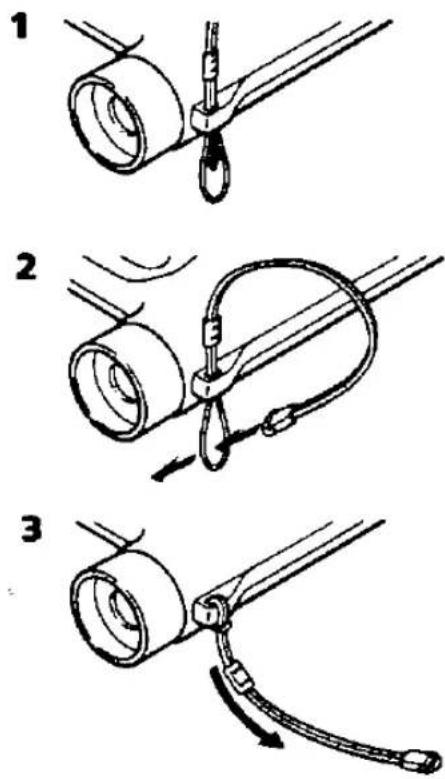
Attaching the Strap
By attach the supplied strap, you can use the unit hanging from your neck.
Specifications
Frequency range
FM: 87.6-108 MHz AM: 530-1,605 kHz
Power output
3.6 mW + 3.6 mW (at 10% harmonic distortion)
Outputs
Headphones jack (stereo minijack) load impedance 16 ohms
Power requirement
1.5 V DC, one size AA (R6) battery
Monocular lens
Magnification: 8 times
Diameter: 24 mm
Angle of sight: 6.25°
Battery life
For FM reception:
Approx. 35 hours with Sony SUM-3(NS) battery
For AM reception:
Approx. 42 hours with Sony SUM-3(NS) battery
Dimension
Approx. 104 × 41 × 127 mm (w/h/d) (4 1/8 × 1 5/8 × 5 inches)
incl. projecting parts and controls
Mass
Approx. 200 g (7.1 oz) incl. battery and headphones
Supplied accessories
Stereo headphones (1, Vertical-in-the-ear type), Strap (1)
Design and specifications are subject to change without notice.
Notes on Headphones
Road safety
Do not use headphones while driving, cycling, or operating any motorized vehicle. It may create a traffic hazard and is illegal in many areas. It can also be potentially dangerous to play your headsets at high volume while walking, especially at pedestrian crossings. You should exercise extreme caution or discontinue use in potentially hazardous situation.
Preventing hearing damage
Avoid using headphones at high volume. Hearing experts advise against continuous, loud and extended play. If you experience a ringing in your ears, reduce the volume or discontinue use.
Caring for others
Keep the volume at a moderate level. This will allow you to hear outside sounds and to be considerate of the people around you.
Do not Immerse in Water
• This product is designed to be water-resistant, but should not be immersed in water or come in continuous contact with water.
• Before installing the battery, be sure to wipe off drops of water on the unit.
• The supplied headphones are not meant to be immersed in water or come in continuous contact with water. If they get wet, dry them with a soft cloth. Never use an electric hair dryer while wearing the headphones.
If you have any questions or problems concerning your unit that are not covered in this manual, please consult the nearest Sony dealer.


- FM Stereo/AM Monocular Radio
- Features
- Precautions
- SONY.
- LIMITED WARRANTY
- Installing the Battery
- Notes on a Battery
- To avoid damage from battery leakage and corrosion.
- To turn off the radio
- To improve the reception
- Using the Monocular
- If You Wear Glasses
- Notes
- Attaching the Strap
- Specifications
- Frequency range
- Power output
- Outputs
- Power requirement
- Monocular lens
- Battery life
- Dimension
- Mass
- Supplied accessories
- Notes on Headphones
- Road safety
- Preventing hearing damage
- Caring for others
- Do not Immerse in Water
Marke : SONY
Modell : SRF-X90
Kategorie : Radio