
Macro Plus Smart - Fahrradcomputer Lezyne - Kostenlose Bedienungsanleitung
Finden Sie kostenlos die Bedienungsanleitung des Geräts Macro Plus Smart Lezyne als PDF.


Benutzerfragen zu Macro Plus Smart Lezyne
0 Frage zu diesem Gerät. Beantworten Sie die, die Sie kennen, oder stellen Sie Ihre eigene.
Eine neue Frage zu diesem Gerät stellen
Laden Sie die Anleitung für Ihr Fahrradcomputer kostenlos im PDF-Format! Finden Sie Ihr Handbuch Macro Plus Smart - Lezyne und nehmen Sie Ihr elektronisches Gerät wieder in die Hand. Auf dieser Seite sind alle Dokumente veröffentlicht, die für die Verwendung Ihres Geräts notwendig sind. Macro Plus Smart von der Marke Lezyne.
BEDIENUNGSANLEITUNG Macro Plus Smart Lezyne
LEZYNE
How to use the LED ALLY app
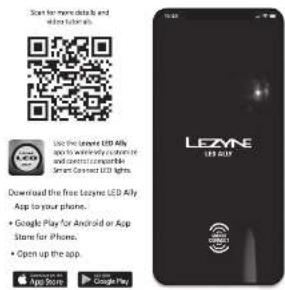
Use the LEAWE LED Ally
apo to wirelessly custom-
te and control compatible
Smart Connect LED lights.
Download the free tozyne LED Ally App to your phone.
• Google Play for Android or App Store for iPhone.
- Open up the app
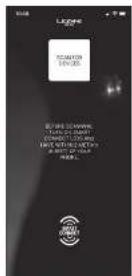
SCAN FOR DEVICES
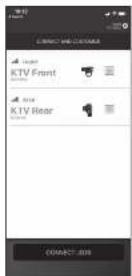
CONNECT AND RENAME
- Click on "Scan for Devices."
- If connecting for the first time,
be sure the Smart Connect lights are turned on and within
two (2) meters of the phone.
(1) 本次股东大会的召集和召开程序
- Select the LEDs you want to
pSP with 3x4 cap - CONNECT LEDs "
□ 导图 — CONNECT LED
图 1
• To remove a light from the
menu, swipe on it from right to left, with a second
• To program the front/rear light
independently, too the green
square icon to break the link between the two.
- When connecting for the first time it is required to give your lights a custom name.
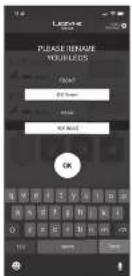
MANAGE YOUR LEDS
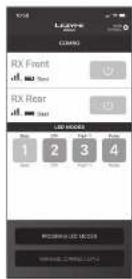
on/off
al: Signai
Battery usage
• Program up to four modes for each
LED and up to four mode sets for the pair.
- Tap the numbers to inside through
the programmed modes.
customers your UFDs
• Tap "MANAGE CONNECTIONS" to
return to the connections page.
CUSTOM PROGRAM LED MODES
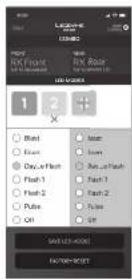
- Tap the (X) or (H) symbols to
add or remove mode sets.
- Customers the mode sites with
the available moves twice.
+ Top "SAVE LED MODES" when
finished.
• The front LED will now control
through modes
• Tap "FACTORY RESET" to
disconnect your LEDs and return
them to their factory settings.
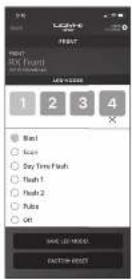
• If programming a front or rear
individually, simply program up to four markets and tax rates.
MORE INFORMATION
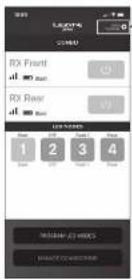

• Top VIEW TUTORIAL for a
2、本次股东大会的召集和召开程序
[Non-Text]
[Non-Text]
[Non-Text]
[Non-Text]
[Non-Text]
[Non-Text]
[Non-Text]
[Non-Text]
[Non-Text]
For more information on
Lazene producta.
KTV Pro Smart Rear
Mounting
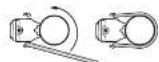
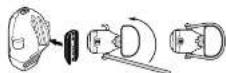
Operation


Battery Indicator

100.75%
for more information on Learyne products, visit: www.learyne.com
(四)公司简介 2019年
More Information
Charging

пк.

charged

54.030-618
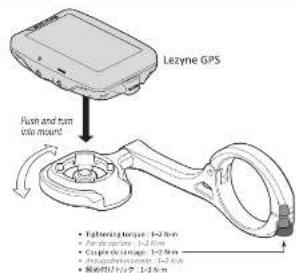
GPS Forward CNC Mount
text_image
Lezyne GPS Flush and turn angle mount • Tightening torque: 1-2.5 Nm • Axial torque: 1-2.5 Nm • Capute torque: 1-2.5 Nm • Anti-pullift torque: 1-2.5 Nm • Force torque: 1-2.5 Nm**APP must be closed for GPS connection
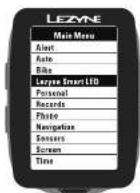
How to pair Lezyne Smart LED with Lezyne GPS computer
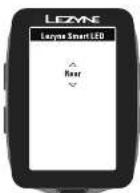
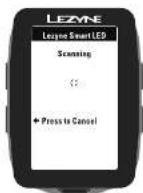
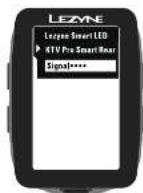
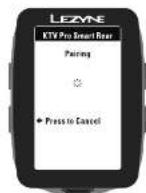
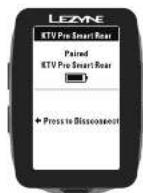
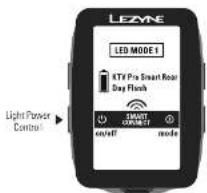
text_image
LEZYNE LED MODE 1 RTF Pro Smart Rear Day Flash SMART ON/OFF on/off mode Light Power Control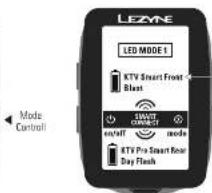
text_image
LEZNE LED MODE 1 KTV Smart Front Blast SMART ENDRANCE on/off mode KTV Pro Smart Rear Day Flash Mode ControlLecyne also has compatible Smart Connect Point LED lights available for purchase
① Back out of "MENU" screen to the ride pages to control lights, new "SMART CONTROLL" pages will be available.
② Only one device can be connected to a smart light at one time (Phone APP or GPS), power off the GPS for Smart light App programming.

together USA, 645 bank farm Rd., Uenoft, San Luis Otispo, California 63421
ZISSA FLD-GFS SMART LOADED GOAL