1215 - Uhr Skmei - Kostenlose Bedienungsanleitung
Finden Sie kostenlos die Bedienungsanleitung des Geräts 1215 Skmei als PDF.


Benutzerfragen zu 1215 Skmei
0 Frage zu diesem Gerät. Beantworten Sie die, die Sie kennen, oder stellen Sie Ihre eigene.
Eine neue Frage zu diesem Gerät stellen
Laden Sie die Anleitung für Ihr Uhr kostenlos im PDF-Format! Finden Sie Ihr Handbuch 1215 - Skmei und nehmen Sie Ihr elektronisches Gerät wieder in die Hand. Auf dieser Seite sind alle Dokumente veröffentlicht, die für die Verwendung Ihres Geräts notwendig sind. 1215 von der Marke Skmei.
BEDIENUNGSANLEITUNG 1215 Skmei
一、Display and function keys
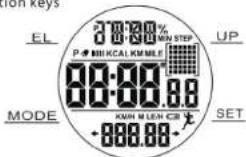
二、Features:
- Time calendar function
Normal Time: Hour, Minutes, Second, Day and Weekday: 12/24 hr format
Calendar (Yr 2000-2099)
Week : English automatic display
- Alarm function
The time of alarming :1 minute
-
Chime hourly
-
Countdown function
1/100 Second Chronograph ringing form 0 to 59:59:99 with SPL function;
- Stopwatch mode
◆ On/off Pedometer function
◆ Smart step for 7 seconds
◆ Two types of pedometer: Time / steps / average speed mode→sports time /calories / mileage display mode
◆ Everyday 0:00(12:00am), the recording of sports will be back to zero automatically
◆ User Information settings: metric / imperial → weight → G-Sensor sensitivity.in59sec,
-
21-day automatic memory storage step function;
-
Low-voltage prompt
8.TWO types backlight: EU
9.1C working Voltage 3V
三、Button instructions:
【MODE】
◆ press and hold for quickly adjust; Time mode→Pedometer mode--Step Memory(MEM) Mode
Under Setting mode, press and quickly change setting time.
【SET】
◆ Press and hold 2 seconds to enter setting mode, press and quickly exit settings.
Press and quickly on/off alarm
◆ Press to turn on/pause stopwatch
Press to downward check the history record. Press and hold for quickly inquire
[UP]
◆ Under setting mode,Press plus 1,press and hold for quickly adjust
Under Time mode, press to change the following mode: time → ALM → stopwatch
◆ In pedometer mode, Press and hold 2 seconds on /off Pedometer function. Press and quickly to change the
following mode: Time / Total steps/ speed per hour display → exercise time / calories / mileage display mode.
- Press to upward check the history record. Press and hold for quickly inquire.
[EL]
◆ press and quickly show backlight for 4 seconds.
- press and quickly turn on / cancel SPL function or clear stopwatch
四、Operating instructions:
- Reset or power on default display
◆ Power on / reset. All datas display for 2 seconds, then the sound "Bi" rings, backlight isn't bright, the power
state detection one time
Power on reset:
| Time | Date | ALM | Chime Hourly | Stopwatch |
| 12:00.00(12h) | 2016-1-1, FRI | 12:00, OFF | OFF | 00' 00" 00 |
2.Time mode :
A. After reset default into time mode, the normal time display interface as shown below.

B. Alarm mode
Press 【UP】 to convert as following:
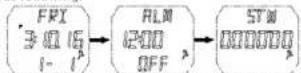
Display model
Alarm mode stopwatch mode
The week display be
| MON | TUE | WED | THU | FRI | SAT | SUN |
C. Setting mode
◆ Press and hold the 【SET】 for 2 seconds to enter the time setting mode.
Press the 【MODE】 to Cyclically Switch the setting item: 12/24 hours format → hour → minutes → seconds → chronological order → year → month → day → Chime hourly on / off, then press 【SET】 to exit the setting such as Picture (red part of the picture represents flashing):
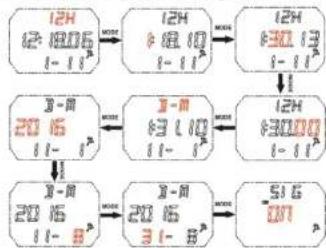
flowchart
graph TD
    A["12H\n12-1805\n(-1)"] --> B["12H\n+8.10\n(-1)"]
    B --> C["12H\n+30.13\n(-1)"]
    C --> D["12H\n+3000\n(-1)"]
    D --> E["2016\n(-1)"]
    E --> F["2016\n(-8)"]
    F --> G["2016\n(-8)"]
    G --> H["-SIG\n-07"]
    H --> I["2016\n(-8)"]
    I --> J["2016\n(-8)"]
    J --> K["2016\n(-8)"]
    K --> L["2016\n(-8)"]
    L --> M["2016\n(-8)"]
    M --> N["2016\n(-8)"]
    N --> O["2016\n(-8)"]
    O --> P["2016\n(-8)"]
    P --> Q["2016\n(-8)"]
    Q --> R["2016\n(-8)"]
    R --> S["2016\n(-8)"]
    S --> T["2016\n(-8)"]
    T --> U["2016\n(-8)"]
    U --> V["2016\n(-8)"]
    V --> W["2016\n(-8)"]
    W --> X["2016\n(-8)"]
    X --> Y["2016\n(-8)"]
    Y --> Z["2016\n(-8)"]
    Z --> AA["2016\n(-8)"]
    AA --> AB["2016\n(-8)"]
    AB --> AC["2016\n(-8)"]
    AC --> AD["2016\n(-8)"]
    AD --> AE["2016\n(-8)"]
    AE --> AF["2016\n(-8)"]
    AF --> AG["2016\n(-8)"]
    AG --> AH["2016\n(-8)"]
    AH --> AI["2016\n(-8)"]
    AI --> AJ["2016\n(-8)"]
    AJ --> AK["2016\n(-8)"]
    AK --> AL["2016\n(-8)"]
    AL --> AM["2016\n(-8)"]
    AM --> AN["2016\n(-8)"]
    AN --> AO["2016\n(-8)"]
    AO --> AP["2016\n(-8)"]
    AP --> AQ["2016\n(-8)"]
    AQ --> AR["2016\n(-8)"]
    AR --> AS["2016\n(-8)"]
    AS --> AT["2016\n(-8)"]
    AT --> AU["2016\n(-8)"]
    AU --> AV["2016\n(-8)"]
    AV --> AW["2016\n(-8)"]
    AW --> AX["2016\n(-8)"]
    AX --> AY["2016\n(-8)"]
    AY --> AZ["2016\n(-8)"]
    AZ --> BA["2016\n(-8)"]
    BA --> BB["2016\n(-8)"]
    BB --> BC["2016\n(-8)"]
    BC --> BD["2016\n(-8)"]
    BD --> BE["2016\n(-8)"]
    BE --> BF["2016\n(-8)"]
    BF --> BG["2016\n(-8)"]
    BG --> BH["2016\n(-8)"]
    BH --> BI["2016\n(-8)"]
    BI --> BJ["2016\n(-8)"]
    BJ --> BK["2016\n(-8)"]
    BK --> BL["2016\n(-8)"]
    BL --> BM["2016\n(-8)"]
    BM --> BN["2016\n(-8)"]
    BN --> BO["2016\n(-8)"]
    BO --> BP["2016\n(-8)"]
    BP --> BQ["2016\n(-8)"]
    BQ --> BR["2016\n(-8)"]
    BR --> BS["2016\n(-8)"]
    BS --> BT["2016\n(-8)"]
    BT --> BU["2016\n(-8)"]
    BU --> BV["2016\n(-8)"]
    BV --> BW["2016\n(-8)"]
    BW --> BX["2016\n(-8)"]
    BX --> BY["2016\n(-8)"]
    BY --> BZ["2016\n(-8)"]
    BZ --> CA["2016\n(-8)"]
    CA --> CB["2016\n(-8)"]
    CB --> CC["2016\n(-8)"]
    CC --> CD["2016\n(-8)"]
    CD --> CE["2016\n(-8)"]
    CE --> CF["2016\n(-8)"]
    CF --> CG["2016\n(-8)"]
    CG --> CH["2016\n(-8)"]
    CH --> CI["2016\n(-8)"]
    CI --> CJ["2016\n(-8)"]
    CJ --> CK["2016\n(-8)"]
    CK --> CR["2016\n(-8)"]
    CR --> CS["2016\n(-8)"]
    CS --> CT["2016\n(-8)"]
    CT --> CU["2016\n(-8)"]
    CU --> CV["2016\n(-8)"]
    CV --> CW["2016\n(-8)"]
    CW --> CX["2016\n(-8)"]
    CX --> CY["2016\n(-8)"]
    CY --> CZ["2016\n(-8)"]
◆ Press 【UP】 to increase the values, hold down 【UP】 for 2 seconds to increase quickly
Adjust the year, month, day, after exit settings, the week automatically updated after exit settings.
In time setting mode, if you do not perform any button within 30 seconds (except [EL]), the watch will automatically exit from settings, and then return to time mode.
3. ALARM MODE :
A. In time mode, Press [UP] to ALM alarm mode.
B. Display mode
◆ Press the 【SET】 to turn on / off alarm. The alarm icon display on alarm
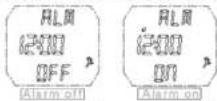
◆ In alarm display mode, no button operation does not automatically return to time display mode.
C. Setting Mode
- press and hold [SET] 2 seconds to enter the alarm setting, in setting mode press 【MODE】 switch the settings items: hour minute and then press [SET] to exit the settings (red figure represents the flashing):
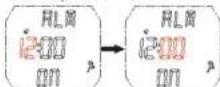
◆ Enter the alarm setting mode, automatically open the alarm, display alarm icon.
◆ Press [UP] to increase the values, hold down [UP] for 2 seconds to increase quickly.
In setting mode, if you do not perform any button within 30 seconds (except 【EL】), the watch will automatically exit from alarm settings, and then return to alarm mode;
D.Ringing mode
When alarm time is reached, the alarm icon will flash, and alarm tone will sound "BIBIBIBI" for 60 seconds, press any button to stop the alarm.
4. STOPWATCH MODE :
A. In alarm mode, press [UP] to switch stopwatch mode, the initial value:00' 00" 00;
B. Press [SET] to start/stop stopwatch, press [EL] to zero when stop the time.
C. During the stopwatch timer, press 【EL】 to turn on the SPL function, "SPL" will flash on the screen, stopwatch running, Press 【EL】 again to return to the stopwatch timer.
D. When start the SPL function and suspend the stopwatch, press EL key to back to timer, showing the stopped time E. Stopwatch reaching the maximum(59' 59* 99), the non-alarm prompted to restart the stopwatch timer. NOTE: under turn on the SPL function, switch to other functions mode, automatically canceled SPL function, stopwatch to run continually. Daily alarm and hourly chime will not quit from SPL function.
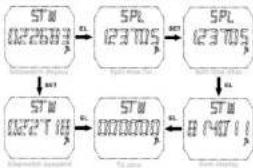
flowchart
graph TD
    A["STW 022683"] --> B["PL 123705"]
    B --> C["SPL 123705"]
    C --> D["STW 022718"]
    D --> E["PL 000000"]
    E --> F["STW 04071"]
    F --> G["End"]
5. PEDOMETER MODE :
A. Display mode
◆ Under the stopwatch mode, Press 【MODE】 to switch the pedometer mode.
In the Pedometer mode, Hold [UP] key for 2 seconds to ON/OFF pedometer function, when on pedometer function, it will comes with pedometer signal.
◆ Press 【UP】 to switch the display: Total time/steps/speed per hour—exercise time/calories/mileage mode. As shown
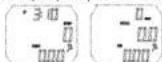
Total time/steps/average speed: the time displays the up LCD screen, the steps display the middle LCD screen, the average speed displays the down LCD screen.
Exercise time/calories/mileage: the exercise time displays the down LCD screen, the calories displays the middle LCD screen, the mileage displays the up LCD screen.
◆ Maximum:
-
Max step number:999999 Steps.
-
Maximum average speed: 99.99KM/H or 99.99MILE/H (Metric displays KM/H or imperial displays MILE/H)
-
Maximum time: 1999MIN
-
Maximum calories: 99999.9KCAL
-
Maximum mileage: 999.99KM or 999.99MILE
◆ In two kinds of pedometer display modes, both can pedometer.
◆ In the pedometer mode, hold [EL] key for 2 seconds, steps, calories, distance value will be return to zero automatically
◆ Every day 00:00 the sport record will be zero automatically at the end of day.
B. Setting mode
◆ In each pedometer mode, hold [SET] key for 2 seconds to enter setting user information mode.
In the user information setting state, press [MODE] key to switch setting items: metric / imperial-weight-step distance-G-Sensor sensitivity, as shown:

flowchart
graph LR
    A["k9\n60"] --> B["k9\n60"]
    B --> C["CM\n70"]
    C --> D["M10\nSEN"]
    E["Lb\n132"] --> F["Lb\n132"]
    F --> G["IN\n28"]
    G --> H["H1\nSEN"]
Imperial display
- metric /imperial : The default to metric, press [UP] key to switch the selected metric / imperial. Adjustment of metric
/ imperial system setting items, the weight and step distance restore the default value automatically; 2. Setting weight: the default value is 60KG(132LB), adjustable range:30-200KG / 66-440LB;
3.Setting step distance: default step distance is 70CM (28INCH), adjustable range 30-150CM/12-59INCH
4.G-Sensor Sensitivity: default value: MID, the sensitivity level for choice: LOW—MIDDLE—HI.
◆ Press 【UP】 key increase the setting item value, press 【UP】 key 2 seconds increase fast.metric/imperial and G-Sensor Sensitivity no fast increase function.
In the user information setting mode, no button operation for 30 seconds.(except [EL] key)automatically exit the setting mode
NOTE : Turn on the pedometer, Except MEM mode and In the user information setting mode, other modes (including the setting mode), all can count steps.
6.STEP MEMORY STORAGE MODE :
◆ In pedometer mode,Press 【UP】 key switch to Step memory storage mode, the default value: 00;

The "MEM" display on the up LCD screen, sport record date display on the down LCD screen. The steps, calories and distance of the historical record display on the middle LCD screen with 1 second for the cycle of automatic switching display, as shown:
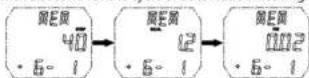
◆ Everyday 0:00.00 , automatic record the day date into MEM.
When adjust the month, date, Metric /imperial, MEM date of the month, date and distance of the historical record and units will fellow to change too.
- press [UP] or [SET] check before /after historical record, hold for quickly adjust. Left arrow display can increase, right arrow display can decrease, no display can not adjust
press [EL] for 2 seconds, historical record will be return to zero automatically. steps, calories, distance value will be return to zero automatically, return to memory storage step mode
- if you do not perform any button within 30 seconds (except 【EL】key), the watch will automatically exit from memory storage step mode, and then return to time mode
7. Low power detection function
◆ Low power detection detect once every minute.
◆ If the battery voltage less than 2.5V, the LCD will display the low power symbol “□”
◆ In low power mode, dont affect other function normal work.
◆ Any mode, Low power detection function can be work.
8. EL light :
◆ undergo a Power-On Reset, EL light not work
◆ Press EL light button, the light keep 4 seconds, recalculate time on each press.
◆ EL light can be work in any mode