1004 - Uhr Skmei - Kostenlose Bedienungsanleitung
Finden Sie kostenlos die Bedienungsanleitung des Geräts 1004 Skmei als PDF.


Benutzerfragen zu 1004 Skmei
0 Frage zu diesem Gerät. Beantworten Sie die, die Sie kennen, oder stellen Sie Ihre eigene.
Eine neue Frage zu diesem Gerät stellen
Laden Sie die Anleitung für Ihr Uhr kostenlos im PDF-Format! Finden Sie Ihr Handbuch 1004 - Skmei und nehmen Sie Ihr elektronisches Gerät wieder in die Hand. Auf dieser Seite sind alle Dokumente veröffentlicht, die für die Verwendung Ihres Geräts notwendig sind. 1004 von der Marke Skmei.
BEDIENUNGSANLEITUNG 1004 Skmei
NO : S2033
Feature:
Mode: Time, Month-Date, Second, LED full display
Function: year (2000-2049 years), month, day, hours, minutes, 12H/24H
Press "K-TEST" to view LED full display
Press "K-SET" to view following date
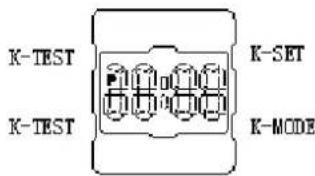
text_image
K-TEST K-TEST K-SET K-MODE
flowchart
graph TD
    A["Hour and minute"] --> B["Month and date"]
    B --> C["Seconds"]
    C --> A
Time Set
- In the Time keeping Mode, Hold down "K-MODE" until the hours start to flash, which indicates the setting screen.
- Press "K-SET" to adjust the flashing data show as following Sequence:
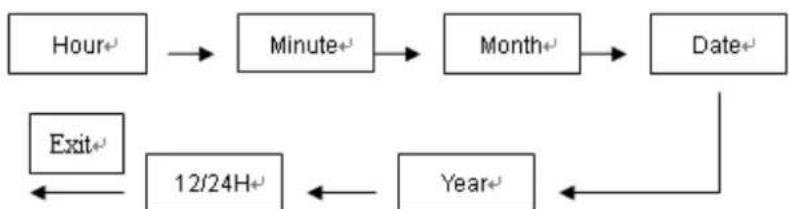
flowchart
graph TD
    A["Hour+"] --> B["Minute+"]
    B --> C["Month+"]
    C --> D["Date+"]
    D --> E["Year+"]
    E --> F["12/24H+"]
    F --> G["Exit+"]
- When you want to adjust the data which is flashing, press "K-SET" to change it as described below
| Chang this setting Perform this button operation | |
| Hour, Minutes, Year, Month, Day Press | “K-SET” key to adjust the data |
| 12/24H Press “K-SET” key | to change 12/24H |
- Press "K-SET" key to exit the setting screen.
In the 12-hour format, the P(PM) indicator appears to the left of the hour digits for times in the range of noon to 11:59 p.m. and no indicator appears to the lift of the hour digits for times in the range of midnight to 11:59 a.m. With the 24-hour format, format, times are displayed in the range of 0:00 to 23:59, without any indicator.