0817B - Uhr Skmei - Kostenlose Bedienungsanleitung
Finden Sie kostenlos die Bedienungsanleitung des Geräts 0817B Skmei als PDF.


Benutzerfragen zu 0817B Skmei
0 Frage zu diesem Gerät. Beantworten Sie die, die Sie kennen, oder stellen Sie Ihre eigene.
Eine neue Frage zu diesem Gerät stellen
Laden Sie die Anleitung für Ihr Uhr kostenlos im PDF-Format! Finden Sie Ihr Handbuch 0817B - Skmei und nehmen Sie Ihr elektronisches Gerät wieder in die Hand. Auf dieser Seite sind alle Dokumente veröffentlicht, die für die Verwendung Ihres Geräts notwendig sind. 0817B von der Marke Skmei.
BEDIENUNGSANLEITUNG 0817B Skmei
Operating instructions
In normal mode model
Display: Week- Hours -Minutes -Seconds
Press S1 show Month and Date
Press S2 button to show Alarm Hours and Minutes
Modes Covert : Press S3
Backlight: Press S4 (seven kinds color backlight)
12/24H format
S4
S3

S1
§2
Modes of watch
In normal display mode: Press S3→ chronograph mode→ alarm setting mode→ time setting mode
Chronograph function

flowchart
graph TD
    A["tap S3 to exit"] --> B["tap S1 to stop"]
    B --> C["tap S2 to read time"]
    C --> D["tap S2 to lap time"]
    D --> E["tap S1 to start"]
    E --> F["tap S1 to stop"]
    F --> G["tap S2 to reset"]
    G --> H["tap S3 once"]
    H --> I["enter chronograph mode"]
    I --> J["tap S1 to stop"]
    J --> K["tap S2 to reset"]
    K --> L["tap S2 to lap time"]
    L --> M["tap S1 to stop"]
Chime of every hour ON/OFF
In normal mode hold S2 and then tap S3, if all icon of week ON means Chime ON, otherwise means OFF.
Alarm ON/OFF
In normal time Mode, hold S1 and S2 to ON/OFF Alarm
Alarm Setting
In normal time Mode, tap S3 twice enter into Alarm setting mode, and the Hours flashing
Tap S1 to adjust correct hour of your alarm. Pay attention to AM/PM
Tap S2 the Minutes will flash. Tap S1 to adjust correct minute of your alarm
Tap S3 to save / exit.
Time&Date setting
In normal time Mode, tap S3 three times to enter Time&Date setting mode and Seconds flashing.
Tap S2 and the Minutes will flash, tap S1 to adjust correct minutes (Pay attention to AM/PM, "H" is 24 hour format)
Tap S2 and the Hours will flash. Tap S1 to reach the correct hours
Tap S2 and the Date will flash. Tap S1 to adjust the correct date
Tap S2 and the Month will flash. Tap S1 to adjust the correct month
Tap S2 and the Week will flash. Tap S1 to adjust the correct week (MO=Monday, TU=Tuesday ...)
Tap S3 to save / exit.
Backlight setting
Hold S4 will show all kinds of colors backlight from
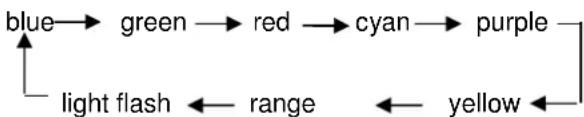
flowchart
graph TD
    A["blue"] --> B["green"]
    B --> C["red"]
    C --> D["cyan"]
    D --> E["purple"]
    E --> F["yellow"]
    F --> G["range"]
    G --> H["light flash"]
    H --> I["light flash"]
Just stop hold the button, last color of will be memorized to set as current back light color