
SL-XP490 - CD-Player TECHNICS - Kostenlose Bedienungsanleitung
Finden Sie kostenlos die Bedienungsanleitung des Geräts SL-XP490 TECHNICS als PDF.


| Produkttyp | Tragbarer CD-Player |
| Marke | Technics |
| Modell | SL-XP490 |
| Abmessungen (ca.) | 130 x 130 x 30 mm |
| Gewicht (ca.) | 250 g |
| Stromversorgung | Netzteil (DC IN 4,5 V) oder 2x wiederaufladbare Batterien (RP-BP60V) / 2x AA-Trockenbatterien |
| Ladezeit | Ca. 1,5 Stunden für vollständige Ladung |
| Wiedergabezeit (Batterie) | Ca. 10 Monate bei täglichem Gebrauch (wiederaufladbare Batterien) |
| Kopfhöreranschluss | 3,5 mm Klinke |
| Anzeige | LCD-Display |
| Wiedergabefunktionen | Normal, Zufallswiedergabe, Programm, Wiederholung (Titel/alle), Überspringen, Suche |
| Anti-Shock | Extra Anti-Shock (EXTRA ANTI-SHOCK) |
| Equalizer/XRS | High Filter / XRS Umschalter |
| Fernbedienung | Ja, über Kopfhörer mit Kabelfernbedienung |
| Hold-Funktion | Ja (Tastensperre) |
| Lieferumfang | Stereo-Kopfhörer, Netzteil, Bedienungsanleitung |
| Hersteller | Matsushita Electric Industrial Co., Ltd. |
| Herstellungsland | Japan |
Häufig gestellte Fragen - SL-XP490 TECHNICS
Benutzerfragen zu SL-XP490 TECHNICS
0 Frage zu diesem Gerät. Beantworten Sie die, die Sie kennen, oder stellen Sie Ihre eigene.
Eine neue Frage zu diesem Gerät stellen
Laden Sie die Anleitung für Ihr CD-Player kostenlos im PDF-Format! Finden Sie Ihr Handbuch SL-XP490 - TECHNICS und nehmen Sie Ihr elektronisches Gerät wieder in die Hand. Auf dieser Seite sind alle Dokumente veröffentlicht, die für die Verwendung Ihres Geräts notwendig sind. SL-XP490 von der Marke TECHNICS.
BEDIENUNGSANLEITUNG SL-XP490 TECHNICS

(No text)
m = 311
Matsushita Electric Industrial Co., Ltd.
Central P.O. Box 288, Osaka 530-91, Japa
2.1.1.1.1.2.2.3.4.5.6.7.8.9.10.11.12.13.14.15.16.17.18.19.20.21.22.23.24.25.26.27.28.29.30.31.32.33.34.35.36.37.38.39.40.41.42.43.44.45.46.47.48.49.50.51.52.53.54.55.56.57.58.59.60.61.62.63.64.65.66.67.68.69.70.71.72.73.74.75.76.77.78.79.80.81.82.83.84.85.86.87.88.89.90.91.92.93.94.95.96.97.98.99.100
B
“
31
[Non-Text]
[Non-Text]
[Non-Text]
[Non-Text]
[Non-Text]
[Non-Text]
[Non-Text]
[Non-Text]
[Non-Text]
[Non-Text]
[Non-Text]
[Non-Text]
[Non-Text]
[Non-Text]
[Non-Text]
[Non-Text]
[Non-Text]
[Non-Text]
[Non-Text]
[Non-Text]
[Non-Text]
[Non-Text]
[Non-Text]
[Non-Text]
[Non-Text]
[Non-Text]
[Non-Text]
[Non-Text]
[Non-Text]
[Non-Text]
[Non-Text]
[Non-Text]
[Non-Text]
[Non-Text]
[Non-Text]
[Non-Text]
[Non-Text]
[Non-Text]
[Non-Text]
[Non-Text]
[Non-Text]
[Non-Text]
[Non-Text]
[Non-Text]
[Non-Text]
[Non-Text]
[Non-Text]
[Non-Text]
[Non-Text]
[Non-Text]
[Non-Text]
[Non-Text]
[Non-Text]
[Non-Text]
[Non-Text]
[Non-Text]
[Non-Text]
[Non-Text]
[Non-Text]
[Non-Text]
[Non-Text]
[Non-Text]
[Non-Text]
[Non-Text]
[Non-Text]
[Non-Text]
[Non-Text]
[Non-Text]
[Non-Text]
[Non-Text]
[Non-Text]
[Non-Text]
[Non-Text]
[Non-Text]
[Non-Text]
[Non-Text]
[Non-Text]
[Non-Text]
[Non-Text]
[Non-Text]
[Non-Text]
[Non-Text]
[Non-Text]
[Non-Text]
[Non-Text]
[Non-Text]
[Non-Text]
[Non-Text]
Location of Controls
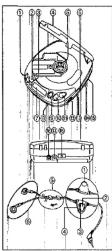
Portable CD Player
① Skiplexarch buttons
(→ -SKIP/-SEARCH)
⑧ Memory/recall button
(MEMORY/RECALL)
- Repeat button (REPEAT)
- Hold lock button (HOLD)
④ Held key switch (HOLD-LOCK)
⑤ Push button (PUSH)
@ Headphones jack (Ω)
⑦ Display
Remote sensor (REMOTE SENSOR)
(REMOTE SENSOR)
② Open button (OPEN)
Stop/operation off button
(■/OPR OFF)
① Play/pause button (▶ II)
③ Headpliche
(VOLUME)
4) High filter/XRS selector
(HIGH FILTER XRS OFF)
Play mode selector (MODE)
Extra anti-shock switch
(EXTRA ANTI-SHOCK)
⊕ Out jack (OUT)
- DC in jack (DC IN 4.5 V, + 0, +)
(1) DC IN JER (DC IN 4.5 V 0-0)
(2) Hole for car mounting box
Figure for all mounting base
[Non-Text]
Stereo earphones
(一)本次股东大会的召集和召开情况
① Volume control (VOLUME)
Remote controller button
Operation Indicator (OPR)
④ Hold switch (HOLD)
@ Slider
Side up to prevent expansion when the steps arrive
with 15.000 capra
® Ear piece
Refer to the specifications (page 11) for the duration of the play time provided when rechargeable
or dry cell batteries are used.
Using rechargeable batteries
2017年第一季度报告
Make sure that the rechargeel
De breathing procedure
Recharging procedure
1 Place the rechargeable batteries
inside the unit.
(No batteries other than RP-BP60V
SH-CDB8D can be recharged.)
0 0 0
p q p q
10
1
1.2008 2.1009
W 1 B W
m - 1 0 ;
(1)
The battery compartment lid becomes dis-
engaged, position it horizontally and press it
pack into position:
(2)
|| |
u j
1. 甲午日, 1
2,3,4
↑
□F
p
2 Connect the AC adaptor.
(1) 2017年1月1日
DC IN JBS (DC IN 4.5V 6-6-Φ)
1.1.1
[1]
图 1
Back panel AC power outlet
of the unit indicator
1. 2. 3. 4. 5. 6. 7. 8. 9. 10. 11. 12. 13. 14. 15. 16. 17. 18. 19. 20. 21. 22. 23. 24. 25. 26. 27. 28. 29. 30. 31. 32. 33. 34. 35. 36. 37. 38. 39. 40. 41. 42. 43. 44. 45. 46. 47. 48. 49. 50. 51. 52. 53. 54. 55. 56. 57. 58. 59. 60. 61. 62. 63. 64. 65. 66. 67. 68. 69. 70. 71. 72. 73. 74. 75. 76. 77. 78. 79. 80. 81. 82. 83. 84. 85. 86. 87. 88. 89. 90. 91.
AC adaptor
□
The power indicator is provided only for
United Kingdom.
(No text)
Note
The configuration of the AC adapt
according to the area.
-When charging is commenced, the re-
charging Indicator "E" flashes on the die
play panel.
• It takes about one and a half hours to
recharge the batteries fully at which point
the recharging indicator will go off.
3 Upon completion of the recharg-
ing, disconnect the AC adaptor
from the DC IN lack and power
outlet.
1. 2017年1月1日
Removing the batteries
Push the batteries upward in the direction of
the snow to remove them.
N | - |
1
1
A
B
[NO TEXT]
2017年1月1日
The batteries can be used for about
10 months (300 times) if they are used
ever; day.
They will need to be replaced if the du
tion of their operation drops drastically.
Power Supply Superaulants
G
Operation
Prevention
- TEPZELSON
2017年
m = 311
(
//
N
m : x = 1 或 3x + 4y + 1 = 0
2.
15
[Non-Text]
195
1
图1
制
制
[1]
1
1
测图6.1
制图
[图]
张!印
[1]
This function proves
ing raven if a control
ever. (When the unit is
disc lid can not be up
Use the function to
situations:
- -
Example 1:
While the unit is not
Involvement turned a
EDW.
Example 2:
Play is interrupted why
1.5% of the share is held by
Example 3:
(Available only from
The disc lid is open
play.
7.1.2.
To use the acc
prevention func
The unit has a HOLD
stored earphones will
a HOLD switch, each
pendently.
(using the unit)
Rut HOLD-LOCK to
SERVICE-LOCK IT
Using the stereo no
controller]
Set HOLD to the HCL
- 2017年1月1日
"hold" indicate
If the unit is in the h
indicator appears w
function buttons (in)
We are the only in law
When the unit is our The 21-4 G infants
the hard work
P. H. P. P.
1
Before operating
Be absolutely sure
10 108369 018 218.1
Playgate Play Baric Play
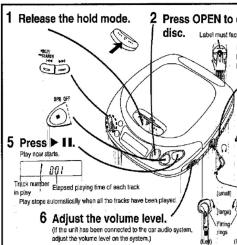
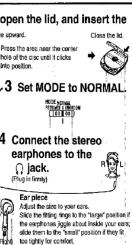
Other Play Methods
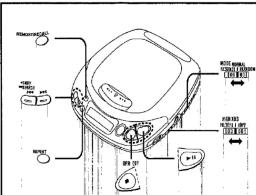

Skip play
•
Preparation
se. the drill
Set MO
2 Press
the day
2
Press
The following table
re tracks a
with the see
after which
Letter which
。
Resume p
1
Set MODE
[NO TEXT]
|| 5
图 2
Play can be
rock which w
vas last seb
ed tuned of
This is very
this is used
题:
To cancel
SoI MODE =
2018年
For your
MODE is
urned off, the
cally activate
Alfina
Notes
- If play is sick
may be res
When the a
910 DEX 16
same push
seeping le
spending to position of
played is at
p, j, s, t
“ ”
。
1
广力云
Random play
- C#MORVE
1 Set MODE 6
2 Press ▶ II
7
i
1
7.1.1
To cancel the
Set MODE to NOR
For your plan
For your Refen The first book is to
The first check to be
by pressing ▶, 1 tracks are played
played.)
12.10
Note
Program play is
RANDOM node.
三、表决方式
(No text)
Repeat function
To support one
To repeat one
Please REPEAT of
using play.
1 ? ?
15
To repeat all th
Press REPEAT to
during play.
(2)
.
10
(In the program pi
grammed tracks w
To convert the
To cancel the
Press REPEAT OR
。
To change the
10 change the
(Available only
the stereo earpho
HONELTER:
HOMETER.
YES:
OFF:
F
The Ground Truth image displays a single, solid horizontal line. According to Rule 2 (UNDERSCORE & LINE RULES), this is a stylistic or background line, not a placeholder underscore. Therefore, the OCR result must ignore it and output nothing or only meaningful text. The provided OCR content is "____", which consists of four underscores. This is an incorrect interpretation of the line as a placeholder, violating the rule that stylistic lines must be ignored. The OCR has hallucinated placeholder underscores where none exist in the GT. Hence, the OCR result is inconsistent with the Ground Truth.
1
1.
Marke : TECHNICS
Modell : SL-XP490
Kategorie : CD-Player