
YLE/200/EG4 - Safe Yale - Kostenlose Bedienungsanleitung
Finden Sie kostenlos die Bedienungsanleitung des Geräts YLE/200/EG4 Yale als PDF.


| Produkttyp | Elektronischer Tresor |
| Marke | Yale |
| Modell | YLE/200/EG4 |
| Stromversorgung | 1x 9V-Batterie (6F22) |
| Anzahl der Codes | 2 (Benutzercode und Mastercode) |
| Code-Länge | 3-8 Ziffern |
| Werkscodes | Benutzer: 0000, Master: 8888 |
| Notöffnung | Schlüssel (manuelle Überbrückung) |
| Batteriewarnung | Display zeigt "Lo-bAT" bei schwacher Batterie |
| Notstromversorgung | Externer 9V-Batteriekontakt am Bedienfeld |
| Befestigung | Boden- und Rückwandbefestigung mit mitgelieferten Schrauben |
| Lautstärkekontrolle | Einstellbar (Summer oder still, außer Alarm) |
| Displaykontrolle | Einstellbar (Anzeige der Ziffern ein/aus) |
| Verriegelung | Automatisch nach Eingabe von ENTER + O- |
| Fehlersperre | 3 Fehlversuche → 60 Sekunden Alarm, dann Notöffnung |
| Lieferumfang | Tresor, 4 Befestigungsschrauben, 2 Schlüssel, Anleitung |
| Wartung | Batteriewechsel, Reinigung mit trockenem Tuch |
Häufig gestellte Fragen - YLE/200/EG4 Yale
Benutzerfragen zu YLE/200/EG4 Yale
0 Frage zu diesem Gerät. Beantworten Sie die, die Sie kennen, oder stellen Sie Ihre eigene.
Eine neue Frage zu diesem Gerät stellen
Laden Sie die Anleitung für Ihr Safe kostenlos im PDF-Format! Finden Sie Ihr Handbuch YLE/200/EG4 - Yale und nehmen Sie Ihr elektronisches Gerät wieder in die Hand. Auf dieser Seite sind alle Dokumente veröffentlicht, die für die Verwendung Ihres Geräts notwendig sind. YLE/200/EG4 von der Marke Yale.
BEDIENUNGSANLEITUNG YLE/200/EG4 Yale
9. Battery replacement warning
To test the batteries: Press "ENTER", if the batteries are low, the display will show 'Lo-bAT', you should replace the batteries.
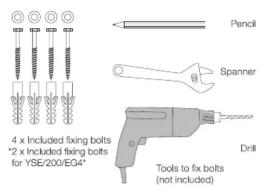
1 Mark the position of the safe through fixing holes.

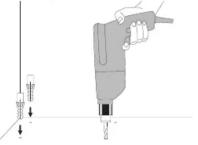
2 Remove the safe and drill the holes as marked. If needed, drop the plugs in the drilled holes.
10. Installing the safe
To reduce the risk of theft it is essential that your safe is securely fixed. Please use the provided bolts to fix the safe horizontally and secure to a solid concrete floor or wall.
For your convenience, there are fixing holes both in the bottom and on the back, please fix the safe correctly according to diagram 3.
For maximum performance it is recommended that the safe is installed by a professional Locksmith.
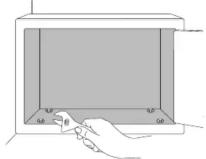
3 Reposition the safe over the holes. Drop the screws and washers though the safe into the drilled holes.

4 Tighten the fixing bolts firmly and ensure there is no movement of the safe.
For any inquiries visit www.yaleasia.com
Yale Essential Electronic Safe User Manual
Thank you for choosing our safe! Before operating your new safe, please read the user manual to ensure maximum performance.
For models:
YSE/200/EG4
YSE/250/EG4
YSE/390/EG4
YLE/200/EG4
Please keep manual safe
for future reference.

The world's favorite lock

An ASSA ABLOY Group brand
ASSA ABLOY
Back Cover
Cover
1. Install the battery
The safe is unlocked after leaving the factory.
The safe requires one (6F22/9V) battery. Remove the battery cover at the back of the door and install the battery into the compartment. Ensuring the battery is fitted with correct corresponding polarity.
2. Programming the code
The safe is programmed with two sets of codes. For your safety, after installing the battery, you should program two sets of your new codes to replace the factory preset codes.
The factory pre-set user code is 0,0,0,0, the factory pre-set master code is 8,8,8,8, when you program the new user code or master code, the factory pre-set codes will be replaced automatically.
Programming the User Code
a. When the door is open, press "ENTER" and hold, simultaneously press the button "3", display will show "SET COdE".
b. Input your code combination (3-8 digits).
c. Press "O—" to confirm.
Display will show "rEPEAT".
d. Enter the codes just entered, press the button "O—n", display will show "good".
Programming the Master Code
a. When the door is open, press ENTER" and hold, simultaneously press the button "4", display will show "OLD COdE".
b. Input the old master code (Factory pre-set code 8888), press "O—n" to confirm. Display will show "SET COdE"
c. Input your code combination as new master code (3-8 digits).
d. Press "O—" to confirm.
Display will show "rEPEAT".
e. Enter the codes just entered, press the button "O—n", display will show "good".
Notice: When you enter the code, you can delete the number by pressing "ENTER"
3. Opening the safe
a. Press "ENTER", display will show "ENT COdE".
b. Input user code or master code you programmed. Press "O—n" to confirm. Display will show "OPEN", then the door is opened automatically.
Warning:
a. If incorrect codes are entered 3 consecutive times, the buzzer will sound for 60 seconds and the display show "Error".
b. Use the override key to open the safe to stop the buzzer.
4. Close the safe
Press the button "ENTER" and then "O—", display will show "closE", The door is closed.
5. Buzzer control
Press "ENTER" and simultaneously press 2, you can control buzzer sound.
When display shows 'bUZZEr', means buzzer will work; when display shows 'SILENT', means buzzer will not work except warning buzzer.
6. Code display control
a. Press" ENTER" and hold it, then input 1;
b. When display shows "dp----", means digital code will not be displayed; when display shows "dp COdE", means digital code will be displayed
7. Override instruction to open the safe
This safe has a manual override system operated by the keys supplied.
a. Move the plate in anti-clockwise direction.
b. Insert the key into the lock and turn it anti-clockwise to open the door.
8. Open the safe on conditions of low battery
If the battery is flat, you can power up the unit from the outside by placing a 9v battery on the external key pad terminals. Hold the battery in place and enter the user or master code to open.


- Battery replacement warning
- Installing the safe
- Yale Essential Electronic Safe User Manual
- Back Cover
- Cover
- Install the battery
- Programming the code
- Programming the Master Code
- Opening the safe
- Warning:
- Close the safe
- Buzzer control
- Code display control
- Override instruction to open the safe
- Open the safe on conditions of low battery
Marke : Yale
Modell : YLE/200/EG4
Kategorie : Safe