
Tecmo Bowl (NES) - Videospiel NINTENDO - Kostenlose Bedienungsanleitung
Finden Sie kostenlos die Bedienungsanleitung des Geräts Tecmo Bowl (NES) NINTENDO als PDF.


| Produkttyp | Videospiel (Modul) |
| Plattform | Nintendo Entertainment System (NES) |
| Entwickler | Tecmo, Inc. |
| Herausgeber | Tecmo, Inc. (lizenziert von Nintendo) |
| Erscheinungsjahr | 1989 |
| Spielermodus | Einzelspieler, Zweispieler, Trainer-Modus |
| Sprache der Anleitung | Deutsch (DE) |
| Stromversorgung | Über NES-Konsole |
| Abmessungen (Modul) | Ca. 13,3 × 12,4 × 2,2 cm |
| Gewicht (Modul) | Ca. 80 g |
| Steuerung | NES-Controller (Steuerkreuz, A/B-Tasten, Start/Select) |
| Spielmodi | Offensive, Defensive, Formationen auswählen, Coach-Modus |
| Wichtige Sicherheitshinweise | Nicht auf Projektionsfernsehern verwenden (Bildschirmschaden) |
| Reinigung und Pflege | Modul und Kontakte mit einem trockenen, fusselfreien Tuch reinigen |
| Garantie | 90 Tage beschränkte Garantie auf Material- und Verarbeitungsfehler |
Häufig gestellte Fragen - Tecmo Bowl (NES) NINTENDO
Benutzerfragen zu Tecmo Bowl (NES) NINTENDO
0 Frage zu diesem Gerät. Beantworten Sie die, die Sie kennen, oder stellen Sie Ihre eigene.
Eine neue Frage zu diesem Gerät stellen
Laden Sie die Anleitung für Ihr Videospiel kostenlos im PDF-Format! Finden Sie Ihr Handbuch Tecmo Bowl (NES) - NINTENDO und nehmen Sie Ihr elektronisches Gerät wieder in die Hand. Auf dieser Seite sind alle Dokumente veröffentlicht, die für die Verwendung Ihres Geräts notwendig sind. Tecmo Bowl (NES) von der Marke NINTENDO.
BEDIENUNGSANLEITUNG Tecmo Bowl (NES) NINTENDO
text_image
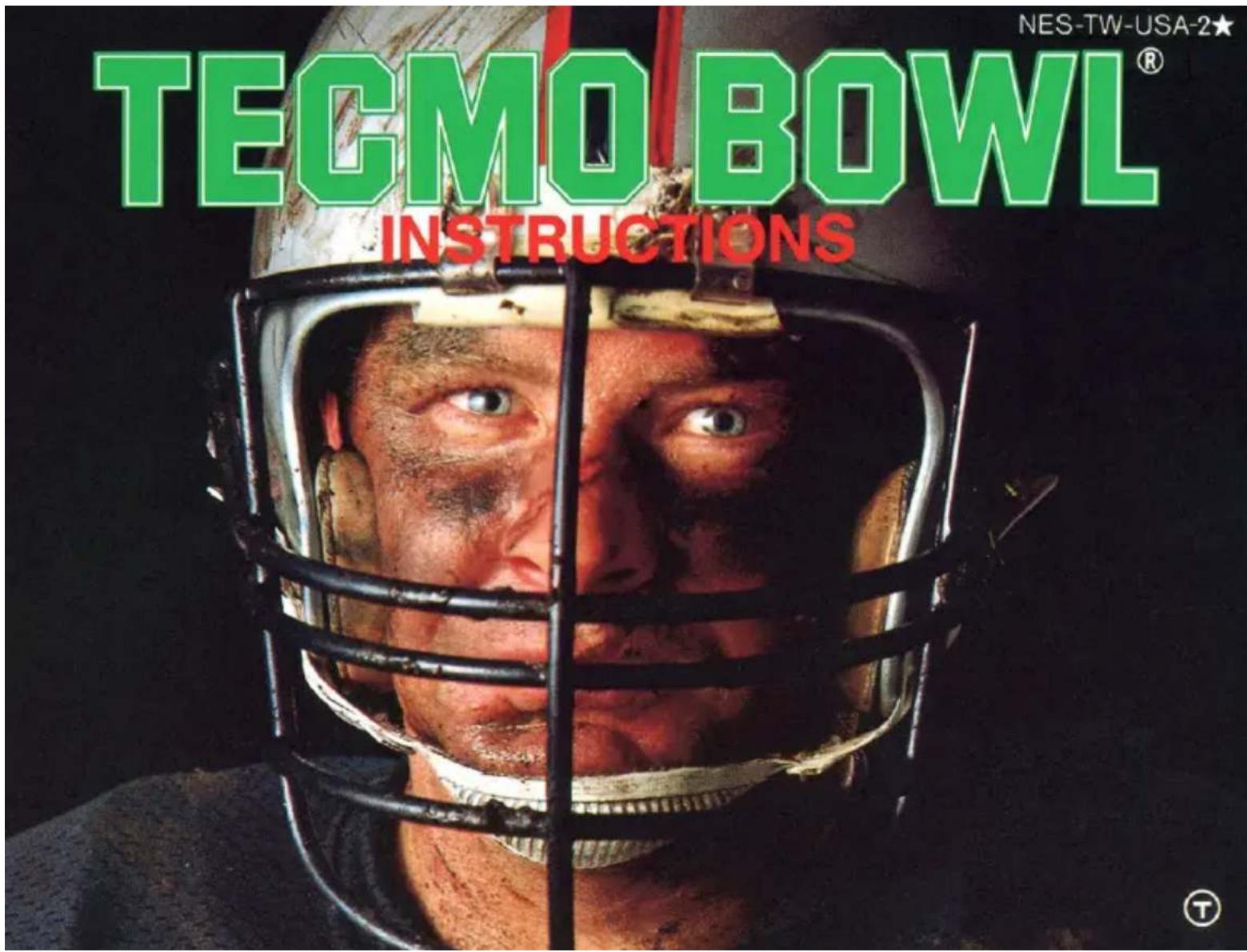
TECMO BOWL® INSTRUCTIONS NES-TW-USA-2★
text_image
Official Nintendo Seal of QualityThis official seal is your assurance that Nintendo ^® has reviewed this product and that it has met our standards for excellence in workmanship, reliability and entertainment value.
Always look for this seal when buying games and accessories to ensure complete compatibility with your
Nintendo ENTERTAINMENT SYSTEM®
This game is licensed by Nintendo® for play on the
Nintendo
ENTERTAINMENT SYSTEM®
Nintendo and Nintendo Entertainment System are registered trademarks of NINTENDO OF AMERICA INC.
Thank you for choosing the fun-filled "TECMO BOWL" game pak by TECMO, INC.
SAFETY PRECAUTIONS
Please take time to read the important instructions in this booklet. Observing the step by step instructions and complying with warnings will be your personal guarantee to greater game satisfaction over a long period of time.
⚠ WARNING: DO NOT USE WITH FRONT OR REAR PROJECTION TV ⚠
Do not use a front or rear projection television with your Nintendo Entertainment System* ("NES") and NES games. Your projection television screen may be permanently damaged if video games with stationary scenes or patterns are played on your projection television. Similar damage may occur if you place a video game on hold or pause. If you use your projection television with NES games, Nintendo will not be liable for any damage. This situation is not caused by a defect in the NES or NES games; other fixed or repetitive images may cause similar damage to a projection television. Please contact your TV manufacturer for further information.
1. CONTROLLER PARTS AND OPERATING INSTRUCTIONS
★ This game can be played by one or two players.
text_image
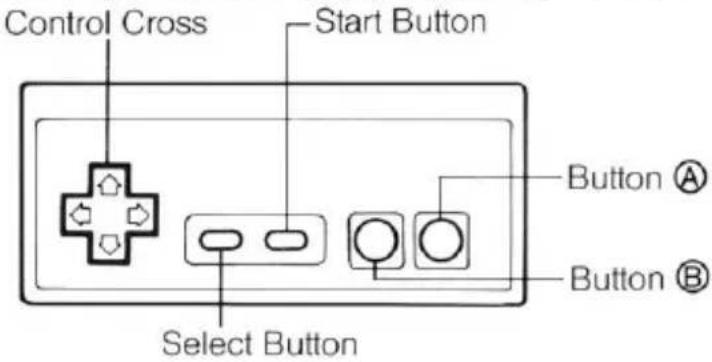
Control Cross Start Button Select Button Button Ⓐ Button ⒷIn Tecmo Bowl, you have total control of the player. Use the controller to pass, run, and kick. The following pages will list easy-to-follow instructions.
Control Cross -- used for maneuvering the players, selecting play formations, and other operations
Select Button ... used for selecting play mode (one player, two players, coach mode)
Start Button .... used for starting play
Button Ⓐ …… used for hiking the ball (the snap), choosing the receiver, kicking and other operations
Button Ⓑ …… used for pass plays, diving tackles and other operations
2. STARTING THE GAME
- SELECTING THE MODE
SELECT BUTTON→START BUTTON
Select "ONE PLAYER" (you VS the computer), "TWO PLAYERS", or "COACH" mode. Then press the start button.
- SELECTING THE TEAM
text_image
←→ BUTTON Ⓐ- ONE PLAYER
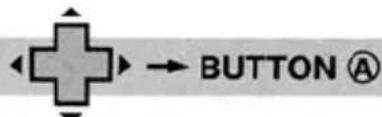
Choose your team by using the control cross and Button Ⓐ. In order to continue play of a saved game, input the whole password using the control cross and then press Button Ⓐ. (Passwords will appear on the screen after a game is won.)
- TWO PLAYER
• COACH
Controller ① is for the kick-off team, and Controller ② is for the receiving team. Select your teams the same way you would if you were playing as ONE PLAYER against the computer.
NOTE
Certain "TECMO BOWL" playing rules may differ slightly from professional football rules.
3. EXPLANATIONS OF THE SCREENS
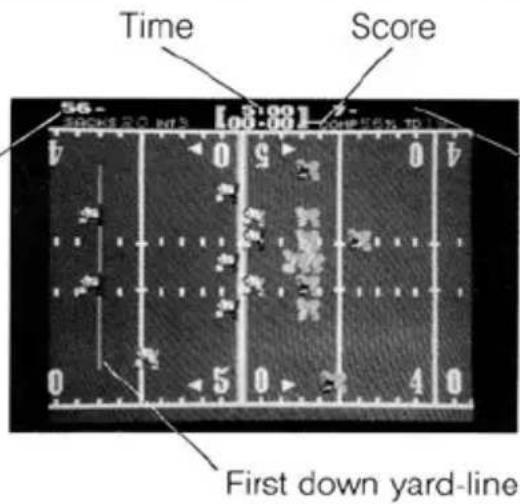
● THE GAME TAKES PLACE ON THIS SCREEN.
Scoreboard display for PLAYER ONE with player's name and statistics.
text_image
Time Score 56 - 100:00 4 5 6 7 8 9 10 11 12 13 14 15 16 17 18 19 20 21 22 23 24 25 26 27 28 29 30 31 32 33 34 35 36 37 38 39 40 41 42 43 44 45 46 47 48 49 50 51 52 53 54 55 56 57 58 59 60 61 62 63 64 65 66 67 68 69 70 71 72 73 74 75 76 77 78 79 80 81 82 83 84 85 86 87 88 89 90 91 92 93 94 95 96 97 98 99 100Scoreboard display for PLAYER TWO or COMPUTER with player's name and statistics.
4. HOW TO PLAY OFFENSE
• HIKE (snap)
BUTTON A
When on offense, begin play by pressing Button Ⓐ to snap the ball from the center to the quarterback.
●KICK
BUTTON A or BUTTON B
★ KICK METER
The kick meter at the top of the screen indicates your kicking strength. The higher your strength, the farther the ball will fly.
• DODGING A TACKLE
OPPONENT CONTACT ✦ BUTTON Ⓐ (REPEATEDLY)
You can avoid being tackled by the defense by repeatedly pressing Button Ⓐ and straight-arming your opponent!
★ PASSING
Choose "pass" on the formation select screen. Remember, you can only pass when using a pass formation.
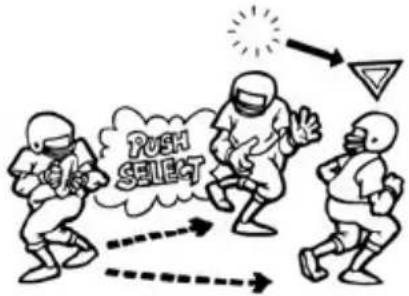
- CHOOSING RECEIVER
MOVE CURSOR WITH BUTTON Ⓐ
text_image
PUSH SELECTBy moving the cursor with Button Ⓐ, you can select your eligible receiver.
●THROWING THE PASS
BUTTON®
The receiver with the cursor will be the eligible receiver.
5. HOW TO PLAY DEFENSE
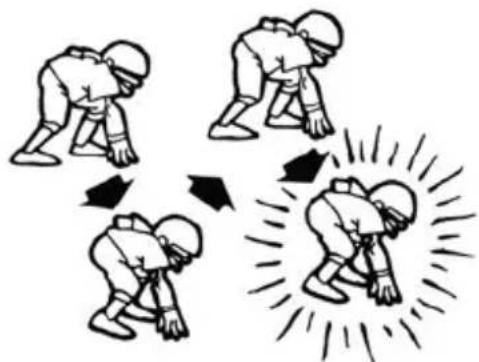
- SELECTING PLAYER
READY TO PLAY ➔ BUTTON Ⓐ
natural_image
Illustration of four figures in a physical maneuver with arrows indicating motion direction (no text or symbols)Use Button Ⓐ to select the player you want to control.
• DIVING TACKLE
CLOSE ON RUNNER ➕ BUTTON Ⓑ
Use the control cross to make your "control" player close in on the runner. Make a diving tackle by pressing Button Ⓑ. A diving tackle will stop any player, no matter how big he is!
• DODGING A BLOCK
OPPONENT CONTACT ♦ BUTTON Ⓐ (REPEATEDLY)
As you close in on the runner to make the tackle, there may be an opposing player there to block you. Press Button Ⓐ repeatedly to avoid being blocked. (This method is the same as in the section HOW TO PLAY OFFENSE.)
6. SELECTING THE FORMATION
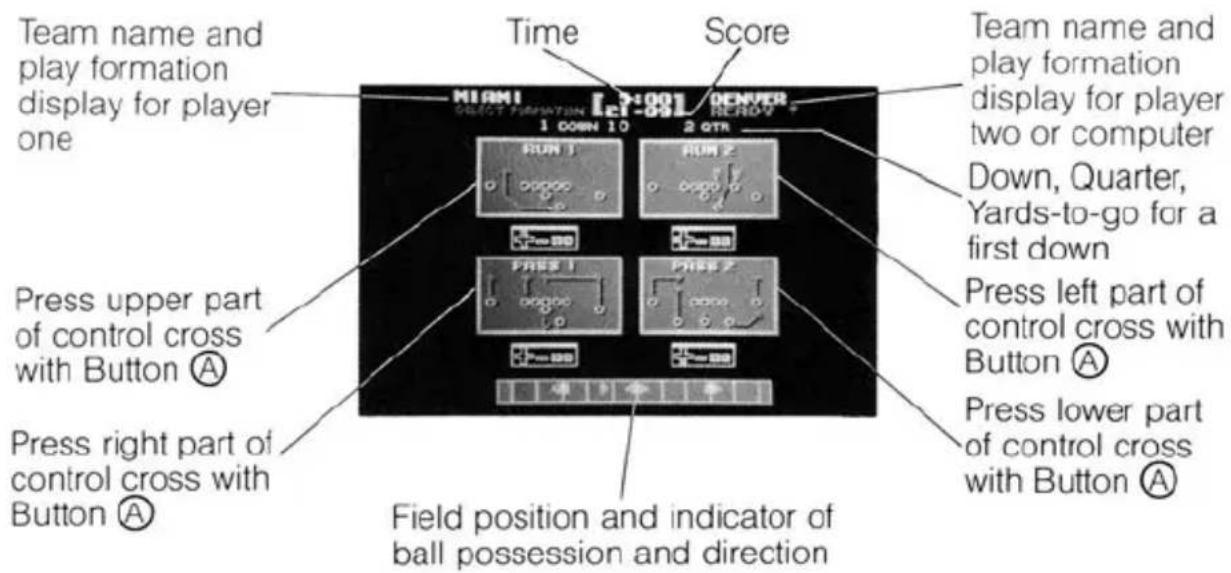
★ The screen for selecting the formation will appear after the ball is dead. There are four formations to choose from.
text_image
Team name and play formation display for player one Press upper part of control cross with Button Ⓐ Press right part of control cross with Button Ⓐ Time Score TEAM1 1 DOWN 10 2 QTR HUM 1 HUM 2 PRESS 1 PRESS 2 Field position and indicator of ball possession and direction Team name and play formation display for player two or computer Down, Quarter, Yards-to-go for a first down Press left part of control cross with Button Ⓐ Press lower part of control cross with Button Ⓐ- SELECTING FORMATION
text_image
←→ BUTTON ⒶUse Button Ⓐ with the control cross to select your formation.
After you have chosen the formation, the indicator under your team name, at the top of the screen, will change from "SELECT to "READY"
"RUN" indicates "running" play and "PASS" indicates "passing" play formations. If you are OFFENSE, select the play you would like to use.
If you are DEFENSE, try to select the right defending formation to crush your opponent.
• FIELD GOALS AND PUNTS
text_image
→ BUTTON Ⓐ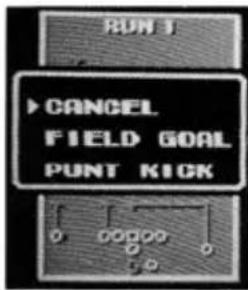
text_image
RUN 1 ▶CANCEL FIELD GOAL PUNT KICKAn indicator such as the one on the left will appear with BUTTON Ⓑ. But, on "fourth down", this indicator will appear without pressing BUTTON Ⓒ.
Only the team on OFFENSE can make this selection. Use the control cross with Button Ⓐ.
If you choose "CANCEL", the screen with the RUN/PASS formations will reappear.
7. COACH MODE
If you choose the COACH MODE, you can enjoy running the team as Head Coach. You become PLAYER TWO. You call the plays from the sidelines by selecting the formation. The computer does the rest.
As Head Coach, you want to outwit your opponent with an unbeatable strategy and command your team to victory!
9. QUICK REFERENCE FOR USING THE CONTROLLER
| OFFENSE | HIKE (Snap) | BUTTON A |
| KICK | BUTTON A or B | |
| DODGING A TACKLE | BUTTON A REPEATEDLY | |
| CHOOSING RECEIVER | BUTTON A | |
| THROWING THE PASS | BUTTON B | |
| DEFENSE | SELECTING PLAYER | READY TO PLAY BUTTON A |
| DIVING TACKLE | CLOSE ON RUNNER BUTTON B | |
| DODGING A BLOCK | BUTTON A REPEATEDLY | |
| FORMATION | SELECTING FORMATION |  (CHOOSE THE FORMATION) + BUTTON A (CHOOSE THE FORMATION) + BUTTON A |
| SELECTING TO PUNT OR KICK A FIELD GOAL | FOURTH DOWN  + BUTTON A + BUTTON A |
10. HOW TO WIN
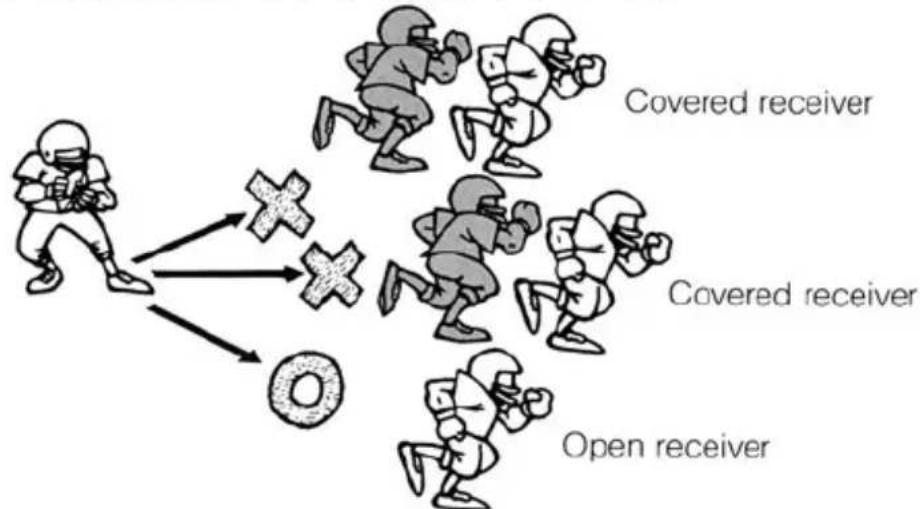
★ PASS Complete your pass and go for the touchdown!
flowchart
graph TD
    A["Covered receiver"] --> B["Cross Symbol"]
    C["Covered receiver"] --> B
    D["Open receiver"] --> B
    B --> E["Donut Icon"]
Don't throw a pass when the receiver is covered by a defending player. The ball will be intercepted. Look for the open receiver and throw the pass. Go for the touchdown!
★ INTERCEPTION Control the player with the control cross and if you stay with your opponent like a good defender, you'll have a chance for an interception!
90-DAY LIMITED WARRANTY TECMO GAME PAKS
90-DAY LIMITED WARRANTY:
Tecmo, Inc. ("Tecmo") warrants to the original consumer that this Tecmo Game Pak ("PAK") (not including Game Pak Accessories or Robot Accessories) shall be free from defect in material and workmanship for a period of 90 days from date of purchase. If a defect covered by this warranty occurs during the 90-day warranty period, Tecmo will repair or replace the PAK, at its option, free of charge.
This warranty shall not apply if the PAK has been damaged by negligence, accident, unreasonable use, modification, tampering, or by other causes unrelated to defective materials or workmanship.
REPAIRS AFTER EXPIRATION OF WARRANTY:
If the PAK develops problems after the 90-day warranty period, you may contact the Tecmo Consumer Division at the phone number noted above. If the Tecmo Service technician is unable to solve the problem by phone, he may provide you with a Return Authorization number. You may then record this number on the outside packaging of the defective PAK and return the defective PAK freight prepaid to Tecmo, enclosing a check or money order for \10.00 payable to Tecmo, Inc. Tecmo will, at its option, subject to the conditions above, repair the PAK or replace it with a new or repaired PAK. If replacement PAKS are not available, the defective PAK will be returned and the \10.00 payment refunded.
WARRANTY LIMITATIONS:
ANY APPLICABLE IMPLIED WARRANTIES, INCLUDING WARRANTIES OF MERCHANTABILITY AND FITNESS FOR A PARTICULAR PURPOSE, ARE HEREBY LIMITED TO NINETY DAYS FROM THE DATA OF PURCHASE AND ARE SUBJECT TO THE CONDITIONS SET FORTH HEREIN. IN NO EVENT SHALL TECMO BE LIABLE FOR CONSEQUENTIAL OR INCIDENTAL DAMAGES RESULTING FROM THE BREACH OF ANY EXPRESSED OR IMPLIED WARRANTIES. The provisions of this warranty are valid in the United States only. Some states do not allow limitations on how long an implied warranty lasts or exclusion of consequential or incidental damages, so the above limitations and exclusion may not apply to you. This warranty gives you specific legal rights, and you may also have other rights which vary from state to state.
COMPLIANCE WITH FCC REGULATIONS
This equipment generates and uses radio frequency energy and if not installed and used properly in strict accordance with the manufacturers' instructions, interference to radio and television reception may occur. It has been type tested and found to comply with the limits for a Class B computing device in accordance with the specifications in Subpart J of Part 15 of FCC Rules, which are designed to provide reasonable protection against such interference in a residential installation. However, there is no guarantee that interference will not occur in a particular installation. If this equipment does cause interference to radio or television reception, which can be determined by turning the equipment on and off, the user is encouraged to try to correct the interference by one or more of the following measures:
— Reorient the receiving antenna
- Relocate the NES with respect to the receiver
- Move the NES away from the receiver
— Plug the NES into a different outlet so that computer and receiver are on different circuits.
natural_image
Illustration of a brown football ball with white stripes and a dashed centerline, against a blue sky background (no text or symbols)TECMO®
©1989 TECMO,INC.
THIS GAME IS
LICENSED BY NINTENDO®
FOR PLAY ON THE
Nintendo
ENTERTAINMENT
SYSTEM®
Printed in Japan
Any original instruction manuals included with this software are digital reproductions of the original printed manuals. They are as faithful as possible to those documents and feature a bare minimum of edits. Reference may be made to features that can't be used in this version of the game, or the contact information provided may no longer be valid. Some copyright information may be out-of-date. Please also note that printed manuals were not always released in multiple languages.