HLG0388SDI - Audio-/Videoverlängerung HELGI - Kostenlose Bedienungsanleitung
Finden Sie kostenlos die Bedienungsanleitung des Geräts HLG0388SDI HELGI als PDF.


| Produkttyp | Audio-/Videoverlängerung (SDI Wireless Transmitter) |
| Marke | HELGI |
| Modell | HLG0388SDI |
| Übertragungsentfernung | Bis zu 200 m (bei freier Sicht) |
| Unterstützte SDI-Formate | SD-SDI, HD-SDI, 3G-SDI |
| IR-Fernbedienung | Unterstützt 20–60 MHz IR-Geräte |
| Stromversorgung | DC 5V/3A (2 Netzteile im Lieferumfang) |
| Leistungsaufnahme Sender (TX) | 13 W |
| Leistungsaufnahme Empfänger (RX) | 11 W |
| Abmessungen (je Gerät) | Ca. 195 x 138 x 32 mm |
| Gewicht (je Gerät) | Ca. 53 g |
| Gehäusematerial | Metall |
| Farbe | Schwarz |
| Betriebstemperatur | 0 °C bis 60 °C |
| Lieferumfang | 1x Sender (TX), 1x Empfänger (RX), 2x Netzteil, 1x IR-Blaster-Kabel, 1x IR-Empfänger-Kabel, 1x Bedienungsanleitung |
| Installation | Kein Kabel zwischen Sender und Empfänger erforderlich |
| Sicherheitshinweise | Nicht Regen oder Feuchtigkeit aussetzen; keine Gegenstände in das Gerät stecken; nur mit DC 5V betreiben; Lüftungsöffnungen frei halten |
Häufig gestellte Fragen - HLG0388SDI HELGI
Benutzerfragen zu HLG0388SDI HELGI
0 Frage zu diesem Gerät. Beantworten Sie die, die Sie kennen, oder stellen Sie Ihre eigene.
Eine neue Frage zu diesem Gerät stellen
Laden Sie die Anleitung für Ihr Audio-/Videoverlängerung kostenlos im PDF-Format! Finden Sie Ihr Handbuch HLG0388SDI - HELGI und nehmen Sie Ihr elektronisches Gerät wieder in die Hand. Auf dieser Seite sind alle Dokumente veröffentlicht, die für die Verwendung Ihres Geräts notwendig sind. HLG0388SDI von der Marke HELGI.
BEDIENUNGSANLEITUNG HLG0388SDI HELGI
- Connection
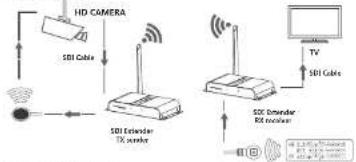
flowchart
graph TD
    A["HD CAMERA"] --> B["SDI Cable"]
    B --> C["SDI Extender TX receiver"]
    C --> D["SDI Extender RX receiver"]
    D --> E["TV"]
    D --> F["SDI Cable"]
Connection instruction:
1). Connect SDI input with SDI source device and connect IR blaster extension cable with IR OUT interface of the sender (TX).
2). Connect SDI output with SDI display device and connect IR receiver extension cable with IR JN interface.
3). Power on the device (power led lights) and it works. Note:
1) When the wireless signal transmits through wall, glass or other obstacles, it will cause signal loss. Suggest installing this device in good environment with few obstacles.
2) The external environment wireless signal interfere the transmission, such as micro waver, wireless mouse and keyboard etc.
• FAQ
Q: TV display "waiting for connection" on the bottom right corner?
A: Please check if the power supply of TX (sender) and RX(receiver) is well connected and the power indicator led lights on.
Q: TV display. "Please check the TX input signal".?
A: 1) please check if there is an SOI signal input of sender TX
2) Try to connect the signal source directly to display device to see if there is signal output from source device or change the signal source, SOI cables and try again.
Q: Display not fluent and stable?
A: 1) Please move the position of sender (TX) and receiver (RX) and make sure the device is within the required scope of the signal.
2) Press 'reset' button on the RX/RX panel, reset and reconnect
3) Remove other wireless signal disturbance and reduce the obstacles on the way.
- Specification
| Items | Specification |
| SDI signal | SD-SDI,HD-SDI,36-SDI |
| Transoam protocol Hb | HbRT |
| Support resolution | SD-SDI: 490/0/60Hz, 578/0/60Hz HD-SDI: 721p/99/99Hz, 1000/350/90Hz,1000p/24/25/30Hz 36-SDI: 1000p/99/99Hz |
| IR remote control | Support 20~60MHz while frequency IR remote device |
| Transoam distance | 200m |
| Working temperature | °C ~ 60°C |
| Power supply | DCW/3A *2PCS |
| Power consumption | TX 13W; RX 11W |
| Endosure material | Mata |
| Product dimension | 195.1kW, x 138.5dB x 3201mm *2PCS |
| Weight | TX 5V3g RX 5V3g |
| Color | Black |
Disclaimer
The product name and brand name may be registered trademark of related manufacturers. I'm and 3 may be omitted on the user manual. The pictures on the user manual are just for reference, and there may be some slight difference with the real products. We reserve the rights to make changes without further notice to a product or system described herein to improve reliability, function or design.

HELGI
SDI Wireless Transmitter 200m
User manual
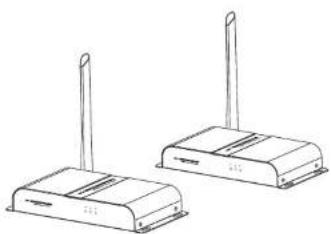
natural_image
Line drawing of two wireless devices with antennas (no text or symbols)• Important safety notice
Please read below safety instructions carefully before installation and operation:
-
Please pay attention to all the warnings and hints on this device.
-
Do not expose this unit to rain, moisture and liquid.
-
Do not put any stuff into the device.
-
Do not repair the device or open the enclosure without professional
person guidance to avoid electronic shock
- Make sure good ventilation openings to avoid product overheating
damage
-
Shut off power and make sure environment is safe before installation.
-
Do not plug-in/out the network cables and IR cables when it is in
using to avoid cables damage.
- Use DC5V only. Make sure the specification matched if using 3
party DC adapters.
Introduction
This transmitter extends SDL signal wirelessly from source device to display device up to 200 meters with the advanced application of HDBiT transport protocol and wireless technology. It requires no cables between sender (TX) and receiver (RX) which makes the installation easy and clean.
Note:
1) Transmission distance will be different due to the environment.
2) Wall, brick or glass will shorten the signal covered range or cause big
signal loss.
Features
1) Transmit SDI signal from source device to display device up to 200
meters wirelessly
2) Support IR remote control function to control source device content
from long distance.
3) No cable between
4) Easy and clean installation
5) Supports SD, SDL, HD, SDL and 3G, SDL signal input
- Package contents

SDI Extensor T3
sender*1pca

SDI Entensor RO
reception*1pvs

DCSV/3A
adropie?rac
IR blaster exchenson

IR receiver extension
cable*1prs

User manual*1pcs
• Installation Requirement
- spi source device like video camera, video recorder etc
- SDI display device like SDTV, HDTV, and projector with SDI port.
- Panel description
- SDI Extender TX sender
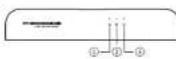
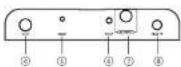
① Power led It lights when power is on
② Data transmission led Led blinks slowly when it is building connection. Led blinks fast when it is successfully connected and transmitting data
① Connection led. It lights when wireless signal is well connected
(2) 2014.03.19: 18:46:50, 19:37:50, 19:38:50
④ Power Input Connect with DCSV/3A power adapter
⑤ Reset Press reset button to restart the choice
IR blaster extension cable interface Connect with IR blaster extension cable. Please put the IR blaster close to source device to wall transmit the IR signal from receiver
(1) SDF input Connect with SDI source device
2017年1月1日
⑥ Antenna Launch wireless signal
- SDF Extender RX receiver
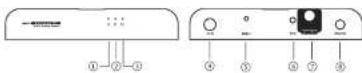
② Power led It lights when power is on
Data transmission Led blinks slowly when it is building connection. Led blinks fast
Iod when it is successfully connected and transmitting data
① Conception led. It lights when worried, so that a well appreciated
② 现金管理人:王志明(2017年1月1日)
④ Power input Connect with UL397.58 power adapter
① Reset Press reset button to restart the device
- 20 remote access - Connect with IR monitor retention cable. Flare make sure the
⑥ Electrical equipment Connect with IR controller extension cable please make a cable interface remote control is within the required range of 15 receivers
The following table provides the information in the United States:
SDI output Connect with SDI display device
© Ardenza Receive wireless signal