HLG0314-HDBITT - Audio-/Videoverlängerung HELGI - Kostenlose Bedienungsanleitung
Finden Sie kostenlos die Bedienungsanleitung des Geräts HLG0314-HDBITT HELGI als PDF.


Benutzerfragen zu HLG0314-HDBITT HELGI
0 Frage zu diesem Gerät. Beantworten Sie die, die Sie kennen, oder stellen Sie Ihre eigene.
Eine neue Frage zu diesem Gerät stellen
Laden Sie die Anleitung für Ihr Audio-/Videoverlängerung kostenlos im PDF-Format! Finden Sie Ihr Handbuch HLG0314-HDBITT - HELGI und nehmen Sie Ihr elektronisches Gerät wieder in die Hand. Auf dieser Seite sind alle Dokumente veröffentlicht, die für die Verwendung Ihres Geräts notwendig sind. HLG0314-HDBITT von der Marke HELGI.
BEDIENUNGSANLEITUNG HLG0314-HDBITT HELGI
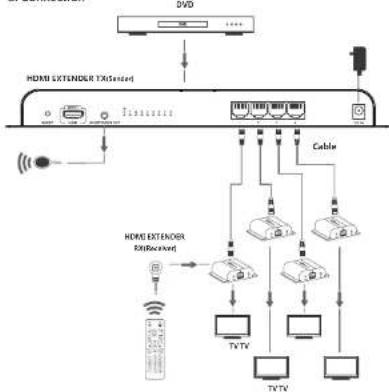
3. Connection instruction:
1). Connect HDM input with HDM[ output of source device.
2). Connect IR blaster extension cable to the IR extender out port.
3). Connect RJ45 port with RJ45 input port of HDMI extender RX.
4). Connect HDMI output of HDMI extender RX to HDMI input of HDTV and set the TV source input to correct HDMI input channel.
5). Power on the device (power indicator led lights) and it works.
- FAQ
Q: TV display "waiting for connection" on the bottom right corner?
A: 1) Please check if the power supply of TX (sender) and RX(receiver)
is well connected and the power indicator led lights on
2) Make sure all cables are firmly connected.
Q: TV display "Please check the TX input signal"?
A: 1) please check if there is An HDMI signal input of TX.
2) Try to connect the signal source directly to display device to see if there is signal output from source device or change the signal source, HDMI cables and try again.
Q: Display not fluent and stable?
A: 1 | Please check the cable length between TX(sender) and RX
(receiver) is within the required range.
2) Press "reset" button on the RX/RX panel, reset and reconnect.
- Specification
| Items | Specification |
| HDMI signal Compatible with HDCP | |
| Transport protocol HDsHT | |
| Support resolutions | 48G@50Hz, 48Gp@60Hz, 57G@50Hz, 57Gp@50Hz, 72Gp@50/60Hz, 108G@50/60Hz, 108Gp@50/60Hz |
| Transmit distance | Up to 120meters transmission distance for 1080p 50Hz full HD over single CAT6 |
| IR signal | Support 20~60kHz IR device |
| Input | 1 x HDMI |
| Output | 4 x R45 |
| Connection indicator leds | 4 x LED |
| Working temperature | 0^ C 60^ C |
| Power supply | DC12V/3A |
| Power Consumption | <24W |
| Dimension | 299(W) x 110.7(D) x 29.6(1) mm |
| Weight | 430g |
| Color | Black |
Disclaimer
The product name and brand name may be registered trademark of related manufacturers.TM and ® may be omitted on the user manual. The pictures on the user manual are just for reference,and there may be some slight difference with the real products.
We reserve the rights to make changes without further notice to a product or system described herein to improve reliability, function or design.

HELGI
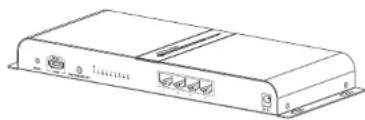
HDbiT 1 to 4 HDMI Extender Splitter
User manual
natural_image
Line drawing of a rectangular electronic device with ports and connectors (no text or symbols)Important Safety Notes:
-
Do not plug-in/out the network cables and IR cables when it is in using.
-
Use DC12V only. Make sure the specification matched if using 3rd
party DC adapters.
Introduction
This product combines the extender and splitter function to split 1 HDMI signal to 4 identical HDMI signals via network cable and it is used as a sender to work with 4 receivers to transmit these 4 HDMI signals up to 120 meters.
With the IR signal transmission to control the source device operation in long distance, it is widely applied in HD audio visual display room, HDTV, Set top box, DVD etc exhibition center and digital monitoring system.
- Features:
-
Support 1 HDMI input to 4 HDBiT outputs.
-
Up to 120 meters transmission distance over single cat6 (high quality cable can reach 150 meters).
-
Compatible with the receiver device which supports HDbiT transport protocol.
-
Compatible with HDCP.
-
Metal housing and mountable design.
- Package contents
HDMI extender IX*1

DC129/3A power adaptor ^®

IR blaster extension cable *1

User manual 1
• Installation Requirement
- HDMI source device(computer graphics card, DVD, PS3, HD monitoring equipment etc)
- HDMI display device like SDTV, HDTV, and projector with HDMI port.
- HDMI extender RX which supports HDBiT transport protocol
- UTP/STP cat5/5e/6 cable, follow standard IEEE-5688
Network cable length supported between every connection: CAT5 80m
CAT5E 100m
CAT6 120m
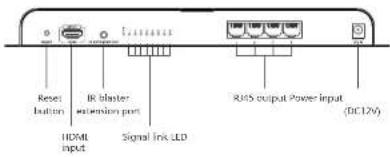
- Panel description
text_image
Reset button IR blaster extension port HDMI input Signal Link LED RMS output Power Input (DC12V)- Connection and operation
1. network cable
Follow the standard of IEEE 568B:
1-Orange/white 5-Blue/white
2-Orange 6-Green
3- Green/white 7- Brown/white
4- Blue 8- Brown

- Connection
flowchart
graph TD
    A["+VCD"] --> B["+VCD"]
    B --> C["+VCD"]
    C --> D["Cable"]
    D --> E["+VCD"]
    E --> F["+VCD"]
    F --> G["Cable"]
    G --> H["+VCD"]
    H --> I["+VCD"]
    I --> J["Cable"]
    J --> K["+VCD"]
    K --> L["Cable"]
    L --> M["+VCD"]
    M --> N["Cable"]
    N --> O["+VCD"]
    O --> P["Cable"]
    P --> Q["+VCD"]
    Q --> R["Cable"]
    R --> S["+VCD"]
    S --> T["Cable"]
    T --> U["+VCD"]
    U --> V["Cable"]
    V --> W["+VCD"]
    W --> X["Cable"]
    X --> Y["+VCD"]
    Y --> Z["Cable"]