
RQ-SX33 - Hi-Fi PANASONIC - Kostenlose Bedienungsanleitung
Finden Sie kostenlos die Bedienungsanleitung des Geräts RQ-SX33 PANASONIC als PDF.


| Produkttyp | Stereo-Kassettenplayer |
| Marke | Panasonic |
| Modell | RQ-SX33 |
| Gewicht | ca. 188 g (mit Akku) |
| Stromversorgung | Akku (1,2 V) oder Trockenbatterie R6/LR6 (1,5 V) |
| Akku-Ladezeit | ca. 2 Stunden |
| Akku-Spielzeit | ca. 6 Stunden (bei 25 °C) |
| Spuranzahl | 4 Spuren, 2 Kanäle, Stereo |
| Frequenzbereich | 15–20.000 Hz (−6 dB) |
| Wiedergabemodi | Auto-Reverse, Blank-Skip (B.S.) |
| Programmsuche | TPS (Tape Program Sensor) |
| Intro-Scan | Ja (10 Sekunden Vorspiel) |
| Wiederholung | ONE-REPEAT (Titelwiederholung) |
| Klangregelung | ASC EQ: Normal, S-XBS (Bass-Boost), TRAIN (Klangoptimierung) |
| Rauschunterdrückung | Dolby NR (ein/aus) |
| Fernbedienung | Ja, beleuchtet (Display und Tasten) |
| HOLD-Funktion | Ja (am Gerät und an der Fernbedienung) |
| Kopfhörer | Anti-Bakterien-Ohrpolster, Größe verstellbar |
| Kopfhöreranschluss | 3,5 mm Klinke |
| Lieferumfang | Stereo-Kopfhörer mit Fernbedienung, Ladegerät, Akku, Akkutrage, Trockenbatteriegehäuse, Tragetasche |
| Reinigung | Kopf mit Alkohol und Wattestäbchen reinigen |
Häufig gestellte Fragen - RQ-SX33 PANASONIC
Benutzerfragen zu RQ-SX33 PANASONIC
0 Frage zu diesem Gerät. Beantworten Sie die, die Sie kennen, oder stellen Sie Ihre eigene.
Eine neue Frage zu diesem Gerät stellen
Laden Sie die Anleitung für Ihr Hi-Fi kostenlos im PDF-Format! Finden Sie Ihr Handbuch RQ-SX33 - PANASONIC und nehmen Sie Ihr elektronisches Gerät wieder in die Hand. Auf dieser Seite sind alle Dokumente veröffentlicht, die für die Verwendung Ihres Geräts notwendig sind. RQ-SX33 von der Marke PANASONIC.
BEDIENUNGSANLEITUNG RQ-SX33 PANASONIC
A
①
RFEV129P-KS
②

RP-BC155AEY
or, RP-BC155EY-0
(For Continental Europe)
②*

RP-BC155EBYA (For UK)
③

AP-BP62EYS1
④

RFA0475-Q
⑤

RFA0310-K2 or, RFA0474-K
⑥
RFC0037-K
396
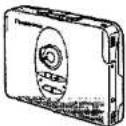
Panasonic® Stereo Cassette Player
BO-SY23
Operating Instructions
Note:
The "EB" indication shown on the packing case indicates United Kingdom.
E
EB
Before connecting, operating or adjusting this product, please read these instructions completely.
Matsushita Electric Industrial Co., Ltd.
Central P.O. Box 268, Osaka 530-91, Japan
Printed in Japan
RQT3053-B
F0295N0
text_image
OPEN DONR VOLUME B.S OFF/ON, →/○ (Blank skip, Reverse mode) PUSH HOLD REW FF +FF, -REW MAIN KEY ASC EQ HOLD VOLUMEB
text_image
2 ① ② ③ ④C
2
natural_image
Technical line drawing of a mechanical assembly with no visible text or symbolsD
自→自→自→
E
text_image
Diagram illustrating a medical procedure for adjusting a device with labeled parts and stepsF
G
text_image
Diagram showing two mechanical components with numbered parts and directional arrows indicating motion or assembly.ENGLISH
Supplied Accessories
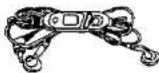
① Stereo earphones with remote controller
② Charger
③ Rechargeable battery
•This one is in the carrying case (④).
④ Rechargeable battery carrying case
③ Dry cell battery case
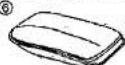
⑥ Carrying bag
PO
Power Sources
This player can operate on any of 2 different power sources:
-
Rechargeable battery (included)
-
Dry cell battery (not included)
Rechargeable battery
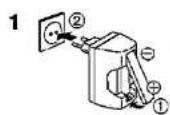
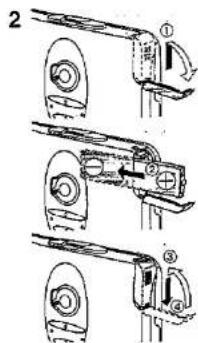
For its initial use after purchasing or after a long time interval (more than three months), be sure to recharge the rechargeable battery.
Normally 2 hours recharging will give approximately 6 hours tape playback (at 25°C). However, playback time may become shorter depending on the operating conditions, e.g. repeating fast-forward or rewind, etc.
1 Recharge the rechargeable battery.
- For UK, the shape of the charger is different.
2 Insert the charged battery into the unit.
Dry cell battery
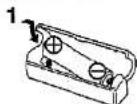
1 Insert one R6/LR6 battery (UM-3 or equivalent, not included) into the battery case.
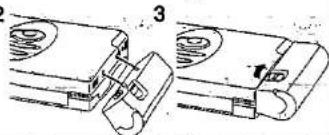
2 Attach the battery case to the unit.
3 Turn the screw until it locks.
■ To extend the playback time
Install both types of battery (rechargeable and dry cell battery) in the unit.
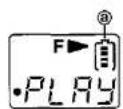
Battery condition indicator D
During operation, the display shows the battery condition indicator ⓐ.
Since flashing of the indication tells the wear of the battery, recharge the rechargeable battery or replace the battery with new one.
The length of time the unit can operate after flashing:
Rechargeable battery ...., about 5 minutes Dry cell battery (or used both types together)
... about 30 minutes
Before Use
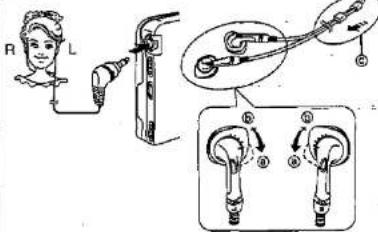
Connecting the stereo earphones E
Unless the earphones are firmly inserted into the jack, the sound may become intermittent, or, operation using the remote controller may become impossible.
The size of the earpiece can be adjusted.
When it's too loose in the ear, turn the fitting ring to ④, when it's too light, turn to ⑥.
When not using the stereo earphones, slide up the slider (◎) to prevent entanglement of the cord.
■ Illuminated remote controller
Pressing any button on the remote controller lights the display for approximately 5 seconds, enabling easy use even in dark areas.
In addition, since "luminous paint materials are used, the characters around the display also shine brightly in the dark.
*Gathering sunlight for approximately 5 minutes or light from fluorescent bulbs approximately 1 hour lets the character glow in the dark. (luminous time: approximately 1 hour)
■ Anti-bacterial earphones
The ear pieces and earphone cords incorporate anti-bacterial materials for sanitary use.
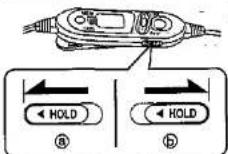
Concerning the hold function F
This function prevents the unit from operating even if one of the buttons is pressed in error.
Use this function to prevent the following situations:
A. While not in use, the play inadvertently start and the battery runs down.
B. Play is interrupted while the unit is in use.
■ To use the hold function
Set the HOLD switch to the hold position (hold state, ⑧).
As for the HOLD switch on the main unit, simply press the PUSH button.
Reference
- Both the main unit and remote control have a HOLD switch, and each of them works individually.
- When the remote control is in the hold state, the display shows "HOLD".
■ Before using any of the buttons
Be sure to move the HOLD to release the hold state (6).
Care and Use
- Avoid using or placing this unit near sources of heat. Do not leave it in an automobile exposed to direct sunlight for a long period of time with the doors and windows closed, as this may deform the cabinet.
Precautions for Listening with the Headphones
- Do not play your headset at a high volume. Hearing experts advise against contiguous extended play.
- If you experience a ringing in your ears, reduce volume or discontinue use.
- Do not use while operating a motorized vehicle. It may create a traffic hazard and is illegal in many areas.
- You should use extreme caution or temporarily discontinue use in potentially hazardous situations.
- Even if your headset is an open-air type designed to let you hear outside sounds, don't turn up the volume so high that you can't hear what's around you.
Rechargeable battery and charger
- Use only the included charger when recharging.
- During recharging, it is normal for the charger and the rechargeable battery to become slightly warm.
- Do not leave the charger turned on for more than 24 hours at one time, otherwise, the rechargeable battery life may be shortened.
- Avoid recharging or placing the rechargeable battery near sources of heat or humidity.
- The included rechargeable battery can be recharged about 300 times. After that, its operation time becomes shortened. That's time for replacing the rechargeable battery.
Dry cell battery and rechargeable battery
- Load new battery with their polarities (⊕ and ⊖) aligned correctly.
- Do not apply heat to batteries, or internal shortcircuit may occur.
- If this unit is not to be used for a long period of time, remove the batteries and store them in a cool and dry place.
- Remove spent batteries immediately
Do not peel of the plastic covering on the rechargeable battery. Short-circuiting may result which is dangerous.
Notice about the rechargeable battery
The battery is designated recyclable.
Please follow your local recycling regulations.
Carrying batteries around
When pulling dry batteries and rechargeable batteries in a pocket or bag; ensure that no other metal objects such as a necklace are placed together with them. Contact with metal may cause short-circuiting which, in turn, may cause a fire. The same caution needs to be heeded with the battery case containing a dry battery.
When carrying rechargeable batteries around, be absolutely sure to place them inside the included rechargeable battery case.
Endless tapes
Failure to operate these tapes correctly may cause the tape to wind around the revolving parts.
For this unit, it is recommended to use the tape which is appropriate to the auto reverse mechanism.
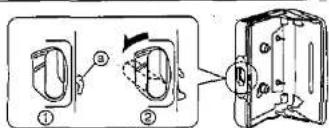
Cassette compartment cover G
If the catch is in the position shown in the figure ①, the cassette compartment cover won't close. The compartment cover may be bent out of shape if an attempt is made to forcibly close the cover. If this occurs, slide OPEN so that the catch (⑥) is in the position shown in the figure ②.
Specifications
Track system:
Frequency range
(Normal/CrO _3 /Metal): 15–20,000 Hz (−6 dB)
Input jack: PHONES
Power output: 5 mW÷5 mW (RMS...max)
power requirement
echargeable
battery;
4 track, 2 channel, stereo
15-20,000 Hz (-6 dB)
PHONES
5 mW÷5 mW (RMS...max)
attery:
DC 1.2 V (included
rechargeable battery)
DC 1.5 V
(one R6/LR6 battery)
Dimensions (W×H×D):
Weight:
188g
(with rechargeable battery)
Charger
Input:
RP-BC155EY-0 (AC 220 V)
_(For Continental Europe).
RP-BC155AEY (AC 230 V)
(For Continental Europe)
RP-BC155EBYA (AC 240 V)
For UK
50 Hz, 4 W
DC 350 mA, 1.2 V
Note:
Specifications are subject to change without notice.
Weight and dimensions are approximate.
H
text_image
1 2 3 4 PLAY1
text_image
DONR B.S OFF/ON, D/O REW FFJ
K
text_image
Diagram showing cable connection to a device with labeled parts ⑥, ⑧, and ⑨L
flowchart
graph TD
    A["STOP"] --> B["PLAY"]
    B --> C["Beep..p"]
    B --> D["Beep"]
    B --> E["Beep Beep"]
    B --> F["Beep Beep Beep"]
    C --> G["STOP"]
    D --> H["DIR"]
    E --> I["FF SNF REVERSE"]
    F --> J["REW REN NO AUTO PLAC"]
    K["STOP"] --> L["Beep Beep"]
    K --> M["Intro-scan(FF)"]
    K --> N["Intro-scan(REW)"]
M
text_image
M ASC EQ F TRAIN S-XBS NOR PLAY Beep NOR → S-XBS Beep Beep TRAIN Beep Beep BeepN
text_image
Diagram showing a device with labeled components and connections, including battery, switch, and motor parts.ENGLISH

pe Playback
H
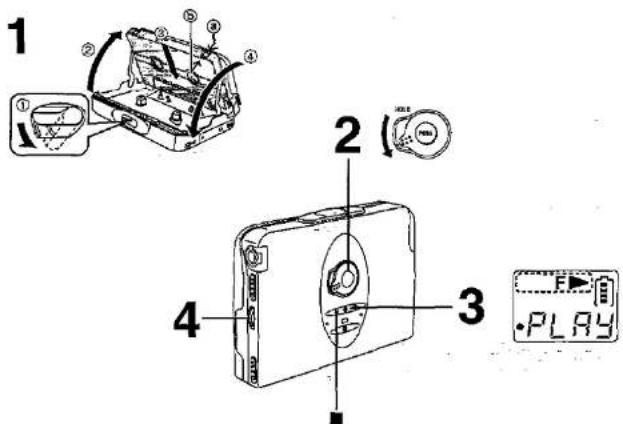
This unit is equipped with an auto tape select function, so you can use normal, CrO_2 or metal types of tape.
1 insert a cassette tape.
Closing the cover, the tape slack will be wound automatically and playback will be expected to start from the forward side.
④ Forward side ⑤ Reverse side
2 Release the hold state.
3 Press ◀▶.
Unless the lid is opened and closed, playback starts from the side that was played when the cassette player was switched off.
F ▶=Forward side
R=Reverse side
4 Adjust the volume.
■ To stop playback
Press ■.
To change the tape direction
Press ◀▶ during playback.
To change the play mode
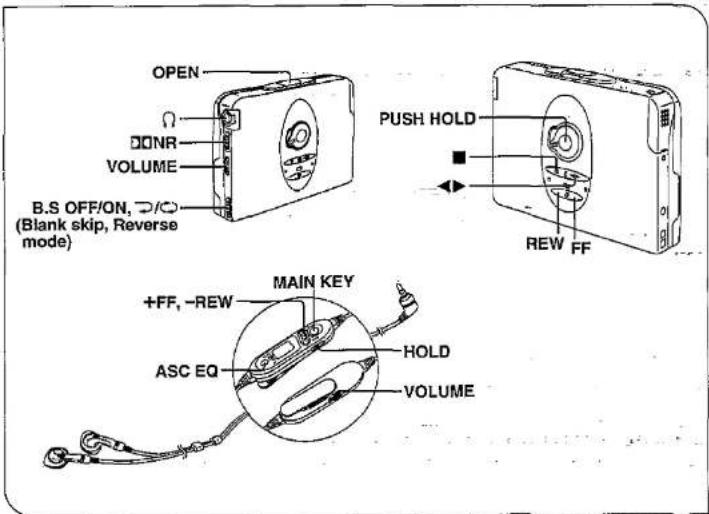
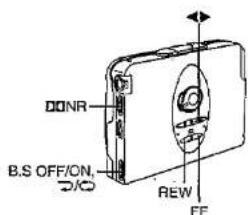
Select the position of the play mode selector (B.S OFF/ON, ⊃/○).
ON, CO:
Both sides of the cassette are played continuously. Blank-skip function works.
OFF, →:
The forward and reverse sides of the cassette are played once and then the playback stops.
Blank-skip function doesn't work.
Blank-skip function (B.S):
When a silent part of more than 13 seconds is detected during playback, fast-forwarding automatically starts and then playback of the opposite side of the cassette starts from the beginning.
- When playback is started at the point close to the end of the last song, it may not work properly.
- When small sound continues for more than 13 seconds, the unit may start fast-forwarding. When you listen to a classical music, set the selector to the OFF position to release the Blank-skip function.
To playback the tape with Dolby NR
Set ☐ NR selector to ON.
Dolby noise reduction manufactured under license from Dolby Laboratories Licensing Corporation. "DOLBY" and the double-D symbol: DIO are trademarks of Dolby Laboratories Licensing Corporation.
To fast forward or rewind
Press FF or REW in the stop mode.
FF: Fast forward
REW: Rewind
To find the beginning of a song
(TPS: Tape Program Sensor)
This function is used to fast forward or rewind to play from beginning of a song. Also, you can skip as many songs as the number of times the button is pressed (up to 9 times).
Press FF or REW during playback.
FF: You can skip forward (+ TPS).
REW: You can skip backward (- TPS).
Remember that in a backward skip, the current song is included in the count.
To repeat a current song
(ONE-REPEAT)
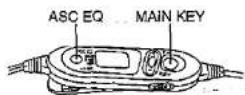
Press and hold ASC EQ on the remote control during play.
■ To cancel the ONE-REPEAT
Press and hold ASC EQ once more.
ONE-REPEAT is also cancelled when tape operations are switched.
To search a song on the cassette
(intro-scan)
Allows you to listen to the beginning portion (intro) of the songs for about 10 seconds each, in order.
1 Press MAIN KEY twice or three times in the stop mode.
Twice: Fast forward starts.
Three times: Rewind starts.
When the beginning of the song is detected, fast forward or rewind will interrupted to play an intro of a song, and then resume fast forward or rewind.
2 To cancel the intro-scan and resume normal play, press MAIN KEY once.
Notes:
Since making use of the silent part between songs, the TPS, ONE-REPEAT and the intro-scan function may fail to function properly in the following situations:
- When the silent part between songs is less than 4 seconds or has noise.
- When the next silent part is less than 10 seconds away.
- When there is a long silent part or particularly low or small sound in the song.
- When there is a part where the sound gradually goes up or goes down in the song.
During TPS or Intro-scan, the unit automatically reverses when the end of the cassette tape is reached and operation continues. However, if the end of a cassette tape is detected three times, the tape automatically stops.
Remote Control Operation
K
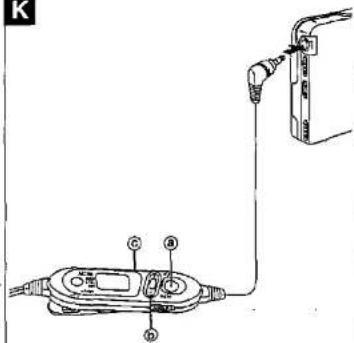
Before using those buttons, plug the stereo earphones into the jack and be sure to release the hold state.
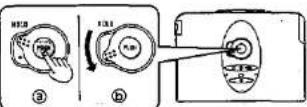
Multi operation button (MAIN KEY) K-⑧
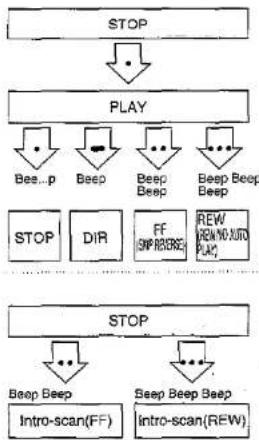
When pressing the button twice or three times in succession, press it within one second and at equal interval.
L
•: Press once to play and stop.
- : Press and hold to change the direction.
••: Press twice for fast forward and Intro-scan (forwards).
•••: Press three times rewind and Intro-scan (backwards).
- When it is pressed twice or three times during play, play will start from beginning of the tape (opposite or the same side).
- Confirmation beep can be heard as shown in the figure.
- The beep tone, which is emitted when the button is pressed once in the stop mode, indicates that a cassette is not inserted.
+, - button K-①
+: Fast forward and + TPS.
-: Rewind and - TPS.
You can operate them as the same way as the FF or REW on the main unit.
To adjust the volume K ©
Before using the VOLUME on the remote control, be sure to adjust the volume control on the main unit to "5-7" position.
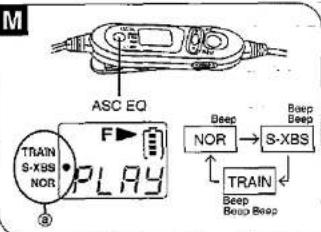
To Change the Tone
(ASC EQ: Amenity Sound Control Equalizer)
Every time you press ASC EQ during play the tone will change as follows in turn. (a indicates the tone.)
- Confirmation beep can be heard as shown in the figure.
NOR:
The ASC EQ effect is cancelled.
S-XBS:
Boosts the low frequency range.
- If the sound distortion occurs, turn down the volume.
TRAIN:
Gives a more natural quality to the sound and reduces strain and fatigue when you listen for long time. It also cuts down the audible level of sound which disturbs people around you.
Maintenance
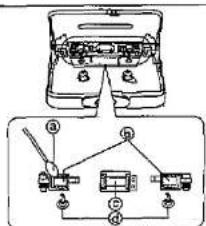
Head care
To ensure good sound quality for tape operation, be sure to clean the head after approximately every 10 hours of use. Clean it with a cotton swab dampened with a little alcohol. Do not bring metal articles or magnetic material, such as a screwdriver, near the head assembly.
a Cotton swab
© Pressure rollers
© Head
(d) Capstans
Main unit
Clean it with a cloth, dampened in a mild solution of soap and water.
Do not clean the cabinet with benzine or thinner. Avoid excessive moisture.
Avoid spray aerosol type cleaner. Some cleaners contain corrosive chemicals that may cause internal damage and cabinet deformation.