
WR-40 MK3 - Radio DENVER - Kostenlose Bedienungsanleitung
Finden Sie kostenlos die Bedienungsanleitung des Geräts WR-40 MK3 DENVER als PDF.


| Produkttyp | DAB+/UKW-Radio mit Bluetooth |
| Marke | Denver |
| Modell | WR-40 MK3 |
| Farbe | Schwarz |
| Abmessungen (B x H x T) | ca. 18 x 10 x 6 cm |
| Gewicht | ca. 0,5 kg |
| Stromversorgung | Netzteil (5V DC) oder 4x AA-Batterien (nicht im Lieferumfang) |
| Leistungsaufnahme | ca. 5 W |
| Radioempfang | DAB+ (Band III) und UKW (87,5–108 MHz) |
| Bluetooth | Ja, Version 5.0 |
| USB-Anschluss | Micro-USB zum Aufladen (nur bei Netzbetrieb) |
| Audioausgang | 3,5 mm Kopfhöreranschluss |
| Lautsprecher | integrierter Mono-Lautsprecher, 3 W |
| Display | LCD mit Hintergrundbeleuchtung |
| Bedienelemente | Drehregler und Tasten |
| Weckerfunktion | Ja, Einschlaf- und Wecktimer |
| Stationsspeicher | bis zu 20 DAB+ und 20 UKW-Sender |
| Hersteller | Denver Electronics |
| Garantie | 2 Jahre |
| Lieferumfang | Radio, Netzteil, Bedienungsanleitung |
| Entsorgung | Elektrogeräte gehören nicht in den Hausmüll |
Häufig gestellte Fragen - WR-40 MK3 DENVER
Benutzerfragen zu WR-40 MK3 DENVER
0 Frage zu diesem Gerät. Beantworten Sie die, die Sie kennen, oder stellen Sie Ihre eigene.
Eine neue Frage zu diesem Gerät stellen
Laden Sie die Anleitung für Ihr Radio kostenlos im PDF-Format! Finden Sie Ihr Handbuch WR-40 MK3 - DENVER und nehmen Sie Ihr elektronisches Gerät wieder in die Hand. Auf dieser Seite sind alle Dokumente veröffentlicht, die für die Verwendung Ihres Geräts notwendig sind. WR-40 MK3 von der Marke DENVER.
BEDIENUNGSANLEITUNG WR-40 MK3 DENVER
ENGLISH
DENVER ELECTRONICS
WR-40 MK2
FM RADIO

natural_image
Exterior view of a Deimer® portable radio device with black buttons and a digital display (no readable text or symbols beyond branding)www.facebook.com/denverelectronics
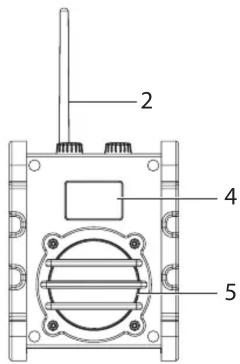
- Power / Volume control Knob
- FM Antenna
- Tuning Knob
- LCD display
- Speaker
- Aux in Jack
- AC adaptor jack
- Battery Compartment
- Carrying Handle


Installing Batteries
- Unscrew the compartment fixture with a tool, lift up the battery compartment cover located on the rear of your Utility Radio
- Insert four "C" size (UM-2) batteries into the compartment. Ensure that battery is inserted in accordance with the diagram shown.
- Close the battery cover and screw the compartment fixture.
- If the radio is not to be used for any extended period of time, it is recommended that the battery is removed from the radio.
Operating your radio FM
- Turn on your radio by switching the Power knob to FM position.
- Rotate the tuning control to select the desired station. One short turn goes 0.1 mhz up/down. Turn and hold for 1 seconds to make a scan after nearest station.
- Adjust the Volume Control for comfortable listening
- To switch off the radio, turn the Power knob to Standby position.
- The soft spring antenna is used for FM band reception.
 The Lightning flash with arrowhead symbol, with an equilateral triangle is intended to alert the user of the presence of uninsulated dangerous voltage within the product's enclosure that may be of sufficient magnitude to constitute a risk of electric shock to persons. The Lightning flash with arrowhead symbol, with an equilateral triangle is intended to alert the user of the presence of uninsulated dangerous voltage within the product's enclosure that may be of sufficient magnitude to constitute a risk of electric shock to persons. | CAUTIONRISK OF ELECTRIC SHOCKDO NOT OPENCAUTION: TO REDUCE THE RISK OF ELECTRIC SHOCK, DO NOT REMOVE COVER (OR BACK). NO USER SERVICEABLE PARTS INS IDE. REF ER SERVICING TO QUALIFIED SERVICE PERSONNEL. |  The exclamation point within an equilateral triangle is intended to alert the user of the presence of important operating and maintenance (servicing) instructions in the literature accompanying the appliance. The exclamation point within an equilateral triangle is intended to alert the user of the presence of important operating and maintenance (servicing) instructions in the literature accompanying the appliance. |
CAUTION
CAUTION :
TO PREVENT ELECTRIC SHOCK, MATCH WIDE BLADE OF PLUG TO WIDE SLOT, FULLY INSERT.
WARNING :
TO REDUCE THE RISK OF FIRE OR ELECTRIC SHOCK, DO NOT EXPOSE THE APPLIANCE TO RAIN OR MOISTURE.
AC Adaptor(Included)
230 VOLT AC ADAPTER IS ONLY FOR USE IN-DOOR! NOT FOR USE OUTDOOR!
The AC adaptor(included) for use with the Utility Radio provides 6V DC output at 1 ampere center pin positive.
Remove the rubber sheet which covers both the DC socket and AUX-in jack, insert the adaptor plug into the DC socket of the radio. Whenever the adaptor is used, the batteries are automatically disconnected.
The AC adaptor should be disconnected from the mains supply and the radio when not in use.
Aux-In Function
- To use it, plug in Aux Cable (3.5mm connector) available at your local dealer and adjust the volume control to a comfortable listening level.
- You can start playing audio files from your AUX compatible device. For instructions on how to play audio files from your AUX compatible device, please refer to its own manual.
ALL RIGHTS RESERVED, COPYRIGHT DENVER ELECTRONICS A/S


Electric and electronic equipment contains materials, components and substances that can be hazardous to your health and the environment, if the waste material (discarded electric and electronic equipment) is not handled correctly.
Electric and electronic equipment is marked with the crossed out trash can symbol, seen above. This symbol signifies that electric and electronic equipment should not be disposed of with other household waste, but should be disposed of separately.
All cities have established collection points, where electric and electronic equipment can either be submitted free of charge at recycling stations and other collection sites, or be collected from the households. Additional information is available at the technical department of your city.
Importer:
DENVER ELECTRONICS A/S
Stavneagervej 22
DK-8250 Egaa
Denmark
www.facebook.com/denverelectronics


Marke : DENVER
Modell : WR-40 MK3
Kategorie : Radio