MC2C5WPCS - Nicht kategorisiert Arkon - Kostenlose Bedienungsanleitung
Finden Sie kostenlos die Bedienungsanleitung des Geräts MC2C5WPCS Arkon als PDF.


Benutzerfragen zu MC2C5WPCS Arkon
0 Frage zu diesem Gerät. Beantworten Sie die, die Sie kennen, oder stellen Sie Ihre eigene.
Eine neue Frage zu diesem Gerät stellen
Laden Sie die Anleitung für Ihr Nicht kategorisiert kostenlos im PDF-Format! Finden Sie Ihr Handbuch MC2C5WPCS - Arkon und nehmen Sie Ihr elektronisches Gerät wieder in die Hand. Auf dieser Seite sind alle Dokumente veröffentlicht, die für die Verwendung Ihres Geräts notwendig sind. MC2C5WPCS von der Marke Arkon.
BEDIENUNGSANLEITUNG MC2C5WPCS Arkon
natural_image
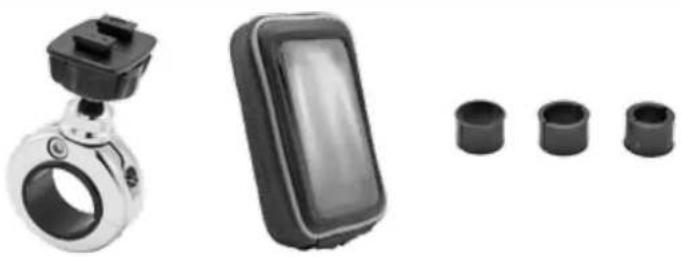
Product photo showing a smart car controller, a black remote control device, and four cylindrical sensors (no text or symbols visible)MC2CSBH WPCS5-SM
Package Contents:
(1) MC2CSBH - Motorcycle Handlebar Mounting Pedestal - Chrome
(1) WPCS5-SM - Water-Resistant Case for Smartphone or GPS
The Premium Motorcycle Mount comes with 3 handlebar spacer/adapter rings of different sizes. Select the appropriate size for optimum mounting to your handlebar.
Device Compatibility:
Compatible with smartphones up to 5.95"H x 3.12"W x .33"D including iPhone® 6, Samsung Galaxy Note® 4, Galaxy S® 6, and LG G3
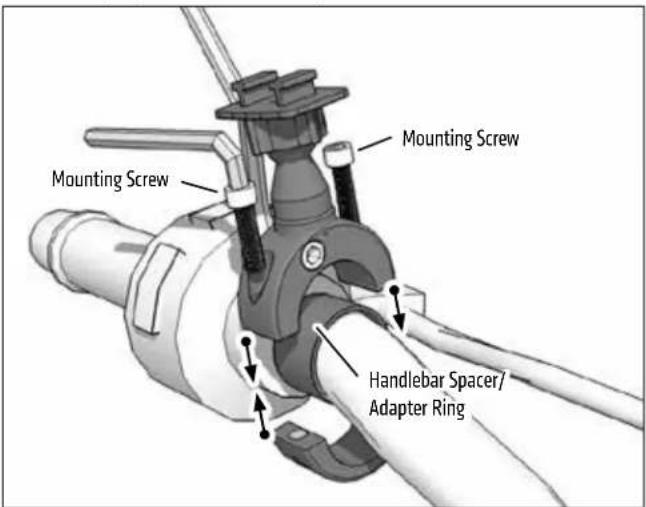
1 Place handlebar spacer/adapter ring around handlebar. Attach mount to handlebar around spacer. Use the included hex key to securely tighten both mounting screws.
text_image
Mounting Screw Mounting Screw Handlebar Spacer/ Adapter Ring3 Insert device and adjust case position as desired. Tighten adjustment ring to secure position.

text_image
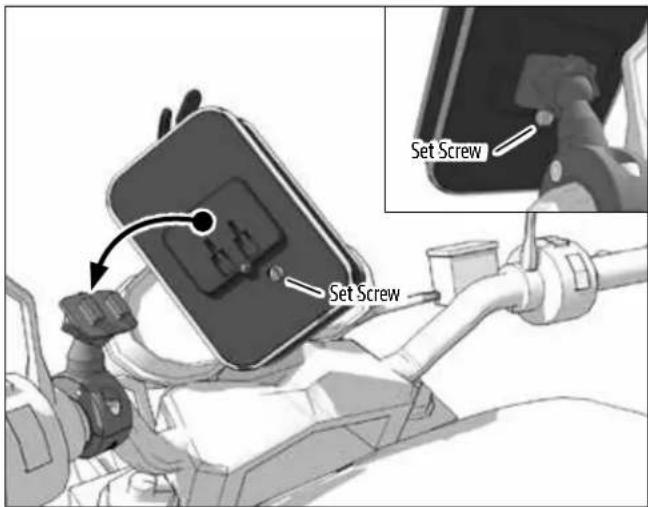
Adjustment Ring2 Attach the smartphone case to the Dual-T head and insert the set screw to secure.
text_image
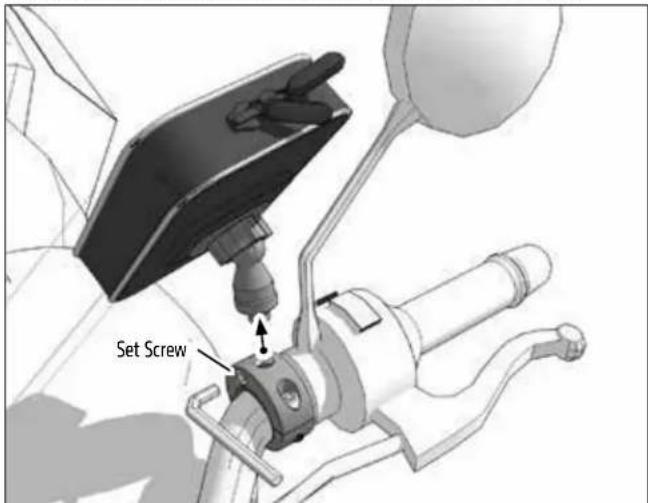
Set Screw Set ScrewOPTIONAL: To remove holder without removing the handlebar attachment, use the hex key to unscrew the set screw and lift up.
text_image
Set Screw
Safety Precautions
Arkon is not responsible for any damages caused to your vehicle, your device, or yourself due to the installation or use of this mount.
ARKON
RESOURCES INC.
The Mobile Mounting Specialists™
Consumer Hotline:
USA (800) 841-0884
INT'L (626) 254-9005
Monday - Friday 9am - 5pm, PST
www.arkon.com
Arcadia, CA 91006 USA
Designed in USA | Made in USA & China
© Copyright 2015 Arkon Resources, Inc.