TT134 - Kit voiture Arkon - Kostenlose Bedienungsanleitung
Finden Sie kostenlos die Bedienungsanleitung des Geräts TT134 Arkon als PDF.


Benutzerfragen zu TT134 Arkon
0 Frage zu diesem Gerät. Beantworten Sie die, die Sie kennen, oder stellen Sie Ihre eigene.
Eine neue Frage zu diesem Gerät stellen
Laden Sie die Anleitung für Ihr Kit voiture kostenlos im PDF-Format! Finden Sie Ihr Handbuch TT134 - Arkon und nehmen Sie Ihr elektronisches Gerät wieder in die Hand. Auf dieser Seite sind alle Dokumente veröffentlicht, die für die Verwendung Ihres Geräts notwendig sind. TT134 von der Marke Arkon.
BEDIENUNGSANLEITUNG TT134 Arkon
TT134 | Freedom Mount™ Windshield / Dash / Console Mount for Tomtom GPS
Compatible with:
• Tomtom One - 1 ^st , 2 ^nd , & 3 ^rd Editions
• Tomtom One (UK version)
• Tomtom One XL - 1 ^st , 2 ^nd , & 3 ^rd Editions
• Tomtom One XL-S - 1 ^st , 2 ^nd , & 3 ^rd Editions
• Tomtom GO 520 / 720 / 920 / 920T
• Tomtom GO 300 / 500 / 700
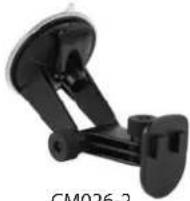
CM026-2
for GO 300, 500, & 700 without dual-T plate
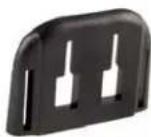
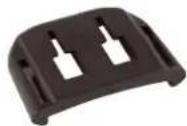

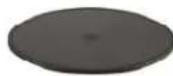
APTTO APTTOXL APTTGO520 AP036
for Tomtom One
for Tomtom One XL and Tomtom One XL-S
for Tomtom GO 520, 720, 920, and 920T
Windshield Installation
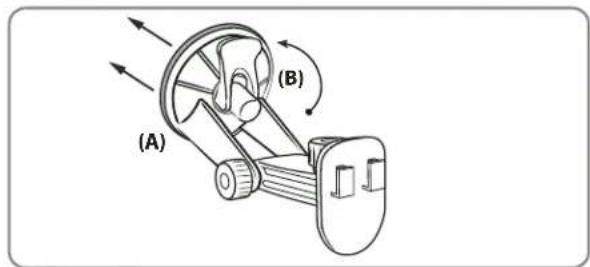
Step 1. Push the pedestal suction cup (A) firmly to the windshield. Flip the lever (B) down to secure the suction cup.
text_image
(A) (B)Dash Installation
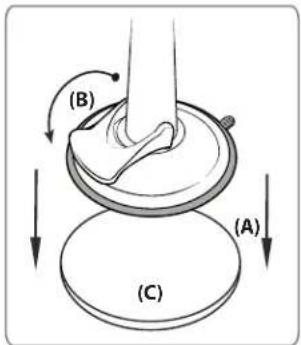
Step 1. Locate a safe flat surface on the dash or console to mount the pedestal. Clean the dash with the alcohol pad provided. Let the dash surface dry before applying the adhesive disc (C).
Step 2. Push the pedestal suction cup (A) firmly to the disc (C). Flip the lever (B) down to secure the suction cup.
text_image
(B) (A) (C)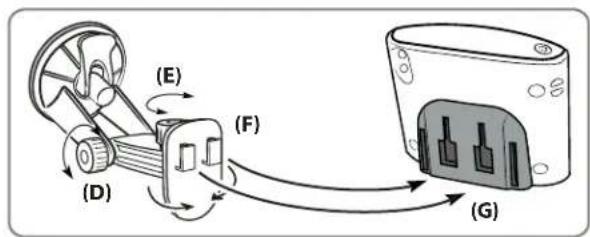
text_image
(E) (D) (F) (G)Pedestal Adjustment and Cradle Attachment
Step 1. Adjust the angle of the pedestal arm by loosening the adjustment knob (D).
Step 2. Adjust the angle and rotation of the pedestal head by loosening the adjustment knob (E).
Step 3. Attach the adapter plate to the back of the device. Attach the device and plate to the pedestal by inserting the dual T-Tabs of the pedestal (F) into the dual T-slots of the adapter plate. (G)
natural_image
Diagram showing a device with a lock and a separate view of its internal components (no text or symbols)Instructions for APTTGO520 Adapter Plate
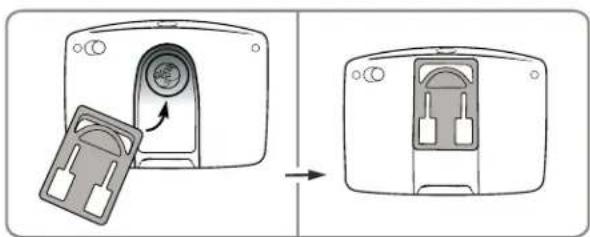
Step 1. Attach the adapter plate by sliding it up into the slot on the back of the Tomtom GO 520, 720, 920, or 920T device as shown above.
Step 2. Follow step 3 from Pedestal Adjustment & Device Cradle Installation above.
natural_image
Technical line drawing of a mechanical component with motion arrows indicating movement (no text or symbols)Instructions for GO 300, 500, and 700 adapter plate
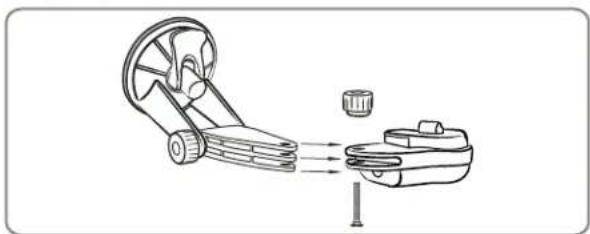
Step 1. Remove the tightening nut and screw to remove the dual-T plate head. Insert the mounting arm into the Tomtom GO 300, 500, or 700 adapter (not included). Attach the device to the adapter plate.

Safety Precautions
Do not install Arkon products over an air bag cover or within the air bag deployment zone. Arkon Resources, Inc. assumes no responsibility of liability for injury or death as a result of car crashes and/or air bag deployment.
Arkon Resources, Inc. is not responsible for any damages caused to your car, your device, or yourself due to the installation or use of the pedestal mount.
ARKON
RESOURCES INC.
The Mobile Mounting Specialists™
Consumer Hotline:
(USA) (800) 841-0884
(INT'L) (626) 254-9005
www.arkon.com
Arcadia, CA 91006 USA
Made in Taiwan
Mon-Fri. 9am-5pm, PST © Copyright 2007 Arkon Resources, Inc.