
IDATA HDMI-KVM2 - Schalter Techly - Kostenlose Bedienungsanleitung
Finden Sie kostenlos die Bedienungsanleitung des Geräts IDATA HDMI-KVM2 Techly als PDF.


| Produkttyp | HDMI KVM Extender (Schalter) |
| Modell | IDATA HDMI-KVM2 |
| Marke | Techly |
| HDMI-Version | HDMI 1.3 |
| HDCP-Version | HDCP 1.2 |
| Maximale Auflösung | 1080p @ 60 Hz |
| Übertragungsdistanz (maximal) | 120 m (mit Cat6-Kabel) |
| Unterstützte Netzwerkkabel | STP/UTP Cat5, Cat5e, Cat6 |
| KVM-Funktion | Ja, für Tastatur und Maus |
| LAN-Standard | 802.3 Ethernet 10/100/1000 Mbps |
| USB-Anschlüsse | TX: 1x USB (PC), RX: 1x USB (Tastatur/Maus) |
| Gehäusematerial | Aluminiumlegierung |
| Farbe | Schwarz |
| Abmessungen (TX/RX) | 109,6 x 89,5 x 26,3 mm (je Stück) |
| Gewicht (TX) | 160 g |
| Gewicht (RX) | 170 g |
| Stromversorgung | 5 V / 1 A (2 Netzteile im Lieferumfang) |
| Leistungsaufnahme | TX < 3,5 W, RX < 3,5 W |
| Betriebstemperatur | 0 °C bis 50 °C |
| Luftfeuchtigkeit | 10 % – 95 % (nicht kondensierend) |
| Lieferumfang | Sender (TX), Empfänger (RX), 2 Netzteile, CD mit Treibern, Bedienungsanleitung |
| Reinigung | Nur mit trockenem Tuch reinigen; keine Reinigungsmittel oder Scheuermittel verwenden |
| Sicherheitshinweise | Nur in trockenen Innenräumen verwenden; Gerät nicht öffnen; vor Wasser und Feuchtigkeit schützen |
| Garantie | Keine Haftung bei unsachgemäßer Nutzung oder Veränderungen |
Häufig gestellte Fragen - IDATA HDMI-KVM2 Techly
Benutzerfragen zu IDATA HDMI-KVM2 Techly
0 Frage zu diesem Gerät. Beantworten Sie die, die Sie kennen, oder stellen Sie Ihre eigene.
Eine neue Frage zu diesem Gerät stellen
Laden Sie die Anleitung für Ihr Schalter kostenlos im PDF-Format! Finden Sie Ihr Handbuch IDATA HDMI-KVM2 - Techly und nehmen Sie Ihr elektronisches Gerät wieder in die Hand. Auf dieser Seite sind alle Dokumente veröffentlicht, die für die Verwendung Ihres Geräts notwendig sind. IDATA HDMI-KVM2 von der Marke Techly.
BEDIENUNGSANLEITUNG IDATA HDMI-KVM2 Techly

HDMI KVM EXTENDER SU CAVO DI RETE
HDMI KVM EXTENDER OVER NETWORK CABLE
Manuale d'istruzione User's manual
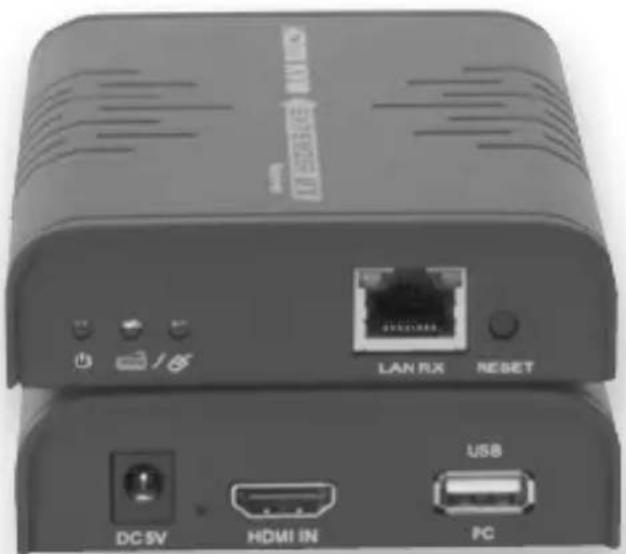
IDATA HDMI-KVM2
HDMI KVM EXTENDER sU caVo DI RETE
Gentile Cliente
Grazie per aver acquistato questo prodotto. Per ottenere il massimo delle prestazioni nella salvaguardia della sua sicurezza, le consigliamo di leggere con attenzione il presente manuale prima di collegare e mettere in funzione il prodotto. Tenga sempre a disposizione il presente manuale per ulteriori esigenze future.
IMPoRTaNTI INFoRMaZIoNI sULLa slcUREZZa
Uso PREVIsTo

Non è consentito l'uso dell'apparecchio in modi diversi da quello indicato nel presente manuale. Utilizzare il prodotto solo luoghi interni asciutti. Non rispettare le istruzioni e le precauzioni di sicurezza riportate nel presente manuale potrebbe causare incidenti mortali, lesioni e danni a persone e cose. Il costruttore/fornitore non risponde dei danni risultanti da un utilizzo non conforme all'uso previsto.


Per ridurre il rischio di shock elettrico, questo prodotto dovrebbe essere aperto SOLO da un tecnico autorizzato quando è necessario ripararlo. Scollegare il prodotto dall'alimentazione e da altri apparecchi se dovesse esserci un problema. Non esporre il prodotto ad acqua o umidità.
- Questo prodotto non è un giocattolo e non è pensato per i bambini, contiene piccole parti che potrebbero venir ingerite o inalate e provocare danni se non utilizzato correttamente!
- Installare l'apparecchio e le periferiche ad esso collegate in modo che non possano provocare danni a persone e oggetti come far inciampare o causare cadute.
- Rimuovere tutti gli imballi che potrebbero causare soffocamento se manipolati da bambini.
- Evitare di installare l'apparecchio in luoghi con temperature o umidità eccessive, o luoghi che potrebbero venire a contatto con l'acqua. Non installare vicino a bocchette dell'aria condizionata o in luoghi che presentano polvere o fumi eccessivi. Mantenere il prodotto distante da materiali infiammabili ed esplosivi
• Non installare il prodotto in luoghi soggetti a vibrazioni o oscillazioni.
- Non modificare o alterare il prodotto e i suoi accessori! Nor utilizzare parti danneggiate.
- Mantenere sufficiente spazio attorno alla periferica per garantir una buona ventilazione, permettere una maggiore libertà di movimento ed evitare danni.
- Tenere il prodotto lontano da ambienti che presentano forti campi magnetici.
- Non scollegare il prodotto quando è in funzione; non mescolare il trasmettitore col ricevitore durante l'installazione.
- Alimentatore: DC5V, utilizzare solo l'alimentatore fornito nella confezione. Non utilizzare se l'alimentatore risulta danneggiato. Nel caso in cui non sia possibile utilizzare l'alimentatore originale fornito nella confezione, assicurarsi che le specifiche dell'alimentatore sostitutivo corrispondano a quelle dell'originale.
INTRODUZIoNE
Questo prodotto è un HDMI KVM Extender costituito da una unit locale (trasmettitore) e da una unità remota (ricevitore). Questo HDMI KVM extender trasmette il segnale HDMI fino a 120 metri tramite cavo di rete e supporta risoluzione fino a 1080p@60Hz. Permette l'accesso ad un computer da una console remota tramite le connessioni USB (per mouse e tastiera USB).
caRaTTERIsTlcHE
- Estende il segnale HDMI fino a 120 metri tramite un singolo cavo di rete
• Supporta massima risoluzione fino a 1080p@60Hz - Indicatori led, permettono di conoscere lo stato dell'alimentazione e della connessione USB facilmente
- Supporta funzione KVM per un conveniente controllo remoto
• Supporta LAN standard 802.3 Ethernet 10/100/1000Mbps - Compatibile con cavi di rete STP e UTP CAT5/5e/6
• Struttura in alluminio, solida e durevole
coNTENUTO DELLa coNFEZIoNE
- Trasmettitore HDMI KVM Extender x1pz
• Ricevitore HDMI KVM Extender x1pz - Alimentatore x2pz
- CD con i driver x1pz
• Manuale d'istruzione x 1pz
REqUIsITI D'INsTaLLaZIoNE
- Dispositivo sorgente: PC o altri dispositivi con scheda grafica HDMI
- Dispositivo di visualizzazione: con ingresso HDMI, tipo SDTV, HDTV o monitor
- Cavo di rete: UTP/STP Cat.5E/6, conforme allo standard EIA 568B. Lunghezza di trasmissione: Cat5E 100m, Cat6 120m
DESCRIZIONE PANNELLO
1. HDMI EXTENDER TX (Trasmettitore)
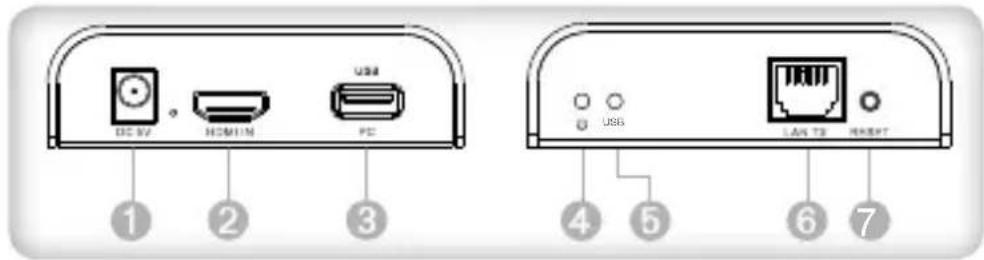
① Ingresso alimentazione (DC5V)
② Ingresso segnale HDMI
③ Porta USB: per connettere il PC
4 Indicatore di accensione
⑤ Indicatore connessione USB
⑥ Uscita segnale LAN
⑦ Tasto reset
2. HDMI EXTENDER RX (Ricevitore)
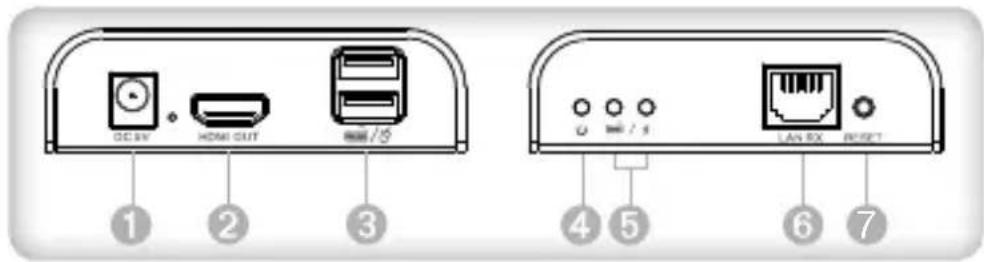
① Ingresso alimentazione (DC5V)
② Uscita segnale HDMI
③ Porta USB: per collegare la tastiera e il mouse
4 Indicatore di accensione
⑤ Indicatore connessione USB
6 Ingresso segnale LAN
⑦ Tasto reset
PROCEDURE DI INSTALLAZIONE
Come preparare un cavo di rete
Seguire lo standard EIA-568B:
1-Arancio/bianco
5-Blu/bianco
2-Arancio
6-Verde
3-Verde/bianco
7-Marrone/bianco
4-Blu
8-Marrone
Installare i driver sul computer prima di utilizzare questa apparecchiatura
- Scegliere la cartella CH34XSER_Driver
- Non è richiesto il riavvio della periferica dopo che l'installazione è stata effettuata
SISTEMI OPERATIVI SUPPORTATI E VERSIONI
Windows 10, Windows 8, Windows 7, Windows 7 x64, Window Server 2008, Windows Server 2008 x64, Windows Vista, Window Vista x64, Windows Server 2003, Windows XP, Windows XP-x64, Windows 2000, Windows ME, Windows 98SE
scHEMa DI coLLEgaMENTo
La distanza di trasmissione può raggiungere i 120m per 1080p tramite un cavo Cat6.
![graph LR PC["PC"] -->|H DM I| TransTX["Trans sm itte r TX"] TransTX -->|USB| TransTX TransTX -->|cable e| ReceiveRX["Receive r RX"] ReceiveRX --> TV["TV"] KeKeyboard["Keyboard / mouse"] --> ReceiveRX](/content/2026/05/789525/images/ecc3cf199db064f3d0857989794dc9f95c02fb20b50ad908d39acceeedfb01af.jpg)
NoTa: la connessione tramite switch (dedicato per questa funzione) è supportata ma si consiglia di non usare più di un ricevitore contemporaneamente.
coNNEssloNE coN swITcH
![graph LR PC["PC"] -->|H DM I| USB["USB"] USB -->|Tran sm itte r TX| CAB1["e"] CAB1 --> Switch1["Switch"] Switch1 --> Switch2["Switch*N"] Switch2 --> ReceiveRx["Receive r RX"] ReceiveRx --> Keyboard["/ mouse"] TV["TV"] <--> ReceiveRx](/content/2026/05/789525/images/da48a96408d3401dbffefba833696b53a35b0ac1b1d9590d0ec3334e7210b878.jpg)
NoTa: la distanza di trasmissione dipende dal tipo di cavo di rete: CAT5E -> 100m, CAT6 -> 120m
Faq
q: La luce gialla della porta LAN sta lampeggiando ma lentamente?
a: 1) Verificare che il trasmsettitore e il ricevitore non siano st installati invertiti.
2) Verificare che la sorgente HDMI presenti un segnale in uscita.
3) Sostituire il cavo HDMI del trasmettitore
q: La luce gialla della porta LAN sta lampeggiando velocemente ma non si riesce a visualizzare le immagini?
a: 1) Verificare che il cavo HDMI del ricevitore sia connesso correttamente
2) Se la sorgente HDMI è una scheda grafica, impostare la risoluzione che può essere supportata dallo schermo
3) Sostituire il cavo HDMI del ricevitore
q: La luce gialla della porta LAN non è accesa?
a: 1) Verificare la connessione del cavo di rete
2) Il cavo di rete è troppo lungo
Q: Vengono visualizzati dei colori anormali o lampeggiano dopo che tutte le periferiche sono state connesse correttamente?
A: 1) Premere il tasto reset dell'extender HDMI
2) Assicurarsi che il cavo di rete sia stato cablato in conformità allo standard EIA-568B
Q: L'USB non funziona?
A: 1) Installare nuovamente il software con i driver, verificare chi cavi USB siano connessi correttamente e quindi resettare trasmettitore e ricevitore
SPECIFICHE
| Versione HDMI HDMI1.3 | |
| Versione HDCP HDCP1.2 | |
| Larghezza di banda video ≤ 70Mbps | |
| Risoluzione HDMI supportata | 640*480@60Hz, 800*600@60Hz, 1024*768@60Hz, 1280*720@60Hz, 1360*768@60Hz, 1440*900@60Hz, 1400*1050@60Hz, 1680*1050@60Hz, 1920*1080@60Hz |
| Audio supportato PCM (44.1KHz, 48Khz) | |
| Connessione HDMI Tipo A, 19-pin, femmina | |
| Connessione di rete RJ45 | |
| Temperatura d'esercizio 0°C ~ 50°C | |
| Umidità relativa 10-95% (senza condensa) | |
| Alimentazione 5V/1A * 2pz | |
| Consumo TX<3.5w RX<3.5w | |
| Dimensione prodotto | 109.6x89.5x26.3 mm * 2pz |
| Peso | TX: 160g RX: 170g |
| Colore | Nero |
Manutenzione: pulire solo con un panno asciutto. Non utilizzare solventi detergenti o abrasivi.
Garanzia: non sarà accettata alcuna garanzia o responsabilità in relazione a cambiamenti e modifiche del prodotto o a danni determinati dall'uso improprio del prodotto stesso.

In conformità alla normativa WEEE le apparecchiature elettriche ed elettroniche non devono essere smaltite con i rifiuti domestici. Il presente prodotto deve essere consegnato ai punti di raccolta preposti allo smaltimento e riciclo delle apparecchiature elettriche ed elettroniche. Contattate le autorità locali competenti per ottenere informazioni in merito allo smaltimento corretto della presente apparecchiatura.

Con il marchio CE, Techlygarantisce che il prodotto e conforme alle norme e direttive europee richieste.
HDMI KVM EXTENDER oVER NETwoRK cable
Dear Customer
Thank you for purchasing this product. For optimum performance air safety, please read these instructions carefully before connecting, operating or adjusting this product. Please keep this manual for future reference.
IMPoRTaNT saFETY INsTRUcTloN
INTENDED Use

We do not permit using the device in other ways like described in this user's manual. Use the product only in dry interior rooms. Not attending to these regulations and safety instruction might cause accidents, injuries, and damages to persons and property. The manufacturer/supplier assumes no liability for damages caused by failure to comply with the intended use.


To reduce risk of electric shock, this product should ONLY be opened by an authorized technician when
service is required. Disconnect the product from mains and other equipment if a problem should occur. Do not expose the product to water or moisture.
- Your product is not a toy and is not meant for children, because it contains small parts which can be swallowed and can injure when used inappropriately!
- Please install the system and devices attached to it in a way that persons cannot be injured, or objects not be damaged for example by dropping or stumbling.
- Please remove the packing materials, because children may do themselves on them while playing. Furthermore, there is a risk of swallowing and inhalation of incidentals and insulating material.
- Avoid places with high temperatures, or humidity, or places which might come into contact with water. Do not install the product close to openings of air conditioners, or at places with an excess amount of dust or smoke. Keeps distance from flammable air explosive devices
- Do not install the product at places subject to vibration, or oscillation
- Do not modify and alter the product and any accessories! Do not use any damaged parts.
- Keep enough space around all devices for a good ventilation and free motion and to avoid damages.
-
Keep this product away from strong static and magnetic environment.
-
Do not unplug when it is in using; do not mix up the transmitter and receiver during installation
- Power supply: DC 5V, usage only the supplied power unit, do not use the power supply if it is damaged. Make sure the specification matched if using 3rd party DC adapters
INTRoDUcTloN
This is a HDMI KVM Extender with a transmitter unit (local side and receiver unit (remote side). This HDMI KVM extender transmits HDMI signal up to 120 meters via network cable, and the resolution supported is up to 1080p@60Hz. It allows access to a computer system from a remote console by USB connectors (USB keyboard and mouse).
FEaTUREs
• 1. Extends HDMI signal up to 120 meters via a single network cable
• The highest resolution supported is up to 1080p@60Hz
- LED indicators, know the status of power and USB connecti easily
• Supports KVM function, remote control conveniently
• Supports LAN standard 802.3 Ethernet 10/100/1000Mbps
• Compliant STP and UTP CAT5/5e/6 network cables
• Aluminum alloy housing design, stable and durable
PacKagE coNTENTS
• HDMI KVM Extender TX x 1pc
• HDMI KVM Extender RX x 1pc
• Power adapter x 2pcs
• CD (USB driver software) x 1pc
- User manual x 1pc
INsTaLLaTloN REqUIREMENTS
- Source device: PC or other device with HDMI graphics card
- Display devices: with HDMI input port, SDTV, HDTV and monitor
- Network cables: UTP/STP Cat.5E/6 network cables, which following the standard EIA-568B. Transmission length: Cat.5E – 100m, Cat.6 – 120m
PANEL DESCRIPTION
1. HDMI EXTENDER TX (Transmitter)
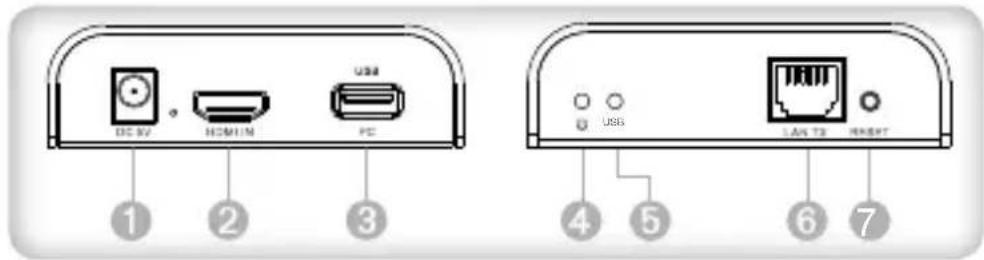
① Power input (DC5V)
② HDMI signal input
③ USB port: to connect with PC
4 Power indicator
⑤ USB connection indicator
6 LAN signal output
⑦ Reset button
2. HDMI EXTENDER RX (Receiver)
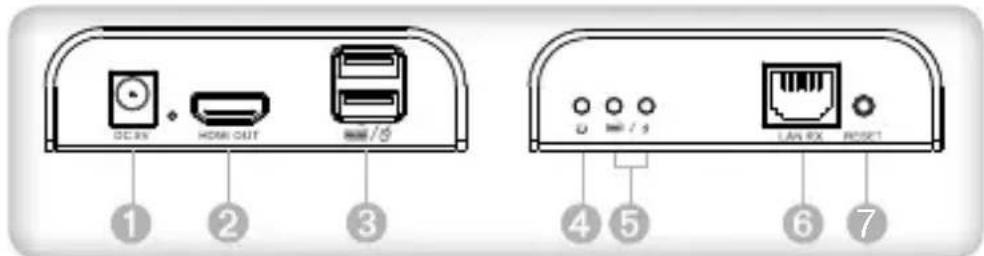
1 Power input (DC5V)
② HDMI signal output
③ USB port: to connect with keyboard/mouse
4 Power indicator
⑤ USB connection indicator
⑥ LAN signal input
⑦ Reset button
INSTALLATION PROCEDURE
How to make a Cat5E/Cat6 network cable
Follow the standard EIA-568B:
1-Orange/white 5-Blue/white
2-Orange 6-Green
3-Green/white 7-Brown/white
4-Blue 8-Brown
Install driving Software of computer USB port before using the device
- Chose English "CH34XSER_Driver" folder
- No need restart when the installation is completed
SUPPORTED OS AND VERSION
Windows 10, Windows 8, Windows 7, Windows 7 x64, Window Server 2008, Windows Server 2008 x64, Windows Vista, Window Vista x64, Windows Server 2003, Windows XP, Windows XP-x64, Windows 2000, Windows ME, Windows 98SE
gENERaL coNNEcTloN
Transmission distance can be up to 120 meters for 1080p over one Cat6.
![graph LR PC["PC"] -->|H DM I| TransMits["Trans sm itte r TX"] TransMits -->|USB| TransMits TransMits -->|cable e| ReceiverRx["Receiver RX"] ReceiverRx --> TV["TV"] ReceiverRx --> Keyboard["Keyboard / mouse use"]](/content/2026/05/789525/images/7c54b4055c281a78381588d514d7e2dba27177db2d228f36dbb7f6766689fbfb.jpg)
NoTE: connection via switch (reserved for this use) is supported but it strongly recommended to use one receiver only at the same time.
swITcH coNNEcTloN
![graph LR PC["PC"] -->|H DM I| USB["USB"] USB -->|trans sm itte r TX| Cable["cable"] Cable --> Switch1["Switch"] Switch1 --> Switch2["Switch*N"] Switch2 --> ReceiverRx["Receiver RX"] ReceiverRx --> Keyboard["Keyboard / mouse use"] TV["TV"] <--> ReceiverRx](/content/2026/05/789525/images/7d6b0a9f4435eeb721369a0d3a5ad0f054a7a2f0467944b96e693dfee5a0bf68.jpg)
NoTE: Transmission distance depends on type of network cable Cat.5E -> 100m; Cat6 -> 120m
Faq
q: Yellow light of Lan port is flashing but slowly?
a: 1) Check whether HDMI Extender Transmitter and HDMI Extender Receiver is reversed
2) Check whether HDMI source device output HDMI signal correctly
3) Check the HDMI cable of transmitter
q: Yellow light of Lan port is flashing quickly but no display?
a: 1) Check whether HDMI cable of Receiver is well connected
2) If the HDMI source is graphic card, please set the resolution to be supported by display
3) Change the HDMI cable of receiver
q: Yellow Led light of Lan port is not light?
a: 1) Check connection of network cable
2) Network cable is too long
Q: Abnormal color display or flashing after all the devices are connected?
A: 1) PIs press reset button of HDMI extender.
2) Make sure the network cable is made according to the standard EIA-568B.
Q: USB does not work?
A: Re-install the driving software, check and make sure the US cables are connected well, then reset Transmitter and Receiver.
SPECIFICATION
| HDMI version HDMI1.3 | |
| HDCP version HDCP1.2 | |
| Video bandwidth ≤70Mbps | |
| HDMI resolution supported | 640*480@60Hz, 800*600@60Hz, 1024*768@60Hz, 1280*720@60Hz, 1360*768@60Hz, 1440*900@60Hz, 1400*1050@60Hz, 1680*1050@60Hz, 1920*1080@60Hz |
| Audio support PCM (44.1KHz, 48Khz) | |
| HDMI connector Type A, 19-pin, female | |
| LAN connection RJ45 | |
| Working temperature 0°C ~ 50°C | |
| Relative humidity 10-95% (non condensing) | |
| Power supply 5V / 1A *2pcs | |
| Power consumption TX<3.5w RX<3.5w | |
| Product dimension | 109 x 89.5 x 26.3 mm * 2pcs |
| Weight | Tx:160g RX:170g |
| Color | Black |
Maintenance: clean only with a dry cloth. Do not use cleaning solvents or abrasives.
Warranty: no guarantee or liability can be accepted for any changes and modifications of the product or damage caused due to incorrect use of this product.

In compliance with EU Directive WEEE this product is marked with this symbol. It means that used electrical and electronic products should not be mixed with general household waste.
There is a separate collections system for these products in compliance with WEEE directive, otherwise contaminative and hazardous substances can pollute the environment.

With the CE sign, Techly® ensures that the product is conformed to the basic European standards and directives.


- HDMI KVM EXTENDER SU CAVO DI RETE
- GENTILE CLIENTE
- IMPORTANTI INFORMAZIONI SULLA SLCUREZZA
- USO PREVISTO
- INTRODUZIONE
- CARATTERISTLCHE
- CONTENUTO DELLA CONFEZIONE
- REQUISITI D'INSTALLAZIONE
- DESCRIZIONE PANNELLO
- HDMI EXTENDER TX (TRASMETTITORE)
- HDMI EXTENDER RX (RICEVITORE)
- PROCEDURE DI INSTALLAZIONE
- COME PREPARARE UN CAVO DI RETE
- INSTALLARE I DRIVER SUL COMPUTER PRIMA DI UTILIZZARE QUESTA APPARECCHIATURA
- SISTEMI OPERATIVI SUPPORTATI E VERSIONI
- SCHEMA DI COLLEGAMENTO
- CONNESSLONE CON SWITCH
- FAQ
- HDMI KVM EXTENDER OVER NETWORK CABLE
- DEAR CUSTOMER
- IMPORTANT SAFETY INSTRUCTLON
- INTENDED USE
- INTRODUCTLON
- FEATURES
- PACKAGE CONTENTS
- INSTALLATLON REQUIREMENTS
- PANEL DESCRIPTION
- HDMI EXTENDER TX (TRANSMITTER)
- HDMI EXTENDER RX (RECEIVER)
- INSTALLATION PROCEDURE
- HOW TO MAKE A CAT5E/CAT6 NETWORK CABLE
- INSTALL DRIVING SOFTWARE OF COMPUTER USB PORT BEFORE USING THE DEVICE
- SUPPORTED OS AND VERSION
- GENERAL CONNECTLON
- SWITCH CONNECTLON
Marke : Techly
Modell : IDATA HDMI-KVM2
Kategorie : Schalter