
Cal 2010 - Uhr CITIZEN - Kostenlose Bedienungsanleitung
Finden Sie kostenlos die Bedienungsanleitung des Geräts Cal 2010 CITIZEN als PDF.


| Produkttyp | Analog-Quarzuhr mit Zentralsekunde |
| Marke | Citizen |
| Modell | Cal 2010 |
| Kalibernummer | 2010A-01, 02 |
| Gehäusedicke (Uhrwerk) | 3,8 mm |
| Gehäusedicke (mit Batteriefach) | 4,15 mm |
| Genauigkeit | ±20 Sekunden pro Monat bei normalen Temperaturen |
| Oszillation | 32.768 Hz |
| Betriebstemperaturbereich | -10°C bis +60°C |
| Integrierter Schaltkreis | C/MOS-LSI |
| Schrittmotor | Bipolar |
| Einstellmethode | DFC (Digital Frequency Control) |
| Datumsanzeige | Ja, mit Schnelleinstellung |
| Wochentagsanzeige | Ja, mit Schnelleinstellung, zweisprachig |
| Sekundenstopp | Ja |
| Stromsparschalter | Ja |
| Lastausgleichsschaltung | Ja |
| Batterietyp | Silberoxid 280-39 (SR-626SW) |
| Batterielebensdauer | ca. 2 Jahre |
| Reinigung | Mit weichem, trockenem Tuch; keine Chemikalien |
| Reparatur | Nur durch autorisierten Fachhändler |
Häufig gestellte Fragen - Cal 2010 CITIZEN
Benutzerfragen zu Cal 2010 CITIZEN
0 Frage zu diesem Gerät. Beantworten Sie die, die Sie kennen, oder stellen Sie Ihre eigene.
Eine neue Frage zu diesem Gerät stellen
Laden Sie die Anleitung für Ihr Uhr kostenlos im PDF-Format! Finden Sie Ihr Handbuch Cal 2010 - CITIZEN und nehmen Sie Ihr elektronisches Gerät wieder in die Hand. Auf dieser Seite sind alle Dokumente veröffentlicht, die für die Verwendung Ihres Geräts notwendig sind. Cal 2010 von der Marke CITIZEN.
BEDIENUNGSANLEITUNG Cal 2010 CITIZEN
TECHNICAL INFORMATION
O
CITIZEN QUARTZ
Cal. No.20***
Cal. No.21※※※
O
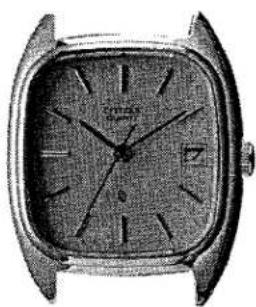
natural_image
Vintage wristwatch with square frame and circular dial (no visible text or symbols)[CAL. NO. 20***]
[CAL. NO. 21***]
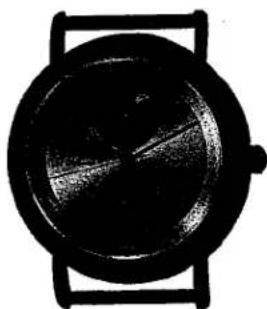
natural_image
Close-up of a wristwatch with black frame and circular dial (no visible text or symbols)[CAL. NO. 218**]
§1. OUTLINE
Cal. 20****and 21**** series are analog quartz watches which are realized through a reduction of the numbers of component parts and a mass production system, through, thus playing an important role in leading the wristwatch market with reasonable prices.
They feature a very thin movement plus a good design of watch.
Cal. 20***series are for ladies and Cal. 21***series for gentlemen.
Cal. 2180* is an analog quartz watch with additional display functions and a handsome functional design.
With the moon's age display and sun display, it can tell the moon's phase as well as the positions of the moon and the sun. Furthermore, the moon's age display can be corrected quickly and independently.


§3. SPECIFICATIONS
| Caliber No. | 2000A-01,022001A-01,022002A-01,02 | 2010A-01,02 | 2020A-01,02 | 2030A-01,022031A-01,02 | |
| Type | Analog quartz crystal watch | ||||
| (w/center second) | (w/no center second) | (w/center second) | |||
| Movement | Size (mm) | 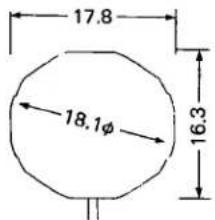 | 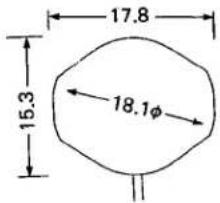 | ||
| Thickness (mm) | 3.8 | 2.8 | |||
| Thickness at power cell part (mm) | 4.15 | 3.15 | |||
| Accuracy | ±20 sec./month at normal temperatures | ||||
| Oscillation | 32,768Hz | ||||
| Effective temperature range | -10°C ~ +60°C (14°F ~ 140°F) | ||||
| Integrated circuit | C/MOS-LSI (1 unit) | ||||
| Converter | Bipolar step motor | ||||
| Adjustment of time rate | By DFC (Digital Frequency Control) method with unit time of measurement of 10 sec. and with no terminal for adjustment) | ||||
| Additional functions | Date (w/quick setting) | Yes | Yes | No | No |
| Day (w/quick setting) | Yes | No | No | No | |
| Bilingual display of days of the week | Yes | No | No | No | |
| Second hand stopping device | Yes | Yes | No | Yes | |
| Power saving switch | Yes | Yes | Yes | Yes | |
| Load compensating circuit | Yes | Yes | Yes | Yes | |
| Dual time | No | No | No | No | |
| Power cell (silver oxide cell) | 280-39 (SR-626SW, Ag2O/NaOH) | ||||


| 2040A-01, 022041A-01, 02 | 2100A-01 | 2110A-01 | 2140A-01 | 2180-0 | |
| (w/small second) | (w/center second) | ||||
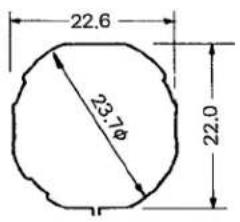 | 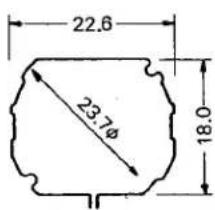 | ||||
| 3.6 | 3.8 | 3.7 | , 3.7 | ||
| 3.95 | 4.15 | 4.05 | 4.0 | ||
| No | Yes | Yes | No | No | Moon dial display periodApprox. 24 hr. 50.49 min. (The average rotation period of the earth on its axis using the moon as reference is 24 hr. 50.47 min., which causes an annual delay of approx. 7 minutes with the moon dial display.)Moon's age display periodApprox. 29.57 days (The average period of a synodical month is 29.530589 days, which causes an annual delay of approx. 0.5 days with the moon's age display.)Sun dial display period24 hours (The average rotation period of the earth on its axis using the sun as reference.) |
| No | Yes | No | No | No | |
| No | Yes | No | No | No | |
| Yes | Yes | Yes | Yes | Yes | |
| Yes | Yes | Yes | Yes | Yes | |
| Yes | Yes | Yes | Yes | Yes | |
| No | No | No | Yes | No | |
| Approx. 2 years | Approx. 2 years | ||||
§3. HANDLING INSTRUCTIONS
3-1. CAL 20\*\*\*\*/21\*\*\*\* (Except 218\*\*)
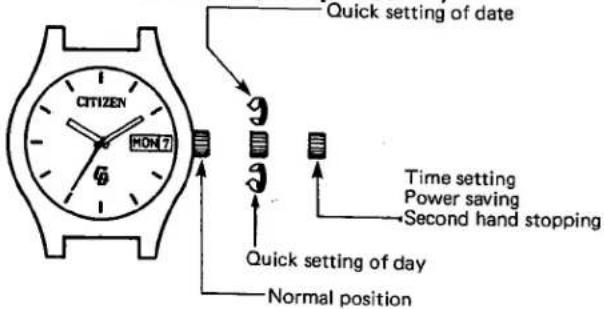
flowchart
graph TD
    A["QUICK SETTING OF DATE"] --> B["9: Time setting"]
    B --> C["9: Power saving"]
    C --> D["Second hand stopping"]
    D --> E["Time setting"]
    E --> F["9: Quick setting of day"]
    F --> G["Normal position"]
(Note) The crown must always be set at the normal position before it is pulled out at the 1st click-stop position.
*Avoid giving a quick setting to both the date and day displays while the calendar mechanism is working.
Working Time of Calendar
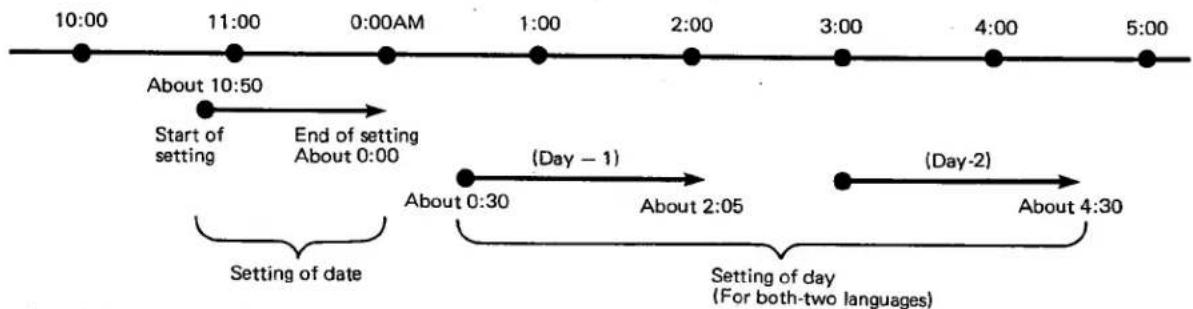
●A_quick setting of day is impossible during the working time of day (about 0:30AM \~ about 4:30 AM).
(Even if such quick setting is carried out, no damage is given to the watch function.)
- In case a quick setting is given to the date during the working time of date (about 10:50PM \~ about 0:00AM), the date does not change even after 0:00AM (with the crown pushed back to its normal position and the timing advanced).
The crown must be set at its normal position after setting the time and calendar.
*It rarely occurs that the second hand has a backward turn during a turning of hands. (Such phenomenon will occur when the hands are turned backward suddenly and consciously after a consecutive forward turning, and this scarcely occurs in the normal way of turning of hands.) This is due to the fact that only the train wheels (rotor and fifth wheel) are used instead of a brake lever to prevent a rotation of the train wheels during a turn of hands. Thus the second hand may turn backward in a slight probability. Such phenomenon, however, does not affect the watch function at all.
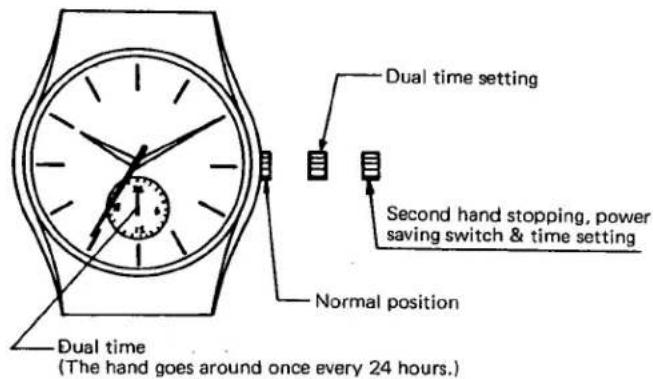
Time setting should be made first with the crown remaining pulled out to the second clicking position. (At this time, the hand for dual time also goes round.) Then, the dual time should be set to the right time with the crown remaining pulled to the first clicking position.
After setting time, be sure to push the crown back to its normal position and then use the watch.
If the watch is used with the crown remaining pulled to the first clicking position, the dual time does not move.
3-2. 218※※
1) Names of the parts and their functions
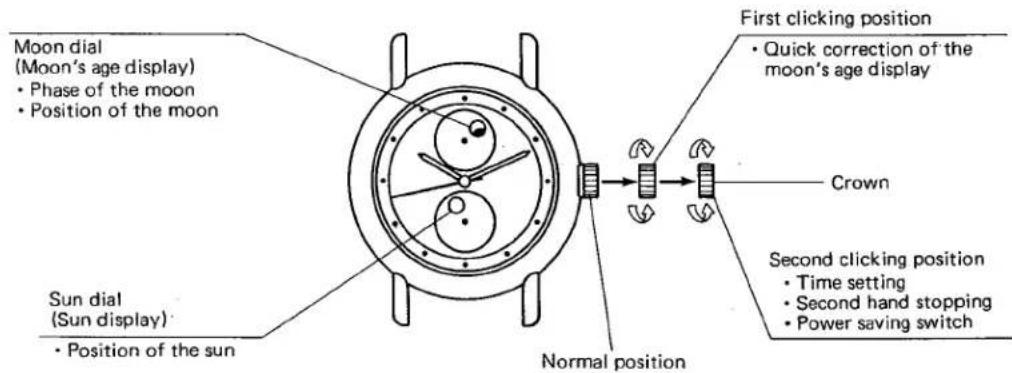
2) Method for reading the moon dial and the sun dial
●The position of the moon and the sun can be learned from where the moon dial and the sun dial rotate.
Culmination above and below an observer ... Culmination above an observer is a phenomenon that occurs when a celestial body passes the meridian which connects the celestial north pole, the zenith (the point on the celestial sphere vertically above an observer) and the celestial south pole.
Culmination below an observer is a phenomenon that occurs when a celestial body passes the meridian that connects the celestial north pole, the nadir (the point on the celestial sphere directly below an observer) and the celestial south pole.
| Culmination above an observer | Culmination below an observer |
Right above (Top position) 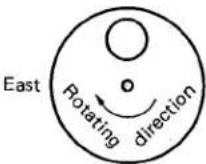 West West | 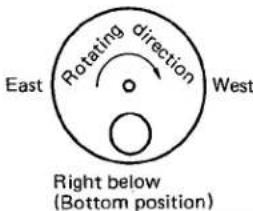 |
*The time when the sun dial showing the sun display comes to the top position, is 12 o'clock noon. The time when it comes to the bottom position, is 12 o'clock midnight. The moon dial and the sun dial are identical with each other in the specifications including the rotating direction.
The inflow or outflow of the tide is learned from the moon's age display.
| Moon's age: 0 (New moon) Spring tide | Moon's age: 7 Neap tide | Moon's age: 15 (Full moon) Spring tide | Moon's age: 22 Neap tide |
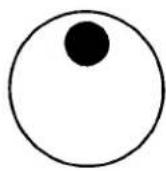 | 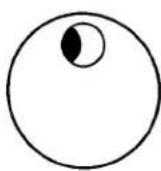 | 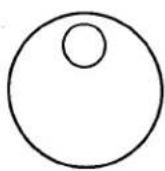 | 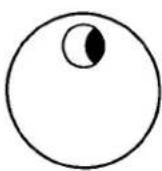 |
* The moon's age display is designed to show the moon's age and is not designed to show the moon's phases.
- The moon's age... The moon's age is the time elapsed starting from the new moon, which is shown on a day basis. Particularly, the time elapsed until noon on a given day is called the meridian age of the moon. The moon's age carried in the newspaper is the meridian age of the moon.
In this watch, both the moon's age display (showing the phase and position of the moon) and the sun display (showing the position of the sun) function in relation with the movement of the hands.
Set the time by turning the crown clockwise or counterclockwise with the crown remaining pulled out to the second clicking position. At this moment, pay attention to the sun display (the position of the sun).
The method for setting the moon's age display is described below, which is available in two ways: a) The general method and b) The method by way of quick correction. It may be convenient for you if you use the right way in the right place.
Installation of the sun display has been carried out adjusting it to the time, and thus the local adjustment is not necessary for the sun display.
3) Method for setting the moon's age display a. The general method
natural_image
Technical diagram of a mechanical component with concentric circles and a shaft, showing no text or symbols.[The time is 12 o'clock noon]
natural_image
Diagram of a circular mechanical or electrical component with internal components and directional arrows (no text or symbols)[The time is 12 o'clock noon at the moon's age of 0]
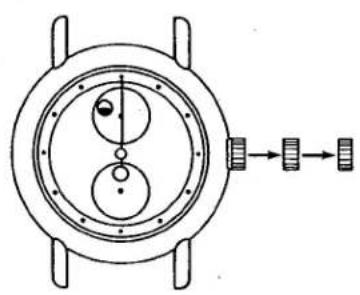
① Pull the crown out to the second clicking position. Then, the second hand stops running.
② Set the hour and minute hands and the sun dial to the 12 o'clock noon position (the top position) by turning the crown clockwise or counterclockwise.
- Whether the time belongs to a.m. or p.m. is confirmed by the position of the sun.
If the sun display is at the top position, the time is 12 o'clock noon.
If the sun display is at the bottom position, the time is 12 o'clock midnight.
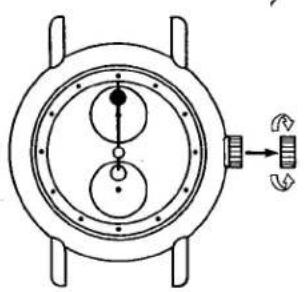
③ Place the crown in the first clicking position.
④ Turn the crown clockwise or counterclockwise so that the moon dial will display the new moon (or the conjunction...the state in which the moon is not seen from the earth).
⑤ With the moon dial display remaining as the new moon, set the moon dial to the 12H position (the top position). At this moment, the time is 12 o'clock noon at the moon's age of 0.
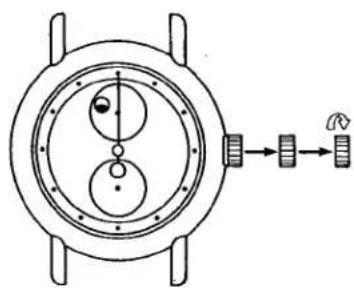
⑥ Confirm today's moon's age
- The moon's age of a given day or the following day is sometimes carried in the weather forecast column of the regional page of the newspaper of the day. Please refer to it.
When setting the moon's age display referring to the moon's age of the following day, subtract the moon's age for one day from the moon age of the following day.
Count fractions of .5 and over as a unit and cut away the rest.
Example) The moon's age of the following day: 5.3
$$ 5. 3 - 1 = 4. 3 \rightarrow 4 $$
The moon's age of a given day comes to 4.

natural_image
Technical diagram of a mechanical component with concentric circles and mounting holes, showing internal structure and directional arrow (no text or labels)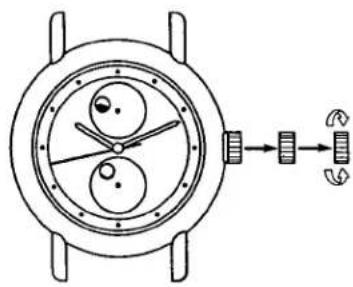
natural_image
Diagram of a mechanical device with rotating components and directional arrows indicating motion (no text or symbols)⑦ Place the crown in the second clicking position.
⑧ Turn the crown clockwise so that the sun dial will turn clockwise starting at the 12 o'clock noon position (the top position). Turn the sun dial the number of times equivalent to the moon's age and adjust it to the 12 o'clock noon position.
Example)
In case the moon's age of a given day is 4: Pull the crown out to the second clicking position. By turning the crown clockwise, turn the sun dial 4 times starting at the 12 o'clock noon position (the top position) and adjust it to the 12 o'clock noon position (the top position).
At this time, the moon's age display indicates 12 o'clock noon at the moon's age of 4.
⑨ Set the hands to the current time with the crown remaining pulled out to the second clicking position.
⑩ If the crown is pushed back into the normal position, the watch starts to keep time.
b. The method by way of quick correction

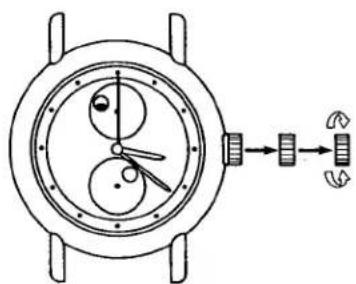
natural_image
Diagram of a mechanical device with gears and a directional arrow, no text or symbols present① Confirm the moon's age of a given day.
* Refer to the No. 6 of the preceding item a) The general method.
② Confirm when the moon culminates at the moon's age of a given day referring to the "Timetable of the moon's culmination" which is attached in a separate sheet.
③ Pull the crown out to the second clicking position and set the hands to the time when the moon culminates.
* Pay attention to whether the time belongs to a.m. or p.m. (the position of the sun display).
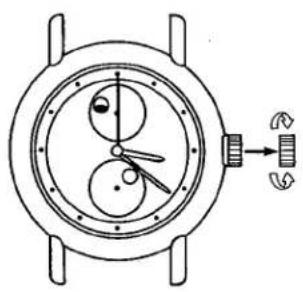
natural_image
Technical line drawing of a mechanical watch with dual gears and a directional arrow (no text or symbols)④ Place the crown in the first clicking position.
Turn the crown clockwise or counterclockwise so that the moon dial will display the new moon (conjunction) and adjust the moon dial to the top position.
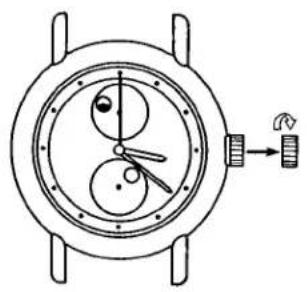
natural_image
Technical diagram of a mechanical watch with two circular components and a directional arrow indicating rotation (no text or labels)⑤ With the crown remaining pulled out in the first clicking position, turn the crown clockwise so that the moon dial will turn clockwise. Turn the moon dial the number of times equivalent to the moon's age of a given day and then adjust the moon dial to the top position. The number of times of turning the moon dial is obtained from the "Timetable of the moon's culmination".
* At this moment, the time when the moon culminates on the given day is indicated.
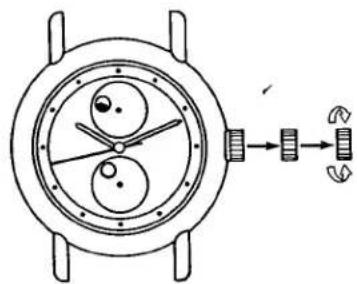
natural_image
Diagram of a mechanical watch with internal components and a directional arrow indicating motion (no text or symbols)⑥ Place the crown in the second clicking position. Then set the hour, minute and second hands to the current time.
⑦ If the crown is pushed back into the normal position, the watch starts to keep time.
*The moon's phase and the position of the sun and the moon shown on this watch may slightly differ from the reality due to the nonuniform motion of the sun and the moon and the difference between the longitude at the given place and the longitude where the standard time is kept. Accordingly, use the display shown on the watch as a standard.
Timetable of the moon's culmination
| The meridian age of the moon | Time when the moon culminates | Number of times of turning the moon dial | The meridian age of the moon | Time when the moon culminates | Number of times of turning the moon dial |
| 0 | 12 hr. 00 min. | 0 | 15 | - | - |
| 1 | 12 hr. 50 min. | 1 | 16 | 0 hr. 37 min. | 15 |
| 2 | 13 hr. 41 min. | 2 | 17 | 1 hr. 28 min. | 16 |
| 3 | 14 hr. 31 min. | 3 | 18 | 2 hr. 18 min. | 17 |
| 4 | 15 hr. 22 min. | 4 | 19 | 3 hr. 08 min. | 18 |
| 5 | 16 hr. 12 min. | 5 | 20 | 3 hr. 59 min. | 19 |
| 6 | 17 hr. 03 min. | 6 | 21 | 4 hr. 49 min. | 20 |
| 7 | 17 hr. 51 min. | 7 | 22 | 5 hr. 40 min. | 21 |
| 8 | 18 hr. 44 min. | 8 | 23 | 6 hr. eo min. | 22 |
| 9 | 19 hr. 34 min. | 9 | 24 | 7 hr. 21 min. | 23 |
| 10 | 20 hr. 25 min. | 10 | 25 | 8 hr. 11 min. | 24 |
| 11 | 21 hr. 15 min. | 11 | 26 | 9 hr. 02 min. | 25 |
| 12 | 22 hr. 06 min. | 12 | 27 | 9 hr. 52 min. | 26 |
| 13 | 22 hr. 56 min. | 13 | 28 | 10 hr. 43 min. | 27 |
| 14 | 23 hr. 47 min. | 14 | 29 | 11 hr. 33 min. | 28 |
*When the moon's age is 15, set the moon dial to the age before or after 15, namely 14 or 16 and then correct it at a later period by advancing or turning back by 24 hours.
*When the moon's age is beyond 29.5, set the moon dial to the age of 0.


- TECHNICAL INFORMATION
- §1. OUTLINE
- §3. HANDLING INSTRUCTIONS
- 3-1. CAL 20\*\*\*\*/21\*\*\*\* (Except 218\*\*)
- 3-2. 218※※
- 1) Names of the parts and their functions
- 2) Method for reading the moon dial and the sun dial
- 3) Method for setting the moon's age display a. The general method
- Example)
- b. The method by way of quick correction
Marke : CITIZEN
Modell : Cal 2010
Kategorie : Uhr