
Cal 3531 - Uhr CITIZEN - Kostenlose Bedienungsanleitung
Finden Sie kostenlos die Bedienungsanleitung des Geräts Cal 3531 CITIZEN als PDF.


| Produkttyp | Analoge Quarzuhr |
| Modulgröße | 30,8 x 3,6 mm |
| Genauigkeit | ±15 Sekunden pro Monat (bei normaler Temperatur) |
| Oszillationsfrequenz | 32.768 Hz |
| Batterietyp | SR927W |
| Batteriespannung | 1,55 V |
| Batteriekapazität | 55 mAh |
| Batterielebensdauer | Ca. 2 Jahre (bei Alarmnutzung 20 s/Tag und Chronographenbetrieb 3x/Tag >3 min) |
| Stromverbrauch Normalanzeige | Max. 3,0 μA |
| Stromverbrauch Chronograph | Max. 80 μA (CG-Hand läuft) |
| Zusatzfunktionen | Chronograph, Timer, Alarm, Zähler |
| Chronograph | 2/100 Sek. Anzeige, max. 11 Std. 59 Min. 59 Sek. 98/100 |
| Timer | Einstellung in 1-Minuten-Schritten (49-Minuten-Zähler) |
| Alarm | 12-Stunden-System, 20 Sek. Dauer |
| Zähler | 50 Einheiten (Timeranzeige wird genutzt) |
| Betriebstemperaturbereich | -10°C bis +60°C |
Häufig gestellte Fragen - Cal 3531 CITIZEN
Benutzerfragen zu Cal 3531 CITIZEN
0 Frage zu diesem Gerät. Beantworten Sie die, die Sie kennen, oder stellen Sie Ihre eigene.
Eine neue Frage zu diesem Gerät stellen
Laden Sie die Anleitung für Ihr Uhr kostenlos im PDF-Format! Finden Sie Ihr Handbuch Cal 3531 - CITIZEN und nehmen Sie Ihr elektronisches Gerät wieder in die Hand. Auf dieser Seite sind alle Dokumente veröffentlicht, die für die Verwendung Ihres Geräts notwendig sind. Cal 3531 von der Marke CITIZEN.
BEDIENUNGSANLEITUNG Cal 3531 CITIZEN
§1. OUTLINE
CAL. No. 3510※: Chronograph/Timer with alarm and date indication mechanism
CAL. No. 3530*/3531*: Chronograph/Timer with alarm
CAL. No. 3560*: Chronograph/Timer with date indication mechanism
CAL. No. 3570*: Chronograph with the indicator of the age of the moon.
§2. SPECIFICATIONS
| Cal. Nos. | 3510A-12 | 3530A/3531A-12 | 3560A-12 | 3570A-12 | ||
| Type | Analog quartz watch with a center second + 3 small hands | |||||
| Module size (mm) | 30.8 × 4.1t | 30.8 × 3.6t | 30.8 × 4.1t | |||
| Accuracy | ±15 sec/month (at normal temperature) | |||||
| Oscillation | 32,768Hz | |||||
| Integrated circuit | C/MOS-LSI (1 unit) | |||||
| Effective temperature range | -10°C ~ +60°C (14°F ~ 140°F) | |||||
| Converter | Bipolar step motor (3 units) | |||||
| Adjustment of time rate | 2 digital frequency control terminals (for market) | |||||
| Measurement gate | 10 sec. | |||||
| Additional functions | Chronograph | Yes Unit: 2/100 sec. (Indication of 2/100 second, second, minute and hour), Max. indication: 11 hours, 59 minutes, 59 seconds, 98/100 second | ||||
| Timmer | Yes Set by 1 minute (49-minute meter) | |||||
| Counter | Yes 50-unit counter (Timer display is used.) | |||||
| Alarm | Yes 12-hour system | No | ||||
| Date quick setting device | Yes | No | Yes | No | ||
| The age of the moon quick setting device | No | No | No | Yes 59 days/rotation | ||
| Power saving switch | Yes | |||||
| Alarm monitor | Yes | X No | ||||
| Electro-magnetic correction mechanism | Yes | |||||
| Second hand zero-reset mechanism | Yes | |||||
| Battery | Parts No. | 280-44 | Cell code | SR927W | ||
| Size | 9.5mm × 2.7t mm | |||||
| Voltage | 1.55V | Capacity | 55mAh | |||
| Lifetime | Approx. 2 years (on the condition that alarm is used for 20 sec/day and that the CG 2/100 sec hand operates three times a day for more than 3 minutes each. | |||||
| Current consumption | Normal time indication 3.0μA max. | |||||
| Chronograph operation (2/100 sec. 80μA max. CG hand operates) | ||||||
| Unit of electronic circuit 0.5μA max. | ||||||
| Coil resistance | Coil 0.8~1.3KΩ | Second coil 1.7~2.1KΩ | ||||
| CG Coil 2.4~3.0KΩ | ||||||
§3. HANDLING METHOD
Operate each button securely
3-1. Name and function of each part
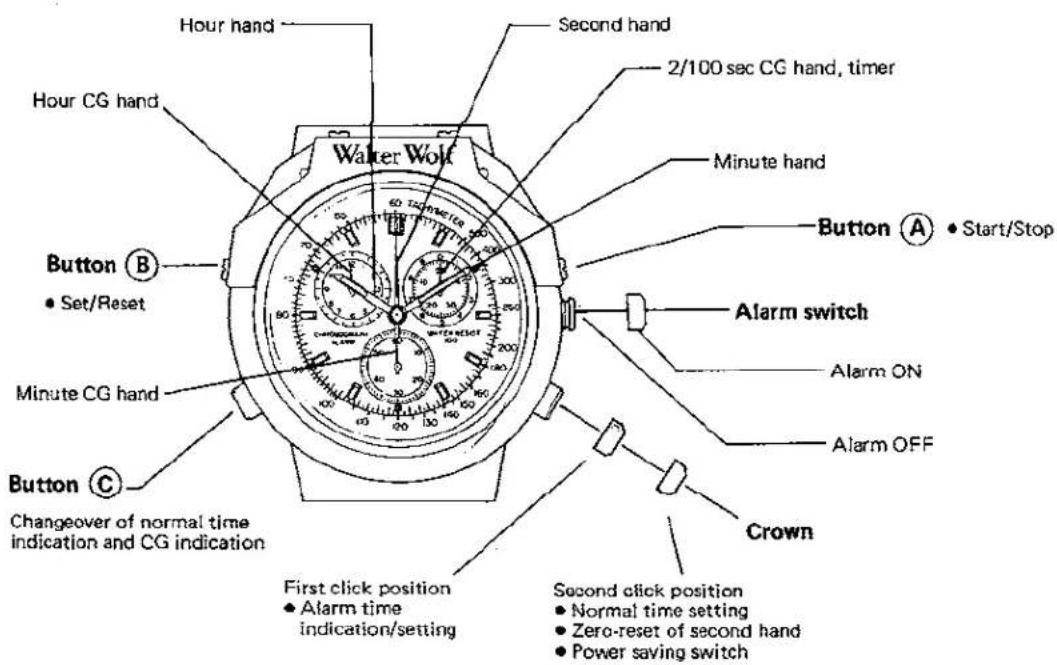
CAL. 3530/3531
* CAL. No. 3510 is the same as above CAL.No. 3530/3531, except that it is equipped with the date indicator (in the direction of 6 o'clock).
* CAL. No. 3560 is the same as above CAL.No. 3530/3531, except that it is equipped with the date indicator (in the direction of 6 o'clock) and is not equipped with the alarm.
* CAL. No. 3570 is the same as above CAL.No. 3530/3531, except that it is equipped with the age of the moon indicator (in the direction of 6 o'clock) and is not equipped with the alarm.
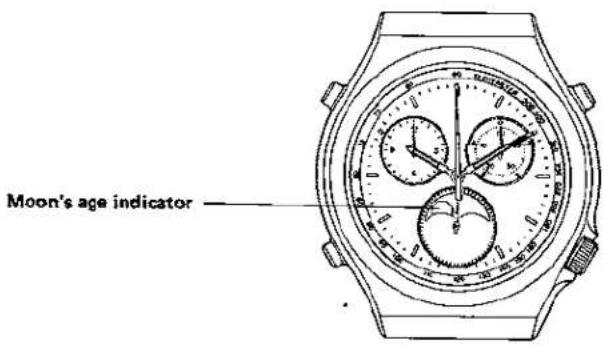
CAL. 3570
3-2. Before use
"0" position adjustment of 2/100 second CG hand and second hand. Execute the following procedure:
- Set a crown to the normal position.
- Slowly push the button Ⓒ two times.
- When the second hand is moving at this time, push the button Ⓒ one more time.
When 2/100 second CG hand and the second hand do not indicate "0" position after operating the above, operate 2 and 3 again.
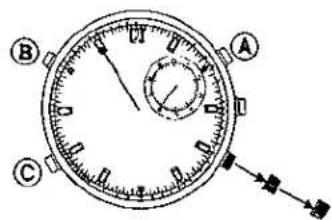
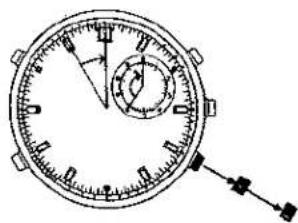
- Pull out the crown to the second click position.
- Second hand
— A push of the button Ⓐ moves the second hand by one second mark.
• 2/100 sec CG hand
— A push of the button Ⓑ moves the 2/100 sec CG hand by one 2/100 sec mark. A continuous push advances it quickly.
natural_image
Technical line drawing of a circular mechanical stopwatch with dial and pointer (no text or symbols)3-3. Calendar (date) quick setting (Cal. 3510/3560)
[• Alarm switch OFF
• One-step pulling of the crown]
The date quick setting can be executed by turning the crown in the clockwise direction.
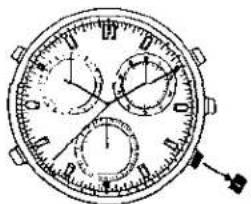
natural_image
Technical line drawing of a circular mechanical watch with multiple dials and a pointer (no text or symbols)[Note]
The date will be changed in the period from around 12:00 a.m. to around 3:30 a.m.
Pay attention since the date will not change when the setting of the alarm is checked and alarm time is set in this time zone.
3-4. How to set and read the age of the moon (Cal. 3570)
* This function indicates the age of the moon, but does not display the shape of the moon.
* Use the indicated age of the moon for reference only.
Therefore, set the age of the moon to an approximate position.
(1) How to set the age of the moon
Since the advancing rate of the moon mark depends on the position, watch the moon mark when setting the age of the moon.
The moon mark can be rotated clockwise by turning the crown to the right, and it is not moved when the crown is turned to the left.
- Confirming today's or tomorrow's age of the moon
Check today's or tomorrow's age of the moon with a newspaper, etc.
In case tomorrow's age of the moon is found, subtract one day from it.
Example) Age of the moon: 4.4
(Tomorrow's age of the moon: 5.4 - 1 = 4.4)
- Setting the age of the moon
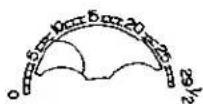
Pull the crown to the first click position and rotate the moon mark clockwise until the center of the moon comes to around the position of 4.4 of the age of the moon scale.
* In case the watch is not equipped with the age of the moon scale
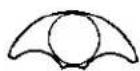
In this case, when the age of the moon shown in a newspaper, etc. is 0, 7, 15 or 22, set the moon mark to the corresponding position of the age of the moon as shown in “(3) How to read the age of the moon” below.
The age of the moon can be set more accurately if it is set when it is 0 (New moon) or 15 (Full moon).
(2) What is the age of the moon
• Waxing and waning of the moon
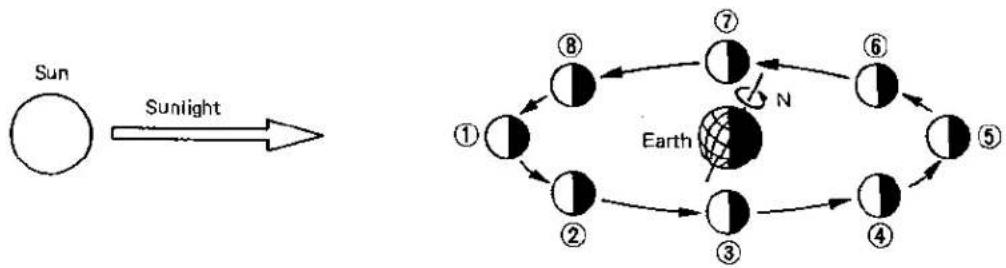
The waxing and waning of the moon are caused by the change of the positions of the sun and moon viewed from the earth.
flowchart
graph TD
    A["Sun"] -->|Sunlight| B["Earth"]
    B --> C["①"]
    B --> D["②"]
    B --> E["③"]
    B --> F["④"]
    B --> G["⑤"]
    B --> H["⑥"]
    B --> I["⑦"]
    B --> J["⑧"]
    style B fill:#000,stroke:#000,color:#fff
    note right of B: Earth's axial tilt is marked 'N' on the Earth's orbit.
When the moon is at position ① shown above (the sun and moon are in the same direction), the moon viewed from the earch is illuminated from its back. The moon is called the new moon at this time.
The moon can be seen at various positions as shown below.

flowchart
graph LR
    A["New moon"] --> B["First quarter moon"]
    B --> C["Full moon"]
    C --> D["Last quarter moon"]
    D --> E["Phase of the moon"]
The moon waxes and wanes repeatedly in order of ① - ⑧ - ① .
• What is the age of the moon
The time from a new moon indicated on the unit of day. The average period from a new moon to the next new moon is equivalent to about 29.5 days.
(3) How to read the age of the moon (Example of indication)
| 1 | New moonAge of the moon: 0(Spring tide) | 3 | First quater moonAge of the moon: Approx. 7(Neap tide) |
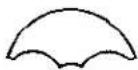 | 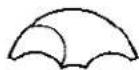 | ||
| 5 | Full moonAge of the moon: Approx. 15(Spring tide) | 7 | Last quater moonAge of the moon: Approx. 22(Neap tide) |
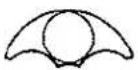 | 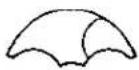 |
* The level of the tide can be seen from the indicated age of the moon.
The age of the moon can be set more accurately if it is set when it is the New moon (the moon mark cannot be seen at all; the age of the moon is 0) or the Full moon (the moon mark is at the top (position of 12 o'clock); the age of the moon is 15).
3-5. Display changeover between normal time and chronograph
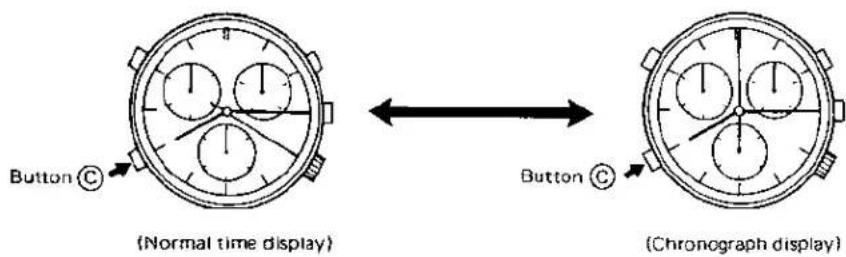
- When the button © is pressed in the normal time display, a confirmation sound is heard. Then, the second hand quickly advances and stops at the 0 position, thus showing the chronograph display.
- When the button © is pressed in the chronograph display, a confirmation sound is heard. Then, the CG 2/100 sec. hand, CG minute hand and CG hour hand come to the 0 position and the second hand changes into the normal time indicator.
3-6. Setting of normal time
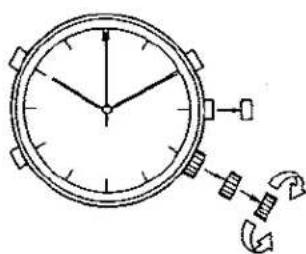
Setting should be made with the crown pulling out to the second clicking position.
Second ---- (1) If the crown is pulled out to the second clicking position, the second hand will instantaneously come to the 0 position.
- When the second hand stands at between 0 and 29 seconds, the minute display will remain as before.
- When the second hand stands at between 30 and 59 seconds, the minute display will increase by 1 minute.
* In case the second hand does not come to the 0 position even if the crown is pulled out to the second clicking position, set the second hand to the 0 position by pushing the button Ⓐ with the crown pulling out to the second clicking position. (A push of the button Ⓐ moves the second hand by one second mark.)
Hour, minute ---- (2) If the crown is turned clockwise, the hands will go round counterclockwise. If the crown is turned counterclockwise, the hands will go round clockwise.
- Quick setting of time is possible by quickly turning the crown.
If you want to stop the quick setting, turn the crown slowly.
* Setting should be made so that the hands stands at the 0 position.
(3) The watch starts running when the crown is pushed back.
If the hands do not start from the 0 position, alarm sounds for 20 seconds before or after the set time. (CAL. 3510/353**)
(Note) Confirm the alarm set time after normal time is set. (CAL. 3510/353*)
3-7. Using method of the chronograph
1) Normal use
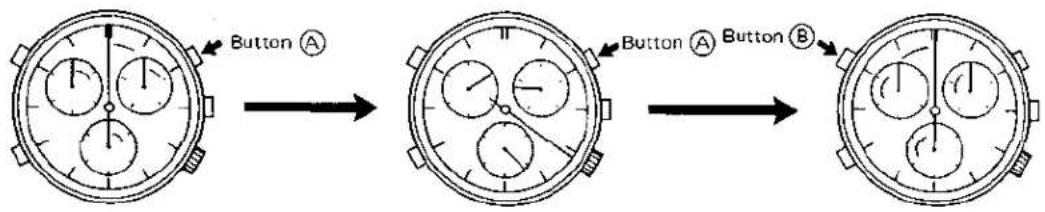
① {Start}
If the button (A) is pressed in the chronograph display, (a confirmation sound is heard ... Cal. 3530/353X). Then, the CG 2/100 second hand, second hand, CG minute hand and CG hour hand operate. The CG 2/100 second hand runs for 3 minutes after starting to run and then it keeps standing at the 0 position. Despite this, it continues measuring after it stops. Counting up to 11 hr. 59 min. 59 sec. 98.
② (Stop)
If the button Ⓐ is pressed while the chronograph is operating, (a confirmation sound is heard ... Cal. 3510/353X). Then, the CG 2/100 second hand, second hand, CG minute hand and CG hour hand stop running. The CG 2/100 second hand, which has kept standing at the 0 position for 3 minutes after the start, runs until it reaches the time to be measured and displays it.
③ (Return to the C position)
If the button (B) is pressed while the chronograph stops operating, the CG 2/100 second hand, CG second hand, CG minute hand and CG hour hand will return to the 0 position and keep standing there.
2) Using method of the chronograph when it is used as an integrating meter
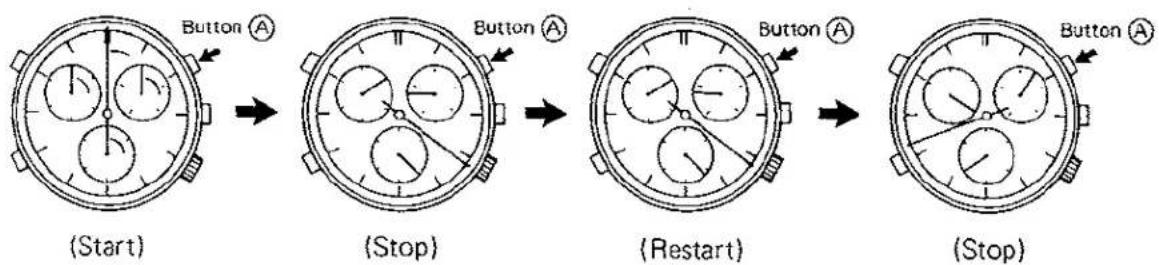
flowchart
graph LR
    A["(Start)"] --> B["(Stop)"]
    B --> C["(Restart)"]
    C --> D["(Stop)"]
- The chronograph is changed over between Stop and Restart any number of times by repeatedly pressing the button Ⓐ during measuring.
3-8. Using method of the chronograph when it is used as a counter
- The above-mentioned usage is available in the normal time display.
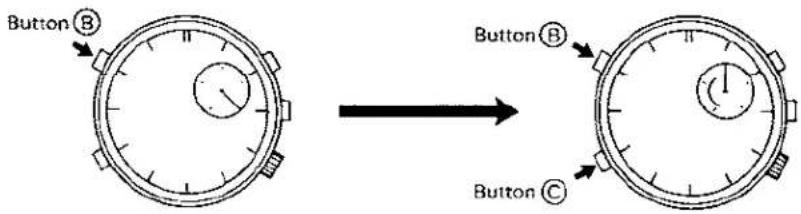
(1) The CG 2/100 sec. hand advances one mark each time the button Ⓑ is pressed, displaying 50 at its maximum.
(2) After the counter is used, be sure to return the CG 2/100 sec. hand to the 0 position by pushing the button Ⓑ. (The CG 2/100 sec. hand returns to the 0 position even if the button Ⓞ is pressed twice.)
3-9. ON/OFF of alarm (CAL. 3510/353\*)
Pulling out the alarm switch activates alarm and pushing it in deactivates it. If you want to stop alarm from sounding, push in the alarm switch.
3-10. Display changeover between normal time and alarm time (CAL. 3510/353※)
Both normal time and alarm time are displayed using the same hour and minute hands.
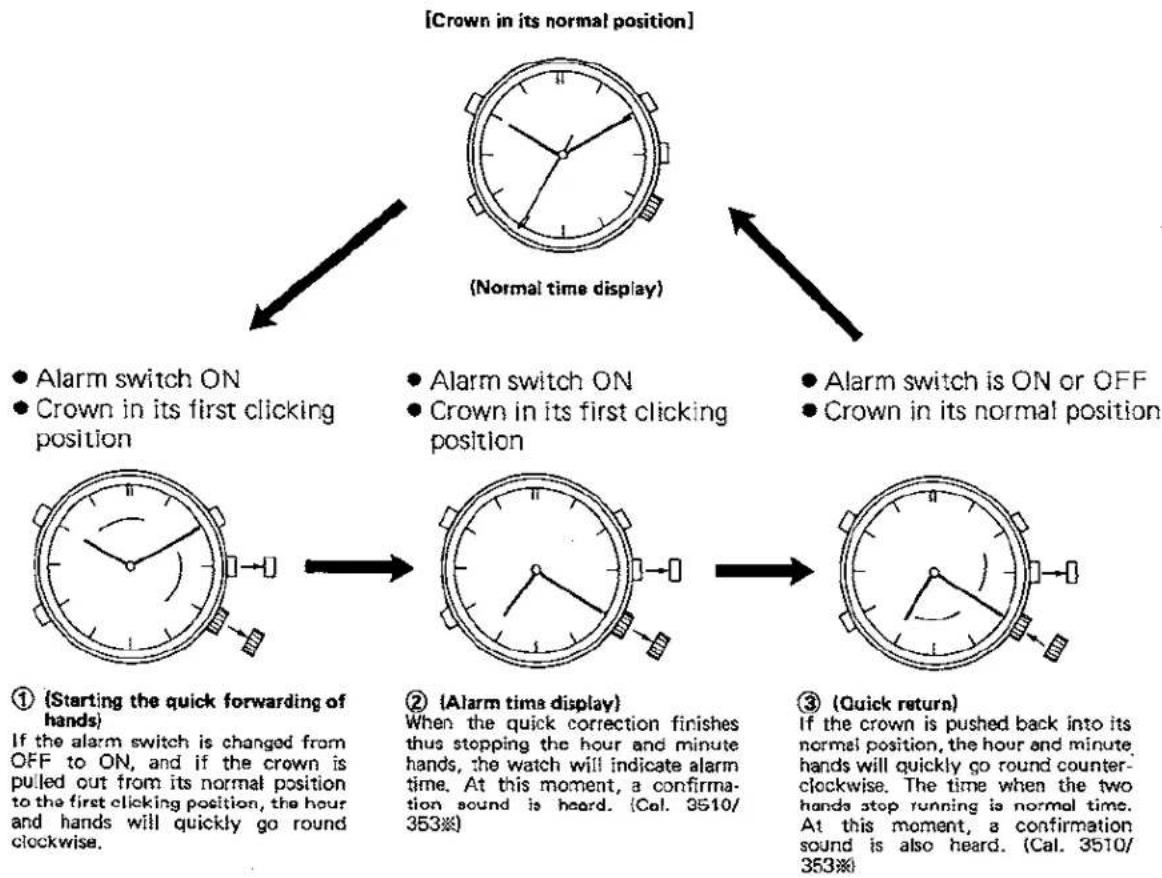
flowchart
graph TD
    A["① (Starting the quick forwarding of hands)<br>If the alarm switch is changed from OFF to ON, and if the crown is pulled out from its normal position to the first clicking position, the hour and hands will quickly go round clockwise."] --> B["② (Alarm time display)<br>When the quick correction finishes thus stopping the hour and minute hands, the watch will indicate alarm time. At this moment, a confirmation sound is heard. (Cal. 3510/353#)"]
    B --> C["③ (Quick return)<br>If the crown is pushed back into its normal position, the hour and minute hands will quickly go round counterclockwise. The time when the two hands step running is normal time. At this moment, a confirmation sound is also heard. (Cal. 3510/353#)"]
    C --> D["● Alarm switch ON<br>● Crown in its first clicking position"]
    C --> E["● Alarm switch ON<br>● Crown in its first clicking position"]
    C --> F["● Alarm switch is ON or OFF<br>● Crown in its normal position"]
    D --> G["● Alarm switch ON<br>● Crown in its first clicking position"]
    E --> H["● Alarm switch ON<br>● Crown in its first clicking position"]
    F --> I["● Alarm switch ON<br>● Crown in its first clicking position"]
3.11. Setting of alarm time (CAL. 3510/353%)
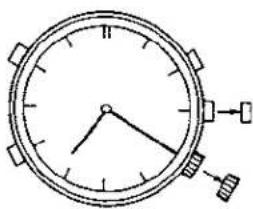
- Alarm switch ON
• Crown in its first clicking position.
natural_image
Simple line drawing of a clock face with hour and minute hands (no numbers or text)(Alarm time display)
* Time can be set on a 1-minute basis.
- If the crown is turned clockwise, the hands will go round counterclockwise.
- If the crown is turned counterclockwise, the hands will go round clockwise.
- If the crown is turned quickly, the quick setting will be made.
- If you want to stop the quick setting, turn the crown slowly.
- If the crown is turned slowly, alarm time can be set on a 1-minute basis.
- When the alarm switch is ON, alarm sounds twice a day, each in the morning and afternoon. (Alarm sounds for 20 seconds for each.)
3-12. Using method of the chronograph when it is used as a timer
(which counts the residual time)
The above-mentioned usage is available in the normal time display.
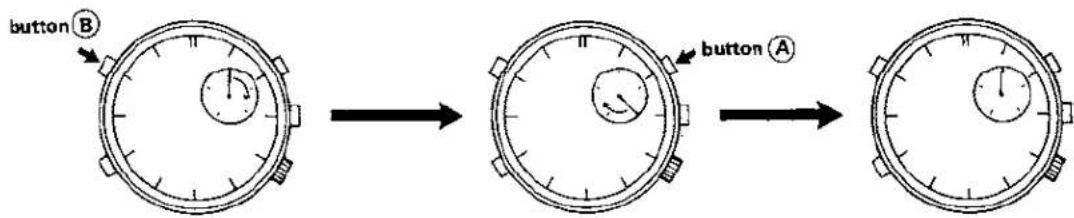
① (Set time)
Set the CG 2/100 sec. hand to any time you like in the same manner as when the chronograph is used as a counter.
② (Start timer)
If the button Ⓐ is pressed, (a confirmation sound is heard ... Cal, 3510/353*) to indicate that the timer has started. The timer runs on a 1-minute basis. If the residual time is less than 50 seconds, the timer runs on a 1-second basis.
③ (Time is up)
(When time is up, a confirmation sound is heard for 10 seconds. ... Cal. 3510/353※)
(Cancelling the timer halfway;)
- If the button Ⓐ is pressed while the timer is operating, the timer stops at any time you like. (At this time, a confirmation sound is heard. ..... CAL. 3510/353**)
- If the timer is not used, be sure to return the CG 2/100 sec. hand to the 0 position referring to the operation of the counter described in the item No. 3-8.
3-13. Alarm monitor (CAL. 3510/353※)
In any display modes, alarm serves as an alarm monitor, sounding for 5 seconds if the alarm switch is changed over in order of ON → OFF → ON in a second.
3-14. Power cell life indicator
If the power cell life nears end, the second hand changes its running mode from a 1-second basis to a 2-second basis, thus indicating the time when the power cell should be replaced.

- §1. OUTLINE
- §3. HANDLING METHOD
- 3-2. Before use
- 3-3. Calendar (date) quick setting (Cal. 3510/3560)
- [Note]
- 3-4. How to set and read the age of the moon (Cal. 3570)
- How to set the age of the moon
- What is the age of the moon
- How to read the age of the moon (Example of indication)
- 3-5. Display changeover between normal time and chronograph
- 3-6. Setting of normal time
- 3-7. Using method of the chronograph
- 1) Normal use
- ① {Start}
- ② (Stop)
- ③ (Return to the C position)
- 2) Using method of the chronograph when it is used as an integrating meter
- 3-8. Using method of the chronograph when it is used as a counter
- 3-9. ON/OFF of alarm (CAL. 3510/353\*)
- 3-10. Display changeover between normal time and alarm time (CAL. 3510/353※)
- Setting of alarm time (CAL. 3510/353%)
- 3-12. Using method of the chronograph when it is used as a timer
- (Cancelling the timer halfway;)
- 3-13. Alarm monitor (CAL. 3510/353※)
- 3-14. Power cell life indicator
Marke : CITIZEN
Modell : Cal 3531
Kategorie : Uhr