EC4SW - Taschenlampe Nitecore - Kostenlose Bedienungsanleitung
Finden Sie kostenlos die Bedienungsanleitung des Geräts EC4SW Nitecore als PDF.


Benutzerfragen zu EC4SW Nitecore
0 Frage zu diesem Gerät. Beantworten Sie die, die Sie kennen, oder stellen Sie Ihre eigene.
Eine neue Frage zu diesem Gerät stellen
Laden Sie die Anleitung für Ihr Taschenlampe kostenlos im PDF-Format! Finden Sie Ihr Handbuch EC4SW - Nitecore und nehmen Sie Ihr elektronisches Gerät wieder in die Hand. Auf dieser Seite sind alle Dokumente veröffentlicht, die für die Verwendung Ihres Geräts notwendig sind. EC4SW von der Marke Nitecore.
BEDIENUNGSANLEITUNG EC4SW Nitecore
NITECORE®
The All-Round Flashlight Expert
Features
• Solid lightweight aero grade aluminum alloy construction
• Utilizes a CREE MT-G2 LED
• Maximum output up to 2000 lumens
• Dual switch design offers unprecedented ease of use
- Thumbscrew lock on tailcap doubles as a tripod receiver
- 5 brightness levels and 3 special modes available
• High efficiency constant current circuit enables maximum runtime up to 325 hours
• Features advanced temperature regulation (ATR) technology
• A power indicator built into the on/off switch indicates remaining battery power (Chinese patent:ZL201220057767.4)
- Direct access to ultralow and turbo outputs
• A micro-textured reflector offers wide angle lighting
- Reverse polarity protection prevents damage arise from incorrectly inserted batteries
- Stainless steel retaining ring protects core components from damage
• Toughened ultra-clear mineral glass with anti-reflective coating
- Waterproof in accordance with IPX-6 (2 meters submersible)
- Impact resistant to 1.5 meters
• Tail stand capability
Dimensions
Length: 5.90" (150mm)
Head diameter: 1.57" (40mm)
Tube: 1.54" × 1.10" (39mm×28mm)
Weight: 6.03oz (171gram) (without battery)
Accessories
Quality holster, lanyard
Battery Options
| TYPE | Nominal voltage | Compatible | |
| 18650 Rechargeable Li-ion battery | 18650 | 3.7V | Y (Recommended) |
| Primary Lithium battery | CR123 | 3V | Y (Recommended) |
| Rechargeable Li-ion battery | RCR123 | 3.7V | Y |
Output & Runtime
| FL1 STANDARD | TURBO | HIGH | MID | LOW | ULTRALOW |
| 2000 LUMENS | 1010 LUMENS | 400 LUMENS | 85 LUMENS | 2 LUMENS | |
| 45min | 2h15min | 6 h15min | 30h45min | 325h | |
| 30min | 2h | 5 h45min | 23h15min | 210h | |
| 238m(Beam Distance) | |||||
| 14,200cd(Peak Beam Intensity) | |||||
| 1.5m(Impact Resistant) | |||||
| IPX-8, 2m(Waterproof AND Submersible) | |||||
NOTICE:
The stated data has been measured in accordance with the international flashlight testing standards ANSI/NEMA FL1, using 2 x Nitecore 18650 Li-ion batteries (3.7V, 2600mAh) or 4 x Nitecore CR123 batteries (3V, 1700mAh) under laboratory conditions. The data may vary in real-world use due to different battery usage or environmental conditions.
Operating Instructions
Battery Installation
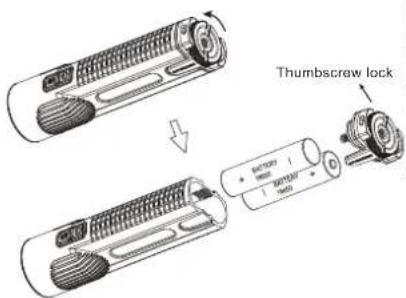
As illustrated, rotate the thumbscrew lock counterclockwise and screw the tail cap off. Insert batteries with the negative (-) ends contacting the springs, and then tighten the thumbscrew lock clockwise.
text_image
Thumbscrew lock + - + - + - + -NOTE: After battery insertion, the power indicator light will blink to indicate remaining battery power. Please refer to the "Power Tips" section of this manual for details.
WARNING:
- Do not mix rechargeable and non-rechargeable batteries.
- Do not mix batteries of different types/brands.
On/Off Operation
To switch on: Press the on/off switch to turn the light on
To switch off: Press the on/off switch ☑ again to turn the light off and enter standby mode
Standby Mode
With the light turned on, press and hold the on/off switch for over one second to turn the light off and activate the power indicator to blink once every three seconds, thus helping users locate the EC4SW in dark environments. When powered by 2x13650 batteries, the EC4SW can operate for over 6 months with the power indicator on, or remain on standby for over 12 months with the power indicator off.
EC4SW User Manual
Brightness Levels
With the light turned on, press the mode switch 📄 repeatedly to cycle through brightness levels of ultralow, low, medium, high and turbo. This mode has memory effect that ensures direct access to the brightness level last used.
Direct Access to Ultralow/Turbo
With the light turned off, press and hold the on/off switch ☑ for over one second to enter ultralow level (2 lumens).
With the light turned off, press and hold the mode switch ☐ for over one second to enter turbo level (2000 lumens).
Special Modes (Strobe/Location Beacon/SOS)
With the light turned on, press and hold the mode switch ☐ for over one second to enter strobe mode. To cycle through location beacon/SOS/strobe modes, press and hold the mode switch ☐ for over one second again. To exit, press the on/off switch ☐ to turn the light off.
Strobe Ready
With the light turned off, press the mode switch ☐ twice in quick succession to enter strobe mode directly. To exit, simply press any switch to turn the light off.
Lockout/Unlock
With the light turned on, press and hold both switches for over one second to switch the light off and enter lockout mode. In this mode, the two switches will not have their respective functions, thus preventing accidental activation. To unlock, press and hold both switches for over one second again.
NOTE:
-
When in lockout mode, the EC4SW will remain operational using 2x18650 batteries for over 12 months.
-
When the EC4SW is kept in a backpack or left unused for extended periods, Nitecore recommends batteries are removed to cut off power entirely and thus prevent battery leakage or accidental activation.
Power Tips
After battery installation or with the mode switch ☐ being pressed when the light is off, the blue power indicator built into the switch will blink to indicate remaining battery power. The power indicator will blink three times when power levels are above 50%; twice when power levels are below 50%; and once when battery is close to depletion.
ATR Technology
Advanced temperature regulation (ATR) technology allows the EC4SW to dynamically adjust output performance according to its internal temperature. This prevents damage from overheating and prolongs its working life.
Changing / Charging Battery
Batteries should be replaced or recharged when output appears to be dim or the flashlight becomes unresponsive.
Maintenance
Every 6 months, threads should be wiped with a clean cloth followed by a thin coating of silicon-based lubricant.
Warranty Service
All NITECORE® products are warranted for quality. Any defective / malfunctioning NITECORE® product can be repaired free of charge for a period of 60 months (5 years) from the date of purchase. Beyond 60 months (5 years), a limited warranty applies, covering the cost of labor and maintenance, but not the cost of accessories or replacement parts.
The warranty is nullified in all of the following situations:
-
The product(s) is/are broken down, reconstructed and/or modified by unauthorized parties.
-
The product(s) is/are damaged through improper use.
-
The product(s) is/are damaged by leakage of batteries
For the latest information on NITECORE® products and services, please contact a local
NITECORE® distributor or send an email to service@nitecore.com
All images, text and statements specified herein this user manual are for reference purpose only. Should any discrepancy occurs between this manual and information specified on www.nitecore.com, information on our official website shall prevail. Sysmax Industry Co., Ltd. reserves the rights to interpret and amend the content of this document at any time without prior notice.
SYSMAX ind.
SYSMAX Industry Co., Ltd.
TEL: +86-20-83862000
FAX: +86-20-83882723
E-mail: info@nitecore.com
Web: www.nitecore.com
Address: Rm1401-03, Glorious Tower, 850 East Dongfeng Road,
Guangzhou, China 510600