
EC25 - Taschenlampe Nitecore - Kostenlose Bedienungsanleitung
Finden Sie kostenlos die Bedienungsanleitung des Geräts EC25 Nitecore als PDF.


Benutzerfragen zu EC25 Nitecore
0 Frage zu diesem Gerät. Beantworten Sie die, die Sie kennen, oder stellen Sie Ihre eigene.
Eine neue Frage zu diesem Gerät stellen
Laden Sie die Anleitung für Ihr Taschenlampe kostenlos im PDF-Format! Finden Sie Ihr Handbuch EC25 - Nitecore und nehmen Sie Ihr elektronisches Gerät wieder in die Hand. Auf dieser Seite sind alle Dokumente veröffentlicht, die für die Verwendung Ihres Geräts notwendig sind. EC25 von der Marke Nitecore.
BEDIENUNGSANLEITUNG EC25 Nitecore
Features
• Utilizes a CREE XM-L2 T6 LED
• Maximum output of up to 960 lumens
- Radiator fins integrated into the head design provide better cooling for exceptional overall performance
- Integrated "Precision Digital Optics Technology" provides extreme reflector performance
- Boasts a peak beam intensity of 23,000cd and a throw distance of up to 300 meters
- Innovative single button two-stage switch offers a user-friendly interface (patented)
• Eight rapidly switchable brightness modes to select from
• High efficiency circuit board provides up to 25 hours runtime
- Integrated power indicator light displays remaining battery power (patented)
- Power indicator's secondary function displays battery voltage (accurate to 0.1V)
- Reverse polarity protection prevents damage due to incorrectly inserted batteries
• Stainless steel titanium-plated two-way clip
- Toughened ultra-clear mineral glass with anti-reflective coating
- Constructed from aero grade aluminum alloy
• Sturdy HAIII military grade hard-anodized
- Waterproof in accordance with IPX-8 (two meters submersible)
- Impact resistant to 1.5 meters
• Tail stand capability
Dimensions
Length: 128mm (5")
Head diameter: 34mm (1.34")
Tube diameter: 25.4mm (1")
Weight: 122g (4.3oz)(without battery)
Accessories
Quality holster, removable clip, lanyard, spare O-ring
Battery Options
| SIZE | Nominal voltage | Compatible | |
| Primary Lithium battery | CR123 3V | Y (Recommended) | |
| 18650 Rechargeable Li-ion battery | 18650 3.7V | Y (Recommended) | |
| Rechargeable Li-ion battery | RCR123 3.7V | Y |
Output & Runtime
| FL 1 STANDARD TURBO HIGH MID LOW LOWER | |||||
| 960 LUMENS | 600 LUMENS | 300 LUMENS | 145 LUMENS | 65 LUMENS | |
| 1h30min | 2h | 4h15min | 10h30min | 25 h | |
| 1h30min | 1h45min | 4h | 9h | 17h30min | |
| 300m (Beam Distance) | |||||
| 23000cd (Peak Beam Intensity) | |||||
| 1.5m (Impact Resistant) | |||||
| IPX-8, 2m (Waterproof AND Submersible) | |||||
NOTICE
Stated data has been measured according to the international flashlight testing standards ANSI/NEMA FL1 using a quality Nitecore 18650 (3.7V 2600mAh) battery or two Nitecore CR123 (3V 1700mAh) batteries under laboratory conditions. The data may vary due to individual usage habits and environmental conditions.
NITECORE (SYSMAX) is a member of PLATO, participating in and helping to develop the ANSI FL1 standard of measurement. Product testing data is in accordance with these internationally recognized scientific standards.
Battery installation
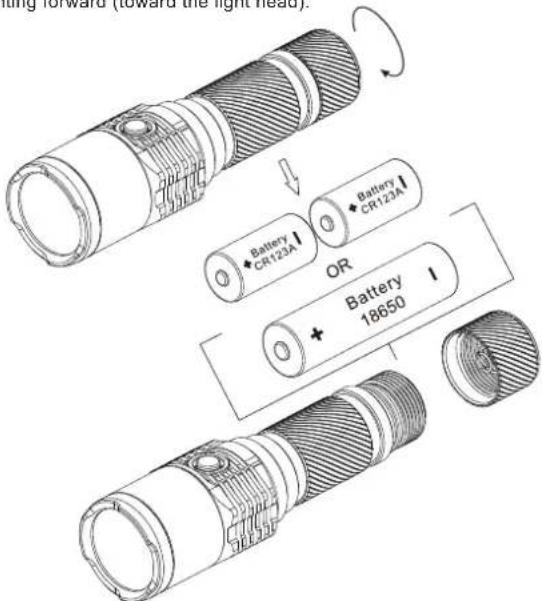
- Unscrew the tail cap in a counter-clockwise direction.
- Insert one 18650 battery or two CR123 batteries with the positive pole pointing forward (toward the light head).
text_image
Bathing forward (toward the light head). Battery CR123A Battery CR123A OR Battery 18650Note: After loading the batteries, the power indicator light will blink to indicate the battery voltage. Please refer to the "Power Tips" section of this manual for details.
WARNING
Ensure batteries are inserted with the positive (+) end pointing to the head. The EC25 will not operate with incorrect installation.
General Operation
The EC25 utilizes a 2-stage switch similar to a camera shutter button. The light's numerous functions are selected according to the depth the switch is pressed. The EC25 has two modes: Daily mode and Search / Turbo mode.
Operating In Daily Mode
- With the light turned off, press the switch partway down and release within a second to enter daily mode.
- Daily mode contains four brightness levels: ultra-low, low, medium, and high. Pressing the switch partway down in quick succession will cycle through these modes. Pressing the switch partway down and holding for more than one second when in daily mode will enter into turbo mode. See Turbo / Search mode instructions below.
- The light is turned off (put into standby mode) by pressing the button all the way down and releasing within a second. This will also memorize the last daily mode used.
- Daily mode has a momentary function which allows the light to be turned on only when the switch is held. With the light turned off, press the switch partway down and hold to activate daily mode's momentary function. The light will turn off the moment the switch is released.
Operating in Search / Turbo Mode
- With the light turned off, press the switch all the way down and release within one second to enter turbo mode. To cycle between high and turbo modes press the button partway down while in turbo mode.
- To turn the light off when in turbo mode, once again press the button all the way down and release within one second.
- Turbo / search mode has a momentary function which allows the light to be turned on only when the switch is held. Pressing the switch all the way down and holding will activate Turbo / Search mode's momentary function. The light will turn off the moment the switch is released.
NB: For user safety and to prevent overheating / failure, the EC25 will automatically switch to high mode after three minutes of use in Turbo mode. Half press and hold the switch to re-activate Turbo.
Standby Mode / Lockout and Unlock functions
With the light turned on, press the switch all the way down and release within one second to enter into standby mode. In this mode, the light will consume small amounts of power to maintain the settings in the MCU (micro control unit) but appear to be turned off. When in standby mode the power indicator light will flash once every three seconds to show the location of the light.
With the light turned on, press the switch all the way down and hold for more than one second. The light will turn off and enter into lockout mode. Lockout mode consumes almost no battery power and prevents the light from accidentally being turned on. Holding the switch for more than one second to exit the lockout mode.
NB: When entering lockout mode, the power indicator will flash to indicate specific battery voltage. Please refer to the "Power Tips" section of this manual for details.
Special Strobe / SOS mode and Location Beacon
With the light turned on, press the switch all the way down twice in quick succession to enter strobe mode. When in strobe mode, press the switch all the way down and hold for more than one second to cycle through strobe, SOS and location beacon modes. To select any of these modes simply release the switch when it is displayed. To turn off the light fully press and release the switch.
Power Tips
- When the light is on, the power indicator will blink once every two seconds when power levels reach 50%.
- When the light is on, the power indicator will blink consistently when power levels are low.
- Each time batteries are inserted or the light is put into lockout mode, the power indicator light will blink in various patterns to indicate the battery voltage (accurate to ±0.1V ). For example, when the battery voltage is at a maximum charge of 4.2V, the power indicator will blink 4 times in quick succession, followed by a one second pause and two more blinks, indicating a total battery voltage of 4.2V.
Changing
When the power indicator blinks rapidly it means the batteries need to be replaced. Alternatively if the light becomes dim or unresponsive to adjustment, this also indicates batteries need to be replaced.
Maintenance
Every 6 months, threads should be wiped with a clean cloth followed by a thin coating of silicon-based lubricant.
Warranty Service
All NITECORE® products are warranted for quality. DOA / defective products can be exchanged for replacement through a local distributor/dealer within the 15 days of purchase. After 15 days, all defective / malfunctioning NITECORE® products will be repaired free of charge for a period of 60 months from the date of purchase. After 60 months, a limited warranty applies, covering the cost of labor and maintenance, but not the cost of accessories or replacement parts.
The warranty is nullified in all of the following situations:
- The product(s) is/are broken down, reconstructed and/or modified by unauthorized parties.
- The product(s) is/are damaged through improper use.
- The product(s) is/are damaged by leakage of batteries.
For the latest information on NITECORE® products and services, please contact your national NITECORE® distributor or send an email to service@nitecore.com

Please follow our facebook for more info: NITECORE Flashlights
natural_image
Technical line drawing of a cylindrical mechanical component with internal grooves and a central bore (no text or symbols)SYSMAX Ind.
SYSMAX Industry Co., Ltd.
TEL: +86-20-83862000
FAX: +86-20-83882723
E-mail: info@nitecore.com
Web: www.nitecore.com
Address: Rm1401, Glorious Tower, 850 East Dongfeng Road, Guangzhou, China 510600