
ST9400S - Thermostat HONEYWELL - Kostenlose Bedienungsanleitung
Finden Sie kostenlos die Bedienungsanleitung des Geräts ST9400S HONEYWELL als PDF.


| Produkttyp | Thermostat-Programmiergerät |
| Modell | ST9400S |
| Marke | Honeywell |
| Kategorie | Thermostat |
| Programmierbare Modi | AUTO, ONCE, CONT, OFF |
| Überbrückungsfunktion | Ja, über OVERRIDE-Taste |
| Extra-Stunden-Funktion | Ja, über EXTRA HOUR-Taste (1–3 Stunden) |
| Service-Erinnerung | Ja, Countdown und Abschaltung bei Überfälligkeit |
| Anzeige | LCD mit Datum und Uhrzeit |
| Bedienelemente | MODE-Tasten, OVERRIDE-Tasten, EXTRA HOUR-Tasten, RUN-Schieber |
| Stromversorgung | 2× AA-Batterien (nicht im Lieferumfang) |
| Reinigung | Mit einem weichen, trockenen Tuch abwischen |
| Sicherheit | Automatische Abschaltung bei überfälligem Heizungsservice |
| Reparierbarkeit | Nicht vom Benutzer reparierbar; Fachmann erforderlich |
| Lieferumfang | Programmiergerät, Bedienungsanleitung |
| Abmessungen (ca.) | 120 × 80 × 25 mm |
| Gewicht (ca.) | 200 g |
Häufig gestellte Fragen - ST9400S HONEYWELL
Benutzerfragen zu ST9400S HONEYWELL
0 Frage zu diesem Gerät. Beantworten Sie die, die Sie kennen, oder stellen Sie Ihre eigene.
Eine neue Frage zu diesem Gerät stellen
Laden Sie die Anleitung für Ihr Thermostat kostenlos im PDF-Format! Finden Sie Ihr Handbuch ST9400S - HONEYWELL und nehmen Sie Ihr elektronisches Gerät wieder in die Hand. Auf dieser Seite sind alle Dokumente veröffentlicht, die für die Verwendung Ihres Geräts notwendig sind. ST9400S von der Marke HONEYWELL.
BEDIENUNGSANLEITUNG ST9400S HONEYWELL
GUIDE TO THE USE OF THE ST9400S PROGRAMMER:
The purpose of the Programmer is to control the times when the heating and hot water can be switched on.
Normal Use:
Lift the flap to make sure the Slider is in the RUN position.
Also make sure that both hot water and heating are operating in AUTO or ONCE mode, by pressing the MODE buttons repeatedly until the display shows AUTO or ONCE.
AUTO means on and off twice each day, following the programme.
ONCE means coming on at the first programme time then off at the last programme time.
To turn the hot water and heating OFF:
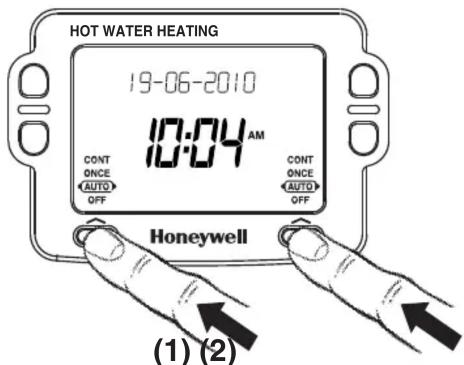
(1) Keep pressing the hot water MODE button until the display shows that hot water is OFF. If the hot water was on, the light will turn off.
(2) Keep pressing the heating MODE button until the display shows that heating is OFF. If the heating was on, the light will turn off.
To turn the hot water and heating ON:
(1) Keep pressing the hot water MODE button until the display shows CONT (this is short for continuous). The hot water light will turn on.
The hot water will not turn off in this position.
(2) Keep pressing the heating MODE button until the display shows CONT (this is short for continuous). The heating light will turn on.
The heating will not turn off in this position.
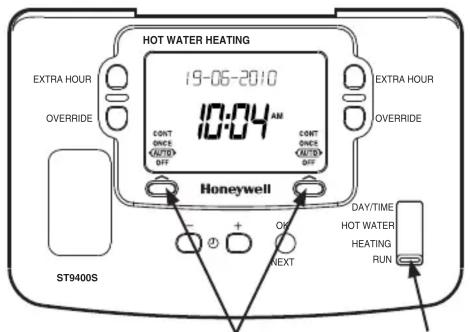
MODE buttons Slider
Temporary Overrides to the Set Programme:
To turn the hot water ON press the hot water OVERRIDE button – the light will turn ON, unless the hot water is operating in the OFF mode.
To turn the hot water OFF press the hot water OVERRIDE button again – the light will turn OFF.
This button will only work in the AUTO or ONCE modes. It will NOT work in the OFF or CONT modes.
At the next SET time the Programmer will go back to automatic operation.
(The same applies to the heating OVERRIDE button)
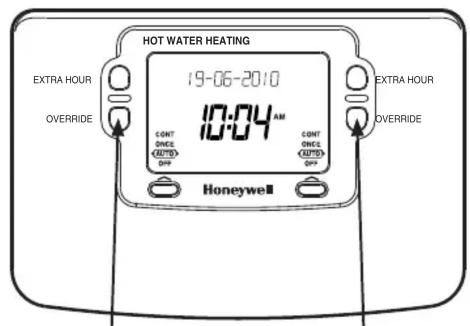
Hot Water
OVERRIDE button
Heating
OVERRIDE button
For a temporary boost of heating or hot water, press the corresponding EXTRA HOUR button.
Pressing once brings the heating or hot water ON for 1 hour.
Press twice for 2 hours extra, three times for 3 hours extra.
Pressing again will turn the heating OFF.
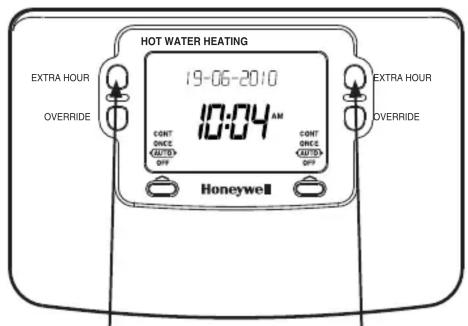
Hot Water
EXTRA HOUR button
Heating
EXTRA HOUR button
This button works in the AUTO, ONCE, and OFF modes. It will NOT work in the CONT mode.
If the heating or hot water is already ON, pressing the corresponding EXTRA HOUR button will add the extra hours to the end of the current ON period.
For guidance on the operation of the other buttons please refer to the complete user instructions supplied with the product.
BOILER SERVICE REMINDER:
By Law, your gas boiler should be inspected once a year to ensure it is operating safely. Your ST9400S Programmer has a range of features designed to help make sure this service is carried out at the correct time.
These features will be programmed by your Installer, Maintenance Engineer or Landlord.
- A message can be displayed on the screen to remind you that a boiler service is due
- If the service is overdue, the Programmer may switch off the heating system, to ensure your safety.
Countdown to service:
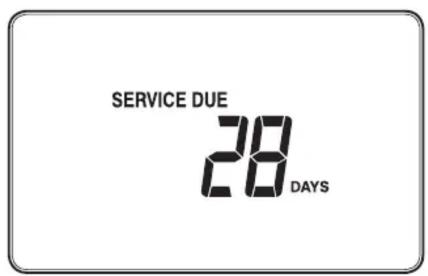
Your Programmer can indicate a countdown for the number of days until a service is due. This type of message will appear on the screen every few seconds, to give you an opportunity to arrange a service visit.
What you should do:
- Arrange for a service visit before the service is due.
When service is due:
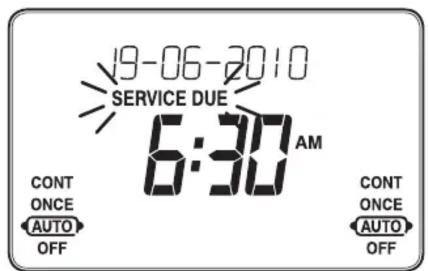
When your gas boiler service is OVERDUE the words "SERVICE DUE" will continue to flash on your screen.
What you should do:
- Arrange an immediate service visit.
Boiler shut-down:
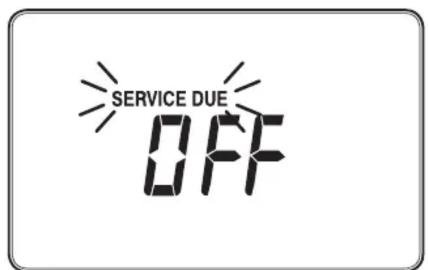
If your Programmer shows the words "SERVICE DUE" and "OFF" then your boiler service is OVERDUE and the boiler has been automatically switched off to ensure your safety.
What you should do:
- Arrange an immediate service visit.
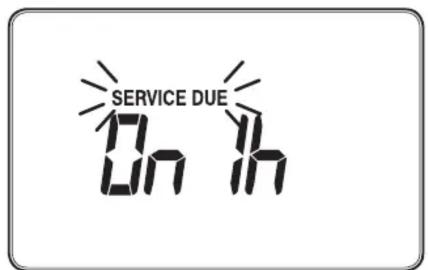
- If set to do so, it may be possible to obtain limited use of the boiler by pressing any EXTRA HOUR button. Each button press will allow operation of the boiler for 1 hour at a time, and the screen will show the message "On 1h"
How to arrange a service visit:
- Your Landlord, Installer, or Maintenance Engineer should contact you before the boiler service is due to allow you to arrange the service visit. Their communication will include contact details.
- Contact details may also be found in the ST9400S User Guide, or may be on an information sticker placed on or near the boiler.
- A contact telephone number may also have been programmed into the Programmer. If so, a message will appear on the screen indicating the number you should call.
- GUIDE TO THE USE OF THE ST9400S PROGRAMMER:
- Normal Use:
- To turn the hot water and heating OFF:
- To turn the hot water and heating ON:
- Temporary Overrides to the Set Programme:
- BOILER SERVICE REMINDER:
- Countdown to service:
- What you should do:
- When service is due:
- Boiler shut-down:
- How to arrange a service visit:
Marke : HONEYWELL
Modell : ST9400S
Kategorie : Thermostat