Ei1529 - Schalter Ei Electronics - Kostenlose Bedienungsanleitung
Finden Sie kostenlos die Bedienungsanleitung des Geräts Ei1529 Ei Electronics als PDF.


Benutzerfragen zu Ei1529 Ei Electronics
0 Frage zu diesem Gerät. Beantworten Sie die, die Sie kennen, oder stellen Sie Ihre eigene.
Eine neue Frage zu diesem Gerät stellen
Laden Sie die Anleitung für Ihr Schalter kostenlos im PDF-Format! Finden Sie Ihr Handbuch Ei1529 - Ei Electronics und nehmen Sie Ihr elektronisches Gerät wieder in die Hand. Auf dieser Seite sind alle Dokumente veröffentlicht, die für die Verwendung Ihres Geräts notwendig sind. Ei1529 von der Marke Ei Electronics.
BEDIENUNGSANLEITUNG Ei1529 Ei Electronics
WEEKLY TESTING
- Test Alarm – use to test the Smoke/Heat Alarms remotely.
1. Press the Test Alarm switch
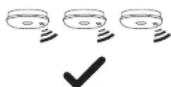
Now check all the alarms sound and the red lights on the covers flash rapidly. Then turn off the Test Alarm switch.
This is equivalent to pressing the test button on all alarms simultaneously.
It also checks that the remote control is receiving mains power.
2. If the alarms do not sound
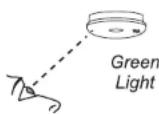
Check for the green mains light on the front cover of the alarms.
If all alarms do not have the green mains light on, check fuses, circuit breakers etc. (see Smoke/Heat Alarm instructions for further details).
FIVE YEAR GUARANTEE
El Electronics guarantees this product for five years from date of purchase against any defects that are due to faulty materials or workmanship. This guarantee only applies to normal conditions of use and service, and does not include damage resulting from accident, neglect, misuse, unauthorised dismantling, or contamination howsoever caused. This guarantee excludes incidental and consequential damage. If this product should become defective within the guarantee period, it must be returned, with proof of purchase, carefully packaged, with the problem clearly stated (see addresses below). We shall at our discretion repair or replace the faulty unit. Do not interfere with the product or attempt to tamper with it. This will invalidate the guarantee, but more importantly may expose the user to shock or fire hazards. This guarantee is in addition to your statutory rights as a consumer.

Aico Ltd. Mile End Business Park, Maesbury Rd, Oswestry,
Shropshire SY10 8NN, U.K
Tel: 0870 758 4000
www.aico.co.uk
Ei Electronics. Shannon, Ireland.
Tel: +353 (0)61 471277
www.eielectronics.com

4

Electronics®
fire + gas detection
REMOTE CONTROL
SWITCH
INSTRUCTIONS
Model
Ei1529RC
WARNING: For use only with the following models: Smoke/Heat/CO Alarms - 2100 Series, 160RC Series, Ei261ENRC & Ei261DENRC Accessories - Ei128RBU, Ei169/160, MCP401RC
DO NOT use any other models with this remote control
The Remote Control is recommended for use in systems comprising of three or more interconnected Alarms.
The Remote Control should be wall mounted at standard light switch level (1.2m from floor level) to allow easy access.
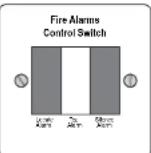
LOCATE ALARM: If alarms sound, press to allow the source of alarm to be identified audibly.
SILENCE ALARM: Press to silence nuisance alarms.
TEST ALARM: Operate weekly to test the alarms. Can also be used to give a manual alarm
MAINS CHECK: The Test Alarm switch will not sound the alarms in the absence of mains power.
SITING
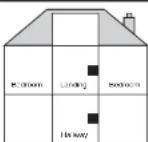
Position the Remote Control in a location that will allow it to be easily accessed. In the majority of installations this will be in a hallway, possibly next to the master bedroom. It should be installed at the standard light switch height (1.2m from floor level).
The Remote Control can be surface mounted using the mounting box provided or alternatively it can be recessed into a standard back-box (not included).
If a metal back-box is used it must have a minimum depth of 35mm.
Up to four EI1529RC System Remote Controls can be used in a system.
© El Electronics 2010
1
P/N B16112 Rev1
WIRING
WARNING: This Remote Control should be installed by a qualified electrician in accordance with the Requirements for Electrical Installations published by the IET as BS7671:2001.
- Disconnect the AC mains power supply from the circuit that is going to be used to power the Smoke/Heat Alarms and the Remote Control.
- Locate and install the Alarms as per the 'Installer Instructions' included with the alarms.
- Select a suitable location for the Remote Control as per the 'SITING' section on page 1 of this leaflet.
- Route the wiring (Live, Neutral, Interconnect/Control and Earth) to this point. A minimum 0.75mm ^2 cable should be used.
- Fix the mounting box provided to the wall for surface mounting or alternately, fix a back box (not included) into the wall if recessed mounting is required.
- Pass the wiring through an appropriate knockout in the mounting box or back-box.
- Connect the wiring as shown in Figures 1 & 2 below. (N.B. The Remote Control does not need to be earthed. However the terminal marked with the earth symbol is provided for the convenience of the installer so that any copper earth wire or cable coloured green & yellow, can be safely terminated).

text_image
Live Interconnect/Control Neutral Earth Refractive Power SupplyFigure 1
Note: The El1529RC Remote Control can be wired from any location within the system.
- Fix the Remote Control to the mounting box or back-box.
- Reconnect the AC mains power to the circuit and check that the green mains indicator lights on the Alarms are on.
- Test the function of the Remote Control as outlined in the 'WEEKLY TESTING' section on page 4 of this leaflet.
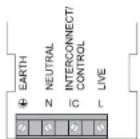
Figure 2
CAUTION
! Ensure all wiring is correctly connected otherwise the Control Switch and all connected units may be damaged.
Do not apply the high voltage insulation test to the wiring as all connected units may be damaged. If it is necessary to check insulation, temporarily remove all Alarms and the Ei1529RC switch.
! If a metal back-box is used (for recessed mounting) it must have a minimum depth of 35mm.
'LOCATE' & 'SILENCE ALARM' FUNCTIONS
- Locate Alarm – primarily used to identify the Alarm sensing fire.
When all the alarms are sounding due to a fire (or nuisance alarm):
Press and release the spring loaded Locate Alarm switch. This will silence all the alarms except those sensing fire / CO.
This is a very useful feature. For example, consider twelve alarms sounding simultaneously, then the unit sensing the fire can be identified audibly and the premises evacuated or the problem quickly resolved.
- Silence Alarm - used to silence nuisance alarms. This should only be pressed after the Locate switch has been used to identify the alarm that triggered the system, and it is determined that no fire is present.
Do not Silence the alarms unless you are sure there is no fire.
To Silence the alarms, press and release the Silence Alarm switch.
WHEN ALARMS ARE SOUNDING
What to do when the Alarms are sounding
- If there is a fire, immediately evacuate the premises and telephone the fire brigade from outside.
- When the alarms are sounding and the cause is not obvious, immediately press the 'Locate Alarm' switch. This will silence all the alarms except those sensing fire themselves.
- Locate the alarm(s) sensing fire audibly. Be careful, check doors are not warm and that there is no sign of smoke before you open them (See escape plan in Smoke/Heat Alarm instructions for further details).
- If you are fully satisfied that there is no fire, but the smoke/heat alarm is still continuing to alarm then press the 'Silence Alarm' switch.