
DLP10405 - Externe Batterie PHILIPS - Kostenlose Bedienungsanleitung
Finden Sie kostenlos die Bedienungsanleitung des Geräts DLP10405 PHILIPS als PDF.


| Produkttyp | Externe Batterie (Powerbank) |
| Marke | Philips |
| Modell | DLP10405 |
| Batterietyp | Lithium-Ionen |
| Kapazität | 10.000 mAh (geschätzt) |
| Eingang | Micro-USB, 5 V |
| Ausgang | 2x USB-A, 5 V |
| Ladezeit (Powerbank) | Ca. 4–6 Stunden (mit 2A Netzteil) |
| Ladezeit (Gerät) | Abhängig vom angeschlossenen Gerät |
| LED-Anzeige | 4 LEDs für Ladezustand |
| Taschenlampe | Ja, integrierte LED (ein-/ausschaltbar durch zweimaliges Drücken des Power-Buttons) |
| Power-Button | Ja, zum Einschalten und Anzeigen des Ladezustands |
| Abmessungen (ca.) | 100 x 60 x 20 mm |
| Gewicht (ca.) | 200 g |
| Lieferumfang | Powerbank, Micro-USB-Kabel, Bedienungsanleitung |
| Schutzfunktionen | Überhitzungsschutz, Kurzschlussschutz, Überspannungsschutz (lt. Sicherheitshinweisen) |
| Betriebstemperatur | 0 °C bis 45 °C (empfohlen) |
| Lagertemperatur | -20 °C bis 60 °C |
| Gehäusematerial | Kunststoff |
| Farbe | Schwarz |
| Hersteller | Gibson Innovations (im Auftrag von Philips) |
| Garantie | Limited Lifetime (siehe Support-Webseite) |
| Entsorgung | Nicht im Hausmüll; Recycling über Batteriesammelstellen |
Häufig gestellte Fragen - DLP10405 PHILIPS
Benutzerfragen zu DLP10405 PHILIPS
0 Frage zu diesem Gerät. Beantworten Sie die, die Sie kennen, oder stellen Sie Ihre eigene.
Eine neue Frage zu diesem Gerät stellen
Laden Sie die Anleitung für Ihr Externe Batterie kostenlos im PDF-Format! Finden Sie Ihr Handbuch DLP10405 - PHILIPS und nehmen Sie Ihr elektronisches Gerät wieder in die Hand. Auf dieser Seite sind alle Dokumente veröffentlicht, die für die Verwendung Ihres Geräts notwendig sind. DLP10405 von der Marke PHILIPS.
BEDIENUNGSANLEITUNG DLP10405 PHILIPS
PHILIPS
Akkupack
DLP10405/37
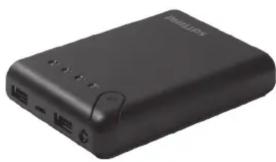
Benutzerhandbuch
WARNUNG: BRAND- UND STROMSCHLAGGEFAHR
BRANDGEFAHR
- VERMEIDEN SIE ES, DAS USB-AKKUPACK DIREKTEM SONNENLICHT, IN DER NÄHE EINER HEIZUNG ODER AN ANDEREN ORTEN MIT EXTREMEN TEMPERATUREN AUSZUSETZEN.
HEIZUNG ODER ANDEREN ORTEN MIT EXTREMEN TEMPERATUREN.
- VERWENDEN SIE DAS USB-AKKUPACK NICHT WEITER UND VERSUCHEN SIE NICHT, ES AUFZULADEN, WENN ES DURCHSTOCHEN, GEQUETSCHT, VERFORMT, BESCHÄDIGT WURDE ODER UNGEWÖHNLICHE EIGENSCHAFTEN AUFWEIST, WIE Z. B. ÜBERMÄSSIGE ERWÄRMUNG, ANSCHWELLEN ODER GERUCHSBILDUNG. - VERWENDEN SIE ES NUR AN TROCKENEN ORTEN; TAUCHEN SIE DAS GERÄT NIEMALS IN FLÜSSIGKEITEN.
• BETREIBEN SIE DAS USB-AKKUPACK NICHT IN DER NÄHE VON
BETREIBEN SIE DIE USB-AKKUPACKS NICHT IN DER NÄHE VON BRENNBAREN MATERIALIEN, DÄMPFEN ODER GASEN.
• VERWENDEN SIE ZUM AUFLADEN DES USB-AKKUPACKS NUR EIN USB-NETZTEIL MIT 5,0 V AUSGANG ODER EINEN COMPUTER-USB-PORT.
COMPUTER-USB-PORT ZUM AUFLADEN DES USB-AKKUPACKS.
• ÖFFNEN SIE DAS USB-AKKUPACK NICHT. ES BEFINDEN SICH KEINE ZU WARTENDEN TEILE DARIN.
• UM EINE EXPLOSION ODER DIE EINWIRKUNG VON GIFTIGEN DÄMPFEN ZU VERMEIDEN,
ENTSORGEN SIE DEN USB-AKKU NICHT IM FEUER.
• VERWENDEN SIE BEI HAUTKONTAKT MIT DEM AKKUINHALT
MILDE SEIFE UND WASSER.
• SPÜLEN SIE BEI AUGENKONTAKT MIT DEM AKKUINHALT DIE AUGEN MIT
KLAREM FLIEßENDEM WASSER UND SUCHEN SIE EINEN ARZT AUF.
- VON KINDERN FERNHALTEN. DER USB-AKKU IST KEIN SPIELZEUG.
• LASSEN SIE DEN USB-AKKU NICHT FALLEN.
• DIE LED-LEUCHTE IST SEHR HELL. VERMEIDEN SIE DIREKTEN KONTAKT DER LED-LEUCHTE MIT DEN AUGEN.
Vielen Dank, dass Sie sich für Ihren neuen USB-Akku entschieden haben. Seine Bequemlichkeit und Praktikabilität machen ihn ideal für Reisen. Egal, wo Sie sind oder wohin Sie gehen, nehmen Sie diesen Akku überallhin mit. Laden Sie ganz einfach Ihre Smartphones, Tablets, Smartwatches und andere mobile Geräte jederzeit und überall.
Lieferumfang
- USB-Akku
- Micro-USB-Ladekabel
• Bedienungsanleitung
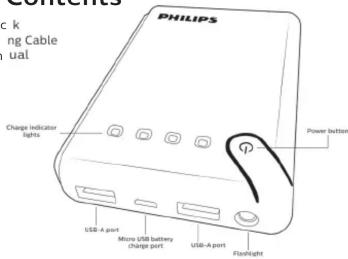
Ladezustandsanzeige
Drücken Sie die Einschalttaste am USB-Akku, um den Ladezustand zu sehen. Hinweis: Drücken Sie die Einschalttaste zweimal, um die Taschenlampe ein- und auszuschalten.
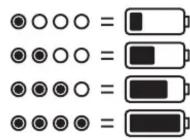
Laden des USB-Akkupacks
Wenn der Akkupack aufgeladen werden muss, stecken Sie das mitgelieferte Micro-USB-Kabel in den Micro-USB-Ladeanschluss am Akkupack. Stecken Sie das andere Ende des USB-Kabels in eine USB-Stromquelle. Wenn der Akkupack vollständig geladen ist, leuchten alle 4 LEDs.
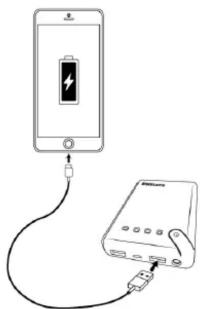
Laden Ihres Geräts
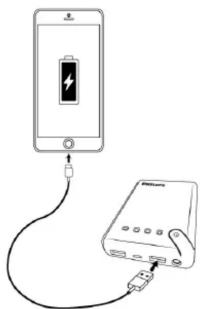
Stecken Sie das USB-A-Ende Ihres Kabels in den USB-Akkupack und das andere Ende in Ihr Gerät. Sobald das Gerät angeschlossen ist, drücken Sie die Einschalttaste am Akkupack und der Ladevorgang beginnt.
FCC-Erklärung
Dieses Gerät erfüllt Teil 15 der FCC-Bestimmungen. Der Betrieb unterliegt den folgenden zwei Bedingungen: (1) Dieses Gerät darf keine schädlichen Störungen verursachen, und (2) dieses Gerät muss alle empfangenen Störungen akzeptieren, einschließlich Störungen, die einen unerwünschten Betrieb verursachen können. FCC-HINWEIS: Der Hersteller ist nicht verantwortlich für Radio- oder Fernsehstörungen, die durch nicht genehmigte Änderungen an diesem Gerät verursacht werden. Solche Änderungen können die Berechtigung des Benutzers zum Betrieb des Geräts erlöschen lassen. HINWEIS: Dieses Gerät wurde getestet und entspricht den
Grenzwerten für ein digitales Gerät der Klasse B gemäß Teil 15 der FCC-Bestimmungen. Diese Grenzwerte sollen einen angemessenen Schutz gegen schädliche Störungen in einer Wohnanlage bieten. Dieses Gerät erzeugt, verwendet und kann Hochfrequenzenergie ausstrahlen und kann, wenn es nicht gemäß den Anweisungen installiert und verwendet wird, schädliche Störungen des Funkverkehrs verursachen. Es gibt jedoch keine Garantie, dass in einer bestimmten Installation keine Störungen auftreten. Wenn dieses Gerät schädliche Störungen des Radio- oder Fernsehempfangs verursacht, was durch Ein- und Ausschalten des Geräts festgestellt werden kann, wird der Benutzer ermutigt, die Störungen durch eine oder mehrere der folgenden Maßnahmen zu beheben:
- Richten Sie die Empfangsantenne neu aus oder verlegen Sie sie.
- Vergrößern Sie den Abstand zwischen dem Gerät und dem Empfänger.
- Schließen Sie das Gerät an eine Steckdose an, die zu einem anderen Stromkreis gehört als der, an den der Empfänger angeschlossen ist.
- Wenden Sie sich an den Händler oder einen erfahrenen Radio-/Fernsehtechniker.
Entsorgung der Batterie
Der USB-Akkupack enthält einen Lithium-Ionen-Akku. Befolgen Sie alle geltenden staatlichen und bundesstaatlichen Gesetze zur Batterieentsorgung und zum Recycling. Entsorgen Sie den USB-Akkupack nicht im Hausmüll. Bringen Sie ihn zu Ihrem örtlichen Batterie-Recyclingzentrum.

IN CHINA HERGESTELLT
Die Philips-Marke und das Philips-Schild-Emblem sind eingetragene Marken von Koninklijke Philips N.V. und werden unter Lizenz verwendet. Dieses Produkt wurde von Gibson Innovations Limited hergestellt. Es wird von der Jasco Products Company LLC, 10 E. Memorial Rd., Oklahoma City, OK 73114, vertrieben und mit Garantie versehen. ©2018 Gibson Innovations, alle Rechte vorbehalten.
Dieses Produkt ist mit einer begrenzten lebenslangen Garantie ausgestattet. Besuchen Sie www.philips.com/support für Garantiedetails.
Fragen? Kontaktieren Sie uns unter 1-844-816-0320 zwischen 7:00 und 20:00 Uhr CST.

DLP10405/37 v1 11/17
Bedienungsanleitung
WARNUNG: BRAND- UND STROMSCHLAGGEFAHR
BRANDGEFAHR
• VERMEIDEN SIE, DEN USB-TRAGBAREN LADER DIREKTEM SONNENLICHT AUSZUSETZEN. IN DER NÄHE EINES
HEIZGERÄTS ODER EINES ORTES MIT SEHR HOHEN TEMPERATUREN
• VERWENDEN SIE DEN USB-TRAGBAREN LADER NICHT WEITER UND VERSUCHEN SIE NICHT, IHN AUFZULADEN, WENN ER
USB LADER WURDE DURCHSTOCHEN, GEQUETSCHT, VERFORMT, BESCHÄDIGT ODER
USB LADER WURDE DURCHSTOCHEN, GEQUETSCHT, VERFORMT, BESCHÄDIGT ODER WEIST EINE ANOMALIE AUF, ZUM BEISPIEL:
WENN ER EINE ANOMALIE AUFWEIST, ZUM BEISPIEL SEHR HEISS IST, GESCHWOLLEN AUSSIEHT ODER EINEN GERUCH ABGIBT
ER IST SEHR HEISS, SIEHT GESCHWOLLEN AUS ODER GIBT EINEN GERUCH AB.
• VERWENDEN SIE IHN NUR AN TROCKENEN ORTEN. TAUCHEN SIE DAS GERÄT NIEMALS IN EINE FLÜSSIGKEIT.
• BETREIBEN SIE DEN USB-TRAGBAREN LADER NICHT IN DER NÄHE VON MATERIALIEN, EMISSIONEN
GASES INFLAMABLES
• ZUM LADEN DES USB-TRAGBAREN LADEGERÄTS NUR EINE USB-STROMVERSORGUNG VERWENDEN
MIT EINEM COMPUTER-USB-PORT ODER EINEM AUSGANG VON 5,0 V.
• ÖFFNEN SIE DAS USB-TRAGBARE LADEGERÄT NICHT, ES ENTHÄLT KEINE TEILE, DIE REPARIERT WERDEN KÖNNEN
- ÖFFNEN SIE DAS USB-TRAGBARE LADEGERÄT NICHT. ES ENTHÄLT KEINE TEILE, DIE REPARIERT WERDEN KÖNNEN. UM EXPLOSIONEN ODER DIE EXPOSITION GEGENÜBER GIFTIGEN EMISSIONEN ZU VERMEIDEN
- UM EXPLOSIONEN ODER DIE EXPOSITION GEGENÜBER GIFTIGEN EMISSIONEN ZU VERMEIDEN, ENTSORGEN SIE DAS USB-TRAGBARE LADEGERÄT NICHT IM FEUER
ENTSORGEN SIE DAS USB-TRAGBARE LADEGERÄT NICHT IM FEUER
• VERWENDEN SIE WASSER UND EINE MILDE SEIFE, FALLS DER INHALT
DER BATTERIEN MIT DER HAUT IN KONTAKT KOMMT.
• SPÜLEN SIE DIE AUGEN MIT LEITUNGSWASSER, FALLS DER INHALT DER
BATTERIEN MIT DEN AUGEN IN KONTAKT KOMMT, UND SUCHEN SIE EINEN ARZT AUF
• BEWAHREN SIE DAS LADEGERÄT AUSSERHALB DER REICHWEITE VON KINDERN AUF
DAS TRAGBARE LADEGERÄT IST KEIN SPIELZEUG
• LASSEN SIE DAS USB-TRAGBARE LADEGERÄT NICHT FALLEN
• DIE LED-LEUCHTE IST SEHR HELL, VERMEIDEN SIE DIREKTE EINWIRKUNG DES LED-LICHTS AUF DIE AUGEN
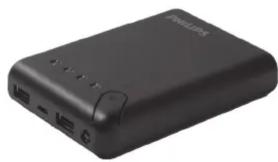
Vielen Dank, dass Sie sich für Ihr neues USB-Tragbares Ladegerät entschieden haben. Es ist ideal für Reisen, dank seiner Bequemlichkeit und Praktikabilität. Egal, wo Sie sind oder wohin Sie gehen, nehmen Sie Ihr USB-Tragbares Ladegerät immer mit. Laden Sie ganz einfach Ihre Smartphones, Tablets, Smartwatches und andere mobile Geräte jederzeit und überall.
Paketinhalt
• USB-Tragbares Ladegerät
- Tragbares Ladegerät 05 - D
• Micro-USB-Ladekabel
- Bedienungsanleitung
Ladeanzeige
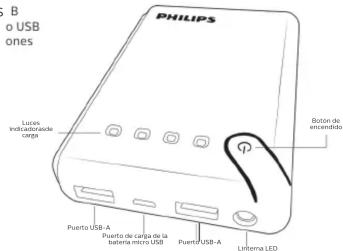
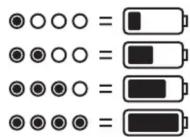
Drücken Sie die Einschalttaste des tragbaren USB-Ladegeräts, um den Akkustand zu sehen.
Hinweis: Drücken Sie die Einschalttaste zweimal, um die Taschenlampe einzuschalten.
So laden Sie das tragbare USB-Ladegerät auf
Wenn Sie das tragbare Ladegerät aufladen möchten, stecken Sie das mitgelieferte Micro-USB-Kabel in den Micro-USB-Ladeanschluss des Ladegeräts. Stecken Sie das andere Ende des USB-Kabels in eine USB-Stromquelle. Wenn das tragbare Ladegerät vollständig aufgeladen ist, leuchten alle vier LED-Leuchten.
So laden Sie Ihr Gerät
Verbinden Sie das USB-A-Ende Ihres Kabels mit dem tragbaren USB-Ladegerät und das andere Ende mit Ihrem Gerät. Sobald das Gerät angeschlossen ist, drücken Sie die Einschalttaste des Ladegeräts, um den Ladevorgang zu starten.
Erklärung der Federal Communications Commission (FCC)
Dieses Gerät erfüllt Teil 15 der FCC-Bestimmungen. Der Betrieb unterliegt den folgenden zwei Bedingungen: (1) Dieses Gerät darf keine schädlichen Störungen verursachen, und (2) dieses Gerät muss alle empfangenen Störungen akzeptieren, einschließlich Störungen, die einen unerwünschten Betrieb verursachen können.
HINWEIS DER FCC: Der Hersteller übernimmt keine Verantwortung für Störungen im Radio- oder TV-Empfang, die durch nicht genehmigte Änderungen an diesem Gerät verursacht werden. Solche Änderungen können die Berechtigung des Benutzers zum Betrieb dieses Geräts aufheben.
HINWEIS: Dieses Gerät wurde getestet und entspricht den Grenzwerten für digitale Geräte der Klasse B gemäß Teil 15 der FCC-Bestimmungen. Diese Grenzwerte sollen einen angemessenen Schutz vor schädlichen Störungen in Wohngebieten bieten. Dieses Gerät erzeugt, verwendet und kann Hochfrequenzenergie ausstrahlen. Wenn es nicht gemäß den Anweisungen installiert und verwendet wird, kann es schädliche Störungen des Funkverkehrs verursachen. Es gibt jedoch keine Garantie, dass in einer bestimmten Installation keine Störungen auftreten. Wenn dieses Gerät schädliche Störungen des Radio- oder Fernsehempfangs verursacht, was durch Ein- und Ausschalten des Geräts festgestellt werden kann, wird dem Benutzer empfohlen, die Störung durch eine oder mehrere der folgenden Maßnahmen zu beheben:
• Die Empfangsantenne neu ausrichten oder neu positionieren. - Den Abstand zwischen dem Gerät und dem Empfänger vergrößern. - Das Gerät an eine Steckdose anschließen, die zu einem anderen Stromkreis gehört als der, an den der Empfänger angeschlossen ist. - Den Händler oder einen erfahrenen Radio-/Fernsehtechniker um Hilfe bitten.
Entsorgung der Batterien
Das tragbare USB-Ladegerät enthält einen Lithium-Ionen-Akku. Beachten Sie die geltenden Bundes- und Landesvorschriften zur Entsorgung und zum Recycling von Batterien. Entsorgen Sie Ihr tragbares USB-Ladegerät nicht im Hausmüll. Bringen Sie es zu Ihrer örtlichen Batterie-Recyclingstelle.

HERGESTELLT IN CHINA
Die Marke Philips und das Philips-Schild-Emblem sind eingetragene Marken der Koninklijke Philips N.V. und werden unter Lizenz verwendet. Dieses Produkt wurde von Gibson Innovations Limited hergestellt. Dieses Produkt wird von Jasco Products Company LLC, 10 E. Memorial Rd., Oklahoma City, OK 73114, vertrieben und ist durch deren Garantie abgedeckt. ©2018 Gibson Innovations, alle Rechte vorbehalten.
Dieses Produkt hat eine eingeschränkte lebenslange Garantie. Besuchen Sie www.philips.com/support für Garantiedetails.
Haben Sie Fragen? Kontaktieren Sie uns unter 1-844-816-0320 zwischen 7:00 und 20:00 Uhr CST (Central Standard Time). DLP10405/37 v1 11/17



- BENUTZERHANDBUCH
- WARNUNG: BRAND- UND STROMSCHLAGGEFAHR
- LIEFERUMFANG
- LADEZUSTANDSANZEIGE
- LADEN DES USB-AKKUPACKS
- LADEN IHRES GERÄTS
- FCC-ERKLÄRUNG
- ENTSORGUNG DER BATTERIE
- IN CHINA HERGESTELLT
- BEDIENUNGSANLEITUNG
- BRANDGEFAHR
- PAKETINHALT
- LADEANZEIGE
- SO LADEN SIE DAS TRAGBARE USB-LADEGERÄT AUF
- SO LADEN SIE IHR GERÄT
- ERKLÄRUNG DER FEDERAL COMMUNICATIONS COMMISSION (FCC)
- ENTSORGUNG DER BATTERIEN
- HERGESTELLT IN CHINA
Marke : PHILIPS
Modell : DLP10405
Kategorie : Externe Batterie