
FTB2600LED - Externe Batterie iconBIT - Kostenlose Bedienungsanleitung
Finden Sie kostenlos die Bedienungsanleitung des Geräts FTB2600LED iconBIT als PDF.


| Produkttyp | Externe Batterie (Powerbank) |
| Marke | iconBIT |
| Modell | FTB2600LED |
| Kapazität | 2600 mAh |
| Eingangsspannung | DC 5 V |
| Eingangsstrom | 800 mA (max.) |
| Ausgangsspannung | DC 5 V ~ 5,5 V |
| Ausgangsstrom | 1000 mA (max.) |
| Abmessungen (L×B×H) | 23,5 × 23,5 × 102 mm |
| Gewicht | 68 g |
| Betriebstemperatur | -10 °C bis 60 °C |
| Lagertemperatur | -10 °C bis 45 °C |
| LED-Taschenlampe | Ja, ein-/ausschaltbar (zweimaliger Tastendruck) |
| Kapazitätsanzeige | 3-stufig: 30 %, 70 %, 100 % |
| Schutzfunktion | Überstromschutz, automatische Abschaltung nach 30 s |
| Ladeanschluss Eingang | USB-Buchse („IN“) |
| Ladeanschluss Ausgang | USB-Buchse („OUT“) |
| Wartung | Alle 3 Monate nachladen; feuchtigkeitsfrei und ohne Chemikalien lagern |
| Kompatible Geräte | Mobiltelefone und andere digitale Geräte |
Häufig gestellte Fragen - FTB2600LED iconBIT
Benutzerfragen zu FTB2600LED iconBIT
0 Frage zu diesem Gerät. Beantworten Sie die, die Sie kennen, oder stellen Sie Ihre eigene.
Eine neue Frage zu diesem Gerät stellen
Laden Sie die Anleitung für Ihr Externe Batterie kostenlos im PDF-Format! Finden Sie Ihr Handbuch FTB2600LED - iconBIT und nehmen Sie Ihr elektronisches Gerät wieder in die Hand. Auf dieser Seite sind alle Dokumente veröffentlicht, die für die Verwendung Ihres Geräts notwendig sind. FTB2600LED von der Marke iconBIT.
BEDIENUNGSANLEITUNG FTB2600LED iconBIT
PRODUCT SPECIFICATION
| Work for | Mobile phone and digital product |
| Input voltage | DC 5V |
| Input current | 800mA(MAX) |
| Output voltage | DC 5V ~ 5.5V |
| Output current | 1000mA (MAX) |
| Capacity | 2600mAh |
| Product weight | 68g |
| Product dimension | 23.5(L)×23.5(W)×102(H)mm |
| Operating temperate | -10°C~60°C |
| Storage temperate | -10°C~45°C |
MAINTENANCE
Keep your power bank operating to the fullest potential, by following the below steps:
- Re-charge your power bank once every three months when it is not in use.
- Keep the power bank away from any moist environment and corrosive material.
- Never wash the power bank with any chemicals, soaps or detergents.

iconBIT
FTB2600 LED
Rechargeable Battery Pack
USER MANUAL
www.iconbit.com
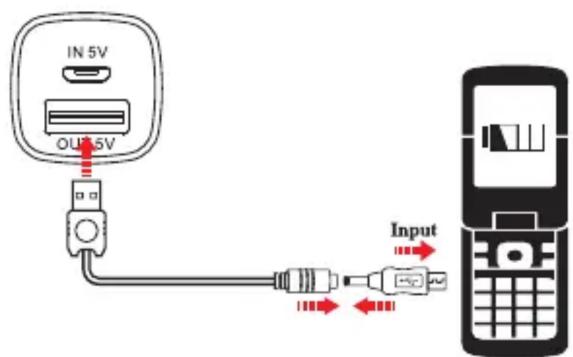
HOW TO USE
- Simply using the attached USB cable to charge the digital product, One end of the USB cable connect with the "OUT" port of the power bank, another end connect with the digital product with converted tip. Press "💡" button once, it will start to charge and the green LED will indicate the charging process.
- Finishing charging or fail to connect the digital product, the green LED will stop flashing. And the power bank will turn off automatically after 30 seconds.
- 30%, 70%, 100% is the three capacity indicator, when the 30% indicator light on means low power, please charge the power bank in time.
- Press the "💡" button twice within one second to turn ON/OFF the LED light.
Note: If the instantaneous current is oversize when charging the digital product, the power bank will turn to protected mode automatically. To relieve the protected mode just charge the power bank.
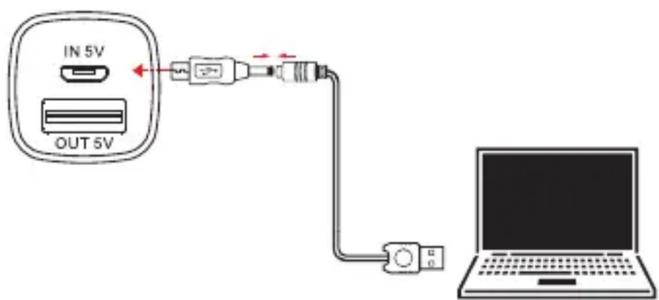
HOW TO CHARGE THE POWER BANK
The "IN" port is the charging port of the power bank. The three blue capacity indicators will light on when charge the power bank, after full charging, the 100% capacity indicator will light on.
UNIT VIEW DESCRIPTION

- Power indicator
- Turn ON button
- USB output port
- DC5V input port


Marke : iconBIT
Modell : FTB2600LED
Kategorie : Externe Batterie