
Premium DeskPhone 8038 - Bürotelefon ALCATEL - Kostenlose Bedienungsanleitung
Finden Sie kostenlos die Bedienungsanleitung des Geräts Premium DeskPhone 8038 ALCATEL als PDF.


| Produkttyp | Bürotelefon |
| Marke | Alcatel (Alcatel-Lucent) |
| Modell | Premium DeskPhone 8038 |
| Abmessungen (ca.) | 220 x 180 x 100 mm |
| Gewicht (ca.) | 800 g |
| Stromversorgung | Power over Ethernet (PoE) oder optionales Netzteil (5V DC) |
| Display | Grafikdisplay mit Hintergrundbeleuchtung |
| Tastatur | Alphanumerisch, 12 Tasten |
| Funktionstasten | Stumm, Freisprechen, Halten, Weiterleiten, Wahlwiederholung, Nachrichten, Intercom, Menü, Zurück, Home |
| Kopfhöreranschluss | 3,5 mm Klinke |
| LED-Anzeigen | Blau (eingehender Anruf), Orange (Alarm) |
| Lautstärkeregelung | Für Hörer, Freisprechen und Kopfhörer (3 Stufen) |
| Kontrasteinstellung | Ja, über Menü |
| Sprache | Mehrsprachig (einstellbar) |
| Klingelton | Auswählbar: Melodien, leise, Pieptöne, Lautstärke einstellbar |
| Telefonbuch | Ja, mit Namenssuche (Firmenverzeichnis) |
| Anrufprotokoll | Ja, letzte 10 gewählte Nummern |
| Konferenzschaltung | Ja, bis zu 3 Teilnehmer |
| Anrufweiterleitung | Sofort, bei Besetzt, bei Nichtmelden |
| Mailbox (Voicemail) | Ja, mit persönlicher Ansage |
| Tastensperre | Ja, über Menü |
| Reinigung | Mit einem weichen, trockenen Tuch; keine aggressiven Reinigungsmittel |
| Sicherheit | Nicht öffnen; nur autorisiertes Personal; vor Feuchtigkeit schützen |
| Reparatur | Bei Defekt an autorisierten Service wenden; keine vom Benutzer austauschbaren Teile |
Häufig gestellte Fragen - Premium DeskPhone 8038 ALCATEL
Benutzerfragen zu Premium DeskPhone 8038 ALCATEL
0 Frage zu diesem Gerät. Beantworten Sie die, die Sie kennen, oder stellen Sie Ihre eigene.
Eine neue Frage zu diesem Gerät stellen
Laden Sie die Anleitung für Ihr Bürotelefon kostenlos im PDF-Format! Finden Sie Ihr Handbuch Premium DeskPhone 8038 - ALCATEL und nehmen Sie Ihr elektronisches Gerät wieder in die Hand. Auf dieser Seite sind alle Dokumente veröffentlicht, die für die Verwendung Ihres Geräts notwendig sind. Premium DeskPhone 8038 von der Marke ALCATEL.
BEDIENUNGSANLEITUNG Premium DeskPhone 8038 ALCATEL
Alcatel-Lucent 8068/8038/8028/8039/8029 Premium DeskPhone
Alcatel·Lucent

Enterprise
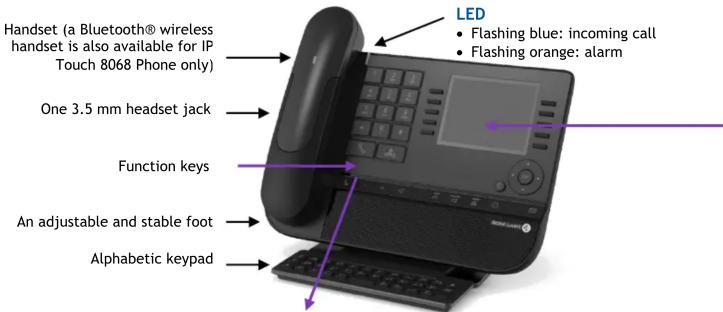
Function keys
| Mute and intercom. | |
| Handsfree, handset or headset volume. Adjust contrast | - + |
| Audio services (handsfree, handset or headset). | |
| Hold: the call is placed on hold.Transfer: transfer the call to another number. | F |
| Redial key: to access the 'Redial' feature. | |
| Guide key: Used to obtain information on functions of the "menu" page and to program key of the "perso" page. | |
| Messaging key to access various mail services. This key is lit when you have received a new voicemail, text message or callback request. | |
| Handsfree key To make or answer a call without lifting the receiver. | |
| END key To terminate a call. |
Bluetooth® wireless handset (8068 Premium DeskPhone)
| Off-hook/On-hook | ||
| Volume/Mute:Short successive presses to change the handset volume level (3 levels)Long press to ensure your caller no longer hears you |
Welcome screens
| Mon 23 Sep 2013 9:47 | ||
| menu | perso | info |
| Settings | Redial list | |
| Appointment | Lock | |
| Text mail | Forward | |
| Events | ||
Contains several lines and pages providing information on calls and the features that can be accessed by pressing the keys associated to the labels on the display (10 keys for 8068/38/39 phones and 6 keys for the 8028/29 phones).
- Menu page: Contains all functions and applications accessible via the keys associated with the words on the screen.
- Perso page: Contains call line keys (allowing supervision of calls) and programmable call keys.
- Info page: Contains information on the telephone and the status of its functions: name, telephone number, number of messages, activation of transfer function, appointment reminder, etc.
- Transfer icon: Pressing the key next to this icon allows you to program or change the transfer function.
Navigation
 | OK key: Used to validate your choices and options while programming or configuringLeft-right navigator: Used to move from one page to another and display information about current calls (call in progress, calls on hold, incoming call).Up-down navigator: Used to scroll through the content of a page |
| [62A2] | Use this key to go back to the previous stepUse this key to go back to the homepage (long press) |
Status icons / Call icons
| Headset connected | Incoming call icon | ||
| Telephone locked | Call in progress icon | ||
| Appointment programmed | Call holding icon |
Alphabetic keypad
| Cursor moving keys (left, right, up and down). |  | The 8028/8029 Premium Deskphone has 4 programmable keys with LED and paper labels. Phone capabilities can be extended with Premium Add-on 10- and40-key modules or Premium Smart display 14-key module. | |
| Caps lock: to write text in capital letters. |  | 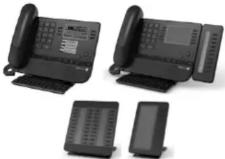 | |
| Alt key: to access the purple characters and features. | |||
| Enter key: to validate edited text. |  | ||
| Backspace key: to delete one character in an edit box. | |||
All features are described for OmniPCX Office and OmniPCX Enterprise Systems. If a feature works differently on each system it is described twice. . The label displayed on the phone depends on the type of phone. This guide provides the labels for 8068/38/39 phones plus 8028/29 phone labels in parentheses (if different). .
Alcatel·Lucent

Enterprise
| CallDial the number directly or dial the number after pressing a line key (an off-hook key phone or Bluetooth handset, hands-free key) | |
| Call by name (Company directory)RCE - Enter the first letters of contact's name and follow the on-screen instructions.OTCT - Enter the name, contact's surname/name or initials and follow the on-screen instructions. | |
| Answer a callTake the handset off the hook, use an off-hook key (phone or Bluetooth handset), use hands-free key, or press the key next to the incoming call icon | |
| Ignore call / End the call | |
| RedialLong press to access the list of the last 10 dialed numbersShort press to call the last dialed numberMake a call-back request to a busy numberCallback | |
| Placing a call on hold (hold) | |
| Sending DTMF signalsUMFcode (RCE), Send DTMF (OTCT)Send numbers | |
| Mute | |
| InterphonyThe phone automatically answers the call.Before the line is taken, you hear a succession of specific beeps. | |
| Making a second call during a conversationNew call | |
| Answering a second call during a conversationPress the key associated with the incoming call | |
| Switching between calls (Broker call)Press the key associated with the call on hold | |
| To cancel your second call and recover the first:You automatically recover the first call | |
| Transferring a callYou are in conversation with one callerCall a second contactTransfer the call | |
| ConferenceCall the first contactCall the second contactConference (Conf) | |
| Make calls via your programmed call keysPress the desired programmed call key | Perso |
| Modify the programmed keyPress the programmed key to be modifiedFollow the on-screen instructions | Perso |
| Erase a programmed keySettings Keys (RCE)Settings Phone Key program (OTCT)Select the key to be erasedFollow the on-screen instructions | Menu |
| Customizing your voice greetingSettingsMailboxYou can listen to the greeting, customize the greeting and set the default greeting | Menu |
| Consulting your voice mailbox | |
| Diverting calls to your voice mailboxPress the key associated to the forward iconImmediate-VMress the key associated with the type of call forward required | |
| Cancel forwardPress the key associated to the forward iconCancelfwd. |
| Do not disturbPress the key associated to the forward iconDoNotDisturb (DND) | |
| Send text messagesMessageSendTxtMsgEnter the destination numberSelect the type of message to send (fixed Msg, New Msg,...) | |
| Read text messagesMessageReadTxtMsg | |
| Instant Messaging (RCE) | |
| Consulting the Call log (RCE) | |
| Information about the phone | Info |
| Lock/unlock the phoneLock | Menu |
| Adjust audio volume | |
| Select the language of your choiceSettings > Options > Language (RCE)Settings > Phone > Language (OTCT) | Menu |
| Choose the tuneSettings > Phone > RingingAdjust the ring via the following menus:Melody, Silent, Beeps, Volume, etc. | Menu |
| Adjusting screen contrastSettings > Phone: > Contrast | Menu |
| Modify the password for your phone setSettings > Options > Password (RCE)Settings > Phone > Password (OTCT) | Menu |
| HomepageSettings > Options > Homepage (RCE)Settings > Phone > Homepage (OTCT)Select the default page | Menu |
Related Documentation - Other languages for these Safety and Regulatory Instructions and User Documentation are available at the following Web site: http://enterprise.alcatel-lucent.com?product=All&page=Directory. Alcatel-Lucent copyright © 2014-E2013113408 - 8AL90893USABed01
Marke : ALCATEL
Modell : Premium DeskPhone 8038
Kategorie : Bürotelefon