
CAL 7750 - Uhr CITIZEN - Kostenlose Bedienungsanleitung
Finden Sie kostenlos die Bedienungsanleitung des Geräts CAL 7750 CITIZEN als PDF.


| Produkttyp | Analog-Quarzuhr |
| Modell | CAL 7750 |
| Marke | Citizen |
| Uhrwerk | Quarz (32.768 Hz) |
| Genauigkeit | ±15 Sekunden pro Monat (bei normalen Temperaturen 5°C–35°C) |
| Betriebstemperaturbereich | -10°C bis +60°C |
| Stromversorgung | Batterie 280-72 (SR626W) |
| Batterielebensdauer | Ca. 2 Jahre |
| Funktionen | Analogzeit, Wecker (12-Stunden-System), Wecker Ein/Aus, Batteriewarnung |
| Weckerdauer | 10 Sekunden |
| Wasserdichtigkeit | 3 bar (geeignet für leichten Wasserkontakt wie Händewaschen, Regen) |
| Gehäusematerial | Nicht angegeben (typisch Edelstahl) |
| Armbandmaterial | Nicht angegeben (typisch Leder oder Edelstahl) |
| Glas | Nicht angegeben (typisch Mineralglas) |
| Durchmesser | Nicht angegeben (ca. 40 mm) |
| Gewicht | Nicht angegeben (ca. 80 g) |
| Reinigung und Pflege | Regelmäßig mit weichem Tuch reinigen; Krone gelegentlich drehen, um Verschmutzung zu vermeiden; alle 2–3 Jahre Wartung empfohlen |
| Sicherheitshinweise | Batterie von Kleinkindern fernhalten; starke Stöße, Magnete, Chemikalien und extreme Temperaturen vermeiden |
| Ersatzteile | Batterie: SR626W; andere Teile nur über autorisierte Servicecenter |
| Reparierbarkeit | Nicht vom Benutzer reparierbar; Service durch Fachkraft empfohlen |
Häufig gestellte Fragen - CAL 7750 CITIZEN
Benutzerfragen zu CAL 7750 CITIZEN
0 Frage zu diesem Gerät. Beantworten Sie die, die Sie kennen, oder stellen Sie Ihre eigene.
Eine neue Frage zu diesem Gerät stellen
Laden Sie die Anleitung für Ihr Uhr kostenlos im PDF-Format! Finden Sie Ihr Handbuch CAL 7750 - CITIZEN und nehmen Sie Ihr elektronisches Gerät wieder in die Hand. Auf dieser Seite sind alle Dokumente veröffentlicht, die für die Verwendung Ihres Geräts notwendig sind. CAL 7750 von der Marke CITIZEN.
BEDIENUNGSANLEITUNG CAL 7750 CITIZEN
CITIZEN QUARTZ Analog Alarm
Model No. AQXXX Cal. No. 775\*
- Instruction Manual
CTZ-B6807
A. NAME OF PARTS
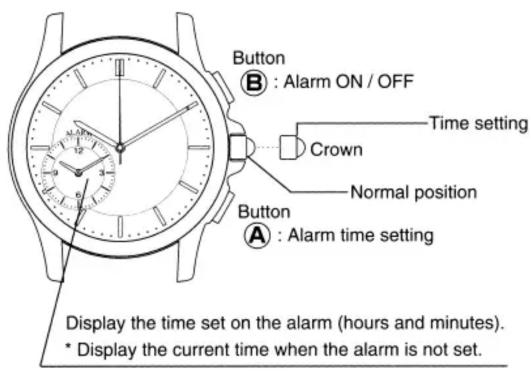
B. SETTING THE TIME AND INITIAL SETTING FOR ALARM
Set the time and initial setting for the alarm by following the procedure described below. The alarm function will not operate correctly unless the initial alarm setting procedure is performed.
- Pull the crown out so that the second hand stops at the "0" position (12:00).
- Set the hour and minute hands to the current time by turning the crown.
- Set the alarm hour and minute hands to the current time by pressing button Ⓐ or Ⓑ.
- Pressing and releasing button B moves the hands counterclockwise in one minute steps.
-
Pressing and releasing button ○Amoves the hands clockwise in one minute steps.
Press and hold button Ⓐ or Ⓑ to advance the hands rapidly. -
Push the crown back into the normal position.
C. USING THE ALARM
This alarm is set on the 12-hour system.
When the alarm set time is reached, the alarm will sound for 10 seconds.
After the alarm sounds, the alarm hands will change to indicate the current time.
Press button ○Aor ○Bto stop alarm sound.
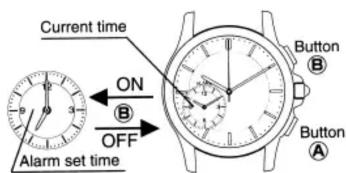
Setting the Alarm
(Perform this procedure with the crown in the normal position.)
Press button ○No set the alarm hour and
minute hands to the desired time.
Pressing and releasing button ○ moves the hands clockwise in one minute steps.
Press and hold button ○No advance the hands rapidly.
When the hour/minute hands and alarm hour/minute hands are indicating different times:
Alarm is on
When the hour/minute hands and alarm hour/minute hands are indicating the same time:
Alarm is off
Once the alarm time has been set, it will remain in the memory until alarm set time is changed. When button ○Bis pressed once when the alarm is off, the alarm will be turned on and sound at the set time stored in memory. Each time button ○Bis pressed, the alarm will switch between on and off. At this time, the alarm will sound as indicated below When alarm is switched to on: sounds twice When alarm is switched to off: sounds once
D. LOW BATTERY WARNING FUNCTION
When the battery is low, the battery warning function causes the second hand to move in 2 second increments. Replace the battery as soon as possible. *Even when this happens, the watch will still maintain the correct time.
E. SPECIFICATIONS
-
Type: Analog quartz watch
-
Frequency: 32,768Hz
-
Accuracy: Within ±15 seconds per month at normal temperatures (5°C\~35°C / 41°F\~140°F)
-
Operating temperature range: -10^ +60^ (14°F \~ 140°F)
-
Additional functions: Alarm function (12 hour system) Low battery warning function
-
Battery No.: 280-72 (SR626W)
-
Battery life: Approx. 2 years
*These specifications are subject to change without prior notice.
F. Precautions for long term use
1. Water-resistant
Check the chart to determine the water resistant properties of this watch.
• Always set the crown in the normal position.
| Examples of use | ||||
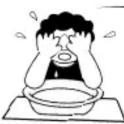 | 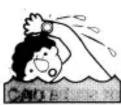 |  |  | 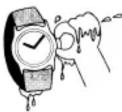 |
| Minor exposure to water (washing face, rain, etc.) | Moderate exposure to water (washing, kitchen, work swimming, etc.) | Marine sports (skin diving) | Scuba diving (with air tank) | Operation of the crown with moisture visible |
| OK | NO | NO | NO | NO |
| OK | OK | NO | NO | NO |
| OK | OK | OK | NO | NO |
| Indication | Specifications | Minor exposure to water (washing face, rain, etc.) | (washing, kitchen, work swimming, etc.) | Marine sports (skin diving) | Scuba diving (with air tank) | Operation of the crown with moisture visible | |
| Watch face | Case (Case back) | ||||||
| NON | WATER RESIST(ANT) | 3 bar water resistant watch | OK | NO | NO | NO | NO |
| WATER RESIST W.R ★★★/★★ BAR OR No INDICATION | WATER RESIST(ANT) | 5 bar water resistant watch | OK | OK | NO | NO | NO |
| 10/20 bar water resistant watch | OK | OK | OK | NO | NO | ||
2. Avoid extreme temperatures
Avoid leaving your watch in extremely warn or cold locations for long periods of time.
3. Avoid strong shocks
4. Avoid strong magnetic fields
5. Avoid chemicals and gasses
Avoid wearing this watch in the presence of chemicals and gasses. If mercury or any chemical (such as fuel, gasoline, thinner, alcohol, spray liquid of cosmetics or the like), attaches, discolouration, deterioration or damage to case, band or other components may occur.
6. Avoid static electricity
The integrated circuits used in this watch are sensitive to static electricity. If exposed to intense static electricity, the watch's display may lose accuracy.
7. Keep the watch clean
It may become difficult to pull out the crown due to dirt and dust getting caught between the crown and case when the watch is worn for long periods of time. To prevent this from happening, turn the crown freely back and forth occasionally while it is in the normal set position. Any dirt left on the case or band may cause skin rash. A watchband will easily become soiled with dust and perspiration because it is in direct contact with the skin. Even a stainless or gold-plated band may begin to corrode if it has not been cleaned for a long period of time.
8. Periodic inspection
Getting your watch checked once every two or three years is recommended to ensure long use and trouble free operation.
9. Be sure to keep the battery away from infants or small children: should accidental ingestion occur, consult a doctor at once.

- CITIZEN QUARTZ Analog Alarm
- Model No. AQXXX Cal. No. 775\*
- CTZ-B6807
- SETTING THE TIME AND INITIAL SETTING FOR ALARM
- USING THE ALARM
- Setting the Alarm
- Alarm is on
- Alarm is off
- LOW BATTERY WARNING FUNCTION
- SPECIFICATIONS
- Precautions for long term use
- Water-resistant
- Avoid extreme temperatures
- Avoid strong shocks
- Avoid strong magnetic fields
- Avoid chemicals and gasses
- Avoid static electricity
- Keep the watch clean
- Periodic inspection
- Be sure to keep the battery away from infants or small children: should accidental ingestion occur, consult a doctor at once.
Marke : CITIZEN
Modell : CAL 7750
Kategorie : Uhr