
CAL 8900 - Uhr CITIZEN - Kostenlose Bedienungsanleitung
Finden Sie kostenlos die Bedienungsanleitung des Geräts CAL 8900 CITIZEN als PDF.


| Produkttyp | Quarzarmbanduhr mit Digital-Analog-Anzeige |
| Marke | Citizen |
| Modell | CAL 8900 |
| Kalibernummer | 8900-08A |
| Uhrwerktyp | Quarz (32.768 Hz) |
| Genauigkeit | ±15 Sekunden pro Monat (bei normalen Temperaturen) |
| Gehäusedurchmesser | 30,0 mm (max.) |
| Gehäusedicke | 4,50 mm (5,51 mm mit Batterie) |
| Stromversorgung | Silberoxid-Knopfzelle 280-15, 1,5 V, 75 mAh, Lebensdauer ca. 3 Jahre |
| Anzeige (digital) | Zeit (24 Std., Min., Sek.), Kalender (Monat, Datum, Wochentag, Jahr), Stoppuhr |
| Anzeige (analog) | Stunden- und Minutenzeiger im 4-Sekunden-Schritt |
| Zusatzfunktionen | Automatischer Kalender (inkl. Schaltjahr), Batterielebensdaueranzeige, Energiesparmodus (Krone ausgezogen) |
| Stoppuhr | Messbereich bis 60 Minuten, 1/100 Sekunden, Zwischenzeit-/Rundenfunktion |
| Bedienelemente | Tasten: M (Modus), ST (Start/Stopp), S (Select), R (Read/Set); Krone |
| Betriebstemperaturbereich | 0 °C bis +60 °C |
| Wartung und Reinigung | Mit einem weichen, trockenen Tuch reinigen; keine aggressiven Reinigungsmittel verwenden |
| Sicherheitshinweise | Nicht extremen Temperaturen oder Feuchtigkeit aussetzen; Batterie fachgerecht entsorgen |
| Ersatzteile und Reparierbarkeit | Batterie (Nr. 280-15) vom Fachmann wechseln lassen; keine kundenseitigen Reparaturen |
| Anwendungsgebiet | Herrenarmbanduhr, Alltag und Sport |
Häufig gestellte Fragen - CAL 8900 CITIZEN
Benutzerfragen zu CAL 8900 CITIZEN
0 Frage zu diesem Gerät. Beantworten Sie die, die Sie kennen, oder stellen Sie Ihre eigene.
Eine neue Frage zu diesem Gerät stellen
Laden Sie die Anleitung für Ihr Uhr kostenlos im PDF-Format! Finden Sie Ihr Handbuch CAL 8900 - CITIZEN und nehmen Sie Ihr elektronisches Gerät wieder in die Hand. Auf dieser Seite sind alle Dokumente veröffentlicht, die für die Verwendung Ihres Geräts notwendig sind. CAL 8900 von der Marke CITIZEN.
BEDIENUNGSANLEITUNG CAL 8900 CITIZEN
TECHNICAL INFORMATION
CITIZEN QUARTZ
Cal.No.890※※
§1. OUTLINE
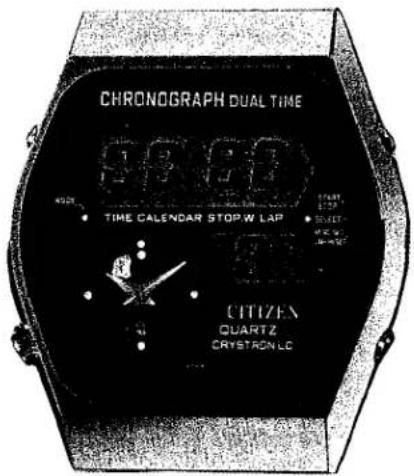
This unique watch combines the advantages of a digital quartz watch and an analog quartz watch together. It is finished in a well unified design thanks to adoption of an L-shaped LC display panel completed through special processing, furthermore featuring a stopwatch function.
§2. FEATURES
1) A compact and multi-function watch for gentlemen's use.
a) One chip of C/MOS-LSI controls both the digital and analog functions.
b) The module size is as follows: Outer diameter 30.0mmφ (max.); Thickness 4.50mm (without power cell); Thickness with power cell 5.51mm.
2) A high accuracy can be maintained about three years with only one unit of small-size silver oxide power cell.
a) Accuracy at the normal temperature: ±15 sec. per month
b) Power cell No.: 280-15; Nominal power cell life: about 3 years
3) Digital display function
a) Time display (24-hour, minute & second) calendar display (month, date & day), plus stopwatch display
b) Automatic calendar setting at the end of each month and year (including the leap year)
c) Power cell life indicating device (with blinking of service mark, (The colon and the time or calendar mark start flashing).
4) Analog display function
a) 2 hands (4-second step movement for hour and minute hands)
b) Power conservation switch (to be actuated with pull-out of crown)
5) An easy time adjustment is possible by means of the trimmer condenser.
6) High-contrast and long-life FE-type LC display.
With application of a special-form LC display panel, an easy-to-see display screen is obtained with increased functional efficiency.
§ 3. SPECIFICATIONS
| Caliber No. | 8900-08A |
| Type | Quartz crystal watch with digital-analog simultaneous display |
| Movement | Size: 30.00mm Thickness: 4.50mm (5.51mm with power cell) |
| Accuracy | ±15 sec./month (at normal temperatures) |
| Oscillation | 32,768Hz |
| Digital watch(Display system) | FE twist type nematic LC display6-digit time display (hour, minute & second)Calendar display by switching (month, date, day & year)'Year' displayed only at display correction timeStopwatch function by selecting button |
| Analog watch(Display system)(Converter) | Time display (hour & minute) by two hands in 4-second step movementBipolar step motor |
| Effective temperature range | 0°C ~ +60°C (32°F ~ 140°F) |
| Integrated circuit | C/MOS-LSI (1 unit) |
| Additional mechanisms | Automatic calendar setting at the end of each month and year (Digital)Power cell life indicating device (Digital)Power conservation switch (Analog) |
| Power cell | Small-size silver oxide power cell (1 unit)Parts No.: 280–15Voltage: 1.5VCapacity: 75mHASize: 11.6mm ×3.00mmLife: About 3 years |
4. HANDLING INSTRUCTION
1) Digital watch
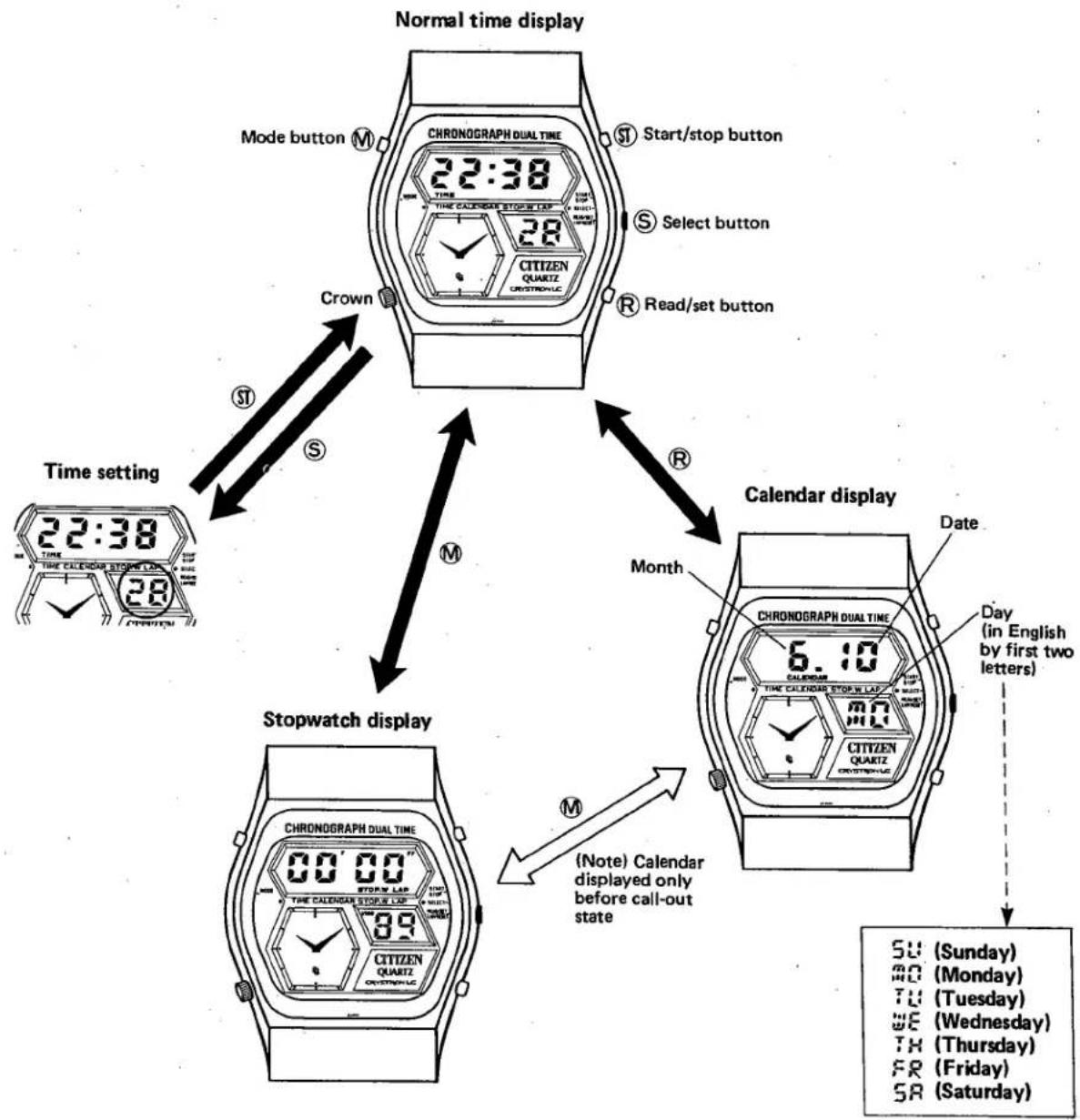
flowchart
graph TD
    A["Normal time display"] --> B["Mode button M"]
    A --> C["Start/stop button S"]
    A --> D["Select button S"]
    A --> E["Read/set button R"]
    A --> F["Crown M"]
    F --> G["Time setting 22:38 TIME"]
    F --> H["Stopwatch display"]
    A --> I["Calendar display"]
    I --> J["Date: CHRONOGRAPH DUAL TIME 6:10"]
    I --> K["Day (in English by first two letters)"]
    K --> L["SU (Sunday)"]
    K --> M["BD (Monday)"]
    K --> N["TU (Tuesday)"]
    K --> O["WE (Wednesday)"]
    K --> P["TH (Thursday)"]
    K --> Q["FR (Friday)"]
    K --> R["SA (Saturday)"]
    I --> S["(Note) Calendar displayed only before call-out state"]
2) Analog watch
a) The crown is pulled out by one step and turned right or left to set the "hour" and "minute".
b) The crown is pushed in to the original place to start the hands.
*The power conservation state is also secured with pull-out of the crown.
*The operation of the crown does not affect the digital display mechanism at all.
c) The hands move once per 4 seconds.
§ 5. TIME AND CALENDAR SETTING
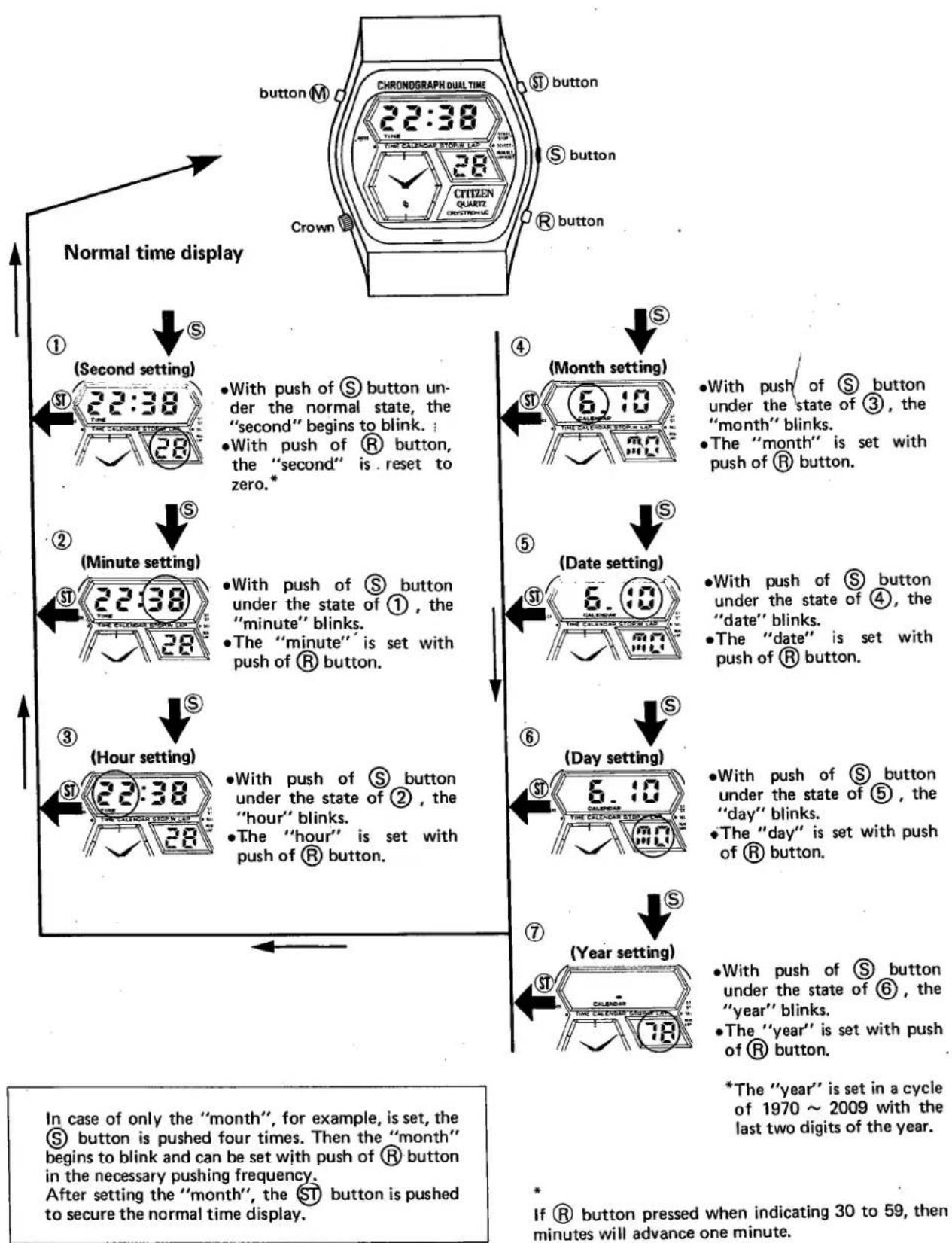
flowchart
graph TD
    A["Normal time display"] --> B["1 (Second setting)"]
    B --> C["2:2:38"]
    C --> D["3 (Hour setting)"]
    D --> E["4 (Month setting)"]
    E --> F["5 (Date setting)"]
    F --> G["6 (Day setting)"]
    G --> H["7 (Year setting)"]

    subgraph Time Settings
        I["Button M"] --> J["22:38"]
        K["ST button"] --> L["28"]
        M["S button"] --> N["28"]
        O["Crown"] --> P["28"]
        Q["R button"] --> R["28"]
        S["Time SET"] --> T["SET SET"]
        U["Time SET"] --> V["SET SET"]
        W["Time SET"] --> X["SET SET"]
        Y["Time SET"] --> Z["SET SET"]
        AA["Time SET"] --> AB["SET SET"]
        AC["Time SET"] --> AD["SET SET"]
        AE["Time SET"] --> AF["SET SET"]
        AG["Time SET"] --> AH["SET SET"]
        AI["Time SET"] --> AJ["SET SET"]
        AK["Time SET"] --> AL["SET SET"]
        AM["Time SET"] --> AN["SET SET"]
        AO["Time SET"] --> AP["SET SET"]
        AQ["Time SET"] --> AR["SET SET"]
        AS["Time SET"] --> AT["SET SET"]
        AU["Time SET"] --> AV["SET SET"]
        AW["Time SET"] --> AX["SET SET"]
        AY["Time SET"] --> AZ["SET SET"]
        BA["Time SET"] --> BB["SET SET"]
        BC["Time SET"] --> BD["SET SET"]
        BE["Time SET"] --> BF["SET SET"]
        BG["Time SET"] --> BH["SET SET"]
        BI["Time SET"] --> BJ["SET SET"]
        BK["Time SET"] --> BL["SET SET"]
        BM["Time SET"] --> BN["SET SET"]
        BO["Time SET"] --> BP["SET SET"]
        BQ["Time SET"] --> BR["SET SET"]
        BS["Time SET"] --> BT["SET SET"]
        BU["Time SET"] --> BV["SET SET"]
        BW["Time SET"] --> BX["SET SET"]
        BY["Time SET"] --> BZ["SET SET"]
    end

    style Time Settings fill:#f9f,stroke:#333,stroke-width:2px
If Ⓗ button pressed when indicating 30 to 59, then minutes will advance one minute.
§ 6. STOPWATCH OPERATION
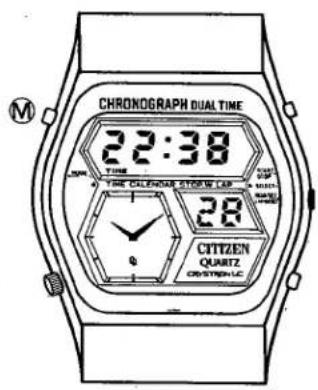
The stopwatch display can be secured with push of Ⓜ button under the state of either the normal time display or the calendar display.
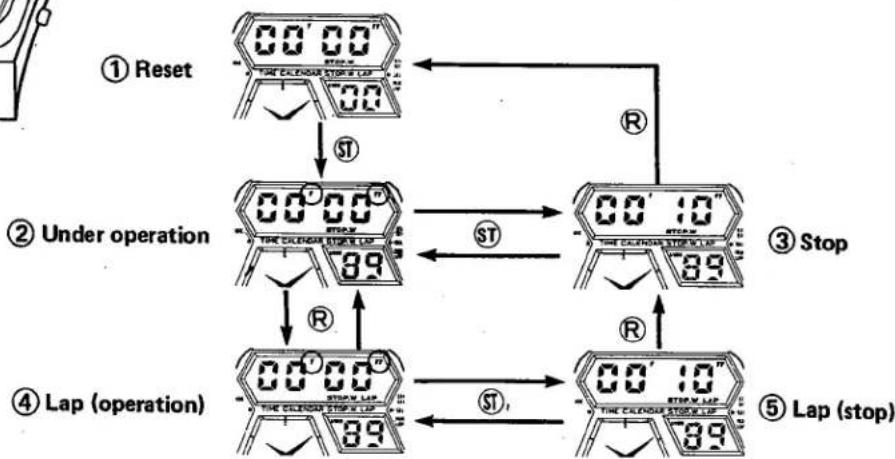
flowchart
graph TD
    A["① Reset"] --> B["② Under operation"]
    B --> C["③ Stop"]
    C --> D["④ Lap (operation)"]
    D --> E["⑤ Lap (stop)"]

    subgraph Reset
        F["00' 00" STOP"]
        G["00' 10" STOP"]
        H["00' 89 STOP"]
        I["00' 89 STOP"]
    end

    subgraph Under operation
        J["00' 00" STOP"]
        K["89 STOP"]
        L["00' 10" STOP"]
        M["89 STOP"]
    end

    subgraph Lap (operation)
        N["00' 00" STOP"]
        O["89 STOP"]
        P["00' 89 STOP"]
        Q["89 STOP"]
    end

    subgraph Lap (stop)
        R["00' 10" STOP"]
        S["89 STOP"]
        T["00' 89 STOP"]
    end
① Reset
The service mark "TIME" disappears, and "I W", "STOP.W" and "1/100" are displayed instead. The "hour", "minute" and "second" of the normal time display are charged to the "minute", "second" and "1/100" of the stopwatch display respectively. Here, "00min. 00sec. 00" is secured for the stopwatch timing.
② Under operation
With push of ST button under the reset state, the service mark "W" begins to blink to indicate that the timing is being carried out.
③ Stop
With push of ST button under the operation state, the service mark "▼▼" stops blinking. At the same time, the timing is also stopped and the elapsed time is displayed. If ST button is pushed under these conditions, the cumulative time can be displayed.
④ Lap (operation)
With push of Ⓑ button under operation, "LAP" is displayed along with the elapsed time. In this case the time measurement is continued. With push of Ⓑ button again, the continued time is displayed.
⑤ Lap (stop)
With push of Ⓕ button after pushing Ⓡ button under operation, the timing is stopped under the "LAP" state. At this moment, the service mark "▼▼▼" stop blinking to indicate the stoppage of the timing. If Ⓡ button is pushed under these conditions, the "LAP" display is erased and the "stop" state is secured.
⑥ Reset
With push of Ⓗ button under the state of ③ shown in the above diagram, the zero-second reset is given with '00 00 00" displayed. Thus, the "reset" state is secured.

Marke : CITIZEN
Modell : CAL 8900
Kategorie : Uhr