
CAL 8980 - Uhr CITIZEN - Kostenlose Bedienungsanleitung
Finden Sie kostenlos die Bedienungsanleitung des Geräts CAL 8980 CITIZEN als PDF.


| Marke | CITIZEN |
| Modell | CAL 8980 |
| Kategorie | Armbanduhr |
| Typ | Quarz-Kombinationsuhr mit Analog- und Digitalanzeige |
| Abmessungen des Moduls (mm) | 26 x 26 x 4,05 (Batteriefach 4,28) |
| Genauigkeit | ±15 Sek./Monat bei normalen Temperaturen |
| Oszillation | 32.768 Hz |
| Anzeigemethode | FE-Typ nematischer Flüssigkristall & 3-Split-Multiplex-Treiber |
| Umrichter | Bipolarer Schrittmotor |
| Integrierter Schaltkreis | C/MOS-LSI (1 Einheit) |
| Effektiver Temperaturbereich | -10 °C bis +60 °C (14 °F bis 140 °F) |
| Stromversorgung | Silberoxid-Knopfzelle SR1120W (1,55 V, 55 mAh) |
| Batterielebensdauer | Ca. 2 Jahre (bei 20 sec Alarm, 24 stdl. Signaltönen und 3 sec Beleuchtung pro Tag) |
| Wasserdichtigkeit | Bis 10 ATM (100 m) |
| Thermometer | Integriert, Messbereich -9,9°C bis +59,9°C, Auflösung 0,1°C, Genauigkeit ±1°C (20-30°C) |
| Stoppuhr | 1/1000 Sekunde, max. 12 Stunden |
| Zusatzfunktionen | Vollautomatischer Kalender (1980-2019), Batterieanzeige, elektromagnetisches Korrektursystem, Beleuchtungslampe, Alarmmonitor, 12/24-Stunden-Umschaltung, sofortiger manueller Rücklauf, Auto-Rückkehr |
| Pflege und Reinigung | Mit einem weichen, trockenen Tuch abwischen. Keine Chemikalien oder Wasserstrahl verwenden. |
| Sicherheit | Batterie nicht kurzschließen oder aufladen. Von Kindern fernhalten. |
| Ersatzteile und Reparatur | Wenden Sie sich an ein autorisiertes Citizen-Servicecenter. Nur Originalteile verwenden. |
| Allgemeine Informationen | Sportuhr mit Thermometer, Doppel-Analoganzeige und digitaler Stoppuhr. |
Häufig gestellte Fragen - CAL 8980 CITIZEN
Benutzerfragen zu CAL 8980 CITIZEN
0 Frage zu diesem Gerät. Beantworten Sie die, die Sie kennen, oder stellen Sie Ihre eigene.
Eine neue Frage zu diesem Gerät stellen
Laden Sie die Anleitung für Ihr Uhr kostenlos im PDF-Format! Finden Sie Ihr Handbuch CAL 8980 - CITIZEN und nehmen Sie Ihr elektronisches Gerät wieder in die Hand. Auf dieser Seite sind alle Dokumente veröffentlicht, die für die Verwendung Ihres Geräts notwendig sind. CAL 8980 von der Marke CITIZEN.
BEDIENUNGSANLEITUNG CAL 8980 CITIZEN
CITIZEN
Setting Instructions for Movement Calibers 8980 8981 8982
CONTENTS
Page
■1. OUTLINE 1
■2 FEATURES 1
■3. SPECIFICATIONS 3
■4. HANDLING INSTRUCTIONS 4
■5. NOTES ON MEASUREMENT OF TEMPERATURE 14
■6. DISASSEMBLY/ASSEMBLY OF MODULE 15
■7. NOTES ON ASSEMBLY/DISASSEMBLY 17
■8. TROUBLESHOOTING AND ADJUSTMENT 19
■1. OUTLINE
The quest for a combination watch having multiple functions gave birth to these watches.
By adding a thermometer and a 1/1000 sec. stopwatch both digitally displayed, and also including two step motors in the analog section, even more functions became available in these watches.
They are known as Caliber 8980, 8981 and 8982. The first two have a temperature sensor located near the crystal glass. The last one's temperature sensor is placed inside the case at the bottom of the face at 6 Hour mark.
This is a sporting watch with water-resistance up to 10 atmospheres of pressure.
■2. FEATURES
a) Thermometer system
A high-accuracy thermistor thermometer is incorporated. The resolution of measurement is 0.1°C or 1°F along with a centigrade-Fahrenheit switching function (with Cal. No. 8980 only).
Furthermore a "temp. Memory" functions to store the temperature every day at a certain moment of time.
b) Twin analog watches
Two analgo watches are available with two hands and a single hand respectively owing to the use of two step motors.
The single-hand analog watch is capable of various standard indications plus a second indication.
c) 1/1000 sec. stopwatch
A 1/1000 sec. stopwatch is incorporated for the first time among Citizen digital watches.
■3. SPECIFICATIONS
| Caliber No. | 8980-04 | 8981-04 | 8982-04 | |
| Type | Combination quartz watch | |||
| Size of module (mm) | 26 x 26 x 4.05t (Power cell part 4.28t) | 27.4 x 31.2 x 4.05t (Power cell part 4.28t) | ||
| Accuracy | ±15 sec./month at normal temperatures | |||
| Oscillation | 32,768Hz | |||
| Display method | FE-type nematic LC (liquid crystal) & 3-split multiplex drive | |||
| Converter | Bipolar step motor | |||
| Integrated circuit | C/MOS-LSI (1 unit) | |||
| Effective temp. range | -10°C ~ +60°C (14°F ~ 140°F) | |||
| Adjustment of time rate | By trimmer condenser | |||
| Display functions | Normal time | AM/PM, hour, minute & second | ||
| Calendar(Measurement of temp.) | Day, date & temp. (See thermometer.) | |||
| Alarm (Temp. memory) | AM/PM, hour, minute & storage of temp. | |||
| Dual time | AM/PM, hour, minute, second & L (Local time mark) | |||
| Stopwatch | Hour (2nd analog): minute, second & 1/100 sec.(Unit time of measurement: 1/100 sec. with 12-hour display) | |||
| Chime | Display of set mark only | |||
| 1st analog | Hour & minute | |||
| 2nd analog | Second, alarm & dual time with operation of push-buttons in modes excepting stopwatch mode | |||
| Additional functions | ●Fully automatic calendar (1980 ~ 2019)●Power cell life indicator●Electromagnetic correction system●Illumination lamp●Alarm monitor●12/24 hour switching function●Instant manual return●Auto-return | |||
| Power cell (Silver oxide) | Parts No.: 280-30 (1 unit). Ag2O/KOHCell code: SR1120WVoltage: 1.55VCapacity: 55mAh (High capacity product)Size (mm): 11.6φ x 2.1tLifetime: About 2 years(20 sec. alarm, 24 hourly chimes & 3 sec. illumination of lamp per day in second mode of 2nd analog) | |||
| Thermometer | Sensor part | Use of thermistor | ||
| Measurement range of temp. | -9.9°C ~ +59.9°C (14°F ~ 139°F) | |||
| Accuracy | ±1°C (±2°F) at 20°C ~ 30°C (36°F ~ 86°F)±2°C (±4°F) at -5°C ~ +40°C (23°F ~ 104°F) | |||
| Resolution | 1.0°C (1°F) | |||
| Others | Centigrade-Fahrenheit switching function & measurement sampling time switching function (Cal. 8980/8982) Measurement sampling time switching function (Cal. 8980/8982) | |||
| Remarks | Product code No.: A (Reflecting plate is (silver color)B (Reflecting plate is (gold color) | |||
* Cal. No. 8981 lacks only the Centigrade--Fahrenheit switching function compared with Cal. No. 8980.
■4. HANDLING INSTRUCTIONS
(Note: The circle marks in the following diagrams show the flashing.)
4.1 Nomenclature and functions of push-buttons
[CAL. 8980/8981]
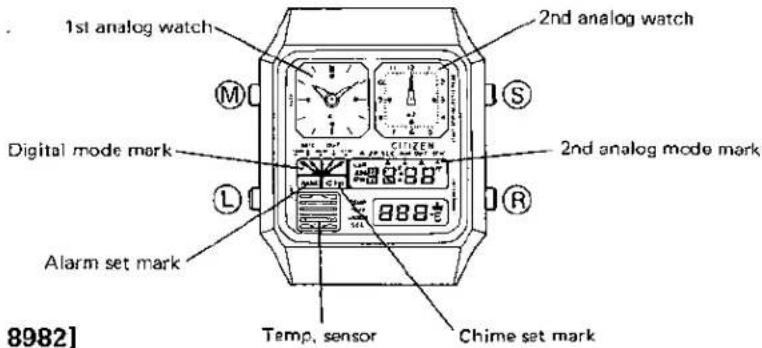
[CAL. 8982]
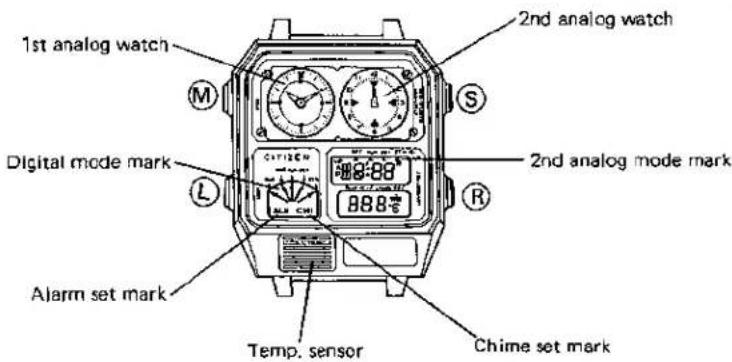
(M) button: Switching of mode & instant manual return
⑤ button: Selection of digit for correction, switching of 2nd analog mode & start/stop (stopwatch)
(R) button: Correction, alarm ON/OFF, switching of sampling time for temp. measurement (1 sec./1 min.), lap & reset (stopwatch)
① button: Illumination lamp
4-2. Switching of 2nd analog mode
The 2nd analog modes are switched as follows excepting the stopwatch mode.
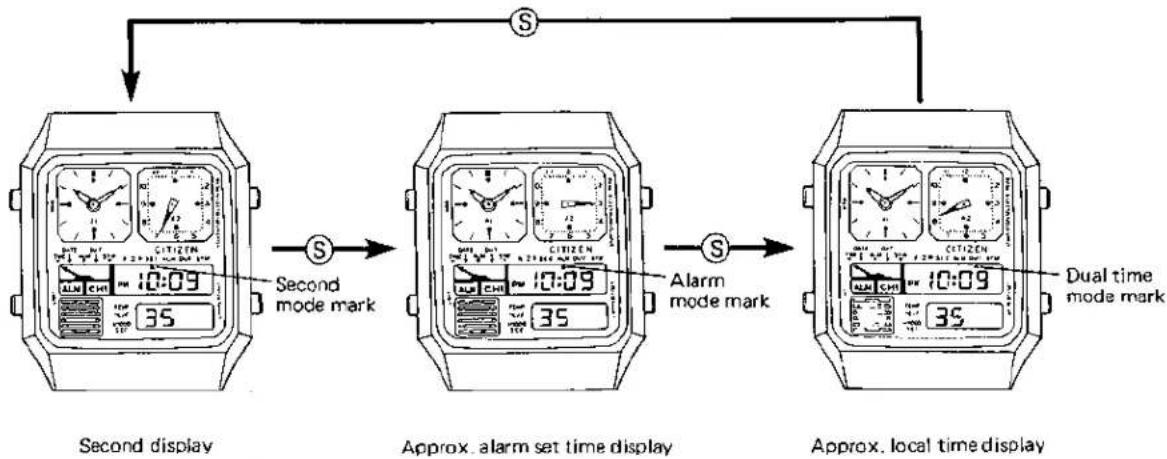
flowchart
graph TD
    A["Second display"] -->|Second mode mark| B["Approx. alarm set time display"]
    B -->|Alarm mode mark| C["Approx. local time display"]
    C -->|Dual time mode mark| D["Final display"]
* This is a switching example on the time display.
4-3. Switching of digital modes
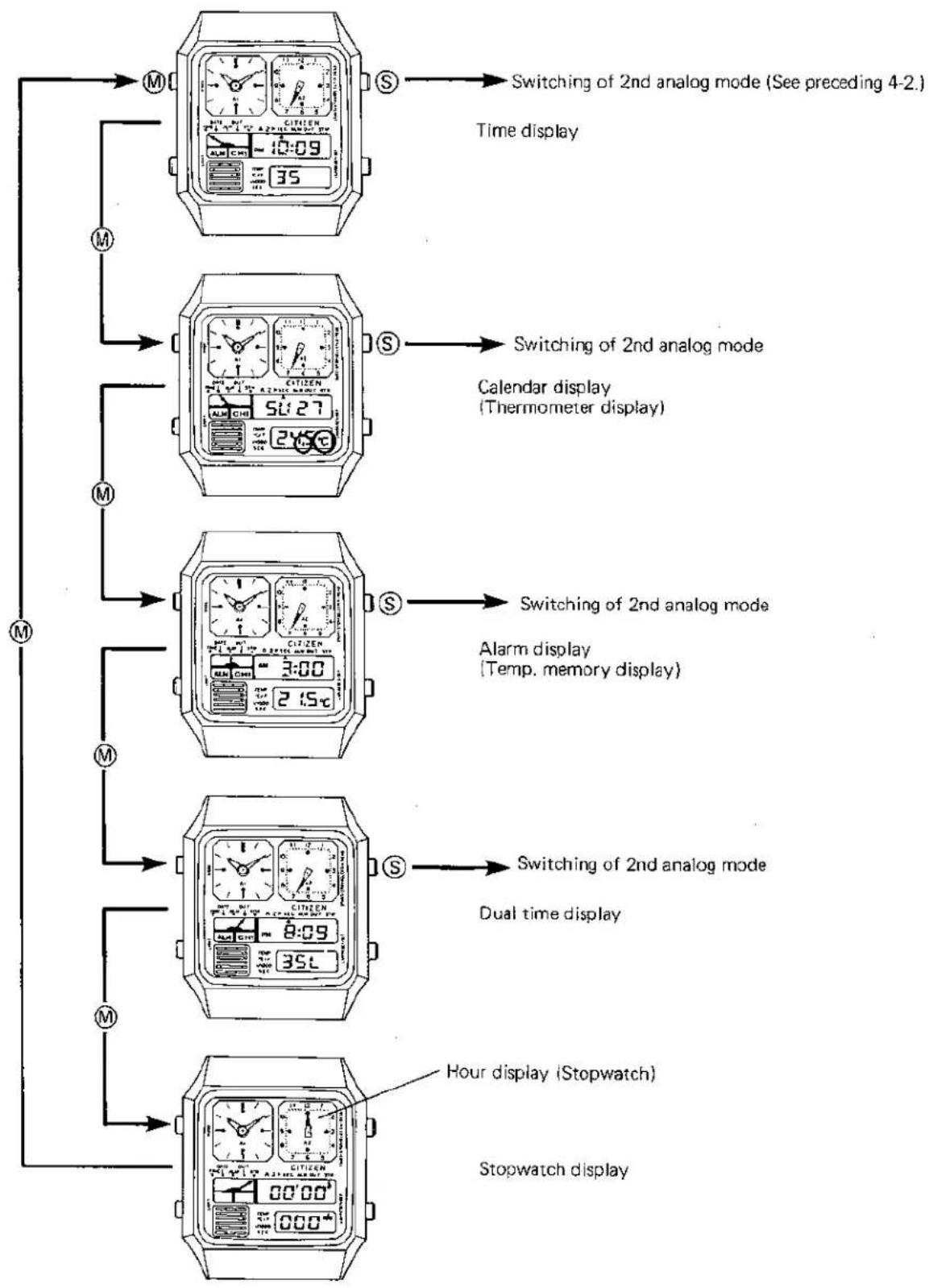
flowchart
graph TD
    A["Time display"] --> B["Switching of 2nd analog mode (See preceding 4-2.)"]
    B --> C["Calendar display (Thermometer display)"]
    C --> D["Alarm display (Temp. memory display)"]
    D --> E["Dual time display"]
    E --> F["Hour display (Stopwatch)"]
    F --> G["Stopwatch display"]
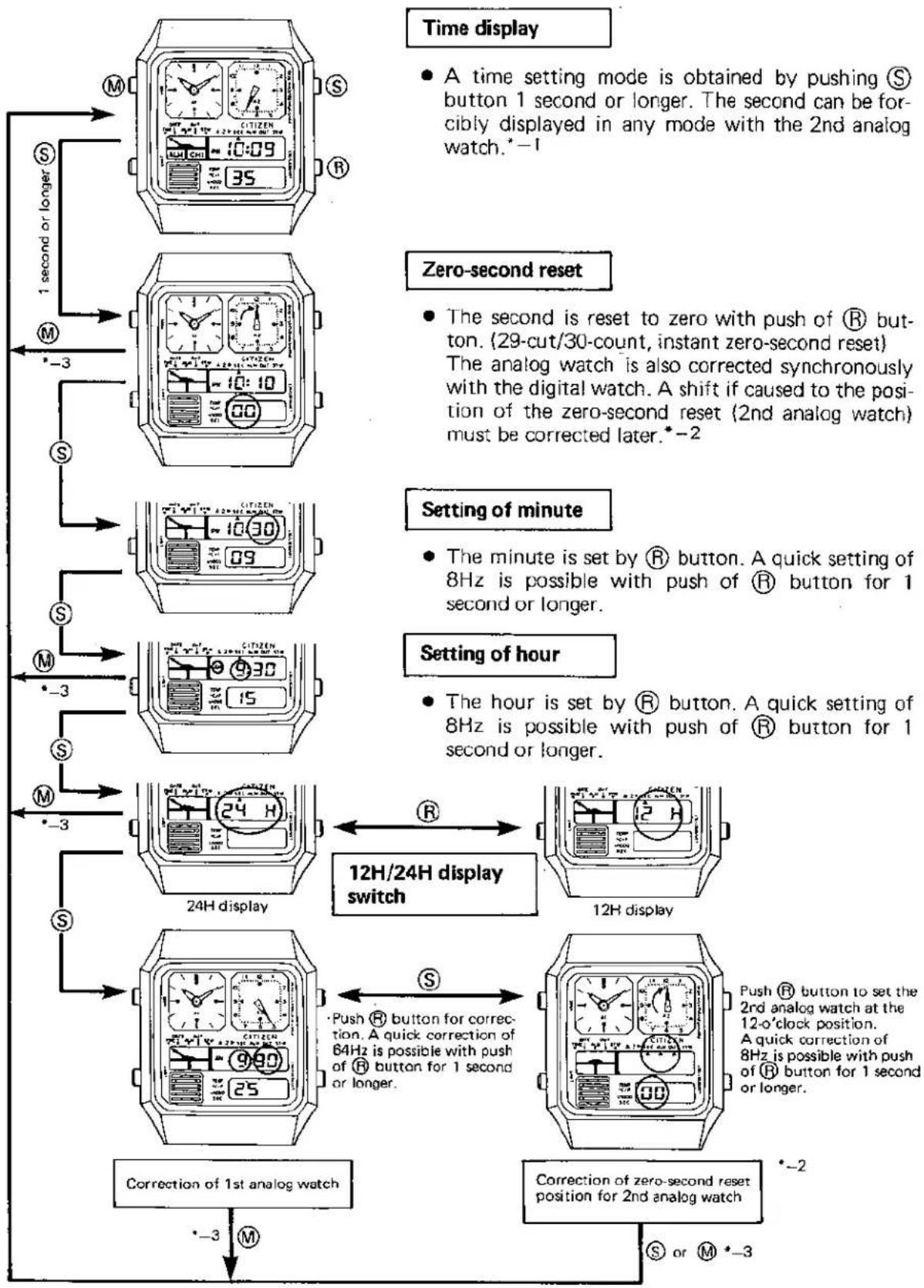
4-4. Time setting procedure
flowchart
graph TD
    A["Time display"] --> B["1 second or longer"]
    B --> C["Time setting mode is obtained by pushing S button 1 second or longer. The second can be forcibly displayed in any mode with the 2nd analog watch.*-1"]
    C --> D["Zero-second reset"]
    D --> E["The second is reset to zero with push of R button. (29-cut/30-count, instant zero-second reset) The analog watch is also corrected synchronously with the digital watch. A shift if caused to the position of the zero-second reset (2nd analog watch) must be corrected later.*-2"]
    E --> F["Setting of minute"]
    F --> G["The minute is set by R button. A quick setting of 8Hz is possible with push of R button for 1 second or longer."]
    G --> H["Setting of hour"]
    H --> I["The hour is set by R button. A quick setting of 8Hz is possible with push of R button for 1 second or longer."]
    I --> J["12H/24H display switch"]
    J --> K["12H display"]
    K --> L["Correction of 1st analog watch"]
    L --> M["Correction of zero-second reset position for 2nd analog watch *-2 or *-3"]
    M --> N["12H/24H display switch"]
    N --> O["12H display"]
    O --> P["Push R button for correction. A quick correction of 64Hz is possible with push of R button for 1 second or longer."]
    P --> Q["Correction of 1st analog watch *-3 or *-3"]
* -1: The second display mode is obtained in any mode of the 2nd analog watch and even before or after a correction.
*-2: A correct zero-second reset is impossible if the second hand of the 2nd analog watch is not set at a correct position. Thus the positioning of the second hand is carried out in a correction mode for zero-second reset position of the 2nd analog watch. The timing is kept even in this positioning action. In other words, if the zero-second reset is previously done, a correct second is obtained after the ordinary time mode is reset.
(Ex.)
Processing of correct second:
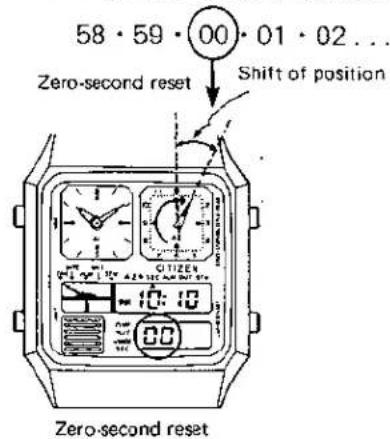
29·30·40...
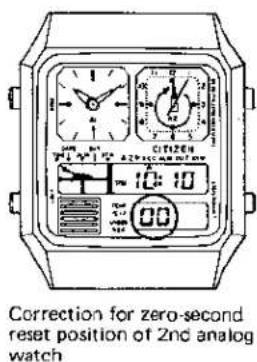
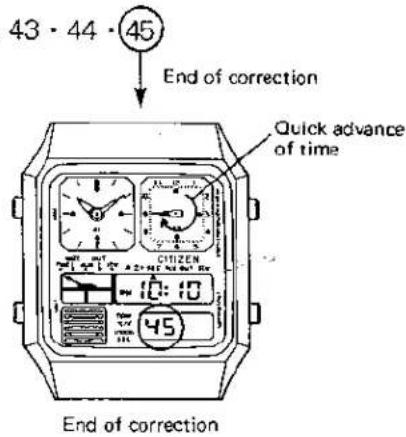
No setting is required for the position of zero-second reset of the 2nd analog watch as long as it is once set correctly.
*—3: The ordinary time display is reset in any mode of correction by pushing Ⓜ button. (Instant manual return)
- Auto-return system
The ordinary time display is automatically reset in 4 \~ 5 minutes in any mode of correction.
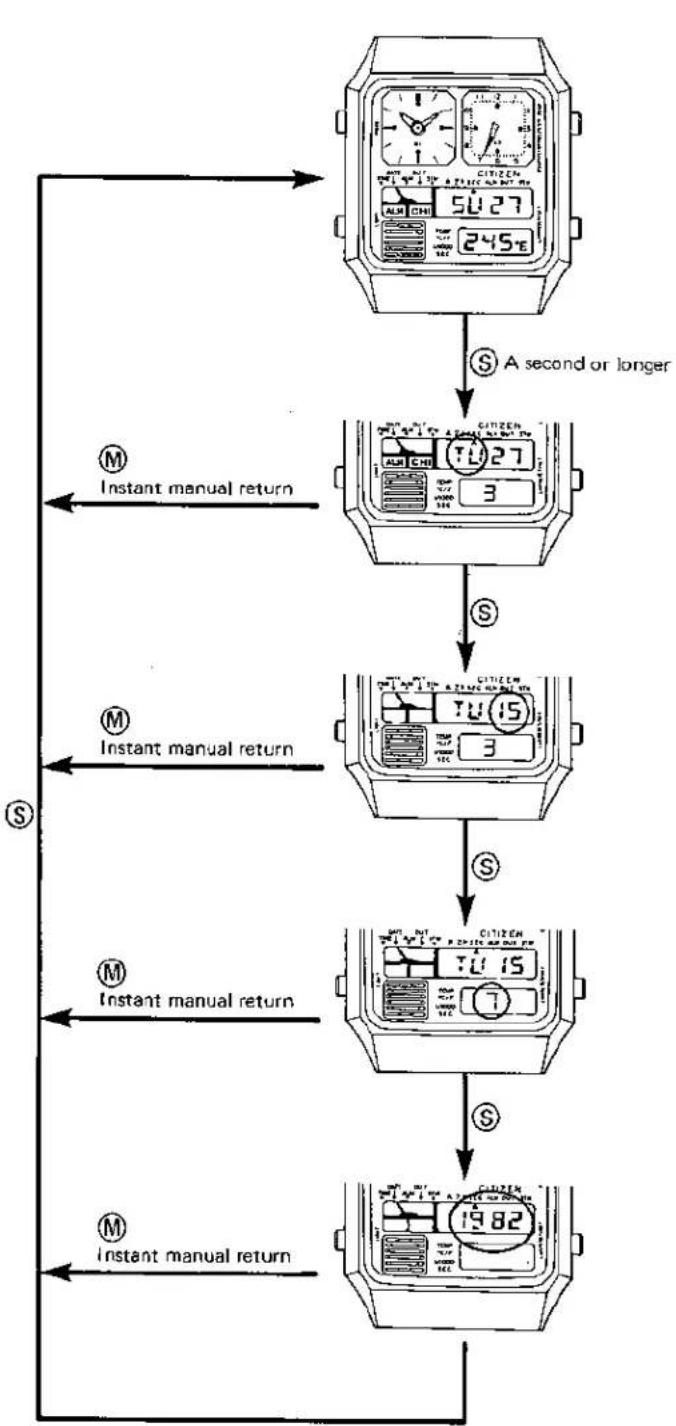
4-5. Calendar setting procedure
flowchart
graph TD
    A["Start"] --> B{A second or longer}
    B -->|S| C["Take 1 second or longer"]
    C --> D{S}
    D -->|S| E["Take 2 seconds or longer"]
    E --> F{S}
    F -->|S| G["Take 3 seconds or longer"]
    G --> H{S}
    H -->|S| I["Take 4 seconds or longer"]
    I --> J{S}
    J -->|S| K["Take 5 seconds or longer"]
    K --> L{S}
    L -->|S| M["Take 6 seconds or longer"]
    M --> N{S}
    N -->|S| O["Take 7 seconds or longer"]
    O --> P{S}
    P -->|S| Q["Take 8 seconds or longer"]
    Q --> R{S}
    R -->|S| S["Take 9 seconds or longer"]
    S --> T{S}
    T -->|S| U["Take 10 seconds or longer"]
    U --> V{S}
    V -->|S| W["Take 11 seconds or longer"]
    W --> X{S}
    X -->|S| Y["Take 12 seconds or longer"]
    Y --> Z{S}
    Z -->|S| AA["Take 13 seconds or longer"]
    AA --> AB{S}
    AB -->|S| AC["Take 14 seconds or longer"]
    AC --> AD{S}
    AD -->|S| AE["Take 15 seconds or longer"]
    AE --> AF{S}
    AF -->|S| AG["Take 16 seconds or longer"]
    AG --> AH{S}
    AH -->|S| AI["Take 17 seconds or longer"]
    AI --> AJ{S}
    AJ -->|S| AK["Take 18 seconds or longer"]
    AK --> AL{S}
    AL -->|S| AM["Take 19 seconds or longer"]
    AM --> AN{S}
    AN -->|S| AO["Take 20 seconds or longer"]
    AO --> AP{S}
    AP -->|S| AQ["Take 21 seconds or longer"]
    AQ --> AR{S}
    AR -->|S| AS["Take 22 seconds or longer"]
    AS --> AT{S}
    AT -->|S| AU["Take 23 seconds or longer"]
    AU --> AV{S}
    AV -->|S| AW["Take 24 seconds or longer"]
    AW --> AX{S}
    AX -->|S| AY["Take 25 seconds or longer"]
    AY --> AZ{S}
    AZ -->|S| BA["Take 26 seconds or longer"]
    BA --> BB{S}
    BB -->|S| BC["Take 27 seconds or longer"]
    BC --> BD{S}
    BD -->|S| BE["Take 28 seconds or longer"]
    BE --> BF{S}
    BF -->|S| BG["Take 29 seconds or longer"]
    BG --> BH{S}
    BH -->|S| BI["Take 30 seconds or longer"]
    BI --> BJ{S}
    BJ -->|S| BK["Take 31 seconds or longer"]
    BK --> BL{S}
    BL -->|S| BM["Take 32 seconds or longer"]
    BM --> BN{S}
    BN -->|S| BO["Take 33 seconds or longer"]
    BO --> BP{S}
    BP -->|S| BQ["Take 34 seconds or longer"]
    BQ --> BR{S}
    BR -->|S| BS["Take 35 seconds or longer"]
    BS --> BT{S}
    BT -->|S| BU["Take 36 seconds or longer"]
    BU --> BV{S}
    BV -->|S| BW["Take 37 seconds or longer"]
    BW --> BX{S}
    BX -->|S| BY["Take 38 seconds or longer"]
    BY --> BZ{S}
    BZ -->|S| BQ
    style Start fill:#f9f,stroke:#333
    style End fill:#f9f,stroke:#333
Calendar display
The calendar correction mode is obtained by pushing Ⓐ button for a second or longer.
In this case, the 2nd analog watch gives a second display like in the case of the time correction.
Setting of day
The day is set by operating Ⓡ button.
A quick setting (8Hz) is possible with push of Ⓡ button for a second or longer.
Setting of date
The date is set by operating Ⓡ button.
A quick setting (8Hz) is possible with push of Ⓡ button for a second or longer.
Setting of month
The month is set by operating Ⓡ button.
A quick setting (8Hz) is possible with push of Ⓗ button for a second or longer.
Setting of year
The year is set by operating Ⓡ button.
A quick setting (8Hz) is possible with push of Ⓡ button for a second or longer.
The setting of year is possible from 1980 to 2019.
* The auto-return system functions in 4 \~ 5 minute if no operation is given to the push-buttons.
* A non-existing date, if set, is automatically corrected and changed to the first day of the following month.
4-6. Operation of thermometer
The thermometer functions in the calendar display mode. The temperature can be measured in both the centigrade and Fahrenheit thermometers with every minute and every second.
a) Switching between centigrade and Fahrenheit thermometers (Cal. No. 8980)
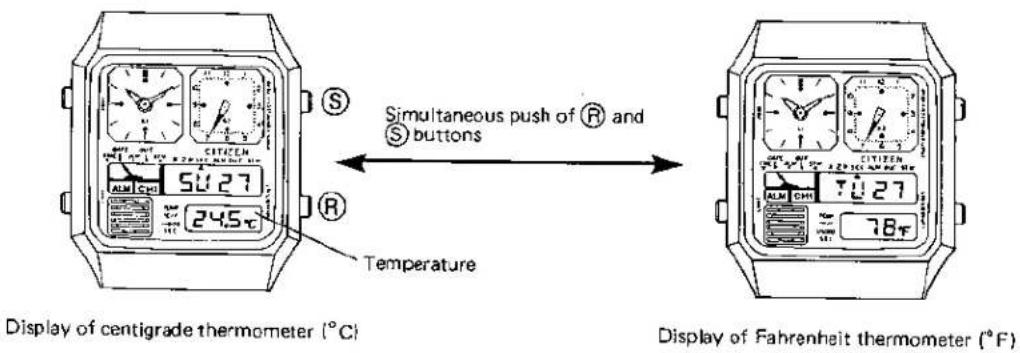
Note: No switching is possible between the centigrade and Fahrenheit thermometers with Cal. No. 8981.
b) Switching of time units of measurement
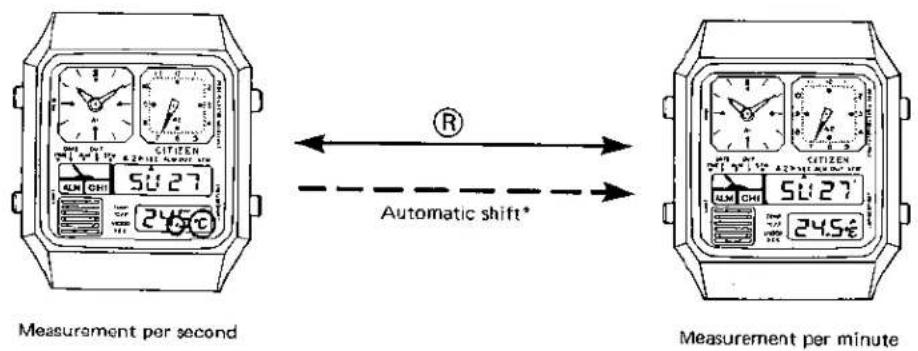
A mark °C (or °F) has a flashing with every second.
A mark °C (or °F) has a flashing (0.5 sec. duration) with every minute.
* Automatic shift
The per-second measurement mode will be automatically shifted to the per-minute measurement mode in 4\~5 minutes.
4-7. Operation of alarm
a) ON/OFF switching
![[Set OFF] 3:00 2 1.5°C R Alarm set mark 3:00 245°C Alarm time [Set ON]](/content/2026/05/774585/images/e129a39f23bc123b73988f3d6ff9f30d470bce93c583308177a98df009322cb5.jpg)
The alarm set ON/OFF is decided by the presence or absence of the alarm set mark. In the case of ON, the alarm set mark is displayed in all modes excepting the stopwatch mode.
b) The alarm rings 20 seconds at each set time of alarm.
c) The ringing of alarm can be stopped freely with push of any of the push-buttons.
d) Setting of alarm time
The setting mode of alarm time is obtained by pushing Ⓐ button for a second or longer in the alarm display mode. In this case, the 2nd analog watch is forcibly set in the approx. alarm set time display. The digit to be set is selected by Ⓐ button, and the alarm time is set by Ⓗ button.
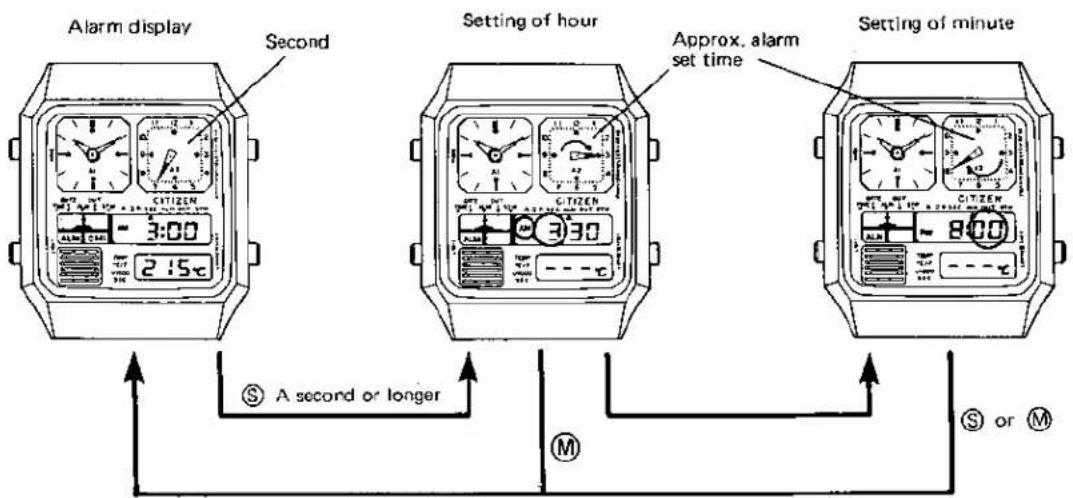
M : Instant manual return
* A quick setting (8Hz) is possible with push of Ⓗ button for a second or longer.
* The approx. alarm set time display is coupling to the digital mechanism. The approx. alarm set time display is given to the 2nd analog watch after the setting of alarm time is over. (The pointer makes a round with every 60 minutes in the correction of minute.)
* The alarm display is automatically reset in 4 \~ 5 minutes owing to the auto-return system.
4-8. How to use temp. memory
The temp. memory stores the temperature at the moment of an alarm set time. Thus you can know the temperature at the same time every day or at a certain moment designated optionally.
A bar display which is useally given after an alarm time is set will be changed to display the temperature at the alarm set time. The data of this temperature is held for 24 hours and until at the next alarm time. (The temp. memory data is cancelled when the alarm time is changed.)
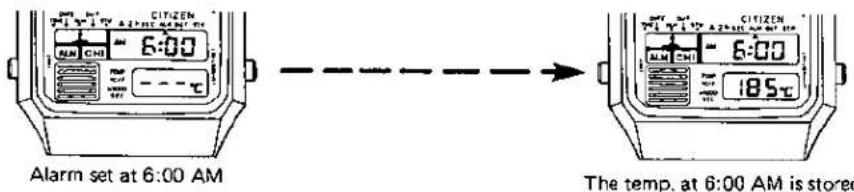
* A centigrade temp. is kept until the next time of measurement although the centigrade display is switched to the Fahrenheit display and vice versa. (Cal. No. 8980)
4-9. How to use dual time
The dual time function is very convenient for a overseas trip or the like.
The 2nd analog watch is capable of three different displays by means of Ⓐ button (Refer to 4-2.) and is forcibly set under the approx. local time in the correction mode of dual time.
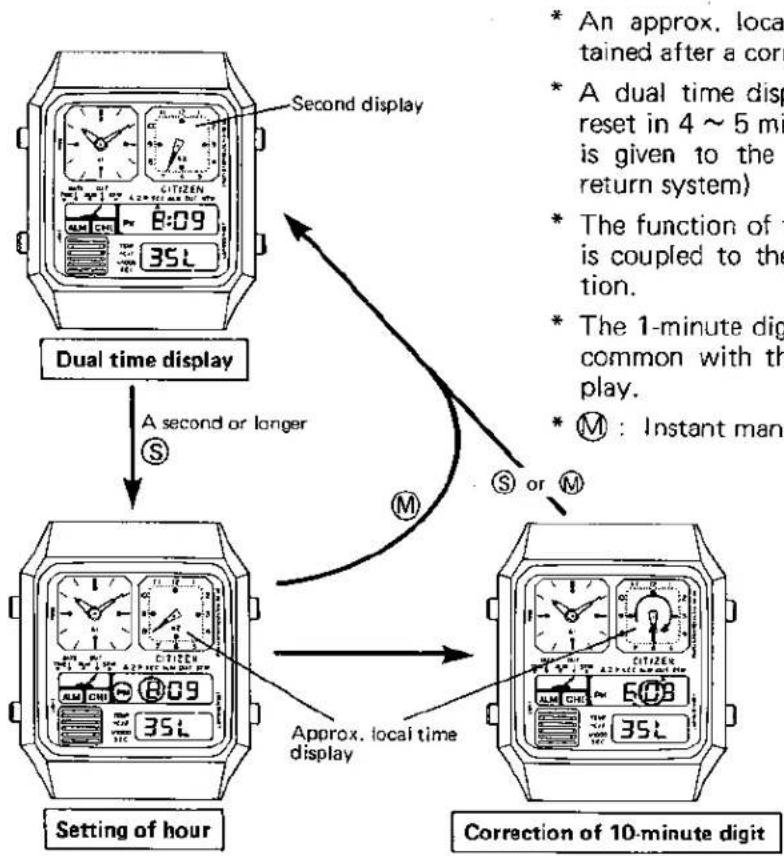
flowchart
graph TD
    A["Second display"] --> B["Dual time display"]
    B --> C["A second or longer"]
    C --> D["Setting of hour"]
    D --> E["Approx. local time display"]
    E --> F["Correction of 10-minute digit"]
    style A fill:#f9f,stroke:#333
    style B fill:#ccf,stroke:#333
    style C fill:#cfc,stroke:#333
    style D fill:#fcc,stroke:#333
    style E fill:#cff,stroke:#333
    style F fill:#ffc,stroke:#333
The time is set by Ⓗ button.
A quick setting (8Hz) is possible with push of Ⓡ button for a second and longer.
4-10. Operation of stopwatch
The operation of this stopwatch is identical with other ordinary stopwatches except for a 1/1000 sec. display and the fact that the hour is displayed on the 2nd analog watch.
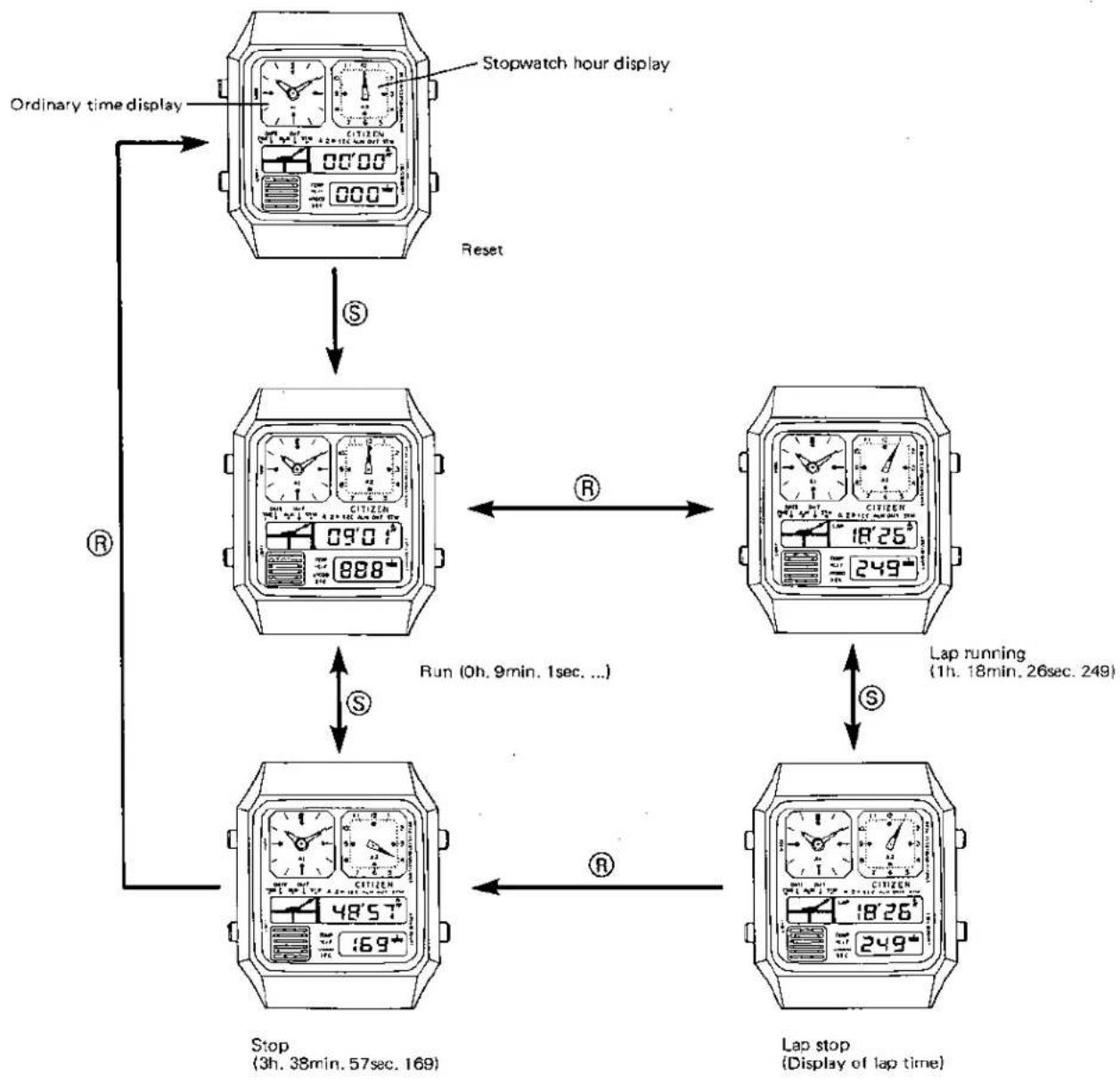
flowchart
graph TD
    A["Stop watch hour display"] -->|S| B["Reset"]
    B --> C["Run (0h, 9min, 1sec...)"]
    C --> D["Lap running (1h, 18min, 26sec, 249)"]
    D --> E["Lap stop (Display of lap time)"]
    E --> F["Stop (3h, 38min, 57sec, 169)"]
    F --> G["Ordinary time display"]
    G --> A
* When the stopwatch mode is released, the 2nd analog watch is reset to the original mode.
* A sound of confirmation is heard with every push of Ⓐ button.
4-11. Alarm monitor
A sound of alarm is produced with a simultaneous push of both Ⓐ and Ⓡ buttons in the mode of the ordinary time display.
4-12. Chime function
a) ON/OFF switching
The ON and OFF of the chime function are switched alternately and every time the alarm monitor is carried out in the mode of the ordinary time display.
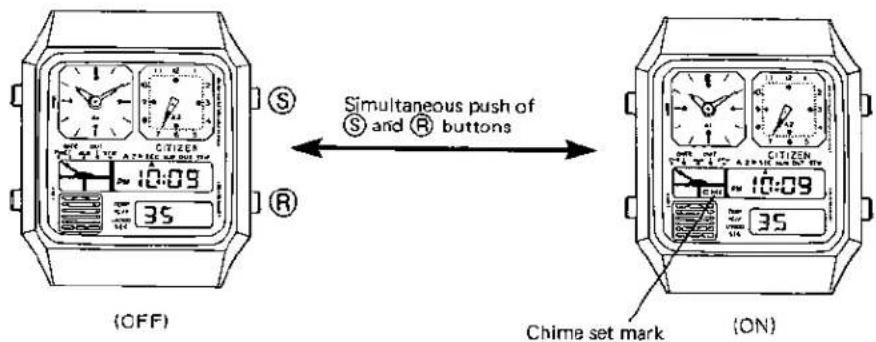
* The chime set mark is displayed in every mode excepting the stopwatch mode when the chime function is ON.
b) Sound of chime
A beep sound is heard every hour on the hour as long as the chime function is ON.
4-13. Power cell life indicator
The colon on the digital display screen blinks when the 2nd analog watch displays the second time and the life of the power cell comes near its end with a drop of the voltage. In such case, the power cell must be replaced soon with new one.
■5. NOTES ON MEASUREMENT OF TEMPERATURE
(1) Accuracy of measurement
A watch put on a wrist is affected by the body heat, and no coincidence is obtained between the display of temperature and the room temperature. An accurate room temperature is measured in the following procedure.
- A watch is put off from the wrist and then left as it is for 20 \~ 30 minutes before the measurement of temperature. This leaving time differs according to the environment in which the watch is put and requires at least 12 minutes or so.
- The display of temperature approximates to the room temperature in an asymptotic way. The room temperature is obtained when the display of temperature has a change of about 0.1°C per minute.
- A considerable difference of temperature is produced by the place of measurement even in the same room. It is especially noticed that a big difference of temperature is produced in a showcase.
(2) Quick measurement
The watch will easily adapt itself to the room temperature when the watch case touches an object having a high heat conductivity.
The measurement is possible in a comparatively short time if the watch is forcibly cooled by air (exposed to the wind). However, the temperature may sometimes change if the supply of wind is cut since the module of the watch does not adapt itself to the outside temperature.
(3) Range of temperature for measurement
It must be noticed that the measurement of temperature outside a prescribed range will affect the basic function of the watch.
(4) Comparison with other thermometers
No absolute standard is available for users in terms of the temperature. Accordingly the following notes must be noticed in case the value of indication is different from other thermometers.
- A difference of response speed exists between the thermometer of this caliber and a liquid column thermometer like an alcohol thermometer, etc. or a finished bimetal-type thermometer. Furthermore, as mentioned in (1), a big difference of temperature is caused according to the place of the thermometer and the place of the watch.
- A bimetal-type thermometer or a liquid column thermometer using the soft glass may have some variation with time to cause some error.
- For an accurate control of temperature, please contact Citizen Service Base where a standard thermometer is provided.

- CITIZEN
- CONTENTS
- ■1. OUTLINE
- ■2. FEATURES
- ■4. HANDLING INSTRUCTIONS
- Nomenclature and functions of push-buttons
- 4-2. Switching of 2nd analog mode
- 4-5. Calendar setting procedure
- Calendar display
- Setting of day
- Setting of date
- Setting of month
- Setting of year
- 4-6. Operation of thermometer
- 4-7. Operation of alarm
- 4-8. How to use temp. memory
- 4-9. How to use dual time
- 4-10. Operation of stopwatch
- 4-11. Alarm monitor
- 4-12. Chime function
- 4-13. Power cell life indicator
- ■5. NOTES ON MEASUREMENT OF TEMPERATURE
- Accuracy of measurement
- Quick measurement
- Range of temperature for measurement
- Comparison with other thermometers
Marke : CITIZEN
Modell : CAL 8980
Kategorie : Uhr