
CAL 9100 - Uhr CITIZEN - Kostenlose Bedienungsanleitung
Finden Sie kostenlos die Bedienungsanleitung des Geräts CAL 9100 CITIZEN als PDF.


| Produkttyp | Digitale Quarzuhr |
| Marke | Citizen |
| Modell | CAL 9100 (auch 9101A) |
| Bewegung | Quarz (32.768 Hz) |
| Genauigkeit | ±10 Sekunden pro Monat (bei normaler Temperatur) |
| Display | LC-Display mit FE-Twist-Nematik |
| Stromversorgung | Silberoxid-Knopfzelle (Teilnr. 280-15, 1,55 V, 75 mAh) |
| Batterielebensdauer | Ca. 2 Jahre |
| Durchmesser | 27,2 mm |
| Dicke | 6,06 mm |
| Betriebstemperatur | 0°C bis +60°C |
| Funktionen | Zeit, Kalender (Monat, Datum, Wochentag), Alarm 1 und 2, Stundensignal, Timer (bis 11:59:59), Stoppuhr (bis 11:59:59), Beleuchtung, Batteriewarnanzeige, automatische Kalendereinstellung |
| Besonderheiten | Alarmmonitor, Zeitansage (nur Cal. 9101A) |
| Wartung und Reinigung | Keine spezifischen Angaben in der Anleitung; zur Reinigung ein weiches, trockenes Tuch verwenden. |
| Sicherheit | Keine besonderen Sicherheitshinweise; Batteriewechsel nur durch Fachpersonal. |
| Ersatzteile und Reparierbarkeit | Batterie separat erhältlich; Reparaturen sollten von autorisierten Servicezentren durchgeführt werden. |
| Allgemeine Informationen | Die Uhr ist nicht wasserdicht gemäß Anleitung; direkten Wasserkontakt vermeiden. |
Häufig gestellte Fragen - CAL 9100 CITIZEN
Benutzerfragen zu CAL 9100 CITIZEN
0 Frage zu diesem Gerät. Beantworten Sie die, die Sie kennen, oder stellen Sie Ihre eigene.
Eine neue Frage zu diesem Gerät stellen
Laden Sie die Anleitung für Ihr Uhr kostenlos im PDF-Format! Finden Sie Ihr Handbuch CAL 9100 - CITIZEN und nehmen Sie Ihr elektronisches Gerät wieder in die Hand. Auf dieser Seite sind alle Dokumente veröffentlicht, die für die Verwendung Ihres Geräts notwendig sind. CAL 9100 von der Marke CITIZEN.
BEDIENUNGSANLEITUNG CAL 9100 CITIZEN
TECHNICAL INFORMATION
CITIZEN QUARTZ
Cal.No.910※※
§ 1. OUTLINE
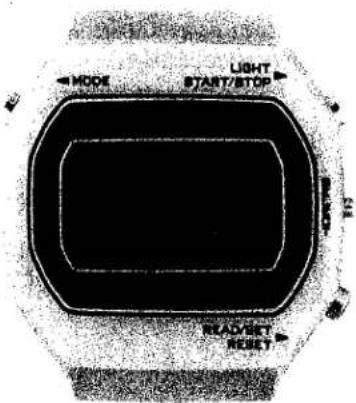
This is digital quartz crystal watch with LC display, which features multiple functions including alarm 1 and 2, time signal, reverse operation timer and stopwatch, in addition to the ordinary display of "hour", "minute", "second" and "AM/PM" plus the calendar display of "month", "date" and "day" respectively. Thus, it excels both in the design and performance for a wristwatch.
The Cal No. 9101A incorporates additionally the time announcement device through which the time is announced in three different kinds of tones.
§2. FEATURES
1) Digital quartz crystal watch with muti-function:
In addition to the normal display ("hour", "minute", "second", "AM/PM") and calendar display ("month", "date", "day"), the following functions are added: alarm-1 and alarm-2 which can be set independently with each other; chime which gives alarm sound twice simultaneously with the time signal; timer mechanism which can set down to second; and stopwatch mechanism which is capable of continuous measurement.
2) Alarm monitor:
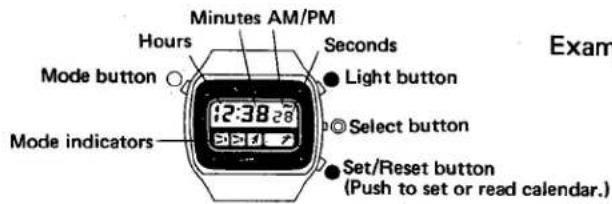
The electronic alarm tone can be heard with simultaneous push of both Ⓡ and Ⓛ buttons under the normal display mode.
3) Mode mark indication:
The mode marks are used to indicate the set modes for quick confirmation of the following functions: alarm-1, alarm 2, chime, timer mechanism and stopwatch mechanism.
4) Built-in illumination lamp:
A built-in illumination lamp facilitates an easy and clear time readout even in the dark.
5) Automatic calender setting system:
The calendar can be set automatically at the end of each month (excluding the leap years).
6) Power cell life indicating device:
The colon on the time screen flashes to indicate replacement of the power cell.
7) Uninterrupted operation about two years by a small-size silver oxide power cell:
The reduction of the power consumption at the electronic circuit part makes it possible to operate the watch accurately for about two years with a small-size silver oxide power cell.
(Main Features of Cal. No. 9101A)
8) Automatic calendar setting system:
The calendar can be set automatically at the end of each month and year including the leap years.
9) Unique time announcement device:
The time announcement device announces the user the time in three different kinds of alarm tones and through one-touch operation of push-buttons.
§ 3. HANDLING INSTRUCTION
Cal. 9100A
1) Operational modes
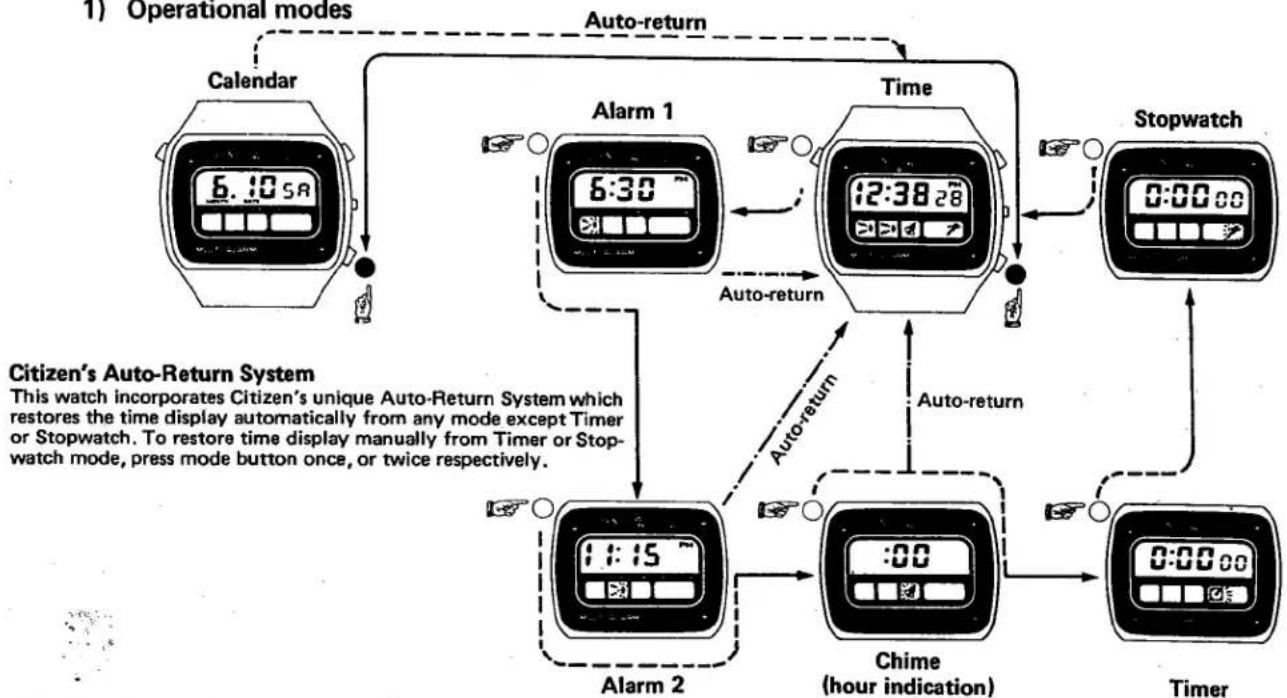
flowchart
graph TD
    A["Calendar"] --> B["6:10 5A"]
    B --> C["Auto-return"]
    C --> D["Alarm 1"]
    D --> E["6:30"]
    E --> F["Time"]
    F --> G["12:38 28"]
    G --> H["Stopwatch"]
    H --> I["0:00 88"]
    I --> J["Auto-return"]
    J --> K["Chime (hour indication)"]
    K --> L["Timer"]
    L --> M["0:00 00"]
    M --> N["Auto-return"]
    N --> O["Alarm 2"]
    O --> P["1:15"]
    P --> Q["Auto-return"]
    Q --> R["Stopwatch"]
    R --> S["0:00 88"]
    S --> T["Auto-return"]
    T --> U["Chime"]
    U --> V["Timer"]
    V --> W["Auto-return"]
    W --> X["Stopwatch"]
    X --> Y["0:00 00"]
    Y --> Z["Auto-return"]
    Z --> AA["Chime"]
    AA --> AB["Timer"]
    AB --> AC["Auto-return"]
    AC --> AD["Stopwatch"]
    AD --> AE["0:00 88"]
    AE --> AF["Auto-return"]
TIME
*The time reads here 12:38 P.M. plus 28 Seconds.
*Graphic indications represent only those modes set, or currently in operation.
Examples:
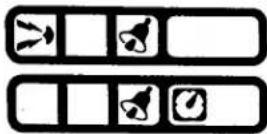
Alarm 1 and Chime are set.
Chime and Timer are set.
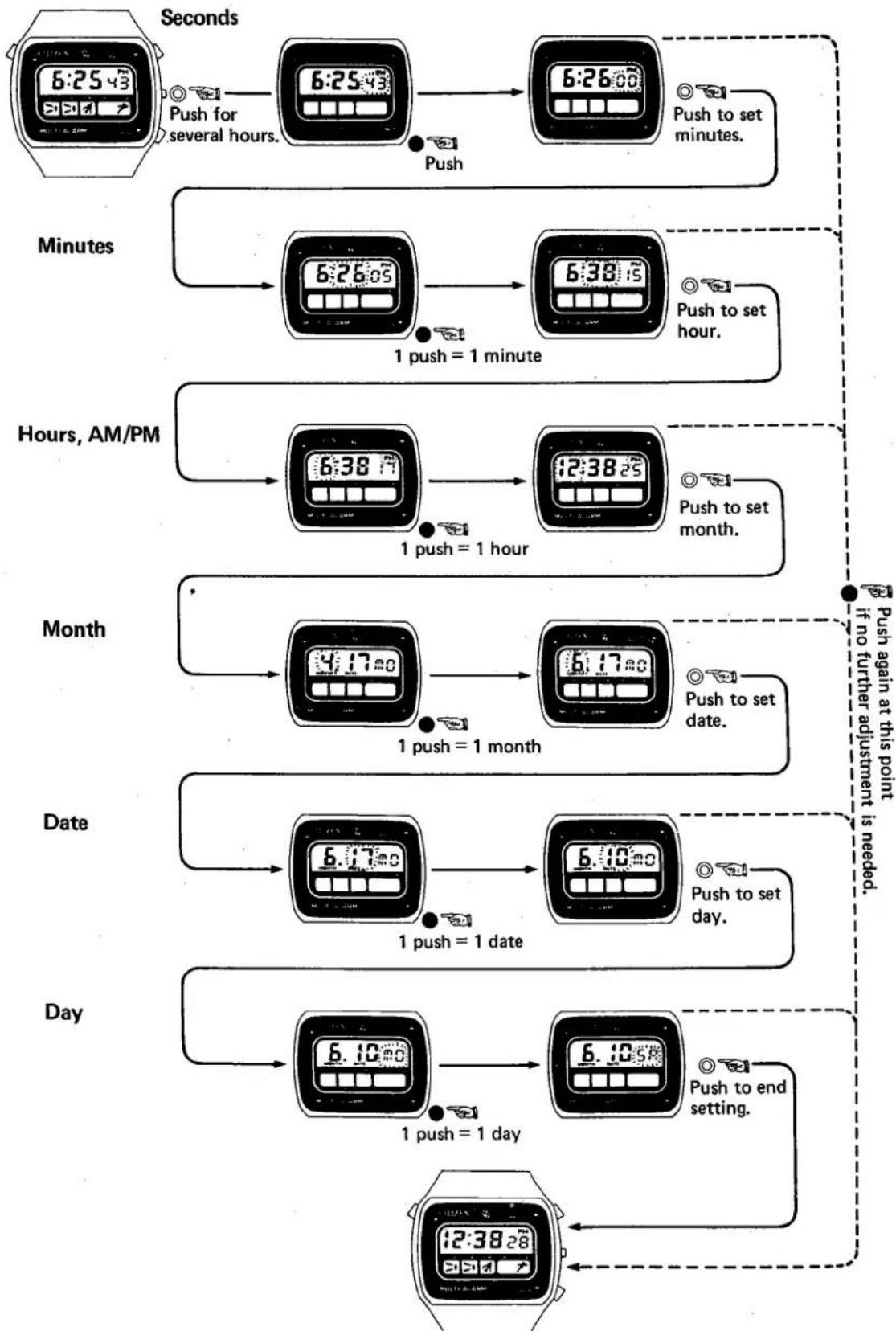
*Time is set in the order of seconds — minutes — hours (AM/PM).
ALARM 1
ALARM 2
CHIME
TIMER STOP-W



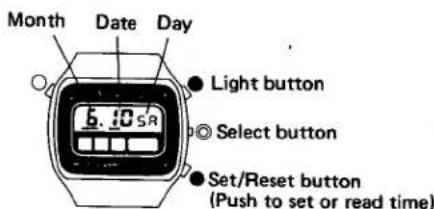
CALENDAR
*The date reads June 10th (Saturday).
*No indications appear in the screens of the display panel when calendar is being read or set.
*Normal time display returns automatically to display panel within several minutes after reading or setting calendar, without pressing reset (black) button. Press reset button to restore time display instantaneously.
*The days of the week are indicated in English abbreviated as shown right.
MONDAY
WEDNESDAY
FRIDAY

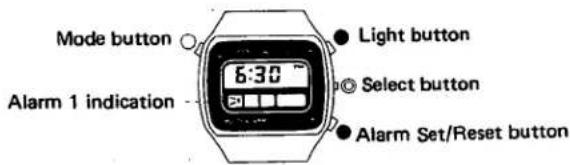
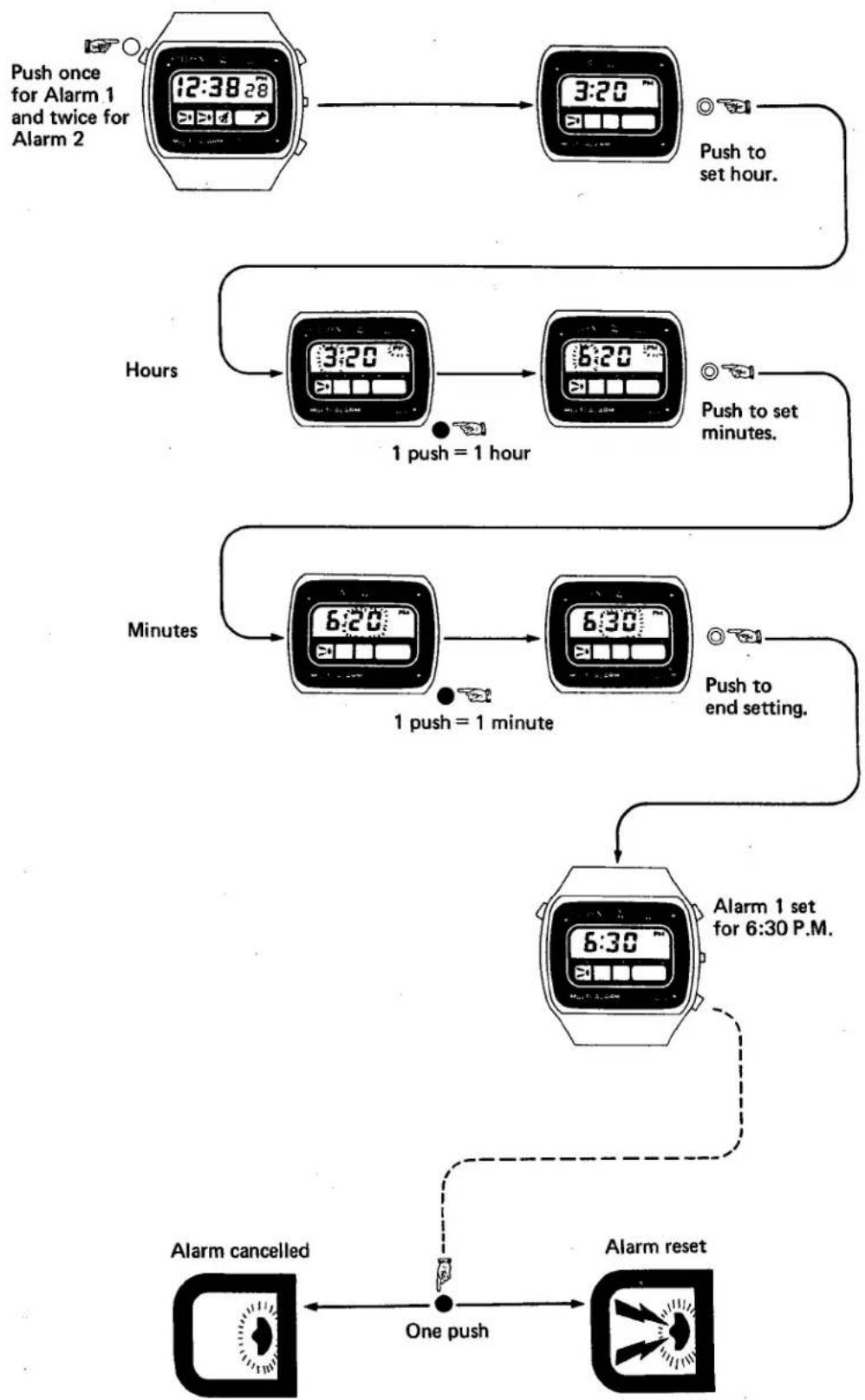
ALARM 1
Once set, Alarm 1 sound at the set hour and minute every day.
*Alarm 1 is set for 6:30 P.M. (No other mode indications appears in the screens of the display panel while Alarm 1 is being set).
*Alarm 1 & Alarm 2 allow setting of hours and minutes only, no seconds.
*Set each alarm in the order of hours (AM/PM) and minutes.
*Normal time display returns automatically to display panel within several seconds after setting.


Alarm set to sound at present time.
To suppress alarm, push reset (black) button; the flashing part of the graphic indication will leave the display panel (see below), and no alarm will sound when the specified time has been reached. To restore alarm, push reset (black) button a second time.
Alarm suppressed.
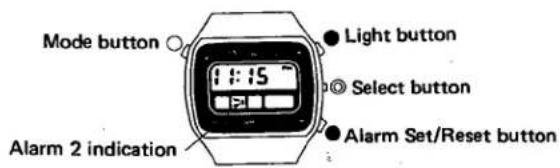
ALARM 2
Alarm 2 is a space alarm provided for added convenience.
*Here Alarm 2 is set to sound at 11:15 P.M.
*Other functions are same as Alarm 1.
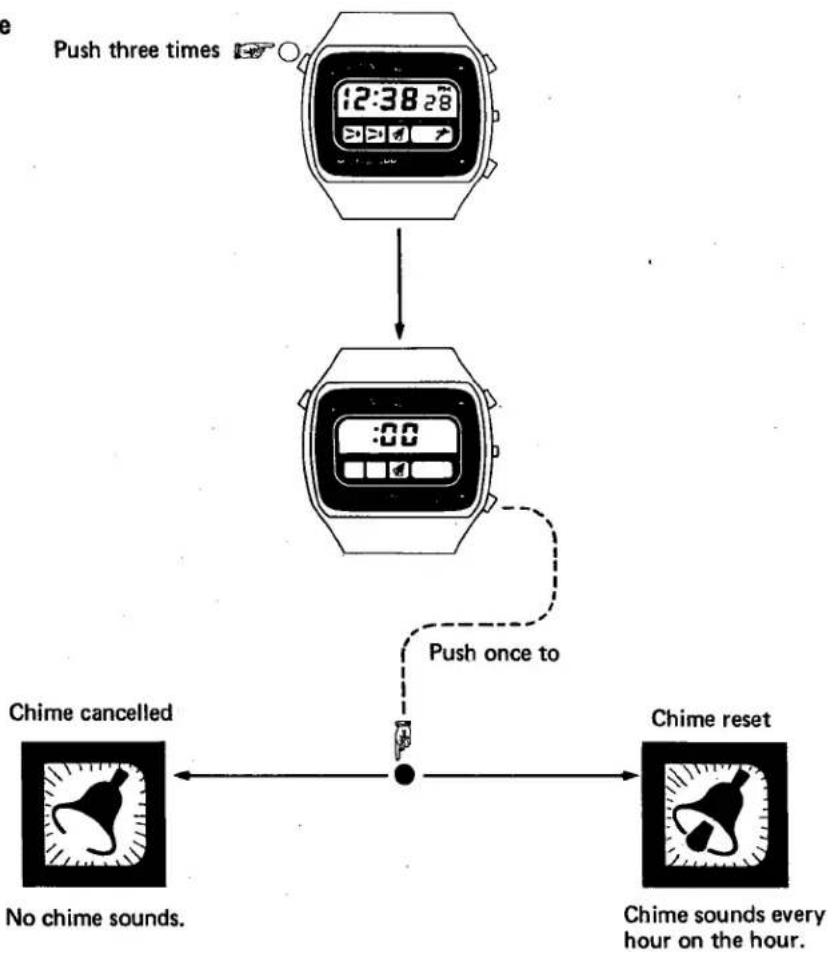
CHIME
The Chime feature provides a handy reminder of the time, every hour on the hour.
*When Chime is set, two abrupt sound bursts will occur every hour on the hour. When hourly (e.g., no minutes) alarm settings have been made, the alarm will replace Chime which would normally sound at that time. Chime will sound as usual on the other hours.
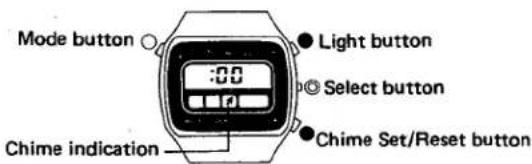


Chime set to sound every hour on the hour.
When chime is not desired, push reset (black) button in chime mode. Suppressed Chime will be indicated by the absence of the striker portion of the bell on the chime status indication. No chime will sound once this setting has been made. To rest chime, push reset (black) button in Chime mode.
Chime suppressed.
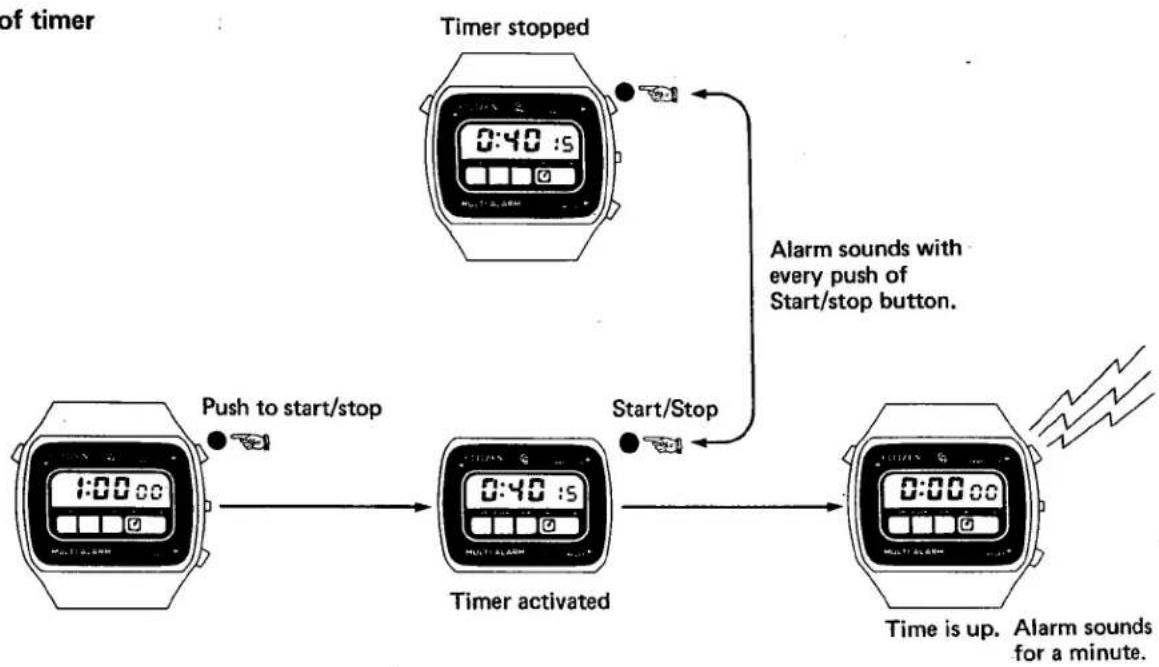
TIMER
Count down. A timer that indicates the time still remaining. Set it for any time period ... a beep that tells you when that period is up.
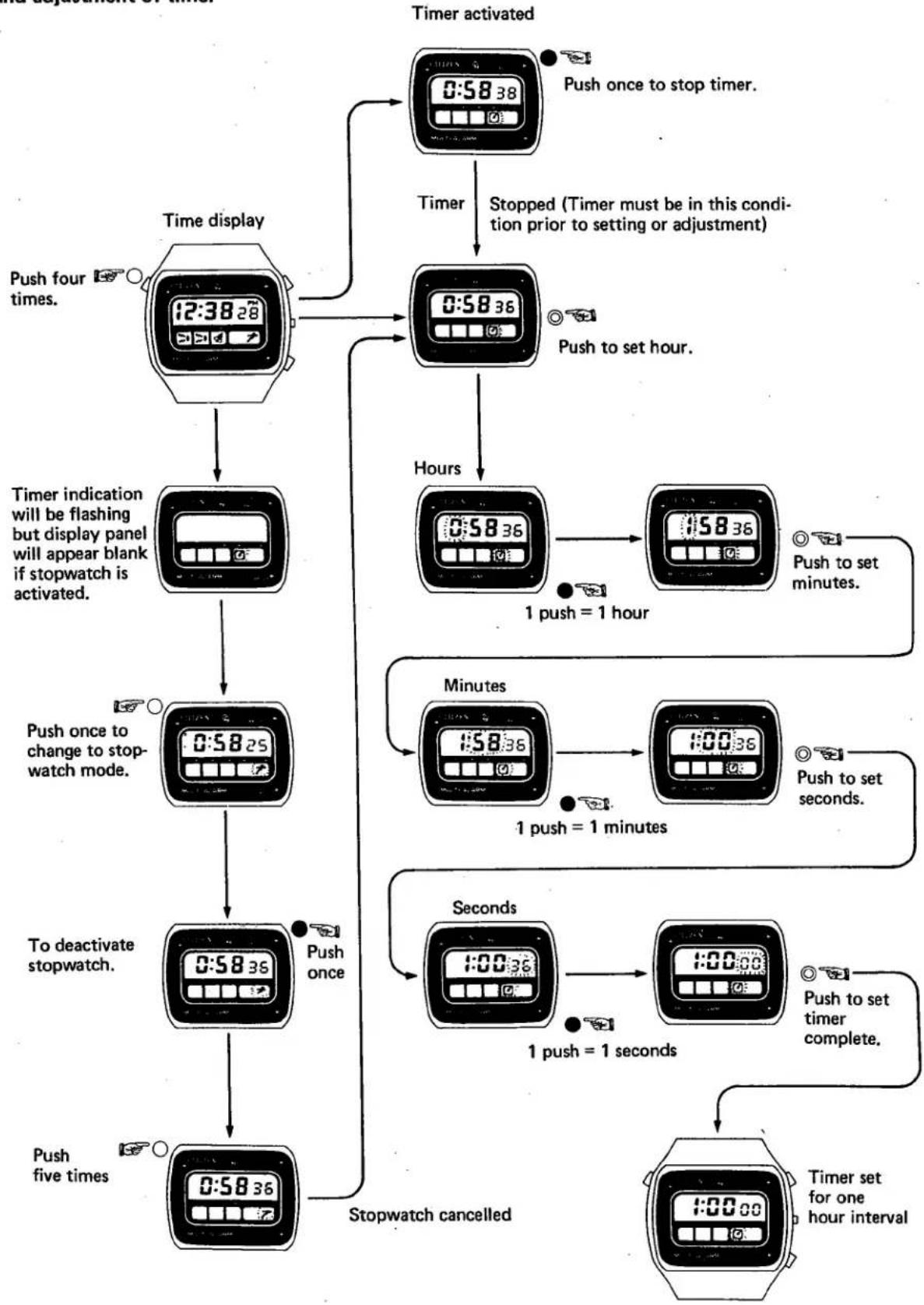
*Timer can be set to time intervals up to 11 hours 59 minutes 59 seconds.
*Countdown can be stopped or started as often as desired. Unless reset by pushing the Set/Reset (black) button, Timer count always resumes from point at which stopped.
*Alarm will buzz sharply once when Timer is started; alarm will sound a full minute when Timer count reaches 0 hours 00 minutes 00 seconds.
Examples: 1:00 cc Alarm sounds when Timer is started with push of Start (yellow) button.
0:5959
0:5958
0:00 o:
0:00 CCN
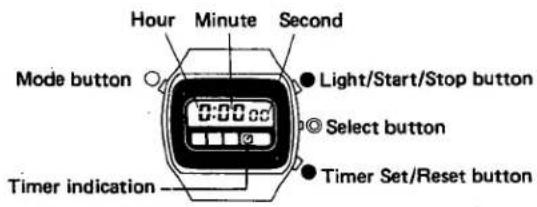
Timer setting is made in the order of hours → minutes → seconds.
Note: If setting was intended in timer mode, but indication flashes, and no numerals appear on the screen, the stopwatch mode is in operation. Make setting again according to the diagram, "Setting and Adjustment of Timer."
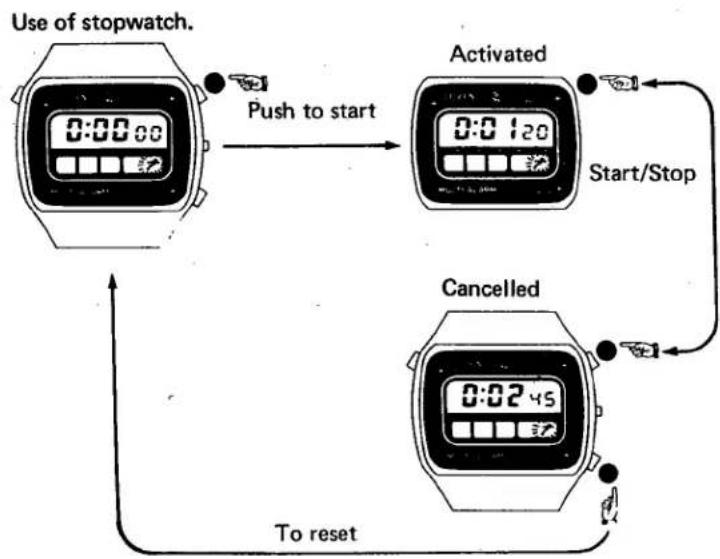
STOPWATCH
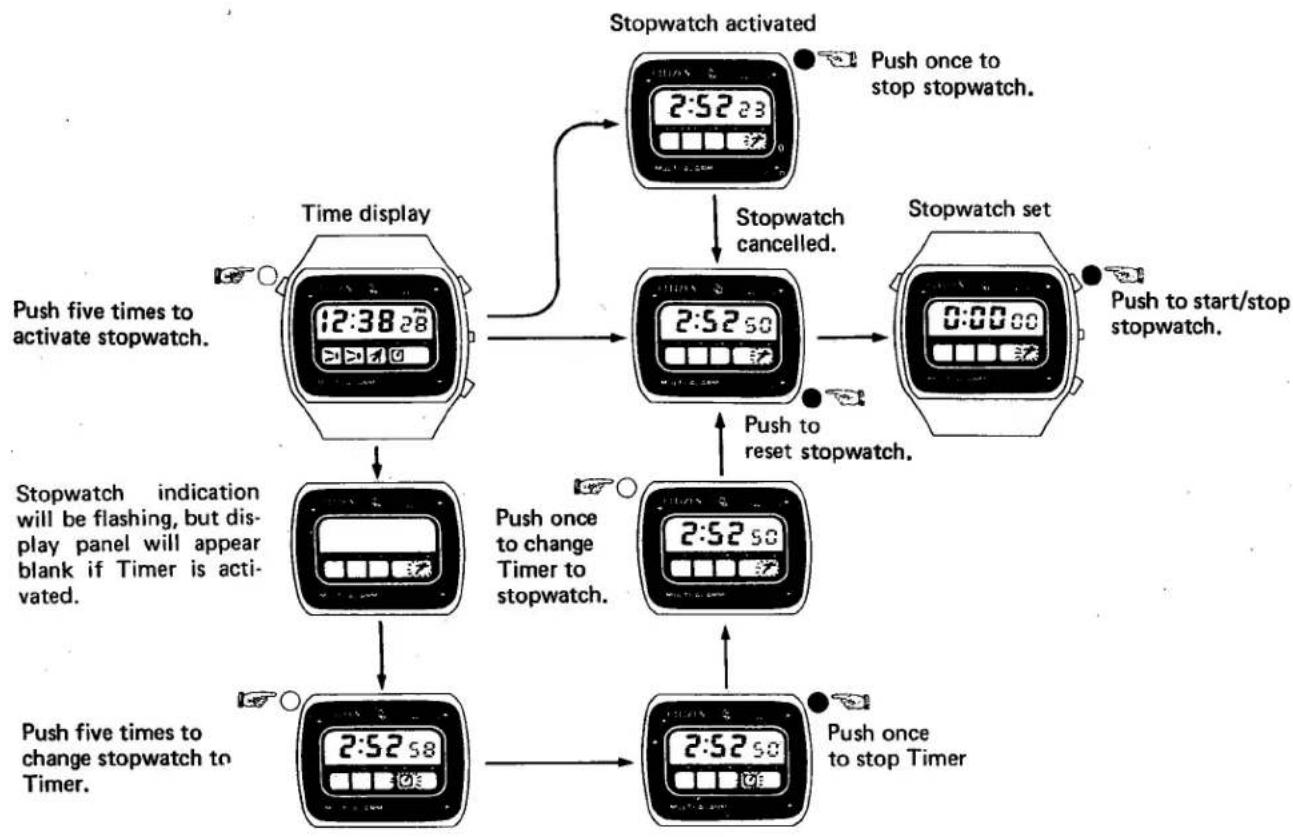
For speed races, car rallies, etc., a single alarm will sound when stopwatch is started or stopped.
*Stopwatch can be used for the time intervals from 0 hours 00 minutes 00 seconds up to 11 hours 59 minutes 59 seconds.
*A single alarm burst will sound when stopwatch is started or stopped.
*Stopwatch indication returns instantly to 0:00oo when reset (black) button is pressed.
*Stopwatch can be stopped and started as often as desired. Stopwatch time display always resumes from point at which started unless reset by pushing the Set/Reset (black) button.
Note: If setting was intended in Stopwatch mode, but indication flashes and no numerals appear on the display panel, the Timer mode is in operation. Make setting again according to the diagram, "Setting and Adjustment of Stopwatch".
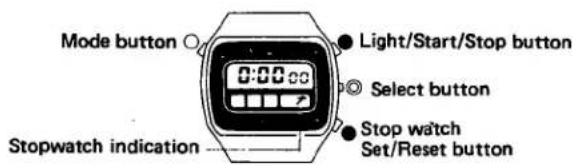
Alarm Monitor
When the timer mode and the calendar mode are on the display, the alarm will be heard if the Light (yellow) button and the Reset (black) button are pushed at the same time.
How to set time, calendar and each mode:
Adjustment and setting of time and date
flowchart
graph TD
    A["6:25:43"] --> B["6:25:43"]
    B --> C["6:26:00"]
    C --> D["Push to set minutes."]
    D --> E["Minutes"]
    E --> F["6:26:05"]
    F --> G["6:38:15"]
    G --> H["Push to set hour."]
    H --> I["Hours, AM/PM"]
    I --> J["6:38:7"]
    J --> K["12:38:25"]
    K --> L["Push to set month."]
    L --> M["Month"]
    M --> N["4:17:00"]
    N --> O["6:17:00"]
    O --> P["Push to set date."]
    P --> Q["Date"]
    Q --> R["6:17:00"]
    R --> S["6:10:00"]
    S --> T["Push to set day."]
    T --> U["Day"]
    U --> V["6:10:00"]
    V --> W["6:10:50"]
    W --> X["Push to end setting."]
    X --> Y["12:38:28"]
    Y --> Z["Day again at this point if no further adjustment is needed."]
Adjustment/Setting completed
Setting and adjustment of alarms (common in Alarm 1 and 2)
flowchart
graph TD
    A["12:38:28"] --> B["3:20"]
    B --> C["Push to set hour."]
    D["12:30:27"] --> E["3:20"]
    E --> F["6:20"]
    F --> G["Push to set minutes."]
    H["12:30:27"] --> I["6:20"]
    I --> J["6:30"]
    J --> K["Push to end setting."]
    L["6:30"] --> M["Alarm 1 set for 6:30 P.M."]
    N["Alarm cancelled"] --> O["One push"]
    P["Alarm reset"] --> Q["Alarm cancelled"]
No alarm sounds at time set.
Alarm sounds at time set.
Setting of Chime
flowchart
graph TD
    A["Push three times"] --> B["12:38 28"]
    B --> C["00"]
    C --> D["Push once to"]
    D --> E["Chime cancelled"]
    E --> F["No chime sounds."]
    D --> G["Chime reset"]
    G --> H["Chime sounds every hour on the hour."]
Use of timer
flowchart
graph TD
    A["Timer stopped"] --> B["Timer activated"]
    B --> C["Time is up. Alarm sounds for a minute."]
    D["Push to start/stop"] --> B
    E["Start/Stop"] --> B
    F["Alarm sounds with every push of Start/stop button."] --> B
Setting and adjustment of timer
flowchart
graph TD
    A["Time display"] --> B["Timer activation"]
    B --> C["Push once to stop timer."]
    B --> D["Timer stopped (Timer must be in this condition prior to setting or adjustment)"]
    A --> E["Push four times."]
    E --> F["Timer indication will be flashing but display panel will appear blank if stopwatch is activated."]
    F --> G["Push once to change to stopwatch mode."]
    G --> H["To deactivate stopwatch."]
    H --> I["Push five times."]
    I --> J["Stopwatch cancelled"]
    J --> K["Seconds"]
    K --> L["1 push = 1 seconds"]
    L --> M["Push to set timer complete."]
    M --> N["Timer set for one hour interval"]
    N --> O["Hours"]
    O --> P["1 push = 1 hour"]
    P --> Q["Minutes"]
    Q --> R["1:58:36"]
    R --> S["1:00:36"]
    S --> T["Push to set seconds."]
    T --> U["Push to set minutes."]
    U --> V["Push to set hour."]
    V --> W["Push to set hour."]
Setting and adjustment of stopwatch
flowchart
graph TD
    A["Time display"] --> B["Stopwatch set"]
    B --> C["Stopwatch set"]
    C --> D["Stopwatch activated"]
    D --> E["Stopwatch cancelled"]
    E --> F["Push to start/stop stopwatch."]
    F --> G["Push once to stop stopwatch."]
    G --> H["Push once to stop stopwatch."]
    H --> I["Push five times to change stopwatch to Timer."]
    I --> J["Push five times to flash, but display panel will appear blank if Timer is activated."]
    J --> K["Push once to change Timer to stopwatch."]
    K --> L["Push once to stop stopwatch."]
    L --> M["Push five times to activate stopwatch."]
    M --> N["Push five times to stop stopwatch."]
flowchart
graph TD
    A["Use of stopwatch"] -->|Push to start| B["Activated"]
    B -->|Start/Stop| C["Cancelled"]
    C -->|To reset| D["End"]
Cal. 9101A
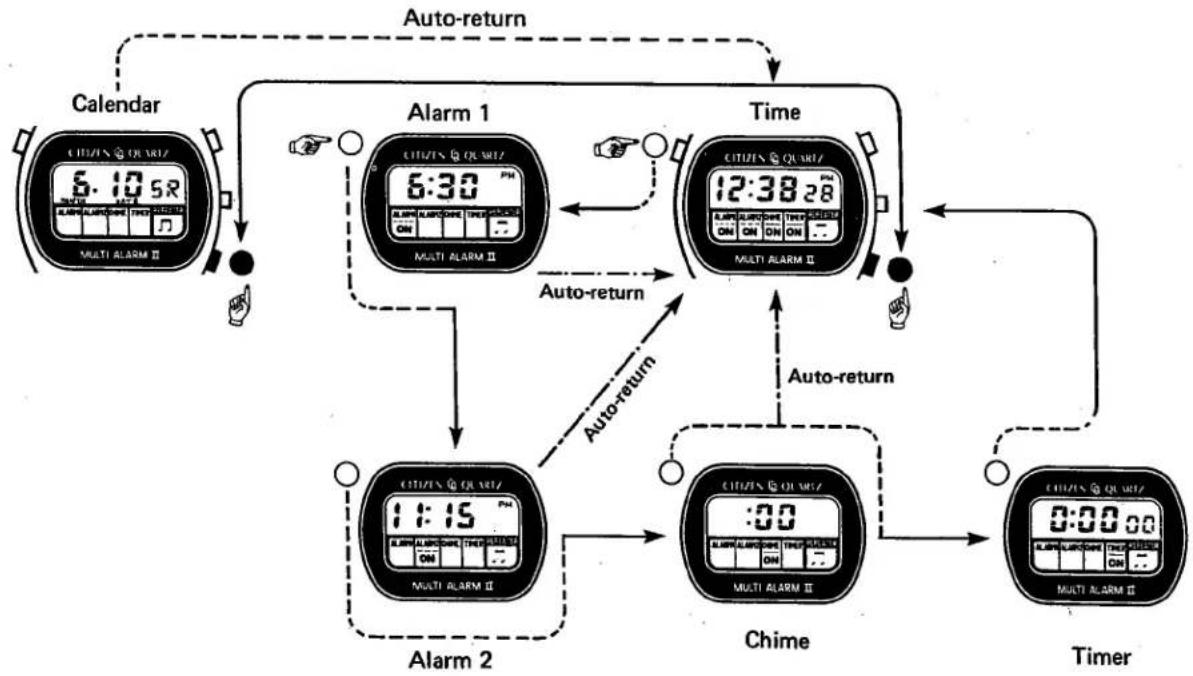
1) Operational modes.
flowchart
graph TD
    A["Calendar"] -->|Auto-return| B["Alarm 1"]
    B -->|Auto-return| C["Alarm 2"]
    C -->|Auto-return| D["Chime"]
    D -->|Auto-return| E["Timer"]
    E -->|Auto-return| F["Time"]
    F -->|Auto-return| G["Multi ALARM II"]
    G -->|Auto-return| H["Multi ALARM II"]
    H --> I["CITI/EN QURIZ"]
    I --> J["6:30 PM"]
    J --> K["Multi ALARM II"]
    K --> L["11:15 PM"]
    L --> M["Multi ALARM II"]
    M --> N["Chime"]
    N --> O["0:00 AM"]
    O --> P["Multi ALARM II"]
    P --> Q["Chime"]
    Q --> R["0:00 AM"]
    R --> S["Multi ALARM II"]
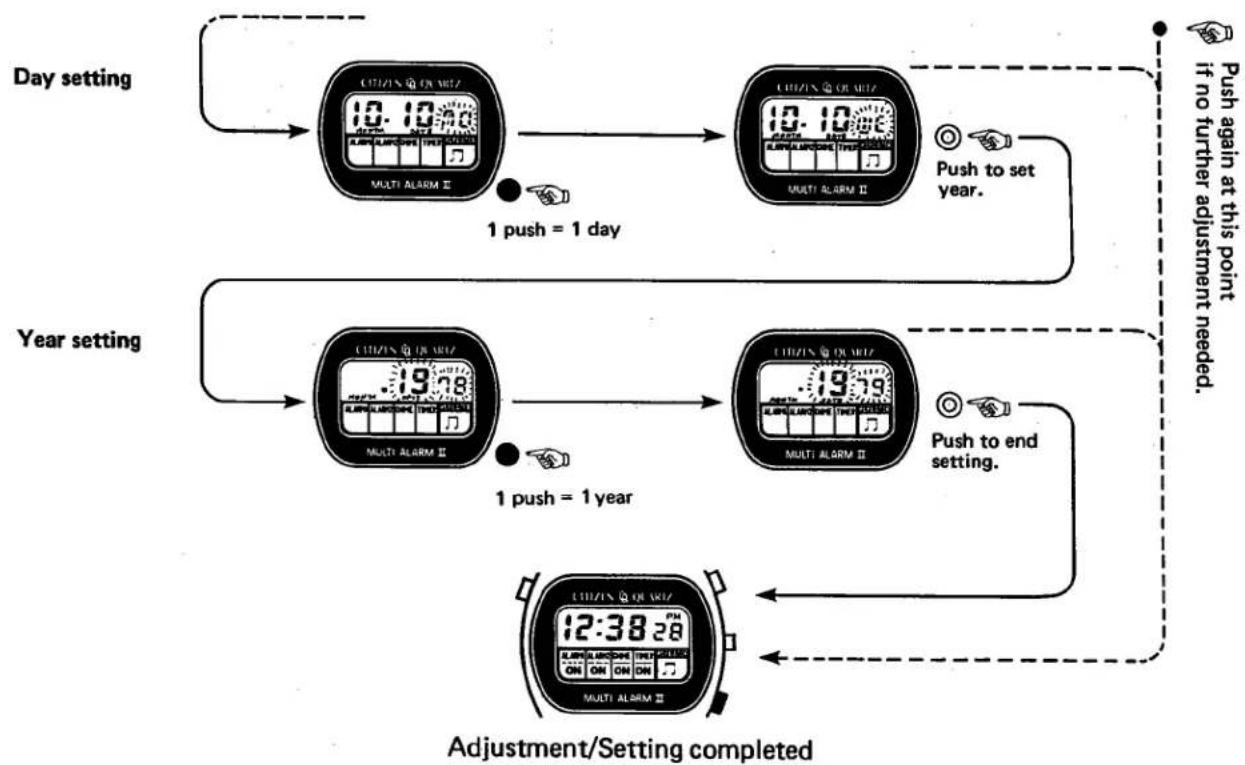
2) Setting and adjustment of time and calendar
The setting method is identical to Cal. No. 9100A with addition of the "year" setting after the "day" setting. The year can be set in a cycle of 1970\~2009 years.
flowchart
graph TD
    A["Day setting"] --> B["Multi Alarm Ⅱ"]
    B --> C["1 push = 1 day"]
    C --> D["Multi Alarm Ⅱ"]
    D --> E["Push to set year."]
    E --> F["Adjustment/Setting completed"]
    F --> G["Year setting"]
    G --> H["Multi Alarm Ⅱ"]
    H --> I["1 push = 1 year"]
    I --> J["Multi Alarm Ⅱ"]
    J --> K["Push to end setting."]
    K --> L["Adjustment/Setting completed"]
    L --> M["Push again at this point if no further adjustment needed."]
3) Setting and adjustment of Alarms (common in Alarm 1 and 2)
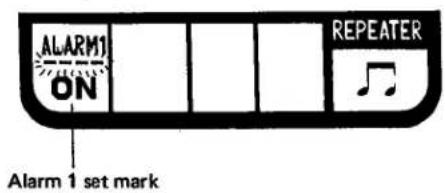
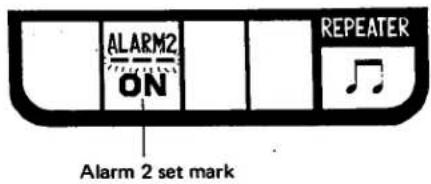
■ Alarm set/cancel
With every push of the black button in the alarm normal display mode, the alarm set and cancel are repeated alternately.
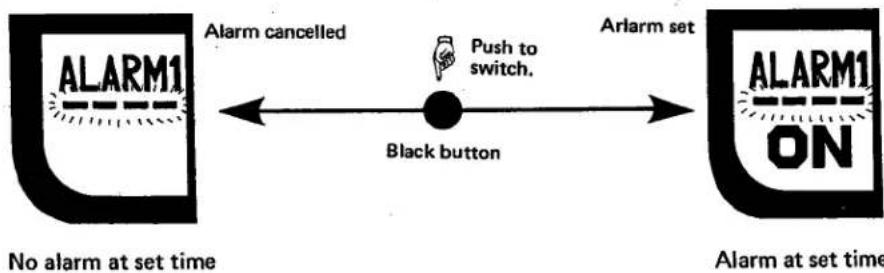
flowchart
graph LR
    A["ALARM1"] -->|No alarm at set time| B["Black button"]
    B -->|Arlarm set| C["ALARM1 ON"]
    C -->|Arlarm set| D["Black button"]
    D -->|Push to switch.| E["Arrow pointing inward"]
    style A fill:#f9f,stroke:#333
    style C fill:#f9f,stroke:#333
    style D fill:#f9f,stroke:#333
■The setting procedure of the alarm time is identical to Cal. No. 9100A.
4) Setting of chime
With every push of the black button in the chime display mode, the chime set and cancel are repeated alternately.
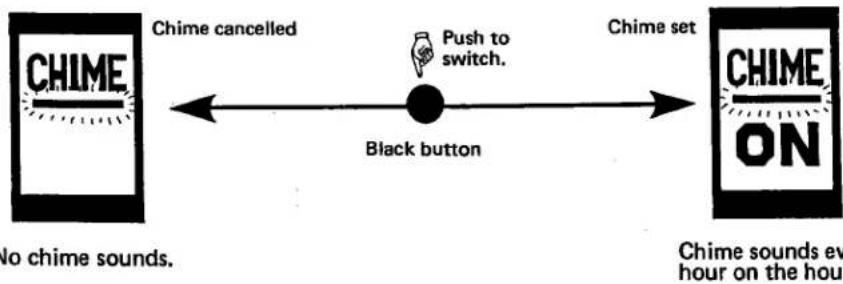
flowchart
graph LR
    A["CHIME"] -->|Chime cancelled| B["Black button"]
    B -->|Push to switch.| C["Chime set"]
    C --> D["CHIME ON"]
    style A fill:#f9f,stroke:#333
    style B fill:#ccf,stroke:#333
    style C fill:#cfc,stroke:#333
    style D fill:#fcc,stroke:#333
5) Setting and adjustment of timer
■The timer can be used independently for Cal. No. 9101A since no stopwatch is incorporated.
■The setting procedure of the timer is identical to Cal. No. 9100A.
6) Handling of time announcement device
With simultaneous push of Ⓐ -button (yellow) and Set/Reset button (black) in the normal time display or the calendar display mode, the time is announced in three different ways of sounding at the instant of the button push.
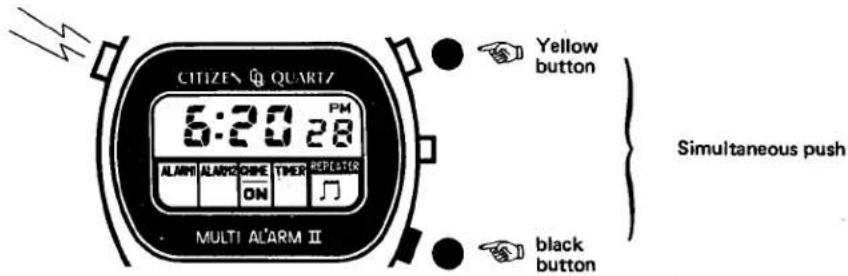
The three different ways of sounding varies in the "hour", "10-minute digit" and "1-minute digit" with no "second" sounding nor discrimination between AM and PM.
■Sounding of hour
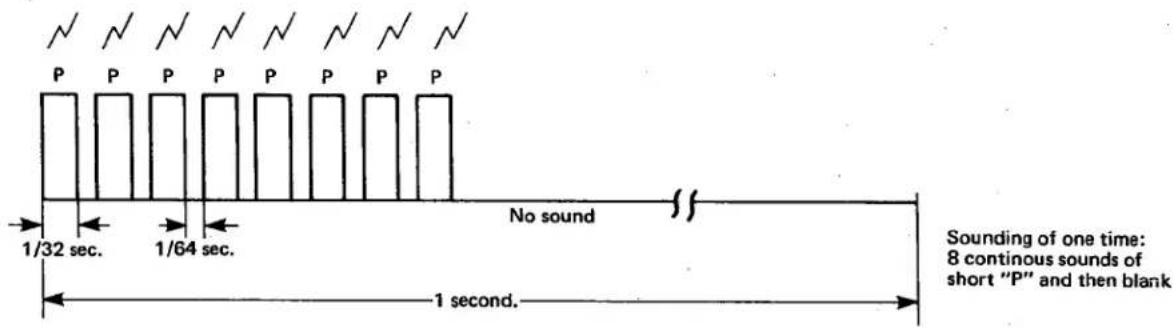
This way of sounding is repeated in the same frequencies as the number of the "hour" then, for example, 5 times for "5 o'clock".
■Sounding of 10-minute digit
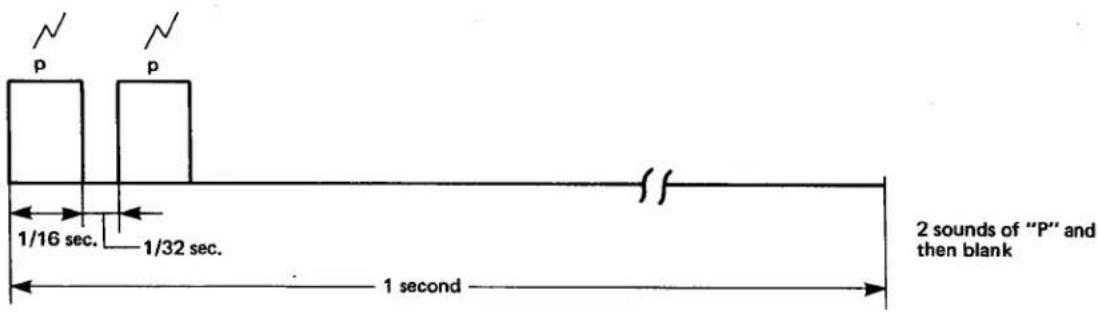
This sounding is given in the same frequencies as the number of the 10-minute digit, for example, 4 times for "X-hour 4Y-minute".
■Sounding of 1-minute digit
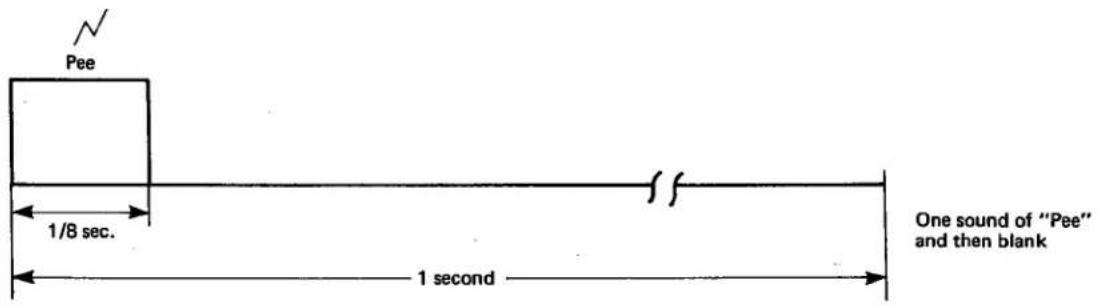
This sounding is given in the same frequencies as the number of the 1-minute digit, for example, 3 times for "X-hour X3-minute".
Thus, the "hour" is announced with 1-second blank followed; the "10-minute digit" is announced with 1-second blank followed; and finally the "1-minute digit" is announced.
(Ex.) With simultaneous push of both the yellow and black buttons when the time shows "5:26", 5 times of hour sounding with 1-second blank followed, 2 times of 10-minute digit sounding with 1-second blank and 6 times of 1-minute digit sounding are given respectively.
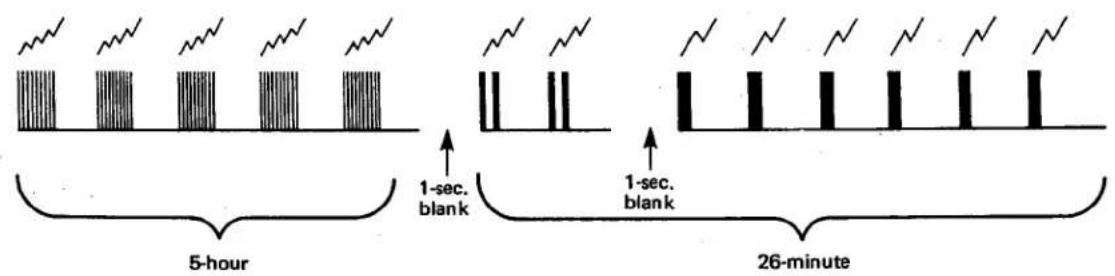
*In case the 10-minute digit or the 1-minute digit is "0", these digits has no sounding.
Examples:
10:00 10 times of hour sounding
8:05 8 times of hour sounding with 1-second blank followed and 5 times of 1-minute digit sound
7:40 7 times of hour sounding with 1-second blank followed and then 4 times of 10-digit sounding
§4. SPECIFICATIONS
| Model | Citizen Quartz Multi Alarm | ||
| Cal. No. | 9100A 9101A | ||
| Movement | Diameter | 27.2mmø | |
| Thickness | 6.06mm | ||
| Oscillation | 32,768Hz | ||
| Accuracy | ±10 sec./month under normal temperature | ||
| Display information | Normal display | "Hour", "minute", "second" and "AM/PM" | |
| Calendar display | "Month", "date" and "day"(year at setting time with Cal. 9101A) | ||
| Alarm display | "Hour" and "minute" | ||
| Chime display | ":☐☐" | ||
| Timer display | "Hour", "minute" and "second"Set time: 11 h. 59 min. 59 sec. | ||
| Stopwatch display | Measurement range: 0 sec. - 11 h. 59 min. (Cal. 9100A)59 sec. Cumulative count possible | ||
| Display system | FE twist-type nematic LC display | ||
| Effective temperature range | 0°C (32°F) ~ +60°C (140°F) | ||
| Semiconductor | C/MOS-LSI | ||
| Additional mechanisms | Alarm-1, Alarm-2ChimeTimerStopwatch (Cal: 9100A)Alarm monitorTime announcement (Cal. 9101A)Illumination lampPower cell life indicatorAutomatic calendar setting | ||
| Power cell | Small-size silver oxide power cellParts No. 280-15 (1 unit)Nominal Voltage: 1.55VCapacity: 75mAHSize: 11.56mmøx 3.0mmLife: about 2 years | ||

Marke : CITIZEN
Modell : CAL 9100
Kategorie : Uhr