
CAL 9560 - Uhr CITIZEN - Kostenlose Bedienungsanleitung
Finden Sie kostenlos die Bedienungsanleitung des Geräts CAL 9560 CITIZEN als PDF.


Benutzerfragen zu CAL 9560 CITIZEN
0 Frage zu diesem Gerät. Beantworten Sie die, die Sie kennen, oder stellen Sie Ihre eigene.
Eine neue Frage zu diesem Gerät stellen
Laden Sie die Anleitung für Ihr Uhr kostenlos im PDF-Format! Finden Sie Ihr Handbuch CAL 9560 - CITIZEN und nehmen Sie Ihr elektronisches Gerät wieder in die Hand. Auf dieser Seite sind alle Dokumente veröffentlicht, die für die Verwendung Ihres Geräts notwendig sind. CAL 9560 von der Marke CITIZEN.
BEDIENUNGSANLEITUNG CAL 9560 CITIZEN
TECHNICAL INFORMATION
CITIZEN QUARTZ
Cal. No. 956※
CONTENTS
§1. OUTLINE P1
§2. FEATURES P1
§3. SPECIFICATIONS P2
§4. BLOCK-SPLIT MULTIPLEX DRIVING SYSTEM P3
§5. HANDLING INSTRUCTIONS P5
§6. DISASSEMBLY/ASSEMBLY OF MODULE P12
§7. TROUBLESHOOTING AND ADJUSTMENT P14
§ 1. OUTLINE
text_image
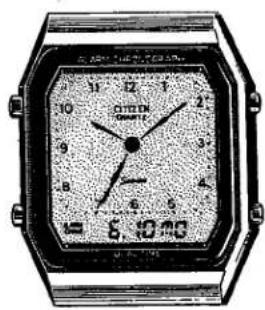
6.10 AM COTTON SINNATI 12 11 10 9 8 7 6 5 4 3 2 1 0 8,10 mThis fully electronic Ana-Digi watch has been developed rather in a short time to cope quickly with the present keen competition of the digital watches as well as expand the group of watches featuring a reasonable price.
The structure of this watch is based on the module of Cal. No. 8940 which is already on the market, having an analog display with center second by an LCD plus a digital display of 6 digits.
§2. FEATURES
1) A fully electronic watch that contains both the analog and digital display functions. The analog part shows constantly the home time of the wearer by the hour, minute and second hands with the 1-second step movement. The digital part has a display function with 6 digits plus 10 marks for the calendar, local time, alarm, stopwatch, timer and chime respectively.
2) A switching is possible between the 12-hour and 24-hour displays in the mode of the local time.
3) The analog display is carried out by the block-split multiplex driving, and the digital display is carried out by the 3-split multiplex driving respectively. Even in the multidisplay mechanism of the digital part, the connection is simplified between the LC display panel and the plate complete.
§ 3. SPECIFICATIONS
| Caliber No. | 9560 | |
| Type | Digital Quartz Watch | |
| Module Size | Outer dia. (mm): 26.0 (3-9H) x 27.4 (12-6H)Thickness (mm): 5.05t (Power cell part 5.85t) | |
| Accuracy | ±15 sec./month at normal temperatures | |
| Oscillation | 32,768Hz | |
| Display system | FE (Field Effect) type nematic LCAnalog part : 1-second step movement of hands with center second,60 x 2 = 120 segments, block-split multiplex driving methodDigital part : 6 digits plus 10 marks, 3-split multiplex driving method | |
| Integrated circuit | C/MOS-LSI (1 unit) | |
| Effective temperature range | ±0°C ~ 55°C (32°F ~ 131°F) | |
| Display functions | Calendar | Normal display: Month, date & dayDisplay during A/P hour, minute & second correctioncorrection: (12H/24H switch coupling to local time) |
| Local time | A/P, hour, minute & LHour, minute & L | |
| Alarm | A/P hour, minute & AL (12H/24H switch coupling to local time)Alarm ON : Display of "Set time AL"Alarm OFF : Display of "OFF AL" | |
| Stopwatch | Hour, minute & 1/10 sec. (60-minute count) | |
| Timer | Hour, minute & second (Max. set time: 11H 59'59") | |
| Additional functions | ●Chime ●Switch of 12H/24H displays●Alarm monitor●Illumination lamp●Quick setting for correction●Fully automatic calendar (1980 ~ 2019)●Auto-return system●Instant manual return system | |
| Power cell(Silver oxide power cell) | Parts No. : 280-15Cell code : SR1130W (Ag2O/KOH)Capacity : 80mAhNominal voltage: 1.55VSize (mm) : 11.6φ x 3.1tLifetime : About 20 months(25 sec. alarm ring, 24-time hourly chime and 3 sec.lamp lighting per day) | |
§4. BLOCK-SPLIT MULTIPLEX DRIVING SYSTEM
• Block-split multiplex driving system
The block-split multiplex driving system (hereafter called "block-split system") is adapted newly to Cal. No. 9560 as an analog display system.
This block-split system is detailed as follows.
text_image
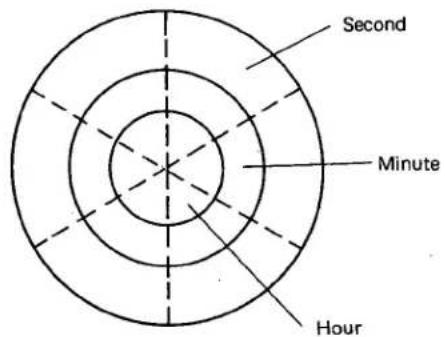
Second Minute HourAs shown in the above diagram, the center, intermediate and outer circumference circle zones are used for display of "hour", "minute" and "second" respectively.
In other words, the following formulas are defined for each display.
$$ \begin{array}{l} \bullet \text { "Second" } = \text { "Hour" } + \text { "Minute" } + \text { "Second" } \ \bullet \text { "Minute" } = \text { "Hour" } + \text { "Minute" } \ \bullet \text { "Hour" } = \text { "Hour" } \ \end{array} $$
At the same time, the analog display part is divided into 6 equal portions as shown by the dotted lines in the above diagram. And 10 pieces of display segments (equivalent to analog hour, minute and second hands each) are included into each range of 60^ .
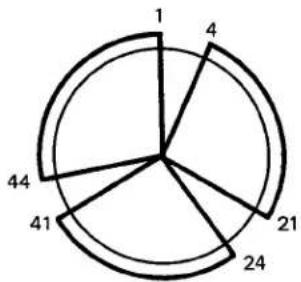
One of the 10 segments in each of the 6 equally divided portions is connected to each other.
(Ex.) As illustrated right, the segments equivalent to 1 (sec.), 4 (sec.), 21 (sec.), 24 (sec.), 41 (sec.) and 44 (sec.) each are connected mutually into a piece of line.
Accordingly, the 28 pieces (= 3 x 6 + 10) of output terminals are obtained. In this case, the figure 3 means "hour", "minute" and "second"; 6 means "6 divided portions"; and 10 is the number of segments respectively.
radar
| Segment | Value | |---|---| | 1 | 1 | | 4 | 4 | | 21 | 21 | | 24 | 24 | | 41 | 41 | | 44 | 44 |In the actual case of Cal. No. 9560, the "second" and "minute" are regarded as one element. As a result, the number of output terminals counts 22 pieces (= 2 × 6 + 10) .
• LC driving voltage of Cal. No. 9560
The LC driving voltage of Cal. No. 9560 is set at 4.5V (3V for other ordinary calibers) in order to secure a high contrast between the ON and OFF of the LC display. Thus an easy-to-see display can be obtained.
The above reasons is detailed as follows.
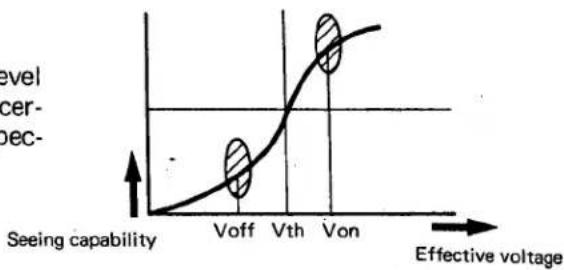
The LC display panel is turned ON at a certain level of voltage V_ON (effective voltage) and OFF at a certain level of voltage V_OFF (effective voltage) respectively. (Fig. 1)
line
| Effective voltage | Value | | ----------------- | ----- | | Voff | 0 | | Vth | 0 | | Von | 0.8 |(Fig. 1)
This V_ON / V_OFF ratio is expressed by _ONV_OFF = working margin (≈ contrast ratio) .
Thus the large the working margin the higher the contrast of LC (liquid crystal) becomes. Then the higher the driving voltage the higher the contrast of LC display in case the working margin is constant. This is due to the fact that the higher the driving voltage the more suddenly V_OFF changes to V_ON .
In this connection, as mentioned first, the voltage is increased up to 4.5V to secure a sufficient ratio between V_ON and V_OFF and thus obtain a higher contrast of LC display.
§ 5. HANDLING INSTRUCTION (The flashing area is shown by ○.)
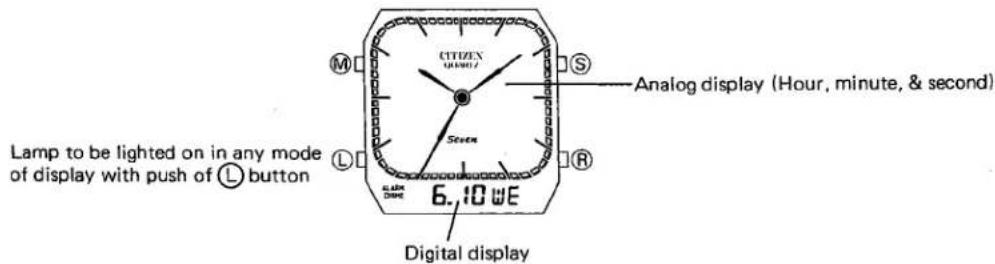
1) Name of each part
text_image
Lamp to be lighted on in any mode of display with push of L button CITIZEN 6:10 WE Analog display (Hour, minute, & second) Digital display2) Switching of display
The modes of display are switched in that order shown below with every push of M button.
The analog shows the home time constantly regardless of a mode switch in the digital part. (The time shown by the analog watch is called home time.)
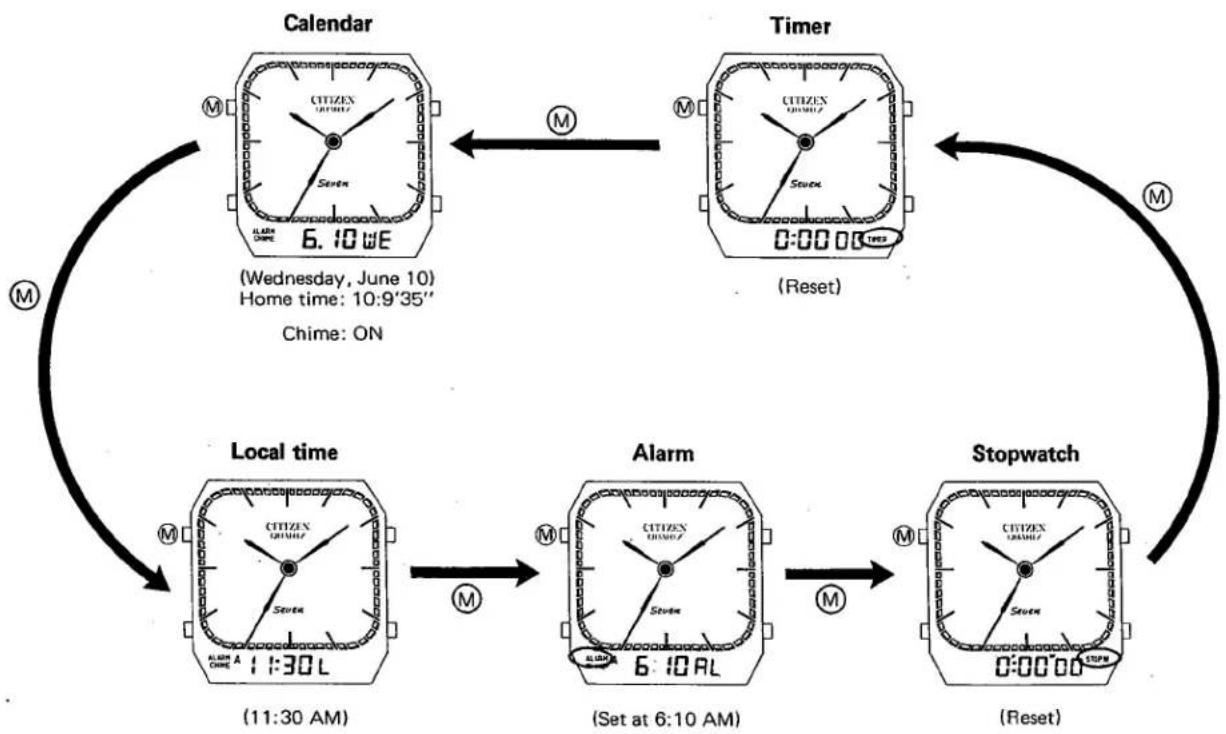
flowchart
graph TD
    A["Calendar"] -->|M| B["Timer"]
    B -->|M| C["Local time"]
    C -->|M| D["Alarm"]
    D -->|M| E["Stopwatch"]
    E -->|M| B
    style A fill:#f9f,stroke:#333
    style B fill:#f9f,stroke:#333
    style C fill:#f9f,stroke:#333
    style D fill:#f9f,stroke:#333
    style E fill:#f9f,stroke:#333
- Alarm monitor
The alarm monitor is possible with a simultaneous push of both Ⓗ and Ⓐ buttons in the display modes of calendar and local time.
The following actions are given simultaneously.
In calendar display: ON/OFF switch of Chime
In local time display: Switch of 12-/24-hour displays
3) Setting of home time
flowchart
graph LR
    A["Normal display"] -->|Push of S button about 2 sec.| B["Display during correction"]
    B -->|Instant manual return with push of M button| A
    A --> C["Digital part: Calendar display (Month, date & day)"]
    B --> D["Time display (Hour, minute & second)"]
    C --> E["(Chime/alarm: ON\nStopwatch/timer: Under counting)"]
    D --> F["A/P glowing\nMode mark turned off"]
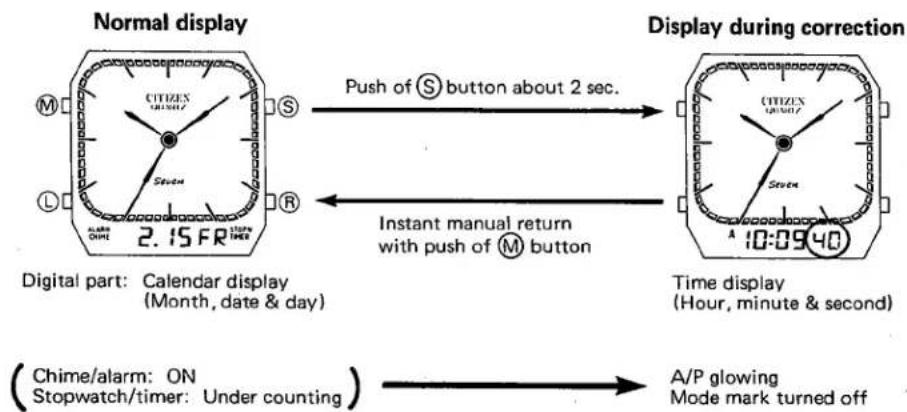
The time displayed at the digital part during a correction or setting is always synchronous with the home time of the analog part.
Thus a coupled correction/setting is given between the analog time and the digital time.
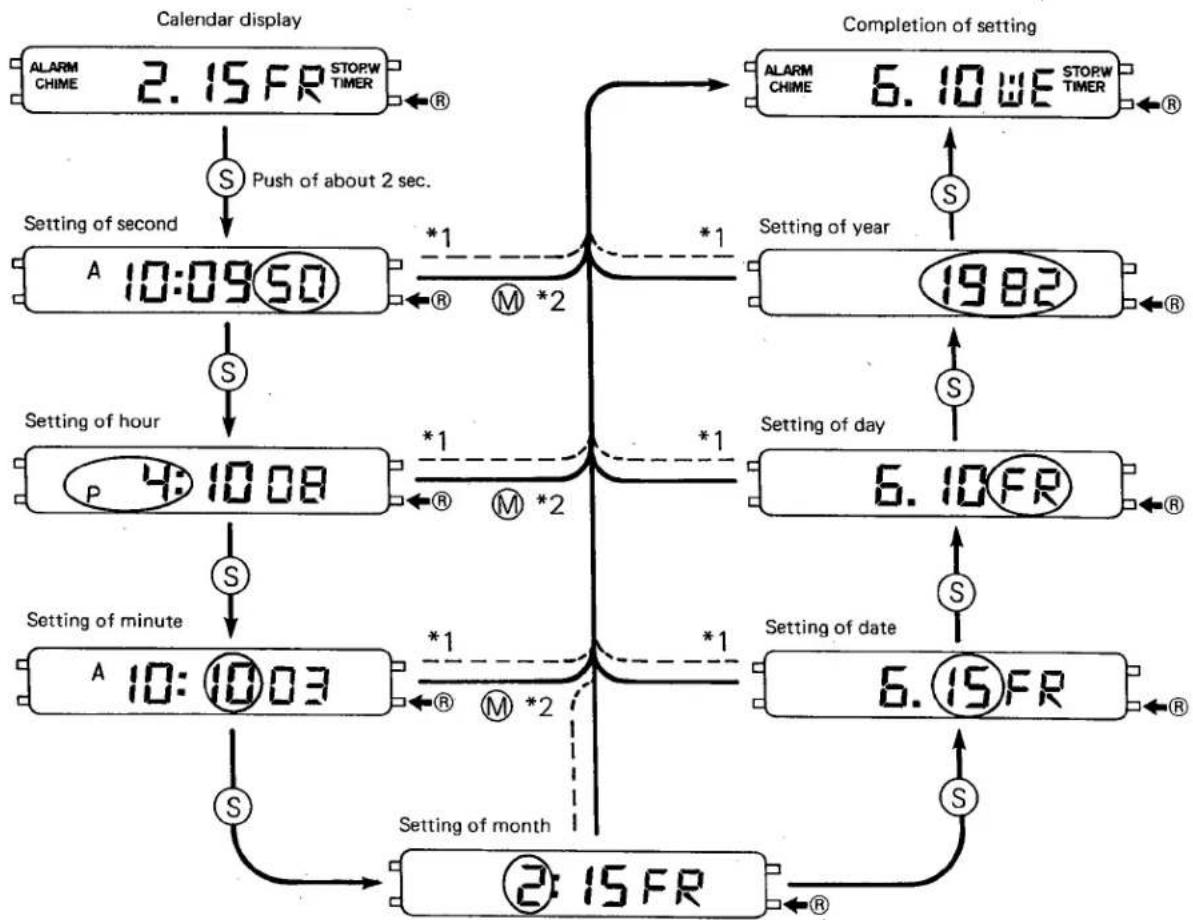
(1) Setting of time
(Ex.) 10:9'50" AM Friday, February 15 → 4:15'00" PM Wednesday, June 10
flowchart
graph TD
    A["Calendar display"] --> B["ALARM CHIME 2.15FR STOPW TIMER"]
    B --> C["S Push of about 2 sec."]
    C --> D["A 10:0950"]
    D --> E["S"]
    E --> F["Setting of second"]
    F --> G["P 4:1008"]
    G --> H["S"]
    H --> I["Setting of minute"]
    I --> J["A 10:1003"]
    J --> K["S"]
    K --> L["Setting of month"]
    L --> M["2:15FR"]

    N["Completion of setting"] --> O["ALARM CHIME 6.10WE STOPW TIMER"]
    O --> P["S"]
    P --> Q["Setting of year"]
    Q --> R["1982"]
    R --> S["S"]
    S --> T["Setting of day"]
    T --> U["6.10FR"]
    U --> V["S"]
    V --> W["Setting of date"]
    W --> X["6.15FR"]
    X --> Y["S"]
    Y --> Z["Setting of month"]

    style A fill:#f9f,stroke:#333
    style N fill:#f9f,stroke:#333
    style O fill:#f9f,stroke:#333
    style P fill:#f9f,stroke:#333
    style Q fill:#f9f,stroke:#333
    style R fill:#f9f,stroke:#333
    style S fill:#f9f,stroke:#333
    style T fill:#f9f,stroke:#333
    style U fill:#f9f,stroke:#333
    style V fill:#f9f,stroke:#333
    style W fill:#f9f,stroke:#333
    style X fill:#f9f,stroke:#333
    style Y fill:#f9f,stroke:#333
*1: Auto-return
The mode is returned automatically in 1\~2 minutes to the calendar display from any other mode.
*2: Instant manual return
The calendar display is reset from each setting mode with push of Ⓜ button.
- Other functions for home time setting
① In the setting of second, one minute is carried up if the 0-second reset is given with push of Ⓡ button while the second reads 30\~59. At this moment, the analog second is also reset to 0 coupling to the digital second.
A synchronous setting is always given between the analog and digital sections for the hour, minute and second each.
② A quick setting (8Hz) is possible in each setting mode by pushing Ⓡ button for about 2 seconds or more. In this instant, the flashing is stopped for the digit to be corrected. In the same way, a quick setting can also be given to a correction of the local time, alarm and timer each.
In each setting mode excepting the 0-second reset, the figure (day) can be advanced one by one for the flashing digit to be corrected with every push of Ⓡ button.
③ The switch between the 12-/24-hour displays of the home time couples to that of the local time.
(Thus this switch is also possible in the display of a local time.)
④ The carry-up is performed up to the highest digit by the time counting even in each setting mode like the normal display mode. However, no carry-up is performed toward the higher digits with operations of Ⓡ button in each setting mode excepting the setting of second.
⑤ A non-existing day, if set, is changed automatically to the first day of the next month when the mode is reset to the calendar display.
(2) ON/OFF of chime
The ON and OFF are switched alternately for the chime in the calendar display mode with a simultaneous push of both Ⓡ and Ⓐ buttons.
The alarm rings for an alarm monitor during a simultaneous push of Ⓗ and Ⓐ buttons.
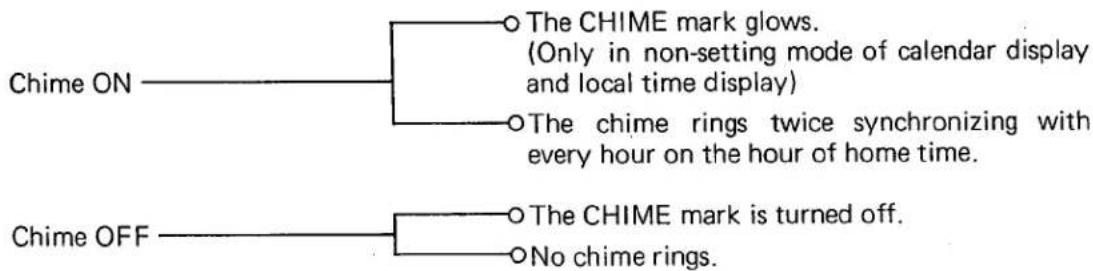
flowchart
graph TD
    A["Chime ON"] --> B{The CHIME mark glows.
(Only in non-setting mode of calendar display
and local time display)}
    A --> C{The chime rings twice synchronizing with
every hour on the hour of home time.}
    D["Chime OFF"] --> E{The CHIME mark is turned off.}
    D --> F{No chime rings.}
4) Setting of local time
(Example of display)
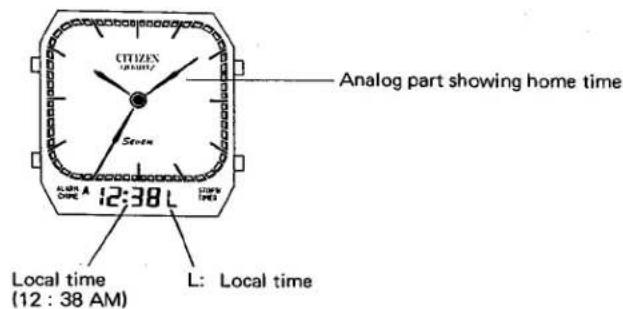
text_image
CITIZEN (12:38 L) Analog part showing home time Sven Local time (12 : 38 AM) Local time L: Local timeEach of the ALARM, CHIME, STOP. W and TIMER modes is displayed in the same way as the calendar display.
Chime/alarm: ON
Stopwatch/timer: Under counting
(1) Setting of time
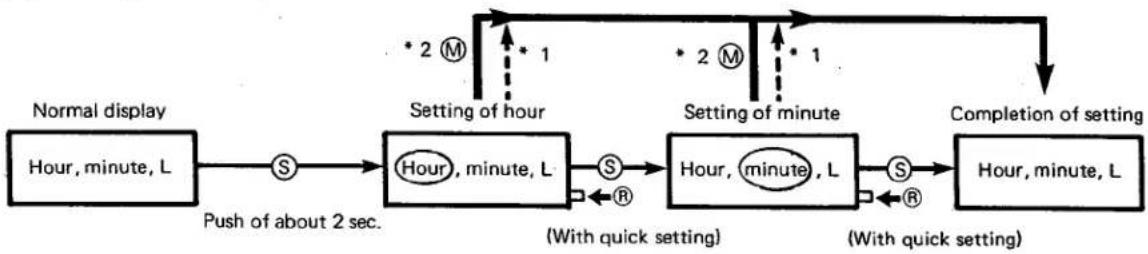
flowchart
graph TD
    A["Normal display\nHour, minute, L"] --> B["S"]
    B --> C["Hour, minute, L"]
    C --> D["S"]
    D --> E["Hour, minute, L"]
    E --> F["S"]
    F --> G["Hour, minute, L"]
    G --> H["Completion of setting\nWith quick setting"]
    C --> I["Push of about 2 sec."]
    E --> J["(With quick setting)"]
    style A fill:#f9f,stroke:#333
    style B fill:#ccf,stroke:#333
    style C fill:#cfc,stroke:#333
    style D fill:#fcc,stroke:#333
    style E fill:#cff,stroke:#333
    style F fill:#ffc,stroke:#333
    style G fill:#cfc,stroke:#333
    style H fill:#fcc,stroke:#333
*1 : Auto-return
*2 : Instant manual return
Other functions for alarm time setting follow ② and ④ of the home time setting.
(2) Switch between 12-/24-hour displays
In the non-setting mode of local time display, a switch is possible between the 12- and 24-hour displays with every simultaneous push of both Ⓡ and Ⓐ buttons.
This switch of the local time couples to both the home time and the alarm each.
The alarm rings for an alrarm monitor during a simultaneous push of Ⓗ and Ⓐ buttons.
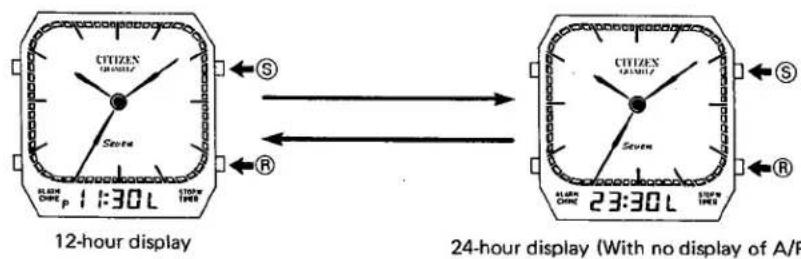
text_image
CITIZEN CITIZEN Scentra 1:30 L 11:00 19:00 S R 12-hour display 24-hour display (With no display of A/P CITIZEN CITIZEN Scentra 1:30 L 11:00 19:00 S R5) Operation of alarm
(Example of display)
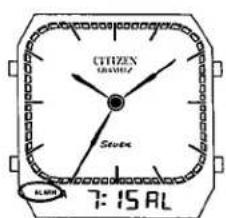
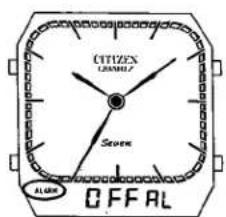
Either one of the following two displays is given when the mode is set to the alarm display.
text_image
CITIZEN MOVELLY Steven 7:15 ALDisplay of set time (7:15 AM)
text_image
CITIZEN CHANNEL Seven ALARM OFFALOFF display
The CHIME, STOP. W and TIMER marks are all turned off regardless of their ON/OFF or counting mode.
Alarm ON ○ Display of set time ○ The alarm rings 20 seconds when a coincidence is obtained at an exact minute between the set time of the alarm and the home time. (The ring of alarm can be stopped immediately with push of any one of the push-buttons.)
Alarm OFF——○ Display of OFF
(1) ON/OFF switch of alarm
The ON/OFF switch is possible for alarm in the non-setting mode of alarm display with every push of Ⓡ button.
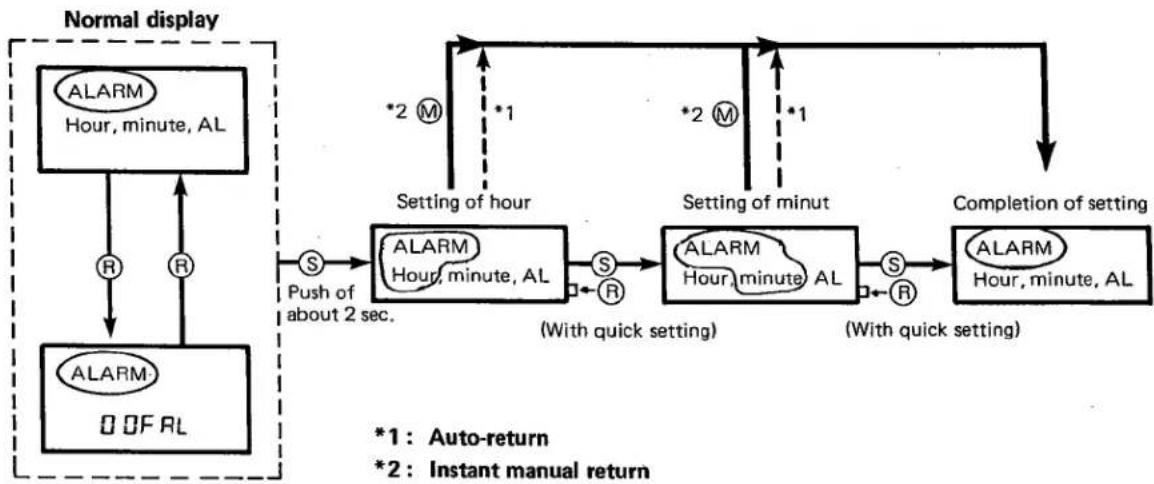
(2) Time setting of alarm
flowchart
graph TD
    A["ALARM Hour, minute, AL"] -->|R| B["ALARM 0 OF RL"]
    B --> C["S Push of about 2 sec."]
    C --> D["ALARM Hour, minute, AL"]
    D -->|S R| E["ALARM Hour, minute AL"]
    E -->|S R| F["ALARM Hour, minute AL"]
    F --> G["Completion of setting"]
    G --> H["*1: Auto-return"]
    G --> I["*2: Instant manual return"]
    D --> J["Setting of hour"]
    E --> K["Setting of minut"]
    H --> L["Setting of hour"]
    I --> M["Setting of minut"]
    J --> N["Push of about 2 sec."]
    K --> O["Push of about 2 sec."]
    L --> P["Push of about 2 sec."]
    M --> Q["Push of about 2 sec."]
Other functions for alarm time setting follow ②, ③ and ④ of the home time setting.
6) Operation of stopwatch
(Example of display)
text_image
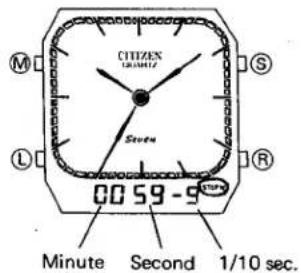
CITIZEN LIGHT S Steu 00:59 - 9 R Minute Second 1/10 sec.Unit of counting: 1/10 sec.
Time of counting: 59'59"9 (60-min. count)
(The counting is reset to 0 again beyond 59'59''9 to continue counting.)
The ALARM, CHIME and TIMER marks are all turned off.
●Method of operation
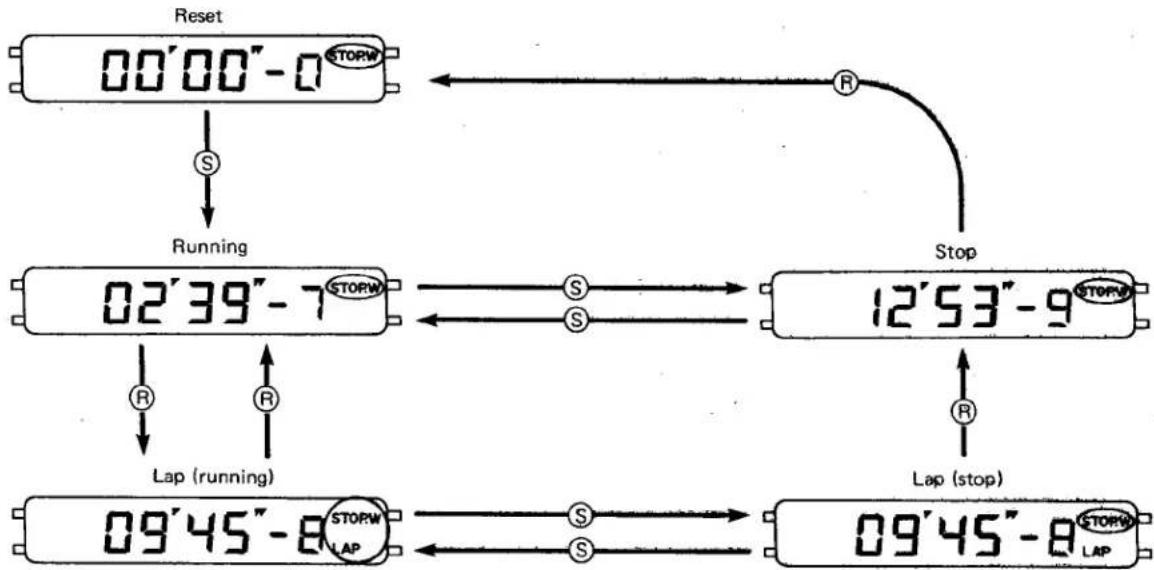
flowchart
graph TD
    A["Reset 00'00"-0 STORW"] -->|S| B["Running 02'39"-7 STORW"]
    B -->|R| C["Lap (running) 09'45"-8 STORW LAP"]
    C -->|S| D["Stop 12'53"-9 STORW"]
    D -->|R| E["Lap (stop) 09'45"-8 STORW LAP"]
    E -->|S| F["Stop"]
    F --> G["Stop"]
    G --> H["Stop"]
Note:
The lap function works only in the mode of stopwatch display. The lap state is cancelled when the stopwatch display is given again after the lap (running) or lap (stop) mode is switched to another mode with push of Ⓜ button. Then the lap (running) and the lap (stop) are turned into the running and stop modes respectively.
*No sound of confirmation is given at the start/stop.
(And so is with the timer display.)
7) Operation of timer
(Example of display)
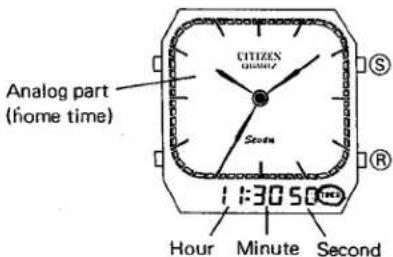
text_image
Analog part (home time) CITIZEN QUARTER Seconds 1:3050 Hour Minute SecondUnit of counting: 1 sec.
Max. set time: 11:59'59"
The ALARM, CHIME and STOP.W marks are all turned off.
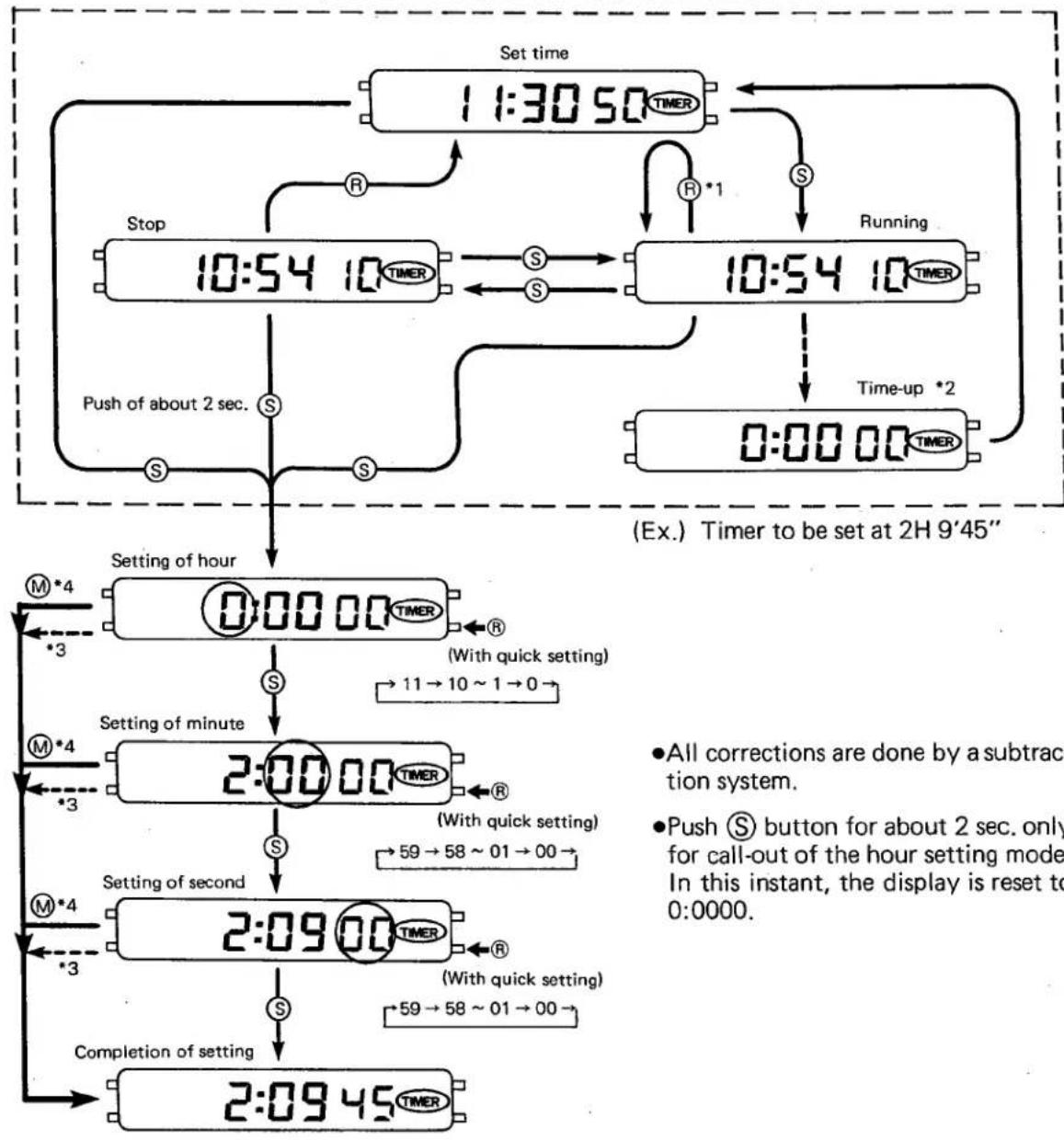
flowchart
graph TD
    A["Set time 11:30:50 TIMER"] --> B["Stop 10:54 10 TIMER"]
    B --> C["Push of about 2 sec. S"]
    C --> D["Setting of hour 0:00:00 TIMER"]
    D --> E["Setting of minute 2:00:00 TIMER"]
    E --> F["Setting of second 2:09:00 TIMER"]
    F --> G["Completion of setting 2:09:45 TIMER"]
    G --> H["(Ex.) Timer to be set at 2H 9'45""]

    I["R *1"] --> J["Running"]
    J --> K["Time-up *2"]

    L["With quick setting"] --> M["-> 11 → 10 ~ 1 → 0"]

    N["All corrections are done by a subtraction system."] --> O["Push S button for about 2 sec. only for call-out of the hour setting mode. In this instant, the display is reset to 0:0000."]
*1: Flyback function
The time once set is stored until the next setting of time (by a memory function).
The set time is reset with push of Ⓗ button in the running mode to sart a count-down action again.
*2: Time-up
The alarm rings 10 seconds, and then the set time is reset.
*3: Auto-return
*4: Instant manual return