
CAL A660 - Uhr CITIZEN - Kostenlose Bedienungsanleitung
Finden Sie kostenlos die Bedienungsanleitung des Geräts CAL A660 CITIZEN als PDF.


Benutzerfragen zu CAL A660 CITIZEN
0 Frage zu diesem Gerät. Beantworten Sie die, die Sie kennen, oder stellen Sie Ihre eigene.
Eine neue Frage zu diesem Gerät stellen
Laden Sie die Anleitung für Ihr Uhr kostenlos im PDF-Format! Finden Sie Ihr Handbuch CAL A660 - CITIZEN und nehmen Sie Ihr elektronisches Gerät wieder in die Hand. Auf dieser Seite sind alle Dokumente veröffentlicht, die für die Verwendung Ihres Geräts notwendig sind. CAL A660 von der Marke CITIZEN.
BEDIENUNGSANLEITUNG CAL A660 CITIZEN
The CITIZEN
T50 T51
Contents
A. Safety Precautions (Instructions to be followed at all times) 4
B. Features 5
C. "The Citizen"-For Prolonged Customer Satisfaction 6
D. Ask for Customer Card (a card type warranty) 9
E-1. Handling the Watch Ladies' model (195*) 10
E-2. Handling the Watch Men's model (A660H).... 11
• Calendar Monitoring
Setting the Time
Setting the Calendar
• Time Difference Correction
F. Accuracy within 5 Seconds per Year ...... 24
- Maintaining Annual Accuracy within ± 5 seconds
• Monthly Accuracy
G. We Recommend Occasionally Turning the Crown 25
H. Battery 26
- Battery Life
- Low Battery Warning Indicator
I. Care for Long Term Use 28
- Water Resistance
- Anti-Magnetism
- To Avoid Injury
- Precautions
- When Wearing Your Watch
• Always Keep your Watch Clean - Handling of the Battery
- Battery Replacement
• Caring for Your Watch
J. Warranty and After-Sales Service 40
K. Specifications 42
L. Customer Support Center 44
Thank you for your purchase of "The Citizen".
"The Citizen" has been carefully designed to be both useful and functional by providing functions that are inherently provided by watches. Some examples of its features include:
- Simple and classic design
- High-performance, high-quality watch achieved through the use of Citizen's most up-to-date technology.
- Complete after-sales service to ensure the customer of worry-free use for as long as the watch is owned.
We at Citizen have tried to create a watch that customers will truly value and benefit from in their daily lives in order to strengthen the ties of communication with our customers.
CAUTION
- Before using the watch, read this instruction manual carefully for safe and correct use.
• After reading this manual, keep it handy for future reference.
A. Safety Precautions (Instructions to be followed at all times)
This manual contains the following the instructions that should be strictly followed at all times to prevent injury to yourself and other persons as well as damage to property.
Injuries and damages which might be caused by using the watch improperly or neglecting any of the instructions or precautions contained in this manual are classified with the following symbols.

WARNING
Can cause serious injury or death

CAUTION
Can or will cause minor or moderate injury or damage
■ Important instructions that should be followed are classified with the following symbol.

Warning (caution) symbol followed by instructions that should be followed or precautions that you should be observed.
B. Features
"The Citizen" offers the major features indicated below.
• High level of accuracy of within ±5 seconds per year.
- Parts and service warranty under normal conditions of use for 10 years after purchase.
- Periodical inspections are provided during the warranty period that are performed free of charge whenever the battery is replaced.
- After-sales service system providing repairs for as long as the customer owns the watch even after the warranty period has elapsed.
Ladies' model (195\*)
- Long battery life of approximately 3 years
Men's model (A660H)
- Long battery life of approximately 5 years
- This watch is equipped with a time difference adjustment function that allows time difference changes to be made easily without stopping the watch, and a perpetual calendar function so that adjustment is not required at the end of each month.
C. "The Citizen"-For Prolonged Customer Satisfaction
The warranty period of “The Citizen” is 10 years.
Even after the 10 year warranty period has elapsed, we will continue to offer repair service for customers registered with Citizen for as long as the watch is owned.
10-year warranty for “The Citizen” is only covered within Japan.
Please note that the coverage of this warranty is not the same as the one of the international warranty available overseas.
Free Periodical Inspection Service
Periodical inspections are performed free of charge whenever the battery is replaced during the warranty period to inspect water resistance performance and other functions and ensure that you can use your watch for a long time without worry. You will be informed by the Citizen Technical Service Center when it is time for an inspection. You are strongly recommended to have your watch inspected at those times.
【Contents of Free Periodical Inspections】
• Water Resistance Inspection
This inspection is performed to maintain the water resistance of the watch and includes replacement of packings or the like.
- Movement Inspection
This inspection covers mechanical components of the watch, including a check of accuracy.
- Battery Replacement
* A questionnaire will be sent to you when you are informed of upcoming inspections. If you have noticed anything that you would like us to know about during the course of using your watch, please indicate that on the questionnaire along with any other comments you may have. That information will be referred to during inspection and adjustment work.
Long term Repair Service
- Long term repair service is offered to customers registered with Citizen when the watch is first purchased. (Please mail the "Customer Registration Card" provided at the time of purchase to Citizen Technical Service Center.)
- Repair service will also be provided after the 10 year warranty period for as long as the watch is owned so that you are able to enjoy your watch for an even longer time. (Repairs after the 10 year warranty period will be performed on a charge basis, however.)
Be sure to remove any protective stickers that may be on your watch (case back, band, clasp, etc.). Otherwise, perspiration or moisture may enter the gaps between the protective stickers and the parts, which may result in a skin rash and/or corrosion of the metal parts.
We do not recommend attempting to adjust the watch band yourself. If not adjusted correctly, the band may become detached leading to an injury or loss of your watch.
(Some retailers may supply a band adjustment tool with your purchase).
For band adjustment, we recommend you consult the retailer where the watch was purchased or Citizen Technical Service Center.
Some repair shops may charge a nominal fee for adjustment if the watch was not purchased directly from them.
D. Ask for Customer Card (a card type warranty)
Mail [Customer Registration Card] attached to the product on purchase to a Citizen Technical Service Center, and ask for The CITIZEN CUSTOMER CARD (a card type warranty).
You will be registered based on the [Customer Registration Card] and at the same time, we will mail The CITIZEN CUSTOMER CARD to you.
To clarify any unclear points concerning the customer card and customer registration, contact the following Citizen Technical Service Center.
◆ Citizen Technical Service Center:
435, Shimotonooka, Iida-shi, Nagano-ken (〒395-0195) TEL. 0120-28-1502
All repairs performed on this watch are to be performed by Citizen. When requesting repairs at the store where you purchased your watch, please indicate that repairs are to be performed by CITIZEN.
E-1. Handling the Watch Ladies' model (195\*)
Setting the Time
- Pull the crown out to position that the second hand is at the 0 seconds position.
- Set the hour and minute hands to the correct time by turning the crown.
- Push the crown back to position① in synchronization with a time signal such as the tone indicating the time heard. The watch will then start running at the correct time.

text_image
CITIZEN Crown Time setting Normal positionE-2. Handling the Watch Men's model (A660H)
CAUTION Adjustment of the Date is Not Required.
The date indicated on this watch changes automatically. Since this watch is equipped with a perpetual calendar function (which changes the date automatically as a result of year, month and day data, including leap years (February 29), being stored in the memory of this watch prior to shipment from the factory), it is normally not necessary for the customer to correct the date.
Since the date is linked with the movement of the hour hand, if the proper procedure is not performed when setting the time or correcting time difference, the perpetual calendar function may not operate properly. If the date should happen to not be displayed correctly, reset to the correct date by referring to Section E of these instructions entitled, “Handling the Watch - Calender Function”. Furthermore, this watch is equipped with a monitor function that allows confirmation of month and year settings by pressing the button. If the date is no longer correct as a result of correcting time difference or other procedure, check the month and year by operating the button and then reset to the correct date.
However, when the date is completely different from the correct date even after being corrected or the date does not change properly from the end of the current month to the beginning of the next, there may be a malfunction. In such cases, please consult Citizen Technical Service Center or Citizen Consumer Help Desk, Customer Support Center.
Calendar Monitoring
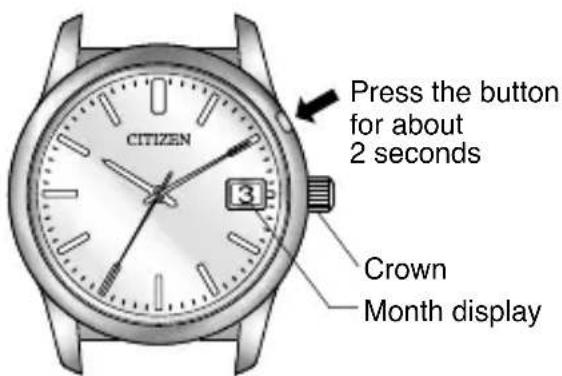
Month is displayed using the numbers 1 through 12 of the date display.
text_image
CITIZEN Press the button for about 2 seconds 3 Crown Month display-
Put the crown in the normal position.
-
The month monitor function is activated by pressing the button for about 2 seconds. At this time, the second hand changes from 1-second increment movement to 4-second increment movement.
- After the date passes the reference position (31st), the current month is displayed. (It takes about 4-5 seconds for the date to advance by one day. Read the “month” from the date display after confirming that the date has definitely stopped.)
* The watch will automatically return to the date display if the button is not pressed for 2-3 minutes after displaying the current month.
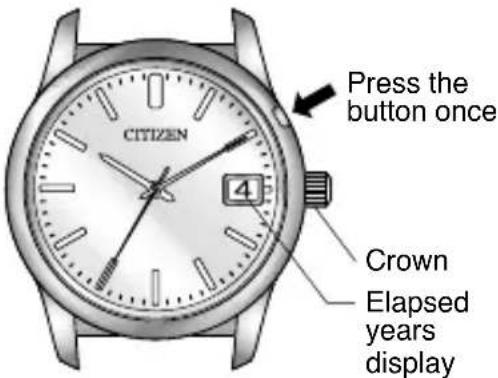
Year is displayed using the numbers 1 through 4 of the date display that represent the number of years that have passed since the most recent leap year.
- After displaying the current month using the month monitor function, press the button again to activate the year monitor function.
At this time, the second hand changes to irregular 4-second increment movement in which it pauses for 3 seconds and then moves 4 steps (4 seconds) in the next second.
text_image
Press the button once CITIZEN 4 Crown Elapsed years display- The month display switches to a display of the number of years that have passed since the most recent leap year.
- The year monitor cannot be activated while the month monitor is changing (while the date display is moving) even by pressing the button. Change to the year monitor function after confirming that the current month is displayed after operation of the month monitor is finished and then pressing the button.
* The watch will automatically return to the normal display if the button is not pressed for 2-3 minutes after displaying the number of years that have passed since the most recent leap year.
[Returning the Watch to the Normal Display from the Year Monitor]
After the number of years that have passed since the most recent leap year is displayed, the watch can be returned to the normal display by pressing the button.
[Reading the Year]
| No. | No. of years elapsed since most recent leap year | Year |
| 1 1st year after leap year | 2013, 2017, 2021, 2025 | |
| 2 2nd year after leap year | 2014, 2018, 2022, 2026 | |
| 3 3rd year after leap year | 2015, 2019, 2023, 2027 | |
| 4 Leap year | 2016, 2020, 2024, 2028 |
* When the crown is of the screw-lock type, turn the crown after first loosening the screw by turning the crown to the left. Once the watch has been set, turn the crown to the right while pressing in after having returned it to the normal position to securely tighten the screw.
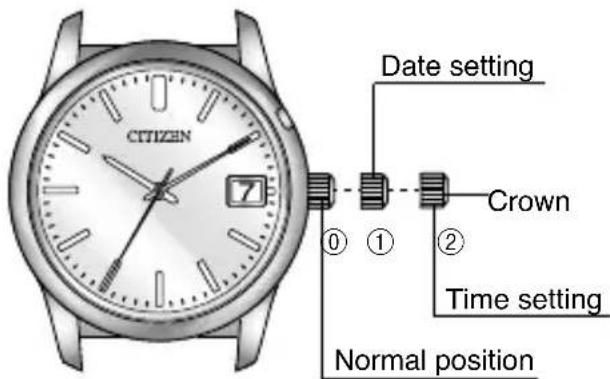
Setting the Time
-
Pull the crown out to position ② when the second hand reaches the 0 second position.
-
Turn the crown to set the time.
- Turning the crown to the left causes the hour and minute hands to move clockwise. - Turning the crown to the right causes the hour and minute hands to move counterclockwise.
- To achieve optimal precision when setting the minute hand, move the minute hand four to five minutes past and then back to the desired setting.
- Firmly press the crown in to position ① in synchronization with a time signal or other time service.
* When setting the time, pay attention to the changing of the date (12:00 midnight) so that AM and PM are set correctly.
text_image
CITIZEN Date setting Crown Time setting Normal positionSetting the Calendar
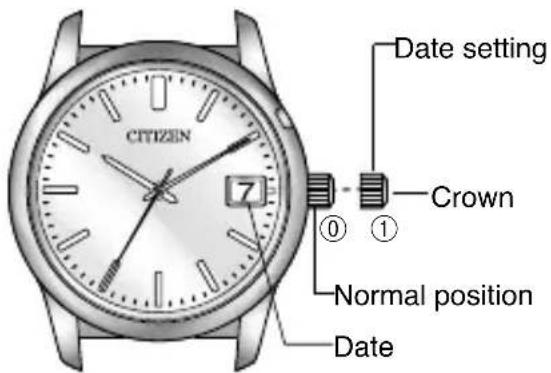
The calendar function used by this watch is a perpetual calendar that eliminates the need to correct the date on the last day of the month, including leap years (February 29), through February 28, 2100 once it has been set.
- Pull the crown out to position ①.
- Turn the crown to set the date.
Turning the crown to the right (clockwise) causes the hour
text_image
CITIZEN Date setting Crown Normal position Datehand to move in the clockwise direction. When the hour hand passes 12:00 midnight, the date advances by 1 day. Turning the crown to the left (counter-clockwise) causes the hour hand to move in the counterclockwise direction. When the hour hand passes 11:00 PM, the date will move back by 1 day.
- Always make sure to return the crown to the normal position ① after setting the date.
* Set the hour hand to the correct time after setting the date.
The time during which the date changes varies according to the direction in which the crown is turned.
- Turning to the right (clockwise): About 12:00 AM
- Turning to the left (counter-clockwise): About 11:00 PM
* Since some time is required until the date wheel begins to move after the hour hand has passed the time at which the date changes (12:00 AM or 11:00 PM), set the date while checking the manner in which the date changes.
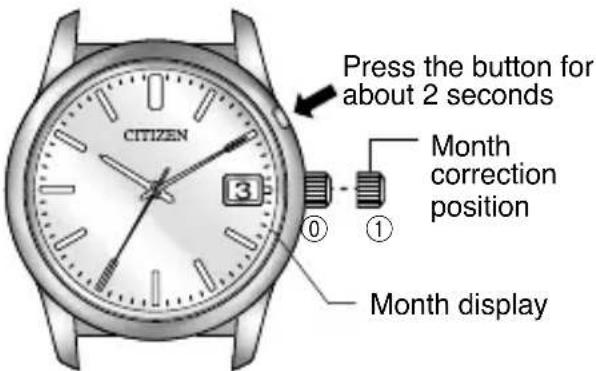
The month is displayed using the numbers 1 through 12 of the date display.
-
Put the crown in the normal position.
-
The watch changes to the month monitor mode when the button is pressed for about 2 seconds.
- The current month is displayed after the date passes the reference position (31st).
text_image
Press the button for about 2 seconds Month correction position Month display-
The watch changes to the month correction mode when the crown is pulled out to position ①.
-
Pressing the button when the watch is in the month correction mode advances the month by 1.
• After confirming that the month has changed, press the button to correct the month. • The numbers 1 through 12 are repeatedly displayed for the month each time the button is pressed.
- When correction of the month is completed, always make sure to return the crown to the normal position.
Note: When continuing with year correction after correcting the month, switch the watch to the year correction mode after first returning the crown to the normal position.
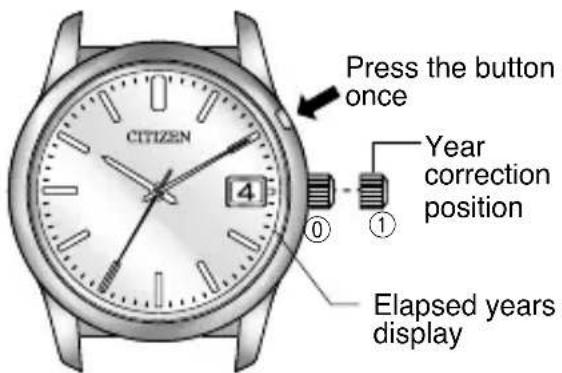
The year is displayed using the numbers 1 through 4 of the date display.
text_image
Press the button once Year correction position Elapsed years display- Put the crown in the normal position.
- The watch changes to the month monitor mode when the button is pressed for about 2 seconds.
- The current month is displayed after the date passes the reference position (31st).
- Pressing the button again changes the watch to the year monitor mode.
- The watch changes to the year correction mode when the crown is pulled out to position ①.
- Pressing the button when the watch is in the year correction mode advances the year by 1.
• After confirming that the year has changed, press the button to correct the year.
- The numbers 1 through 4 are repeatedly displayed for the number of years that have passed since the most recent leap year each time the button is pressed.
- When correction of the month is completed, always make sure to return the crown to the normal position.
Time Difference Correction
Time difference can be corrected in 1 hour units without stopping the second hand.
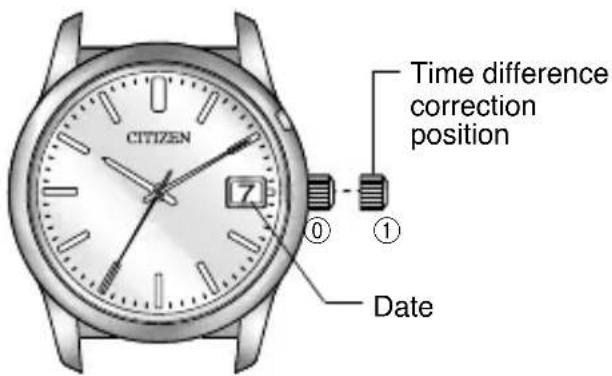
text_image
CITIZEN Time difference correction position Date- Pull the crown out to position ①.
- Correct the time difference by turning the crown.
- Turning the crown to the right (clockwise) enables the time difference to be corrected by moving the hour hand forward in 1 hour increments. Turning the crown to the left (counter-clockwise) enables the time difference to be corrected by moving the hour hand backward in 1 hour increments.
* Continue to turn the crown until the hour hand definitely advances by 1 hour.
* Since the hour hand and date wheel are linked, correcting the time difference may cause the date to change if the hour hand passes 12:00 AM (or 11:00 PM).
- Always make sure to return the crown to the normal position ^① after correcting time difference.
[When Time Difference Correction is Required during Overseas Travel]
- When correcting time difference, set the time and date while paying attention to AM and PM. (The time when the date changes as a result of the hour hand turning is 12:00 AM.)
- Since movement of the hour hand and date is linked, when the hour hand is corrected to correct time difference, the date changes when the hour hand passes 12:00 AM (or 11:00 PM when turning counter-clockwise). When returning time difference to its original setting, make sure that the date is also properly corrected.
- When returning time difference to its original setting, return the hour hand in the direction opposite that in which correction was made.
Example: When the time in Tokyo (home time) is 10:10 AM, the time in London (local time) is 1:10 AM. Since there is a time difference of -9 hours between home time and local time, the procedure for correcting this time difference is as follows:
![CITIZEN CAL A660 - [When Time Difference Correction is Required during Overseas Travel] - 1](/content/2026/05/774576/images/68d92e7a81392060b47a46bb13a621d5b1df9586c5ff50771687a6337deba57a.jpg)
natural_image
Illustration of a citizen wristwatch with analog dials and a dial (no text or symbols on the watch face)![CITIZEN CAL A660 - [When Time Difference Correction is Required during Overseas Travel] - 2](/content/2026/05/774576/images/77cc0e269bf47957795c7442a81037909aadcde9a0ce5d7b16a868b1d284dbae.jpg)
natural_image
Close-up of a wristwatch with visible dial and wrist (no text or symbols beyond 'CITIZEN' and '7')London time Tokyo time
- Put the crown in the time difference correction position. Move the hour hand while always making sure to turn the crown to the left so that the hour hand moves counterclockwise, and set it to 1:00.
☆ If the hour hand is set to 1:00 by moving clockwise, the current year and month will no longer match the year and month stored in the memory of the perpetual calendar, thereby preventing the date from changing at the correct time.
![CITIZEN CAL A660 - [When Time Difference Correction is Required during Overseas Travel] - 3](/content/2026/05/774576/images/64a925ddaf3044cef46294d3485f845f1ac6a0989e23117c994e27d7261a35ed.jpg)
- When returning time difference to the original setting, return the watch to that time difference by always making sure to turn the crown to the right so that the hour hand moves in the clockwise direction.
☆ If the time difference is returned to its original setting by moving the hour hand in the counterclockwise direction, the current year and month will no longer match the year and month stored in the memory of the perpetual calendar, thereby preventing the date from changing at the correct time.
* When the date is completely different from the correct date or the date does not change properly and so forth, please consult Citizen Technical Service Center or Citizen Consumer Help Desk, Customer Support Center.
◆ Citizen Technical Service Center: TEL. 0120-28-1502
For Proper Use of this Watch
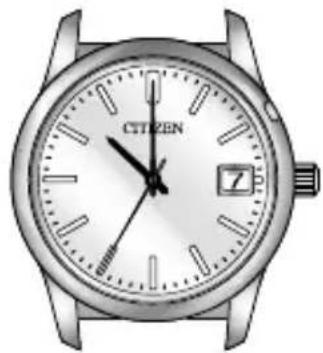
If you suspect that the time (hour hand) is incorrect, perform the following procedure to ensure that the watch is used properly.
Note: When correcting time difference, if the crown is returned to the normal position after having advanced the hour hand by 30 minutes without advancing by 1 hour, the positions of the hour hand and minute hand will be out of alignment, thereby preventing the time from being read correctly.
There are times when the crown may rarely be pulled out causing the position of the hour hand to become incorrect. In such cases, use the watch after first resetting the watch to the correct time in accordance with the correction procedure described below.
[When Hour Hand is not at Correct Position (Not a Malfunction)]
Correction Procedure:
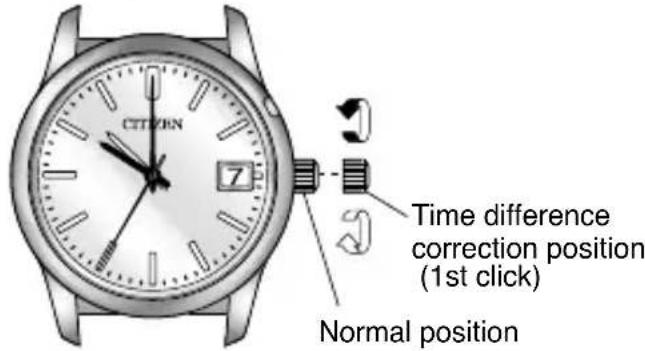
- Pull the crown out to the time difference correction position (1st click) and then turn it slowly to advance the hour hand by 30 minutes.
- The hour hand moves to the correct position and stops.
- Use the watch after returning the crown to the normal position.
natural_image
Close-up of a wristwatch with visible analog clock face and wrist strap (no text or symbols beyond brand name)
text_image
CITIEN 7 Time difference correction position (1st click) Normal position[Correcting the Hour Hand by Time Difference Correction]
Correct the time difference in 1 hour units.
- Pull the crown out to the time difference correction position (1st click).
- Turn the crown to correct the time difference.
* Turn the crown until the hour hand is precisely advanced by 1 hour.
- Use the watch after returning the crown to the normal position.
* When the date is considerably different from the correct date or does not change properly, please consult Citizen Technical Service Center or Citizen Consumer Help Desk, Customer Support Center.
F. Accuracy within 5 Seconds per Year
This watch is accurate to within approximately ±5 seconds per year.
Maintaining Annual Accuracy within ±5 seconds
Your watch will keep time accurately when used at normal temperatures (5-35°C) and worn for approximately 12 hours per day. Accuracy may decrease slightly if used under conditions other than those described above.
Monthly Accuracy
The monthly accuracy of this watch cannot always be determined simply by dividing the annual accuracy of ±5 seconds by 12. Monthly accuracy may differ by approximately ±2 seconds depending on conditions of use (such as temperature changes between seasons), amount of time the watch is worn and other factors.
G. We Recommend Occasionally Turning the Crown
CAUTION
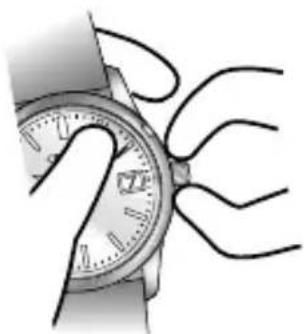
Due to the high accuracy of this watch, it is normally not necessary to turn the crown. Since small amounts of dirt and debris may become clogged in the tiny gap between the crown and the case, however, it is recommended to occasionally turn the crown. If this is not done, there is the risk of the crown becoming rusted causing difficulty when pulling it out. Turn the crown from time to time while in the normal ① position. Also, remove any dirt and debris.
natural_image
Illustration of a wristwatch being held with a strap, showing hand positioning and cable cord (no text or symbols)H. Battery
Battery Life
A new battery installed in the watch will last approximately 5 years under normal use in the case of the men's model, and 3 years in the case of the ladies' model.
* The battery in the watch at the time of purchase has been used to test function and performance of the watch. Please be aware that after purchase this battery may not last for the approximately 5 years estimated for the men's model, or 3 years estimated for the ladies' model.
It will be replaced with a new one free of charge at the times of the inspections performed during the warranty period (see p.6 for further details).
Low Battery Warning Indicator
This watch is equipped with a low battery warning indicator function. When the battery is low, the low battery warning indicator causes the second hand to move in two second increments. Although the watch will still keep time accurately even when the low battery warning indicator has been activated, have the battery replaced as soon as possible.
Ladies' model
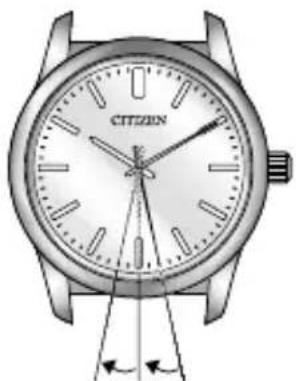
natural_image
Illustration of a citizen's wristwatch with hourlight and minute hand (no text or symbols on the watch face)2 seconds 2 seconds
【Two-second increment movement】
Men's model
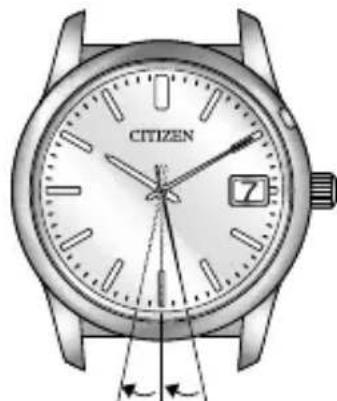
natural_image
Illustration of a citizen's wristwatch with hourlight and minute hand (no text or symbols on the watch face)2 seconds 2 seconds
【Two-second increment movement】
I. Care for Long Term Use
WARNING Water Resistance
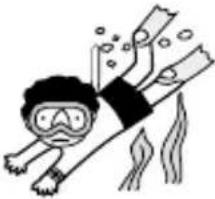
- Reinforced water resistance for ordinary use means that the watch can be used during skin diving but cannot be used during scuba diving or saturation diving.
Water Resistance:
- Refer to the watch case back for the indication of the water resistance (※※ bar) of your watch. The chart to the right provides examples of use for reference to ensure that your watch is used properly. (The unit “bar” is roughly equal to 1 atmosphere.)
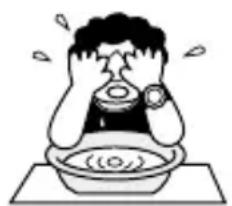
natural_image
Cartoon illustration of a person washing dishes in a basin (no text or symbols)When water is simply splashed onto the watch (washing your face or in rain)
| Name | Specification | (washing your face or in rain) |
| Upgraded everyday-use water-resistant watch | Water-resistant to 10 atmospheres | OK |
| Water-resistant to 20 atmospheres | OK |
| Water-related use | ||||
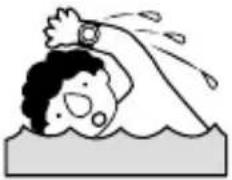 |  |  |  | |
| Swimming and general washing work (kitchen work/swimming, etc.) | Water sports and skin diving (without air tank) | Scuba diving (With air tank) | Operate the crown or button when the watch is wet. | |
| OK OK NO NO | ||||
| OK OK NO NO | ||||

AUTION
Anti-Magnetism
- Anti-Magnetic Performance... This watch is a grade 1 anti-magnetic watch. The magnetic products listed in this chart are only typical examples of such products.
Since the intensity of the magnetism produced by these
products differs according to each product, they are shown only for reference purposes.
| • Door magnets of refrigerators and microwave ovens• Magnetic necklaces• Magnetic health band• Outside of handbag magnets | • Magnetic bands• Anchoring magnets of television remote control units | ||
| Grade | Case Back | ||
| Ordinary watches | — | OK | NO |
| Grade 1 Anti-Magnetic Watches | ☐ | OK | OK |
【In the event your watch has become magnetized】
Move the watch away from the magnetic product and reset the watch to the correct time. Operation of the watch will return to normal.
| Status 1 cm away from magnet Status 5 cm | away from magnets in contact with magnet | |||
| Door magnets of microwave ovensHandbag magnets | Door magnets of refrigeratorsMagnetic necklacesAnchoring magnets of television remote control unitsMagnetic health band | Door magnets of microwave ovensHandbag magnets | Door magnets of refrigeratorsMagnetic bandsMagnetic necklacesAnchoring magnets of television remote control unitsMagnetic health band | |
| NO NONO NOOK NO | ||||
| NO NOOK NOOK OK | ||||
In accordance with JIS B7024 (1994 Edition)
CAUTION To Avoid Injury
- Be particularly careful when wearing your watch while holding a small child, to avoid injury.
- Be particularly careful when engaged in strenuous exercise or work, to avoid injury to yourself and others.
- Do NOT wear your watch while in a sauna or other location where your watch may become excessively hot, since there is the risk of burns.
- Be careful when putting on and taking off your watch, since there is a risk of damaging your fingernails, depending on the manner in which the band is fastened.
• Take off your watch before going to bed.
CAUTION Precautions
- Always use the watch with the crown pushed in (normal position). If the crown is of the screw lock-type, make sure it is securely locked.
- Do NOT operate the crown or any push buttons when the watch is wet. Water may enter the watch causing damage to vital components.
- If water enters the watch or the watch fogs up and does not clear up even after a long time, consult your dealer or Citizen Technical Service Center for inspection and/or repair.
• Even if your watch has a high level of water resistance, please be careful of the following. - If your watch is immersed in sea water, rinse thoroughly with fresh water and wipe with a dry cloth.
- Do not pour water from a tap directly onto your watch.
- Take off your watch before taking a bath.
- If seawater enters the watch, place the watch in a box or plastic bag and immediately take it in for repair. Otherwise, pressure inside the watch will increase, and parts (crystal, crown, push button, etc.) may come off.
CAUTION When Wearing Your Watch
- Leather, genuine skin and rubber (urethane) bands will deteriorate over time due to perspiration, body oils and dirt. Be sure to replace the band periodically.
- The durability of a leather band may be affected when wet (fading, peeling of adhesive), owing to the properties of the material. Moreover, wet leather may cause a rash.
- It is recommended to take off the watch if it gets wet, even if the watch itself is water resistant.
- Do not wear the band too tightly. Try to leave enough space between the band and your skin to allow adequate ventilation.
- The rubber (urethane) band may be stained by dyes or soil present in or on clothing or other accessories. Since these stains may not be removable, caution is required when wearing your watch with items that tend to easily transfer color (articles of clothing, purses, etc.). In addition, the band may be deteriorated by solvents or moisture in the air. Replace with a new one when it has lost elasticity or become cracked.
- Please request adjustment or repair of the band in the following cases:
- You notice an abnormality with the band due to corrosion.
- The pin of the band is protruding.
- We do not recommend attempting to adjust the watch band yourself. Special expertise and experience is required for proper adjustment. If not adjusted correctly, the band may become detached leading to loss of your watch. (Some retailers may supply a band adjustment tool with your purchase). For band adjustment, we recommend you consult the retailer from where the watch was purchased or Citizen Technical Service Center. Some repair shops may charge a nominal fee for adjustment if the watch was not purchased directly from them.
- The watch may stop or the function of the watch may be impaired in extremely high or low temperature. Do not use the watch in places where the temperature is outside the operating temperature range as stated in the specifications.
- Analog quartz watches are powered by a step motor that uses a magnet. Subjecting the watch to strong magnetism from the outside can cause the motor to operate improperly and prevent the watch from keeping time accurately.
Do not allow the watch to come into close proximity to magnetic health devices (magnetic necklaces, magnetic elastic bands, etc.) or the magnets used in the latches of refrigerator doors, clasps used in handbags, the speaker of a cell phone, electromagnetic cooking devices and so on.
- Avoid dropping the watch or subjecting it to other strong impact. It may cause malfunctions and/or performance deterioration as well as damage to the case and bracelet.
- The integrated circuits (IC) used in quartz watches are sensitive to static electricity. Please note that the watch may operate erratically or not at all if exposed to intense static electricity.
- If paint thinner, benzene or other solvents or products containing these solvents (including gasoline, nail-polish remover, cresol, bathroom cleaners and adhesives, water repellent, etc.) are allowed to come into contact with the watch, they may discolor, dissolve or crack the materials. Be careful when handling these chemicals. Contact with mercury such as that used in thermometers may also cause discoloration of the band and case.
- Be sure to remove any protective stickers that may be on your watch (case back, band, clasp, etc.). Otherwise, perspiration or moisture may enter the gaps between the protective stickers and the parts, which may result in a skin rash and/or corrosion of the metal parts.
CAUTION Always Keep Your Watch Clean
- Rotate the crown while it is pressed in fully and press the buttons periodically so they do not become stuck due to accumulations of foreign matter.
- The case and band of the watch come into direct contact with the skin in the same manner as undergarments. Corrosion of the metal or unnoticed soiling such as that caused by perspiration and dirt can soil sleeves and other portions of clothing. Keep your watch clean at all times.
- The case and band of the watch come into direct contact with the skin. If you think there is something wrong, discontinue wearing the watch immediately and consult your physician. In the case of accumulation of sweat or dirt on a metal band or case, clean thoroughly using a brush and neutral detergent. In the case of a leather band, wipe clean using a dry cloth.
- Leather bands may become discolored by perspiration or dirt. Always keep your leather band clean by wiping with a dry cloth.
WARNING Handling of the Battery
- Keep the battery out of the reach of small children.
- In the event a battery is swallowed, immediately consult a physician.
CAUTION Battery Replacement
- If the battery should happen to be removed from the watch, keep it out of the reach of small children.
- Always be sure to select a battery of the correct specifications when replacing the battery.
Caring for Your Watch
- Wipe any dirt or moisture such as perspiration from the case and crystal with a soft cloth.
- For a metallic, plastic or rubber (urethane) watchband, wash any dirt off with water.
Remove the small amounts of dirt trapped between the crevices of the metallic band with a soft brush.
• For a leather band, wipe off dirt using a dry cloth. - If you will not be using your watch for an extended period of time, carefully wipe off any perspiration, dirt or moisture and store in a proper location, avoiding locations subject to excessively high or low temperatures and high humidity.
The paint on the dial and hands helps you with reading the time in a dark place. The luminous paint stores light (daylight or artificial light) and glows in a dark place. It is free from any radioactive substance or any other material harmful to a human body or environment.
• The light emission gradually becomes weaker as time passes.
- The duration of the light (“glow”) will vary depending on the brightness, types of and distance from a light source, exposure time, and the amount of the paint.
- The paint may not glow and/or may dissipate quickly if exposure to light was not sufficient.
J. Warranty and After-Sales Service
1. Warranty
If your watch should malfunction during the warranty period when used normally in accordance with the contents of the instruction manual, please take it to your dealer where the watch was purchased or send it to Citizen Technical Service Center together with your warranty card. Repairs will be performed free of charge according to the conditions of the warranty.
2. Repair Parts Availability Period
Citizen will accommodate repairs on this watch for as long as you own it. Repair parts will therefore also be made available for long term repair service. However, in the case of external parts such as the case, glass, dials, hands and crown, it may be necessary to use substitute parts that are slightly different in appearance. In addition, some specifications of the movement may also be different.
3. Repair Availability Period
Repairs will still be able to be made after the 10 year warranty period provided the watch has been used under normal conditions. (Normal repair rates will be charged in this case, however.) Since the time during which repairs can be made varies considerably depending on the conditions and environment in which the watch is used, check whether or not repairs can be made when requesting repairs. Also be aware that it may be difficult to restore accuracy to its initial level in the case of reduced accuracy accompanying long-term use.
- Always make sure to inform Citizen Technical Service Center of your new address and telephone number if you should happen to move during the warranty period. (If not, we will not be able to inform you of upcoming inspections.)
5. Other Inquiries
Please direct inquiries concerning the warranty, repairs or other questions to Citizen Technical Service Center or Citizen Consumer Help Desk, Customer Support Center.
K. Specifications
Ladies' model (195\*)
- Caliber Number: 195 ※
- Crystal Oscillator Frequency: 32,768 Hz (Hz: no. of oscillations per second)
- Time Accuracy: Approx. ±5 seconds per year
(when worn for 12 hours per day at +5°C to +35°C) - Operating Temperature Range: -10^ to +60^
- Additional Features: Low battery warning indicator
- Battery Life: Approx. 3 years: (after installing a new battery)
- Battery Used: Silver oxide battery (mercury-free) 1 pce.
- Water Resistance Performance: 10 bar
- Anti-magnetic performance: Grade 1 (ANTIMAG 4800) in compliance with 1994 JIS standards
Men's model (A660H)
- Caliber Number: A660H
- Crystal Oscillator Frequency: 32,768 Hz (Hz: no. of oscillations per second)
- Time Accuracy: Approx. ±5 seconds per year (when worn for 12 hours per day at +5 to +35°C)
- Operating Temperature Range: -10^ to +60^
- Additional Features: • Low battery warning indicator • Perpetual calendar feature (compatible with dates through February 28, 2100) • Time difference correction feature (correction unit: 1 hour)
- Battery Life: Approx. 5 years: (after installing a new battery)
- Battery Used: Silver oxide battery (mercury-free) 1 pce.
- Water Resistance Performance: 10 bar / 20 bar
- Anti-magnetic performance: Grade 1 (ANTIMAG 4800) in compliance with 1994 JIS standards
*Specifications are subject to change without notice.
L. Customer Support Center
- For support, call us or visit our web site.
- Access is also possible from cellular phone and PHS.
- Please turn on caller ID for your phone before calling. If caller ID is turned off, please dial “186” before dialing the phone number.
- For the purpose of improving the quality of our support service, phone conversations are recorded.
- Support is provided in Japanese only.
Repairs and warranty service
Contact us about your customer card issuance or periodical inspections.
Citizen Technical Service Center
TEL: 0120-28-1502
435, Shimotonooka, Iida-shi, Nagano-ken
(〒395-0195)
Business hours: 9:00–17:00
(Monday thru Friday excluding holidays)
Other service
Citizen Consumer Help Desk
TEL: 0120-78-4807
Business hours: 9:30–17:30
(Monday thru Friday excluding holidays)
All relevant information can be found in the “サポート” section of out web site.
URL: http://citizen.jp/
取扱説明書
INSTRUCTION MANUAL
②