
CAL B742 - Uhr CITIZEN - Kostenlose Bedienungsanleitung
Finden Sie kostenlos die Bedienungsanleitung des Geräts CAL B742 CITIZEN als PDF.


Benutzerfragen zu CAL B742 CITIZEN
0 Frage zu diesem Gerät. Beantworten Sie die, die Sie kennen, oder stellen Sie Ihre eigene.
Eine neue Frage zu diesem Gerät stellen
Laden Sie die Anleitung für Ihr Uhr kostenlos im PDF-Format! Finden Sie Ihr Handbuch CAL B742 - CITIZEN und nehmen Sie Ihr elektronisches Gerät wieder in die Hand. Auf dieser Seite sind alle Dokumente veröffentlicht, die für die Verwendung Ihres Geräts notwendig sind. CAL B742 von der Marke CITIZEN.
BEDIENUNGSANLEITUNG CAL B742 CITIZEN
MODELS - BJ2\*\*\* ECO-DrlvE aQUaLanD
Mvmt. Cal. No. B74*
FEATURES
□ Light Powered
□ Depth Sensor
□ Depth Indicator Hand
□ Elapsed-Time Bezel
□ Water Sensor
□ 50 Minute Chronograph
□ Water-Resistant to 200 Meters
□ Reserve Power Indicator
□ Rechargeable Battery
BENEFITS
□ Free Energy Source
□ Accurate Depth Indication
□ Instant Depth Reading
□ Assists in Measuring 'Down Time'
□ Automatically Switches to Dive Mode
□ Precise Measurement of Elapsed-Time
□ Good for Scuba Diving
□ Safe Dives
□ No Battery Changes
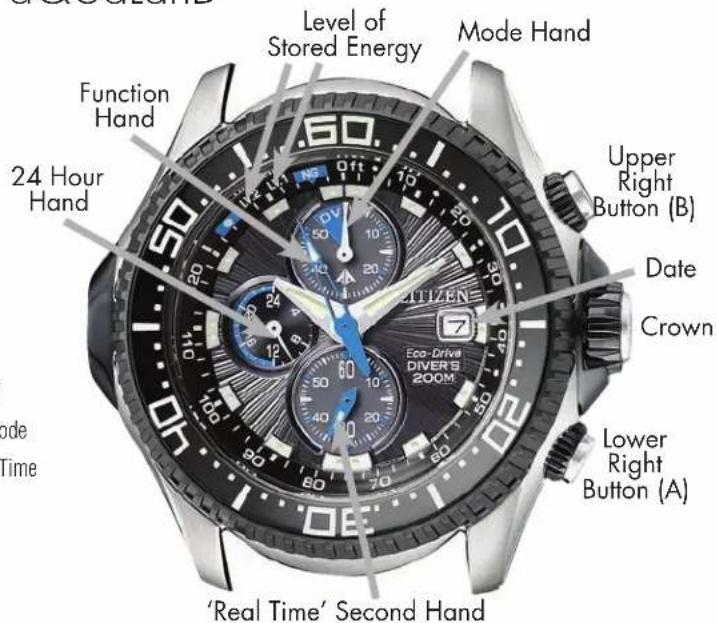
text_image
Level of Stored Energy Mode Hand Function Hand 24 Hour Hand Upper Right Button (B) Date Crown Lower Right Button (A) 'Real Time' Second Hand Eco-Drive DIVERS 200MIMPORTANT NOTE: Before use, be sure the watch is fully charged. The charge level of the energy cell can be checked by placing the watch in time mode. The function hand (sweep second hand) will move to one of three positions indicating the level of stored energy. Level 2 indicates a maximum charge*. Level 1 indicates the charge level is in normal operating range. NG indicates the charge level is not sufficient for diving and is getting low for normal operation. For recharge times and rates, refer to your instruction manual or visit our website at www.citizenwatch.com. Do not use a halogen light, or place the watch on the dashboard of a car for charging as temperatures in excess of 140 degrees Fahrenheit can be reached which may damage vital components of the watch. If either a low charge/no charge state is reached, or the function hand continues to indicate 'over-zone', or another malfunction is experienced, then an ALL RESET AND O-POSITIONING PROCEDURES will be required.
ALL RESET AND O-POSITIONING PROCEDURES
□ Unscrew the crown to release it from the case and pull it out two 'clicks'. Simultaneously push the upper right (B) and the lower right (A) buttons at the same time and hold down for 2-3 seconds, then release. This 'resets' the movement.
☐ Press the upper right button (B) to set the function and mode hands to the 0 or 12:00 position.
□ Set the time if necessary.
☐ Return the crown to its position next to the case and screw it in to secure it.
Note: After the ALL RESET, the function hand will indicate 'NG' charge for approximately one hour, then will return to the correct charge indication.
TO CHANGE MODES
☐ To switch to the chronograph mode while in normal time display mode, (mode hand on DV), press and hold down the lower right button (A) for 3 seconds. Mode and function hands will move to 0-position.
☐ To switch back to normal time display mode from chronograph mode, press and hold the lower right button (A) for 3 seconds.
Watch switches to dive standby mode automatically when sensor is wet.
☐ To switch back to time after dive, press and hold the upper right button (B) for 3 seconds.
☐ To call up maximum depth memory of the last dive, while in the time or dive mode, press the upper right button (B). The depth indicator hand (mode hand) will move to show the deepest point of the last dive. Press and release the upper right button (B) again to return the depth indicator hand (mode hand) back to its previous position.
TO SET THE TIME
□ Unscrew the crown by turning it in a counter clockwise direction to release it.
☐ Pull the crown out two 'clicks' to set the Hour and Minute hands. Turn the crown to move the hands forward to the correct time while observing the 24 Hour hands so as to properly set the time for a.m. or p.m.
□ Push the crown in to finalize setting.
TO SET THE DATE
□ After the correct time has been set (24 Hour hand indicating whether time is a.m. or p.m.) and the crown is pulled out one 'click' (intermediate position), then rotate the crown in the counterclockwise direction to set the date.
Once time and/or date is set, then push the crown in against the case and while continuing to apply pressure, turn the crown clockwise until it is screwed tightly against the case.
TO USE THE CHRONOGRAPH
☐ Hold the lower right button (A) down for 3 seconds while in normal time display mode to switch to chrono graph mode. Function hand now becomes chrono graph sweep second hand and mode indicator becomes minute register hand. Small second hand always shows actual running seconds.
□ Press and release the upper right button (B) to start or stop chronograph.
□ When stopped, press the lower right button (A) to reset hands to 0-position. If either of the two hands does not return to the 0-position, please refer to the ALL RESET PROCEDURE outlined previously.
☐ To return to normal time display mode from chrono-graph mode, press and hold the lower right button (A).
Chronograph does not operate simultaneously with time or dive mode. If mode is switched from chronograph, chronograph data is deleted.
TO USE THE DEPTH METER
Before the watch goes into dive standby mode and before diving, make sure 'screw lock' crown is tightened securely against the case. Watch is now ready for diving.
Watch will automatically switch to dive standby mode from either normal time or chronograph mode whenever water sensor gets wet. Mode hand moves to 'DV' and depth indicator hand will move to '0' feet. (If this does not happen, please refer to the ALL RESET PROCEDURE outlined previously).
☐ To read the maximum depth memo for the last dive (after all moisture has been removed from exterior of watch) press the upper right button (B) while in time or dive mode. Depth indicator hand will point to the maximum depth of your last dive.
☐ Press the upper right button (B) again to return to the previous mode.
Depth meter and chronograph cannot be used simultaneously. The elapsed time indicator (ETI) bezel ring should be used to keep track of elapsed dive time (see your instruction manual for detailed information).
Maximum depth measurement is 125 feet. If diver exceeds that depth, depth indicator hand rests on 'over-zone' mark until returning to 125 feet or less.
□ Always use the 'buddy system' when diving. This watch is not a substitute for a dive partner.
☐ It is recommended that there be no diving unless the power level indicator is at Level 1 or 2.
*Level 2 indicates maximum charge level and will remain there for 3-8 hours depending on the type of light used for charging and functions of the watch being utilized.
For charge rates and additional in depth instructions, please refer to the full instruction manual or our website at www.citizenwatch.com.