
IRC-S2 - Überwachungskamera BLAUPUNKT - Kostenlose Bedienungsanleitung
Finden Sie kostenlos die Bedienungsanleitung des Geräts IRC-S2 BLAUPUNKT als PDF.


| Produkttyp | Kabellose PIR-Sicherheitskamera |
| Marke | Blaupunkt |
| Modell | IRC-S2 |
| Stromversorgung | 2 x 1,5 V AA-Alkalibatterien (im Lieferumfang enthalten) |
| Batterielebensdauer | Ca. 1–2 Jahre (abhängig von Nutzung) |
| Erfassungsmethode | Passiv-Infrarot (PIR) |
| Erfassungsbereich | Ca. 10 m (typisch) |
| Bilder bei Alarm | 3 Aufnahmen, Übertragung an die Zentrale |
| Funkfrequenz | 2,4 GHz |
| Betriebstemperatur | -10 °C bis 40 °C |
| Luftfeuchtigkeit | Bis 85 % nicht kondensierend |
| Montage | Flächen- oder Eckmontage mit Schrauben und Dübeln |
| LED-Anzeige | Blaue LED und LED-Blitz; verschiedene Signale (siehe Anleitung) |
| Tamper-Schutz | Bodenschraube löst Alarm bei unbefugtem Öffnen aus |
| Testmodus | 5 Minuten nach Drücken der Lerntaste (3 Sek. halten) |
| Einschwingzeit | 30 Sekunden nach Scharfschaltung |
| Lieferumfang | 1 Kamera, 4 Dübel, 4 Schrauben, 2 AA-Batterien (vorinstalliert) |
| Kompatibilität | Blaupunkt Control Panel (nicht im Lieferumfang) |
| Reinigung | Mit weichem, trockenem Tuch |
| Reparatur | Keine Benutzerwartung; Reparatur nur durch Fachpersonal |
Häufig gestellte Fragen - IRC-S2 BLAUPUNKT
Benutzerfragen zu IRC-S2 BLAUPUNKT
0 Frage zu diesem Gerät. Beantworten Sie die, die Sie kennen, oder stellen Sie Ihre eigene.
Eine neue Frage zu diesem Gerät stellen
Laden Sie die Anleitung für Ihr Überwachungskamera kostenlos im PDF-Format! Finden Sie Ihr Handbuch IRC-S2 - BLAUPUNKT und nehmen Sie Ihr elektronisches Gerät wieder in die Hand. Auf dieser Seite sind alle Dokumente veröffentlicht, die für die Verwendung Ihres Geräts notwendig sind. IRC-S2 von der Marke BLAUPUNKT.
BEDIENUNGSANLEITUNG IRC-S2 BLAUPUNKT
Kabellose PIR-Kamera (IRC-S2)
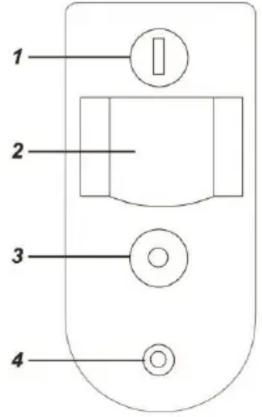
Teilebeschreibung
- Blaue LED / Lerntaste
- IR-Sensor
- LED-Blitz
Der LED-Blitz liefert ausreichend Licht für die Bildaufnahme bei schlechten Lichtverhältnissen.
- PIR-Kameraobjektiv
- Batterie-Isolator
Ziehen Sie den Isolator heraus, um die Batterie zu aktivieren.
- Bodenschraube (Sabotageschalter)
Der Sabotageschalter schützt die PIR-Kamera vor unbefugtem Öffnen des Gehäuses und wird durch die Bodenschraube niedergedrückt. Wenn die Schraube gelöst wird, wird der Sabotageschalter aktiviert.
Paketinhalt
1 x PIR-Kamera, 4 x Dübel und Schrauben, 2 x 1,5-V-AA-Alkalibatterien (vorinstalliert)
Anlernen
Die PIR-Kamera kann nur innerhalb von 3 Minuten nach dem Einschalten in die Zentrale angelernt werden. Wenn sie länger als 3 Minuten eingeschaltet ist, entfernen Sie die Batterien und setzen Sie sie wieder ein, um die Kamera neu einzuschalten.
- Versetzen Sie die Zentrale in den Lernmodus.
- Halten Sie die Lerntaste an der PIR-Kamera 10 Sekunden lang gedrückt, bis die beiden LEDs und die blaue LED einmal blinken, und lassen Sie dann die Taste los, um einen Lerncode zu senden.
- Warten Sie kurz, bis die PIR-Kamera eine Verbindung zur Zentrale herstellt. Wenn die Kamera erfolgreich angelernt wurde, blinkt die blaue LED zweimal. Die Zentrale zeigt auch die Informationen der PIR-Kamera an. Lesen Sie das Handbuch der Zentrale, um das Anlernen abzuschließen.
- Wenn die PIR-Kamera und die Zentrale nach kurzer Zeit (ca. 20\~30 Sekunden) nicht reagieren, wiederholen Sie den Vorgang ab Schritt 2 und halten Sie die Taste erneut gedrückt.
Nach Abschluss des Anlernens halten Sie die Lerntaste nicht erneut 10 Sekunden lang innerhalb von 3 Minuten nach dem Einschalten gedrückt, da sonst die PIR-Kamera die Verbindung zur Zentrale verliert und erneut angelernt werden muss.
Installation
Montage
- Die PIR-Kamera ist für die Montage auf einer ebenen Fläche oder in einer Ecke mit den mitgelieferten Schrauben und Dübeln ausgelegt.
- Die Basis hat Ausbrechstellen, an denen das Plastik dünner ist und für die Montage durchbrochen werden kann. 2 in der Mitte für die Flächenmontage und 4 an den Seiten für die Eckmontage.
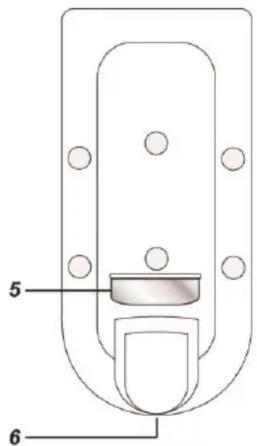
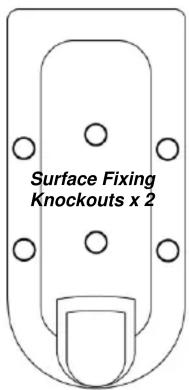
Ausbrechstellen für Eckmontage x 4
- Entfernen Sie die Abdeckung.
- Für die Flächenmontage brechen Sie die 2 Ausbrechstellen in der Mitte der Basis durch. Für die Eckmontage brechen Sie die 4 Ausbrechstellen an der Ecke der PIR-Kamera durch.
- Verwenden Sie die Löcher als Schablone, um Löcher in die Wand zu bohren.
- Setzen Sie die Dübel ein, wenn Sie in Gips oder Ziegel befestigen.
- Schrauben Sie die Basis an die Wanddübel.
- Schrauben Sie die Abdeckung wieder auf die Basis.
Betrieb
Bewegungserkennung
Die PIR-Kamera ist dafür ausgelegt, Bewegungen im geschützten Bereich zu erkennen. Bei Bewegungserkennung meldet die PIR-Kamera dies an die Zentrale, um einen Alarm auszulösen, und nimmt gleichzeitig 3 Bilder auf. Die Bilder werden an die Zentrale übertragen, um sie an programmierte Ziele zu senden, damit der Benutzer sie ansehen kann.
Aufwärmphase
Wenn die Zentrale in den Scharfmodus wechselt oder die PIR-Kamera in den Testmodus versetzt wird, wärmt sich die PIR-Kamera 30 Sekunden lang auf. Lösen Sie die PIR-Kamera während der 30-sekündigen Aufwärmphase nicht aus. Wenn die PIR-Kamera eine schwache Batterie hat oder der Manipulationsschutz geöffnet ist, leuchtet die blaue LED während der Aufwärmphase auf.
Batterie
Die PIR-Kamera verwendet zwei 1,5-V-AA-Alkalibatterien als Stromquelle. Entfernen Sie den Batterieisolator, um die Batterie zu aktivieren. Sie verfügt außerdem über eine Unterspannungserkennungsfunktion, die die Zentrale benachrichtigt, wenn die Batteriespannung niedrig ist.
Wenn die Batterie der PIR-Kamera schwach ist, befolgen Sie das folgende Verfahren zum Wechseln der Batterien.
- Öffnen Sie die Rückabdeckung der PIR-Kamera.
- Entfernen Sie die alten Batterien.
- Drücken Sie den Manipulationsschalter mehrmals, um die Restladung vollständig zu entladen.
- Setzen Sie die neuen Batterien ein und setzen Sie die Rückabdeckung der PIR-Kamera wieder auf.
Richtlinie zur Batterieeinsparung
Die PIR-Kamera ist jederzeit drahtlos mit der Zentrale verbunden. Wenn die PIR-Kamera die Verbindung zur Zentrale verliert, sucht sie aktiv nach der Zentrale, was zusätzlichen Strom verbraucht und die Batterielebensdauer erheblich verkürzt. Um unnötigen Stromverbrauch zu vermeiden, befolgen Sie bitte die folgenden Richtlinien:
- Stellen Sie sicher, dass die Zentrale eingeschaltet ist, bevor Sie den Batterieisolator entfernen. Lernen Sie die PIR-Kamera immer sofort nach dem Aktivieren der Batterie an.
- Stellen Sie sicher, dass die Zentrale eingeschaltet und in Reichweite ist, wenn die PIR-Kamera eingeschaltet wird.
- Wenn Sie die PIR-Kamera von der Zentrale entfernt haben, entfernen Sie auch die Batterien aus der PIR-Kamera.
Testmodus
Die Testmodusfunktion ermöglicht es Ihnen, den Erfassungsbereich der PIR-Kamera zu überprüfen. Halten Sie die Lerntaste länger als 3 Sekunden gedrückt und lassen Sie sie dann los, um den Testmodus für 5 Minuten zu aktivieren.
Die PIR-Kamera wärmt sich zunächst 30 Sekunden lang auf. Lösen Sie die PIR-Kamera während dieser Aufwärmphase nicht aus. Nach Abschluss der Aufwärmphase können Sie die PIR-Kamera auslösen, um ihren Erfassungsbereich zu überprüfen. Wenn die PIR-Kamera ausgelöst wird, leuchtet die blaue LED auf.
Für den Signalreichweitentest lesen Sie bitte das Handbuch der Zentrale.
LED-Anzeige
| Off | Normal Operation |
| On (2 seconds) | Movement detection under low battery, tamper triggered condition, or Test mode. |
| On (30 seconds) | PIR Camera is warming up under low battery or tamper triggered condition |
| Flash Rapidly | PIR Camera is transferring image under low battery or tamper triggered condition. |
| Flash Once | PIR Camera sends a learn code |
| Flash Twice | PIR Camera is learnt into Control Panel |
| Flash every 20 minutes | PIR Camera has lost signal connection with the Control Panel. |
Technische Daten
Umgebungsbedingungen
-10 °C bis 40 °C, relative Luftfeuchtigkeit 85 % nicht kondensierend.
Funk
2,4 GHz

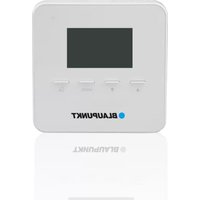

Marke : BLAUPUNKT
Modell : IRC-S2
Kategorie : Überwachungskamera