
4.5mm f2.8 EX DC Circular Fisheye - Objektiv SIGMA - Kostenlose Bedienungsanleitung
Finden Sie kostenlos die Bedienungsanleitung des Geräts 4.5mm f2.8 EX DC Circular Fisheye SIGMA als PDF.


| Produkttyp | Objektiv (Festbrennweite, Fischauge) |
| Marke | Sigma |
| Modell | 4,5 mm f/2,8 EX DC Circular Fisheye |
| Brennweite | 4,5 mm (Festbrennweite) |
| Maximale Blendenöffnung | f/2,8 |
| Minimale Blendenöffnung | f/22 |
| Bildwinkel | 180° (kreisförmig) |
| Linsensystem | 13 Linsenelemente in 9 Gruppen |
| Naheinstellgrenze | 13,5 cm |
| Abbildungsmaßstab | 1:6 |
| Filtergewinde | Kein vorderes Filtergewinde; Gelatinefilter hinten (optional) |
| Fokussierung | Autofokus (HSM) und manueller Fokus |
| Fokusmodus-Schalter | AF/M |
| Durchmesser | 76,2 mm |
| Länge | 77,7 mm |
| Gewicht | 470 g |
| Bajonettanschluss | Sigma (verschiedene Kamera-Mounts verfügbar) |
| Kompatibilität | Digitale Spiegelreflexkameras mit APS-C-Sensor |
| Stromversorgung | Keine (passives Objektiv mit elektronischen Kontakten) |
| Reinigung | Weiches, angefeuchtetes Tuch; keine Lösungsmittel |
| Lagerung | Kühl, trocken, gut belüftet |
| Sicherheit | Vor Stößen, extremen Temperaturen und Feuchtigkeit schützen; nicht wasserdicht |
| Reparatur | Nur durch autorisiertes Service-Center; keine vom Benutzer austauschbaren Teile |
Häufig gestellte Fragen - 4.5mm f2.8 EX DC Circular Fisheye SIGMA
Benutzerfragen zu 4.5mm f2.8 EX DC Circular Fisheye SIGMA
0 Frage zu diesem Gerät. Beantworten Sie die, die Sie kennen, oder stellen Sie Ihre eigene.
Eine neue Frage zu diesem Gerät stellen
Laden Sie die Anleitung für Ihr Objektiv kostenlos im PDF-Format! Finden Sie Ihr Handbuch 4.5mm f2.8 EX DC Circular Fisheye - SIGMA und nehmen Sie Ihr elektronisches Gerät wieder in die Hand. Auf dieser Seite sind alle Dokumente veröffentlicht, die für die Verwendung Ihres Geräts notwendig sind. 4.5mm f2.8 EX DC Circular Fisheye von der Marke SIGMA.
BEDIENUNGSANLEITUNG 4.5mm f2.8 EX DC Circular Fisheye SIGMA
ENGLISH
Thank you very much for purchasing a Sigma Lens. In order to get the maximum performance and enjoyment out of your Sigma lens, please read this instruction booklet thoroughly before you start to use the lens.
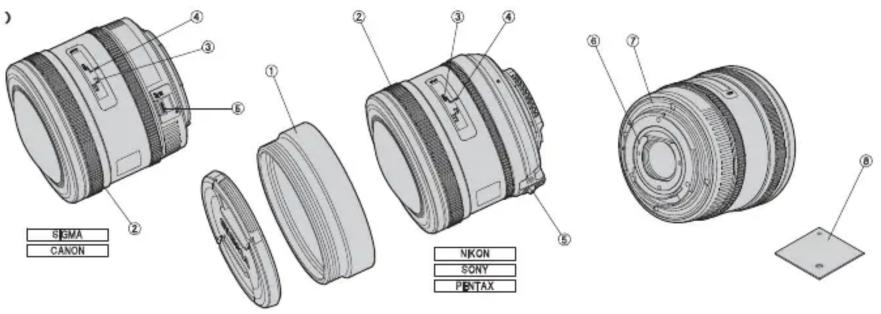
DESCRIPTION OF THE PARTS (fig.1)
① Adapter Ring
⑤ Focus Mode Switch
② Focus Ring
⑥ Filter Holder
③ Distance Scale
⑦ Mount
④ Focus Index Line
⑧ Guide Plate
DC CIRCULAR FISHEYE LENS
The 4.5mm f/2.8 EX DC HSM Circular Fisheye lens has an angle of view of 180 degrees in all directions. When used in conjunction with digital SLRs with APS-C size image sensors, it produces a perfectly circular image within the frame.
- If used with a film or full frame digital SLR camera, the circular image produced will appear much smaller within the centre of the frame.
It is recommended that either spot or center-weighted metering is used. (Multi-Pattern, Multi-Zone and Honeycomb metering may not prove accurate.)
It is recommended to check composition of your image through the viewfinder as the extraordinarily wide angle of view of this fisheye lens may capture extremities of the unsuspecting photographer.
ATTACHING TO CAMERA BODY
When this lens is attached to the camera body it will automatically function in the same way as your normal lens. Please refer to the instruction booklet for your camera body.
- On the lens mount surface, there are a number of couplers and electrical contacts. Please keep them clean to ensure proper connection. To avoid damaging the lens, be especially sure to place the lens with its front end down while changing the lens.
- When you take a picture, please remove the lens cap and the adapter ring (fig.1-①) not just the lens cap, to avoid vignetting.
SETTING THE EXPOSURE MODE
The sigma lens functions automatically after mounting to your camera. Please, refer to the camera instruction book.
FOCUSING
This lens features Sigma's built-in Hyper Sonic Motor (HSM). The HSM enables quick and quiet autofocusing.
《SIGMA AF and CANON AF》
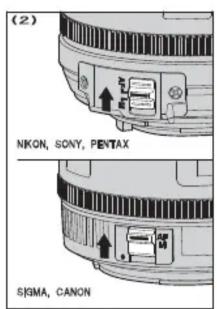
For autofocus operation, set the focus mode switch on the lens to the "AF" position (fig.2). If you wish to focus manually, set the focus mode switch on the lens to the "M" position. You can adjust the focus by turning the focus ring.
《NIKON AF, PENTAX AF and SONY》
For autofocus operation, set the camera to AF mode and set the focus mode switch on the lens to the "AF" position (fig.2). If you wish to focus manually, set the focus mode switch on the lens to the "M" position. You can adjust the focus by turning the focus ring.
-
Please refer to camera's instruction manual for details on changing the camera's focusing mode.
For Nikon, Pentax and Sony mounts, it is only possible to use AF with camera bodies which support motors driven by ultrasonic waves such as HSM. AF will not function if the camera body does not support this type of motor. -
This lens also permits manual focusing even in the autofocus mode. With the camera set to the One-Shot AF (AF-S) mode, it is possible to manually override the autofocus while the shutter release button is pressed halfway.
When operating this lens in manual focus mode, it is recommended that correct focus be confirmed visually in the viewfinder rather than relying on the distance scale. This is due to possible focus shift resulting from extreme changes in temperature which cause various components in the lens to expand and contract. Special allowance is made for this at the infinity setting. - This lens has a short focal length and gives a wide depth of field and wide focusing area in front of and behind the subject. For this reason, the focusing position with AF may not match the position of the Distance Scale on the camera body.
If the subject is too small, it may not be possible for the camera's AF sensor to focus on it. Please ensure the subject is in the AF frame before shooting.
PREVENTION OF FLARE AND GHOST
Because of the extremely wide angle of view of this lens, flare and ghosting may occur much more easily than with other lenses. When you take a picture with this lens, please pay special attention to flare and ghosting which can occur when shooting near or directly into the sun or other very bright lights.
FILTER
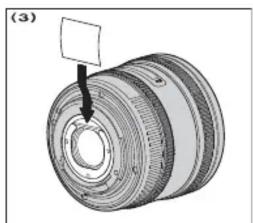
Filters cannot be mounted on the front of the lens. If you wish to use filters, please use gelatin type. Please cut the gelatin filter, using the guide plate accessory as a pattern, and insert the filter into the filter holder at the rear of the lens. (fig.3)
BASIC CARE AND STORAGE
- Avoid any shocks or exposure to extreme high or low temperatures or to humidity.
- For extended storage, choose a cool and dry place, preferably with good ventilation. To avoid damage to the lens coating, keep away from mothballs or naphthalene gas.
Do not use thinner, benzine or other organic cleaning agents to remove dirt or finger prints from the lens elements. Clean by using a soft, moistened lens cloth or lens tissue. - This lens is not waterproof. When you use the lens in the rain or near water, keep it from getting wet. It is often impractical to repair the internal mechanism, lens elements and electric components damaged by water.
- Sudden temperature changes may cause condensation or fog to appear on the surface of the lens. When entering a warm room from the cold outdoors, it is advisable to keep the lens in the case until the temperature of the lens approaches room temperature.
TECHNICAL SPECIFICATIONS
| Lens construction 9 – 13 | |
| Angle of View 180° | |
| Minimum Aperture 22 | |
| Minimum Focusing Distance 13.5cm (0.44 ft) | |
| Magnification | 1:6 |
| Dimensions Dia.×Length | 76.2×77.7mm (3×3.06in) |
| Weight | 470g |
Dimensions and weight include the SIGMA mount.
(1)
natural_image
Mechanical component diagram showing a cylindrical assembly with a pin inserted (no text or symbols)

Marke : SIGMA
Modell : 4.5mm f2.8 EX DC Circular Fisheye
Kategorie : Objektiv