
50mm f2.8 APO EX DC MKII 50-1 - Objektiv SIGMA - Kostenlose Bedienungsanleitung
Finden Sie kostenlos die Bedienungsanleitung des Geräts 50mm f2.8 APO EX DC MKII 50-1 SIGMA als PDF.


| Produkttyp | Zoomobjektiv |
| Marke | Sigma |
| Modell | 50mm f2.8 APO EX DC MKII 50-1 (50-150mm f/2.8) |
| Brennweite | 50-150 mm (äquivalent 85-255 mm bei APS-C) |
| Lichtstärke | f/2,8 |
| Kleinste Blende | f/22 |
| Optischer Aufbau | 18 Linsen in 14 Gruppen |
| Naheinstellgrenze | 1 m (3,28 ft) |
| Max. Abbildungsmaßstab | 1:5,3 |
| Filtergewinde | 67 mm |
| Abmessungen (⌀ x Länge) | 76,5 x 140,2 mm |
| Gewicht | 780 g (mit Bajonett) |
| Fokusmotor | Hyper Sonic Motor (HSM) – schnell und leise |
| Fokusmodusschalter | AF/MF |
| Gegenlichtblende | Bajonett-Gegenlichtblende (abnehmbar, umkehrbar) |
| Telekonverter-Kompatibilität | Sigma 1,4x EX und 2,0x EX APO (optional) |
| Bajonett | Sigma (auch für Canon, Nikon, Pentax, Sony) |
| Sensorformat | DC (optimiert für APS-C) |
| Besonderheiten | APO (Apochromat), EX-Serie |
| Reinigung | Weiches, leicht angefeuchtetes Tuch; kein Verdünner oder Benzin |
| Lagerung | Kühl, trocken, gut belüftet; fern von Mottenkugeln oder Naphthalin |
Häufig gestellte Fragen - 50mm f2.8 APO EX DC MKII 50-1 SIGMA
Benutzerfragen zu 50mm f2.8 APO EX DC MKII 50-1 SIGMA
0 Frage zu diesem Gerät. Beantworten Sie die, die Sie kennen, oder stellen Sie Ihre eigene.
Eine neue Frage zu diesem Gerät stellen
Laden Sie die Anleitung für Ihr Objektiv kostenlos im PDF-Format! Finden Sie Ihr Handbuch 50mm f2.8 APO EX DC MKII 50-1 - SIGMA und nehmen Sie Ihr elektronisches Gerät wieder in die Hand. Auf dieser Seite sind alle Dokumente veröffentlicht, die für die Verwendung Ihres Geräts notwendig sind. 50mm f2.8 APO EX DC MKII 50-1 von der Marke SIGMA.
BEDIENUNGSANLEITUNG 50mm f2.8 APO EX DC MKII 50-1 SIGMA
ENGLISH
Thank you very much for purchasing a Sigma Lens. In order to get the maximum performance and enjoyment out of your Sigma lens, please read this instruction booklet thoroughly before you start to use the lens.
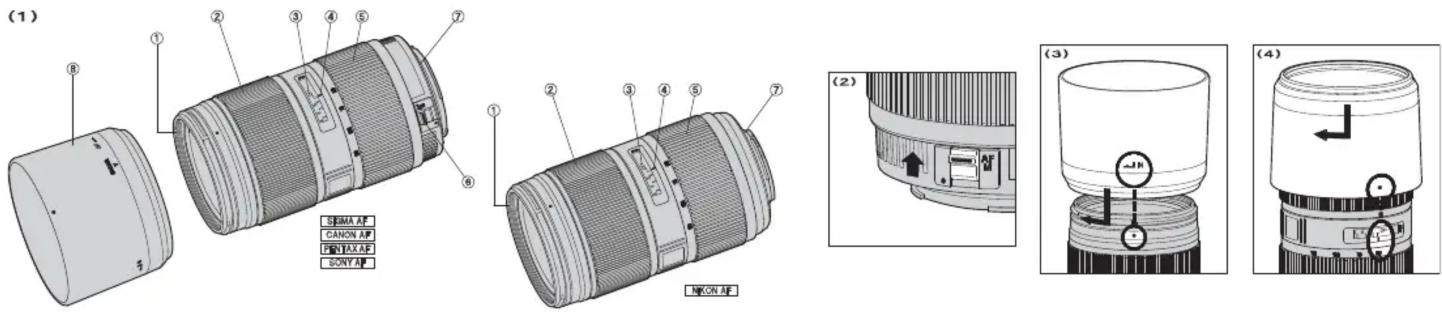
DESCRIPTION OF THE PARTS (fig.1)
- Filter Attachment Thread 5. Zoom Ring
- Focus Ring 6. Focus Mode Switch (except Nikon
- Distance Scale mount)
- Focus Index Line 7. Mount 8. Lens Hood
DC LENS
These are special lenses that are designated for digital cameras because the lens image circle is designated to correspond to the size of the image sensors of most digital SLR cameras. The specialized design gives these lenses the ideal properties for digital cameras.
An image sensor element larger than those corresponding to APS-C cannot be used in digital cameras or 35mm SLR cameras. If such an element is used vignetting will occur on the picture surface.
- If you use SD9, SD10 or SD14 digital cameras, corresponding angle of view will be 85-255mm.
ATTACHING TO CAMERA BODY
When this lens is attached to the camera body it will automatically function in the same way as your normal lens. Please refer to the instruction booklet for your camera body.
- On the lens mount surface, there are a number of couplers and electrical contacts. Please keep them clean to ensure proper connection. To avoid damaging the lens, be especially sure to place the lens with its front end down while changing the lens.
SETTING THE EXPOSURE MODE
The sigma lens functions automatically after mounting to your camera. Please, refer to the camera instruction book.
FOCUSING AND ZOOMING
This lens features Sigma's built-in Hyper Sonic Motor (HSM). The HSM enables quick and quiet autofocusing.
《SIGMA AF and CANON AF》
For autofocus operation, set the focus mode switch on the lens to the "AF" position (fig.2). If you wish to focus manually, set the focus mode switch on the lens to the "M" position. You can adjust the focus by turning the focus ring.
《 PENTAX AF and SONY》
For autofocus operation, set the camera to AF mode and set the focus mode switch on the lens to the "AF" position (fig.2). If you wish to focus manually, set the focus mode switch on the lens to the "M" position. You can adjust the focus by turning the focus ring.
《 NIKON AF》
For autofocus operation, set the camera's focus mode to AF. If you wish to focus manually, set the camera's focus mode to "M" and adjust the focus by turning the focus ring.
- Please refer to camera's instruction manual for details on changing the camera's focusing mode.
For Nikon, Pentax and Sony mounts, it is only possible to use AF with camera bodies which support motors driven by ultrasonic waves such as HSM. AF will not function if the camera body does not support this type of motor. - This lens also permits manual focusing even in the autofocus mode. With the camera set to the One-Shot AF (AF-S) mode, it is possible to manually override the autofocus while the shutter release button is pressed halfway.
- When operating this lens in manual focus mode, it is recommended that correct focus be confirmed visually in the viewfinder rather than relying on the distance scale. This is due to possible focus shift resulting from extreme changes in temperature which cause various components in the lens to expand and contract. Special allowance is made for this at the infinity setting.
《Zooming》
Rotate the Rubber grip on the zoom ring to the desired position.
FLASH PHOTOGRAPHY
The camera's built-in flash will cause barrel shadow if used with this lens. For best results, please only use an external flash unit.
ABOUT TELE CONVERTERS
The lens can be used with Sigma's 1.4x EX or 2.0x EX Apo Tele Converters (optional), becoming a 70-210mm F4 Autofocus telephoto zoom lens or a 100-300mm F5.6 Autofocus telephoto zoom lens respectively.
- Do not use other manufacturers' teleconverter's, only those listed above are compatible.
- We recommend the DG APO Tele-Converters when using with DSLR cameras.
- The Pentax mount Tele Converter is not compatible with this particular lens.
In case of Sony AF mount, it is possible to use AF when attaching tele converters with a serial number above 5000001. AF will not work if the tele converter's serial number is lower than 5000001.
LENS HOOD
A bayonet type detachable hood is provided with the lens. This lens hood helps to prevent flare and ghosted images caused by bright illumination from outside the picture area. Attach the hood and turn clockwise until it stops rotation. (fig.3)
- In order to place the lens and hood into the storage case, you must first remove the hood, then replace it on the lens in the reverse position. (fig.4)
FILTER
- Only one filter should be used at the time. Two or more filters and/or special thicker filters, like a polarizing filter, may cause vignetting.
- When using a polarizing filter with AF camera, use the “circular” type.
BASIC CARE AND STORAGE
- Avoid any shocks or exposure to extreme high or low temperatures or to humidity.
For extended storage, choose a cool and dry place, preferably with good ventilation. To avoid damage to the lens coating, keep away from mothballs or naphthalene gas.
Do not use thinner, benzine or other organic cleaning agents to remove dirt or finger prints from the lens elements. Clean by using a soft, moistened lens cloth or lens tissue. - This lens is not waterproof. When you use the lens in the rain or near water, keep it from getting wet. It is often impractical to repair the internal mechanism, lens elements and electric components damaged by water.
- Sudden temperature changes may cause condensation or fog to appear on the surface of the lens. When entering a warm room from the cold outdoors, it is advisable to keep the lens in the case until the temperature of the lens approaches room temperature.
TECHNICAL SPECIFICATIONS
| Lens construction 14 – 18 | |
| Angle of View 27.9 – 9.5° | |
| Minimum Aperture 22 | |
| Minimum Focusing Distance 1m (3.28 ft) | |
| Magnification | 1:5.3 |
| Filter Size 67mm | |
| Dimensions Dia.×Length | 76.5×140.2mm (3×5.52 in) |
| Weight 780g (27.5 oz) |
Dimensions and weight include the SIGMA mount.


Marke : SIGMA
Modell : 50mm f2.8 APO EX DC MKII 50-1
Kategorie : Objektiv