8200M - Hi-Fi Audiolab - Kostenlose Bedienungsanleitung
Finden Sie kostenlos die Bedienungsanleitung des Geräts 8200M Audiolab als PDF.


Benutzerfragen zu 8200M Audiolab
0 Frage zu diesem Gerät. Beantworten Sie die, die Sie kennen, oder stellen Sie Ihre eigene.
Eine neue Frage zu diesem Gerät stellen
Laden Sie die Anleitung für Ihr Hi-Fi kostenlos im PDF-Format! Finden Sie Ihr Handbuch 8200M - Audiolab und nehmen Sie Ihr elektronisches Gerät wieder in die Hand. Auf dieser Seite sind alle Dokumente veröffentlicht, die für die Verwendung Ihres Geräts notwendig sind. 8200M von der Marke Audiolab.
BEDIENUNGSANLEITUNG 8200M Audiolab
8200Q
8200P
8200M
CODE:AH10-MNLO006
http://www.audiolabel.co.uk
Fax: 01480 431767
Tel: 01480 447700
Huntingdon PE29 6XU
Ermine Business Park,
Sovereign Count.
IAG House,
Audio lab

text_image
GAIN VOLUME INPUT RECORD POWER B2000 15 12 8 5 3 2 1 - - - - - - - - - - - - - - - - - - - - - - - - - - - - - - - - - - - - - - - - - - - - - - - - - - - - - - - - - - - - - - - - - - - - - - - - - - - - - - - - - - - - - - - - - - - - - - - - - - - - + audiolab
text_image
8200P POWER audiclab
text_image
8200M POWER audiolabUser Instructions
audiolab
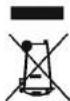
Comfort Disposal of this product. This meaning indicates how this product should not be disposed with other household environment or human health from uncontrolled waste disposal, recycle it responsibly to promote the sustainable waste environment or human health from uncontrolled waste the claim and collection systems to correct the regular water the product was purchased. They can take this product for environmental size recycling.
IAG-A.LAB
proves to be necessary.
Packing, Insurance and Freight on the return journey will be paid by Audioloa or their outlined organs or distributor if corrective work
Insurance is recommended as goods are returned at owner's risk. Australia or their authorized distributors cannot be held liable for loss or damage in transit.
new cooking.
If asked to return products for inspection and report, pack carefully, preferably in the original corners of packaging affording an equal degree of protection, and return period. If unsuitable packaging is used,AUDolorb may make a charge for the supply of
authored distributors.
To obtain warranty service content the Audiolol outlined dealer from which you purchased this product. Do not despair goods without the prior agreement of the dealer, Audiolol or their
How to claim:
country to country.
Some countries and US states do not allow the exhaustion or limitation of incidental or consequential damages or implied warranties so the excursions in the paragraph above may not apply to you. This warranty gives your specialist legal rights, and you may have other regulatory rights, which vary from state to state or
This warranty provides benefits that are additional to and do not affed your statutory rights as a consumer.
purose.
Repairs for replications as provided under this warranty are the necessary necessary for the necessary necessary for the necessary necessary for the necessary necessary for the necessary necessary for the necessary necessary for the necessary necessary for the necessary necessary for the necessary necessary for the necessary necessary for the necessary necessary for the necessary necessary for the necessary necessary for the necessary necessary for the necessary necessary for the necessary necessary for the necessary necessary for the necessary necessary for the necessary necessary for the necessary necessary for the necessary necessary for the necessary necessary for the necessary necessary for the necessary necessary for the necessary necessary for the necessary necessary to, the warranty of mercantial ability and fitness for a practical tool, the warranty of mercantial ability and fitness is not allowed. Both express and implied, induding, but not limited whatsoever, both express and implied, induding, but not limited whatsoever, both express and implied, induding, but not limited whatsoever, both express and implied, induding, but not limited whatsoever, both express and implied, induding, but not limited whatsoever, both express and implied, induding, but not limited whatsoever, both express and implied, induding, but not limited whatsoever, both express and implied, induding, but not limited whatsoever, both express and implied, induding, but no other worriedness or impurity of warranty in this product. Except to the required price or implied warranty in this product, except to the required price or implied warranty in this product. Except to the required price or implied warranty in this product, except to the required price or implied warranty in this product. Except to the required price or implied warranty in this product, except to the required price or implied warranty in this product. Except to the required price or implied warranty in this product, except to the required price or implied warranty in this product. Except to the required price or implied warranty in this product, except to the required price or implied warranty in this products. Except to the required price or implied warranty in this product, except to the required price or implied warranty in this product. Except to the required price or implied warranty in this product, except to the required price or implied warranty in this product. Except to the required price or implied warranty in this product, except to the required price or implied warranty in this product. Except to the required price or implied warranty in this product, except to the required price or implied warranty in this product. Except to that
Products sold, as is, as seen, or, with all faults.
Products that were not new of the time of original purchase.
Products not purchased from an Audiolaq outhorsed dealer.
Audiola of its orthorised organs or distributors.
- Reports or alterations covered out by parties other than
unsuitable, inappropriate or faulty apparatus.
• Equipment hot has been operated in conjunction with
is not in accordance with Audiolab's user instructions.
nagleed or careless operation or handling of the product which
God, incurred installation, convection or packaging, misuse,
- Accidental damage, faults caused by commercial use, aids of
Transportation or installation of the product.
Normal wear and tear and cosmetic damage.
altered or otherwise mode illegible.
• Produces on which the serial number has been removed.
The following are not covered:
the first purchaser and is not transferable.
This warranty is void only in the country of purchase, applies only to
period of warranty.
Any repair or replacement under this warranty will not extend the
Any parts that are replaced will become the property of Audiolab.
replacement point.
If any portion is no longer allowable it will be replaced with a functional
woronty.
distributors. Any unauthorized repair or modification will void this
All work will be carried out by Android or its unhonested agents or
chargeable to you.
carried out. Without this proof, any work carried out will be
You must provide proof of purchase / delivery before work can be
This is taller.
The warranty stores on the date of purchase (or the date of delivery
Terms and conditions:
country to country.
Audiab lid. warrents this product, suited to the terms and options below to be from defects in materials and conditions below to the years and options above (on Audiobols option) this product, or any derivative part in this product, if it is bound to be defective due to fourth materials, mechanising of function. The warranty period may vary from
Audiola limited warranty
8: Warranty
7: Specifications
8200Q Pre-amplifier
Inputs: Gain and Sensitivity
CD, TUNER, AUX, VIDEO, TAPE 1, TAPE 2: IMPEDANCE: 20kΩ
GAIN: Adjustable by 3dB steps 0 -15dB., corresponding to
SENSITIVITY(nom.):100mV, 140mV, 200mV, 283mV, 400mV, 562mV
HEADPHONES: Gain adjustable 18dB - 33dB in 3dB steps
Signal To Noise Ratio (IHF, rel. 0.5V output)
Any input, any gain setting: 97dB
Headphones: 80dB
Frequency Response
10 Hz-20 kHz ± 0.2 dB: 1 Hz-75 kHz-3 dB.
Total Harmonic Distortion & Noise
Less than 0.007% ref 7.7V rms, 20Hz - 20kHz
Channel Balance
Within 1 dB
Channel Separation
Better than 100 dB @ 1 kHz any input, any setting
Pre-amp Output
Max. Output >7.7V RMS (20dBm); Output impedance 75Ω
Headphone Output
7.7Vrms;100Ω: (for headphones 8Ω-2 kΩ impedance)
Record Output
VIDEO OUT, TAPE 1 OUT, TAPE 2 OUT: Gain 0 dB (x1); 100Ω
Muting
Attenuation>63 dB, controlled automatically
Operating Temperature Range
10-35°C
Power Requirements (Depending on Region)
50-60Hz 100V, 110-120V, and 220-230V models available
Maximum Power Consumption: 25 VA
Dimensions (WXHXD)
445x74x335 mm - including feet, terminals and controls
445 x 64 x 302 mm- excluding feet, terminals and controls
Weight
Net: 6 kg Shipping: 7.3 kg
8200P Power Amplifier
Rated Output Power
100W (20dBW) /Channel into 8Ω both channels driven
Input
1V rms for 100W into 8Ω
Input Impedance: 50kΩ
Load
Connected in parallel with INPUT
Gain
29.0 dB at 1 kHz
Signal To Noise Ratio (IHF, rel. 0.dBW)
Better than 95 dB
Frequency Response
20 Hz-20 kHz ± 0.3 dB
0.1 Hz-75 kHz-3 dB.
Total Harmonic Distortion & Noise
Less than 0.05%
Channel Balance
Within 1 dB
Polarity (Phase)
Non-Inverting
Muting
Muting controlled automatically
Operating Temperature Range
10-35°C
Power Requirements (Depending on Region)
50-60 Hz 100V, 110-120V, and 220-230V models available
Maximum Power Consumption: 500 VA
Dimensions (WXHXD)
445x74x337 mm - including feet, terminals and controls
445 x 64 x 302 mm- excluding feet, terminals and controls
Weight
Net: 8.7kg Shipping:10kg
8200M Power Amplifier
Rated Output Power
125W (21dBW) / Channel into 8Ω, 20Hz - 20kHz
Input Sensitivity
1.12V rms for 120W into 8Ω
Input Impedance: 50kΩ
Load
Connected in parallel with INPUT
Gain
29.0 dB at 1 kHz
Signal To Noise Ratio (IHF, rel. 0.dBW)
Better than 96 dB
Frequency Response
20 Hz-20 kHz ± 0.3 dB
0.1 Hz-75 kHz-3 dB.
Total Harmonic Distortion & Noise
Less than 0.05%
Polarity (Phase)
Non-Inverting
Muting
Muting controlled automatically
Operating Temperature Range
10-35℃
Power Requirements (Depending on Region)
50-60Hz 100V, 110-120V, and 220-230V models available
Maximum Power Consumption: 300 VA
Dimensions (WXHXD)
445x74x337 mm - including feet, terminals and controls
445 x 64 x 302 mm- excluding feet, terminals and controls
Weight
Net: 8.2 kg Shipping: 9.6 kg
Audiolab reserves the right to alter design and specification without prior notice. Specification may vary for different countries.
Audiolab is a member of the International Audio Group.
1: Statutory & Safety Information

text_image
CAUTION! RISK OF ELECTRIC SHOCK DO NOT OPEN TO REDUCE THE RISK OF ELECTRIC SHOCK DO NOT REMOVE COVER NO USER-REMOVABLE PARTS INSIDE REFER SERVICING TO QUALIFIED PERSONNEL ADVERTISSEMENT: RISQUE DE CHOC ELECTRIQUE- NE PAS OUVIR
This symbol indicates that there are important operating and maintenance instructions in the literature accompanying this unit.

This symbol indicates that dangerous voltage constituting a risk of electric shock is present within this unit.
Read these instructions.
Keep these instructions. In the event that you pass the product to a third party this instruction manual should be provided along with the product.
Heed all warnings.
Follow all instructions.
Do not use this apparatus near water.
Clean only with dry cloth.
Do not block any ventilation openings.
Install in accordance with the manufacturer's instructions.
Do not install near any heat sources such as radiators, heat registers, stoves, or other apparatus (including amplifiers) that produce heat.
Do not defeat the safety purpose of the polarized or grounding type plug. A polarized plug has two blades with one wider than the other. A grounding type plug has two blades and a third grounding prong. The wider blade or the third prong is provided for your safety. If the provided plug does not fit into your outlet, consult an electrician for replacement of the obsolete outlet.
Protect the power cord from being walked on or pinched, particularly at plugs, convenience receptacles, and the point where they exit from the apparatus.
Warning: Battery shall not be exposed to excessive heat such as the sunshine, fire or the like.
Use only attachments/accessories specified by the manufacturer.

Use only with a cart, stand, tripod, bracket, or table specified by the manufacturer, or sold with the apparatus. When a cart is used, use caution when moving the cart/apparctus combination to avoid injury from tip-over.
Unplug this apparatus during lightning storms or when unused for long periods of time.
Refer all servicing to qualified service personnel. Servicing is required when the apparatus has been damaged in any way, such as power-supply cord or plug is damaged, liquid has been spilled or objects have fallen into the apparatus, the apparatus has been exposed to rain or moisture, does not operate normally, or has been dropped.
Warning: To reduce the risk of fire or electrical shock, do not expose this product to rain or moisture. The product must not be exposed to dripping and splashing and no object filled with liquids such as a vase of flowers should be placed on the product.
No naked flame sources - such as candles - should be placed on the product.
Caution: Changes or modifications not expressly approved by the manufacturer could void the user's authority to operate this device.
8200Q: This equipment has been tested and found to comply with the limits for a Class B digital device, pursuant to part 15 of the FCC rules. These limits are designed to provide reasonable protection against harmful interference in a residential installation. This equipment generates, uses and can radiate radio frequency energy and, if not installed and used in accordance with the instructions, may cause harmful interference to radio or television reception, which can be determined by tuning the equipment off and on, the user is encouraged to try to correct the interference by one or more of the following measures:
Re-orientate or re-locate the receiving antenna. Increase the separation between the equipment and the receiver. Connect the equipment into an outlet on a circuit different from that to which the receiver is connected.
Consult the dealer or on experienced radio/TV technician for help.
Important Note: The batteries supplied with the 8200Q handset should be treated with core and not punctured or damaged. Used batteries should be disposed of in full conformity with recycling regulations in your area. NEVER dispose of batteries in a fire or in the general rubbish.
Mains supply and safety
Mains Supply: The mains voltage of Audiolab units is shown on the rear panel. If this does not match the voltage in your area, consult your dealer. The mains supply fuse is on the rear panel. If it has broken, check for any obvious cause before replacing the fuse with one of the correct rating and type. The fuses for all areas are type T (time lag) AL 20mm.
The fuse values are:
8200Q: 220-230V:1.0A
8200M: 220-230V: 3.15A
8200P: 220-230V:4.0A
100-120V: 1.6A
100-120V:5.0A
100-120V:5.0A
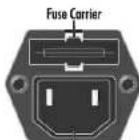
The fuse is located in a slide-in carrier which also contains a spare fuse. The carrier can only be pulled out after the IEC power cord is unplugged. When the carrier is opened the first fuse is the spare. Remove and safely dispose of the blown fuse before replacing it.
IEC Mains Connector

Class II construction double insulated. These products must not be connected to earth.
Power Cord: An AC power cord is normally supplied with a mains plug suitable for your area. If you have any doubts, consult your dealer about obtaining a suitable power cord.
Important notice to UK users
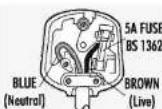
The appliance cord is terminated with a UK approved mains plug fitted with a 5A fuse. If the fuse needs to be replaced, an ASTA or BSI approved BS1362 fuse rated at 5A must be used. If you need to change the mains plug, remove the fuse and dispose of this plug safely immediately after cutting it from the cord.
Connecting a Mains Plug
Warning: The mains plug is used as disconnect device, the disconnect device shall remain readily operable.
The wires in the mains lead are coloured in accordance with the code:
Blue: NEUTRAL; Brown: LIVE:
As these colours may not correspond to the coloured markings identifying the terminals in your plug, proceed as follows:
The BLUE wire must be connected to the terminal marked with the letter N or coloured BLUE or BLACK. The BROWN wire must be connected to the terminal marked with the letter L or coloured BROWN or RED.
| Running in | Before first use, the 8000 and its the par-computer set shorter to minute or with the volume control lured to minimum name, address, telephone number, and hire dcetation of the reason for turn. | |
| After first use, the 8000 and its the par-computer set shorter to minute or with hire dcetation of the reason for turn. | ||
| After first use, the 8000 and its the par-computer set shorter to minute or with hire dcetation of the reason for turn. | ||
| After first use, the 8000 and its the par-computer set shorter to minute or with hire dcetation of the reason for turn. | ||
| After first use, the2000 and its the par-computer set shorter to minute or with hire dcetation of the reason for turn. | ||
| After first use, the2000 and its the par-computer set shorter to minute or with hire dcetation of the reason for turn. | ||
| After first use, the2000 and its the par-computer set shorter to minute or with hire dcetation ofthe reason for turn. | ||
| After first use, the2000 and its the par-computer set shorter to minute or with hire dcetation of the reason for turn. | ||
| After first use, the2000 and its the par-computer set shorter to minute or with hire dcetation of the reason for turn. | ||
| After first use, the2000 and its the par-computers connected to the power components. This enables the power components. This enables the power components. This enables the power components. This enables the power components. This enables the power components. This enables the power components. This enables the power components. This enables the power components. This enables the power components. This enables the power components. This enables the power components. This enables the power components. This enables the power components. This enables the power components. This enables the | ||
| Before first use, the 8000 and its the par-computer set shorter to minute or with hire dcetation of the reason for turn. | ||
| After first use, the2000 and its the par-computer set longer to minute or with hire dcetation of the reason for turn. | ||
| After first use, the2000 and its the par-computer set shorter to minute or with hire dcetation of the reason for turn. | ||
| After first use, the2000 and its the par-computer set longer to minute or with hire dcetation of the reason for turn. | ||
| After first use, the2000 and its the par-computer set shorter to minute or with hire dcetation ofthe reason for turn. | ||
| After first use, the2000 and its the par-computer set longer to minute or with hire dcetation of the reason for turn. | ||
| After first use, the2000 and its the par-computer set shorter to minute or with hire dcetation of the reason for turn. | ||
| After first use, the2000 and its the par-computers connected to the power components. This enables the power components. This enables the power components. This enables the | ||
| Before first use, the 8000 and its the par-computer set shorter to minute or with hire dcetation of the reason for turn. | ||
| After first use, the2000 and its the par-computer set longer to minute or with hire dcetation of the reason for turn. The | ||
| After first use, the2000 and its the par-computer set shorter to minute or with hire dcetation of the reason for turn. | ||
| After first use, the2000 and its the par-computer set longer to minute or with hire dcetation of the reason for turn. | ||
| After first use, the2000 and its the par-computer set shorter tominute or with hire dcetation of the reason for turn. | ||
| After first use, the2000 and its the par-computer set longer to minute or with hire dcetation of the reason for turn. | ||
| After first use, the2000 and its the par-computer set shorter to minute or with hire dcetation of the reason for turn. | ||
| After first use, the1400 and its the par-computer set longer to minute or with hire dcetation of the reason for turn. | ||
| After first use, the1400 and its the par-computer set longer to minute or with hire dcetation of the reason for turn. | ||
| After first use, the1400 and its the par-computer set longer to minute or with hire dcetation of the reason for turn. | ||
| After first use |
flowchart
graph TD
    subgraph Left
        A["Audio System"] --> B["QoQo"]
        B --> C["Audio System"]
        C --> D["Audio System"]
        D --> E["Audio System"]
        E --> F["Audio System"]
        F --> G["Audio System"]
        G --> H["Audio System"]
        H --> I["Audio System"]
        I --> J["Audio System"]
        J --> K["Audio System"]
        K --> L["Audio System"]
        L --> M["Audio System"]
        M --> N["Audio System"]
        N --> O["Audio System"]
        O --> P["Audio System"]
        P --> Q["Audio System"]
        Q --> R["Audio System"]
        R --> S["Audio System"]
        S --> T["Audio System"]
        T --> U["Audio System"]
        U --> V["Audio System"]
        V --> W["Audio System"]
        W --> X["Audio System"]
        X --> Y["Audio System"]
        Y --> Z["Audio System"]
        Z --> AA["Audio System"]
        AA --> AB["Audio System"]
        AB --> AC["Audio System"]
        AC --> AD["Audio System"]
        AD --> AE["Audio System"]
        AE --> AF["Audio System"]
        AF --> AG["Audio System"]
        AG --> AH["Audio System"]
        AH --> AI["Audio System"]
        AI --> AJ["Audio System"]
        AJ --> AK["Audio System"]
        AK --> AL["Audio System"]
        AL --> AM["Audio System"]
        AM --> AN["Audio System"]
        AN --> AO["Audio System"]
        AO --> AP["Audio System"]
        AP --> AQ["Audio System"]
        AQ --> AR["Audio System"]
        AR --> AS["Audio System"]
        AS --> AT["Audio System"]
        AT --> AU["Audio System"]
        AU --> AV["Audio System"]
        AV --> AW["Audio System"]
        AW --> AX["Audio System"]
        AX --> AY["Audio System"]
        AY --> AZ["Audio System"]
        AZ --> BA["Audio System"]
        BA --> BB["Audio System"]
        BB --> BC["Audio System"]
        BC --> BD["Audio System"]
        BD --> BE["Audio System"]
        BE --> BF["Audio System"]
        BF --> BG["Audio System"]
        BG --> BH["Audio System"]
        BH --> BI["Audio System"]
        BI --> BJ["Audio System"]
        BJ --> BK["Audio System"]
        BK --> BL["Audio System"]
        BL --> BM["Audio System"]
        BM --> BN["Audio System"]
        BN --> BO["Audio System"]
        BO --> BP["Audio System"]
        BP --> BQ["Audio System"]
        BQ --> BR["Audio System"]
        BR --> BS["Audio System"]
        BS --> BT["Audio System"]
        BT --> BU["Audio System"]
        BU --> BV["Audio System"]
        BV --> BW["Audio System"]
        BW --> BX["Audio System"]
        BX --> BY["Audio System"]
        BY --> BZ["Audio System"]
        BZ --> CA["Audio System"]
        CA --> CB["Audio System"]
        CB --> CC["Audio System"]
        CC --> CD["Audio System"]
        CD --> CE["Audio System"]
        CE --> CF["Audio System"]
        CF --> CG["Audio System"]
        CG --> CH["Audio System"]
        CH --> CI["Audio System"]
        CI --> CJ["Audio System"]
        CJ --> CK["Audio System"]
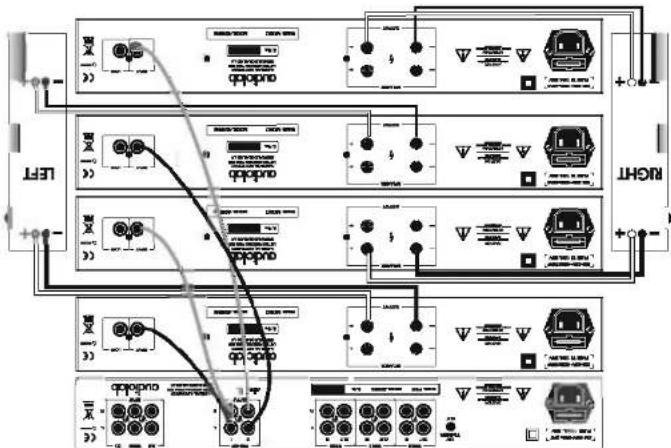
BL-Amplified convection-8200G with four 8200M power amplifiers
Communications should be created periodically. If necessary the plays should be cleaned with a proprietary dealer of, in the case of loudesper bar conditions, healthy re-mode.
Maintaining Connections
If the sound appears madded and loading clearly this may be because one or more speaker commands are not correctly made. Always check loudspeaker commands carefully when you have made any operation to your system.
difoult to dened.
This becomes especially important in bid wired and completely systems where the effects of one or more incorrectly connected (out of process) is apparatuses may severely impact the sound and yet be
It is essential that the loudspeaker conventions are secure and with
Phase
When you have finished using the equipment switch off all the power ampifiers. Some manuscripts master to have the pre- computer partsy switched ac. If you do this, answer that the simpler partentry switched ac. If you do this, answer that the pre- computer partsy switched ac. If you do this, answer that the power ampifiers. Some manuscripts master to have the pre-
the remote handset.
The 8200G pre-campifier may be operated via the front panel or
is operational.
The power indicators on all the units will light showing the system
to afford by the power amplifier/s.
Switch on the maws and then switch on the pre-compiler
amplifier/s and then into the wall socket.
Plug the power cords into the pre-amplifier and the power
the camp are secure and correctly made.
Make sure all the signal and/or placeholder connections to and from
Switching On
6: Service
5:Operation

text_image
Remote Handbag Methods shown in white control the 82000. Methods shown in white control the 82000. Methods shown in white control the 82000. Methods shown in white control the 82000. Methods shown in white control the 82000. Methods shown in white control the 82000. Methods shown in white control the 82000. Methods shown in white control the 82000. Methods shown in white control the 85000. Methods shown in white control the 85000. Methods shown in white control the 85000. Methods shown in white control the 85000. Methods shown in white control the 85000. Methods shown in white control the 85000. Methods shown in white control the 85000. Methods shown in white control the 85000. Methods shown in white Control on the four panel pulses. Methods shown in White Control on the four panel pulses. Methods shown in White Control on the four panel pulses. Methods shown in White Control on the four panel pulses. Methods shown in White Control on the four panel pulses. Methods shown in White Control on the four panel pulses. Methods shown in White Control on the four panel pulses. Methods shown in White Control on the four panel pulses. Methods shown in White Control on the four panel pulses. Methods shown in White Control on the four panel pulses. Methods shown in White Controls on the four panel pulses. Methods shown in White Controls on the four panel pulses. Methods shown in White Controls on the four panel pulses. Methods shown in White Controls on the four panel pulses. Methods shown in White Controls on the four panel pulses. Methods shown in White Controls on the four panel pulses. Methods shown in White Controls on the four panel pulses. Methods shown in White Controls on the four panel pulses. Methods shown in White Controls on the four panel pulses. Methods shown in White Controls On the four panel pulses. Methods shown in White Controls On the four panel pulses. Methods shown in White Controls On the four panel pulses. Methods shown in White Controls On the four panel pulses. Methods shown in White Controls On the four panel pulses. Methods shown in White Controls On the four panel pulses. Methods shown in White Controls On the four panel pulses. Methods shown in White Controls On the four panel pulses. Methods shown in White Controls On the four panel pulses. Methods shown in White Controls On The Four Panel Pulse IF you wish to record, the record input must be selected manually. if you wish to record, the record input must be selected manually. Press to select listening source. The I/RFIT selector on the front power turns. selector on the front power turns. If you wish to record, the record input must be selected manually. Press to select listening source. The I/RFIT selector on the front power turns. If you wish to record, the record input must be selected manually. Press to select listening source. The I/RFIT selector on the front power turns. If you wish to record, the record input must be selected manually. Press to select listening source. The I/RFIT selector on the front power turns. If you wish to record, the record input must be selected manually. Press to select listening source. The I/Ref Output should be required for additional details (D) or other functions that are used to monitor CPU power. Check with your dealer.Muta (convolution the remote handset) Targeting pre-amp output D/Fc. According to uncorrected Headphone Socket Solder for condition of headphones. Using headphones when not in us. Canating headphones requires the a2000
How to select sources to record to Top 1, Top 2 for Video. You can record to any Q, top or other recorders with and above in册. Record selector and input selector operate independently. It is possible to record from any source who will be listening to another
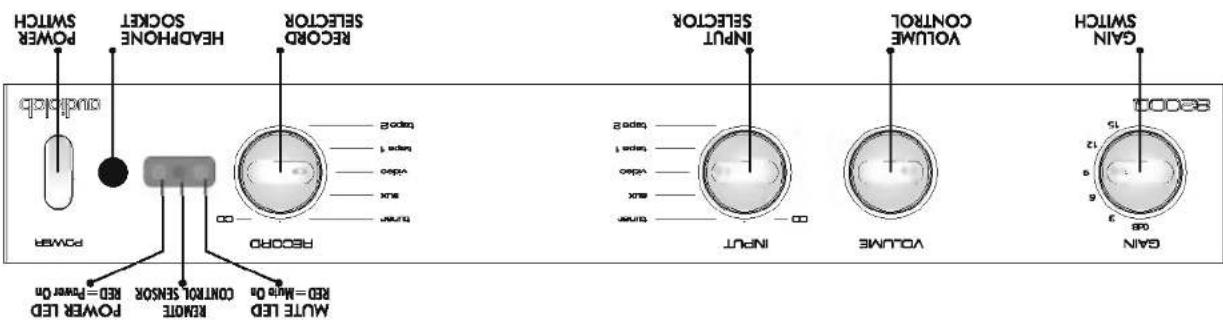
Record Selector
Volume Contract Adjusts playing volume. Always turn the volume up gradually. Turn the volume down before charging inputs.
This and the you to operate the two control over a wide range of 1000 units, with a understanding notes for those (also) from 248. The following: INCREASE: Gen. 1: light sensitivity cholesterol, for any source. UNICEFES Gen.: low sensitivity lipoprotein, for any source. Other changes in the age of the cell was affected by the growth of 3000 cells. Altered the gain will not be called the repeat cells.
Gain Switch
inrupt factor Turn to solid the listening source. The e2000 mice briefly when a new input is sealed.
When power is switched on the 2000 is moved for 3 seconds.
PowerSwitch
Controls and Functions
The dobry compartment is on the cover of the holder, using the bolsters, open the compartment over and inner the bolsters. Follow priority indicators in the dobry compartment, expressed below in parks, uses batteries of the some type and range.
Interacting Batteries in the Handset
Bardon any duouge surmonte to your dealer so soon as possible.
This Instruction Manual
One Remote Handset with two A batteries
One IEC power cord suitable for your acre
• The Auditory Board
Unpack the product fully. The cotton should contain
Unpacking
text_image
POWER SWITCH outclock power HEDPHONE SOCKET RECORO SELECTOR RECORO power INPUT SELECTOR INPUT CONTROL VOLUME 3 GAIN SWITCH GAIN MUTE LED RED = Mio 0s Control Sensor RED = Power 0s power LED2a: Introduction-82000
4: Connecting Loudspeakers
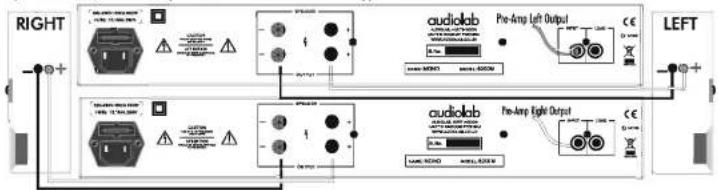
8200M - Standard Loudspeaker Connection
If you are stacking the 8200M, by convention the Left Channel is the upper connection
text_image
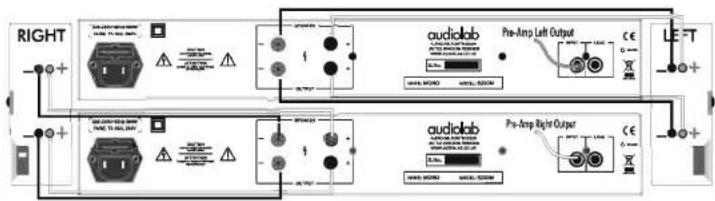
RIGHT audiolab Pre-Amp Left Output www.MHO www.800M audiolab Pre-Amp Right Output www.NEO www.ALEO LEFT8200M - Bi-Wired Loudspeaker Connection
BI-wiring offers improved sound quality because high and low frequency signals are carried individually to the loudspeaker drive units.
text_image
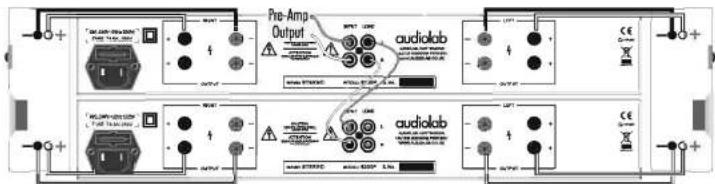
RIGHT Pre-Amp Left Output audiolab Pre-Amp Right Output audiolab LEFT8200P - Bi-Amplified Loudspeaker Connection
The principle of Bi-wiring can be extended by using a dedicated power amplifier for each loudspeaker drive unit
text_image
Pre-Amp Output audiolab + - + - + - + - + - + - + - + - + - + - + - + - + - + - + - + - + - + - + - + - + - + - + - + - + - + - + - + - + - + - + -Standard and Bi-Wired loudspeaker connections using the 8200P are shown in Section 3a.
Switch power off when making connections
Connecting Loudspeakers
Switch power off when connecting loudspeakers.
Use good quality low resistance loudspeaker cable.
Connect the Positive RED (+) terminal of the amplifier to the Positive (+) RED terminal of the loudspeaker. Connect the Negative (-) BLACK terminals similarly.
Tighten the loudspeaker terminals securely by hand. Make there are no loose strands of wire which could cause shorts.
When bi-wiring loudspeakers, make sure you remove the straps connecting the HF and LF terminal pairs.
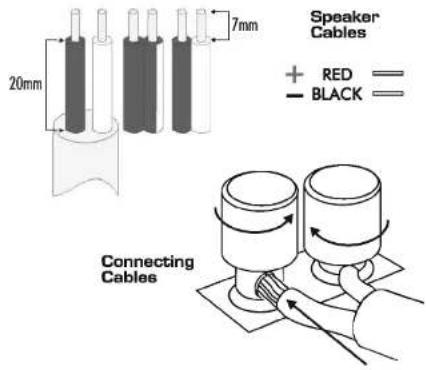
text_image
Speaker Cables + RED —— — BLACK —— 20mm 7mm Connecting Cables2b: Introduction- 8200P & 8200M
8200P

text_image
8200P POWER LED RED=Power On POWER SWITCH POWER audiolab8200M

text_image
8200M POWER LED RED=Power On POWER SWITCH POWER audiolabUnpacking
Unpack the product fully. Each carton should contain
The appropriate Audiolab Power Amplifier
One IEC power cord suitable for your area
⊗ This instruction manual
Report any damage or shortage to your dealer as soon as possible.
Retain the packing if possible. If you dispose of the packing, do so
with regard to any recycling regulations in your area.
Power Switch
When any Audiolab power amplifier is switched on, the output remains muted for 8 seconds. After 8 seconds you will hear the safety relay switch on and the system will now be operational.
When the amplifier is powered the red power indicator will light.
Power Amplifier Protection Circuits
Short Circuit Protection: If the output terminals are connected together or there is a short caused by a faulty speaker or connecting lead, the amplifier will mute and un-mute until the fault condition is removed.
DC Offset Protection: If there is an internal or external fault which may cause DC voltage to be presented to the loudspeaker, the amplifier will mute and stay muted until the fault is removed.
Thermal Protection: If the amplifier is driven excessively for long periods, or the output devices are pushed beyond their safe operating area, the amplifier will switch off and then switch back on again when it has cooled down.
In all cases, if the amplifier does not respond to remedial action, consult your dealer.
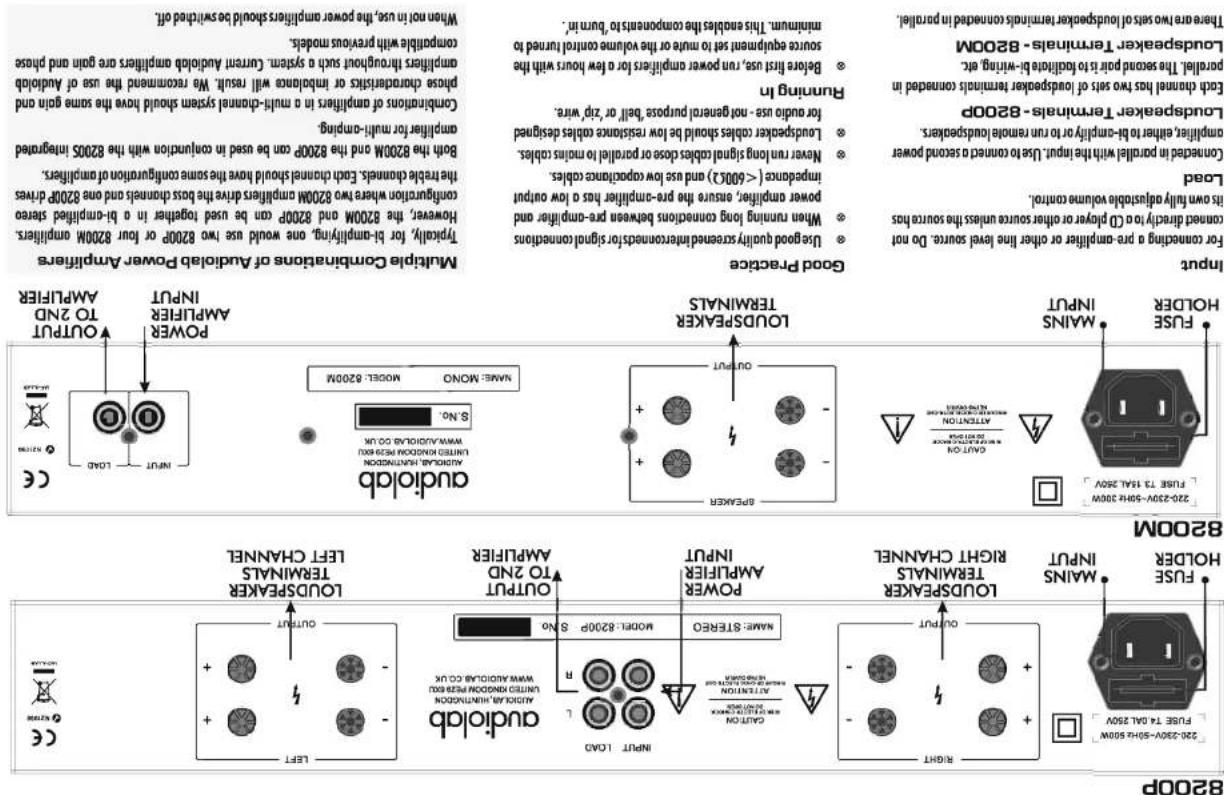
text_image
Multiple Combinations of Audio/Power Amplifiers Typical, for 8-complifying one would as low 200P or low 28000 components. However, the 2800M and 2820M can be used together in a 8-complied stereo configuration where two 2820M components drive the biss compounds and one 2820P drives the travel terminals. Each channel should have the same gain and compatible with previous models. Combitions of amplifiers in a multi-channel system should have the some gain and compatible with multi-comping. Combitions of amplifiers in a multi-channel system should have the some gain and compatible with previous models. When not in use, the power amplifiers should be switched off. Multiple Capacitivities of Audio/Power Amplifiers Output TO 2ND AMP/FIR Output INT/UT Output POWER INT/UT Output POWER INT/UT Output INT/UT Output POWER INT/UT Output INT/UT Output POWER INT/UT Output INT/UT Output POWER INT/UT Output INT/UT Output POWER INT/UT Output INT/UT Output POWER INT/UT Output INT/UT Output POWER INT/UT Output INT/UT Output POWER INT/UT Output INP/RL INT/RL INT/RL INT/RL INT/RL INT/RL INT/RL INT/RL INT/RL INT/RL INT/RL INT/RL INT/RL INT/RL INT/RL INT/RL INT/RL INT/RL INT/RL INT/RL INT/RL INT/RL INT/RL INT/RL INT/RL INT/RL INP/RCL INT/RL INT/RL INT/RL INT/RL INT/RL INT/RL INT/RL INT/RL INT/RL INT/RL INT/RL INT/RL INT/RL INT/RL INT/RL INT/RL INT/RL INT/RL INT/RL INT/RL INT/RL INT/RL INT/RL INT/RL INT/RIL INT/RIL INT/RIL INT/RIL INT/RIL INT/RIL INT/RIL INT/RIL INT/RIL INT/RIL INT/RIL INT/RIL INT/RIL INT/RIL INT/RIL INT/RIL INT/RIL INT/RIL INT/RIL INT/RIL INT/RIL INT/RIL INT/RIL INT/RIL INT/RIL INT/RRL INT/RRL INT/RRL INT/RRL INT/RRL INT/RRL INT/RRL INT/RRL INT/RRL INT/RRL INT/RRL INT/RRL INT/RRL INT/RRL INT/RRL INT/RRL INT/RRL INT/RRL INT/RRL INT/RRL INT/RRL INT/RRLSwitch power off when making connections
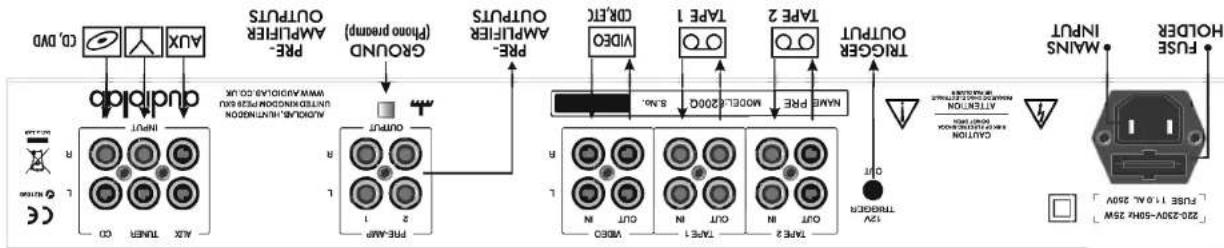
3b: Connections-8200P & 8200M
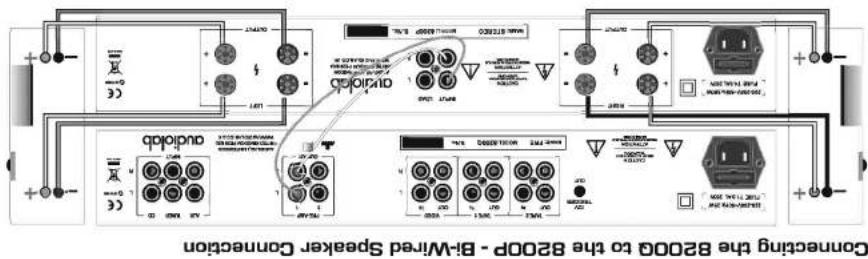
text_image
Concenting the 8200P to the 8200P - B-Wired Speaker Connection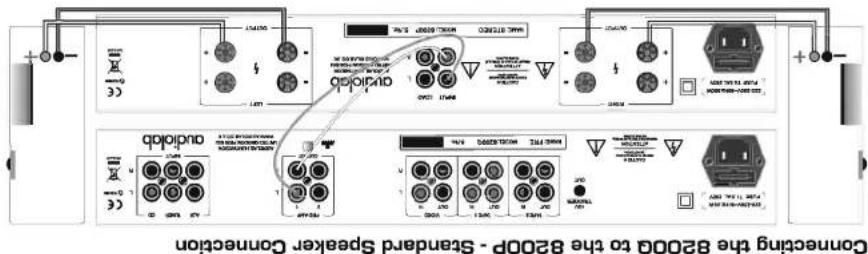
text_image
Connecting the 82000 to the 82000 - Standard Speaker ConnectionThis is a 3.5mm clock socket. When conaded to the trigger input of a power amplifier (e.g. the Aludide 8200B) the 82000 pre-amplifier and any associated power amplifiers/scan be simultaneously brought in and out of Standay.
12YTRIGCER
dealer.
Use only if phono py-complier and tunnelable use used and both ore (loss 11 double insulated (no earth convection), in this case the ground terminal can be connected to the method of cost these units to eliminate residual burn. The ground terminal must not be used as a safety earth. If in doubt consult your
GROUND
mute is seized.
Low impedance (100 ohm) outputs for driving external power amplifiers, sub-workers or signal processors. Long cables may be used if required. Pre-amp outputs are switched off when
PRE-AMP OUT 182
Three sets of record outputs for completion of up to three stereo audio recorders, e.g. tape recorder, (D) recorder, audio recording input of VCR, DVD, MP3, MiniDisc recorder, etc.
VIDEO OUT TAPE 1 OUT TAPE 2 OUT
The six inputs may be used for controlling any line level source.
CD, TURNER, AUX, VIDEO IN, TAPE 1 IN, TAPE 2 IN
82000 Connections
flowchart
graph TD
    A["Max Input"] --> B["ON/OFF"]
    B --> C["OUT"]
    C --> D["TYPE 2"]
    D --> E["OFF"]
    E --> F["IN"]
    F --> G["TYPE 1"]
    G --> H["OFF"]
    H --> I["IN"]
    I --> J["TYPE 2"]
    J --> K["OFF"]
    K --> L["IN"]
    L --> M["TYPE 2"]
    M --> N["OFF"]
    N --> O["IN"]
    O --> P["TYPE 2"]
    P --> Q["OFF"]
    Q --> R["IN"]
    R --> S["TYPE 2"]
    S --> T["OFF"]
    T --> U["IN"]
    U --> V["TYPE 2"]
    V --> W["OFF"]
    W --> X["IN"]
    X --> Y["TYPE 2"]
    Y --> Z["OFF"]
    Z --> AA["IN"]
    AA --> AB["TYPE 2"]
    AB --> AC["OFF"]
    AC --> AD["IN"]
    AD --> AE["TYPE 2"]
    AE --> AF["OFF"]
    AF --> AG["IN"]
    AG --> AH["TYPE 2"]
    AH --> AI["OFF"]
    AI --> AJ["IN"]
    AJ --> AK["TYPE 2"]
    AK --> AL["OFF"]
    AL --> AM["IN"]
    AM --> AN["TYPE 2"]
    AN --> AO["OFF"]
    AO --> AP["IN"]
    AP --> AQ["TYPE 2"]
    AQ --> AR["OFF"]
    AR --> AS["IN"]
Switch power off when making connections