
RDS-TMC - Browser TOMTOM - Kostenlose Bedienungsanleitung
Finden Sie kostenlos die Bedienungsanleitung des Geräts RDS-TMC TOMTOM als PDF.


| Produkttyp | RDS-TMC Verkehrsdatenempfänger |
| Marke | TomTom |
| Modell | RDS-TMC |
| Kategorie | Navigationszubehör |
| Abmessungen (ca.) | 55 × 30 × 12 mm |
| Gewicht (ca.) | 20 g |
| Stromversorgung | USB (5 V) oder 12-V-Fahrzeugadapter |
| Stromverbrauch | < 0,5 W |
| Empfangsfrequenz | FM RDS (87,5 – 108 MHz) |
| Protokoll | RDS-TMC (Traffic Message Channel) |
| Funktionen | Empfang aktueller Verkehrsinformationen, automatische Routenaktualisierung |
| Kompatibilität | TomTom Navigationsgeräte mit RDS-TMC-Anschluss |
| Installation | Plug-and-Play, kein separates Netzteil erforderlich |
| Anzeige | keine (reine Empfangseinheit) |
| Gehäusematerial | Kunststoff |
| Betriebstemperatur | -10 °C bis +60 °C |
| Lagertemperatur | -20 °C bis +70 °C |
| Schutzart | IP20 (nicht wasserdicht) |
| Reinigung | Mit einem trockenen, fusselfreien Tuch abwischen |
| Wartung | Keine regelmäßige Wartung erforderlich |
| Sicherheitshinweise | Nicht Feuchtigkeit oder direkter Sonneneinstrahlung aussetzen |
| Ersatzteile / Reparatur | Keine vom Benutzer austauschbaren Teile; bei Defekt Gerät ersetzen |
| Umweltinformationen | Elektro-Altgeräte nicht im Hausmüll entsorgen |
| Zertifizierungen | CE, RoHS |
Häufig gestellte Fragen - RDS-TMC TOMTOM
Benutzerfragen zu RDS-TMC TOMTOM
0 Frage zu diesem Gerät. Beantworten Sie die, die Sie kennen, oder stellen Sie Ihre eigene.
Eine neue Frage zu diesem Gerät stellen
Laden Sie die Anleitung für Ihr Browser kostenlos im PDF-Format! Finden Sie Ihr Handbuch RDS-TMC - TOMTOM und nehmen Sie Ihr elektronisches Gerät wieder in die Hand. Auf dieser Seite sind alle Dokumente veröffentlicht, die für die Verwendung Ihres Geräts notwendig sind. RDS-TMC von der Marke TOMTOM.
BEDIENUNGSANLEITUNG RDS-TMC TOMTOM
RDS-TMC Receiver Guide
Introduction
This guide explains how to set up the TomTom RDS-TMC Traffic Receiver, for receiving traffic information to help improve your journey times and travel planning.
Getting started
Before connecting the RDS-TMC Traffic Receiver for the first time, make sure your TomTom device is switched off.
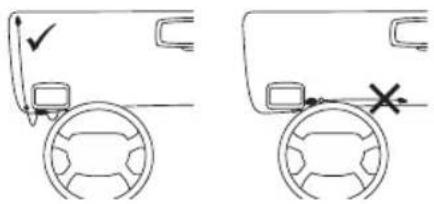
- Attach the TomTom device to the Windscreen Holder.
- Plug the TMC receiver into your TomTom device or the Windscreen Mount, depending on your product
- Position the TomTom device at the bottom left corner of the car windscreen.
- Press the transparent suction cup at the tip of the antenna firmly against the upper left corner of the car windscreen
- Press the second transparent suction cup firmly against the bottom left corner of your windscreen.
- Place the egg shaped receiver with the black suction cup on the windscreen at any place convenient. Avoid putting too much tension on the cables.
The Traffic bar is shown in the Driving View and your TomTom device searches for a radio station that carries RDS-TMC information.
While your TomTom device is searching for a radio station, the following symbols are shown on the top of the Traffic bar:

Your TomTom device is looking for a radio station.

Your TomTom device has found a radio station and is checking if the radio station carries RDS-TMC information.

Your TomTom device is tuned to a radio station and receives RDS-TMC information when available.
Setting the frequency
If you want to tune to a particular radio station, you can enter the frequency as follows:
- Tap the Traffic bar in the Driving View.
- Tap Tune RDS-TMC.
- Enter the frequency of the radio station.
- Tap Done.
Your TomTom device looks for the radio station. If it does not find the station you requested, it will search for the next available station.
Note: If radio reception is poor, for example when you are driving through a mountain valley, RDS-TMC reception will also be affected.
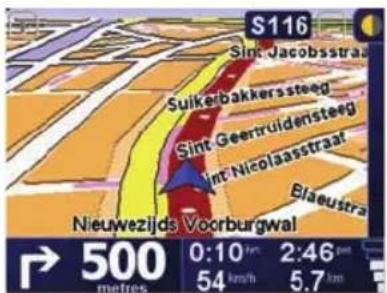
Setting the country
If you are driving close to a country border, your TomTom device may tune to a radio station from a neighbouring country. If this happens you will only receive RDS-TMC traffic information for the neighbouring country.
To avoid tuning to a radio station in another country, set the required country as follows:
- Tap the screen to open the Main Menu.
- Tap TomTom Traffic.
- Tap Select RDS-TMC country.
- Select the country that you want to receive traffic reports for.
Your TomTom device searches for a radio station located in the country you have chosen.
Driving View
Traffic incidents are shown in the Driving View and on the Traffic bar.
Incidents are shown on the Traffic bar, in the order that they occur along your planned route.
The estimated time for any delay is shown next to the incident symbol.
The distance from your current location to the next Traffic incident on your route, is shown at the bottom of the Traffic bar.
Incidents are also shown in the Driving View, so that you can view the precise location of any incident.
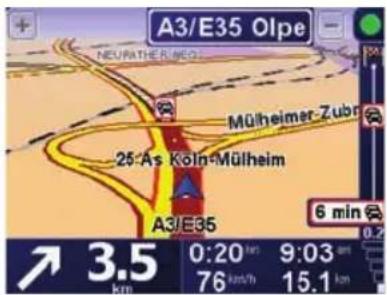
For more detailed information about specific Traffic incidents, tap the Traffic bar, then tap Show traffic info.
RDS-TMC Traffic menu
Tap the Traffic bar in the Driving View to open the Traffic Status menu.

Minimise traffic delays
Your TomTom device replans your route based on the latest traffic information.

Tune RDS-TMC
Enter radio frequency that carries RDS-TMC information.

Show traffic info
Shows traffic incidents on the map.
Tap Replan to calculate a new route based on the latest traffic information.
Important: Reliable TMC Traffic reception is strongly dependent on: optimal antenna placement, vehicle features (e.g. coated windscreen), surrounding environment (e.g. mountains, high buildings), RDS-TMC Radio station transmission signal.

Marke : TOMTOM
Modell : RDS-TMC
Kategorie : Browser