T7300 - Thermostat HONEYWELL - Kostenlose Bedienungsanleitung
Finden Sie kostenlos die Bedienungsanleitung des Geräts T7300 HONEYWELL als PDF.


| Produkttyp | Programmierbarer Thermostat |
| Marke | Honeywell |
| Modell | T7300 |
| Abmessungen (B x H x T) | ca. 100 x 80 x 30 mm |
| Gewicht | ca. 150 g |
| Stromversorgung | 24 V Wechselstrom oder 2 AA-Batterien (Ersatz) |
| Display | LCD mit Hintergrundbeleuchtung |
| Programmierbare Zeitpläne | 7-Tage, 4 Zeitintervalle pro Tag |
| Heiz-/Kühlsteuerung | Ja, umschaltbar |
| Genauigkeit der Temperaturregelung | ±0,5 °C |
| Temperaturbereich | 5 °C bis 35 °C (Heizen) / 10 °C bis 37 °C (Kühlen) |
| Kompatible Systeme | Standard 24-V-Heiz-/Kühlsysteme (Gas, Öl, Elektro, Wärmepumpe) |
| Benutzeroberfläche | Tastenfeld mit 4 Tasten |
| Kindersicherung / Tastensperre | Ja, einstellbar |
| Ferienmodus | Ja, programmierbar |
| Filterwechselanzeige | Ja, einstellbar |
| Batteriewechselanzeige | Ja, bei schwacher Batterie |
| Reinigung und Pflege | Mit einem trockenen, weichen Tuch abwischen. Keine Flüssigkeiten oder Reinigungsmittel verwenden. |
| Sicherheit | Niederspannung; keine besonderen Sicherheitsvorkehrungen erforderlich. |
| Ersatzteile | Batterien (AA), ggf. Montageplatte |
| Reparierbarkeit | Keine reparierbaren Teile im Innenraum; nur Batteriewechsel durch Benutzer. |
Häufig gestellte Fragen - T7300 HONEYWELL
Benutzerfragen zu T7300 HONEYWELL
0 Frage zu diesem Gerät. Beantworten Sie die, die Sie kennen, oder stellen Sie Ihre eigene.
Eine neue Frage zu diesem Gerät stellen
Laden Sie die Anleitung für Ihr Thermostat kostenlos im PDF-Format! Finden Sie Ihr Handbuch T7300 - HONEYWELL und nehmen Sie Ihr elektronisches Gerät wieder in die Hand. Auf dieser Seite sind alle Dokumente veröffentlicht, die für die Verwendung Ihres Geräts notwendig sind. T7300 von der Marke HONEYWELL.
BEDIENUNGSANLEITUNG T7300 HONEYWELL
Honeywell
ENVIRONMENTAL CONTROL

T7200/T7300
Programmable
Commercial
Thermostat
Owner's Manual
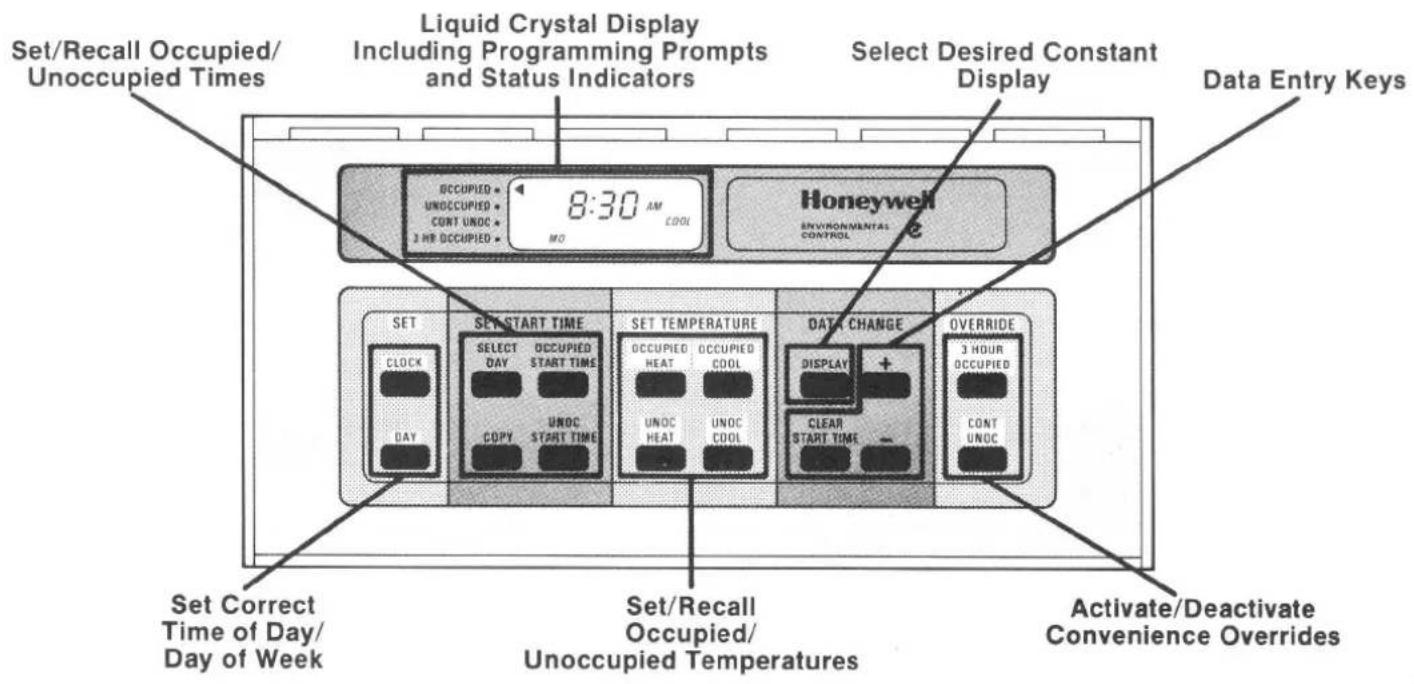
This thermostat provides security which can lock out programming to prevent tampering. If the keyboard or display do not respond, programming may be locked out -- contact your installer. The override, display and clock keys remain active and are not locked out by this feature. See the section titled OVERRIDING THE THERMOSTAT'S PROGRAM for a complete description.
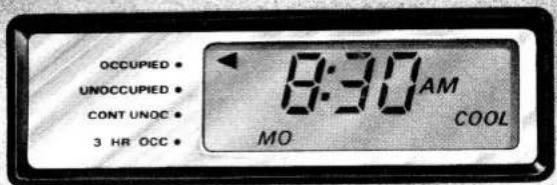
The T7200 and T7300 thermostats feature a liquid crystal display of temperature or of time and day of week. These thermostats mount on the wall and include the display, program memory, keyboard and temperature sensor. Security is provided for tamper resistance, along with three overrides which maximize comfort without sacrificing energy savings. The T7200 is for use on 1 heat - 1 cool conventional rooftop systems. The T7300 is for use on 1 heat - 1 cool to 2 heat - 2 cool conventional or heat pump rooftop systems, and may be used with a remote sensor.
T7200/T7300 PROGRAMMABLE COMMERCIAL THERMOSTAT
Congratulations!
You are the owner of one of the finest thermostats ever produced by Honeywell.
The unique features of the T7200/T7300 Programmable Commercial Thermostats satisfy the special requirements of commercial single zone air conditioning systems, and provide convenience and temperature control accuracy that is unparalleled in the industry. These thermostats also include energy saving features which allow them to minimize the energy needed to maintain comfort conditions by
using outdoor air for "free" cooling whenever possible.
A thorough review of this Owner's Manual will help you identify those features which will maximize comfort, convenience and savings in your application.
Terms and words that may not be familiar to you are explained in the glossary at the end of this manual.
TABLE OF CONTENTS
Page
T7200/T7300 Thermostat Operation
Startup 6
Operation....6
Selecting the Desired Operating Display 6
Indicators 6
Minimum Operation Times 7
Program Schedule 7
Security and Overrides 8
Security 10
Overriding the Thermostat's Program 10
3 Hour Occupied 11
Setpoint Adjust 13
Continuous Unoccupied 15
Introduction to T7200/T7300 Programming 17
Programming the Thermostat 18
To Set The Clock 20
To Set The Day 21
To Set The Occupied Heat Temperature 23
To Set The Unoccupied Heat Temperature 25
To Set The Occupied Cool Temperature 27
To Set The Unoccupied Cool Temperature 29
To Set Occupied And Unoccupied Start Times 31
To Clear A Programmed Start Time 33
To Copy A Day 35
To Set The Amount of Setpoint Adjust 37
Sample Schedule 1 39
Sample Schedule 2 40
Form to Enter Your Schedule 42
Battery Access and Replacement 44
Glossary 46
Troubleshooting Guide 48
T7200/T7300 THERMOSTAT OPERATION
STARTUP
When power is first applied, an internal startup program begins. This takes place after any total loss of power (supply voltage and backup battery) and lasts 2 seconds.
At this time, default temperature setpoint values are used for temperature control. These are: heating 68 F [20 C] and cooling 78 F [26 C]. Following the startup period, you can enter new setpoints which will be used in place of these default values.
Should a power failure occur after your time and temperature schedule entries are made, the backup battery will maintain your schedule up to 60 hours. As long as either system or battery backup power is present, your program is available and will be used for temperature control.
OPERATION
SELECTING THE DESIRED OPERATING DISPLAY
The DISPLAY key allows you to select a continuous display of time or temperature. Each press of the DISPLAY key will toggle the display between time or temperature.
INDICATORS
No Program in Thermostat Memory
A display of 4 dashes (----) indicates that there is no program stored in the thermostat's memory. This will occur when power is first applied to the thermostat, or when power was lost to the thermostat while battery backup was either weak or not installed.
Loss of External Power
A blank display indicates loss of external power. The backup battery will maintain your time and temperature schedule during power loss. The keyboard and display are inoperative while the thermostat is operating on battery power.
BATT Displayed on LCD
BATT displayed on LCD indicates backup battery is weak or not installed. Refer to section titled BATTERY ACCESS AND REPLACEMENT for instructions.
Temperature Display of --°
A display of 2 dashes and a degree symbol ( --^ ) indicates a temperature sensor failure. See section titled TROUBLESHOOTING GUIDE for instructions.
MINIMUM OPERATION TIMES
The T7200 and T7300 thermostats incorporate minimum operation times of 2 to 4 minutes. These times are in effect after startup, anytime power to the thermostat is removed and then reapplied, or after heating or cooling goes either on or off. These time delays will protect and extend the life of your heating and cooling equipment.
Due to these times, the thermostats will not react instantaneously to setpoint changes.
T7200/T7300 THERMOSTAT OPERATION
PROGRAM SCHEDULE
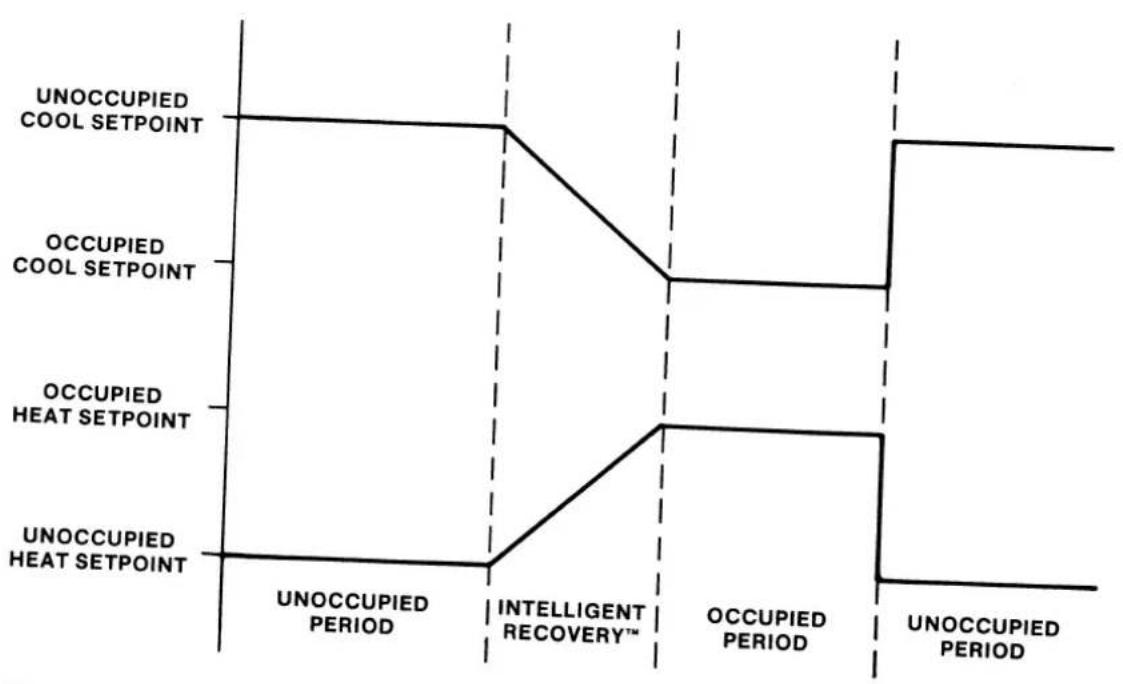
Each day of the week can be individually programmed with 2 Occupied and 2 Unoccupied periods to make maximum use of schedule variations.
Occupied operation is based on Occupied Heat and Occupied Cool setpoints. Unoccupied operation is based on Unoccupied Heat and Unoccupied Cool setpoints.
Intelligent Recovery™, based on a setpoint ramping feature, is used when switching from Unoccupied operation to Occupied operation. This selects the optimum time to begin building warmup or cool-down, and can vary depending on space temperature deviation from setpoint. The end result of Intelligent Recovery™ is the correct temperature at the occupancy time. This increases energy savings while also providing increased user convenience.
flowchart
graph TD
    A["UNOCCUPIED COOL SETPOINT"] --> B["UNOCCUPIED PERIOD"]
    B --> C["INTELLIGENT RECOVERY™"]
    C --> D["OCCUPIED PERIOD"]
    D --> E["UNOCCUPIED PERIOD"]
    F["OCCUPIED COOL SETPOINT"] --> G["OCCUPIED PERIOD"]
    G --> H["INTELLIGENT RECOVERY™"]
    H --> I["OCCUPIED PERIOD"]
    I --> J["UNOCCUPIED PERIOD"]
    K["OCCUPIED HEAT SETPOINT"] --> L["OCCUPIED PERIOD"]
    L --> M["INTELLIGENT RECOVERY™"]
    M --> N["OCCUPIED PERIOD"]
    N --> O["UNOCCUPIED PERIOD"]
SECURITY AND OVERRIDES
SECURITY
The T7200/T7300 thermostats provide program security capability which, if used, can lock out programming. This prevents tampering with thermostat setpoints and schedules. If the lock out function is not used, the thermostat can be programmed normally as described in this manual. When the thermostat is locked out, only limited keyboard functions are available. The three overrides, setting clock times and program reviews can be performed when the keyboard is locked out.
OVERRIDING THE THERMOSTAT'S PROGRAM
The security feature of this thermostat does not lock out the use of the 3 overrides.
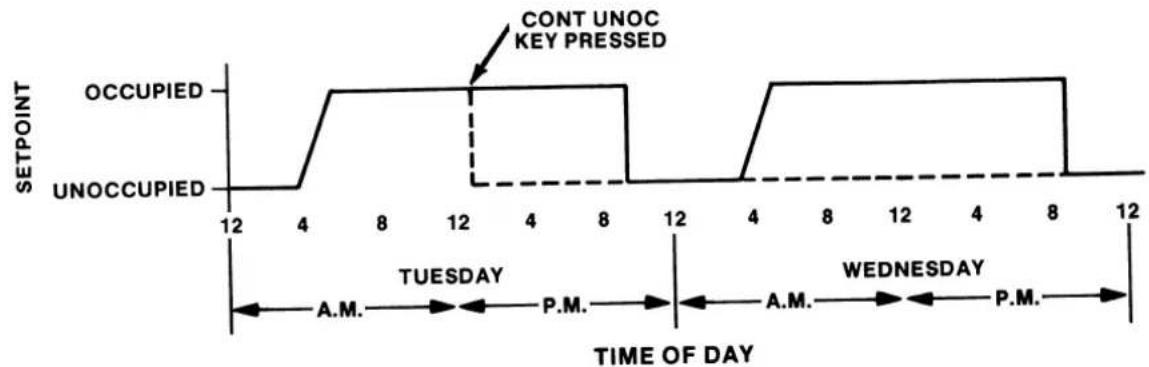
Two of the overrides (3 Hour Occupied and Setpoint Adjust) are timed for 3 hours, at which time the thermostat returns to the normal program. The last override (Continuous Unoccupied) is not timed. Once this override is in operation, it cannot be exited unless the CONT UNOC key is pressed or another override is placed into operation.
None of these 3 overrides may be used at the same time, and the last override placed into operation will be in control.
SECURITY AND OVERRIDES
KEY USED FOR THE 3 HOUR OCCUPIED OVERRIDE
3 HOUR OCCUPIED
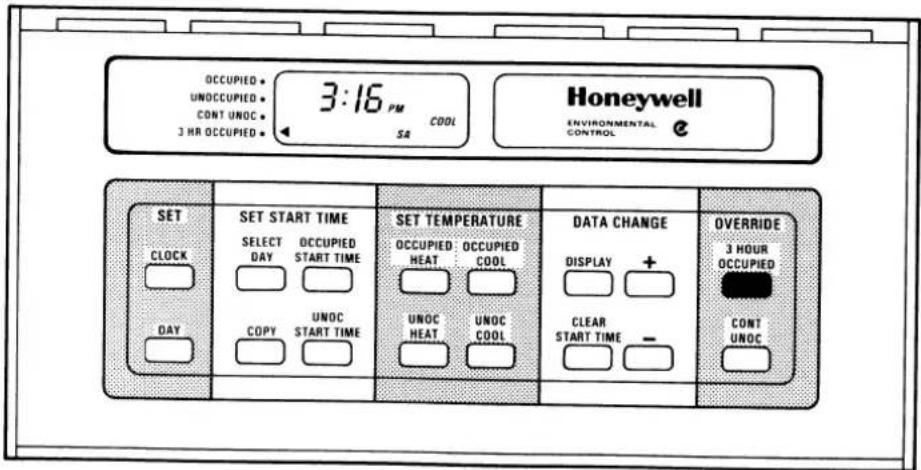
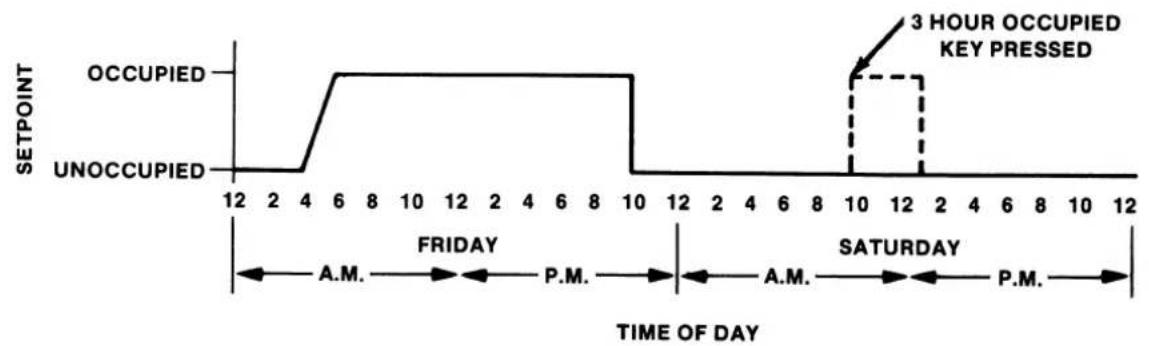
This override is useful in situations where people will have to be in a building when it is normally vacant such as after normal working hours or on weekends or holidays. Press the 3 HOUR OCCUPIED key to place the thermostat into the Occupied mode,
controlling the space temperature to the occupied setpoints for 3 hours. The indicator on the left side of the display will point to 3 HR OCCUPIED while this override is in effect.
line
| Time of Day | Occupied | Unoccupied | | :--- | :--- | :--- | | 12 | 0 | 0 | | 2 | 0 | 0 | | 3 | 0 | 0 | | 4 | 0 | 0 | | 5 | 1 | 0 | | 6 | 1 | 0 | | 7 | 1 | 0 | | 8 | 1 | 0 | | 9 | 1 | 0 | | 10 | 0 | 0 | | 11 | 0 | 0 | | 12 | 0 | 0 | | 13 | 0 | 0 | | 14 | 0 | 0 | | 15 | 0 | 0 | | 16 | 0 | 0 | | 17 | 0 | 0 | | 18 | 0 | 0 | | 19 | 0 | 0 | | 20 | 0 | 0 | | 21 | 0 | 0 | | 22 | 0 | 0 | | 23 | 0 | 0 | | 24 | 0 | 0 | | 25 | 0 | 0 | | 26 | 0 | 0 | | 27 | 0 | 0 | | 28 | 0 | 0 | | 29 | 0 | 0 | | 30 | 0 | 0 | | 31 | 0 | 0 | | 32 | 0 | 0 | | 33 | 0 | 0 | | 34 | 0 | 0 | | 35 | 0 | 0 | | 36 | 0 | 0 | | 37 | 0 | 0 | | 38 | 0 | 0 | | 39 | 0 | 0 | | 40 | 0 | 0 | | 41 | 0 | 0 | | 42 | 0 | 0 | | 43 | 0 | 0 | | 44 | 0 | 0 | | 45 | 0 | 0 | | 46 | 0 | 0 | | 47 | 0 | 0 | | 48 | 0 | 0 | | 49 | 0 | 0 | | 50 | 0 | 0 | | 51 | 0 | 0 | | 52 | 0 | 0 | | 53 | 0 | 0 | | 54 | 0 | 0 | | 55 | 0 | 0 | | 56 | 0 | 0 | | 57 | 0 | 0 | | 58 | 0 | 0 | | 59 | 0 | 0 | | 60 | 0 | 0 | | 61 | 0 | 0 | | 62 | 0 | 0 | | 63 | 0 | 0 | | 64 | 0 | 0 | | 65 | 0 | 0 | | 66 | 0 | 0 | | 67 | 0 | 0 | | 68 | 0 | 0 | | 69 | 0 | 0 | | 70 | 0 | 0 | | Note: The data is already in the image. The 'Occupied' and 'Unoccupied' values are only present for the first three time points (Friday to Saturday). There is only one data point for the last three times (Friday to Saturday) in the time series.SECURITY AND OVERRIDES
KEYS USED FOR THE SETPOINT ADJUST OVERRIDE
SETPOINT ADJUST
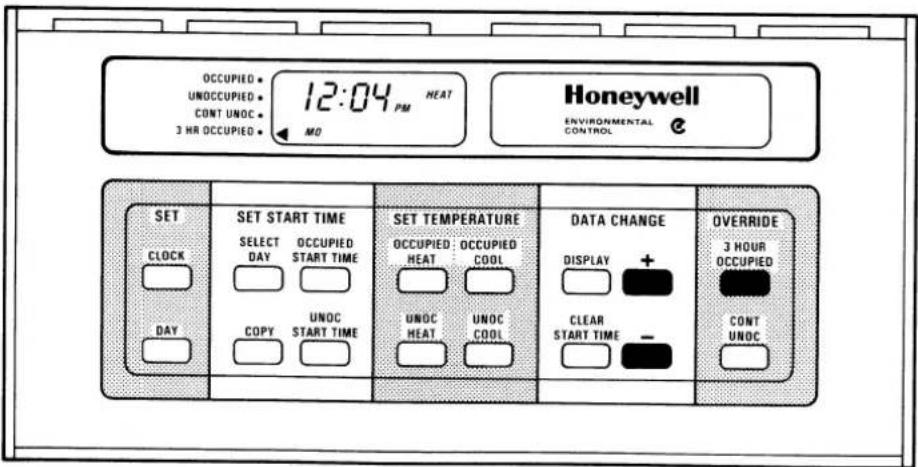
This override is useful in situations where the occupied space feels too cool or warm for the occupants and a temporary change of setpoint would make the temperature more comfortable. It can be called from either the Occupied or Unoccupied modes and functions in this way:
— Press the 3 HOUR OCCUPIED key. If in Unoccupied, the thermostat will go to the Occupied mode, controlling the space temperature to the Occupied setpoints for 3 hours. If in Occupied mode, no change of setpoints will occur. However, this will ensure 3 hours of Occupied setpoint control regardless of any Unoccupied Start Times that may be programmed. The indicator on the left side of the display will point to 3 HR OCCUPIED while this override is in effect.
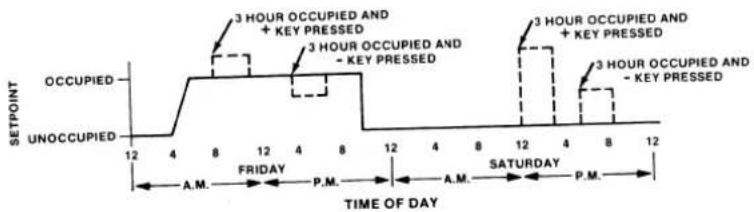
THEN: — Press the the + key. This will adjust the setpoint up by a preprogrammed "Amount of Setpoint Adjust". As an example, Occupied Heat is set for 70 F and "Amount of Setpoint Adjust" is set for 5 F. After the + key is pressed, the Occupied Heat setpoint will be 70 + 5 or 75 F. The thermostat will then control the space temperature to 75 F and the indicator on the left side of the display will continue to point to 3 HR OCCUPIED during the remainder of the 3 hours of adjusted setpoint.
OR — Press the - key. This will adjust the setpoint down by a preprogrammed "Amount of Setpoint Adjust". As an example, Occupied Heat is set for 70 F and "Amount of Setpoint Adjust" is set for 5 F. After the - key is pressed, the Occupied Heat setpoint will be 70 - 5 or 65 F. The thermostat will then control the space temperature to 65 F and the indicator on the left side of the display will continue to point to 3 HR OCCUPIED during the remainder of the 3 hours of adjusted setpoint.
NOTE: Refer to the section titled TO SET THE AMOUNT OF SET- POINT ADJUST for instructions on how to vary the setpoint adjust.
SECURITY AND OVERRIDES
KEY USED FOR CONTINUOUS UNOCCUPIED OVERRIDE
CONTINUOUS UNOCCUPIED
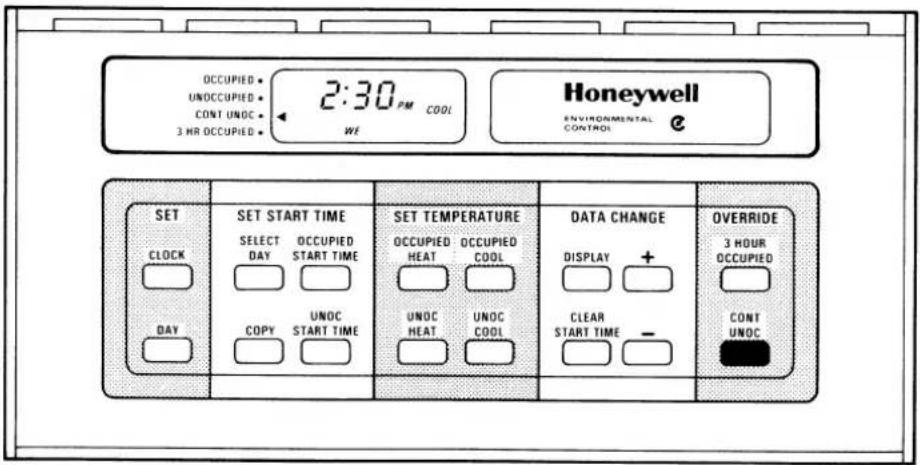
This override is useful in situations where the building will be vacant for an extended period of time (such as temporary closings or long holidays). Pressing the CONT UNOC key will place the T7300 into the unoccupied period for an indefinite time.
When in this mode, the thermostat will control to the unoccupied setpoints with the indicator pointing to CONT UNOC. A second press of the CONT UNOC key will cancel this override mode and return the T7300 to normal operation.
line
| Time of Day | Status | Setpoint | | :--- | :--- | :--- | | 12:00 | Occupied | Unoccupied | | 12:00 | Cont Unoc Key Pressed | Occupied | | 12:00 | Unoccupied | Unoccupied | | 12:30 | Occupied | Occupied | | 12:30 | Cont Unoc Key Pressed | Occupied | | 12:30 | Unoccupied | Unoccupied | | 12:35 | Occupied | Occupied | | 12:35 | Cont Unoc Key Pressed | Occupied | | 12:35 | Unoccupied | Unoccupied | | 12:40 | Occupied | Occupied | | 12:40 | Cont Unoc Key Pressed | Occupied | | 12:40 | Unoccupied | Unoccupied | | 12:45 | Occupied | Occupied | | 12:45 | Cont Unoc Key Pressed | Occupied | | 12:45 | Unoccupied | Unoccupied | | 12:50 | Occupied | Occupied | | 12:50 | Cont Unoc Key Pressed | Occupied | | 12:50 | Unoccupied | Unoccupied | | 12:55 | Occupied | Occupied | | 12:55 | Cont Unoc Key Pressed | Occupied | | 12:55 | Unoccupied | Unoccupied | | 12:60 | Occupied | Occupied | | 12:60 | Cont Unoc Key Pressed | Occupied | | 12:60 | Unoccupied | Unoccupied | | 12:65 | Occupied | Occupied | | 12:65 | Cont Unoc Key Pressed | Occupied | | 12:65 | Unoccupied | Unoccupied | | 12:70 | Occupied | Occupied | | 12:70 | Cont Unoc Key Pressed | Occupied | | 12:70 | Unoccupied | Unoccupied | | 12:75 | Occupied | Occupied | | 12:75 | Cont Unoc Key Pressed | Occupied | | 12:75 | Unoccupied | Unoccupied | | 12:80 | Occupied | Occupied | | 12:80 | Cont Unoc Key Pressed | Occupied | | 12:80 | Unoccupied | Unoccupied | | 12:85 | Occupied | Occupied | | 12:85 | Cont Unoc Key Pressed | Occupied | | 12:85 | Unoccupied | Unoccupied | | 12:90 | Occupied | Occupied | | 12:90 | Cont Unoc Key Pressed | Occupied | | 12:90 | Unoccupied | Unoccupied | | 12:95 | Occupied | Occupied | | 12:95 | Cont Unoc Key Pressed | Occupied | | 12:95 | Unoccupied | Unoccupied | | 13:00 | Occupied | Occupied | | 13:00 | Cont Unoc Key Pressed | Occupied | | 13:00 | Unoccupied | Unoccupied | | 13:05 | Occupied | Occupied | | 13:05 | Cont Unoc Key Pressed | Occupied | | 13:05 | Unoccupied | Unoccupied | | 13:10 | Occupied | Occupied | | 13:10 | Cont Unoc Key Pressed | Occupied | | 13:10 | Unoccupied | Unoccupied | | 13:15 | Occupied | Occupied | | 13:15 | Cont Unoc Key Pressed | Occupied | | 13:15 | Unoccupied | Unoccupied | | 13:20 | Occupied | Occupied | | 13:20 | Cont Unoc Key Pressed | Occupied | | 13:20 | Unoccupied | Unoccupied | | 13:25 | Occupied | Occupied | | 13:25 | Cont Unoc Key Pressed | Occupied | | 13:25 | Unoccupied | Unoccupied | | 13:30 | Occupied | Occupied | | 13:30 | Cont Unoc Key Pressed | Occupied | | 13:30 | Unoccupied | Unoccupied | | 13:35 | Occupied | Occupied | | 13:35 | Cont Unoc Key Pressed | Occupied | | 13:35 | Unoccupied | Unoccupied | | 13:40 | Occupied | Occupied | | 13:40 | Cont Unoc Key Pressed | Occupied | | 13:40 | Unoccupied | Unoccupied | | 13:45 | Occupied | Occupied | | 13:45 | Cont Unoc Key Pressed | Occupied | | 13:45 | Unoccupied | Unoccupied | | 13:50 | Occupied | Occupied | | 13:50 | Cont Unoc Key Pressed | Occupied | | 13:50 | Unoccupied | Unoccupied | | 13:55 | Occupied | Occupied | | 13:55 | Cont Unoc Key Pressed | Occupied | | 13:55 | Unoccupied | Unoccupied | | 14:00 | Occupied | Occupied | | 14:00 | Cont Unoc Key Pressed | Occupied | | 14:00 | Unoccupied | Unoccupied | | 14:05 | Occupied | Occupied | | 14:05 | Cont Unoc Key Pressed | Occupied | | 14:05 | Unoccupied | Unoccupied | | 14:10 | Occupied | Occupied | | 14:10 | Cont Unoc Key Pressed | Occupied | | 14:10 | Unoccupied | Unoccupied | | 14:15 | Occupied | Occupied | | 14:15 | Cont Unoc Key Pressed | Occupied | | 14:15 | Unoccupied | Unoccupied | | 14:20 | Occupied | Occupied | | 14:20 | Cont Unoc Key Pressed | Occupied | | 14:20 | Unoccupied | Unoccupied | | 14:25 | Occupied | Occupied | | 14:25 | Cont Unoc Key Pressed | Occupied | | 14:25 | Unoccupied | Unoccupied | | 14:30 | Occupied | Occupied | | 14:30 | Cont Unoc Key Pressed | Occupied | | 14:30 | Unoccupied | Unoccupied | | 14:35 | Occupied | Occupied | | 14:35 | Cont Unoc Key Pressed | Occupied | | 14:35 | Unoccupied | Unoccupied | | 14:40 | Occupied | Occupied | | 14:40 | Cont Unoc Key Pressed | Occupied | | 14:40 | Unoccupied | Unoccupied | | 14:45 | Occupied | Occupied | | 14:45 | Cont Unoc Key Pressed | Occupied | | 14:45 | Unoccupied | Unoccupied | | 14:50 | Occupied | Occupied | | 14:50 | Cont Unoc Key Pressed | Occupied | | 14:50 | Unoccupied | Unoccupied | | 14:55 | Occupied | Occupied | | 14:55 | Cont Unoc Key Pressed | Occupied | | 14:55 | Unoccupied | Unoccupied | | 14:60 or more (after the next day) are not available for purpose of this purpose. The time of day is divided into three phases based on the date of day. There is no further breakdown of the time of day. The time of day is divided into three phases based on the date of day. There is no further breakdown of the time of day. There is no further breakdown of the time of day. There is no further breakdown of the time of day. There is no further breakdown of the time of day. There is no further breakdown of the time of day. There is no further breakdown of the time of day. There is no further breakdown of the time of day. There is no further breakdown of the time of day.INTRODUCTION TO T7200/T7300 PROGRAMMING
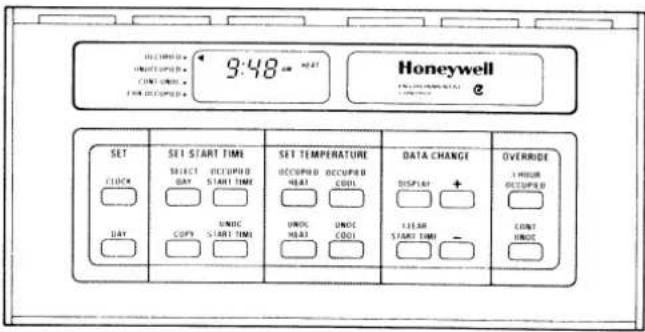
Convenient keyboard layout provides effortless program entry ... your avenue to maximum energy and cost savings.
The following pages provide function-by-function instructions to program the T7200/T7300 Programmable Commercial Thermostats.
The following general steps are required to enter your weekly time and temperature schedule into the thermostat.
- Enter the correct time and day.
- Enter the temperature setpoints you want for heating and cooling system operation.
- For each day of the week, enter starting time for the periods when your building will be occupied and unoccupied.
- To review program entries, simply press the same function keys used to begin each programming step. For example, to review the occupied cool temperature setpoint, press the OCCUPIED COOL key.
• Sample schedules can be found at the end of the PROGRAMMING THE THERMOSTAT section.
PROGRAMMING NOTES:
The + and - keys are used to adjust the day, time or setpoint temperatures ahead or back respectively.
Use the DISPLAY key to exit any programming mode.
IMPORTANT
This thermostat provides security which can lock out programming to prevent tampering. If the keyboard or display do not respond, programming may be locked out -- contact your installer. The override, display and clock keys remain active and are not locked out by this feature. See the section titled SECURITY AND OVERRIDES for details.
PROGRAMMING THE THERMOSTAT
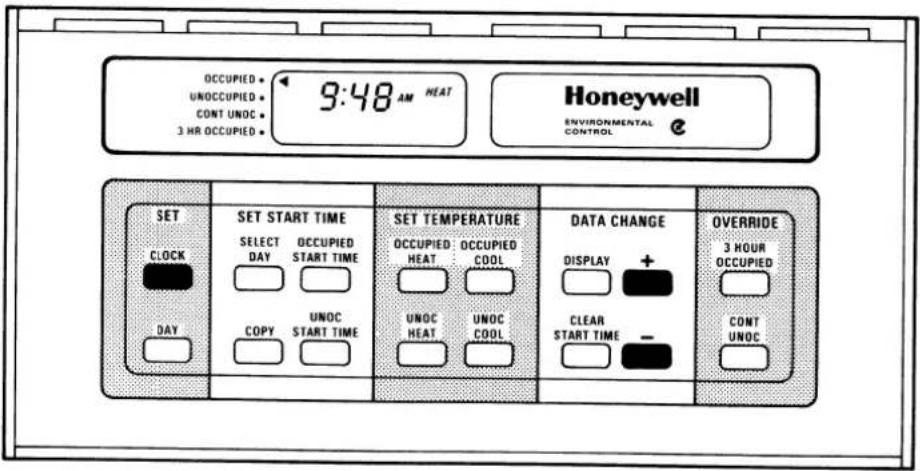
KEYS USED FOR SETTING THE CLOCK
TO SET THE CLOCK
- Press the CLOCK key.
- Press the + or - key until the display shows the correct time.
NOTES:
The + and - keys adjust the clock ahead and back, respectively.
As you approach the correct time, repeatedly tap the + or - key to adjust minutes one at a time.
PROGRAMMING THE THERMOSTAT
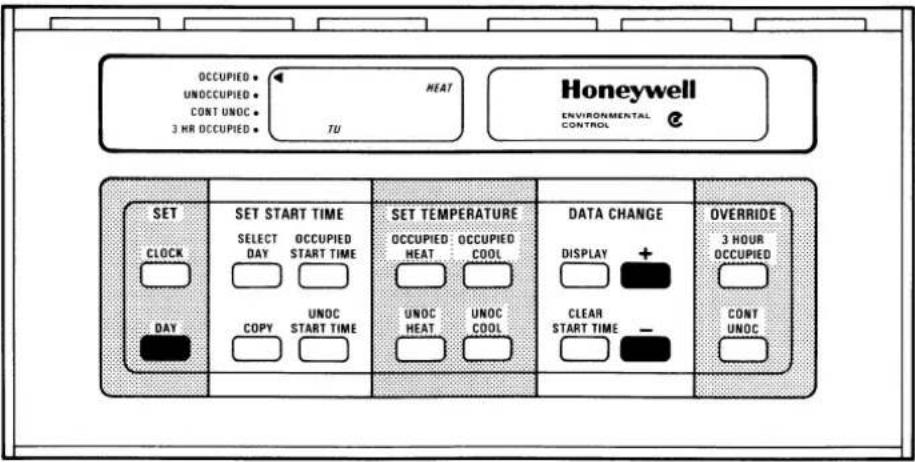
KEYS USED FOR SETTING THE DAY
TO SET THE DAY
- Press the DAY key.
- Press the + or - key until the display shows the current day.
NOTE:
Su=Sunday; Mo=Monday; Tu=Tuesday; We=Wednesday; Th=Thursday; Fr=Friday; Sa=Saturday.
PROGRAMMING THE THERMOSTAT
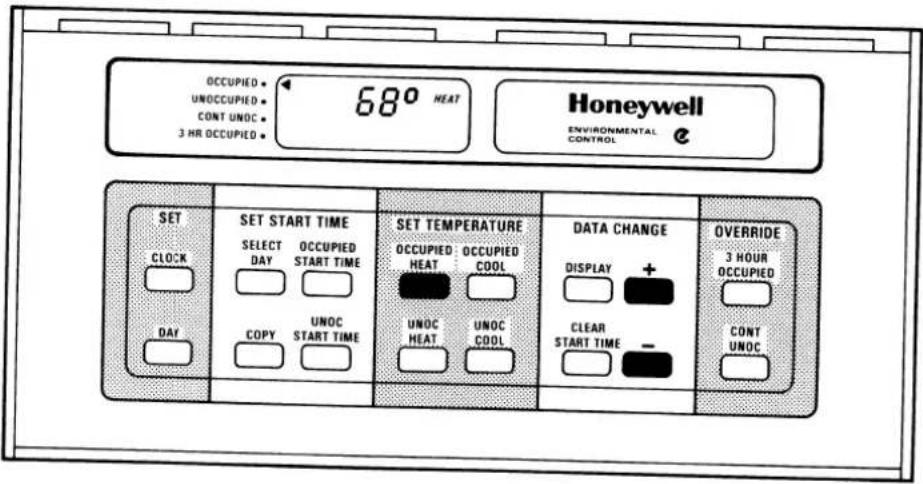
KEYS USED FOR SETTING THE OCCUPIED HEAT SETPOINT
TO SET THE OCCUPIED HEAT TEMPERATURE
-
Press the OCCUPIED HEAT key. The indicator on the display will point to OCCUPIED and the word HEAT will be displayed, to indicate that the occupied heat setpoint has been selected. The display will also show the last entered (or default) occupied heat setpoint.
-
Press the + or - key until the display shows the desired temperature for the occupied period.
NOTES:
OCCUPIED HEAT temperature is the heating system setpoint for the period when your building will be occupied.
Minimum OCCUPIED HEAT setting cannot be lower than the UNOCCUPIED HEAT setpoint.
Maximum OCCUPIED HEAT setting is 2 F [1 C] lower than the OCCUPIED COOL setpoint.
Limits of OCCUPIED HEAT setting can be changed by adjusting the UNOCCUPIED HEAT and OCCUPIED COOL setpoints.
PROGRAMMING THE THERMOSTAT
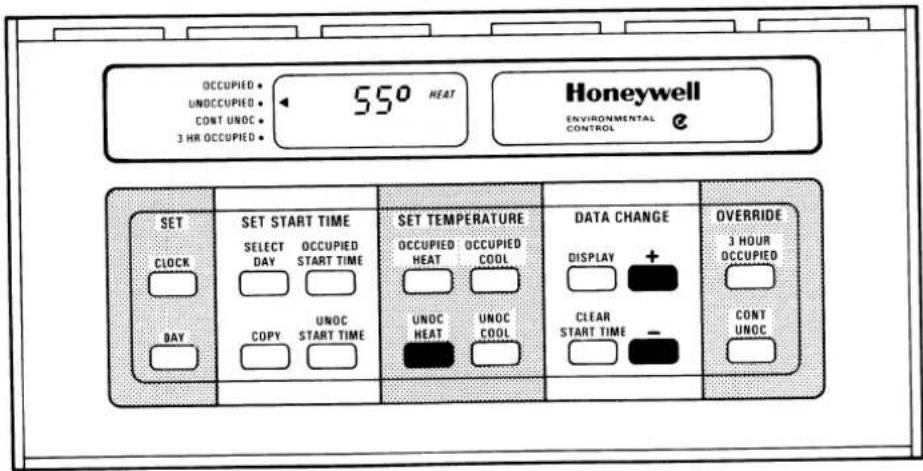
KEYS USED FOR SETTING THE UNOCCUPIED HEAT SETPOINT
TO SET THE UNOCCUPIED HEAT TEMPERATURE
-
Press the UNOC HEAT key. The indicator on the display will point to UNOCCUPIED and the word HEAT will be displayed, to indicate that the unoccupied heat setpoint has been selected. The display will also show the last entered (or default) unoccupied heat setpoint.
-
Press the + or - key until the display shows the desired temperature for the unoccupied period.
NOTES:
UNOCCUPIED HEAT temperature is the heating system setpoint for the period when your building will be unoccupied.
Maximum setting cannot exceed the OCCUPIED HEAT setpoint.
Lower limit of the UNOCCUPIED HEAT setting is 45 F [7 C].
Upper limit of UNOCCUPIED HEAT setting can be changed by adjusting the OCCUPIED HEAT set-point.
PROGRAMMING THE THERMOSTAT
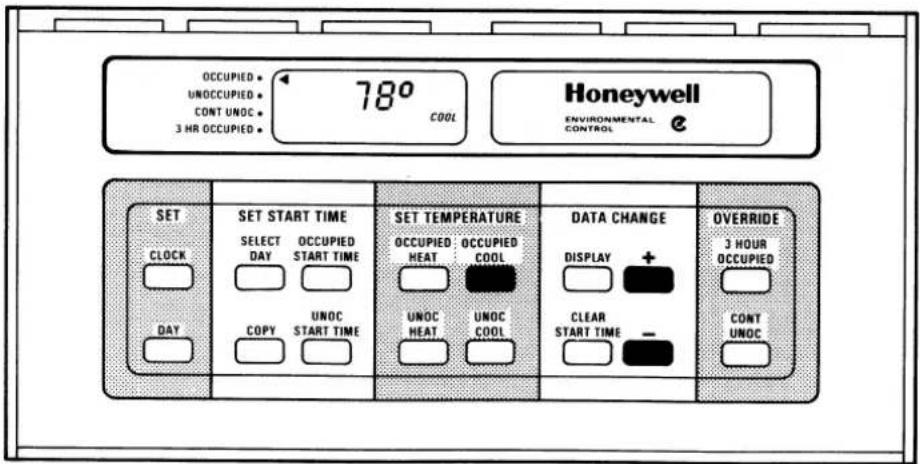
KEYS USED FOR SETTING THE OCCUPIED COOL SETPOINT
TO SET THE OCCUPIED COOL TEMPERATURE
- Press the OCCUPIED COOL key. The indicator on the display will point to OCCUPIED and the word COOL will be displayed, to indicate that the occupied cool setpoint has been selected. The display will also show the last entered (or default) occupied cool setpoint.
- Press the + or - key until the display shows the desired temperature for the occupied period.
NOTES:
OCCUPIED COOL temperature is the mechanical cooling system setpoint for the period when your building will be occupied.
Minimum OCCUPIED COOL setting is 2 F [1 C] higher than the OCCUPIED HEAT setpoint.
Maximum OCCUPIED COOL setting cannot exceed the UNOCCUPIED COOL setpoint.
Limits of OCCUPIED COOL setting can be changed by adjusting the OCCUPIED HEAT and UNOCCUPIED COOL setpoints.
PROGRAMMING THE THERMOSTAT
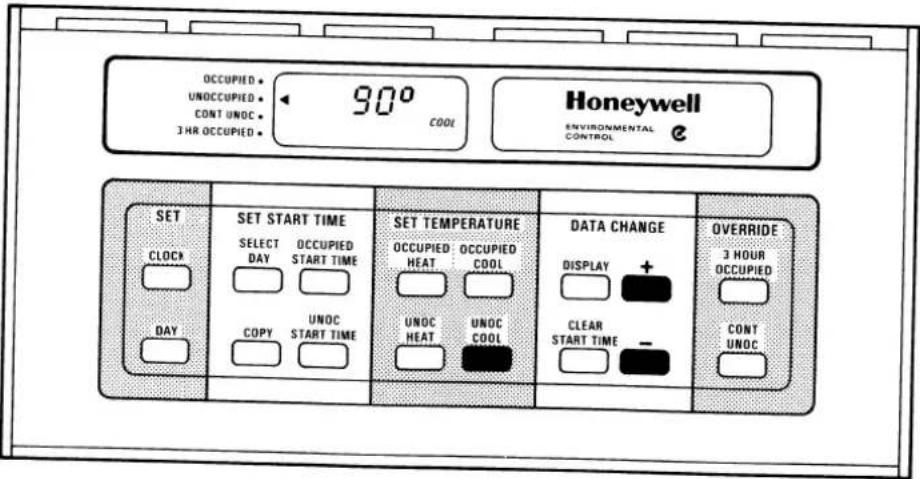
KEYS USED FOR SETTING THE UNOCCUPIED COOL SETPOINT
20
30
TO SET THE UNOCCUPIED COOL TEMPERATURE
-
Press the UNOC COOL key. The indicator on the display will point to UNOCCUPIED and the word COOL will be displayed, to indicate that the unoccupied cool setpoint has been selected. The display will also show the last entered (or default) unoccupied cool setpoint.
-
Press the + or - key until the display shows the desired temperature for the unoccupied period.
NOTES:
UNOCCUPIED COOL temperature is the mechanical cooling system setpoint for the period when your building will be unoccupied.
Minimum UNOCCUPIED COOL setting cannot be lower than the OCCUPIED COOL setpoint.
Lower limit of UNOCCUPIED COOL setting can be changed by adjusting the OCCUPIED COOL set-point.
Upper limit of the UNOCCUPIED COOL setting is 95 F [35 C].
PROGRAMMING THE THERMOSTAT
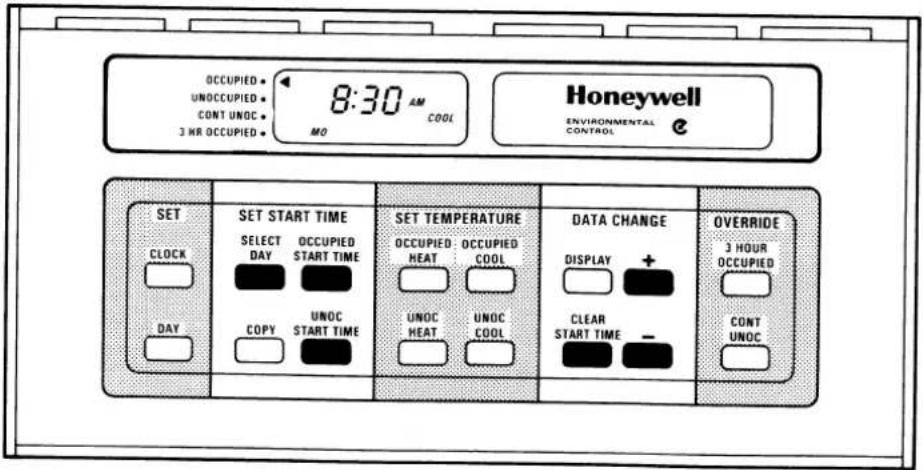
KEYS USED FOR SETTING THE START TIMES
TO SET OCCUPIED AND UNOCCUPIED START TIMES
- Press the SELECT DAY key. The display will show an abbreviated day of the week.
- Press the + or - key until the desired day is displayed.
- Press the OCCUPIED START TIME key. The indicator on the display will point to OCCUPIED, indicating that the OCCUPIED period has been selected.
- Press the + or - key until the desired start time appears on the display.
- If the occupied time displayed is not desired, press the CLEAR START TIME key.
- Press the UNOC START TIME key. The indicator on the display will point to UNOCCUPIED, indicating that the UNOCCUPIED period has been selected.
- Press the + or - key until the desired start time appears on the display.
- If the unoccupied start time displayed is not desired, press the CLEAR START TIME key.
NOTES:
To program a second Occupied Start Time for the selected day, repeat step 3 until either 4 dashes (----) are displayed, or the second start time (if previously programmed) is displayed. Then repeat step 4.
To program a second Unoccupied Start Time for the selected day, repeat step 6 until either 4 dashes (----) are displayed, or the second start time (if previously programmed) is displayed. Then repeat step 7.
Repeat Steps 1 through 8 for each remaining day of the week, or refer to the section titled TO COPY A DAY.
Program times are entered in 10-minute increments.
Each day of week has two OCCUPIED START TIME and two UNOCCUPIED START TIME slots available for programming.
Each "day" is the 24-hour period from 12 a.m. to 12 a.m. (midnight to midnight).
PROGRAMMING THE THERMOSTAT
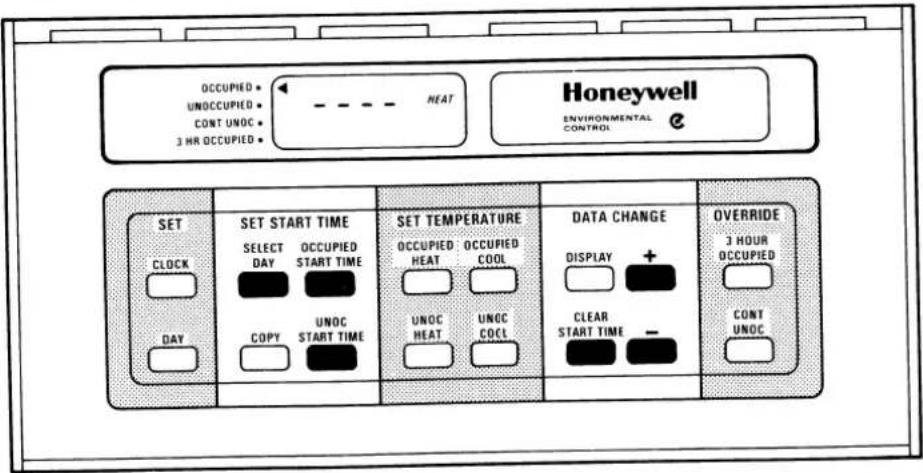
KEYS USED TO CLEAR A PROGRAMMED START TIME
TO CLEAR A PROGRAMMED START TIME
- Press the SELECT DAY key.
- Press the + or - key until the desired day is displayed.
- Press the OCCUPIED START TIME key or the UNOC START TIME key until the time to be cleared is displayed.
- Press the CLEAR START TIME key. The display should now show four dashes (----) or the other start time if programmed.
PROGRAMMING THE THERMOSTAT
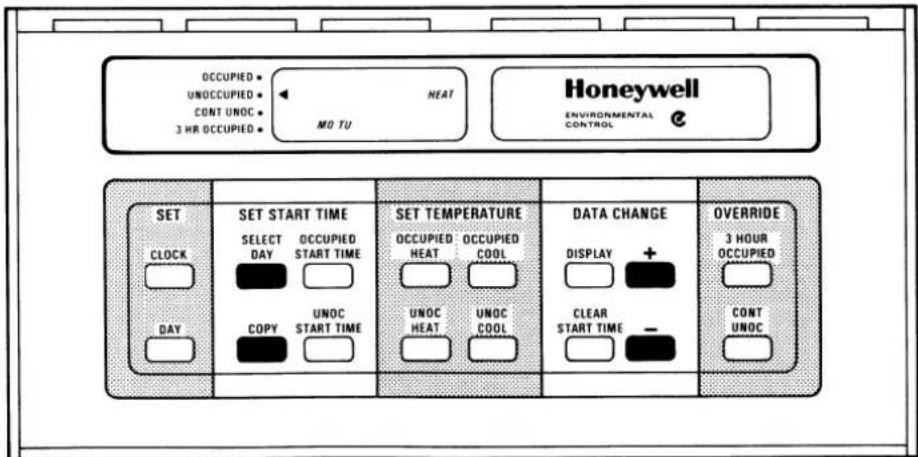
KEYS USED FOR COPYING A DAY
TO COPY A DAY
- Press the SELECT DAY key.
- Press the + or - key until the day to be copied from is displayed.
- Press the COPY key.
- Press the + or - key until the day to be copied to is displayed.
NOTE: The day to be copied from will remain on the DISPLAY.
-
Press the COPY key again to perform the copy.
-
Repeat Steps 3 to 5 to copy a day again.
NOTES:
The COPY DAY procedure is optional. Start times for each day of the week can be programmed as described in the preceding instructions, TO SET START TIMES.
If you use the COPY DAY feature, review all start time schedules to verify that copying was completed without error.
PROGRAMMING THE THERMOSTAT
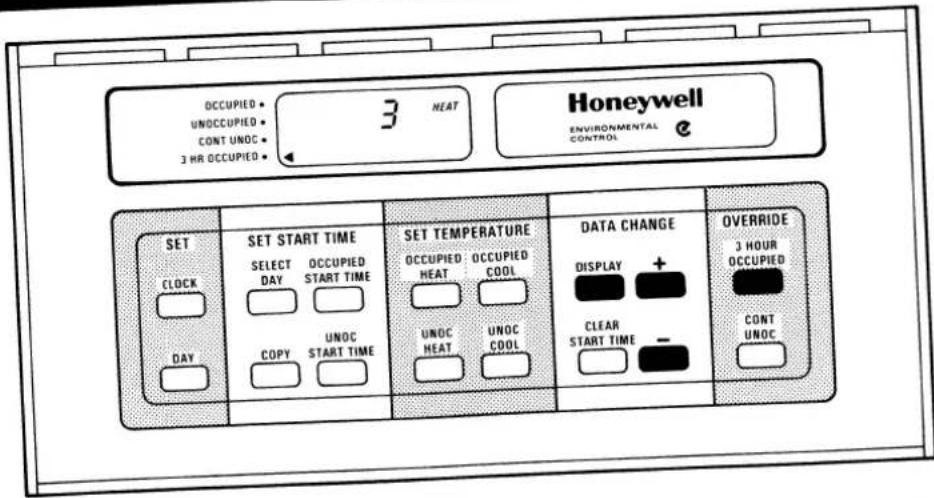
KEYS USED FOR SETTING AMOUNT OF SETPOINT ADJUST
TO SET THE AMOUNT OF SETPOINT ADJUST
This page explains how to set the "Amount of Set-point Adjust" for the setpoint adjust override described in the SECURITY AND OVERRIDES section.
- Press the 3 HOUR OCCUPIED key. The indicator on the left side of the display will point to 3 HR OCCUPIED.
- Press the DISPLAY key to enter the set mode. The LCD will display 0 (default) or 1 to 5 degrees F if previously set.
- Press the + or - key to change the amount of setpoint adjust from 0 to 5 degrees F.
PROGRAMMING THE THERMOSTAT
SAMPLE SCHEDULE 1
In this sample schedule, the owner wants the building's temperature to be at the OCCUPIED HEAT/COOL setpoint beginning at 7:00 a.m. on Monday through Saturday.
The building's UNOCCUPIED times vary. On Monday, Tuesday, Thursday, and Friday, the building is UNOCCUPIED beginning at 5:00 p.m. The UNOCCUPIED Period starts later on Wednesday (9:00 p.m.), and earlier on Saturday (11:00 a.m.).
On Sunday, the building is unoccupied all day. Neither an OCCUPIED period nor an UNOCCUPIED period starts on Sunday. The building is UNOCCUPIED starting at 11:00 a.m. on Saturday, and remains UNOCCUPIED until Monday morning at 7:00 a.m.
In programming Sunday's schedule, the CLEAR START TIME key would be used to clear OCCUPIED START and UNOCCUPIED START times for Sunday.
Note that start times for Tuesday, Thursday, and Friday are identical to those for Monday. Each day can be programmed separately. Optionally, Monday's start times can be entered, then the Monday schedule copied into each of the other 3 days with the aid of the COPY DAY key.
| OCCUPIEDStart Times ^a | UNOCCUPIEDStart Times ^b | |
| Sunday | ---- | ---- |
| Monday | 7:00 a.m. | 5:00 p.m. |
| Tuesday | 7:00 a.m. | 5:00 p.m. |
| Wednesday | 7:00 a.m. | 9:00 p.m. |
| Thursday | 7:00 a.m. | 5:00 p.m. |
| Friday | 7:00 a.m. | 5:00 p.m. |
| Saturday | 7:00 a.m. | 11:00 a.m. |
^a Time at which you want your building to reach the OCCUPIED HEAT/COOL temperature setpoints.
^b Time at which you want your building to control to the UNOCCUPIED HEAT/COOL temperature setpoints.
---- No time entered.
PROGRAMMING THE THERMOSTAT
SAMPLE SCHEDULE 2
In this sample schedule, the owner wants the building's temperature at the OCCUPIED HEAT/COOL setpoints twice a day Monday through Friday, and most of the day Saturday. On Sunday the building will be unoccupied all day.
Monday through Friday's first OCCUPIED period will be from 9:00 a.m. to 2:00 p.m. The second OCCUPIED period will be from 4:00 p.m. to 1:00 a.m. the following morning. Care must be taken when entering the second UNOCCUPIED START time for these days. The second UNOCCUPIED START time will actually occur on the following day because the thermostat changes days at midnight (12:00 a.m.). Therefore the second UNOCCUPIED START time of 1:00 a.m. is entered into the following day (Monday will not have a 1:00 a.m. UNOCCUPIED START time, Tuesday through Saturday will).
Saturday's OCCUPIED period is 10:00 a.m. to 2:00 a.m. the following morning. Saturday's UNOCCUPIED START time, for the same reason as above, actually occurs on Sunday. Therefore the 2:00 a.m. UNOCCUPIED START time is entered into Sunday.
No other building occupancies are planned until Monday at 9:00 a.m., so no other START times need to be entered into the thermostat.
The COPY key may be used to copy Tuesday's program to Wednesday through Friday.
| First OCCUPIED Start Time ^a | First UNOCCUPIED Start Time ^b | Second OCCUPIED Start Time ^a | Second UNOCCUPIED Start Time ^b | |
| Sunday | ---- | 2:00 a.m. | ---- | ---- |
| Monday | 9:00 a.m. | 2:00 p.m. | 4:00 p.m. | ---- |
| Tuesday | 9:00 a.m. | 1:00 a.m. | 4:00 p.m. | 2:00 p.m. |
| Wednesday | 9:00 a.m. | 1:00 a.m. | 4:00 p.m. | 2:00 p.m. |
| Thursday | 9:00 a.m. | 1:00 a.m. | 4:00 p.m. | 2:00 p.m. |
| Friday | 9:00 a.m. | 1:00 a.m. | 4:00 p.m. | 2:00 p.m. |
| Saturday | 10:00 a.m. | 1:00 a.m. | ---- | ---- |
aTime at which you want your building to reach the OCCUPIED HEAT/COOL temperature setpoints.
^b Time at which you want your building to control to the UNOCCUPIED HEAT/COOL temperature setpoints.
---- No time entered.
PROGRAMMING THE THERMOSTAT
FORM TO ENTER YOUR SCHEDULE OF OCCUPIED AND UNOCCUPIED START TIMES
| First OCCUPIED Start Timea | First UNOCCUPIED Start Timeb | Second OCCUPIED Start Timea | Second UNOCCUPIED Start Timeb | |
| Sunday | ||||
| Monday | ||||
| Tuesday | ||||
| Wednesday | ||||
| Thursday | ||||
| Friday | ||||
| Saturday |
aTime at which you want your building to reach the OCCUPIED HEAT/COOL temperature setpoint.
bTime at which you want your building to control at the UNOCCUPIED HEAT/COOL temperature setpoint.
BATTERY ACCESS AND REPLACEMENT
- Do not disconnect the power supply to the system during battery replacement. This would cause backup battery operation and battery drain until the system is powered up.
- Loosen Allen screw at each corner along the bottom of thermostat.
-
Remove thermostat by swinging bottom away and upward from wallplate or subbase. Do not detach cables.
-
If battery replacement is required, replace only with a fresh Mallory MN1604 or equivalent 9-volt alkaline battery.
- Locate the battery holder on the back of the thermostat. Snap a 9V alkaline battery into the connector/holder observing polarity. Slide the battery up to the battery connector until connected.
- Reattach T7200/T7300 to wallplate or subbase and secure by tightening both Allen screws along bottom of thermostat. Do not overtighten.
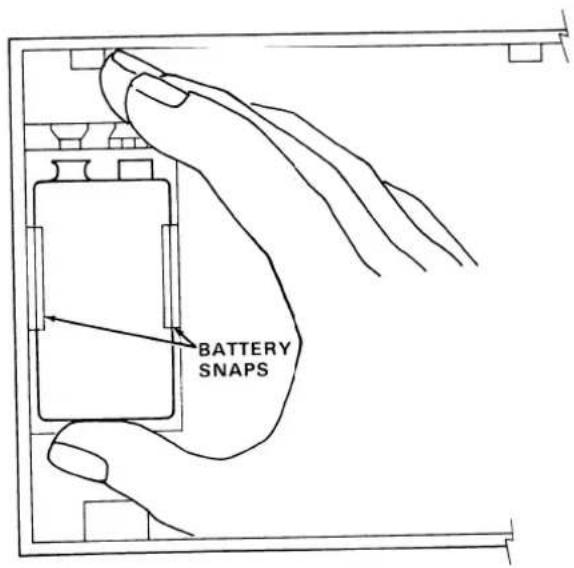
STEP 1 - KEEP THERMOSTAT'S CABLES CONNECTED TO SUBBASE OR WALLPLATE.
STEP 2 - SNAP BATTERY IN PLACE.
STEP 3 - SLIDE BATTERY UP TO THE BATTERY CONNECTOR UNTIL CONNECTED.
IMPORTANT
Do not connect battery until the thermostat's cables are connected and the HVAC system is ready to be put into operation. Battery power will be drained if system power is off for lengthy periods.
GLOSSARY
Backup Battery — A battery located in the T7200/T7300 thermostat that provides electricity to maintain your time and temperature schedule during power loss. If the battery is dead or runs down during a power failure, the time and temperature schedule will be lost. However, the thermostat will control to a standard set of "default" setpoints when power is restored.
Default Setpoints — Temperature settings of 68 F for heating and 78 F for cooling that are built into the T7200/T7300. These assure that the system will remain operational even if the thermostat is not programmed or the time and temperature schedules are lost due to battery failure.
Economizer — An auxiliary control system which allows use of cool outdoor air for free cooling, in place of electrical air conditioning equipment. Based on the availability of outdoor air for "free" cooling, the economizer control system will provide cool air, increasing comfort without the extra expense of running mechanical cooling. Only if outdoor air cannot or does not sufficiently cool the space will mechanical cooling be allowed to run.
"Free" Cooling — See Economizer.
Intelligent Recovery™ — A control method which adjusts the heating warmup and cooldown time periods based on outside weather conditions. Commonly referred to as “optimized start.”
Mechanical Cooling — Cooling that is provided by running compressors to extract heat from the conditioned space.
Minimum Operation Times — Fixed minimum on/off equipment run times used to prevent harmful short cycling (turning on and off too often) which can significantly reduce equipment life or cause permanent damage.
Occupied Temperature Setpoint — The heating and cooling temperature settings used when the room or building is scheduled to be occupied.
Occupied Start Time — The selected time at which the air conditioned space is to reach the comfort temperature for people occupying the room.
Setpoint — The selected temperature at which the heating/cooling system is to maintain the conditioned space. There are separate setpoints for heating and cooling in the OCCUPIED and UNOCCUPIED time periods.
GLOSSARY
Single Zone Air Conditioning System — A packaged system that includes heating, cooling, and air distribution equipment. It might also include an economizer (see Economizer). These systems are self-contained, often roof mounted, and condition the air in a specific local area with its own thermostat. Larger buildings may have 2 or more areas or zones, each with its own air conditioning system and thermostat.
Thermostat Cycle — The time necessary for the heating or cooling equipment to come on, operate, and turn and remain off until the next time it is needed. Cycle time is controlled by the thermostat. For example, mechanical cooling equipment might turn on and then go off 4 times in an hour.
Unoccupied Temperature Setpoint — The heating and cooling temperature settings used when the room or building is scheduled to be unoccupied.
Unoccupied Start Time — The selected time at which the air conditioned space is allowed to become cooler/warmer to save energy. NOTE: can be temporarily overridden by using the "3-Hour Override" key.
7-Day Program — Each day of the week (7 days) may be individually scheduled for occupied or unoccupied start times. This allows maximum flexibility for building scheduling.
TROUBLESHOOTING GUIDE
| If... | Then |
| Setpoint or start times cannot be changed. | Keyboard is locked out. Contact your installer. See section titled SECURITY AND OVERRIDES for details. |
| BATT displayed on LCD. | Battery weak or not installed. See section titled BATTERY ACCESS AND REPLACEMENT for details. |
| Heating/Cooling will not go on or off. | Wait for the minimum operation time delay of 2 to 4 minutes. Recall temperature setpoints and subbase system and fan switches (if available) to verify correct settings. |
| No heating/cooling with no display of time or temperature. | Power to the thermostat has been lost. If battery backup is installed, program will be maintained. If power to thermostat is out for more than 24 hours, contact your installer. |
| Display of 4 dashes (----) for time. | There is no program stored in thermostat. This will occur when power is first applied to the thermostat, or when power was lost to the thermostat while battery backup was either weak or not installed. Re-program the thermostat. |
| Display of 2 dashes and a degree symbol (---°) for temperature. | Temperature sensor has failed, or is out of range. No heating/cooling will be allowed to come on. Contact your installer. |
A TEAM OF EXPERTS READY TO HELP YOU
HONEYWELL has been a recognized leader in energy management for nearly a century. With that background, we are uniquely qualified to offer you the ultimate in total energy management
Honeywell Building Controls division has developed a nationwide network of authorized distributors specially trained to assist you with your energy management needs. In addition, thousands of independent contractors, trained by Honeywell as Energy Management Specialists, are ready to sell, install and maintain our energy management products to your satisfaction.
Together, we can find the answers.
Honeywell
63-4039 © Honeywell 1987 Printed in U.S.A.