
LCP-48 - Lichteffekte Maschine BeamZ - Kostenlose Bedienungsanleitung
Finden Sie kostenlos die Bedienungsanleitung des Geräts LCP-48 BeamZ als PDF.


| Produkttyp | Lichteffektmaschine (LED Farbpanel) |
| Modell | LCP-48 |
| Marke | BeamZ |
| Abmessungen (L x B x H) | 470 x 82 x 190 mm |
| Gewicht | 3,7 kg |
| Stromversorgung | 100-240 V AC, 50/60 Hz |
| Leistungsaufnahme | 87 W |
| Lichtquelle | 48 x 1 W RGB-LEDs (16 Rot, 16 Grün, 16 Blau) |
| DMX-Kanäle | 3, 6, 9, 15, 27 (umschaltbar) |
| Betriebsmodi | Auto, Sound-Aktiv, Master/Slave, DMX512 |
| Strobe-Funktion | Ja, einstellbare Geschwindigkeit |
| Farben und Effekte | Statische Farben, Farbmischung, Lauflichter, Verblassen |
| Schutzart / Sicherheit | Nur für Innenräume; geerdete Steckdose; Augenkontakt vermeiden |
| Umgebungstemperatur | Max. 40 °C |
| Sicherung | 3,15 A / 250 V |
| Lieferumfang | Gerät, Netzkabel, Bedienungsanleitung |
| Wartung / Reinigung | Mindestens zweimal monatlich; Linsentuch oder weiches Baumwolltuch mit Alkohol |
| Hersteller / Importeur | TRONIOS BV, Niederlande |
Häufig gestellte Fragen - LCP-48 BeamZ
Benutzerfragen zu LCP-48 BeamZ
0 Frage zu diesem Gerät. Beantworten Sie die, die Sie kennen, oder stellen Sie Ihre eigene.
Eine neue Frage zu diesem Gerät stellen
Laden Sie die Anleitung für Ihr Lichteffekte Maschine kostenlos im PDF-Format! Finden Sie Ihr Handbuch LCP-48 - BeamZ und nehmen Sie Ihr elektronisches Gerät wieder in die Hand. Auf dieser Seite sind alle Dokumente veröffentlicht, die für die Verwendung Ihres Geräts notwendig sind. LCP-48 von der Marke BeamZ.
BEDIENUNGSANLEITUNG LCP-48 BeamZ
Ref. Nr. 150.666

LCP-48 LED COLOR PANEL 48X 1W RGB
HANDBUCH
Vielen Dank, dass Sie sich für unsere Produkte entschieden haben. Bitte lesen Sie diese Anweisungen sorgfältig durch, um eine optimale Leistung und eine längere Lebensdauer zu erzielen, bevor Sie mit der Nutzung beginnen.
INHALT
INHALT....2
Auspacken und Prüfen .... 3
Auspackanweisungen .... 3
Prüfen des Kartoninhalts:....3
Sicherheitshinweise....3
Produktübersicht 4
Funktionsbeschreibungen ...... 4
Hauptfunktionen .... 4
Bedienungsanleitung .... 5
Funktionen des Bedienfelds 5
Master/Slave-Modus....6
Master/Slave-Verbindung 6
Sound-Active-Modus 6
Automatischer Modus....6
Steuerung über DMX512 7
DMX-Werte Funktionen....8
27-Kanal-Modus 8
15-Kanal-Modus 9
9-Kanal-Modus 9
6-Kanal-Modus 9
3-Kanal-Modus 10
Wartung 10
Technische Daten 10
CE- & R&TTE-Konformitätserklärung.... 11
AUSPACKEN UND INSPEKTION
Auspackanleitung
- Bitte packen Sie den Karton aus und prüfen Sie die Ware sorgfältig, wenn Sie sie erhalten. Wenn Sie Transportschäden, fehlende Teile oder Qualitätsprobleme feststellen, benachrichtigen Sie bitte den Spediteur und lehnen Sie die Ware ab.
- Bevor Sie dieses Produkt verwenden, lesen Sie bitte die Anleitung sorgfältig durch und bewahren Sie sie an einem sicheren Ort für zukünftige Referenz auf.
Überprüfung des Kartoninhalts:
Das Produkt, Netzkabel, Bedienungsanleitung
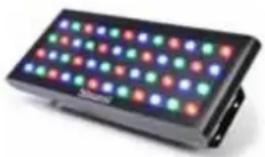

SICHERHEITSHINWEISE
- Sicherheits- und regelkonforme Steckdose mit hochwertigem Ausgang sollte verwendet werden. • Schließen Sie das Produkt immer an einen geerdeten Stromkreis an, um das Risiko eines Stromschlags zu vermeiden.
- Legen Sie niemals kleine Metallgegenstände wie Schraubendreher, Eisendraht, Münzen usw. in das Innere oder führen Sie sie in die Maschine ein, um Kurzschlüsse zu vermeiden.
- Stellen Sie sicher, dass Sie die richtige Spannung anschließen und nicht höher oder niedriger als auf dem Aufkleber oder der Rückseite des Produkts angegeben.
- Vermeiden Sie Stöße, Stürze oder Quetschungen mit anderen Gegenständen beim Transport. Tragen Sie das Produkt niemals am Netzkabel oder an beweglichen Teilen. Verwenden Sie immer die Aufhänge-/Montagehalterung oder die Griffe. • Das Produkt ist nur für den Innenbereich geeignet.
- Ziehen oder zerren Sie niemals am Kabel und tauschen Sie es nicht gegen ein anderes aus. Verwenden Sie es nicht mehr, wenn es beschädigt ist oder heiß wird.
- Verwenden Sie das Produkt nicht mehr, wenn beim Anschließen des Netzsteckers Funken entstehen.
- Bedienen Sie das Produkt nicht mit nassen Händen und stellen Sie es niemals in die Nähe von Wasser oder anderen Flüssigkeiten.
- Stellen Sie sicher, dass sich während des Betriebs keine brennbaren Materialien in der Nähe der Leuchte befinden. Installieren Sie es immer an einem Ort mit ausreichender Belüftung.
- Ersetzen Sie die Lichtquelle niemals durch eine andere Spezifikation oder Leistung, wenn die ursprüngliche beschädigt ist.
- Stellen Sie sicher, dass das Gerät ausgeschaltet ist, bevor Sie die Lichtquelle oder die Sicherung austauschen. Führen Sie diesen Vorgang niemals bei eingeschaltetem Gerät durch.
- Die Umgebungstemperatur darf 40°C(104°F) nicht überschreiten.
- Reinigen Sie das Gerät niemals mit Wasser, Verdünner oder anderen Lösungsmitteln.
- Stellen Sie die Verwendung des Produkts bei schwerwiegenden Betriebsproblemen ein und senden Sie es sofort an unsere Wartungsstelle. Lassen Sie Reparaturen niemals von nicht qualifiziertem Personal durchführen.
- Vermeiden Sie direkten Augenkontakt mit der Lichtquelle, während das Produkt eingeschaltet ist.
PRODUKTÜBERSICHT
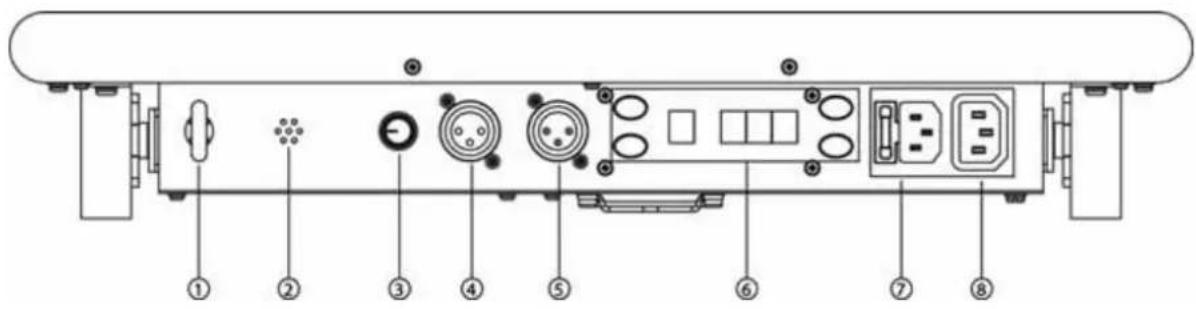
- Sicherheitsöse
- Mikrofon
- Einstellung der Schallempfindlichkeit
- DMX-Signalausgang
- DMX-Signaleingang
- Bedienfeld
- Stromeingang
- Leistungsabgabe
- Aufhängebügel
- LEDs

FUNKTIONSBESCHREIBUNGEN
Hauptfunktionen
• 3, 6, 9, 15 und 27 DMX-Kanäle • Automatikmodus, Musikmodus und Master/Slave-Modus • Integrierte 24 Programme, individuelle Steuerung der RGB-LEDs. Lauf- und Stroboskopgeschwindigkeit einstellbar. - Mit statischen Farben, Stroboskop, Farbmischung, Lauflicht- und Fade-Effekt.
BEDIENUNGSANLEITUNG
Bedienungsanleitung für das Bedienfeld
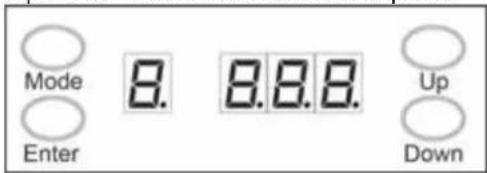
| BUTTON | FUNCTION |
| Mode Select a function of mode | |
| Enter Confirm a function of mode and save | |
| Up Select increasing advancement in the value | |
| Down Select decreasing advancement in the value | |
Das Bedienfeld zeigt den aktuellen Zustand des Geräts an. Es dient zur Auswahl des Betriebsmodus sowie der Unterfunktionen. Eine detaillierte Darstellung der Bedienfeld-Funktionen finden Sie im Abschnitt "Menüübersicht" weiter unten.
Funktionen des Bedienfelds
| Menu Program Run Speed (P) Strobe Speed (F) Description | ||||
| A | 001 | 000No Strobe001 – 099StrobeSlow->Fast100Sound-active strobe | Red (static) | |
| 002 | Green | |||
| 003 | Blue | |||
| 004 | Yellow | |||
| 005 | Magenta | |||
| 006 | Cyan | |||
| 007 | White | |||
| 008 | 000Only sound-active001 – 009Run SpeedSlow->Fast100No Delay | Auto/Sound Mode 1 | ||
| 009 | Auto/Sound | |||
| 010 | Auto/Sound | |||
| 011 | Auto/Sound | |||
| 012 | Auto/Sound Mode 5 | |||
| 013 | Auto/Sound | |||
| 014 | Auto/Sound | |||
| 015 | Auto/Sound | |||
| 016 | Auto/Sound | |||
| 017 | Auto/Sound | |||
| 018 | Auto/Sound | |||
| 019 | Auto/Sound | |||
| 020 | Auto/Sound | |||
| 021 | Auto/Sound | |||
| 022 | Auto/Sound | |||
| 023 | Auto/Sound | |||
| 024 | Color | |||
| d 001 - 485 DMX address | ||||
Master/Slave-Modus
Das erste Gerät ist der Master ohne DMX-Signal, die anderen angeschlossenen Geräte sind Slave-Geräte und folgen den Aktionen des Masters.
Master/Slave-Verbindung![graph TD A["Master"] --> B["Slave"] B --> C["Slave"] C --> D["Continue"]](/content/2026/05/1031719/images/2d02351395cd68a600eec1d6ed5b5a9e641fa0057051b583122531dd65f80239.jpg)
Musikmodus
Es ist musikaktiv, ohne Tonsteuerung stoppt es, wenn die Laufgeschwindigkeit Null ist. Wenn die Stroboskopgeschwindigkeit Null ist, gibt es kein Stroboskop; wenn die Stroboskopgeschwindigkeit einhundert ist, strobt es im Takt der Musik.
Automatikmodus
Drehen Sie den Klangempfindlichkeits-Einstellknopf oder die Musik ab, das Produkt zeigt automatisch aktuelle Aktionen an.
Gesteuert über DMX512
Folgen Sie dem untenstehenden Bild und schalten Sie alle angeschlossenen Geräte gleichzeitig ein. Die Produkte werden gesteuert, sobald die Adresse eingerichtet ist.
![graph TD A["Device 1: Mbeam2"] --> B["DMX output"] A --> C["DMX input"] B --> D["Component 1"] C --> E["Component 2"] D --> F["Continue"] E --> F style A fill:#f9f,stroke:#333 style B fill:#ccf,stroke:#333 style C fill:#ccf,stroke:#333 style D fill:#cfc,stroke:#333 style E fill:#cfc,stroke:#333 styl…](/content/2026/05/1031719/images/bbaf2ae92838ddc754a7a2f5c8755164ff93b82d4007a54af7a3ee422de77663.jpg)
DMX-Wert-Funktionen
27-Kanal-Modus
| CHANNEL | VALUE | FUNCTION SECTION / NOTES |
| 1 | 000 - 019 27 | Channel Mode Set this channel between these values for this mode |
| 2 | This Channel is not used for this mode | |
| 3 | 000 - 002 | No Strobe |
| 003 - 249 Slow-First | ||
| 250 - 255 Sound-Active (static color only) | ||
| 4 | 000 - 255 Red | Section 1 |
| 5 | 000 - 255 Green | |
| 6 | 000 - 255 Blue | |
| 7 | 000 - 255 Red | Section 2 |
| 8 | 000 - 255 Green | |
| 9 | 000 - 255 Blue | |
| 10 | 000 - 255 Red | Section 3 |
| 11 | 000 - 255 Green | |
| 12 | 000 - 255 Blue | |
| 13 | 000 - 255 Red | Section 4 |
| 14 | 000 - 255 Green | |
| 15 | 000 - 255 Blue | |
| 16 | 000 - 255 Red | Section 5 |
| 17 | 000 - 255 Green | |
| 18 | 000 - 255 Blue | |
| 19 | 000 - 255 Red | Section 6 |
| 20 | 000 - 255 Green | |
| 21 | 000 - 255 Blue | |
| 22 | 000 - 255 Red | Section 7 |
| 23 | 000 - 255 Green | |
| 24 | 000 - 255 Blue | |
| 25 | 000 - 255 Red | Section 8 |
| 26 | 000 - 255 Green | |
| 27 | 000 - 255 Blue | |
15-Kanal-Modus
| CHANNEL | VALUE FUNCTION | SECTION / NOTES | ||
| 1 | 020 – 039 15 Channel Mode | Set this channel between these values for this mode | ||
| 2 | This Channel is not used for this mode | |||
| 3 | 000 – 002 | Strobeast | No Strobe | |
| 003 – 249 | ||||
| 250 – 255 | Sound-Active (static color only) | |||
| 4 | 000 – 255 Red | Section 1 | ||
| 5 | 000 – 255 Green | |||
| 6 | 000 – 255 Blue | |||
| 7 | 000 – 255 Red | Section 2 | ||
| 8 | 000 – 255 Green | |||
| 9 | 000 – 255 Blue | |||
| 10 | 000 – 255 Red | Section 3 | ||
| 11 | 000 – 255 Green | |||
| 12 | 000 – 255 Blue | |||
| 13 | 000 – 255 Red | Section 4 | ||
| 14 | 000 – 255 Green | |||
| 15 | 000 – 255 Blue | |||
9-Kanal-Modus
| CHANNEL | VALUE | FUNCTION SECTION / NOTES |
| 1 | 040 – 059 9 Channel Mode Set this mode | channel between these values for this mode |
| 2 | This Channel is not used for this mode | |
| 3 | 000 – 002 Slow-First | No Strobe |
| 003 – 249 | ||
| 250 – 255 Sound-Active (static color only) | ||
| 4 | 000 – 255 Red | Section 1 |
| 5 | 000 – 255 Green | |
| 6 | 000 – 255 Blue | |
| 7 | 000 – 255 Red | Section 2 |
| 8 | 000 – 255 Green | |
| 9 | 000 – 255 Blue |
6-Kanal-Modus
| CHANNEL | VALUE | FUNCTION SECTION / NOTES | |
| 1 | 060 – 079 6 | Channel Mode Set this | channel between these values for this mode |
| 2 | This Channel is not used for this mode | ||
| 3 | 000 – 002 | StroBeast | No Strobe |
| 003 – 249 | |||
| 250 – 255 | Sound-Active (static color only) | ||
| 4 | 000 – 255 Red | Section 1 | |
| 5 | 000 – 255 Green | ||
| 6 | 000 – 255 Blue | ||
3-Kanal-Modus
| CHANNEL | VALUE | FUNCTION |
| 1 | 080 – 089 Auto Sound Mode 1 | |
| 090 – 099 Auto Sound Mode 2 | ||
| 100 – 109 Auto Sound Mode 3 | ||
| 110 – 119 Auto Sound Mode 4 | ||
| 120 – 129 Auto Sound Mode 5 | ||
| 130 – 139 Auto Sound Mode 6 | ||
| 140 – 149 Auto Sound Mode 7 | ||
| 150 – 159 Auto Sound Mode 8 | ||
| 160 – 169 Auto Sound Mode 9 | ||
| 170 – 179 Auto Sound Mode 10 | ||
| 180 – 189 Auto Sound Mode 11 | ||
| 190 – 199 Auto Sound Mode 12 | ||
| 200 – 209 Auto Sound Mode 13 | ||
| 210 – 219 Auto Sound Mode 14 | ||
| 220 – 229 Auto Sound Mode 15 | ||
| 230 – 239 Auto Sound Mode 16 | ||
| 240 – 255 Auto Mode 1 | ||
| 2 | 000 – 249 Speed Fast -> Slow | |
| 250 – 255 Speed stop | ||
| 3 | 000 – 002 No strobe | |
| 003 – 249 Strobe Slow -> Fast | ||
| 250 – 255 Strobe Sound Active | ||
WARTUNG
Das Gerät sollte regelmäßig gereinigt werden, um eine optimale Leistung zu gewährleisten. Verschmutzungen können die Lebensdauer der Lampe verkürzen und die Lichtleistung wird durch Staub beeinträchtigt, der das Gerät überhitzen lassen kann. Führen Sie die Wartung im Allgemeinen mindestens zweimal im Monat durch. Stellen Sie sicher, dass das Gerät vor der Reinigung ausgeschaltet ist.
Reinigen Sie das Gerät erst, wenn es wieder normale Temperatur erreicht hat, da es bei hoher Temperatur verwendet wird. Verwenden Sie Linsenreinigungstücher oder ein weiches Baumwolltuch mit Alkohol, um sanft zu wischen.
Die Reinigungshäufigkeit hängt von der Umgebung ab, in der das Gerät betrieben wird. Feuchte, rauchige oder schmutzige Umgebungen können zu einer stärkeren Schmutzansammlung auf der Optik führen. Reiben oder drücken Sie niemals stark auf das Panel.
TECHNISCHE DATEN
Spannung 100-240V AC 50/60Hz
Eingangsstrom 2A
Leistung 87W
Sicherung....3.15A 250V
Lichtquelle 48x 1W
16x Rot
16x Grün
16x Blau
Gewicht 3.7kg
Abmessungen.....L470 x B82 x H190mm

tronios
Sound & Light
CE- & R&TTE-KONFORMITÄTSERKLÄRUNG
Importeur:
TRONIOS
BV
Bedrijvenpark Twente 415
7602 KM - ALMELO
Tel.:
0031546589299
Fax: 0031546589298
Die Niederlande
Produktnummer: 150.666
Produktbeschreibung: Beamz,
LCP-48 LED-Farbpanel 48x 1W RGB
Regulatorische Anforderung: EN 60598-1/-2-17:2009
EN 62031:2008
EN 61347-2-13:2007
EN 62479:2010
EN 55015:2006/A2:2009
EN61547:2009
Das Produkt erfüllt die Anforderungen der oben genannten Normen. Dieses Zertifikat deckt nicht Aspekte ab, die relevant sein können, wie Leistung und Eignung für den Zweck.
Almelo,
10-03-2012
Unterschrift:

Änderungen an Spezifikationen und Design vorbehalten.
www.tronios.com
Copyright © 2013 by TRONIOS Niederlande


- LCP-48 LED COLOR PANEL 48X 1W RGB
- INHALT
- AUSPACKEN UND INSPEKTION
- AUSPACKANLEITUNG
- ÜBERPRÜFUNG DES KARTONINHALTS
- SICHERHEITSHINWEISE
- PRODUKTÜBERSICHT
- FUNKTIONSBESCHREIBUNGEN
- HAUPTFUNKTIONEN
- BEDIENUNGSANLEITUNG
- MASTER/SLAVE-MODUS
- MUSIKMODUS
- AUTOMATIKMODUS
- GESTEUERT ÜBER DMX512
- DMX-WERT-FUNKTIONEN
- WARTUNG
- TECHNISCHE DATEN
- TRONIOS
- SOUND & LIGHT
- CE- & R&TTE-KONFORMITÄTSERKLÄRUNG
Marke : BeamZ
Modell : LCP-48
Kategorie : Lichteffekte Maschine