
LCP-288 150.662 - Lichteffekte Maschine BeamZ - Kostenlose Bedienungsanleitung
Finden Sie kostenlos die Bedienungsanleitung des Geräts LCP-288 150.662 BeamZ als PDF.


| Produkttyp | Lichteffektmaschine |
| Modell | LCP-288 150.662 |
| Marke | BeamZ |
| Abmessungen (ca.) | 290 x 220 x 330 mm |
| Gewicht | 2,8 kg |
| Stromversorgung | 100-240 V AC, 50/60 Hz |
| Leistungsaufnahme | 30 W |
| Lichtquelle | 288 LEDs (RGB) |
| DMX-Kanäle | 7/14 Kanäle umschaltbar |
| Betriebsmodi | DMX, Master/Slave, Musiksteuerung, Automatikprogramm |
| Abstrahlwinkel | 120° |
| Dimmer | 0-100 % stufenlos |
| Stroboskop | 0-20 Hz |
| Anschlüsse | 3-poliger DMX-Ein-/Ausgang, Netzeingang |
| Gehäusematerial | Kunststoff |
| Schutzart | IP20 (nur Innenbereich) |
| Umgebungstemperatur | 0°C bis 40°C |
| Reinigung | Mit weichem, trockenem Tuch abwischen; keine Flüssigkeiten verwenden |
| Sicherheitshinweise | Nicht in Wasser tauchen; Netzstecker ziehen vor Reinigung; nur für Innenräume |
| Ersatzteile/Reparatur | Ersatzteile beim Hersteller oder autorisierten Händler erhältlich |
| Lieferumfang | Gerät, Netzkabel, Bedienungsanleitung |
Häufig gestellte Fragen - LCP-288 150.662 BeamZ
Benutzerfragen zu LCP-288 150.662 BeamZ
0 Frage zu diesem Gerät. Beantworten Sie die, die Sie kennen, oder stellen Sie Ihre eigene.
Eine neue Frage zu diesem Gerät stellen
Laden Sie die Anleitung für Ihr Lichteffekte Maschine kostenlos im PDF-Format! Finden Sie Ihr Handbuch LCP-288 150.662 - BeamZ und nehmen Sie Ihr elektronisches Gerät wieder in die Hand. Auf dieser Seite sind alle Dokumente veröffentlicht, die für die Verwendung Ihres Geräts notwendig sind. LCP-288 150.662 von der Marke BeamZ.
BEDIENUNGSANLEITUNG LCP-288 150.662 BeamZ
Ref. Nr. 150.662
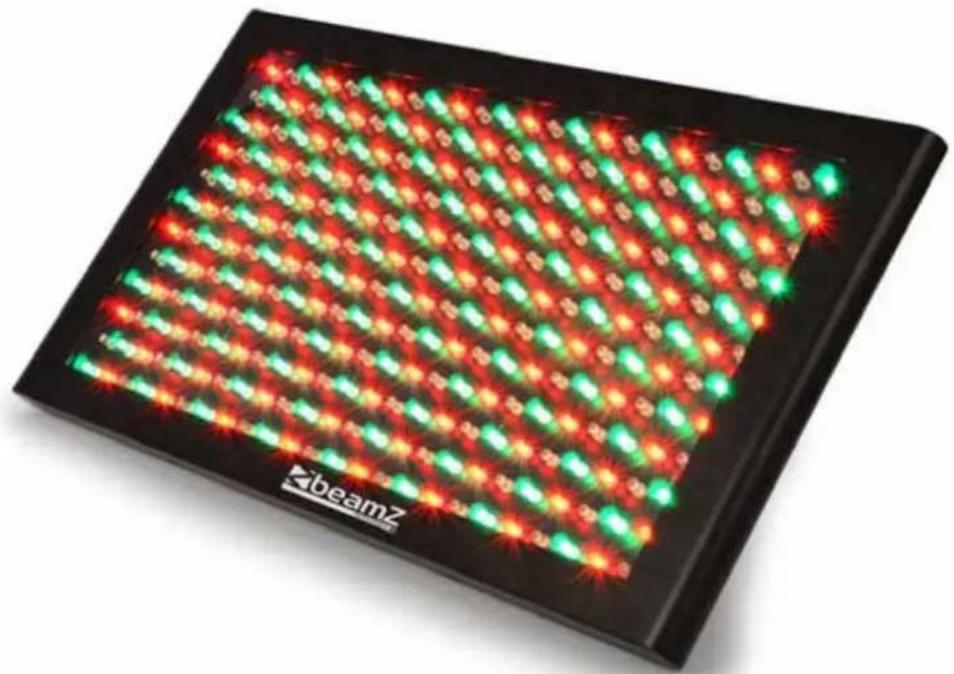
LCP-288 LED COLOR PANEL 288X LED 5MM
MANUAL
Thank you for purchasing our company products. Please read these instructions carefully to enjoy optimum performance and a longer service life before you start to use.
CONTENTS
CONTENTS....2
Unpacking Inspections .... 3
Unpacking instructions .... 3
Checking the contents of the carton:....3
Safety Instructions....3
Product Overview 4
Functions Introductions .... 5
Main Functions .... 5
Operation Instructions 5
Functions for control panel 5
Power supply by storage battery 6
Master/Slave mode....6
Master/Slave connection 6
Sound Active Mode 6
Automatic Mode....7
Controlled by DMX512 7
DMX Value Functions....8
27 Channel mode 8
15 Channel mode 9
9 Channel mode 9
6 Channel mode 10
3 Channel mode 10
Maintenance 11
Specification 11
CE & R&TTE Declaration of Conformity.... 13
UNPACKING INSPECTIONS
Unpacking instructions
- Please unpack the carton and check the goods carefully when you receive it, if discover packing damage, shortage or quality problem, please notify the shipper and reject the goods.
- Before using this product, please read the instructions carefully and keep it in a safe place for future reference.
Checking the contents of the carton:
The product, Power cord, Instruction Manual


SAFETY INSTRUCTIONS
- Safety and regulatory power socket with high quality output should be used.
• Always connect the product to a grounded circuit to avoid the risk of electrocution. - Never put tiny metal objects such as a screwdriver, iron wire and coins, etc. into the internal or stretch into the machine in case of short circuit.
- Please make sure to connect the proper voltage and do not higher or lower than that stated on the decal or rear panel of the product.
- Avoid hitting, crashing or squeezing with other objects in transportation. Never carry the product from the power cord or any moving part. Always use the hanging / mounting bracket or the handles.
• The product is used in door only. - Never pull or tug on the cord and change it for another one, stop using it when it is damaged or becomes hot.
- Stop using the product once there is sparks when connecting with the power plug.
• Can not operate product with wet hands and never place it near the water or other liquid. - Make sure there are no flammable materials close to the fixture while operating. Always install it in a location with adequate ventilation.
- Never replace the lighting source with different specification and rating when the original one is damaged.
• Make sure to power off before replacing the light source or the fuse. Never do it while it is on. - The ambient temperature is no more than 40°C(104°F) .
- Never clean the fixture by water, thinner or other dissolved agent.
- Stop using the product in case of a serious operating problem and send it to our maintenance agent immediately. Never repair by non-professional workers.
- Avoid direct eye exposure to the light source while the product is on.
PRODUCT OVERVIEW
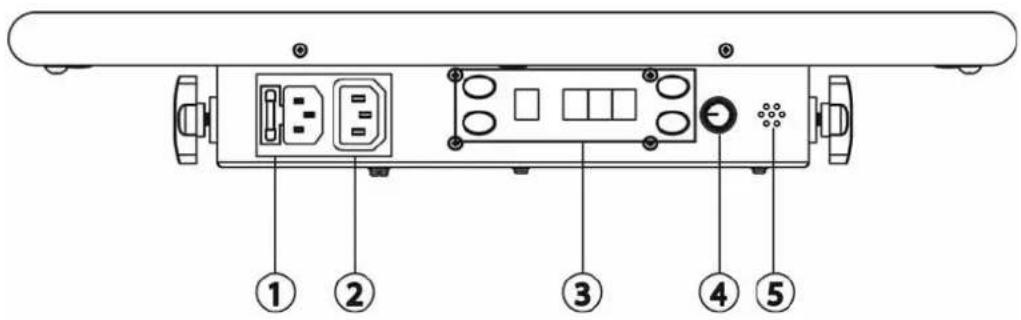
- Power input
- Power output
- Control panel
- Sound sensitivity adjustment
- Microphone
- DMX signal output
- DMX signal input
- Four pin DC connector
- Safety Eyebolt
- Hanging bracket
- LEDs


FUNCTIONS INTRODUCTIONS
Main Functions
• 3,6,9,15 & 27 DMX channels
• Automatic, sound active and master/slave mode
• Built-in 24 actions, individual control of RGB LEDs. running and strobe speed can be adjusted.
- With static colors, strobe, color mixing, chasing and fade effect.
OPERATION INSTRUCTIONS
Operation instructions for control panel

| BUTTON | FUNCTION |
| Mode Select a function of mode | |
| Enter Confirm a function of mode and save | |
| Up Select increasing advancement in the value | |
| Down Select decreasing advancement in the value | |
The Control Panel shows the current state of the unit, it is used to select the operating mode, as well as the sub-features. For a detailed layout of the control panel functions, please see the "menu map" section below.
Functions for control panel
| Menu Program Run Speed (P) Strobe Speed (F) Description | ||||
| A | 001 | 000No Strobe001 - 099StrobeSlow->Fast100Sound-active strobe | Red (static) | |
| 002 | Green | |||
| 003 | Blue | |||
| 004 | Yellow | |||
| 005 | Magenta | |||
| 006 | Cyan | |||
| 007 | White | |||
| 008 | 000Only sound-active001 - 009Run SpeedSlow->Fast100No Delay | Auto/Sound Mode 1 | ||
| 009 | Auto/Sound | |||
| 010 | Auto/Sound | |||
| 011 | Auto/Sound | |||
| 012 | Auto/Sound Mode 5 | |||
| 013 | Auto/Sound | |||
| 014 | Auto/Sound | |||
| 015 | Auto/Sound | |||
| 016 | Auto/Sound | |||
| 017 | Auto/Sound | |||
| 018 | Auto/Sound | |||
| 019 | Auto/Sound | |||
| 020 | Auto/Sound | |||
| 021 | Auto/Sound | |||
| 022 | Auto/Sound | |||
| 023 | Auto/Sound | |||
| 024 | Color | |||
| d 001 - 485 DMX address | ||||
Power supply by storage battery
The storage batteries Wi-Powerhouse provide DC 12V, can be connected through four-pin Airline Terminal without other power supply, when plug power 100-240V AC, the Wi-Powerhouse will stop supplying power.

Master/Slave mode
The first unit is master without signal of DMX, the others connected are slave units and follow the actions of Master.
Master/Slave connection
![graph TD A["Top Row: Master"] --> B["Arrow to Slave"] B --> C["Slave"] C --> D["Arrow to Slave"] D --> E["Continue"]](/content/2026/05/1031713/images/ca59329775bd574eb7ead74028de8ea8de983e6beb860b2c8f0201493e07c41d.jpg)
Sound Active Mode
It is sound active with music, without sound controlling when running speed is zero, it stops. Running; when strobe speed is zero, no strobe; when strobe speed is one hundred, strobe by sound.
Automatic Mode
Turn off the sound sensitivity adjustment knob or music, the product displays current actions automatically.
Controlled by DMX512
Follow below picture and power on all connected at the same time. The products will be controlled once the address is set up.
![graph TD A["DMX output"] --> B["DMX input"] B --> C["Continue"] style A fill:#f9f,stroke:#333 style B fill:#ccf,stroke:#333 style C fill:#cfc,stroke:#333](/content/2026/05/1031713/images/d499026998388414d03a06f37dcd5af51670d5ce9e490769a488fba1fcd5f847.jpg)
DMX Value Functions
27 Channel mode
| CHANNEL | VALUE | FUNCTION SECTION / NOTES |
| 1 | 000 - 019 27 | Channel Mode Set this channel between these values for this mode |
| 2 | This Channel is not used for this mode | |
| 3 | 000 - 002 | No Strobe |
| 003 - 249 Slow Street | ||
| 250 - 255 Sound-Active (static color only) | ||
| 4 | 000 - 255 Red | Section 1 |
| 5 | 000 - 255 Green | |
| 6 | 000 - 255 Blue | |
| 7 | 000 - 255 Red | Section 2 |
| 8 | 000 - 255 Green | |
| 9 | 000 - 255 Blue | |
| 10 | 000 - 255 Red | Section 3 |
| 11 | 000 - 255 Green | |
| 12 | 000 - 255 Blue | |
| 13 | 000 - 255 Red | Section 4 |
| 14 | 000 - 255 Green | |
| 15 | 000 - 255 Blue | |
| 16 | 000 - 255 Red | Section 5 |
| 17 | 000 - 255 Green | |
| 18 | 000 - 255 Blue | |
| 19 | 000 - 255 Red | Section 6 |
| 20 | 000 - 255 Green | |
| 21 | 000 - 255 Blue | |
| 22 | 000 - 255 Red | Section 7 |
| 23 | 000 - 255 Green | |
| 24 | 000 - 255 Blue | |
| 25 | 000 - 255 Red | Section 8 |
| 26 | 000 - 255 Green | |
| 27 | 000 - 255 Blue | |
15 Channel mode
| CHANNEL | VALUE FUNCTION | N SECTION / NOTES | ||
| 1 | 020 – 039 | 15 Channel Mode | Set this channel between these values for this mode | |
| 2 | This Channel is not used for this mode | |||
| 3 | 000 – 002 | Strobeast | No Strobe | |
| 003 – 249 | ||||
| 250 – 255 | Sound-Active (static color only) | |||
| 4 | 000 – 255 | Red | Section 1 | |
| 5 | 000 – 255 | Green | ||
| 6 | 000 – 255 | Blue | ||
| 7 | 000 – 255 | Red | Section 2 | |
| 8 | 000 – 255 | Green | ||
| 9 | 000 – 255 | Blue | ||
| 10 | 000 – 255 | Red | Section 3 | |
| 11 | 000 – 255 | Green | ||
| 12 | 000 – 255 | Blue | ||
| 13 | 000 – 255 | Red | Section 4 | |
| 14 | 000 – 255 | Green | ||
| 15 | 000 – 255 | Blue | ||
9 Channel mode
| CHANNEL | VALUE | FUNCTION SECTION / NOTES | |
| 1 | 040 – 059 9 | Channel Mode Set this mode | channel between these values for this mode |
| 2 | This Channel is not used for this mode | ||
| 3 | 000 – 002 | Slow-Active | No Strobe |
| 003 – 249 | |||
| 250 – 255 | only) | ||
| 4 | 000 – 255 Red | Section 1 | |
| 5 | 000 – 255 Green | ||
| 6 | 000 – 255 Blue | ||
| 7 | 000 – 255 Red | Section 2 | |
| 8 | 000 – 255 Green | ||
| 9 | 000 – 255 Blue | ||
6 Channel mode
| CHANNEL | VALUE | FUNCTION SECTION / NOTES | |
| 1 | 060 – 079 6 | Channel Mode Set this mode | channel between these values for this mode |
| 2 | This Channel is not used for this mode | ||
| 3 | 000 – 002 | Strobeast | No Strobe |
| 003 – 249 | |||
| 250 – 255 | Sound-Active (static color only) | ||
| 4 | 000 – 255 Red | Section 1 | |
| 5 | 000 – 255 Green | ||
| 6 | 000 – 255 Blue | ||
3 Channel mode
| CHANNEL | VALUE | FUNCTION |
| 1 | 080 – 089 Auto Sound Mode 1 | |
| 090 – 099 Auto Sound Mode 2 | ||
| 100 – 109 Auto Sound Mode 3 | ||
| 110 – 119 Auto Sound Mode 4 | ||
| 120 – 129 Auto Sound Mode 5 | ||
| 130 – 139 Auto Sound Mode 6 | ||
| 140 – 149 Auto Sound Mode 7 | ||
| 150 – 159 Auto Sound Mode 8 | ||
| 160 – 169 Auto Sound Mode 9 | ||
| 170 – 179 Auto Sound Mode 10 | ||
| 180 – 189 Auto Sound Mode 11 | ||
| 190 – 199 Auto Sound Mode 12 | ||
| 200 – 209 Auto Sound Mode 13 | ||
| 210 – 219 Auto Sound Mode 14 | ||
| 220 – 229 Auto Sound Mode 15 | ||
| 230 – 239 Auto Sound Mode 16 | ||
| 240 – 255 Auto Mode 1 | ||
| 2 | 000 – 249 Speed Fast -> Slow | |
| 250 – 255 Speed stop | ||
| 3 | 000 – 002 No strobe | |
| 003 – 249 Strobe Slow -> Fast | ||
| 250 – 255 Strobe Sound Active | ||
MAINTENANCE
The unit should be cleaned periodically to ensure the optimum performance, the smudginess can decrease the life of light and the output of light is affected by the dust which can make the machine overheating. In general, make the maintenance at least two times a month. Be sure to power off the unit before cleaning.
Do not clean until the unit recovers normal temperature since high temperature for using, use the lens tissue or soft cotton cloth with alcohol to wipe gently.
Cleaning frequency depends on the environment in which the fixture operates, damp, smoky or dirty surrounding can cause greater accumulation of dirt on the optics. Never rub or press strongly on the panel.
SPECIFICATION
Voltage 100-240V AC 50/60Hz
Input current 0.1A
Power 30W
Fuse....2A250V
Light source 288x 5mm
96x Red
96x Green
96x Blue
Weight 3.2kg
Size.....L465 x W110 x H450mm

tronios
Sound & Light
CE & R&TTE DECLARATION OF CONFORMITY
Importer:
TRONIOS
BV
Bedrijvenpark Twente 415
7602 KM - ALMELO
Tel :
0031546589299
Fax: 0031546589298
The Netherlands
Product number: 150.662
Product Description: Beamz,
LCP-288 LED Color Panel 288 LED 5mm
Regulatory Requirement: EN 60598-1/-2-17:2009
EN 62031:2008
EN 61347-2-13:2007
EN 62479:2010
EN 55015:2006/A2:2009
EN61547:2009
The product meets the requirements stated in the above mentioned Standards. This certificate does not cover the aspects that may be relevant such as performance and fitness for purpose.
Almelo,
10-03-2012
Signature:

Specifications and design are subject to change without prior notice..
www.tronios.com


- LCP-288 LED COLOR PANEL 288X LED 5MM
- CONTENTS
- UNPACKING INSPECTIONS
- UNPACKING INSTRUCTIONS
- CHECKING THE CONTENTS OF THE CARTON
- SAFETY INSTRUCTIONS
- PRODUCT OVERVIEW
- FUNCTIONS INTRODUCTIONS
- MAIN FUNCTIONS
- OPERATION INSTRUCTIONS
- POWER SUPPLY BY STORAGE BATTERY
- MASTER/SLAVE MODE
- SOUND ACTIVE MODE
- AUTOMATIC MODE
- CONTROLLED BY DMX512
- DMX VALUE FUNCTIONS
- MAINTENANCE
- SPECIFICATION
- TRONIOS
- SOUND & LIGHT
- CE & R&TTE DECLARATION OF CONFORMITY
Marke : BeamZ
Modell : LCP-288 150.662
Kategorie : Lichteffekte Maschine