
SET-MSZ-EF25VEW - Klimaanlage MITSUBISHI - Kostenlose Bedienungsanleitung
Finden Sie kostenlos die Bedienungsanleitung des Geräts SET-MSZ-EF25VEW MITSUBISHI als PDF.


| Produkttyp | Split-Klimaanlage (Inneneinheit) |
| Modell | MSZ-EF25VEW (SET-MSZ-EF25VEW) |
| Betriebsmodi | Kühlen, Heizen, Entfeuchten, Lüften, Automatik |
| Sonderfunktionen | i-save, ECONO COOL, Wochen-Timer |
| Timer-Funktionen | Ein/Aus-Timer (täglich), Wochen-Timer (bis zu 28 Timer pro Woche) |
| Luftfilter | Nano-Platin-Filter (antibakteriell, desodorierend, semi-permanent) |
| Filterreinigung | Alle 2 Wochen (staubsaugen oder mit Wasser abspülen) |
| Optionaler Filter | Elektrostatischer Anti-Allergie-Enzymfilter (MAC-2320FT, jährlich ersetzen) |
| Notbetrieb | Über Not-Schalter (E.O.SW) an der Inneneinheit (Kühlen oder Heizen) |
| Auto-Neustart | Ja (nach Stromausfall automatischer Neustart mit letzter Einstellung) |
| Garantierter Betriebsbereich Kühlen (Innen) | 21°C DB / 15°C WB bis 32°C DB / 23°C WB |
| Garantierter Betriebsbereich Kühlen (Außen) | -10°C DB bis 46°C DB |
| Garantierter Betriebsbereich Heizen (Innen) | 20°C DB bis 27°C DB |
| Garantierter Betriebsbereich Heizen (Außen) | -15°C DB / -16°C WB bis 24°C DB / 18°C WB |
| Kältemittel | R410A (nur durch Fachpersonal) |
| Sicherheitshinweise | Nur durch Fachpersonal installieren, vor Reinigung Netzstecker ziehen, keine brennbaren Sprühdosen |
| Fernbedienung | Ja, mit LCD-Anzeige, Batterien (ca. 1 Jahr Lebensdauer) |
| Reinigung Frontplatte | Mit weichem, trockenem Tuch (kein Wasser, keine Scheuermittel) |
| Vor langer Nichtnutzung | Kühlbetrieb mit höchster Temperatur 3–4 Stunden laufen lassen, dann Netz ausschalten |
| Multi-System-Fähigkeit | Ja (mehrere Innengeräte an einem Außengerät möglich) |
Häufig gestellte Fragen - SET-MSZ-EF25VEW MITSUBISHI
Benutzerfragen zu SET-MSZ-EF25VEW MITSUBISHI
0 Frage zu diesem Gerät. Beantworten Sie die, die Sie kennen, oder stellen Sie Ihre eigene.
Eine neue Frage zu diesem Gerät stellen
Laden Sie die Anleitung für Ihr Klimaanlage kostenlos im PDF-Format! Finden Sie Ihr Handbuch SET-MSZ-EF25VEW - MITSUBISHI und nehmen Sie Ihr elektronisches Gerät wieder in die Hand. Auf dieser Seite sind alle Dokumente veröffentlicht, die für die Verwendung Ihres Geräts notwendig sind. SET-MSZ-EF25VEW von der Marke MITSUBISHI.
BEDIENUNGSANLEITUNG SET-MSZ-EF25VEW MITSUBISHI
SPLIT-TYPE AIR CONDITIONERS
INDOOR UNIT
MSZ-EF22VEW MSZ-EF25VEW MSZ-EF35VEW MSZ-EF42VEW MSZ-EF50VEW MSZ-EF22VEB MSZ-EF25VEB MSZ-EF35VEB MSZ-EF42VEB MSZ-EF50VEB MSZ-EF22VES MSZ-EF25VES MSZ-EF35VES MSZ-EF42VES MSZ-EF50VES
natural_image
Exterior view of a modern office building (no signage)OPERATING INSTRUCTIONS
For user
- To use this unit correctly and safely, be sure to read these operating instructions before use.
English
CONTENTS
■ SAFETY PRECAUTIONS 1
■ NAME OF EACH PART 3
■ PREPARATION BEFORE OPERATION 3
■ SELECTING OPERATION MODES 4
■ FAN SPEED AND AIRFLOW DIRECTION ADJUSTMENT 5
■ I-SAVE OPERATION 6
■ ECONO COOL OPERATION 6
■ TIMER OPERATION (ON/OFF TIMER) 6
■ WEEKLY TIMER OPERATION 7
■ CLEANING 8
■ WHEN YOU THINK THAT TROUBLE HAS OCCURRED 9
■ WHEN THE AIR CONDITIONER IS NOT GOING TO BE USED FOR A LONG TIME 10
■ INSTALLATION PLACE AND ELECTRICAL WORK 10
■ SPECIFICATIONS 10
SAFETY PRECAUTIONS
- Since rotating parts and parts which could cause an electric shock are used in this product, be sure to read these "Safety Precautions" before use.
- Since the cautionary items shown here are important for safety, be sure to observe them.
• After reading this manual, keep it together with the installation manual in a handy place for easy reference. - Be sure to receive a guarantee card from your dealer and check that the purchased data and shop name, etc. are entered correctly.
Marks and their meanings
WARNING: Incorrect handling could cause serious hazard, death, serious injury, etc. with a high probability.
CAUTION : Incorrect handling could cause serious hazard depending on the conditions.
Meanings of symbols used in this manual
Be sure not to do.
: Be sure to follow the instruction.
: Never insert your finger or stick, etc.
: Never step onto the indoor/outdoor unit and do not put anything on them.
: Danger of electric shock. Be careful.
: Be sure to disconnect the power supply plug from the power outlet.
: Be sure to shut off the power.
| WARNING | |
| Do not connect the power cord to an intermediate point, use an extension cord, or connect multiple devices to a single AC outlet. This may cause overheating, fire, or electric shock. | |
| Make sure the power plug is free of dirt and insert it securely into the outlet. A dirty plug may cause fire or electric shock. | |
| Do not bundle, pull, damage, or modify the power cord, and do not apply heat or place heavy objects on it. This may cause fire or electric shock. | |
| Do not turn the breaker OFF/ON or disconnect/connect the power plug during operation. This may create sparks, which can cause fire. After the indoor unit is switched OFF with the remote controller, make sure to turn the breaker OFF or disconnect plug. | |
| Do not expose your body directly to cool air for a prolonged length of time. This could be detrimental to your health. | |
| The unit should not be installed, relocated, disassembled, altered, or repaired by the user. An improperly handled air conditioner may cause fire, electric shock, injury, or water leakage, etc. Consult your dealer. If the power supply cord is damaged, it must be replaced by the manufacturer or its service agent in order to avoid a hazard. | |
| When installing, relocating, or servicing the unit, make sure that no substance other than the specified refrigerant (R410A) enters the refrigerant circuit. Any presence of foreign substance such as air can cause abnormal pressure rise and may result in explosion or injury. The use of any refrigerant other than that specified for the system will cause mechanical failure, system malfunction, or unit breakdown. In the worst case, this could lead to a serious impediment to securing product safety. | |
| This appliance is not intended for use by persons (including children) with reduced physical, sensory or mental capabilities, or lack of experience and knowledge, unless they have been given supervision or instruction concerning use of the appliance by a person responsible for their safety. | |
| Children should be supervised to ensure that they do not play with the appliance. | |
the
| Do not insert your finger, a stick, or other objects into the air inlet or outlet.·This may cause injury, since the fan inside rotates at high speed during operation. | |
| In case of an abnormal condition (such as a burning smell), stop the air conditioner and disconnect the power plug or turn the breaker OFF.·A continued operation in the abnormal state may cause a malfunction, fire, or electric shock. In this case, consult your dealer. | |
| When the air conditioner does not cool or heat, there is a possibility of refrigerant leakage. In this case, consult your dealer. If a repair involves recharging the unit with refrigerant, ask the service technician for details.·The refrigerant used in the air conditioner is safe. Normally, it do not leak. However, if refrigerant leaks and comes in contact with a heat source such as a fan heater, kerosene heater, or cooking stove, it will create a harmful gas. | |
| The user should never attempt to wash the inside of the indoor unit. Should the inside of the unit require cleaning, contact your dealer.·Unsuitable detergent may cause damage to plastic material inside the unit, which may result in water leakage. Should detergent come in contact with electrical parts or the motor, it will result in a malfunction, smoke, or fire. | |
| CAUTION | |
| Do not touch the air inlet or the aluminum fins of the indoor/outdoor unit.·This may cause injury. | |
| Do not use insecticides or flammable sprays on the unit.·This may cause a fire or deformation of the unit. | |
| Do not expose pets or houseplants to direct airflow.·This may cause injury to the pets or plants. | |
| Do not place other electric appliances or furniture under the indoor/outdoor unit.·Water may drip down from the unit, which may cause damage or malfunction. | |
| Do not leave the unit on a damaged installation stand.·The unit may fall and cause injury. | |
SAFETY PRECAUTIONS
| CAUTION | |
| Do not step on an unstable bench to operate or clean the unit.This may cause injury if you fall down. | |
| Do not pull the power cord.This may cause a portion of the core wire to break, which may cause overheating or fire. | |
| Do not charge or disassemble the batteries, and do not throw them into a fire.This may cause the batteries to leak, or cause a fire or explosion. | |
| Do not operate the unit for more than 4 hours at high humidity (80% RH or more) and/or with windows or outside door left open.This may cause the water condensation in the air conditioner, which may drip down, wetting or damaging the furniture.The water condensation in the air conditioner may contribute to growth of fungi, such as mold. | |
| Do not use the unit for special purposes, such as storing food, raising animals, growing plants, or preserving precision devices or art objects.This may cause deterioration of quality, or harm to animals and plants. | |
| Do not expose combustion appliances to direct airflow.This may cause incomplete combustion. | |
| Never put batteries in your mouth for any reason to avoid accidental ingestion.Battery ingestion may cause choking and/or poisoning. | |
| Before cleaning the unit, switch it OFF and disconnect the power plug or turn the breaker OFF.This may cause injury, since the fan inside speeds during operation. | |
| When the unit will be unused for a long time, disconnect the power plug or turn the breaker OFF.The unit may accumulate dirt, which may cause overheating or fire. | |
| Replace all batteries of the remote controller with new ones of the same type.Using an old battery together with a new one overheating, leakage, or explosion. | |
| If the battery fluid comes in contact with your skin or clothes, wash them thoroughly with clean water.If the battery fluid comes in contact with your eyes, wash them thoroughly with clean water and immediately seek attention. | |
| Ensure that the area is well-ventilated when the unit is operated together with a combustion appliance.Inadequate ventilation may cause oxygen starvation. | |
| Turn the breaker OFF when you hear thunder and there is a possibility of a lightning strike.The unit may be damaged if lightning strikes. | |
| After the air conditioner is used for several seasons, perform inspection and maintenance in addition to normal cleaning.Dirt or dust in the unit may create an unpleasant odor, contribute to growth of fungi, such as mold, or clog the drain passage, and cause water to leak from the indoor unit. Consult your dealer for inspection and maintenance, which specialized knowledge and skills. | |
| Do not operate switches with wet hands.· This may cause electric shock. | |
| Do not clean the air conditioner with water or place an object that contains water, such as a flower vase, on it.· This may cause fire or electric shock. | |
| Do not step on or place any object on the outdoor unit.· This may cause injury if you or the object falls down. |
| IMPORTANT |
| Dirty filters cause condensation in the air conditioner which will contribute to the growth of fungi such as mold. It is therefore recommended to clean air filters every 2 weeks. |
| Before starting the operation, ensure that the horizontal vanes are in the closed position. If operation starts when the horizontal vanes are in the open position, they may not return to the correct position. |
| For installation |
| WARNING | |
| s at high | Consult your dealer for installing the air conditioner.· It should not be installed by the user since installation require specialized knowledge and skills. An improperly installed air conditioner may cause water leakage, fire, or electric shock. |
| y cause | Provide a dedicated power supply for the air conditioner.· A non-dedicated power supply may cause overh fire. |
| Do not install the unit where flammable gas could leak.· If gas leaks and accumulates around the outdoor unit, it may cause an explosion. | |
| edical | Earth the unit correctly.· Do not connect the earth wire to a gas pipe, water pipe, light ning rod, or a telephone ground wire. Improper earthing may cause electric shock. |
| CAUTION | |
| Install an earth leakage breaker depending on the installa- tion location of the air conditioner (such as highly humid areas).· If an earth leakage breaker is not installed, it may cause elec shock. | |
| Ensure that the drain water is properly drained.· If the drain passage is improper, water may drip down from the indoor/outdoor unit, wetting and damaging the furniture. | |
| In case of an abnormal condition |
| Immediately stop operating the air conditioner and consult your dealer. |

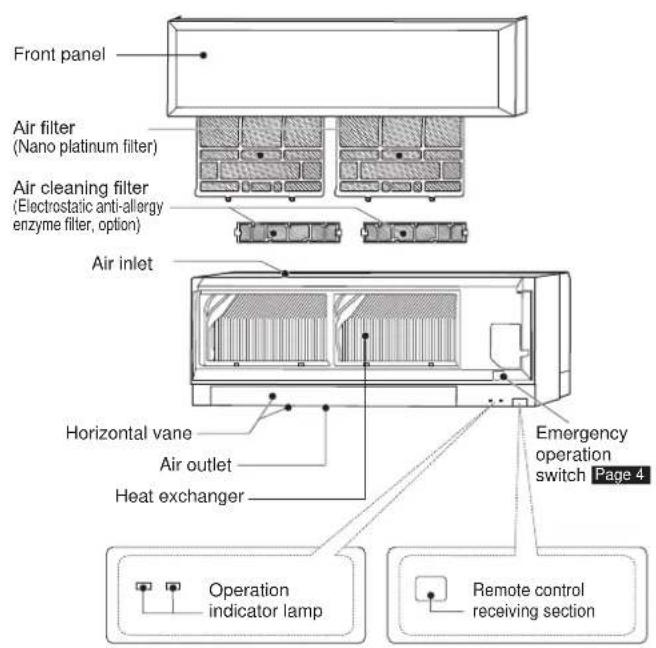
NAME OF EACH PART
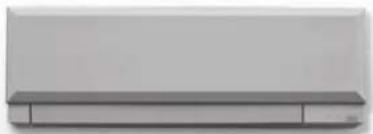
Indoor unit Remote controller
Outdoor unit
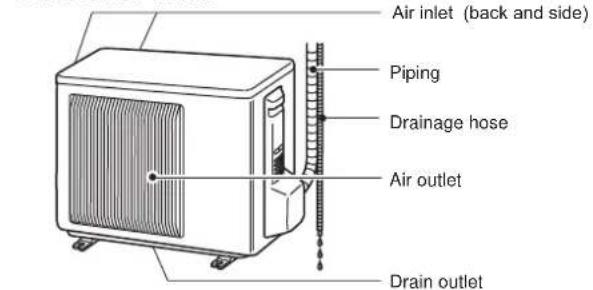
Outdoor units may be different in appearance.
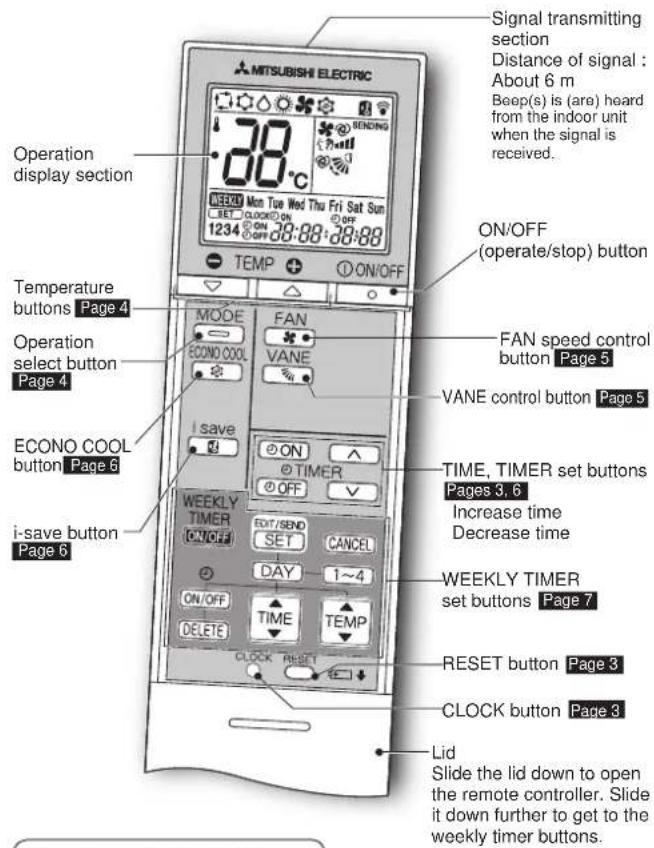
Remote controller holder
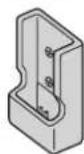
Only use the remote controller provided with the unit.
Do not use other remote controllers. If two or more indoor units are installed in proximity to one another, an indoor unit that is not intended to be operated may respond to the remote controller.
PREPARATION BEFORE OPERATION
Before operation: Insert the power supply plug into the power outlet and/or turn the breaker on.
Installing the remote controller batteries
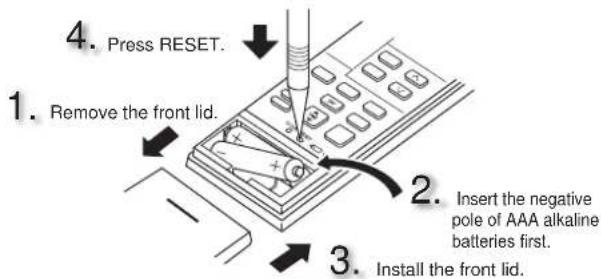
• Make sure the polarity of the batteries is correct.
- Do not use manganese batteries and leaking batteries. The remote controller could malfunction.
- Do not use rechargeable batteries.
- Replace all batteries with new ones of the same type.
- Batteries can be used for approximately 1 year. However, batteries with expired shelf lives last shorter.
- Press RESET gently using a thin instrument. If the RESET button is not pressed, the remote controller may not operate correctly.
Setting current time
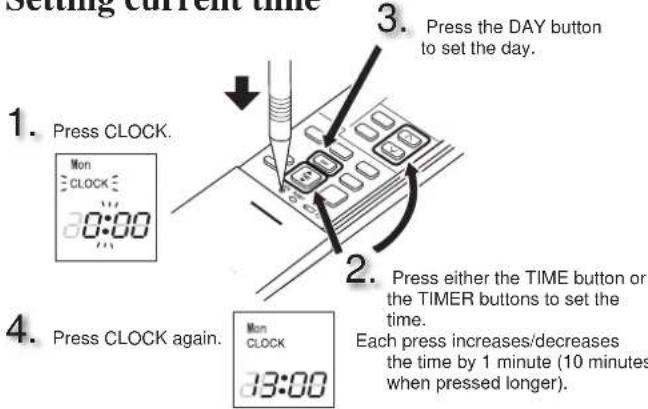
- Press CLOCK gently using a thin instrument.
SELECTING OPERATION MODES
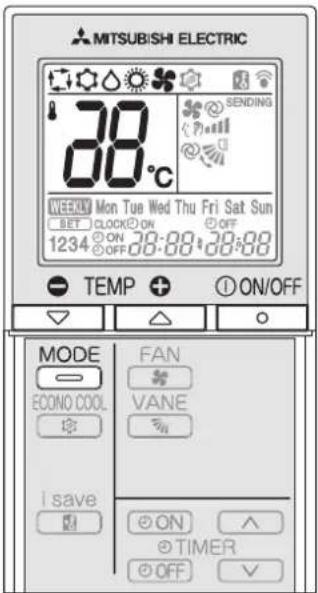
1
Press ON/OFF to start the operation.
2
Press MODE to select operation mode. Each press changes mode in the following order:

3
Press or to set the temperature. Each press raises or lowers the temperature by 1^ .
-
① ON/OFF Press to stop the operation.
Operation indicator lamp
The operation indicator lamp shows the operation state of the unit.
| Indication Operation state Room temperature | ||
| The unit is operating to reach the set temperature | About 2°C or more away from set temperature | |
| The room temperature is approaching the set temperature | About 1 to 2°C from set temperature | |
| Standby mode (only during multi system operation) | — | |

Lighted

Blinking

Not lighted
Note:
Multi system operation
Two or more indoor units can be operated by one outdoor unit. When several indoor units are operated simultaneously, cooling/fan and heating operations cannot be done at the same time. When COOL/FAN is selected with one unit and HEAT with another or vice versa, the unit selected last goes into standby mode.

AUTO mode (Auto change over)
The unit selects the operation mode according to the difference between the room temperature and the set temperature. During AUTO mode, the unit changes mode (COOL↔HEAT) when the room temperature is 2^ C away from the set temperature for more than 15 minutes.
Note:
Auto Mode is not recommended if this indoor unit is connected to a MXZ type outdoor unit. When several indoor units are operated simultaneously, the unit may not be able to switch operation mode between COOL and HEAT. In this case, the indoor unit becomes standby mode (Refer to table of Operation indicator lamp).

COOL mode
Enjoy cool air at your desired temperature.
Note:
Do not operate COOL mode at very low outside temperatures (less than -10°C). Water condensed in the unit may drip and wet or damage furniture, etc.

DRY mode
Dehumidify your room. The room may be cooled slightly. Temperature cannot be set during DRY mode.

HEAT mode
Enjoy warm air at your desired temperature.

FAN mode
Circulate the air in your room.
Emergency operation
When the remote controller cannot be used...
Emergency operation can be activated by pressing the emergency operation switch (E.O.SW) on the indoor unit.
Each time the E.O.SW is pressed, the operation changes in the following order:
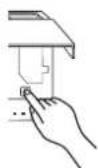
Operation indicator lamp
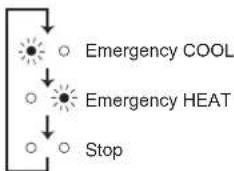
flowchart
graph TD
    A["Sun icon"] --> B["Emergency COOL"]
    C["Sun icon"] --> D["Emergency HEAT"]
    E["Sun icon"] --> F["Stop"]
Set temperature : 24°C Fan speed : Medium Horizontal vane : Auto
Note:
- The first 30 minutes of operation is test run. Temperature control does not work, and fan speed is set to High.
- In the emergency heating operation, the fan speed gradually rises to blow out warm air.
- In the emergency cooling operation, the horizontal vanes' position will be reset in about a minute, then the operation will start.
Auto restart function
If a power failure occurs or the main power is turned off during operation, "Auto restart function" automatically starts operation in the same mode as the set with the remote controller just before the shutoff of the main power. When timer is set, timer setting is cancelled and the unit starts operation when power is resumed.
If you do not want to use this function, please consult the service representative because the setting of the unit needs to be changed.
FAN SPEED AND AIRFLOW DIRECTION ADJUSTMENT
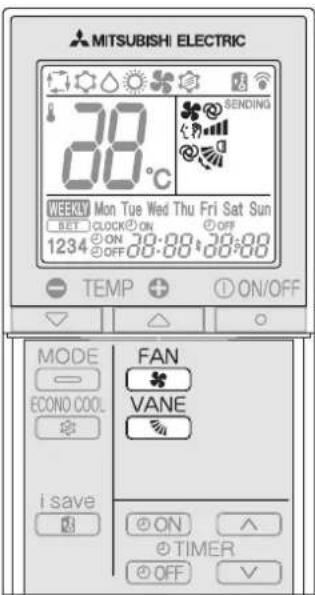
Press FAN to select fan speed. Each press changes fan speed in the following order:

- Two short beeps are heard from the indoor unit when set to AUTO.
- Use higher fan speed to cool/heat the room quicker. It is recommended to lower the fan speed once the room is cool/warm.
- Use lower fan speed for quiet operation.
Note:
Multi system operation
When several indoor units are operated simultaneously by one outdoor unit for heating operation, the temperature of the airflow may be low. In this case, it is recommended to set the fan speed to AUTO.
VANE
Press ☐ to select airflow direction. Each press changes airflow direction in the following order:

flowchart
graph LR
    A["→"] --> B["(AUTO)"]
    B --> C["(1)"]
    C --> D["(2)"]
    D --> E["(3)"]
    E --> F["(4)"]
    F --> G["(5)"]
    G --> H["(SWING)"]
    H --> I["→"]
    I --> J["→"]
• Two short beeps are heard from the indoor unit when set to AUTO.
- Always use the remote controller when changing the direction of airflow. Moving the horizontal vanes with your hands causes them to malfunction.
- When the breaker is turned on, the horizontal vanes' position will be reset in about a minute, then the operation will start. The same is true in the emergency cooling operation.
- When the horizontal vanes seem to be in an abnormal position, see page 9.
Air ow direction
(AUTO)......The vane is set to the most efficient airflow direction. COOL/DRY/FAN:horizontal position. HEAT:position (4).
(Manual) .....For efficient air conditioning, select the upper position for COOL/DRY, and the lower position for HEAT. If the lower position is selected during COOL/DRY, the vane automatically moves to the horizontal position after 0.5 to 1 hour to prevent any condensation from dripping.
(Swing) ......The vane moves up and down intermittently.
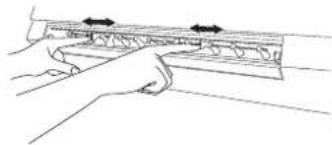
■ To change the horizontal airflow direction.
Move the vertical vane manually before starting operation.
natural_image
Line drawing of a hand holding a metal ruler with arrows indicating measurement direction (no text or symbols)Note:
If the vertical vanes are adjusted, be sure to return the horizontal vanes to the original closed position.
I-SAVE OPERATION
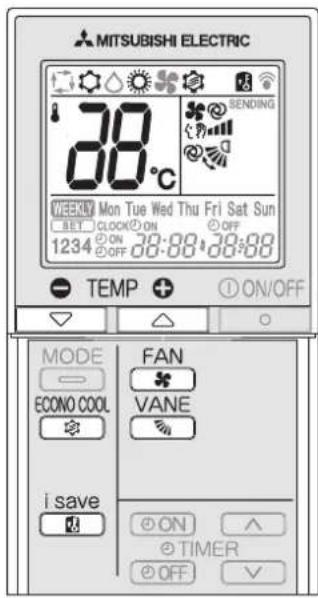
1
i save
Press ☑uring COOL, ECONO COOL, or HEAT mode to select i-save mode.
2
Set the temperature, fan speed, and airflow direction.
- The same setting is selected from the next time by: i save
- Two settings can be saved. (One for COOL/ECONO COOL, one: HEAT)
- Select the appropriate temperature, fan speed, and airflow direction according to your room.
- Normally, the minimum temperature setting in HEAT However, during i-save operation only, the minimum temperature setting is 10^ .
i save
Press again to cancel i-save operation.
- i-save operation also is cancelled when the MODE button is pressed.
i-save operation
A simplified set back function enables to recall the preferred (preset) setting with a single push of the save button. Press the button again and you can go back to the previous setting in an instance.
Example of use:
- Low energy mode
Set the temperature 2^ C to 3^ C warmer in COOL and cooler in HEAT mode. This setting is suitable for unoccupied room, and while you are sleeping. - Saving frequently used settings
Save your preferred setting for COOL/ECONO COOL and HEAT. This enables you to select your preferred setting with a single push of the button.
Note:
When using the multi system MXZ-8A140, the temperature cannot 10^ C. Even if the temperature is set to 10^ C, the air con at 16^ C.
ECONO COOL OPERATION
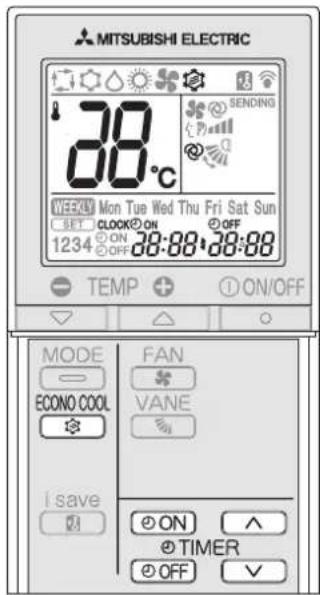
ECONO COOL
Press during COOL mode
ECONO COOL operation.
e 4 start
The unit performs swing operation vertically in various cycles according to the temperature airflow.
simply
pressing ECONO COOL
Press again to cancel ECONO COOL operation.
• ECONO COOL operation is also cancelled when the VANE button is pressed.
What is "ECONO COOL"?
Swing airflow (change of airflow) makes you feel cooler than stationary airflow. So, mode even though the set temperature is automatically set at 2°C higher, it is possible to perform cooling operation with keeping comfort. As a result, energy can be saved.
TIMER OPERATION (ON/OFF TIMER)
1
Press ON during operation to set the timer.
④ON (ON timer): The unit turns ON at the set time.
OFF (OFF timer): The unit turns OFF at the set time.
* OPEN BLINKESF
* Make sure that the current time and day are set correctly. Page 3
2
Press ▲(Increase) and (Decrease) to set the
time of timer.
Each press increases or decreases the set time by 10 minutes.
- Set the timer while ON or OFF blinking.
3
Press ON or OFF again to cancel timer.
Note:
- ON and OFF timers can be set together. Mark indicates the order of timer operations.
- If power failure occurs while ON/OFF timer is set, see page 4 "Auto restart function".
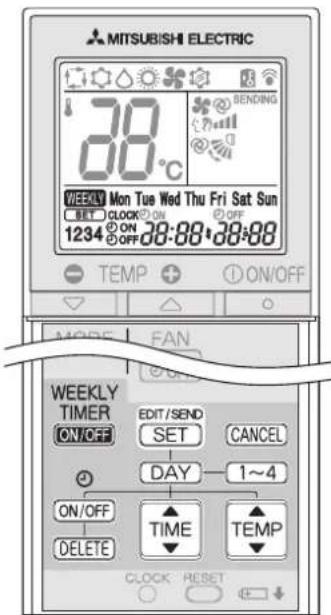
WEEKLY TIMER OPERATION
• A maximum of 4 ON or OFF timers can be set for individual days of the week.
• A maximum of 28 ON or OFF timers can be set for a week.
E.g.: Runs at 24°C from waking up to leaving home, and runs at 27°C from getting home to going to bed on weekdays.
Runs at 27°C from waking up late to going bed early on weekends.
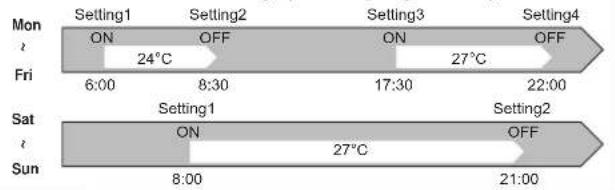
Note:
The simple ON/OFF timer setting is available while the weekly timer is on. In this case, the ON/OFF timer has priority over the weekly timer; the weekly timer operation will start again after the simple ON/OFF timer is complete.
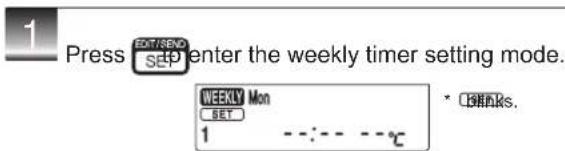
Se ing the weekly timer
* Make sure that the current time and day are set correctly.
2 Press DAY and 1\~4 to select setting day and number.
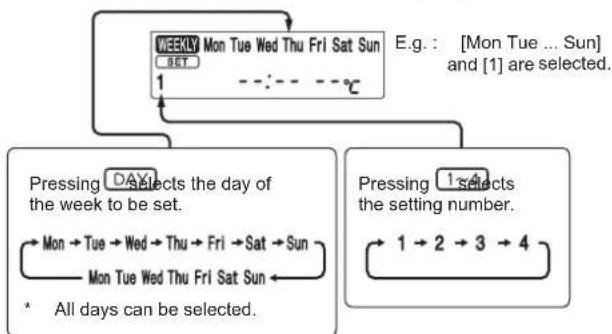
flowchart
graph TD
    A["MON Tue Wed Thu Fri Sat Sun"] --> B{1}
    B --> C["Pressing DAY Selects the day of the week to be set."]
    B --> D["Pressing 1 Selects the setting number."]
    C --> E["Mon → Tue → Wed → Thu → Fri → Sat → Sun"]
    D --> F["1 → 2 → 3 → 4"]
    E --> G["* All days can be selected."]
    F --> G
3
Press ON/OFF and TIME set ON/OFF, time, and temperature.
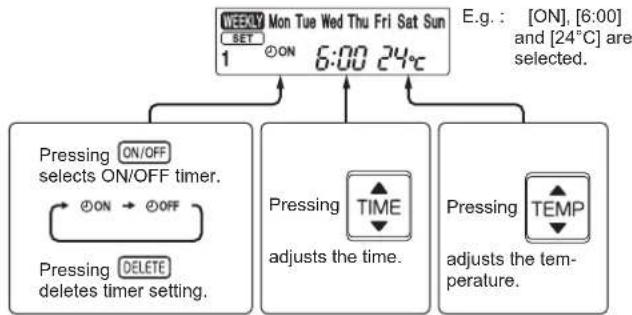
flowchart
graph TD
    A["ON"] --> B["ON/OFF selects ON/OFF timer"]
    B --> C["ON → OFF"]
    C --> D["PRESSING DELETE timer setting"]
    D --> E["PRESSING TIME adjusts the time."]
    E --> F["PRESSING TEMP adjusts the temperature."]
    F --> G["E.g.: [ON"], [6:00] and["24°C"] are selected.]
* Hold down the button to change the time quickly.

Press D and to continue setting the timer for other days and/or numbers.
4
Press EDIT/SEND SET Complete and transmit the weekly timer setting.
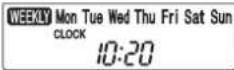
SET which was blinking goes out, and the current time will be displayed.
Note:
- Press SET/REND SED transmit the setting information of weekly timer to the indoor unit. Point the remote controller toward the indoor unit for 3 seconds.
- When setting the timer for more than one day of the week or one number, SET does not have to be pressed per each setting. Press SET Service after all the settings are complete. All the weekly timer settings will be saved.
- Press SET to enter the weekly timer setting mode, and press and hold DELETE for 5 seconds to erase all weekly timer settings. Point the controller toward the indoor unit.
5
Press WEEKLY TIMER ON TO turn the weekly timer ON. ( lights.)
* When the weekly timer is ON, the day of the week whose timer setting is complete, will light.

Press WEEKLY TIMBER GK Praain to turn the weekly timer OFF. (WEEKLY goes out.)
Note:
The saved settings will not be cleared when the weekly timer is turned OFF.
Che ing weekly timer se ing
1
Press SET/SEND enter the weekly timer setting mode. * C#Rks.
2
Press DAY to view the setting of the particular day or number.
-
Press CANO Exit the weekly timer setting.
Note:
When all days of the week are selected to view the settings and a different setting is included among them, ·s·s·s·s·s·s·s·s·s·s·s·s·s will be displayed.
CLEANING
Instructions:
- Switch off the power supply or turn off the breaker before cleaning.
• Be careful not to touch the metal parts with your hands.
• Do not use benzine, thinner, polishing powder, or insecticide.
• Use only diluted mild detergents.
• Do not expose parts to direct sunlight, heat, or fire to dry.
• Do not use water hotter than 50°C.
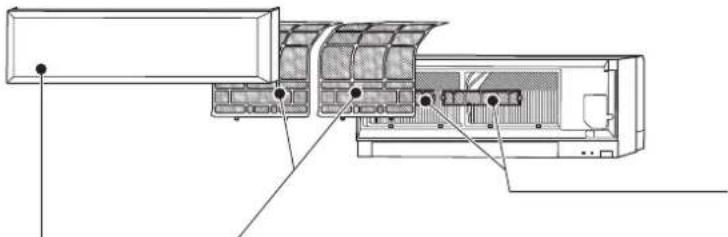
natural_image
Technical line drawing of an air conditioner unit with internal compartments and mounting points (no text or symbols)Air filter (Nano platinum filter)
• Clean every 2 weeks
- Remove dirt by a vacuum cleaner, or rinse with water.
• After washing with water, dry it well in shade.
What is "Nano platinum filter"?
Nano platinum is a ceramic particle that includes a platinum nanoparticle. The particles are incorporated into the filter material, which results in providing semi-permanent antibacterial and deodorizing characteristics for the filter. Nano platinum surpasses the catechin (a bioflavonoid that is found in green tea) in performance. Nano platinum filter uses this compound not only to improve air quality but also to eliminate bacteria and viruses. This air filter has a semi-permanent lasting effect even after washing it with water.
Air cleaning filter (Electrostatic anti-allergy enzyme filter, option)
Every 3 months:
- Remove dirt by a vacuum cleaner.
When dirt cannot be removed by vacuum cleaning:
- Soak the filter and its frame in lukewarm water before rinsing it.
• After washing, dry it well in shaddnstall all tabs of the air filter.
Every year: - Replace it with a new air cleaning filter for best performance.
• Parts Number MAC-2320FT
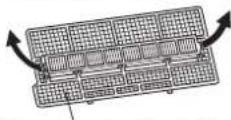
Pull to remove from the air filter
Front panel
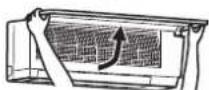
- Lift the front panel until a "click" is heard.
- Close the front panel securely and press the positions indicated by the arrows.
- Clean the front panel without detaching it from the unit.
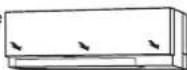
- Wipe with a soft dry cloth. A dedicated soft dry cloth is only provided with MSZ-EF**VEB type.
• Use the dedicated SOFT DRY CLOTH. Parts Number MAC-1001CL-E - Do not soak the front panel in water.
Important
- The surface of the indoor unit is easily scratched, so never rub or hit the unit with something hard. Also, when installing or removing the front panel, handle it with care to prevent scratches on it.
- Do not use abrasive cleaner to prevent scratches on the surface of the indoor unit.
- It is very easy to get fingerprints on the surface of the indoor unit. When fingerprints are noticeable, gently wipe them off with a soft dry cloth.
- When using a commercially available chemical impregnated cloth, follow its instructions.
- Do not leave the front panel open for a prolonged time.
WHEN YOU THINK THAT TROUBLE HAS OCCURRED
Even if these items are checked, when the unit does not recover from the trouble, stop using the air conditioner and consult your dealer.
| Symptom Explanation & Check points | |
| Indoor Unit | |
| The unit cannot be operated. | • Is the breaker turned on?• Is the power supply plug connected?• Is the ON timer set Page |
| The horizontal vane does not move. | • Are the horizontal vane and the vertical vane installed correctly?• Is the fan guard deformed?• When the breaker is turned on, the horizontal vanes' position will be reset in about a minute. After the reset has completed, the normal horizontal vanes' operation resumes. The same is true in the emergency cooling operation. |
| The unit cannot be operated for about 3 minutes when restarted. | • This protects the unit according to instructions from the microprocessor. Please wait. |
| Mist is discharged from the air outlet of the indoor unit. | • The cool air from the unit rapidly cools moisture in the air inside the room, and it turns into mist. |
| The swing operation of the HORIZONTAL VANE is suspended for a while, then restarted. | • This is for the swing operation of the HORIZTAL VANE to be performed normally. |
| When SWING is selected in COOL/DRY/FAN mode, the lower horizontal vane does not move. | • It is normal that the lower horizontal vane does not move when SWING is selected in COOL/DRY/FAN mode. |
| The airflow direction changes during operation.The direction of the horizontal vane cannot be adjusted with the remote controller. | • When the unit is operated in CO mode, if the operation continues with air blowing down for 0.5 to 1 hour, the direction of the airflow is automatically set to horizontal post prevent water from condensing and dripping.• In the heating operation, if the aperture is too low or when defrosting is being done, the horizontal vane is automatically set to horizontal position. |
| The operation stops for about 10 minutes in the heating operation. | • Outdoor unit is in defrost.Since this is completed in max. 10 please wait. (When the outside temperature is to low and humidity is too high, frost is formed.) |
| The unit starts operation by itself when the main power is turned on, but hasn't received sign from the remote controller. | • These models are equipped with a restart function. When the main power turned off without stopping the unit remote controller and is turned on again unit starts operation automatically in the same mode as the one set with the remote controller just before the shutoff of the main Refer to "Auto restart function" page 4. |
| The two horizontal vanes touch each other. The horizontal vanes are in an abnormal position. The horizontal vanes do not return to the correct "close position". | Perform one of the following:• Turn off and on the breaker. Make sure the horizontal vanes move to the correct "close position".• Start and stop the emergency cooling operation and make sure the horizontal vanes move to the correct "close position". |
| In COOL/DRY mode, when the room temperature reaches near the set temperature, the outdoor unit stops, then the indoor unit operates at low speed. | • When the room temperature deviates from the set temperature, the indoor fan starts running according to the settings on the remote controller. |
| The indoor unit discolors over time. | Although plastic turns yellow due to the influence some factors such as ultraviolet light and temperature, this has no effect on the product functions. |
| Multi system | |
| The indoor unit which is not operating becomes warm and a sound, similar to water flow-ing, is heard from the unit. | • A small amount of refrigerant control flow into the indoor unit even though it is not operating. |
| When heating operation is selected, operation does not start right away. | • When operation is started during defrosting of outdoor unit is done, it takes a few minutes (max 10 minutes) to blow out warm air. |
| Outdoor Unit | |
| The fan of the outdoor unit does not rotate even though the compressor is running. Even if the fan starts to rotate, it stops soon. | • When the outside temperature is Ic cooling operation, the fan operates intermittently to maintain sufficient cooling capacity. |
| Water leaks from the outdoor unit. | • During COOL and DRY operations, pipe or pin connecting sections are cooled and this causes water to condense.• In the heating operation, water condensed on the heat exchanger drips down.• In the heating operation, the defrosting operation make ice forming on the outdoor unit melt and drip down. |
| White smoke is discharged from the outdoor unit. | • In the heating operation, vapor generated by defrosting operation looks like white smoke. |
| Symptom Explanation & Check points | |
| Remote controller | |
| The display on the remote controller does not appear or it is dim. The indoor unit does not respond to the remote control signal. | Are the batteries exhaust ePageIshet polarity (+,-) of the batteriesPage 3Are any bluns on the remote controller of other electric appliances being pressed? |
| Does not cool or heat | |
| The room cannot be cooled or heated sufficiently. | Is the te mperature setting appropriapPage 4Is the fan setting appropriate? Please change fan speed to higher setting.Page 5Are the filters clean Page Is the fan or heat exchanger of the indoor unit clean?Are there any obstacles blocking the air inlet or outlet of the indoor or outdoor unit?Is a window or door open? |
| The room cannot be cooled sufficiently. | When a ventilation fan or a gas cooker is used in a room, the cooling load increases, resulting in an insufficient cooling effect.When the outside temperature is high, the cool effect may not be sufficient. |
| The room cannot be heated sufficiently. | When the outside temperature is low, the heat effect may not be sufficient. |
| Air does not blow out soon in the heating operation.DRYAirflow | Please wait as the unit is preparing to blow out warm air. |
| The air from the indoor unit smells strange. tem- | Are the filters clean Page Is the fan or heat exchanger of the indoor unit clean?The unit may suck in an odor adher wall, carpet, furniture, cloth, etc. and blow it out with the air. |
| Sound | |
| Cracking sound is heard. | This sound is generated by the expansion/contraction of the front panel, etc. due to change in temperature. |
| "Burbling" sound is heard.the | This sound is heard when the out absorbed from the drain hose by turning on the range hood or the ventilation fan, making water flowing in the drain hose to spout out.This sound is also heard when the out blows into the drain hose in case wind is strong. |
| Mechanical sound is heard from the indoor unit. | This is the switching sound in turning on/off the fan or the compressor. |
| The sound of water flowing is heard. | This is the sound of refrigerant or condensed water flowing in the unit. |
| Hissing sound is sometimes heard. | This is the sound when the flow of inside the unit is changed. |
| Timer | |
| Weekly timer does not operate according to settings.to | Is the ON/OFF timer set PageTransmit the setting information of the timer to the indoor unit again. When the mation is successfully received, a long beep will sound from the indoor unit. If information fails to be received, 3 short beeps will be heard. Ensure information is successfully received.Page 7When a power failure occurs and the main power turns off, the indoor unit built-in clo incorrect. As a result, the weekly timer may not work normally.Be sure to place the remote control the signal can be received by thePage 3 |
| The unit starts/stops the operation by itself. | Is the weekly timer set Page |
during
In the following cases, stop using the air conditioner and consult your dealer.
- When water leaks or drips from the indoor unit.
- When the left operation indicator lamp blinks.
• When the breaker trips frequently.
- The remote control signal is not received in a room where an electronic ON/OFF type fluorescent lamp (inverter-type fluorescent lamp, etc.) is used.
• Operation of the air conditioner interferes with radio or TV reception. An amplifier may be required for the affected device.
• When an abnormal sound is heard.
correct?
tside air is
tside air the outside
refrigerant
weekly infor-
ock will be
1
1
oller where
indoor unit
WHEN THE AIR CONDITIONER IS NOT GOING TO BE USED FOR A LONG TIME
1
Set to the highest temperature in manual COOL mode, and operate for 3 to 4 hours. Page 4
- This dries the inside of the unit. - Moisture in the air conditioner contributes to favorable conditions for growth of fungi, such as mold.
2
Press ① ON/OFF to stop the operation.
3
Turn off the breaker and/or disconnect the power supply plug.
4
Remove all batteries from the remote controller.
When using the air conditioner again:
1
Clean the air filter. Page 8
2
Check that the air inlet and outlet of the indoor and outdoor units are not blocked.
3
Check that the earth is connected correctly.
4
Refer to the "PREPARATION BEFORE OPERATION", and follow the instructions. Page 3
INSTALLATION PLACE AND ELECTRICAL WORK
Installation place
Avoid installing the air conditioner in the following places.
• Where there is much machine oil.
- Salty places such as the seaside.
• Where sulfide gas is generated such as a hot spring.
- Where oil is splashed or where the area is filled with oily smoke (such as cooking areas and factories, in which the properties of plastic could be changed and damaged).
• Where there is high-frequency or wireless equipment.
• Where the air from the outdoor unit air outlet is blocked.
- Where the operation sound or air from the outdoor unit does not bother the house next door.
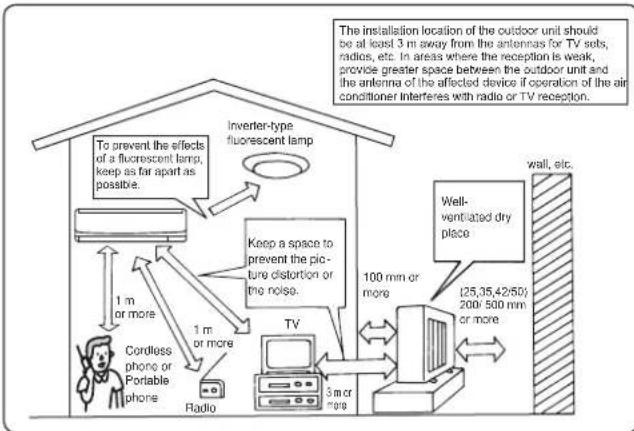
flowchart
graph TD
    A["Radio"] --> B["Cordless phone or Portable phone"]
    B --> C["1 m or more"]
    C --> D["Inverter-type fluorescent lamp"]
    D --> E["To prevent the effects of a fluorescent lamp, keep as far apart as possible."]
    D --> F["Keep a space to prevent the picture distortion or the noise."]
    F --> G["TV"]
    G --> H["3 m or more"]
    H --> I["100 mm or more"]
    I --> J["Well-ventilated dry place"]
    J --> K["125,35,42:50/200/500 mm or more"]
    K --> L["wall, etc."]
Electrical work
- Provide an exclusive circuit for the power supply of the air conditioner.
- Be sure to observe the breaker capacity.
If you have any questions, consult your dealer.
SPECIFICATIONS
Guaranteed operating range
| Indoor Outdoor | |||
| Cooling | Upper limit | 32°C DB23°C WB | 46°C DB— |
| Lower limit | 21°C DB15°C WB | -10°C DB— | |
| Heating | Upper limit | 27°C DB— | 24°C DB18°C WB |
| Lower limit | 20°C DB— | -15°C DB-16°C WB | |
DB: Dry Bulb
WB: Wet Bulb
Note:
EF22 has no specifications for single combination.
This indoor model is only for multi system air conditioner.
As for the specifications of multi system, please confirm your dealer and/or refer to the catalogue.
MITSUBISHI ELECTRIC CORPORATION
HEAD OFFICE: TOKYO BLDG., 2-7-3, MARUNOUCHI, CHIYODA-KU, TOKYO 100-8310, JAPAN
- SPLIT-TYPE AIR CONDITIONERS
- INDOOR UNIT
- OPERATING INSTRUCTIONS
- CONTENTS
- SAFETY PRECAUTIONS
- Marks and their meanings
- Meanings of symbols used in this manual
- NAME OF EACH PART
- PREPARATION BEFORE OPERATION
- SELECTING OPERATION MODES
- 1
- 2
- 3
- -
- Operation indicator lamp
- Note:
- Multi system operation
- AUTO mode (Auto change over)
- COOL mode
- DRY mode
- HEAT mode
- FAN mode
- Emergency operation
- When the remote controller cannot be used...
- Auto restart function
- FAN SPEED AND AIRFLOW DIRECTION ADJUSTMENT
- VANE
- Air ow direction
- ■ To change the horizontal airflow direction.
- I-SAVE OPERATION
- Example of use:
- ECONO COOL OPERATION
- simply
- What is "ECONO COOL"?
- TIMER OPERATION (ON/OFF TIMER)
- WEEKLY TIMER OPERATION
- Se ing the weekly timer
- 4
- 5
- Che ing weekly timer se ing
- CLEANING
- Instructions:
- Air filter (Nano platinum filter)
- What is "Nano platinum filter"?
- Air cleaning filter (Electrostatic anti-allergy enzyme filter, option)
- Front panel
- Important
- WHEN YOU THINK THAT TROUBLE HAS OCCURRED
- WHEN THE AIR CONDITIONER IS NOT GOING TO BE USED FOR A LONG TIME
- When using the air conditioner again:
- INSTALLATION PLACE AND ELECTRICAL WORK
- Installation place
- Electrical work
- SPECIFICATIONS
- MITSUBISHI ELECTRIC CORPORATION
Marke : MITSUBISHI
Modell : SET-MSZ-EF25VEW
Kategorie : Klimaanlage