
APCRBC118 - Batterie APC - Kostenlose Bedienungsanleitung
Finden Sie kostenlos die Bedienungsanleitung des Geräts APCRBC118 APC als PDF.


| Produkttyp | Ersatzbatterie für USV |
| Batterietechnologie | VRLA (ventilgeregelte Blei-Säure) |
| Nennspannung | 12 V |
| Kapazität | 9 Ah |
| Länge | 151 mm |
| Breite | 65 mm |
| Höhe | 94 mm |
| Gewicht | 2,6 kg |
| Anschlussart | Faston 6,3 mm |
| Wartung | Wartungsfrei, geschlossene Bauweise |
| Lebensdauer | 3–5 Jahre (abhängig von Einsatzbedingungen) |
| Betriebstemperatur | 0 °C bis 40 °C |
| Lagertemperatur | -15 °C bis 50 °C |
| Zertifizierungen | CE, UL |
| Kompatible USV-Modelle | APC Back-UPS NS 1000/1500, BR1500GI u. a. |
| Recycling | Gemäß lokalen Vorschriften entsorgen (Blei-Säure) |
| Lieferumfang | 1 Batterie, Anschlusskabel (falls erforderlich) |
Häufig gestellte Fragen - APCRBC118 APC
Benutzerfragen zu APCRBC118 APC
0 Frage zu diesem Gerät. Beantworten Sie die, die Sie kennen, oder stellen Sie Ihre eigene.
Eine neue Frage zu diesem Gerät stellen
Laden Sie die Anleitung für Ihr Batterie kostenlos im PDF-Format! Finden Sie Ihr Handbuch APCRBC118 - APC und nehmen Sie Ihr elektronisches Gerät wieder in die Hand. Auf dieser Seite sind alle Dokumente veröffentlicht, die für die Verwendung Ihres Geräts notwendig sind. APCRBC118 von der Marke APC.
BEDIENUNGSANLEITUNG APCRBC118 APC
Smart-UPS® X-Series 2000-3000 VA RBC 117 & 118
UPS Replacement Battery—APCRBC117


For information on recycling the used battery, see the Used Battery Information sheet included with the replacement battery.
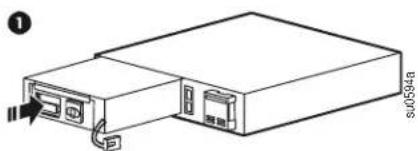
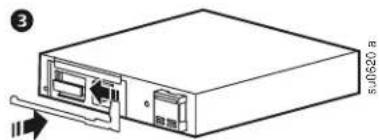
Remove the UPS Battery
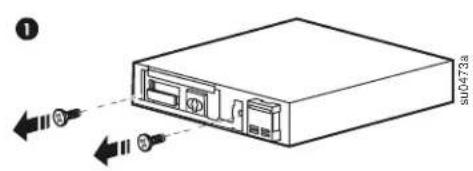
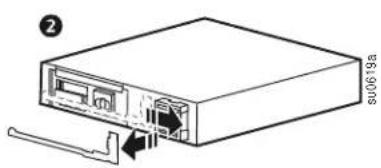
natural_image
Diagram of an internal device showing a drive and cable ports (no text or labels)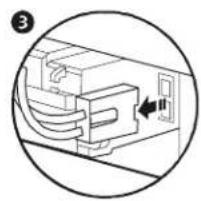
natural_image
Diagram of a computer interface showing cable routing and a switch (no text or symbols)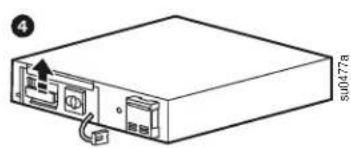
natural_image
Line drawing of a computer internal unit with ports and cables (no text or symbols)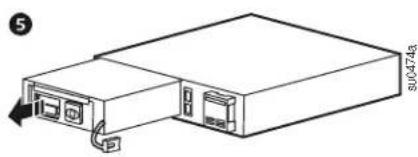
natural_image
Line drawing of a server rack with ports and an attached cable (no text or symbols)Install the UPS Replacement Battery
natural_image
Line drawing of a server rack unit with ports and connectors (no text or symbols)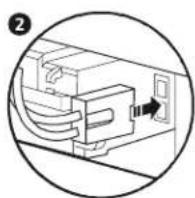
natural_image
Diagram of a computer interface unit with ports and an external connector (no text or symbols)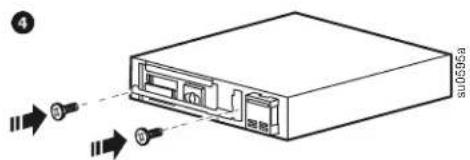
XLBP Replacement Batteries—APCRBC118
Remove the XLBP Batteries

Install the XLBP Replacement Batteries
1
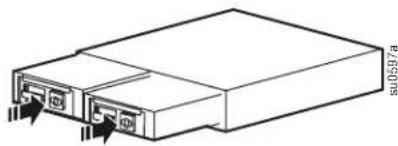
natural_image
Technical line drawing of a rectangular electronic device with ports and connectors (no text or symbols)2
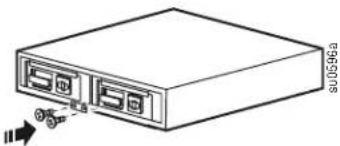
natural_image
Line drawing of a server rack with ports and an attached cable (no text or symbols)Reset the Battery Install Date
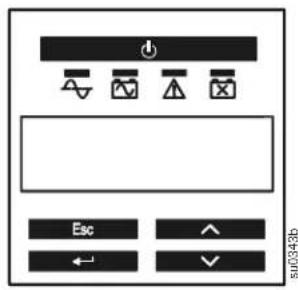
Reset the Battery Install Date for the internal UPS battery.
If the Battery Install Date screen does not appear on the display interface within two minutes of installing the new battery, use the arrow keys to navigate to: Main Menu > Configuration > Battery Install Date.
On the Battery Install Date screen, use the arrow keys to select the month, date, and year. Press ENTER to make a selection and move to the next option.
When finished, press ENTER to save the date.
When the RBC is fully charged, perform a self-test and run time calibration test.


Marke : APC
Modell : APCRBC118
Kategorie : Batterie