
PSNKW30P - Sportuhr Pyle - Kostenlose Bedienungsanleitung
Finden Sie kostenlos die Bedienungsanleitung des Geräts PSNKW30P Pyle als PDF.


| Produkttyp | Sportuhr |
| Marke | Pyle |
| Modell | PSNKW30P |
| Gehäusematerial | Resin / Kunststoff |
| Armbandmaterial | Kunststoffband |
| Abmessungen (Gehäuse) | Ca. 45 mm Durchmesser |
| Gewicht | Ca. 50 g |
| Stromversorgung | 1x CR2032 Knopfzelle (im Lieferumfang) |
| Wasserdichtigkeit | Bis 50 Meter (5 ATM) |
| Funktionen | Stoppuhr, Timer, Wecker, Datumsanzeige, Hintergrundbeleuchtung |
| Zifferblatttyp | Digital (LCD) |
| Bedienerführung | Druckknöpfe an der Seite |
| Reinigung und Pflege | Mit einem feuchten Tuch abwischen; keine aggressiven Reinigungsmittel verwenden |
| Sicherheitshinweise | Nicht in heißen Umgebungen lagern; vor starken Magnetfeldern schützen |
| Ersatzteile | Batterie (CR2032), Armband |
| Garantie | 1 Jahr |
Häufig gestellte Fragen - PSNKW30P Pyle
Benutzerfragen zu PSNKW30P Pyle
0 Frage zu diesem Gerät. Beantworten Sie die, die Sie kennen, oder stellen Sie Ihre eigene.
Eine neue Frage zu diesem Gerät stellen
Laden Sie die Anleitung für Ihr Sportuhr kostenlos im PDF-Format! Finden Sie Ihr Handbuch PSNKW30P - Pyle und nehmen Sie Ihr elektronisches Gerät wieder in die Hand. Auf dieser Seite sind alle Dokumente veröffentlicht, die für die Verwendung Ihres Geräts notwendig sind. PSNKW30P von der Marke Pyle.
BEDIENUNGSANLEITUNG PSNKW30P Pyle
PYLE SPORTS
"Recreational Gear For The Great Outdoors"
IMPORTANT: Back carefully in original package it possible. We are not responsible for damage incurred in returning items for repair
A letter stating your exact street address, daytime phone number, and the problem
you are experiencing should be included. You must also enclose a copy of the original receipt a special date of purchase
natural_image
Close-up of small ice cubes with a dark curved line extending from them, no visible text or symbolsBrooklyn, NY 11204
140445671
Monday Through Thursday 2AM16 5PM
Friday 9AM to 1PM Eastern.
www.pyleaudio.com
PYLE® SPORTS
"Recreational Gear For The Great Outdoors"
PSNKW30 USER'S MANUAL
www.pyleaudio.com
1.0 Introduction
General Guide
Thank you for purchasing this Watch.
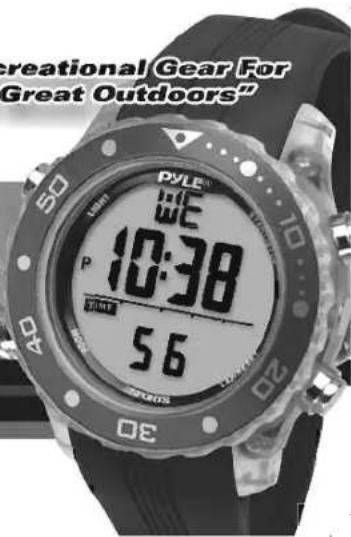
With this Watch, you can get your diving information easily! In addition to the diving function, this Watch can also record your diving information for your further review.
Simply put on the Watch and dive with it, your diving information like dive depth, dive duration, water temperature etc. will be exhibited on the display!
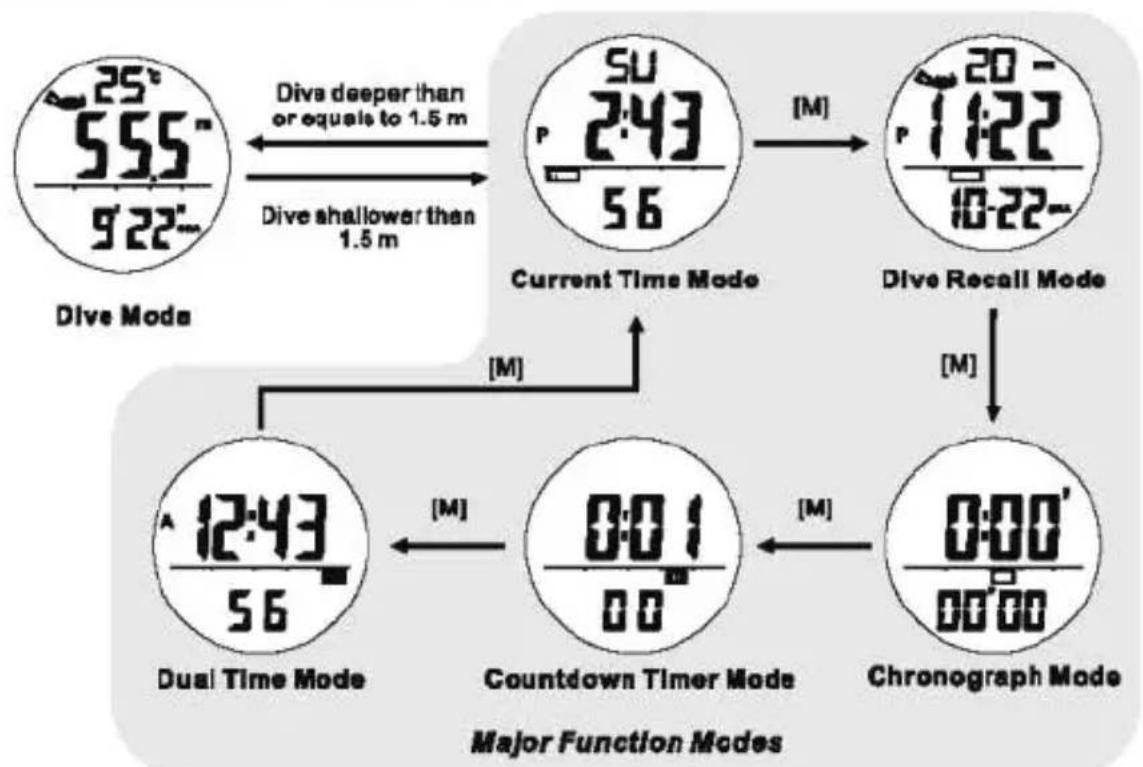
This Watch Includes 6 functional modes, they are Current Time Mode, Chronograph Mode, Countdown Timer Mode, Dual Time Mode, Dive Mode and Dive Recall Mode.
Your watch is carefully designed and produced. In order to utilize this feature of your watch, it is advisable to use the watch in conformity with the notes mentioned below:
- Read this user manual carefully before you use the Watch, and keep this manual in a safe place for your further reference.
- Avoid exposing the Watch to extreme conditions for an unreasonable time, and avoid rough uses or severe impacts on the Watch.
-
It is recommended to complete the battery replacement by a certified service agency because this will ensure the water proof standard last on your watch.
-
Clean the Watch, particular the water sensor on the back of the Watch' occasionally with a soft cloth.
- DO NOT expose the Watch to strong chemicals such as gasoline and alcohol, as they will damage your watch.
- Store the Watch in a dry place when it is not in use.
WARNING!
- Diving is one of the higher risk sports, commit an error in diving may lead to serious injury or death, hence, always put your safety first, and always remember that you are responsible for your own safety.
- The Watch is a supplementary device for proper trained, qualified divers in diving. It is NOT a substitute for any dive training gear.
• Always get proper training, instruction and qualification prior before start diving.
• Make sure that you fully understand the functions and limitations of the Watch, and you have back-up device other than this watch in diving.
• DO NOT use the Watch for commercial or professional diving.
2.0 Button and its Function
![5U 2:43 56 [EL] [P] [M] [D] DISPLAY Current Time Mode](/content/2026/05/1028276/images/8573d7fd6d5de2beab2c46c60b275c7ac85006857408a4feb0b09c2a382658ff.jpg)
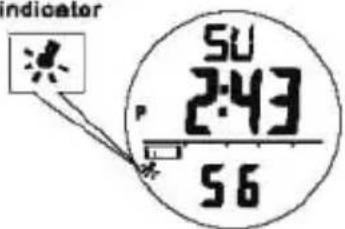
auto backlight
indicator
Auto Backlight
Mode Button [M]
■ To select among the Current Time, Dive Recall, Chronograph, Countdown Timer and Dual Time Mode.
■ Hold to enter Setting Mode
Up/Start/Stop Button [U]
■ To change the setting value or increase the set value during Setting Mode.
■ To activate the 'start' or 'stop' function during Chronograph and Countdown Timer Mode.
■ To change the sub-function display of Current Time Mode.
■ To select dive record in Dive Recall Mode
Down/Reset Button [D]
■ To show the Daily Alarm.
■ To change the setting value or decrease the set value during setting display.
■ To clear the value for the Chronograph and Countdown Timer.
■ To select dive record in Dive Recall Mode
EL Button [EL]
■ Hold the [EL] button for 2 seconds to set the auto backlight between ON and OFF,
■ To turn on the EL back light for about 3 seconds.
Auto Backlight
■ When Auto Backlight is set ON, the EL backlight will turn on for 3 seconds automatically when a key is pressed.
NOTE: The major key operations are summarized on the above paragraphs, however please read the coming chapters for the detail operations.
3.0 Major Function Modes
flowchart
graph TD
    A["Dive Mode 25° 555m 9'22""] -->|Dive shallower than 1.5 m| B["Current Time Mode SU 2:43/56"]
    B -->|[M]| C["Dive Recall Mode 20-1:22/10-22-"]
    C -->|[M]| D["Dual Time Mode 12:43/56"]
    D -->|[M]| E["Countdown Timer Mode 0:01/00"]
    E -->|[M]| F["Chronograph Mode 0:00'/00'00"]
    F -->|[M]| D
4.0 Current Time Mode - Sub-function Display and Daily Alarm
flowchart
graph TD
    A["Day of week-Date Display"] --> B["Day of week-Second Display"]
    B --> C["Temperature-Date Display"]
    C --> D["Temperature-Second Display"]
    D --> E["Day of Week"]
    style A fill:#f9f,stroke:#333
    style B fill:#f9f,stroke:#333
    style C fill:#f9f,stroke:#333
    style D fill:#f9f,stroke:#333
Current Time Sub-function Display
![7:00 Dally Alarm Display AL hold [D] Release [D] Alarm Time 5U 2:43 56 Current Time Mode Current Time](/content/2026/05/1028276/images/3226243221666a51e51e65b9057b25680e805857e61f1ff89c205b29eaa538a1.jpg)
Current Time Sub-function Display
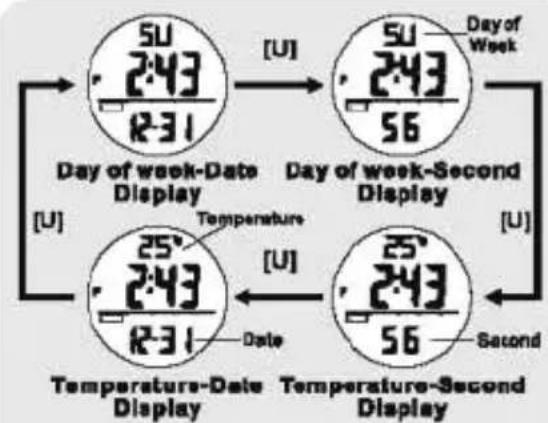
■ Press the [U] button will change the sub-function display on the 1st and 3rd row in the Current time Mode following the adjacent diagram:
■ The 1st row of display will show the Day of week or the current temperature.
■ The 2nd row will be the current Time.
■ The 3rd row will show the Second or Data.
Daily Alarm Display
■ Press the [D] button will display the Alarm Time until the [D] button is released.
NOTE: If [D] is pressed and hold for more than 2 seconds, it will go into the Alarm Time setting display. Please refer to the Chapter 4.2 for more details on Alarm Time setting.
■
4.1 Current Time Mode - The Setting Display
flowchart
graph TD
    A["Current Time Mode"] --> B["Second"]
    A --> C["Dive Mode Settings"]
    A --> D["Beep"]
    B --> E["Minute"]
    C --> F["Chime"]
    D --> G["day"]
    E --> H["Hour"]
    F --> I["12/24-hr"]
    G --> J["D/N or M/D"]
    H --> K["minutes"]
    I --> L["year"]
    J --> M["month"]
    K --> N["day"]
    L --> O["day"]
    style A fill:#f9f,stroke:#333
    style B fill:#ccf,stroke:#333
    style C fill:#ccf,stroke:#333
    style D fill:#ccf,stroke:#333
    style E fill:#cfc,stroke:#333
    style F fill:#cfc,stroke:#333
    style G fill:#cfc,stroke:#333
    style H fill:#fcc,stroke:#333
    style I fill:#fcc,stroke:#333
    style J fill:#fcc,stroke:#333
    style K fill:#fcc,stroke:#333
    style L fill:#fcc,stroke:#333
    style M fill:#fcc,stroke:#333
    style N fill:#fcc,stroke:#333
    style O fill:#fcc,stroke:#333
How to Set the Watch
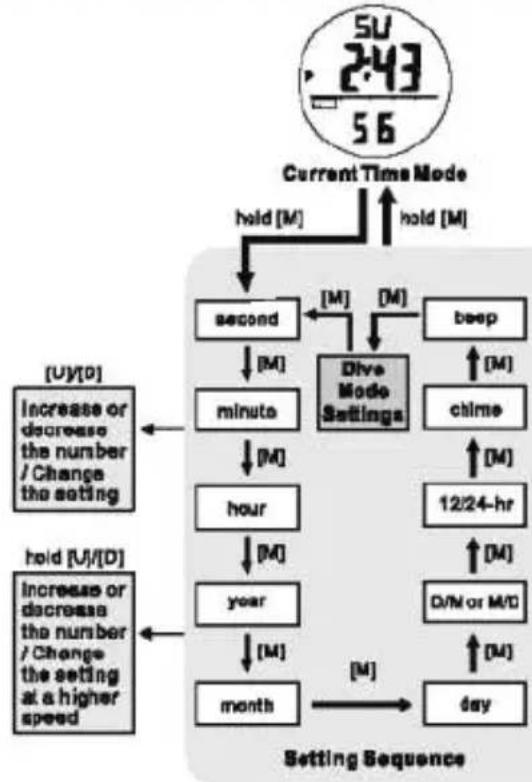
■ To select the setting display, hold the [M] button for 2 seconds in the Current Time Mode, and then the 'Second' digits will start flashing.
■ In setting display, press the [M] button to move the flashing following the adjacent diagram to select among different settings.
■ During one of the settings (except second) is flashing, press the [U] or [D] button to increase or decrease the number / change the setting (hold down the button to change it at a higher speed).
■ When the second digits start flashing, press the [U] or [D] button to reset to zero.
■ When the "beep" (Key tone) is set ON, there will be a beep sound when a key is pressed.
■ If the 'chime' (Hourly Chime) is turned ON (19), the Watch will beep once every hour.
■ When the setting is completed, hold the [M] button for 2 seconds to exit the setting display. If there is NO key-stroke for 1 minute, the Watch will also exit the setting display automatically.
NOTE: Please check the Chapter 8.3 for more detail of Dive Mode Settings.
4.2 Current Time Mode - Setting the Daily Alarm
flowchart
graph TD
    A["Current Time Display"] --> B["Settling Sequence"]
    B --> C["minutes"]
    B --> D["hour"]
    B --> E["daily alarm ON/OFF"]
    C --> F["Hold [M"]]
    D --> G["Hold [M"]]
    E --> H["Hold [M"]]
    I["Su 243 56"] --> J["Current Time Display"]
    K["U"][D] --> L["Increase or decrease the number / Change the setting"]
    M["hold [U"]/[D]] --> N["Increase or decrease the number / Change the setting at a higher speed"]
    O["RL 100 ON"] --> P["daily Alarm Indicator"]
    Q["am/pm indicator for alarm time"] --> R["Daily Alarm is set ON"]
    S["day alarm indicator"] --> T["101"]
How to Set the Daily Alarm
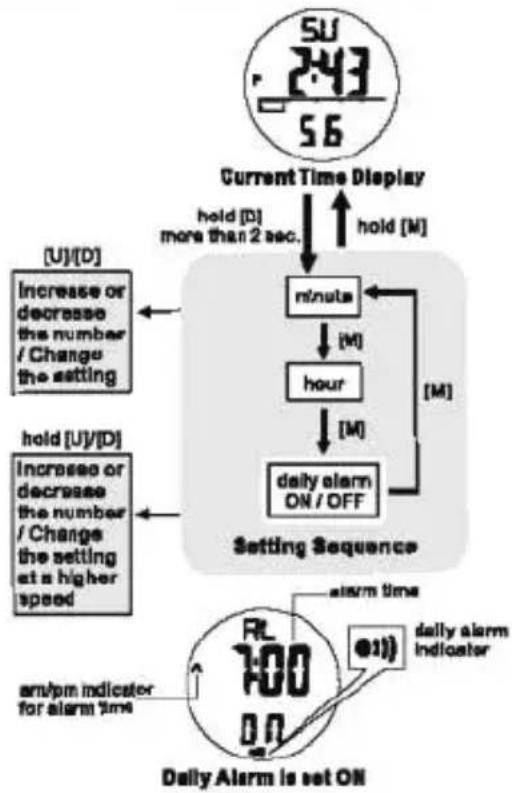
■ To select the Daily Alarm setting display, hold the [D] button for 2 seconds in the Current Time Mode until the 'Minute' digits start flashing.
■ In setting display, press the [M] button to move the flashing following the adjacent diagram to select among different settings.
■ During "minute" or "hour" is flashing, press the [U] or [D] button to increase or decrease the number (hold down the button to change the number at a higher speed).
■ When 'ON' or 'OFF' is flashing, press the [U] or [D] button to turn ON/OFF the daily alarm.
■ When the setting is completed, hold the [M] button for 2 seconds to exit the setting display. If there is NO key-stroke for 1 minute, the Watch will also exit the setting display automatically.
■ When the daily alarm is ON, the daily alarm indicator '=0' will be appeared.
5.0 Chronograph Mode - Using the Chronograph
flowchart
graph TD
    A["Chenograph "All Zero" Display"] --> B["Stopped Running Display"]
    B --> C["Split Time Display (Frozen)"]
    A --> D["0:10' 36'97"]
    A --> E["0:00' 00'00"]
    A --> F["0:03' 20'56"]
    D --> G["hold [D"]]
    E --> H["[U"]]
    F --> I["[D"]]
Chronograph Mode
■ This Watch includes a stopwatch function which measures elapsed time and current split time.
■ The measuring capacity of the chronograph:
■ Measuring resolution: 1/100 second,
■ Measuring range: 89 hours, 59 minutes and 59.99 seconds.
How to Use the Chronograph
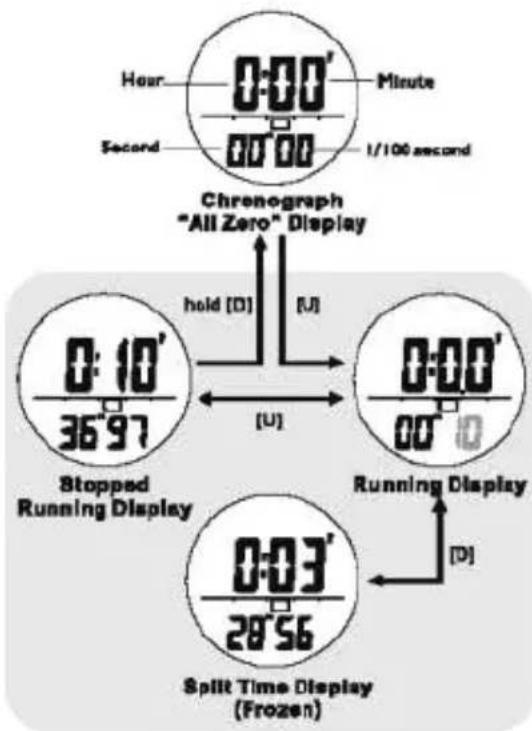
■ When the Chronograph Display is selected, press the [U] button to start the chronograph. Press [U] again to Stop counting.
■ When the chronograph is running, press the [D] button will freeze the counting display for user to take a split time.
NOTE: When the [D] button is pressed, the chronograph is still running.
■ Press the [D] button again to resume the running display.
■ When the chronograph is stopped, hold the [D] button will reset the counter to all zero.
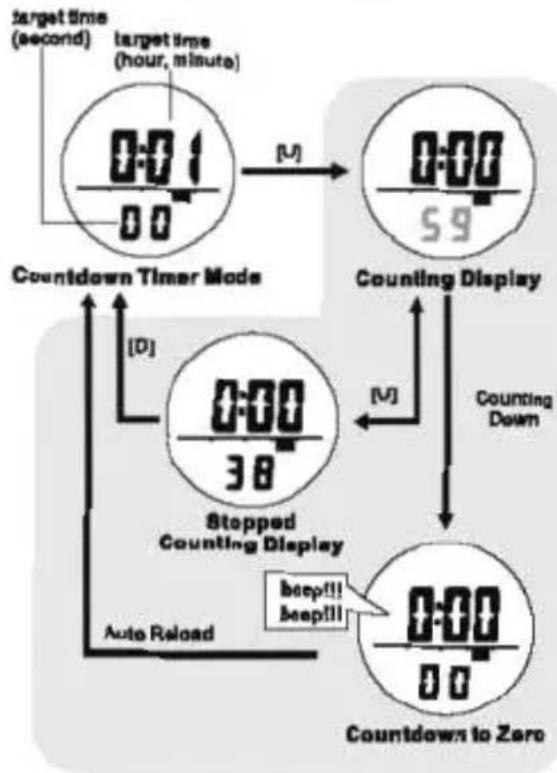
6.0 Countdown Timer Mode - Countdown Timer Display
flowchart
graph TD
    A["0:01 target time (second)"] --> B["0:00"]
    B --> C["59"]
    C --> D["Counting Display"]
    D --> E["Counting Down"]
    E --> F["0:00"]
    F --> G["38"]
    G --> H["Stopped Counting Display"]
    H --> I["beep!!!"]
    H --> J["beep!!!"]
    I --> K["Auto Reload"]
    J --> L["Auto Reload"]
    K --> M["Countdown Timer Mode"]
    L --> N["Countdown Timer Mode"]
Countdown Timer Mode
■ The measuring resolution of the timer is 1 second, and the target time of the timer can be set up to a maximum of 99 hours, 59 minutes and 59 seconds.
■ Press [U] to start counting when timer is stopped or stop the counting when the timer is running.
■ During counting, the Watch will beep for 30 seconds when counts down to zero.
■ When the timer counts to zero, it will reload the initial value of the target time automatically.
How to Reload the Timer
■ Press the [D] button to clear the timer and reload the target time to initial value when the timer is stopped counting.
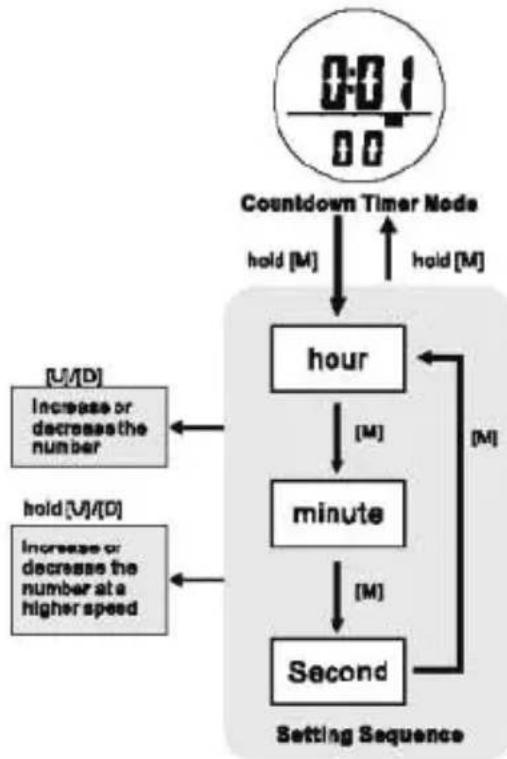
6.1 Countdown Timer Mode - Setting the Countdown Timer
flowchart
graph TD
    A["0:01/0:0"] --> B["Countdown Timer Node"]
    B --> C["hold [M"]]
    C --> D["hour"]
    D --> E["minutes"]
    E --> F["Second"]
    F --> G["Settling Sequence"]
    H["U/D"] --> I["Increase or decreases the number"]
    J["hold U/D"] --> K["Increase or decreases the number at a higher speed"]
    L["M"] --> M["hour"]
    N["M"] --> O["minute"]
    P["M"] --> Q["Second"]
How to Set the Countdown Timer
■ To select the setting display, hold the [M] button for 2 seconds in the Countdown Timer Display, and then the 'Hour' digit will start flashing.
■ In setting display, press the [M] button to move the flashing following the adjacent diagram to select among different settings.
■ When the digits are flashing, press the [U] or [D] button to increase or decrease the number (hold down the button to change the number at a higher speed).
■ When the setting is completed, hold the [M] button for 2 seconds to exit the setting display. If there is NO key-stroke for 1 minute, the Watch will also exit the setting display automatically.
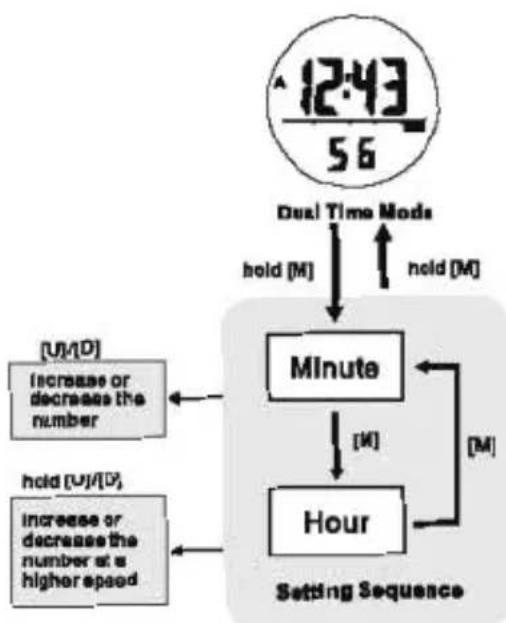
7.0 Dual Time Mode - Setting the Dual Time
flowchart
graph TD
    A["12:43/56"] --> B["Dual Time Mode"]
    B --> C["hold [M"]]
    C --> D["Minute"]
    D --> E["hold [M"]]
    E --> F["Hour"]
    F --> G["Settling Sequence"]
    H["[U"]/[D]] --> I["Increase or decreases the number"]
    J["[U"]/[D], increase or decreases the number at a higher speed] --> K["Increase or decreases the number"]
    L["[M"]] --> M["Hold"]
    N["[M"]] --> O["Hold"]
Dual Time Mode
■ This Watch Includes a Dual Time Mode which tells user another time when they travel overseas.
How to Set the Dual Time
■ To select the setting display, hold the [M] button for 2 seconds in the Dual Time Display, and then the 'Minute' digit will start flashing.
■ In setting display, press the [M] button to move the flashing following the adjacent diagram to select among different settings.
- When 'Hour' or 'Minute' is flashing, press the [U] or [O] button to increase or decrease the number (hold down the button to change the number at a higher speed).
- When the setting is completed, hold the [M] button for 2 seconds to exit the setting display. If there is NO key-stroke for 1 minute, the Watch will also exit the setting display automatically.
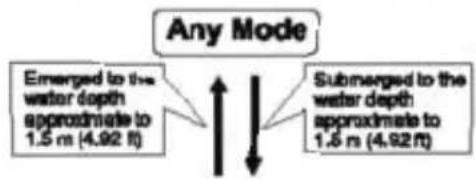
8.0 Dive Mode - Precaution and Dive Mode
flowchart
graph TD
    A["Any Mode"] --> B["Emerged to the water depth approximate to 1.5 m (4.92 ft)"]
    A --> C["Submerged to the water depth approximate to 1.5 m (4.92 ft)"]
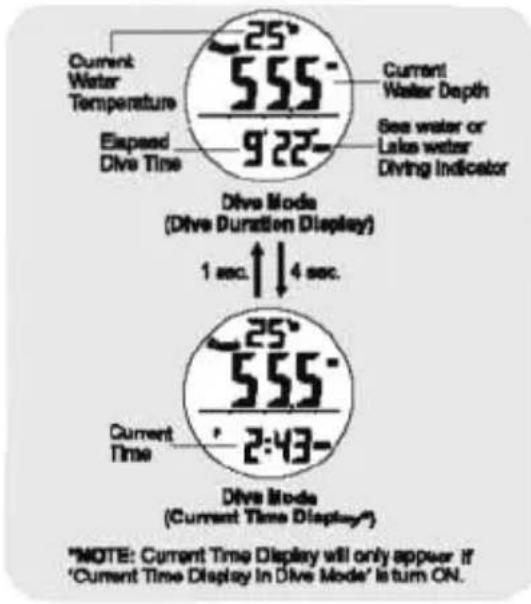
Dive Mode Precaution
■ If moisture is escalated around the water sensor, it may activate the Dive Mode unintentionally. To prevent this happen, dry the water sensor with a soft cloth when the water sensor is wet.
■ If dirt is escalated around the water sensor, it may obstruct the Watch to switch to Dive Mode automatically when you are diving. To prevent this happen, clean the water sensor with a soft cloth before starting a dive.
Dive Mode
■ The Dive Mode will be activated automatically if the user submerges, and reaches the water level approximately to 1.5 m (4.82 ft).
■ When the user emerges, and returns to the water level approximately to 1.5 m (4.92 ft), the Normal Mode will be resumed automatically.
■ When the Dive Mode appear, the following Information will be displayed:
1) the Current water depth,
2) the Current water temperature,
3) the Dive Status Indicator, and
4) the Elapsed Diva Time.
5) Current Time Display (Optional)
NOTE: Current Time Display will only appear if 'Current Time Display in Dive Mode' is set ON In the Setting Display. Please check for chapter 8.3 for more detail.
8.1 Dive Mode - Dive Status Indicator and Dive Site Selection
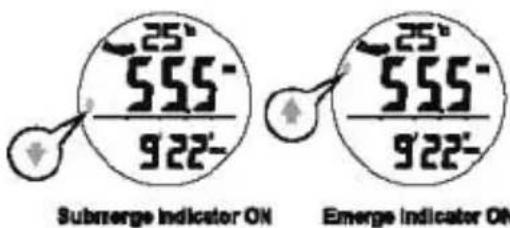
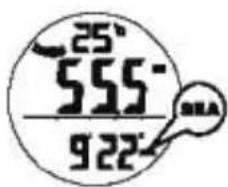
SEA Indicator ON
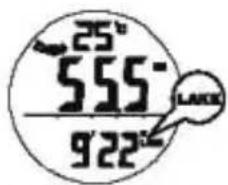
LAKE Indicator ON
Dive Status Indicator
■ This Watch Includes 2 Dive Status Indicators, they are the Submerge and Emerge. They will flash on the display as follows:
- Submerge Indicator: if the user submergoes away from the water level at a speed of 10m/min or higher, this indicator will appear and flash.
- Emerge indicator: If the user emerges to the water level at a speed of 6m/min or higher, this indicator will appear and flash.
WARNING: If user emerges too fast to the water level, the sudden change of water pressure will be harmful to human's body. Therefore, this Watch will alert user with beep sound if user emerges faster than 6 m/min.
Sea and Lake Dive
■ This Watch can work either in sea water or lake water. Set 'SEA' for sea water diving or set 'LAKE' for lake water diving.
■ Check the Chapter B.3 for more detail of how to set the diving site setting.
8.2 Dive Mode - Dive Record for a Single Dive and Subsequent Dives
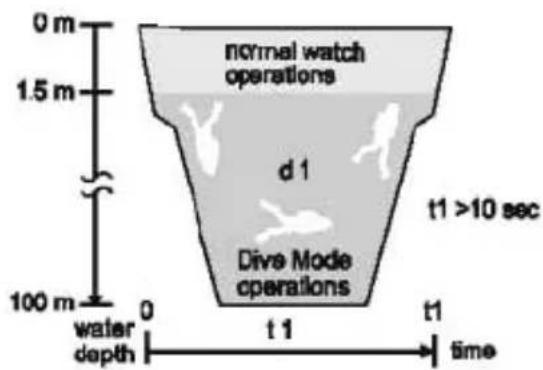
Elapsed Dive Time
Dive Records
■ Each Time user starts a dive for more than 10 seconds (with at least 1.5m depth or deeper), the following information will be stored as a record into the Watch:
-
The Elapsed Dive Time,
-
The Maximum Reached Watch Depth,
-
The Minium Water Temperature during dive.
-
The Starting Time and Date of the dive, and
-
Dive Site Information
■ User can store up to 100 dive records, and user can recall these dive record(s) in a later day.
NOTE: Check the Chapter 9.0 for more detail of how to recall dive record.
8.3 Dive Mode - Settings of Dive Mode
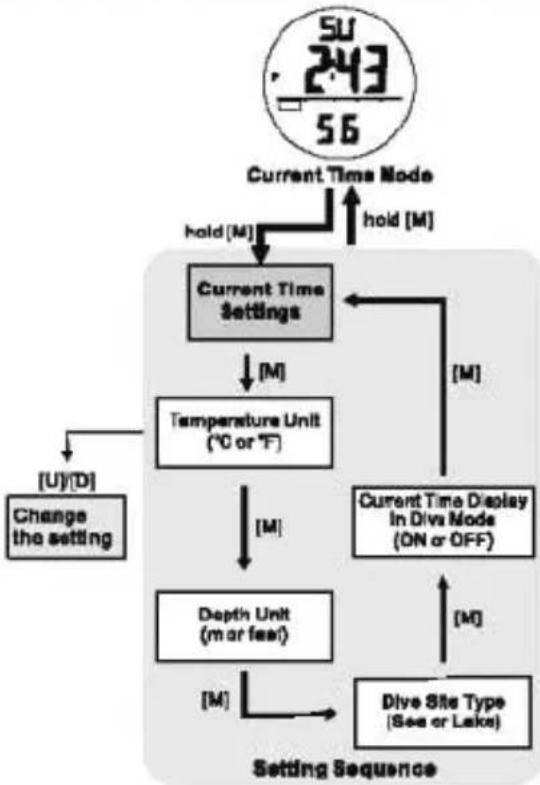
flowchart
graph TD
    A["Current Time Mode"] --> B["Current Time Settings"]
    B --> C["Temperature Unit (°C or °F)"]
    C --> D["Depth Unit (m or feet)"]
    D --> E["Dive Site Type (Sea or Lake)"]
    E --> F["Current Time Display in Dive Mode (ON or OFF)"]
    F --> G["[M"]]
    G --> H["[U"][D]]
    H --> I["Change the setting"]
    I --> B
    style A fill:#f9f,stroke:#333
    style B fill:#ccf,stroke:#333
    style C fill:#cfc,stroke:#333
    style D fill:#fcc,stroke:#333
    style E fill:#cff,stroke:#333
    style F fill:#ffc,stroke:#333
    style G fill:#fcf,stroke:#333
    style H fill:#cff,stroke:#333
    style I fill:#ffc,stroke:#333
How to Set for the Dive Mode
■ Check for Chapter 4.1 of how to go into Setting Display.
■ In setting display, press the [M] button to bypass the settings of current time until "C" or "F" is flashing.
■ During one of the settings is flashing (selected), press the [U] or [D] button to change the setting.
■ When the 'Current Time Display In Dive Mode' is set ON, the Watch will display the current time for 1 second for every 4 seconds during Diving.
■ When the setting is completed, hold the [M] button for 2 seconds to exit the setting display. If there is NO key-stroke for 1 minute, the Watch will also exit the setting display automatically.
9.0 Dive Recall Mode - Recalling the Dive Records
![Dive record Number Starting Time 7:22 0-22- Recall Mode Indicator Starting Date Site Indicator 2 sec. Minium Water Temperature Maximum Dive depth 25° 555° 922° Elapsed Dive time Dive Record Display 1 Dive Record Display 2 Dive Record Recall Mode record 1 [U]* → the next stored record(s) [U]* [U]* Dive Record Recall Mode](/content/2026/05/1028276/images/56823bbccabebda39d90e0492b8cea625f71d4a9a169a1a147c23fc504c9778b.jpg)
*NOTE: Press the [D] button to move in reverse direction.
Dive Record Recall Mode
■ To select the Dive Record Recall Mode, press the [M] button in the Current Time Mode.
■ User can store up to 100 dive records, and user can select displaying those records by pressing the [U] or [D] button.
Dive Record Display
■ In the Recall Mode, the Watch will show the following information alternatively:
Display 1:
1) Records Number
2) Starting Time
3) Starting Data
4) Dive Site Indicator
Display 2:
5) Minimum Water Temperature
6) Maximum Dive Depth
7) Elapsed Dive Time
How to Reset the records
■ Hold down the [M] button for 2 seconds to select deleting the CURRENT record. Press [U] or [D] to select YES or NO and hold [M] to confirm.
■ Hold down the [M] button for 4 seconds to select deleting the PREVIOUS record. Press [U] or [D] to select YES or NO and hold [M] to confirm.
■ Hold down the [M] button for 8 seconds to select deleting ALL records. Press [U] or [D] to select YES or NO and hold [M] to confirm.
10.0 Specification
Current Time Moda
■ Hour, Minute, Second display
■ Month, Data, Day of Week display
■ Auto Calendar from 2000 to 2099
■ 12/24 hour format
■ Month/Date or Date/Month display
■ Hourly Chima
■ Delly Alarm
■ Temperature Display
Chronograph Moda
■ Resolution : 1/100 second
■ Range : 99 hours, 59 minutes, 59.99 seconda
■ Split Time function
Countdown Timer Mode
■ Resolution : 1 second
■ Range : 99 hours, 59 minutes, 59 seconds
■ Beep once per minute for last 10 minutes
■ Beep once per 10 seconds for last minute
■ Beep once per second for last 5 seconds
■ Beep for 30 seconds when countdown to zero
Dive Mode
■ Sea or Lake diving site selectable
■ Automatically activate/deactivate Dive Mode when submerge or emerge to 1.5m of water depth.
■ Current Dive duration, Depth and Water temperature display
■ Depth Unit : meter or foot selectable
■ Depth resolution : 0.1m / 0.1 ft
■ Maximum Depth : 100m / 328ft
■ Dive Alarm when emerge faster than 6m/minute
■ Automatic: Dive log memory
■ Unit : °C / °F selectable
■ Resolution : 1°C / 1°F
■ Range: -10°C to +60°C / 14°F to 140°F
■ Maximum 100 records to be recorded and recall
■ Each dive record contains:
Starting Time and Date
Dive Duration
Maximum Dive Depth
Minimum Water Temperature
Dive Site Indication
■ Delete current/previous/all records function
Temperature Display
Dive Recall Mode
EL Backlight
- [EMPTY]
- (No text)
- [Non-Text]
[Non-Text]
[Non-Text]
[Non-Text]
[Non-Text]
[Non-Text]
[Non-Text]
[Non-Text]
[Non-Text]
[Non-Text]
[Non-Text]
[Non-Text]
[Non-Text]
[Non-Text]
(No text)
广力云
(No text)
广力云
[Non-Text]
[Non-Text]
[Non-Text]
[Non-Text]
[Non-Text]
[Non-Text]
[Non-Text]
[Non-Text]
[Non-Text]
[Non-Text]
[Non-Text]
[Non-Text]
[Non-Text]
[Non-Text]
[EMPTY] - (No text)
广力云智慧零售收银系统
[Non-Text]
[Non-Text]
[Non-Text]
[Non-Text]
[Non-Text]
[Non-Text]
[Non-Text]
[Non-Text]
[Non-Text]
[Non-Text]
[Non-Text]
[Non-Text]
[Non-Text]
[Non-Text]
The Ground Truth image displays a single, solid horizontal line. According to Rule 2 (UNDERSCORE & LINE RULES), if the GT contains lines used for stylistic emphasis or as background elements (like ruled paper), the OCR result must ignore them. The provided OCR content is "____", which consists of four underscores. This is an incorrect interpretation of the line as a placeholder symbol, violating the rule that stylistic lines must be ignored. Therefore, the OCR output hallucinated symbols where none should exist.
广力云智慧零售收银系统
[Non-Text]
[Non-Text]
[Non-Text]
[Non-Text]
[Non-Text]
[Non-Text]
[Non-Text]
[Non-Text]
[Non-Text]
[Non-Text]
-
[Non-Text]
[Non-Text]
[Non-Text]
[Non-Text]
[Non-Text]
-
广力云智慧零售收银系统
[Non-Text]
[Non-Text]
[Non-Text]
[Non-Text]
[Non-Text]
[Non-Text]
[Non-Text]
[Non-Text]
[Non-Text]
[Non-Text]
[Non-Text]
[Non-Text]
[Non-Text]
[Non-Text]
(No text)
[Non-Text]
[Non-Text]
[Non-Text]
[Non-Text]
[Non-Text]
[Non-Text]
[Non-Text]
[Non-Text]
[Non-Text]
[Non-Text]
-
[Non-Text]
[Non-Text]
[Non-Text]
[Non-Text]
[Non-Text]
[Non-Text]


- PYLE SPORTS
- "Recreational Gear For The Great Outdoors"
- PYLE® SPORTS
- PSNKW30 USER'S MANUAL
- Introduction
- General Guide
- WARNING!
- Button and its Function
- Mode Button [M]
- Up/Start/Stop Button [U]
- Down/Reset Button [D]
- EL Button [EL]
- Auto Backlight
- Current Time Mode - Sub-function Display and Daily Alarm
- Current Time Sub-function Display
- Daily Alarm Display
- Current Time Mode - The Setting Display
- How to Set the Watch
- Current Time Mode - Setting the Daily Alarm
- How to Set the Daily Alarm
- Chronograph Mode - Using the Chronograph
- Chronograph Mode
- How to Use the Chronograph
- Countdown Timer Mode - Countdown Timer Display
- Countdown Timer Mode
- How to Reload the Timer
- Countdown Timer Mode - Setting the Countdown Timer
- How to Set the Countdown Timer
- Dual Time Mode - Setting the Dual Time
- Dual Time Mode
- How to Set the Dual Time
- Dive Mode - Precaution and Dive Mode
- Dive Mode Precaution
- Dive Mode
- Dive Mode - Dive Status Indicator and Dive Site Selection
- Dive Status Indicator
- Sea and Lake Dive
- Dive Mode - Dive Record for a Single Dive and Subsequent Dives
- Dive Records
- Dive Mode - Settings of Dive Mode
- How to Set for the Dive Mode
- Dive Recall Mode - Recalling the Dive Records
- Dive Record Recall Mode
- Dive Record Display
- Display 1:
- Display 2:
- How to Reset the records
- Specification
- Current Time Moda
- Chronograph Moda
- Temperature Display
- Dive Recall Mode
- EL Backlight
Marke : Pyle
Modell : PSNKW30P
Kategorie : Sportuhr